What is VPN? Virtual Private Network, WireGuard and OpenVPN
Security

What is VPN? Virtual Private Network, WireGuard and OpenVPN

VPN (Virtual Private Network) creates an encrypted tunnel between your device and the VPN server, protecting traffic and hiding your real IP address. Learn how WireGuard and OpenVPN work, and when to use VPN instead of a Proxy.

In this series: Bảo mật
  1. 1 What is Malware? Classification, Characteristics, and Prevention
  2. 2 What is DDoS? Signs, Response and Effective Prevention Methods
  3. 3 What is Phishing? Recognizing and Preventing Online Fraud
  4. 4 What is DNS Sinkhole? Applications and How to Use DNS Sinkhole Technique
  5. 5 What is OAuth 2.0? Authorization and Login with Google/GitHub
  6. 6 What is a Trojan? Essential Information About Trojan Malware
  7. 7 What Is Zero Trust? The 'Never Trust, Always Verify' Security Model
  8. 8 What is VPN? Virtual Private Network, WireGuard and OpenVPN
  9. 9 What Is MFA? Multi-Factor Authentication vs 2FA Explained
  10. 10 What is a Firewall? Role and Functions in Network Security
  11. 11 What is SQL Injection? Database Attacks and Prevention
  12. 12 What is XSS? Cross-Site Scripting Attacks and Prevention
✦ Quick summary
VPN (Virtual Private Network) creates an encrypted tunnel between your device and the VPN server, protecting traffic and hiding your real IP address. Learn how WireGuard and OpenVPN work, and when to...
How was this post?

VPN (Virtual Private Network) is a critical network security technology that enables remote workers to access company resources, protects connections on public WiFi, and links branch offices together. This article explains how VPN works under the hood, compares WireGuard with OpenVPN, and provides a practical WireGuard configuration guide.

What is a VPN?

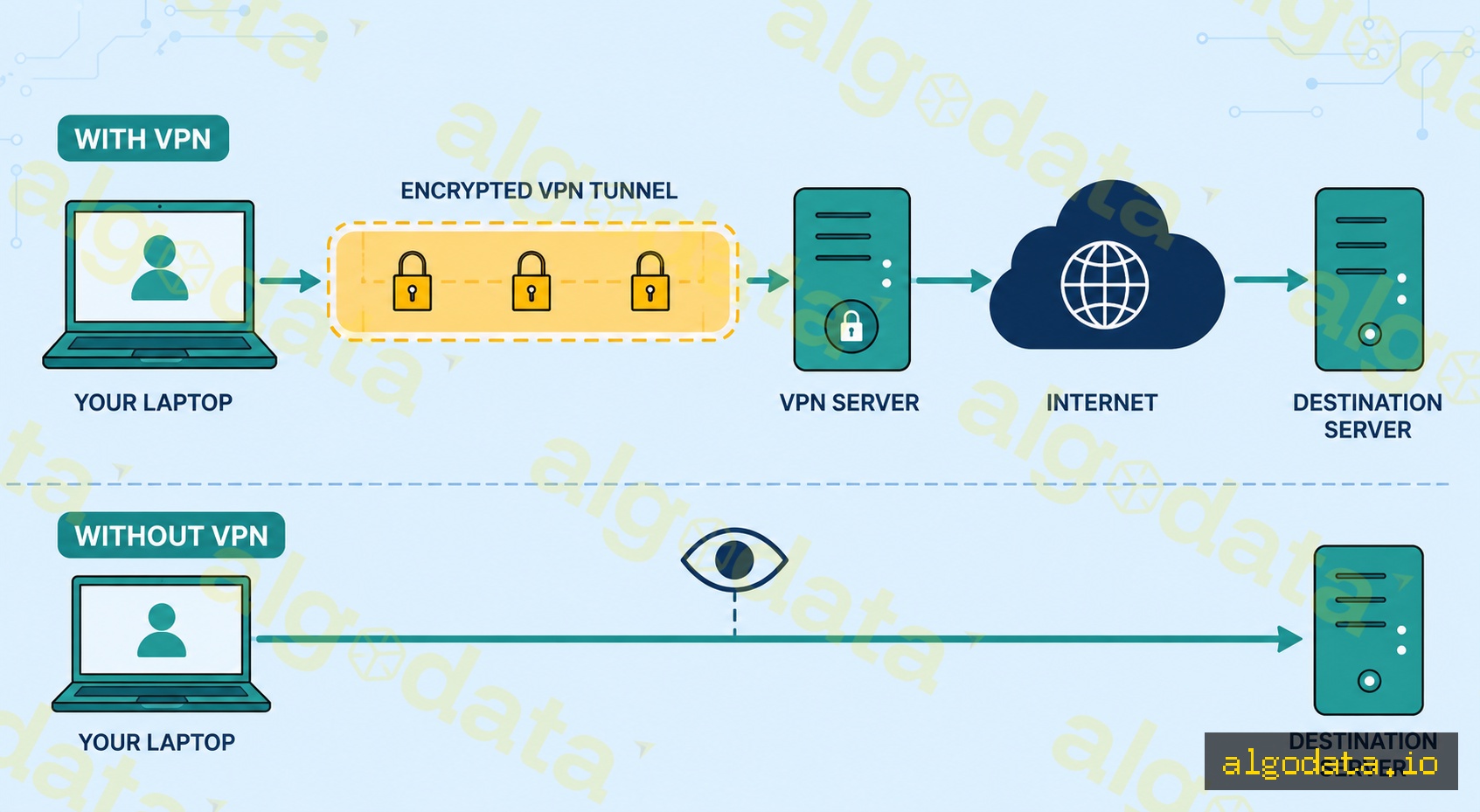
A VPN (Virtual Private Network) creates an encrypted tunnel between your device and a VPN server. Instead of your traffic traveling directly to the internet and exposing your real IP address, all data is encrypted and only decrypted at the VPN server end.

How it works:

  1. Your device establishes an encrypted connection to the VPN server
  2. All traffic is encapsulated and encrypted inside the tunnel
  3. The VPN server decrypts the traffic and forwards the request to the real destination
  4. The response travels back through the same tunnel
  5. The destination website sees only the VPN server's IP address

Why do you need a VPN?

  • Remote work: Employees working remotely need access to internal resources (file servers, databases, internal tools)
  • Public WiFi: Coffee shops, airports — unencrypted WiFi is easy to eavesdrop on
  • Privacy: Hide your real IP from websites and your ISP
  • Site-to-site: Connect branch offices to each other or to a data center

VPN Protocols

The most modern protocol, designed from the ground up for performance and security:

  • ~4,000 lines of code (easy to audit, small attack surface)
  • Uses UDP — faster than TCP, slightly less reliable but fine for VPN usage
  • Integrated into the Linux kernel since version 5.6 (2020)
  • State-of-the-art cryptography: Curve25519, ChaCha20, Poly1305
  • Extremely fast reconnect when switching networks (roaming)

OpenVPN

The oldest and most mature VPN protocol:

  • ~100,000 lines of code — more complex, more feature-rich
  • Supports both TCP and UDP
  • Can run on port 443 (same as HTTPS) to bypass strict firewalls
  • Supported on virtually all platforms
  • Widely used in enterprise environments

IPsec/IKEv2

  • Industry standard, built into iOS/Android/Windows natively
  • IKEv2 is especially suited for mobile: fast reconnect when switching networks (WiFi to 4G)
  • Common in corporate VPN solutions (Cisco AnyConnect, Juniper)

L2TP/PPTP (Legacy)

  • PPTP: Do not use — broken since 1999, not secure
  • L2TP/IPsec: Still functional but WireGuard is significantly better

Practical WireGuard Configuration

Installing WireGuard on Ubuntu:

Bash
1# Install WireGuard
2apt update && apt install wireguard
3
4# Generate key pair (server)
5wg genkey | tee /etc/wireguard/server_private.key | wg pubkey > /etc/wireguard/server_public.key
6
7# Generate key pair (client)
8wg genkey | tee client_private.key | wg pubkey > client_public.key

Server config — /etc/wireguard/wg0.conf:

ini
 1[Interface]
 2Address = 10.0.0.1/24
 3PrivateKey = <server-private-key>
 4ListenPort = 51820
 5
 6# Enable NAT so clients have internet access
 7PostUp = iptables -A FORWARD -i wg0 -j ACCEPT; iptables -t nat -A POSTROUTING -o eth0 -j MASQUERADE
 8PostDown = iptables -D FORWARD -i wg0 -j ACCEPT; iptables -t nat -D POSTROUTING -o eth0 -j MASQUERADE
 9
10[Peer]
11# Client 1
12PublicKey = <client-public-key>
13AllowedIPs = 10.0.0.2/32

Client config:

ini
 1[Interface]
 2Address = 10.0.0.2/24
 3PrivateKey = <client-private-key>
 4DNS = 1.1.1.1
 5
 6[Peer]
 7PublicKey = <server-public-key>
 8Endpoint = 203.0.113.1:51820
 9AllowedIPs = 0.0.0.0/0        # Route all traffic through VPN
10PersistentKeepalive = 25       # Keep connection alive through NAT

Starting WireGuard:

Bash
 1# Bring up the WireGuard interface
 2wg-quick up wg0
 3
 4# Check status
 5wg show
 6
 7# Enable auto-start on boot
 8systemctl enable wg-quick@wg0
 9
10# View traffic statistics
11wg show wg0 transfer

Verifying the tunnel is active:

Bash
1# Check your public IP — should show VPN server IP
2curl ifconfig.me
3
4# Confirm the WireGuard interface is up
5ip addr show wg0
6
7# Test DNS resolution through the tunnel
8nslookup google.com 1.1.1.1

Site-to-Site vs Remote Access VPN

Site-to-site VPN — connects two fixed networks:

  • No VPN client needed on individual employee machines
  • The routers/firewalls at both offices establish the tunnel between them
  • Employees at office A can access resources at office B as if they were on the same network

Remote access VPN — employees connect from anywhere:

  • Each employee installs a VPN client (WireGuard, OpenVPN, Cisco AnyConnect, etc.)
  • Connects to the company's VPN gateway
  • Once connected, can access all internal resources

Which type should you choose?

  • Fixed office ↔ data center: Site-to-site
  • Work from home, remote teams: Remote access
  • A combination of both: common in large enterprises

Common use cases:

  • Startup with cloud infra + WFH team: WireGuard remote access VPN on a small VPS
  • Multi-office company: IPsec site-to-site between branch routers
  • Enterprise with compliance requirements: Cisco AnyConnect with certificate-based auth

VPN vs Proxy

Criteria VPN Proxy
Encryption Always Depends (HTTP proxy = none)
Scope Entire OS Single application
DNS Through VPN (leak protection) App decides
Speed Slightly slower Faster
Setup OS-level Per-app config
Use case Remote work, full privacy Web dev, bypass, debugging

When to use a VPN:

  • You need to encrypt all traffic from your device
  • Remote employees need access to internal company resources
  • Connecting two offices or networks together
  • Privacy from your ISP on untrusted networks

When a proxy is enough:

  • You only need to route a single application's traffic
  • Web scraping or testing geo-restricted content in a browser
  • Development proxy (like Charles Proxy) to inspect HTTP traffic

What is a Proxy? Forward, Reverse and SOCKS5 Proxies Explained

What is Subnet & CIDR? IP Network Segmentation Explained

What is Zero Trust? The 'Never Trust, Always Verify' Security Architecture

Frequently Asked QuestionsQ&A
What is a VPN in simple terms?
A VPN (Virtual Private Network) creates an encrypted tunnel between your device and a VPN server. All your traffic passes through this tunnel, hiding your real IP address and encrypting your data. Websites and destination servers only see the VPN server's IP address, not your real one.
How does WireGuard differ from OpenVPN?
WireGuard has only ~4,000 lines of code, uses UDP, and has been integrated directly into the Linux kernel since version 5.6. It is extremely fast, easy to audit, and simple to configure. OpenVPN has a longer history (2001), ~100,000 lines of code, supports more options (TCP/UDP, port 443 to bypass firewalls), but is more complex and slower. WireGuard is the default choice for new deployments.
Does a VPN completely hide your identity?
Not completely. Your VPN provider can still see all your traffic — choose a reputable provider. Additionally: (1) DNS leaks — if DNS queries do not go through the VPN, your ISP can still see what you access; (2) WebRTC leaks — browsers may expose your real IP via WebRTC even when using a VPN; (3) Device fingerprinting — websites can identify you through browser fingerprints without needing your IP. Use a kill switch and DNS-over-VPN to reduce risk.
What is split tunneling?
Split tunneling is a feature that routes only a portion of traffic through the VPN while the rest goes directly to the internet. For example: traffic to internal company servers goes through the VPN (to access internal resources), while Netflix/YouTube goes directly to the internet (to avoid VPN overhead). Most enterprise VPN clients support split tunneling.
How does site-to-site VPN differ from remote access VPN?
Site-to-site VPN connects two fixed networks together — for example, an office in one city connected to another office: both LANs connect as if they were a single network, without needing configuration on each employee's machine. Remote access VPN allows individual employees to connect remotely to the company network from anywhere — a VPN client is required on each personal device.
Does a VPN slow down internet speed?
Yes, because every packet must be encrypted/decrypted and routed through an intermediate server. In practice, WireGuard is about 40% faster than OpenVPN in real-world benchmarks. Speed also depends on the distance to the VPN server (a nearby server is faster than one in another country), the provider's bandwidth, and the current server load. Under normal conditions with a nearby server, the difference is usually less than 20%.

VPN (Virtual Private Network) là công nghệ bảo mật mạng quan trọng giúp nhân viên làm việc từ xa, bảo vệ kết nối trên WiFi công cộng, và kết nối các văn phòng chi nhánh. Bài viết giải thích cơ chế hoạt động, so sánh WireGuard với OpenVPN, và hướng dẫn cấu hình thực tế.

VPN là gì?

VPN (Virtual Private Network) tạo một đường hầm mã hóa (encrypted tunnel) giữa thiết bị của bạn và VPN server. Thay vì traffic đi thẳng ra internet và lộ IP thực, mọi dữ liệu đều được mã hóa và chỉ giải mã ở đầu VPN server.

Cơ chế hoạt động:

  1. Thiết bị tạo kết nối mã hóa đến VPN server
  2. Mọi traffic được đóng gói và mã hóa bên trong tunnel
  3. VPN server giải mã và forward request đến đích thực
  4. Response đi ngược lại theo cùng tunnel
  5. Website đích chỉ thấy IP của VPN server

Tại sao cần VPN?

  • Remote work: Nhân viên làm việc từ xa cần truy cập tài nguyên nội bộ (file server, database, internal tools)
  • Public WiFi: Quán cà phê, sân bay — WiFi không mã hóa, dễ bị nghe lén
  • Privacy: Ẩn IP thực khỏi website và ISP
  • Site-to-site: Kết nối văn phòng chi nhánh với nhau

Các giao thức VPN

WireGuard (Khuyên dùng)

Protocol hiện đại nhất, được thiết kế từ đầu cho hiệu năng và bảo mật:

  • ~4,000 dòng code (dễ audit, ít bug surface)
  • Dùng UDP — nhanh hơn TCP, kém tin cậy hơn nhưng ổn với VPN
  • Tích hợp vào Linux kernel từ phiên bản 5.6 (2020)
  • Cryptography state-of-the-art: Curve25519, ChaCha20, Poly1305
  • Reconnect cực nhanh khi đổi mạng (roaming)

OpenVPN

Giao thức lâu đời và trưởng thành nhất:

  • ~100,000 dòng code — phức tạp hơn, nhiều tính năng hơn
  • Hỗ trợ cả TCP và UDP
  • Có thể chạy trên port 443 (giống HTTPS) để bypass firewall nghiêm ngặt
  • Được hỗ trợ trên hầu hết nền tảng
  • Phổ biến trong enterprise

IPsec/IKEv2

  • Chuẩn công nghiệp, tích hợp sẵn vào iOS/Android/Windows
  • IKEv2 đặc biệt tốt cho mobile: reconnect nhanh khi chuyển mạng (WiFi ↔ 4G)
  • Phổ biến trong corporate VPN (Cisco AnyConnect, Juniper)

L2TP/PPTP (Lỗi thời)

  • PPTP: Không dùng — đã bị break từ 1999, không an toàn
  • L2TP/IPsec: Vẫn dùng được nhưng WireGuard tốt hơn nhiều
PPTP hoàn toàn không an toàn

PPTP sử dụng MS-CHAPv2 đã bị crack từ năm 1999. Nếu hệ thống đang dùng PPTP, hãy migrate sang WireGuard hoặc OpenVPN ngay — traffic PPTP có thể bị giải mã offline chỉ trong vài giờ bằng công cụ như Asleap hoặc CloudCracker.

Cấu hình WireGuard thực tế

Cài đặt WireGuard trên Ubuntu:

Bash
1# Cài đặt
2apt update && apt install wireguard
3
4# Tạo cặp key (server)
5wg genkey | tee /etc/wireguard/server_private.key | wg pubkey > /etc/wireguard/server_public.key
6
7# Tạo cặp key (client)
8wg genkey | tee client_private.key | wg pubkey > client_public.key

Server config — /etc/wireguard/wg0.conf:

ini
 1[Interface]
 2Address = 10.0.0.1/24
 3PrivateKey = <server-private-key>
 4ListenPort = 51820
 5
 6# Bật NAT để client có internet access
 7PostUp = iptables -A FORWARD -i wg0 -j ACCEPT; iptables -t nat -A POSTROUTING -o eth0 -j MASQUERADE
 8PostDown = iptables -D FORWARD -i wg0 -j ACCEPT; iptables -t nat -D POSTROUTING -o eth0 -j MASQUERADE
 9
10[Peer]
11# Client 1
12PublicKey = <client-public-key>
13AllowedIPs = 10.0.0.2/32

Client config:

ini
 1[Interface]
 2Address = 10.0.0.2/24
 3PrivateKey = <client-private-key>
 4DNS = 1.1.1.1
 5
 6[Peer]
 7PublicKey = <server-public-key>
 8Endpoint = 203.0.113.1:51820
 9AllowedIPs = 0.0.0.0/0        # Route tất cả traffic qua VPN
10PersistentKeepalive = 25       # Giữ connection sống qua NAT
Full tunnel vs Split tunnel trong WireGuard

AllowedIPs = 0.0.0.0/0 (full tunnel) route toàn bộ traffic qua VPN — mọi request đều qua server. Nếu chỉ cần truy cập mạng nội bộ công ty, dùng split tunnel thay thế: AllowedIPs = 10.0.0.0/8, 192.168.0.0/16 — traffic đến internet đi thẳng, chỉ traffic đến private range mới qua VPN. Split tunnel giảm tải cho VPN server và cải thiện tốc độ đáng kể.

Khởi động WireGuard:

Bash
 1# Bật WireGuard interface
 2wg-quick up wg0
 3
 4# Kiểm tra trạng thái
 5wg show
 6
 7# Bật tự động khi boot
 8systemctl enable wg-quick@wg0
 9
10# Xem traffic stats
11wg show wg0 transfer

Site-to-site vs Remote Access VPN

Site-to-site VPN — kết nối hai mạng cố định:

  • Không cần cài VPN client trên từng máy nhân viên
  • Router/firewall của cả hai văn phòng tạo tunnel với nhau
  • Nhân viên văn phòng A có thể truy cập resource của văn phòng B như thể cùng mạng

Remote Access VPN — nhân viên kết nối từ xa:

  • Mỗi nhân viên cài VPN client (WireGuard, OpenVPN, Cisco AnyConnect...)
  • Kết nối đến VPN gateway của công ty
  • Sau khi kết nối, có thể truy cập tất cả resource nội bộ

Chọn loại nào?

  • Văn phòng cố định ↔ data center: Site-to-site
  • Work from home, remote team: Remote Access
  • Kết hợp cả hai: common trong enterprise lớn

VPN vs Proxy

Tiêu chí VPN Proxy
Mã hóa Luôn luôn Tùy loại (HTTP proxy = không)
Scope Toàn bộ OS Một ứng dụng
DNS Qua VPN (chống leak) App quyết định
Tốc độ Chậm hơn một chút Nhanh hơn
Setup OS-level Per-app config
Use case Remote work, full privacy Web dev, bypass, debug

Proxy là gì? Forward Proxy, Reverse Proxy và SOCKS5

VPN không bảo vệ bạn khỏi DNS leak và WebRTC leak

Dùng VPN không đồng nghĩa với ẩn danh hoàn toàn. Hai rủi ro phổ biến: (1) DNS leak — nếu DNS query không đi qua VPN tunnel, ISP vẫn thấy bạn truy cập domain nào; kiểm tra tại dnsleaktest.com. (2) WebRTC leak — trình duyệt có thể lộ IP thực qua WebRTC ngay cả khi VPN đang bật; tắt WebRTC trong browser hoặc dùng extension như uBlock Origin. Luôn bật kill switch để ngắt internet nếu VPN mất kết nối đột ngột.

Zero Trust là gì? Kiến trúc bảo mật "Không tin tưởng ai"

Subnet và CIDR là gì? Chia mạng IP và định tuyến hiện đại

Câu hỏi thường gặpQ&A
VPN là gì ngắn gọn?
VPN (Virtual Private Network) tạo một đường hầm mã hóa (encrypted tunnel) giữa thiết bị của bạn và VPN server. Mọi traffic của bạn đi qua tunnel này, ẩn IP thực và mã hóa dữ liệu. Website và server đích chỉ thấy IP của VPN server, không thấy IP thực của bạn.
WireGuard khác OpenVPN thế nào?
WireGuard chỉ có ~4,000 dòng code, dùng UDP, được tích hợp trực tiếp vào Linux kernel từ phiên bản 5.6. Cực nhanh, dễ audit, setup đơn giản. OpenVPN có lịch sử lâu đời hơn (2001), ~100,000 dòng code, hỗ trợ nhiều options hơn (TCP/UDP, port 443 để bypass firewall), nhưng phức tạp và chậm hơn. WireGuard là lựa chọn mặc định cho triển khai mới.
VPN có che giấu hoàn toàn danh tính không?
Không hoàn toàn. VPN provider vẫn thấy toàn bộ traffic của bạn — chọn provider uy tín. Ngoài ra: (1) DNS leak — nếu DNS query không đi qua VPN, ISP vẫn thấy bạn truy cập gì; (2) WebRTC leak — browser có thể lộ IP thực qua WebRTC ngay cả khi dùng VPN; (3) Device fingerprinting — website nhận dạng bạn qua browser fingerprint, không cần IP. Dùng kill switch và DNS-over-VPN để giảm risk.
Split tunneling là gì?
Split tunneling là tính năng chỉ route một phần traffic qua VPN, phần còn lại đi thẳng ra internet. Ví dụ: traffic đến server nội bộ công ty đi qua VPN (để truy cập resource nội bộ), còn Netflix/YouTube đi thẳng ra internet (để tránh VPN overhead và bypass proxy). Hầu hết VPN client enterprise đều hỗ trợ split tunneling.
Site-to-site VPN khác Remote Access VPN thế nào?
Site-to-site VPN kết nối hai mạng cố định với nhau — ví dụ văn phòng Hà Nội ↔ văn phòng TP.HCM: cả hai mạng LAN kết nối như thể chúng là một mạng duy nhất, mà không cần cấu hình trên từng máy nhân viên. Remote Access VPN cho phép từng nhân viên kết nối từ xa vào mạng công ty từ bất kỳ đâu — cần VPN client trên thiết bị cá nhân.
VPN làm chậm internet không?
Có, vì phải mã hóa/giải mã mọi packet và route qua server trung gian. Mức độ: WireGuard nhanh hơn OpenVPN khoảng 40% trong benchmark thực tế. Tốc độ còn phụ thuộc vào khoảng cách đến VPN server (server Việt Nam nhanh hơn server Mỹ), băng thông của provider, và tải hiện tại của server. Trong điều kiện bình thường với server gần, chênh lệch thường < 20%.