- 1 What is Malware? Classification, Characteristics, and Prevention
- 2 What is DDoS? Signs, Response and Effective Prevention Methods
- 3 What is Phishing? Recognizing and Preventing Online Fraud
- 4 What is DNS Sinkhole? Applications and How to Use DNS Sinkhole Technique
- 5 What is OAuth 2.0? Authorization and Login with Google/GitHub
- 6 What is a Trojan? Essential Information About Trojan Malware
- 7 What Is Zero Trust? The 'Never Trust, Always Verify' Security Model
- 8 What is VPN? Virtual Private Network, WireGuard and OpenVPN
- 9 What Is MFA? Multi-Factor Authentication vs 2FA Explained
- 10 What is a Firewall? Role and Functions in Network Security
- 11 What is SQL Injection? Database Attacks and Prevention
- 12 What is XSS? Cross-Site Scripting Attacks and Prevention
Need data solutions for your business?
AlgoData has helped businesses with data engineering, analytics & AI since 2019.
What Is Zero Trust? Why the Old Perimeter Model Failed
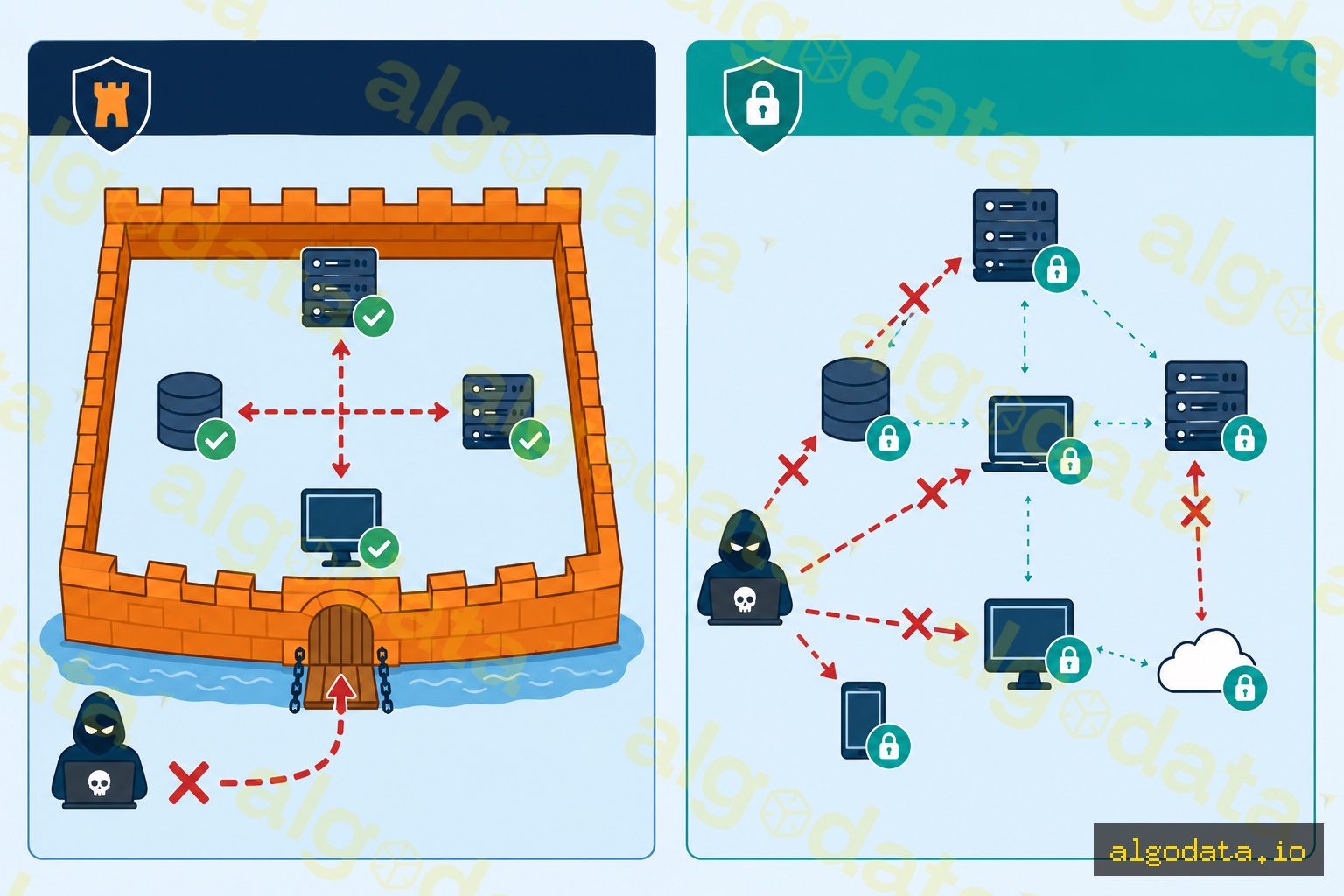
Zero Trust is a security model coined by John Kindervag of Forrester Research in 2010, built on one core principle:
"Never trust, always verify — never assume anything is safe by default; always authenticate and authorize explicitly."
Why did the perimeter model fail?
The traditional castle-and-moat security model assumed that everything inside the corporate network (behind the VPN or firewall) was safe. An attacker only needed to breach the perimeter once — after that, they could move freely throughout the network (lateral movement).
Modern realities shatter this assumption:
- Remote work: employees work from many locations on many different devices
- Cloud-first: resources live on AWS/GCP/Azure, no longer "inside" the corporate network
- Supply chain attacks: attackers enter through vendors or partners without ever touching the firewall directly
- Insider threats: a compromised device inside the network is just as dangerous as an outside attacker
By the numbers: 80% of data breaches involve stolen credentials (Verizon DBIR 2024). Trusting anyone who logged in once is a critical vulnerability.
The Three Core Principles of Zero Trust
1. Verify Explicitly
Authenticate and authorize every request using all available data points:
- Identity (who is making the request?)
- Device health (is the device managed and fully patched?)
- Location (from where? the office, or a coffee shop Wi-Fi?)
- Service/workload (which resource is being accessed?)
- Data classification (is this sensitive data?)
2. Use Least Privilege Access
Grant the minimum permissions needed, at the right time, for the right duration:
- Just-in-Time (JIT) access: temporary rights for a specific task
- Just-Enough-Access (JEA): no permanent admin privileges
- Privileged Identity Management (PIM): temporary escalation when genuinely needed
3. Assume Breach
Design systems assuming an attacker is already inside:
- Encrypt everything, including internal traffic (mTLS)
- Segment the network to limit blast radius
- Monitor and log all activity
- Minimize impact when a breach occurs
Zero Trust vs VPN — Why VPN Isn't Enough
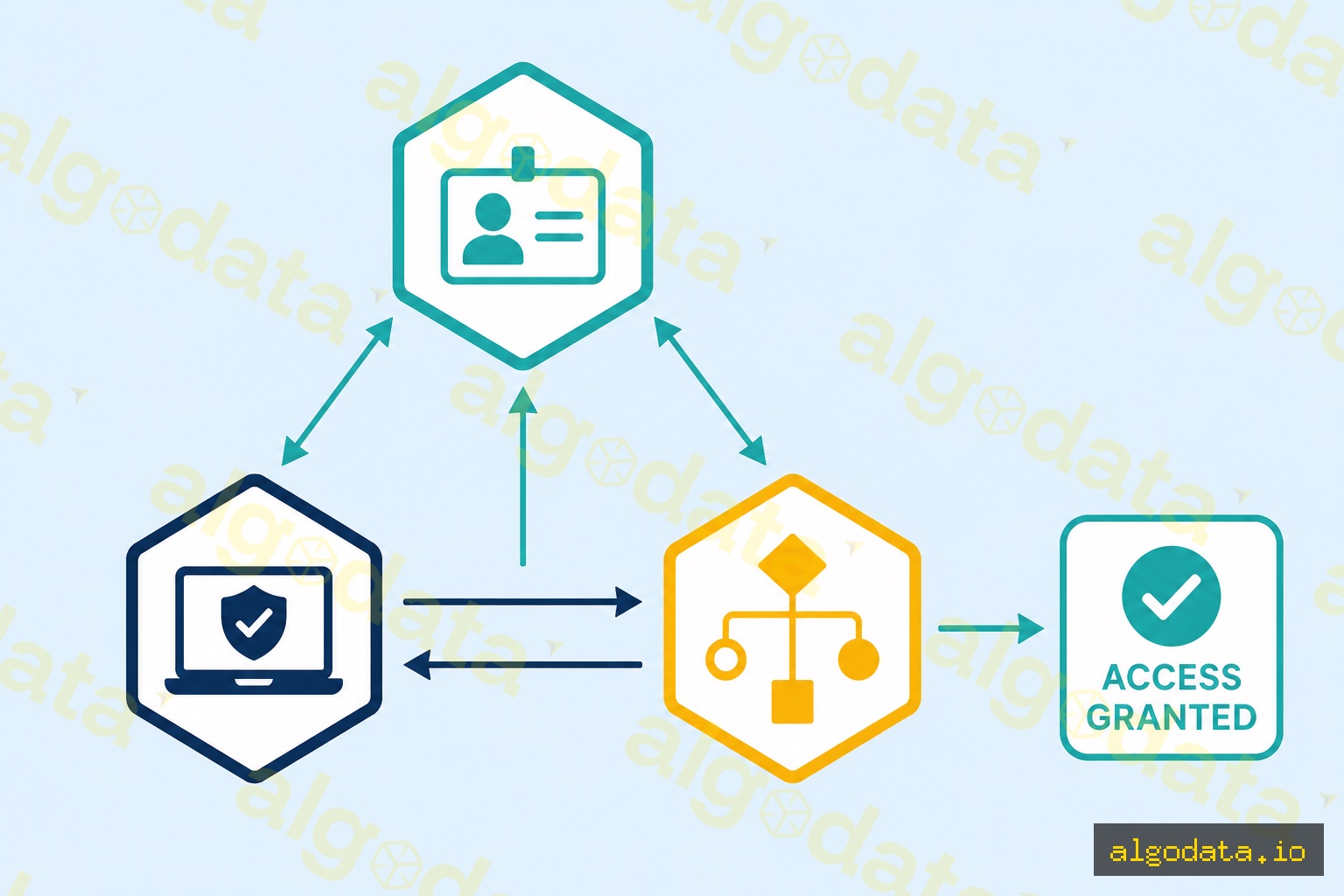
Traditional VPN:
- Grants full internal network access after a single authentication
- Does not distinguish between managed and unmanaged devices
- Does not continuously verify device state
- If credentials are stolen, the attacker has full network access
Zero Trust Network Access (ZTNA):
- Grants access per-application only
- Verifies device posture (OS patch level, antivirus, disk encryption)
- Continuous authentication — re-verified per session and behavior
- Least privilege: a developer can only reach the dev server, not the production database
Comparison:
| Criterion | VPN | ZTNA |
|---|---|---|
| Scope after authentication | Entire network | Per application |
| Device trust check | No | Yes (continuous) |
| Lateral movement | Easy | Blocked by microsegmentation |
| Visibility | Low | High (every request logged) |
| Remote work UX | Slow, laggy | Faster (direct to cloud) |
Zero Trust Architecture: 4 Core Components
1. Identity Provider (IdP)
The center of Zero Trust. Manages user identity, enforces MFA and SSO.
- Examples: Okta, Azure Active Directory, Google Workspace, Ping Identity
2. Device Trust
Checks device state before granting access:
- Is the device managed (MDM enrolled)?
- Is the OS on the latest patch?
- Is disk encryption enabled?
- Is antivirus running?
- Are there any malware indicators?
3. Policy Engine
The decision brain: allow/deny/step-up-auth based on defined policies.
Policy:
  IF user.role == "engineer"
  AND device.managed == true
  AND device.os_patch_age <= 30 days
  AND request.resource == "prod-db"
  AND request.location NOT IN ["high-risk-countries"]
  THEN allow WITH session_logging
  ELSE deny OR require step-up MFA
4. Microsegmentation
Divides the network into micro-segments with individual policies to block lateral movement.
Real-World Deployment: BeyondCorp and Cloudflare Access

Google BeyondCorp:
Google built BeyondCorp starting in 2011 after Operation Aurora (an APT attack). Instead of VPN:
- Device inventory database — tracks every corporate device
- Identity-aware proxy — every request goes through a proxy that verifies identity and device
- Context-aware access — policy driven by user role, device state, and location
- No "trusted" network — an engineer on coffee shop Wi-Fi has the same security posture as one in the office
Cloudflare Access:
 1# Cloudflare Access policy (terraform)
 2resource "cloudflare_access_policy" "engineering_only" {
 3  application_id = cloudflare_access_application.internal_app.id
 4  zone_id        = var.zone_id
 5  name           = "Engineering Team Only"
 6  precedence     = 1
 7  decision       = "allow"
 8
 9  include {
10    email_domain = ["company.com"]
11    group        = [cloudflare_access_group.engineers.id]
12  }
13
14  require {
15    device_posture = [cloudflare_device_posture_rule.managed_device.id]
16  }
17}
Azure AD Conditional Access:
 1{
 2  "displayName": "Require MFA for all users",
 3  "state": "enabled",
 4  "conditions": {
 5    "users": { "includeUsers": ["All"] },
 6    "applications": { "includeApplications": ["All"] }
 7  },
 8  "grantControls": {
 9    "operator": "OR",
10    "builtInControls": ["mfa"]
11  }
12}
Microsegmentation — Blocking Lateral Movement
Microsegmentation breaks up a flat network (where every server can talk to every other server) into small zones with individual policies:
Zone: Web Tier
  - Accepts traffic only from Load Balancer (port 443)
  - May only connect to App Tier (port 8080)
  - CANNOT connect directly to Database Tier

Zone: App Tier
  - Accepts traffic only from Web Tier (port 8080)
  - May only connect to DB Tier (port 5432)
  - NO internet access

Zone: DB Tier
  - Accepts traffic only from App Tier (port 5432)
  - NO outbound internet
  - Encrypted at rest + in transit (mTLS)
If an attacker compromises the Web Tier, they CANNOT jump directly to the database. They must traverse each zone, and every step is controlled and logged.
Zero Trust Maturity Model — 3 Stages
Stage 1: Traditional (Starting Point)
- VPN used for remote access
- Little or no MFA
- Flat network with all servers in a single subnet
- Action: Enable MFA for all accounts, deploy SSO
Stage 2: Advanced
- SSO + MFA mandatory
- Basic conditional access policies
- Device management (MDM)
- Action: Begin microsegmentation, implement ZTNA for critical apps
Stage 3: Optimal
- Continuous verification for every request
- Automated device compliance enforcement
- Full microsegmentation with real-time policy
- Behavioral analytics and anomaly detection
- Action: Eliminate VPN entirely, mTLS between all services
Practical Applications
Remote work security: Remote employees are authenticated by device state and identity — no slow VPN required. Cloudflare Access or Zscaler Private Access replaces the VPN.
Post-breach recovery: After a breach, Zero Trust helps contain damage — attackers cannot move laterally at will.
SaaS-heavy organizations: When most apps are SaaS (Slack, Salesforce, GitHub), an identity-aware proxy with Conditional Access protects each application individually.
What is an API Gateway? Control point in Zero Trust architecture