
- 1 What is Malware? Classification, Characteristics, and Prevention
- 2 What is DDoS? Signs, Response and Effective Prevention Methods
- 3 What is Phishing? Recognizing and Preventing Online Fraud
- 4 What is DNS Sinkhole? Applications and How to Use DNS Sinkhole Technique
- 5 What is OAuth 2.0? Authorization and Login with Google/GitHub
- 6 What is a Trojan? Essential Information About Trojan Malware
- 7 What Is Zero Trust? The 'Never Trust, Always Verify' Security Model
- 8 What is VPN? Virtual Private Network, WireGuard and OpenVPN
- 9 What Is MFA? Multi-Factor Authentication vs 2FA Explained
- 10 What is a Firewall? Role and Functions in Network Security
- 11 What is SQL Injection? Database Attacks and Prevention
VPN (Virtual Private Network) is a critical network security technology that enables remote workers to access company resources, protects connections on public WiFi, and links branch offices together. This article explains how VPN works under the hood, compares WireGuard with OpenVPN, and provides a practical WireGuard configuration guide.
Need data solutions for your business?
AlgoData has helped businesses with data engineering, analytics & AI since 2019.
What is a VPN?
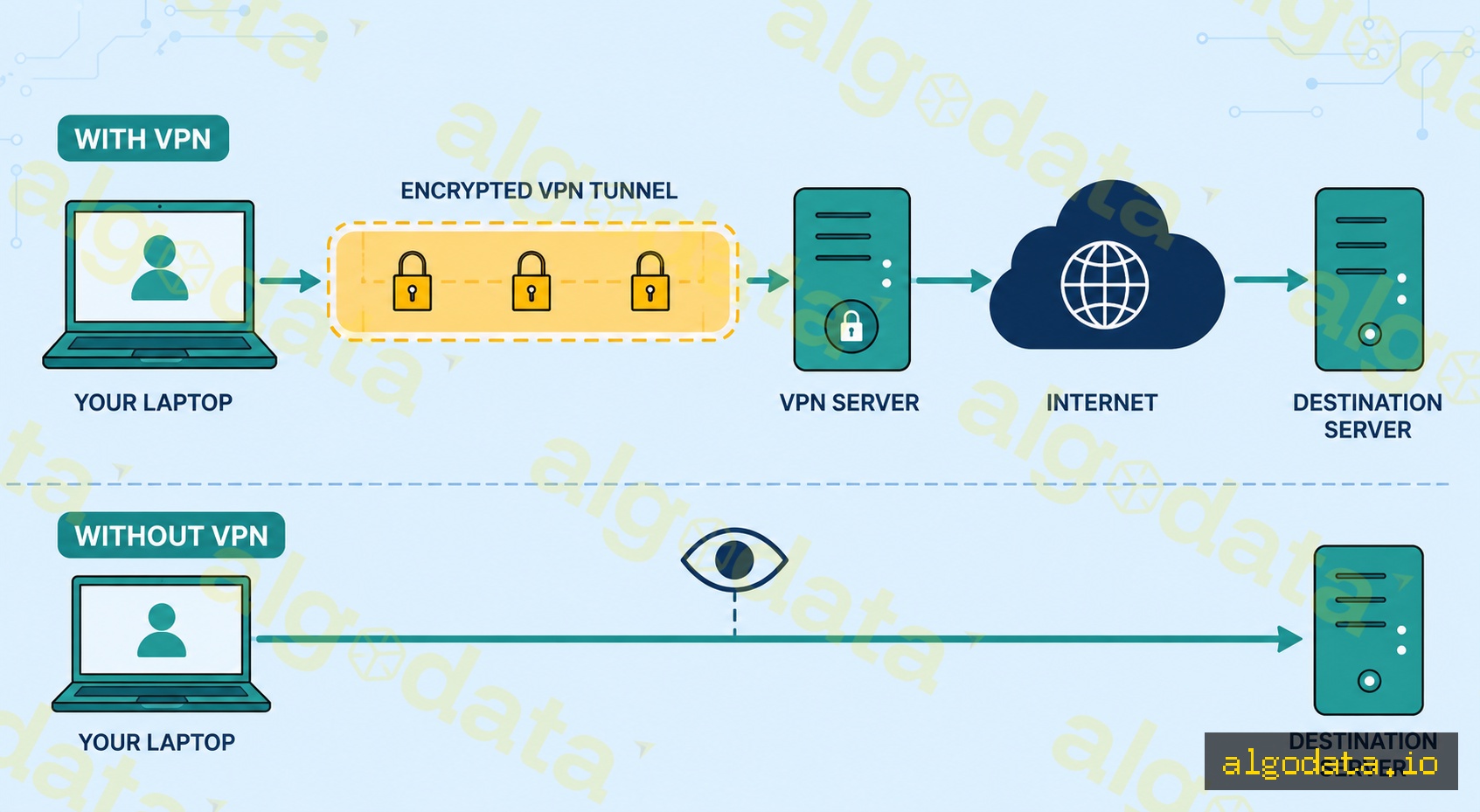
A VPN (Virtual Private Network) creates an encrypted tunnel between your device and a VPN server. Instead of your traffic traveling directly to the internet and exposing your real IP address, all data is encrypted and only decrypted at the VPN server end.
How it works:
- Your device establishes an encrypted connection to the VPN server
- All traffic is encapsulated and encrypted inside the tunnel
- The VPN server decrypts the traffic and forwards the request to the real destination
- The response travels back through the same tunnel
- The destination website sees only the VPN server's IP address
Why do you need a VPN?
- Remote work: Employees working remotely need access to internal resources (file servers, databases, internal tools)
- Public WiFi: Coffee shops, airports — unencrypted WiFi is easy to eavesdrop on
- Privacy: Hide your real IP from websites and your ISP
- Site-to-site: Connect branch offices to each other or to a data center
VPN Protocols

WireGuard (Recommended)
The most modern protocol, designed from the ground up for performance and security:
- ~4,000 lines of code (easy to audit, small attack surface)
- Uses UDP — faster than TCP, slightly less reliable but fine for VPN usage
- Integrated into the Linux kernel since version 5.6 (2020)
- State-of-the-art cryptography: Curve25519, ChaCha20, Poly1305
- Extremely fast reconnect when switching networks (roaming)
OpenVPN
The oldest and most mature VPN protocol:
- ~100,000 lines of code — more complex, more feature-rich
- Supports both TCP and UDP
- Can run on port 443 (same as HTTPS) to bypass strict firewalls
- Supported on virtually all platforms
- Widely used in enterprise environments
IPsec/IKEv2
- Industry standard, built into iOS/Android/Windows natively
- IKEv2 is especially suited for mobile: fast reconnect when switching networks (WiFi to 4G)
- Common in corporate VPN solutions (Cisco AnyConnect, Juniper)
L2TP/PPTP (Legacy)
- PPTP: Do not use — broken since 1999, not secure
- L2TP/IPsec: Still functional but WireGuard is significantly better
Practical WireGuard Configuration
Installing WireGuard on Ubuntu:
1# Install WireGuard
2apt update && apt install wireguard
3
4# Generate key pair (server)
5wg genkey | tee /etc/wireguard/server_private.key | wg pubkey > /etc/wireguard/server_public.key
6
7# Generate key pair (client)
8wg genkey | tee client_private.key | wg pubkey > client_public.key
Server config — /etc/wireguard/wg0.conf:
 1[Interface]
 2Address = 10.0.0.1/24
 3PrivateKey = <server-private-key>
 4ListenPort = 51820
 5
 6# Enable NAT so clients have internet access
 7PostUp = iptables -A FORWARD -i wg0 -j ACCEPT; iptables -t nat -A POSTROUTING -o eth0 -j MASQUERADE
 8PostDown = iptables -D FORWARD -i wg0 -j ACCEPT; iptables -t nat -D POSTROUTING -o eth0 -j MASQUERADE
 9
10[Peer]
11# Client 1
12PublicKey = <client-public-key>
13AllowedIPs = 10.0.0.2/32
Client config:
 1[Interface]
 2Address = 10.0.0.2/24
 3PrivateKey = <client-private-key>
 4DNS = 1.1.1.1
 5
 6[Peer]
 7PublicKey = <server-public-key>
 8Endpoint = 203.0.113.1:51820
 9AllowedIPs = 0.0.0.0/0        # Route all traffic through VPN
10PersistentKeepalive = 25       # Keep connection alive through NAT
Starting WireGuard:
 1# Bring up the WireGuard interface
 2wg-quick up wg0
 3
 4# Check status
 5wg show
 6
 7# Enable auto-start on boot
 8systemctl enable wg-quick@wg0
 9
10# View traffic statistics
11wg show wg0 transfer
Verifying the tunnel is active:
1# Check your public IP — should show VPN server IP
2curl ifconfig.me
3
4# Confirm the WireGuard interface is up
5ip addr show wg0
6
7# Test DNS resolution through the tunnel
8nslookup google.com 1.1.1.1
Site-to-Site vs Remote Access VPN
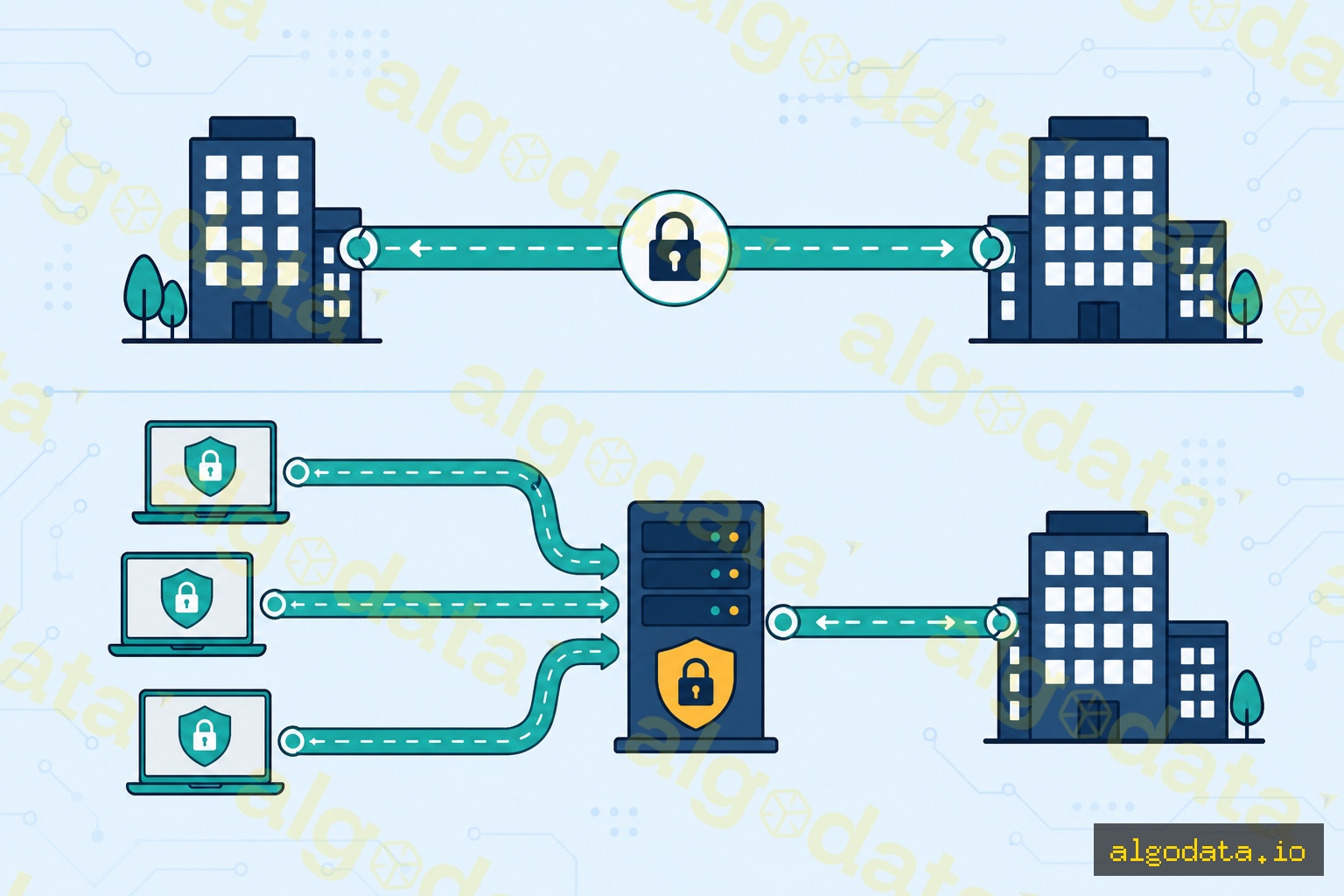
Site-to-site VPN — connects two fixed networks:
- No VPN client needed on individual employee machines
- The routers/firewalls at both offices establish the tunnel between them
- Employees at office A can access resources at office B as if they were on the same network
Remote access VPN — employees connect from anywhere:
- Each employee installs a VPN client (WireGuard, OpenVPN, Cisco AnyConnect, etc.)
- Connects to the company's VPN gateway
- Once connected, can access all internal resources
Which type should you choose?
- Fixed office ↔ data center: Site-to-site
- Work from home, remote teams: Remote access
- A combination of both: common in large enterprises
Common use cases:
- Startup with cloud infra + WFH team: WireGuard remote access VPN on a small VPS
- Multi-office company: IPsec site-to-site between branch routers
- Enterprise with compliance requirements: Cisco AnyConnect with certificate-based auth
VPN vs Proxy
| Criteria | VPN | Proxy |
|---|---|---|
| Encryption | Always | Depends (HTTP proxy = none) |
| Scope | Entire OS | Single application |
| DNS | Through VPN (leak protection) | App decides |
| Speed | Slightly slower | Faster |
| Setup | OS-level | Per-app config |
| Use case | Remote work, full privacy | Web dev, bypass, debugging |
When to use a VPN:
- You need to encrypt all traffic from your device
- Remote employees need access to internal company resources
- Connecting two offices or networks together
- Privacy from your ISP on untrusted networks
When a proxy is enough:
- You only need to route a single application's traffic
- Web scraping or testing geo-restricted content in a browser
- Development proxy (like Charles Proxy) to inspect HTTP traffic
What is a Proxy? Forward, Reverse and SOCKS5 Proxies Explained
What is Zero Trust? The 'Never Trust, Always Verify' Security Architecture