- 1 What is Ransomware? File Encryption Malware and Prevention
- 2 What Is a WAF? Web Application Firewall Explained
Need data solutions for your business?
AlgoData has helped businesses with data engineering, analytics & AI since 2019.
What Is a WAF and Why Do You Need One?
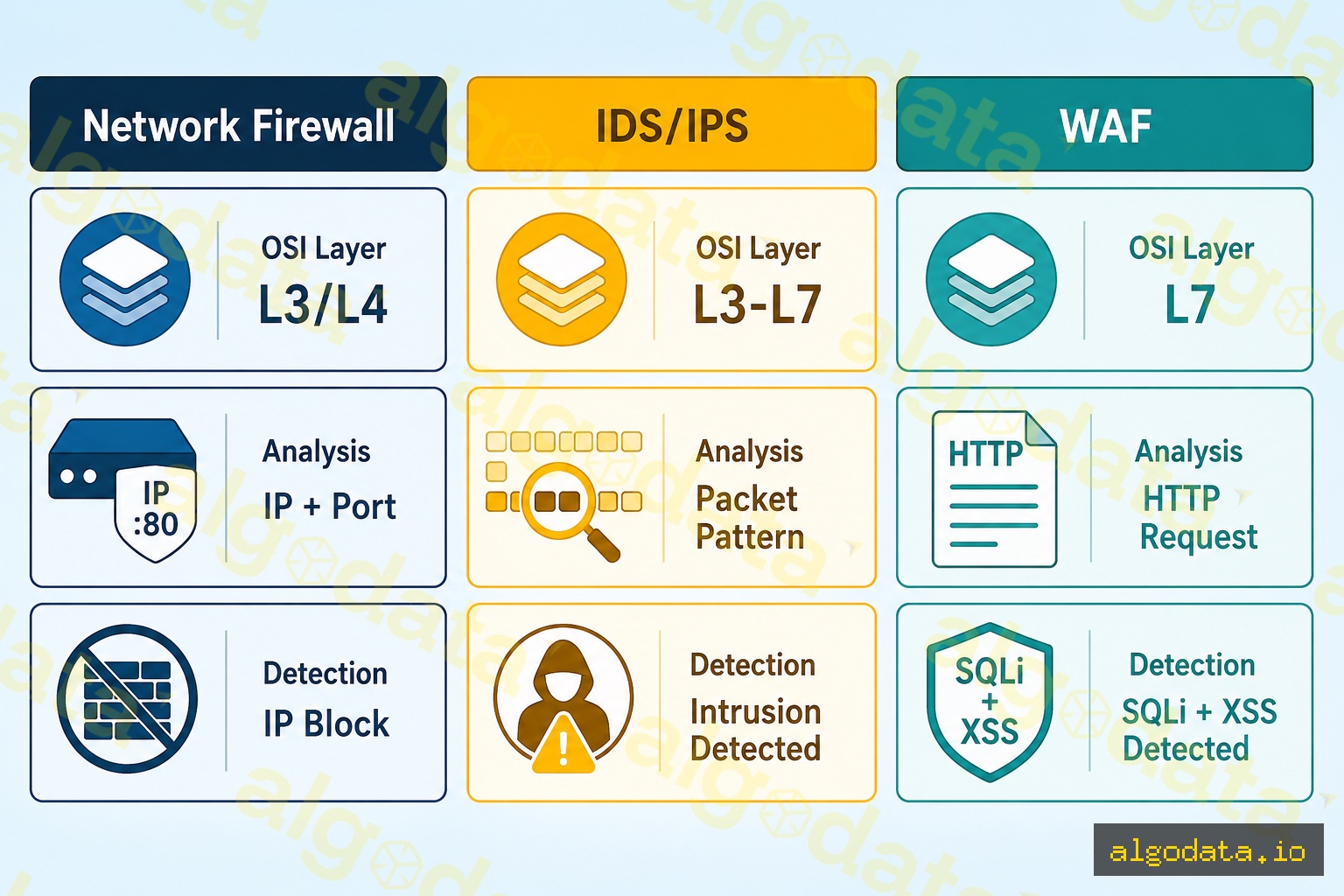
A WAF (Web Application Firewall) is a security component that operates at Layer 7 of the OSI model, monitoring and filtering HTTP/HTTPS traffic between the internet and your web application.
Unlike traditional firewalls that only inspect IP addresses and ports, a WAF understands the semantics of HTTP requests — analyzing URLs, headers, cookies, query strings, and request bodies to detect attack patterns.
Why do you need a WAF?
Web applications are the number one attack target. According to the Verizon DBIR 2024 report, more than 40% of data breaches involve web applications. The OWASP Top 10 — the list of the ten most critical web security risks — can all be detected and blocked by a properly configured WAF.
WAF vs. Firewall vs. IDS/IPS:
| Type | Layer | Analyzes | Detects |
|---|---|---|---|
| Network Firewall | L3/L4 | IP, Port, Protocol | IP block, port filter |
| IDS/IPS | L3–L7 | Packet pattern | Network intrusion |
| WAF | L7 | HTTP payload | SQLi, XSS, LFI, RCE |
How WAF Detection Works
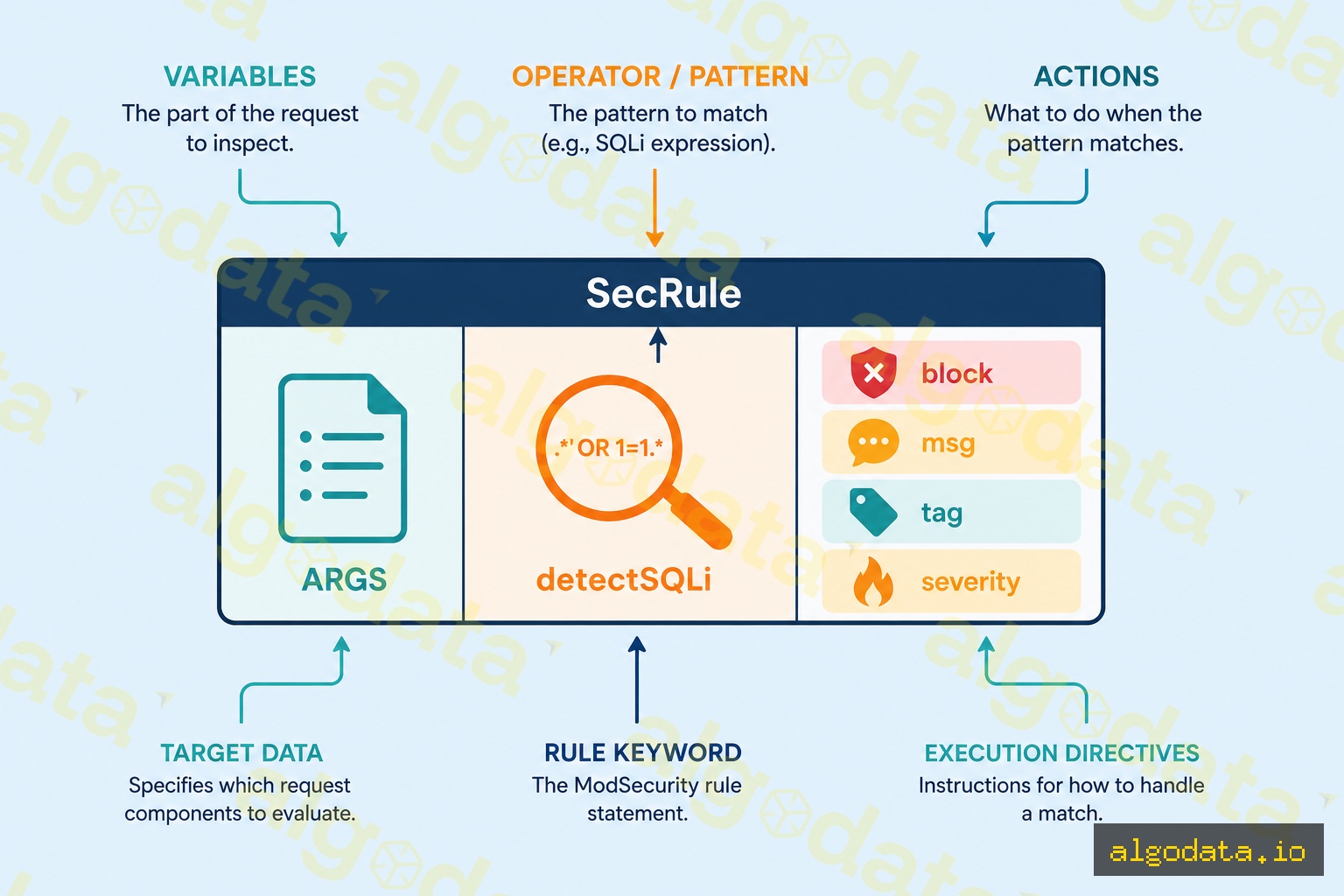
1. Signature-based detection
Compares each request against a database of known attack signatures. Fast with low false positives, but only catches known attacks.
Request: GET /users?id=1' OR '1'='1
WAF rule: matches SQL injection pattern → BLOCK
2. Anomaly-based detection (Rule scoring)
Each request receives an anomaly score. Exceeding the threshold triggers a block. Less susceptible to bypass than pure signature matching.
3. ML-based / Behavioral detection
Learns a baseline of normal traffic and flags deviations. Effective against zero-days and unknown attacks, but more complex to tune.
OWASP Core Rule Set (CRS) is the most widely used open rule set for WAFs, covering:
- SQL Injection (REQUEST-942)
- XSS (REQUEST-941)
- Local File Inclusion (REQUEST-930)
- Remote Code Execution (REQUEST-932)
- Scanner detection (REQUEST-913)
ModSecurity and OWASP CRS in Practice
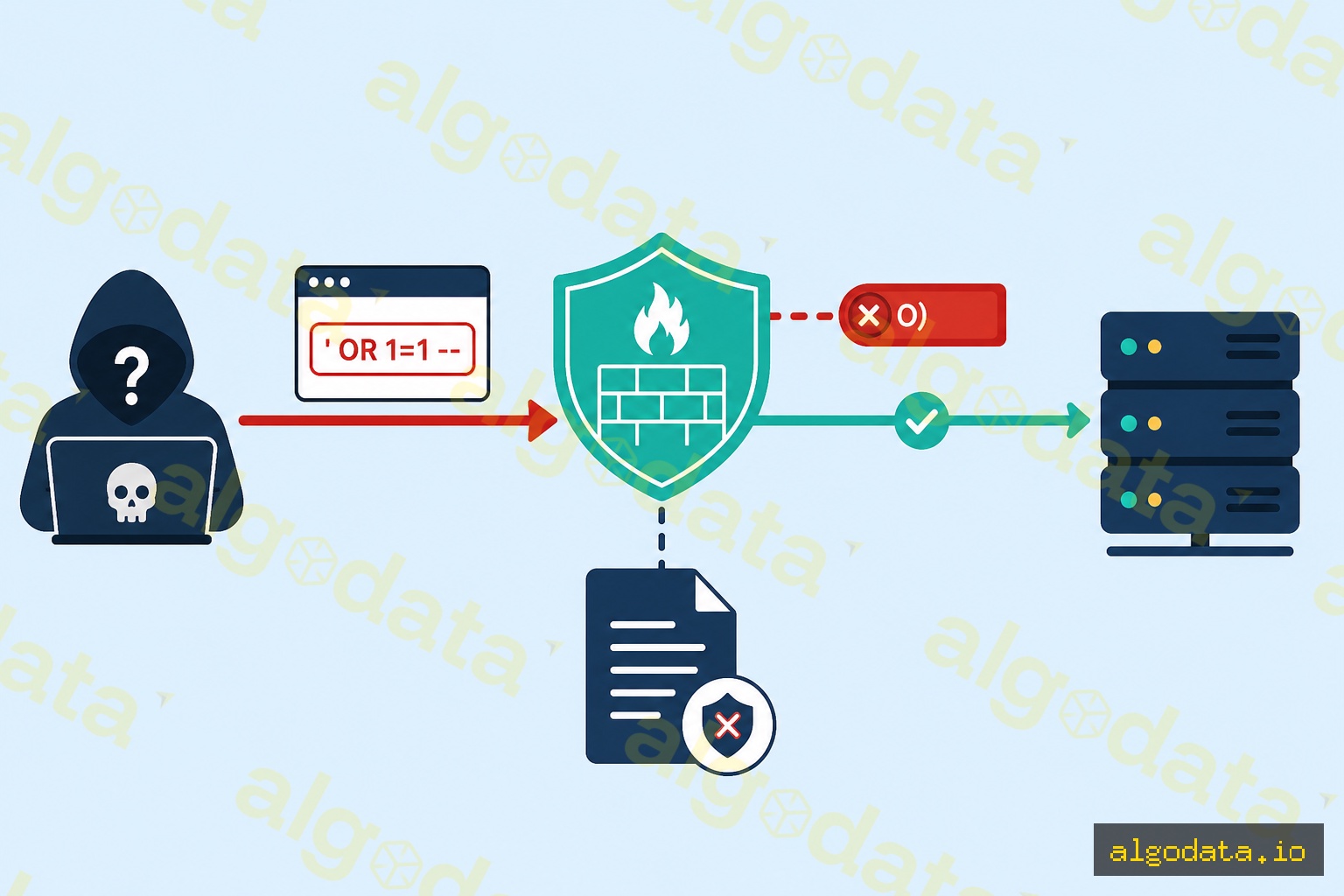
ModSecurity is an open-source WAF engine embedded into NGINX or Apache. Combined with OWASP CRS, it is the most popular self-hosted WAF solution.
Installing ModSecurity with NGINX:
1# Cài modsecurity và nginx connector
2apt-get install libmodsecurity3 libmodsecurity-dev
3git clone --depth 1 https://github.com/SpiderLabs/ModSecurity-nginx
4# Build nginx với modsecurity module
NGINX configuration:
1load_module modules/ngx_http_modsecurity_module.so;
2
3server {
4    listen 443 ssl;
5    modsecurity on;
6    modsecurity_rules_file /etc/nginx/modsec/main.conf;
7}
Example ModSecurity rule — detecting SQL injection:
SecRule ARGS "@detectSQLi" \
    "id:942100,\
    phase:2,\
    block,\
    capture,\
    t:none,t:utf8toUnicode,t:urlDecodeUni,t:removeNulls,t:removeComments,t:compressWhitespace,\
    msg:'SQL Injection Attack Detected via libinjection',\
    logdata:'Matched Data: %{TX.0} found within %{MATCHED_VAR_NAME}: %{MATCHED_VAR}',\
    tag:'application-multi',\
    tag:'language-multi',\
    tag:'platform-multi',\
    tag:'attack-sqli',\
    tag:'OWASP_CRS',\
    tag:'capec/1000/152/248/66',\
    tag:'PCI/6.5.2',\
    ver:'OWASP_CRS/3.3.4',\
    severity:'CRITICAL',\
    setvar:'tx.sql_injection_score=+%{tx.critical_anomaly_score}',\
    setvar:'tx.anomaly_score_pl1=+%{tx.critical_anomaly_score}'"
Each rule includes: id, phase (processing stage), block/detect, a transform chain, message, tags, severity, and anomaly score actions.
Popular WAF Solutions on the Market
AWS WAF:
- Managed service, integrates with CloudFront, ALB, and API Gateway
- Ready-made managed rule groups (AWS Managed Rules, Bot Control, Fraud Control)
- Manage rules via the Console or Terraform
 1resource "aws_wafv2_web_acl" "example" {
 2  name  = "example-waf"
 3  scope = "REGIONAL"
 4
 5  default_action { allow {} }
 6
 7  rule {
 8    name     = "AWSManagedRulesCommonRuleSet"
 9    priority = 1
10    override_action { none {} }
11    statement {
12      managed_rule_group_statement {
13        name        = "AWSManagedRulesCommonRuleSet"
14        vendor_name = "AWS"
15      }
16    }
17    visibility_config {
18      cloudwatch_metrics_enabled = true
19      metric_name                = "CommonRuleSetMetric"
20      sampled_requests_enabled   = true
21    }
22  }
23
24  visibility_config {
25    cloudwatch_metrics_enabled = true
26    metric_name                = "ExampleWAF"
27    sampled_requests_enabled   = true
28  }
29}
Cloudflare WAF: Managed and custom rules, easy to use, integrated with CDN and DDoS protection.
ModSecurity (self-hosted): Open-source, full control, low cost but requires self-maintenance.
WAF Bypass Techniques (Educational)
Understanding bypass techniques helps you tune your WAF more effectively and recognize its limitations.
URL Encoding bypass:
# Payload gốc (bị block):
' OR '1'='1

# URL encoded (có thể bypass WAF không decode đúng):
%27%20OR%20%271%27%3D%271
Case variation:
Modern WAFs counter bypass attempts by: normalizing input before matching (lowercase, URL decode, multiple rounds of HTML decode), using parser-based detection instead of simple regex, and applying ML to detect evasion patterns.
Note: Knowledge of bypass techniques should only be used to test your own WAF (penetration testing) or to better understand how to configure WAF rules.
WAF Deployment Modes
Inline (Blocking mode):
- The WAF sits directly in the request path
- Bad requests are blocked immediately
- Risk: misconfiguration can block legitimate users
- Best suited after thorough rule tuning
Monitor (Detection-only mode):
- The WAF logs but does not block
- Ideal when first deploying, allowing you to observe false positives
- After 2–4 weeks of monitoring, tune rules, then switch to blocking
Best practices when onboarding a WAF:
- Deploy in monitor mode
- Run for 2–4 weeks, reviewing logs daily
- Whitelist false positives (custom exclude rules)
- Enable blocking mode for verified rules
- Continue monitoring and tuning regularly