- 1 What is Malware? Classification, Characteristics, and Prevention
- 2 What is DDoS? Signs, Response and Effective Prevention Methods
- 3 What is Phishing? Recognizing and Preventing Online Fraud
- 4 What is DNS Sinkhole? Applications and How to Use DNS Sinkhole Technique
- 5 What is OAuth 2.0? Authorization and Login with Google/GitHub
- 6 What is a Trojan? Essential Information About Trojan Malware
- 7 What Is Zero Trust? The 'Never Trust, Always Verify' Security Model
- 8 What is VPN? Virtual Private Network, WireGuard and OpenVPN
- 9 What Is MFA? Multi-Factor Authentication vs 2FA Explained
- 10 What is a Firewall? Role and Functions in Network Security
- 11 What is SQL Injection? Database Attacks and Prevention
Phishing is one of the most dangerous weapons in a hacker's arsenal — it requires no technical exploit, only human deception. Understanding how phishing works and its many variants is the first step toward protecting yourself and your organization against an ever-more-sophisticated wave of cyber attacks.
Need data solutions for your business?
AlgoData has helped businesses with data engineering, analytics & AI since 2019.
What is Phishing? Social Engineering via Web and Email
Phishing is a Social Engineering attack in which an adversary impersonates a trusted organization or individual — a bank, Google, Amazon, or even a colleague — to trick victims into taking a harmful action: handing over passwords, credit card numbers, OTP codes, or installing malware.
The core of phishing is exploiting human psychology, not technical vulnerabilities. Emotions commonly leveraged include:
- Fear: "Your account will be locked in 24 hours if you don't verify immediately"
- Greed: "You've won $2,000 — click here to claim your prize"
- Trust: "IT from HR is requesting you update your VPN password"
- Urgency: "Your order will be cancelled if you don't confirm within 2 hours"
According to the Verizon Data Breach Investigations Report (DBIR), approximately 90% of data breaches begin with a phishing email. Not because systems are weak — but because humans are always the most exploitable link in the security chain.
Phishing is not a new phenomenon — the term dates back to the 1990s when hackers impersonated AOL to steal account credentials. But today's attacks are increasingly sophisticated, personalized, and indistinguishable from legitimate communications.
Types of Phishing Attacks
Email Phishing — Mass, Non-Personalized
The classic and most common form. Attackers send millions of fake emails impersonating banks, PayPal, Amazon, or popular services. Messages typically include a link to a fake login page, urging victims to enter their credentials.
Because they are sent at mass scale without personalization, standard phishing emails are often easier to spot — generic language, spelling errors, unfamiliar sender domains. However, low success rates are offset by enormous volume: even 0.1% of 10 million emails yields 10,000 victims.
Spear Phishing — Personalized and Targeted
Spear phishing targets a specific individual or organization. Attackers research their target carefully beforehand — full name, title, colleagues, current projects — and use that information to craft extremely convincing emails.
Example: "Hi Alex, per the request of CEO Sarah, please review the attached Q4 contract and approve before 5 PM today."
This email includes a real name, references a real superior, and creates time pressure. Success rates for spear phishing are dramatically higher than mass phishing — some studies report 30–40%.
Whaling — Targeting CEOs, CFOs, and C-Suite
Whaling is spear phishing aimed at "big fish" — CEOs, CFOs, or other senior executives. The goal is often Business Email Compromise (BEC): convincing a CFO to wire funds to an attacker-controlled account, or extracting sensitive financial data.
The FBI estimates BEC caused over $26 billion in losses globally from 2016 to 2022 — more than ransomware.
Smishing — SMS Phishing
Phishing via SMS. Attackers impersonate banks, delivery services, or government agencies. Messages are typically brief: "Your package is awaiting confirmation: [link]" or "Your account has been locked, verify now: [link]".
Smishing is effective because users tend to be less vigilant when reading SMS than email, and small mobile screens make it harder to inspect URLs.
Vishing — Voice Call Phishing
Attackers call directly, impersonating bank staff, tech support, or even law enforcement. They apply psychological pressure to extract OTP codes, account credentials, or authorize fund transfers.
With the rise of AI voice cloning, vishing is increasingly dangerous — attackers can clone a CEO's voice from just a few minutes of publicly available audio to call a finance employee.
Clone Phishing — Duplicating Legitimate Emails
Attackers clone a legitimate email the victim has already received (newsletter, order confirmation, notification from a real service), replace links or attachments with malicious versions, and resend it as an "updated version" or "resent due to a technical error."
Clone phishing is particularly dangerous because victims are already familiar with the format of the original email and are more likely to trust it.
Anatomy of a Fake Login Page
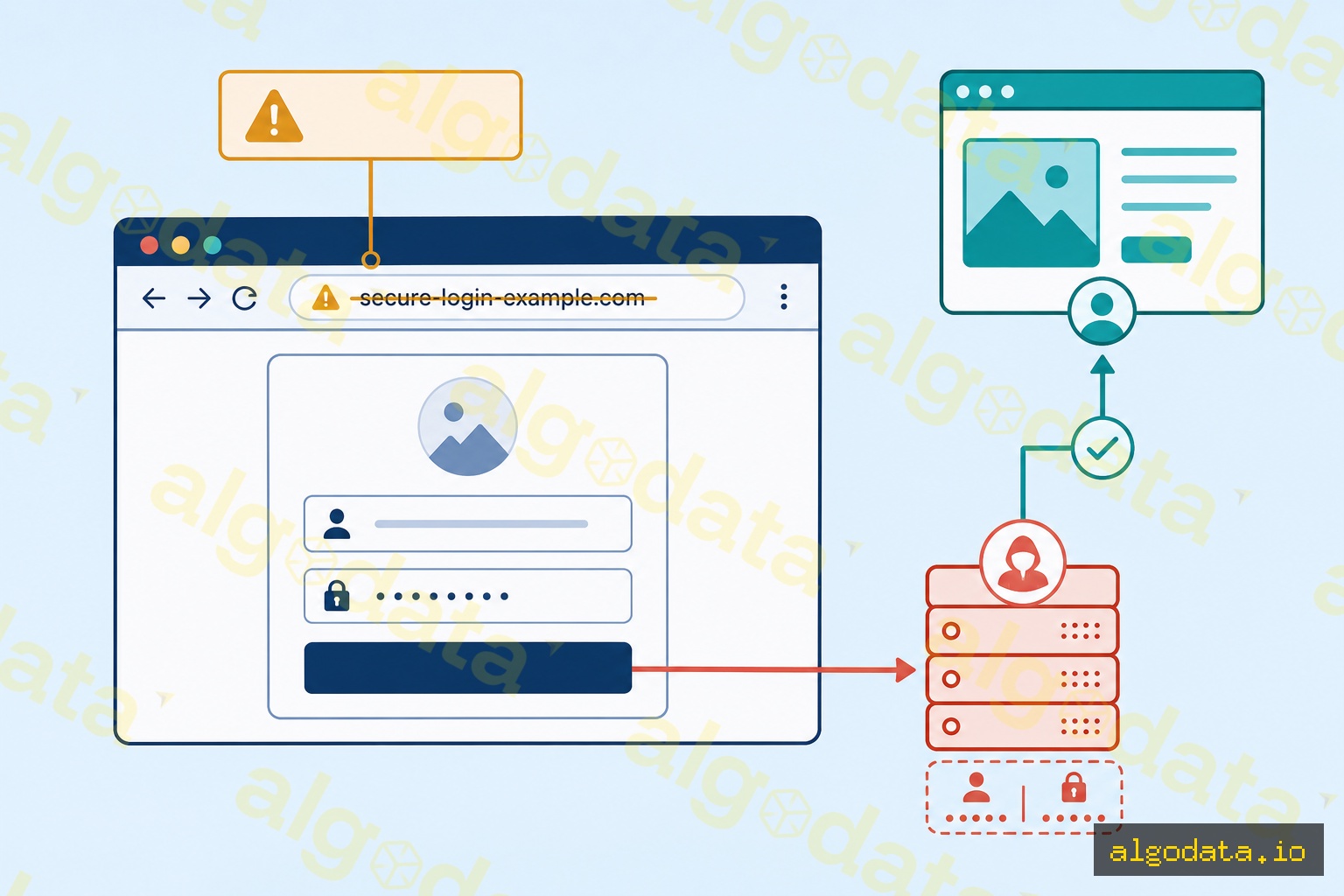
A typical fake login page follows this sequence:
Step 1 — Different URL, identical interface:
The attacker creates a website with a pixel-perfect copy of the real site — logo, colors, layout, content. But the URL is different: accounts.g00gle.com, login-google.com, google-accounts-security.com, or using IDN homographs (see next section).
Step 2 — Victim enters credentials: Because the interface looks identical to the real site, the victim has no reason for suspicion and enters their username and password as normal.
Step 3 — Credentials sent to the attacker's server: Instead of logging into the real account, the form submission sends the credentials to the attacker's server, where they are stored.
Step 4 — Redirect to the real site: Immediately after collecting the information, the fake page redirects the victim to the real login page with a message such as "Session expired, please log in again." The victim logs in successfully and has no idea they were just compromised.
This entire process takes seconds — enough time for the attacker to capture credentials, but far too fast for the victim to notice anything wrong.
Techniques to Bypass Detection
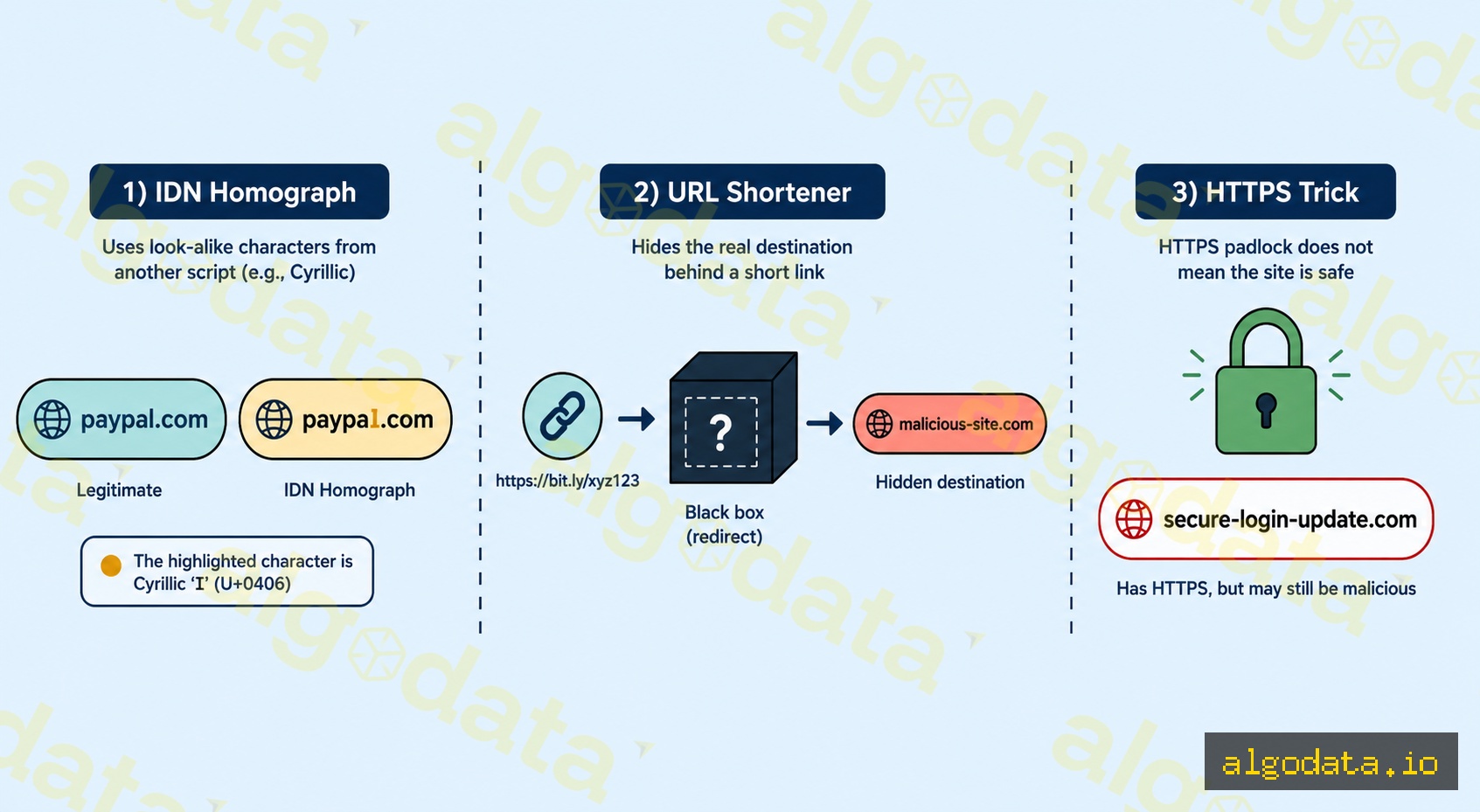
IDN Homograph Attack
Internationalized Domain Names (IDN) allow domain names to use Unicode characters. This creates a vulnerability: many Unicode characters look identical to Latin characters but are technically different.
- The letter
а(Cyrillic U+0430) looks likea(Latin U+0061) - The letter
е(Cyrillic U+0435) looks likee(Latin U+0065) - The letter
ο(Greek U+03BF) looks likeo(Latin U+006F)
Result: pаypal.com (with Cyrillic 'а') looks identical to paypal.com (Latin) on screen, but is an entirely different domain. Modern browsers counter this by displaying the punycode form: xn--pypal-4ve.com instead of pаypal.com, though this is not always shown proactively.
URL Shorteners
Links like bit.ly/abc123 or tinyurl.com/xyz completely conceal the true destination domain. Users cannot know where a shortened link leads just by looking at it. Attackers use URL shorteners to bypass email filters that rely on domain blacklists.
HTTPS on Fake Sites
Many users believe "the green HTTPS padlock means it's safe" — this is a widespread misconception. HTTPS only encrypts the connection; it does not verify the website is legitimate. Attackers can obtain a free SSL certificate from Let's Encrypt for any domain, including paypa1.com. The fake site still displays a green padlock.
Subdomain Tricks
A domain like paypal.com.attacker.com leads users who skim quickly to see "paypal.com" and trust the link. In reality, the actual domain is attacker.com — paypal.com is merely a subdomain. This technique is particularly effective on mobile where URLs are truncated.
Personal Defenses Against Phishing
Check the Sender Domain — Not Just the Display Name
Email clients display the sender's name (display name), which an attacker can set to anything: "PayPal Security" or "Google Account Team." What matters is the actual email address inside <>: security@paypa1.com is not security@paypal.com.
Never trust the display name alone — always expand the email header to see the full address.
Hover Over Links Before Clicking
Before clicking any link in an email, hover your mouse over it to see the real URL appear in the browser's status bar at the bottom. If the URL does not match the organization contacting you, do not click.
On mobile, press and hold a link to see a URL preview before opening it.
Never Enter Credentials via Links in Emails
The safest habit: never log into an account via a link in an email. Instead, open your browser and type the website address directly (or use a saved bookmark). If there is a genuine issue with your account, it will appear when you log in directly.
2FA — Your Shield Even When Passwords Are Stolen
Enable two-factor authentication (2FA) on all important accounts. Even if an attacker steals your password via phishing, they still need your OTP code or hardware key to log in. 2FA does not prevent phishing but significantly reduces the damage when a password is compromised.
Priority: Hardware key (YubiKey) > Authenticator app (TOTP) > SMS OTP (most vulnerable to SIM swap).
Password Managers — Automatically Detecting Fake Domains
Password managers like Bitwarden or 1Password store credentials tied to a specific domain. When you visit paypa1.com (fake), the password manager will not autofill your credentials because the domain does not match paypal.com (real) in its database.
This is an extremely effective automatic defense layer — even if a user fails to recognize a fake site, the password manager will not autofill, creating an implicit warning.
Organizational Defenses: SPF / DKIM / DMARC
To prevent attackers from spoofing your organization's domain (sending emails appearing to come from ceo@yourcompany.com), configure these three DNS records:
# DNS TXT records for domain example.com

# SPF — only Google and Sendgrid mail servers are authorized to send
example.com. TXT "v=spf1 include:_spf.google.com include:sendgrid.net -all"

# DKIM — public key to verify email signatures
google._domainkey.example.com. TXT "v=DKIM1; k=rsa; p=MIGfMA0G..."

# DMARC — reject if both SPF and DKIM fail; send reports to admin
_dmarc.example.com. TXT "v=DMARC1; p=reject; rua=mailto:dmarc@example.com; pct=100"
SPF (Sender Policy Framework): The SPF record lists the mail servers authorized to send email on behalf of your domain. When a receiving server checks an email from yourcompany.com, it looks up the SPF record and verifies whether the sender's IP is in the authorized list. The -all at the end means reject all servers not listed.
DKIM (DomainKeys Identified Mail): DKIM adds a digital signature to each outgoing email. Your mail server signs the email with a private key; the receiving server verifies the signature using the public key published in DNS. This signature covers the email content, enabling detection of spoofed or tampered emails in transit.
DMARC (Domain-based Message Authentication, Reporting, and Conformance): DMARC specifies the policy to apply when SPF or DKIM fails:
p=none: Monitor only, no blocking — use when starting to deployp=quarantine: Move to spam/junk folderp=reject: Reject the email entirely — the target configuration for production
DMARC also provides a reporting mechanism (rua): receiving servers send reports to your designated email address, allowing you to monitor who is sending emails impersonating your domain.
DMARC Deployment Roadmap:
- Start with
p=noneandruato collect data (2–4 weeks) - Analyze reports; ensure all legitimate mail servers are covered by SPF and have DKIM configured
- Switch to
p=quarantinewithpct=10(10% of emails) - Gradually increase
pctto 100% - Finally switch to
p=reject