- 1 What is an API Gateway? Single Entry Point for Microservices
- 2 What is NAT? Network Address Translation Explained
- 3 What is GitLab CI/CD? Automated Pipeline for Build, Test, and Deploy
- 4 What is Apache Kafka? Distributed Event Streaming Platform Explained
- 5 What is Serverless? FaaS, Cold Start, and When to Go Serverless
- 6 What is Subnet & CIDR? IP Network Segmentation and Routing
- 7 What is Kubernetes? The Most Popular Container Orchestration Platform Today
- 8 What is a Proxy? Forward Proxy, Reverse Proxy and SOCKS5 Explained
- 9 What is Nginx? Web server, reverse proxy, and load balancer in one
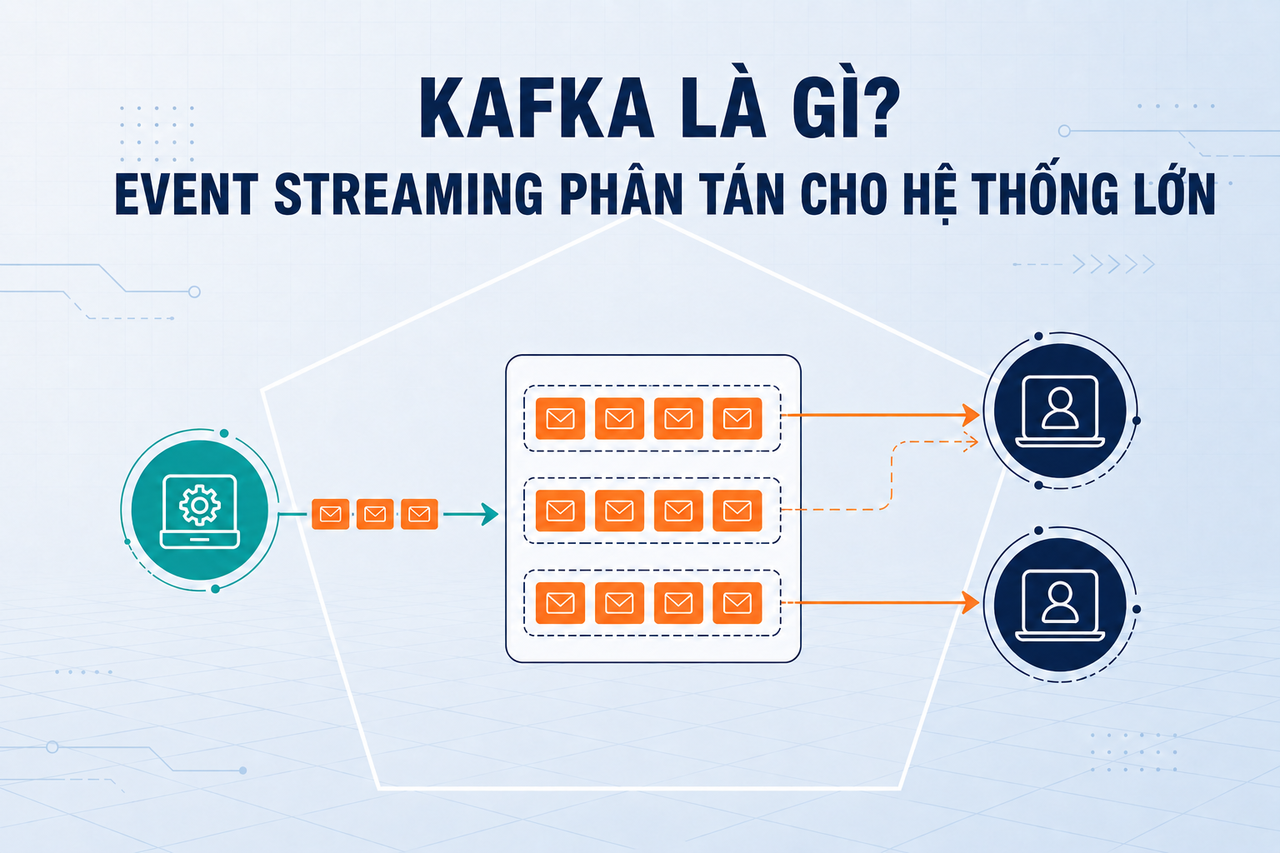
Apache Kafka is the distributed event streaming platform invented at LinkedIn in 2011 and donated to the Apache Software Foundation. From an internal tool handling billions of events per day at LinkedIn, Kafka has become the backbone of real-time data pipelines at Uber, Airbnb, Netflix, and thousands of companies worldwide.
Need data solutions for your business?
AlgoData has helped businesses with data engineering, analytics & AI since 2019.
What is Apache Kafka?
Apache Kafka is a distributed event streaming system — a distributed immutable log that enables:
- Publishing (writing) messages from many Producers
- Subscribing (reading) messages by many independent Consumers
- Storing messages durably with flexible retention policies
- Processing messages in real time or replaying historical events
Kafka is engineered for extreme throughput: a typical Kafka cluster handles millions of messages per second with end-to-end latency under 10ms.
Core differentiator: Unlike traditional message queues that delete messages after they are read, Kafka retains messages for a configurable window (e.g. 7 days). Consumers can rewind and replay the full history of events at any time.
The Problem Kafka Solves
Imagine an e-commerce system: when a user places an order, that event must be processed by:
- Inventory service — deduct stock
- Notification service — send a confirmation email
- Analytics service — update the dashboard
- Fraud detection service — check for suspicious activity
- Recommendation engine — update purchase history
If Order Service calls these five services directly over HTTP:
Order Service → Inventory (HTTP)
             → Notification (HTTP)
             → Analytics (HTTP)
             → Fraud (HTTP)
             → Recommendation (HTTP)
The system becomes tightly coupled: adding a new service requires modifying Order Service, a slow downstream call blocks the entire pipeline, and there is no built-in retry when a downstream service fails.
Kafka solves this by introducing a central event bus:
Order Service → [order-placed Topic] → Inventory Service
                                     → Notification Service
                                     → Analytics Service
                                     → Fraud Service
                                     → Recommendation Service
Order Service publishes one event and is done. Each downstream service subscribes and processes at its own pace, completely independently. Adding a new service requires zero changes to Order Service.
Kafka Architecture
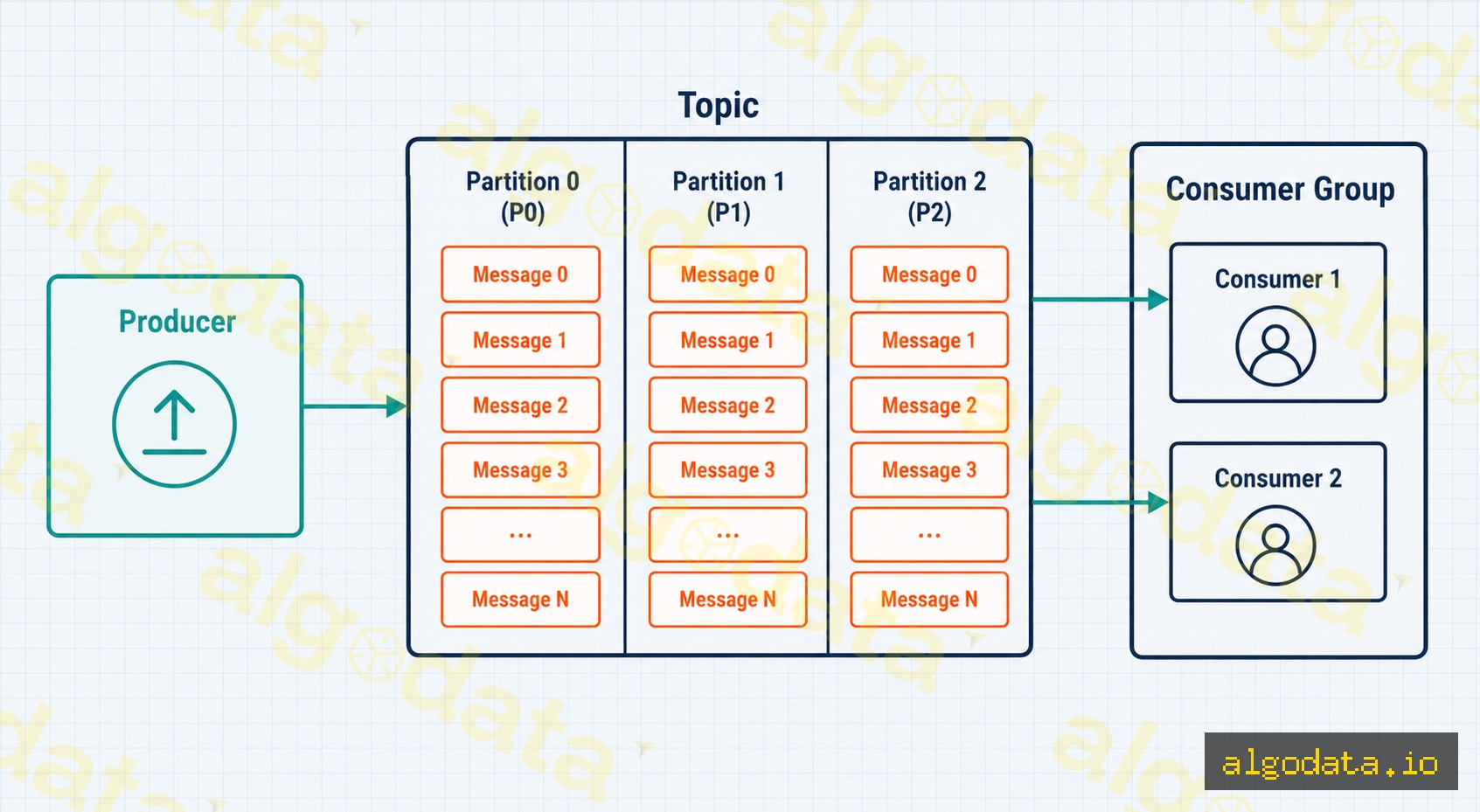
Kafka's architecture is built around several key components:
Producer
A Producer is any application that writes messages to Kafka. The Producer selects which Topic to write to and optionally specifies a Partition key to control message routing.
Topics and Partitions
A Topic is a logical category for grouping related messages (e.g., order-placed, user-signup, payment-processed).
Each Topic is split into N Partitions — the unit of parallelism:
- Each Partition is an ordered, immutable log: messages are appended to the end and never modified.
- Messages within the same Partition have a strict ordering guarantee.
- Messages with the same Partition key always land in the same Partition — guaranteeing ordering for a specific entity (e.g., all events for user_id=123 go to the same Partition).
- More Partitions → more parallelism → higher throughput.
Brokers
A Broker is a Kafka server — a node that stores and serves Partitions. A production Kafka cluster typically has 3–5 Brokers. Each Partition has one Leader Broker (handles reads and writes) and multiple Follower replicas (for high availability).
ZooKeeper (or KRaft starting from Kafka 3.3+) manages cluster metadata and leader election.
Consumers and Consumer Groups
A Consumer is an application that reads messages from a Topic.
A Consumer Group is a set of Consumers cooperating to consume a Topic:
- Kafka assigns Partitions to Consumers within the Group: each Partition → exactly one Consumer at a time.
- If there are more Consumers than Partitions in a Group, the extra Consumers sit idle.
- Multiple Consumer Groups read the same Topic completely independently — each Group maintains its own offset.
Topic: order-placed (3 Partitions)
│
├─ Consumer Group "inventory-svc"   → Consumer A (P0), Consumer B (P1, P2)
└─ Consumer Group "analytics-svc"  → Consumer X (P0, P1, P2)
Retention, Offsets, and Consumer Lag
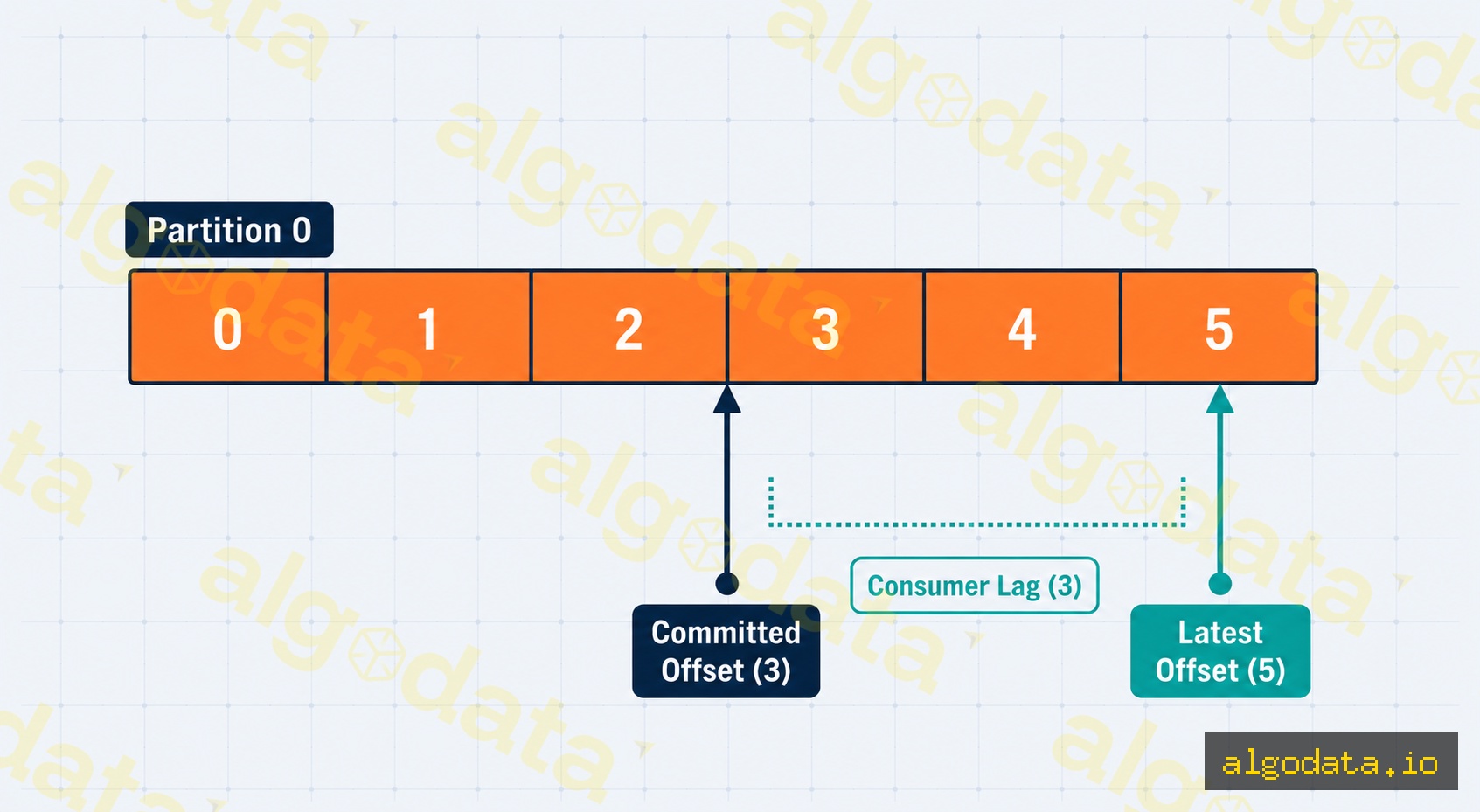
Offsets
Every message in a Partition has an offset — a monotonically increasing integer (0, 1, 2, …) that identifies its position. Consumers manage their own offsets: after processing a message, a Consumer commits its offset to signal how far it has progressed.
Offsets are not stored in the Kafka Broker directly but in a special internal topic called __consumer_offsets.
Retention
Kafka retains messages for a configurable time window or size limit:
# Retain messages for 7 days
log.retention.hours=168

# Or cap by size
log.retention.bytes=10737418240  # 10 GB per Partition
After the retention period, Kafka deletes the oldest messages — regardless of whether all Consumers have read them. This is a pull model: Consumers decide how fast to read.
Consumer Lag
Consumer Lag = Latest Offset − Committed Offset = the number of messages the Consumer has not yet processed.
High lag indicates that the Consumer is falling behind the Producer's publish rate. Monitoring lag is one of the most critical metrics in a production Kafka deployment.
Code Examples
Python with kafka-python
 1from kafka import KafkaProducer, KafkaConsumer
 2import json
 3
 4# Producer: write messages to a Topic
 5producer = KafkaProducer(
 6    bootstrap_servers=['localhost:9092'],
 7    value_serializer=lambda v: json.dumps(v).encode('utf-8'),
 8    # Wait for all in-sync replicas to acknowledge — no message loss
 9    acks='all',
10    retries=3
11)
12
13# Send an order-placed event
14order_event = {
15    "event": "order_placed",
16    "order_id": "ORD-2026-001",
17    "user_id": 42,
18    "total": 29.99
19}
20
21# Partition key = user_id ensures all events for a user go to the same Partition
22future = producer.send(
23    topic='order-placed',
24    key=str(order_event['user_id']).encode('utf-8'),
25    value=order_event
26)
27record_metadata = future.get(timeout=10)
28print(f"Sent → partition={record_metadata.partition}, offset={record_metadata.offset}")
29
30producer.flush()
31producer.close()
32
33# Consumer Group: consume messages from the Topic
34consumer = KafkaConsumer(
35    'order-placed',
36    bootstrap_servers=['localhost:9092'],
37    group_id='inventory-service',  # Consumer Group ID
38    auto_offset_reset='earliest',  # Read from the beginning if no prior offset
39    value_deserializer=lambda m: json.loads(m.decode('utf-8')),
40    enable_auto_commit=False  # Manual offset commit for reliability
41)
42
43print("Inventory Service listening...")
44try:
45    for message in consumer:
46        event = message.value
47        print(f"Received: order_id={event['order_id']}, user={event['user_id']}")
48
49        # Handle business logic here (deduct stock, etc.)
50        # ...
51
52        # Commit offset only after successful processing
53        consumer.commit()
54finally:
55    consumer.close()
Node.js with kafkajs
 1const { Kafka } = require('kafkajs');
 2
 3const kafka = new Kafka({
 4  clientId: 'my-app',
 5  brokers: ['localhost:9092'],
 6});
 7
 8// ── Producer ──────────────────────────────────────────────
 9async function runProducer() {
10  const producer = kafka.producer();
11  await producer.connect();
12
13  // Send a batch of messages to the Topic
14  await producer.send({
15    topic: 'order-placed',
16    messages: [
17      {
18        key: '42',                               // Partition key = user_id
19        value: JSON.stringify({
20          event: 'order_placed',
21          orderId: 'ORD-2026-002',
22          userId: 42,
23          total: 49.99,
24        }),
25      },
26      {
27        key: '99',
28        value: JSON.stringify({
29          event: 'order_placed',
30          orderId: 'ORD-2026-003',
31          userId: 99,
32          total: 12.49,
33        }),
34      },
35    ],
36  });
37
38  console.log('Sent 2 order events to Kafka');
39  await producer.disconnect();
40}
41
42// ── Consumer Group ────────────────────────────────────────
43async function runConsumer() {
44  const consumer = kafka.consumer({ groupId: 'notification-service' });
45  await consumer.connect();
46
47  // Subscribe to the Topic
48  await consumer.subscribe({ topic: 'order-placed', fromBeginning: false });
49
50  await consumer.run({
51    // eachMessage is called for every message received
52    eachMessage: async ({ topic, partition, message }) => {
53      const event = JSON.parse(message.value.toString());
54      console.log(`[P${partition}] orderId=${event.orderId}, userId=${event.userId}`);
55
56      // Send confirmation email / push notification
57      // await notificationSvc.send(event);
58    },
59  });
60}
61
62runProducer().catch(console.error);
63runConsumer().catch(console.error);
Kafka vs RabbitMQ vs Redis Pub/Sub
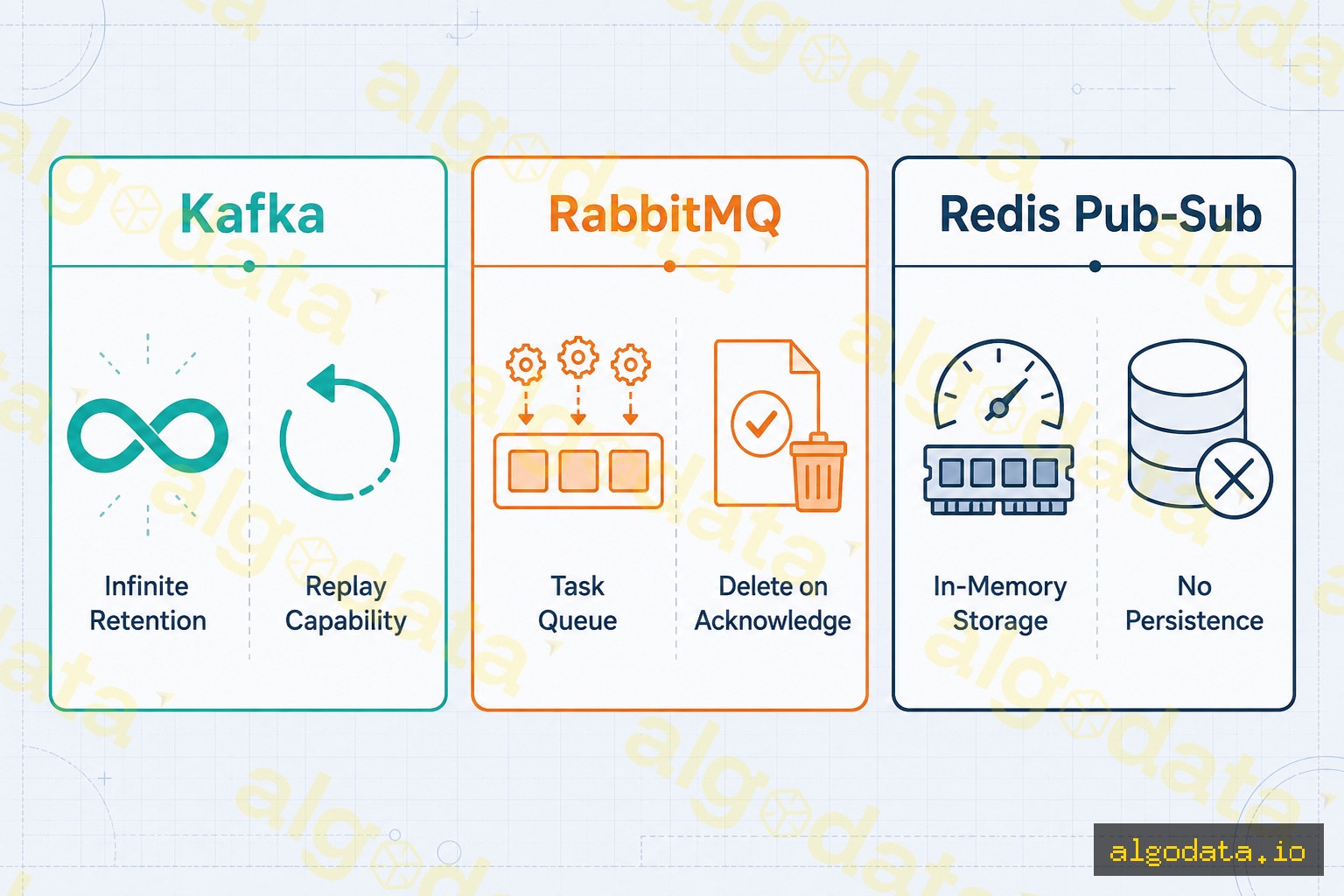
| Criterion | Kafka | RabbitMQ | Redis Pub/Sub |
|---|---|---|---|
| Model | Distributed log | Message broker (AMQP) | In-memory pub/sub |
| Retention | Configurable (time/size) | Deleted after ACK | No persistence |
| Replay | Yes (rewind offset) | No | No |
| Throughput | Extremely high (millions/s) | High (hundreds of thousands/s) | Very high but ephemeral |
| Ordering | Within a Partition | Within a Queue | Not guaranteed |
| Consumer Groups | First-class feature | Competing consumers | All subscribers receive |
| Routing | Simple (key-based) | Complex (Exchange/Binding) | Channel-based |
| Operational Complexity | High | Medium | Low |
When to Use Kafka
Kafka is the right choice when:
- High-throughput event streaming: millions of events per second from many sources
- Replay required: audit logs, reprocessing after a bug fix, backfilling a data warehouse
- Multiple independent Consumers need the same stream (fan-out without event loss)
- Data pipelines: CDC (Change Data Capture) from databases, real-time ETL
- Event sourcing: persisting the full history of state changes
When NOT to Use Kafka
- Need complex routing (topic exchange, fanout exchange) → RabbitMQ
- Simple fire-and-forget task queue → Redis List / BullMQ
- Small team or system without Kafka operational experience → overhead not justified
- Request-reply (RPC pattern) required → RabbitMQ is a better fit
Kafka Connect and Kafka Streams
Kafka Connect
Kafka Connect is a framework bundled with Kafka for integrating external systems without writing custom code:
- Source Connectors: MySQL Debezium (CDC), S3, MongoDB → Kafka
- Sink Connectors: Kafka → Elasticsearch, Snowflake, PostgreSQL, S3
 1// Example: Debezium MySQL Source Connector configuration
 2{
 3  "name": "mysql-orders-connector",
 4  "config": {
 5    "connector.class": "io.debezium.connector.mysql.MySqlConnector",
 6    "database.hostname": "mysql-host",
 7    "database.port": "3306",
 8    "database.user": "debezium",
 9    "database.password": "secret",
10    "database.server.name": "mydb",
11    "table.include.list": "shop.orders"
12  }
13}
Kafka Streams
Kafka Streams is a Java/Scala library for building stateful stream processing directly on top of Kafka:
- Filter, map, aggregate, and join Kafka Topics
- KTable — a materialized view continuously updated from a stream
- Windowed aggregation — aggregate over time windows (5 minutes, 1 hour)
- No separate cluster required (unlike Spark or Flink) — runs as a library inside your application
Kafka Streams is a lightweight choice for stream processing; use Apache Flink when you need more complex stateful computation at very large scale.
Real-World Use Cases: LinkedIn, Uber, Airbnb
LinkedIn — Where Kafka Was Born
LinkedIn created Kafka in 2011 to handle the activity stream of hundreds of millions of users. Before Kafka, LinkedIn relied on a patchwork of message queues resulting in a "data integration mess" of dozens of point-to-point connections. Kafka replaced them all with a single central nervous system, processing more than 7 trillion messages per day.
Uber — Pricing and Surge Detection
Uber uses Kafka as the backbone of its real-time pricing engine. Every trip, driver location update, and ride request is an event stream. Kafka enables Uber to compute surge pricing in real time based on supply and demand in each geographic area, processing millions of events per minute.
Airbnb — Data Pipelines and ML Feature Store
Airbnb uses Kafka for SmartPricing — its dynamic pricing recommendation system for hosts. Every user interaction (view, search, booking) is streamed through Kafka into the data warehouse and ML feature store in real time, allowing models to refresh features continuously without relying on overnight batch jobs.
What is Redis? Caching, Pub/Sub, and Queues with an In-Memory Database
What is Elasticsearch? Full-Text Search and Real-Time Log Analytics
What is an API Gateway? Architecture, Features, and Deployment