What is NAT? Network Address Translation Explained
DevOps

What is NAT? Network Address Translation Explained

NAT (Network Address Translation) is a technique that lets multiple devices share a single public IP address. Learn how PAT, Static NAT, Dynamic NAT work, and how NAT operates in routers, cloud VPCs, and Docker.

In this series: DevOps
  1. 1 What is an API Gateway? Single Entry Point for Microservices
  2. 2 What is NAT? Network Address Translation Explained
  3. 3 What is GitLab CI/CD? Automated Pipeline for Build, Test, and Deploy
  4. 4 What is Apache Kafka? Distributed Event Streaming Platform Explained
  5. 5 What is Serverless? FaaS, Cold Start, and When to Go Serverless
  6. 6 What is Subnet & CIDR? IP Network Segmentation and Routing
  7. 7 What is Kubernetes? The Most Popular Container Orchestration Platform Today
  8. 8 What is a Proxy? Forward Proxy, Reverse Proxy and SOCKS5 Explained
  9. 9 What is Nginx? Web server, reverse proxy, and load balancer in one
✦ Quick summary
NAT (Network Address Translation) is a technique that lets multiple devices share a single public IP address. Learn how PAT, Static NAT, Dynamic NAT work, and how NAT operates in routers, cloud VPCs,...
How was this post?

NAT (Network Address Translation) is the networking technique that lets millions of home and office devices share a single public IP address — the practical solution to IPv4 address exhaustion. This article explains what NAT is, how PAT works step by step, and how NAT operates in home routers, cloud VPCs, and Docker.

What is NAT?

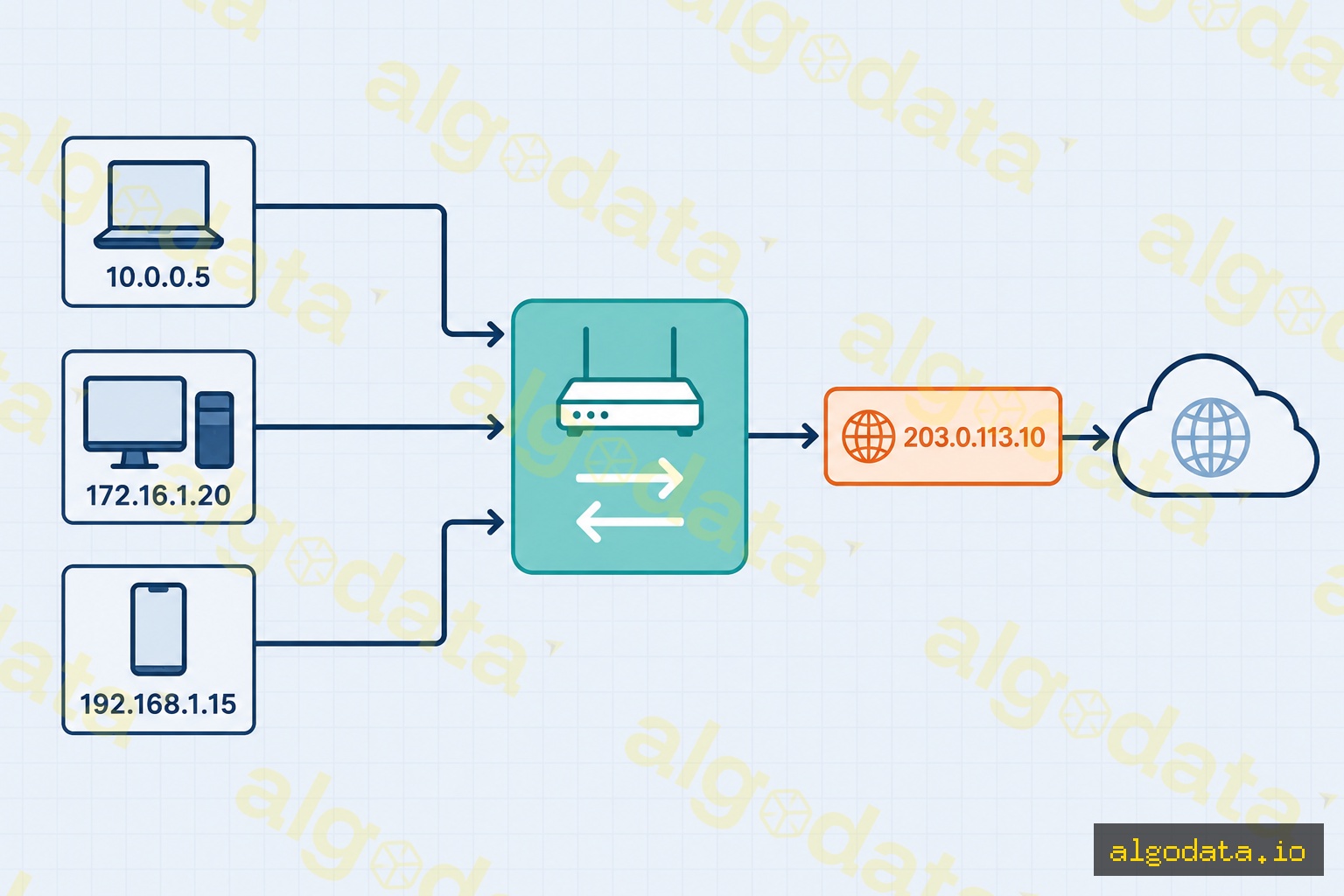
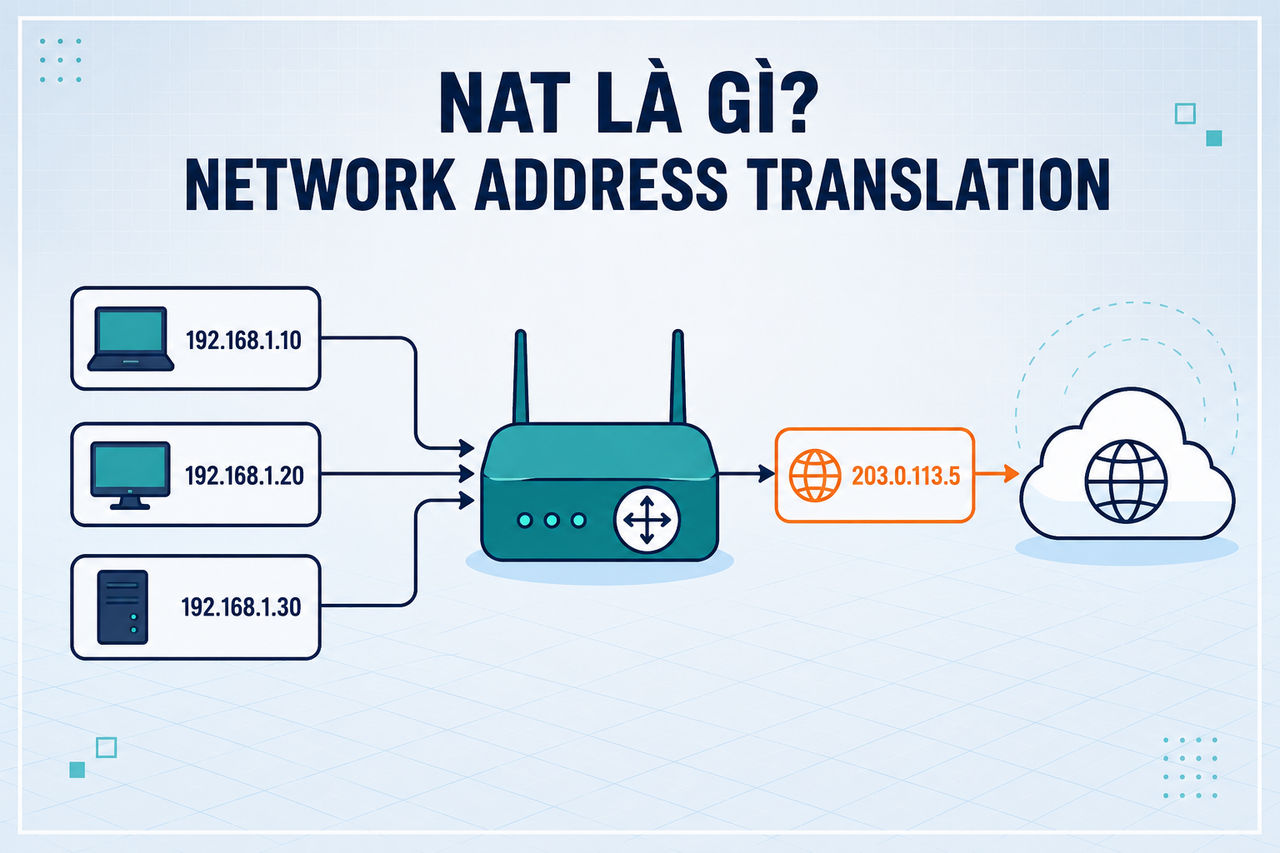
NAT (Network Address Translation) is the process by which a router or firewall modifies IP addresses in packet headers as those packets pass through the device. The original goal: allow multiple devices on a private network to share a single public IP address when communicating with the internet.

In 1996, IANA predicted IPv4 would run out — and they were right (it happened in 2011). NAT became the "life raft" that extended IPv4's lifespan by 15+ years by separating the private address space from the public internet.

Private IP ranges (not routable on the public internet):

  • 10.0.0.0/8 — Class A, up to 16 million internal addresses
  • 172.16.0.0/12 — Class B, commonly used in mid-size enterprises
  • 192.168.0.0/16 — Class C, ubiquitous in home networks (65,536 addresses)

Devices on a local network can use any address in these ranges without registering with IANA, because they never appear directly on the public internet — NAT handles the translation at the boundary.

3 Types of NAT
Static NAT

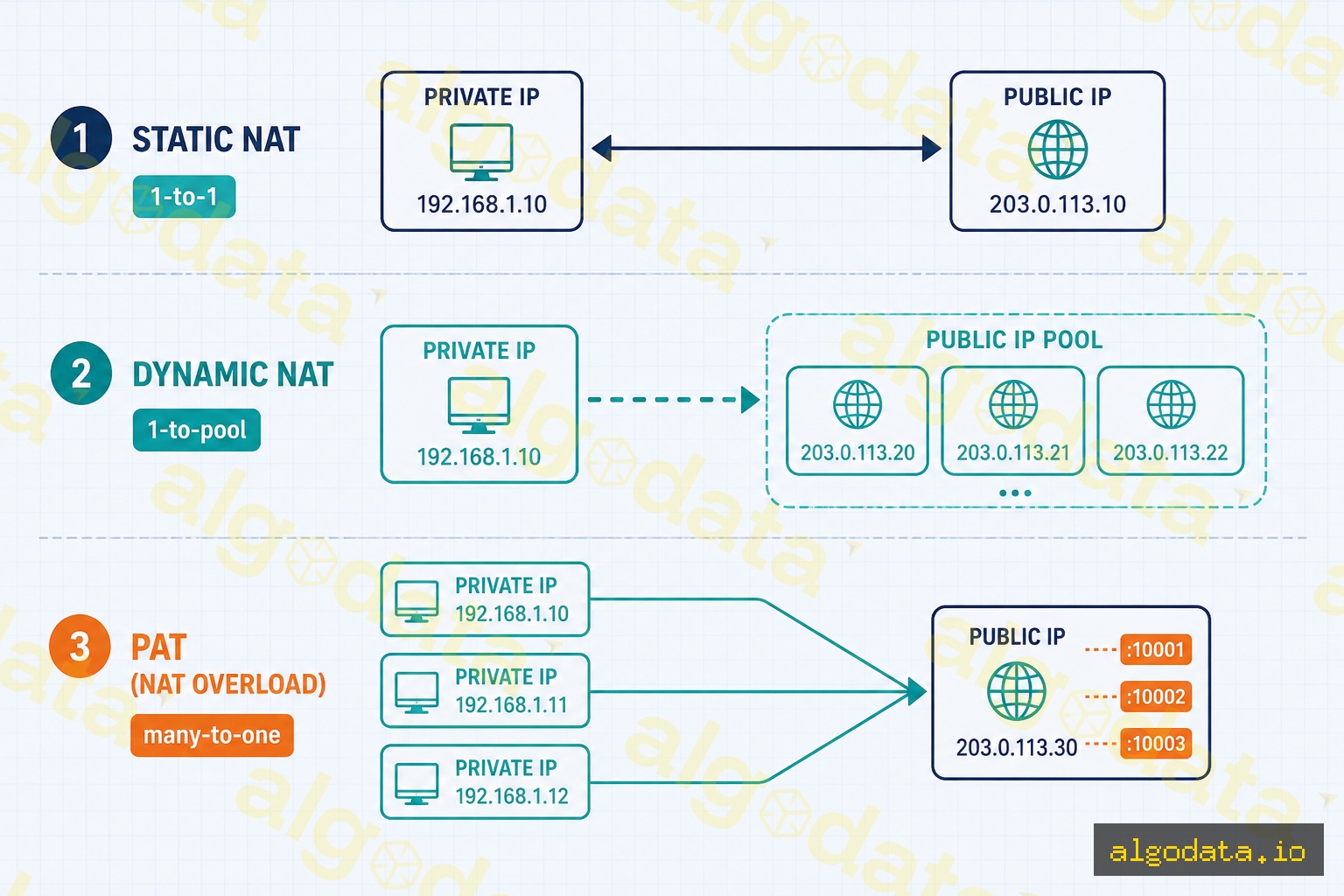
A 1-to-1 fixed mapping: one private IP always corresponds to one fixed public IP. Ideal for web servers and mail servers that need a stable, reachable address so external clients can initiate connections.

Example: 192.168.1.10203.0.113.10 (permanent, bidirectional)

Dynamic NAT

The router maintains a pool of public IPs and temporarily assigns one to a device when it needs internet access. When the device disconnects, the IP returns to the pool. Less common today because it still requires multiple public IPs — you don't get the many-to-one efficiency of PAT.

PAT — Port Address Translation (NAT Masquerade)

This is the most common type — many private IPs share a single public IP, distinguished by port number. Also called "IP Masquerading" on Linux or "NAT Overload" on Cisco IOS.

Virtually every home router and most enterprise routers use PAT. A router with a single public IP can simultaneously serve dozens of devices by multiplexing connections across different source port numbers. TCP/UDP ports range from 0–65535, giving the router tens of thousands of slots per public IP.

How PAT Works: Step-by-Step

When a computer at 192.168.1.10 sends a DNS query to 8.8.8.8:53:

  1. Original packet leaves device: src=192.168.1.10:52341, dst=8.8.8.8:53
  2. Router rewrites source: src=203.0.113.1:40001, dst=8.8.8.8:53
  3. Router records in NAT table: 192.168.1.10:52341 ↔ 203.0.113.1:40001
  4. DNS response arrives at router: dst=203.0.113.1:40001
  5. Router looks up NAT table → forwards to 192.168.1.10:52341

The NAT table is stateful — the router tracks every active connection. When a connection ends or times out (typically 30 seconds for UDP, 120 seconds for TCP established), the entry is removed and the port slot becomes available again.

Multiple devices can use the same source port internally (e.g., both 192.168.1.10:52341 and 192.168.1.20:52341) — the router gives each a different external port (40001 and 40002) and maps them separately. This is the core insight of PAT: external port number becomes the unique session identifier.

NAT on Linux with iptables

Linux can act as a full NAT router using iptables. This configuration is common for home labs, cloud gateway instances, or self-hosted VPN exit nodes:

Bash
 1# Enable IP forwarding (allow Linux to forward packets between interfaces)
 2echo 1 > /proc/sys/net/ipv4/ip_forward
 3
 4# Persist across reboots via sysctl
 5echo "net.ipv4.ip_forward = 1" >> /etc/sysctl.conf
 6sysctl -p
 7
 8# NAT Masquerade: all traffic from the internal network exits via eth0
 9iptables -t nat -A POSTROUTING -o eth0 -j MASQUERADE
10
11# Port forwarding (DNAT): route external port 8080 to internal 192.168.1.10:80
12iptables -t nat -A PREROUTING -i eth0 -p tcp --dport 8080 \
13  -j DNAT --to-destination 192.168.1.10:80
14iptables -A FORWARD -p tcp -d 192.168.1.10 --dport 80 -j ACCEPT
15
16# Persist rules across reboots
17iptables-save > /etc/iptables/rules.v4

To inspect the current NAT state:

Bash
 1# View the connection tracking table (all active NAT mappings)
 2conntrack -L
 3# or read directly from the kernel
 4cat /proc/net/nf_conntrack
 5
 6# View all iptables NAT rules
 7iptables -t nat -L -n -v
 8
 9# Count active NAT entries
10conntrack -L | wc -l

The conntrack command shows every active session being tracked, including protocol, state, timeouts, and the original/reply address tuples. This is the live NAT table you can inspect on a running Linux router.

NAT in Docker

Docker automatically creates NAT rules when launching containers in a bridge network:

Bash
 1# Inspect Docker's default bridge network
 2docker network inspect bridge
 3
 4# View iptables NAT rules created by Docker
 5sudo iptables -t nat -L DOCKER -n -v
 6
 7# Port mapping (-p 8080:80) creates a DNAT rule automatically
 8docker run -p 8080:80 nginx
 9# Equivalent to:
10# iptables -t nat -A DOCKER -p tcp --dport 8080 -j DNAT --to 172.17.0.2:80

Containers in the bridge network receive IPs from the 172.17.0.0/16 range by default. When a container sends traffic outbound, the Docker host performs MASQUERADE — replacing the container's IP with the host's IP. Inbound traffic to published ports is DNAT-ed directly to the container's private IP and port.

You can inspect what Docker has created:

Bash
1# See all NAT rules in the POSTROUTING chain (including Docker MASQUERADE)
2sudo iptables -t nat -L POSTROUTING -n -v
3
4# See active connections through Docker NAT
5sudo conntrack -L | grep 172.17

Custom Docker networks (created with docker network create) also use NAT by default, but with different subnets (e.g., 172.18.0.0/16, 172.19.0.0/16). This allows containers on different networks to be isolated while still sharing the host's public IP for outbound traffic.

NAT in Cloud (AWS VPC)
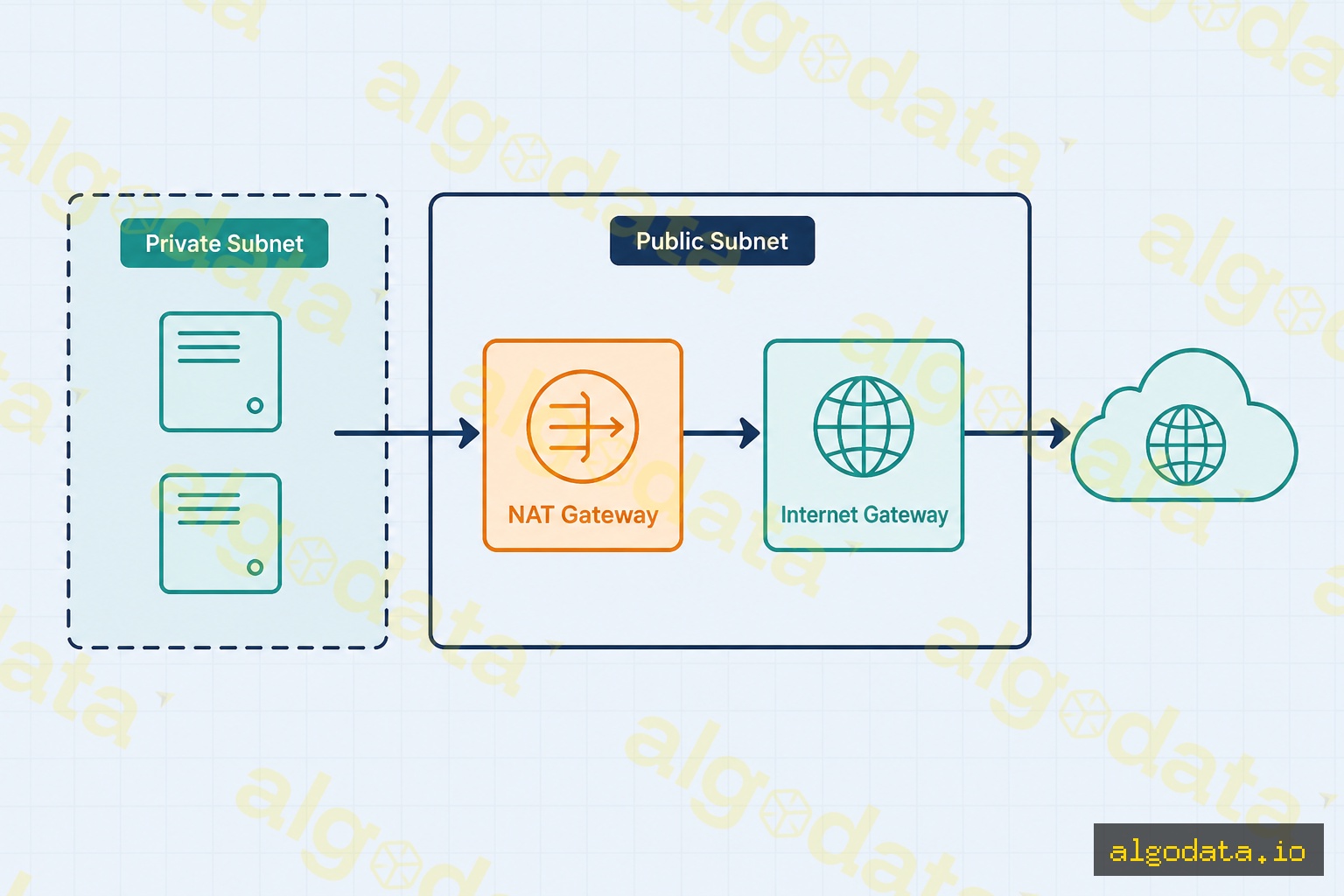
AWS VPC uses a NAT Gateway to give private subnet resources internet access without exposing them with public IPs:

Traffic flow: Private subnet EC2 → NAT Gateway (in public subnet) → Internet Gateway → Internet

AWS NAT Gateway characteristics:

  • Has an Elastic IP (static public IP) — useful for IP whitelisting with third-party services
  • Fully managed — AWS scales it automatically, no administration required
  • Billed per hour ($0.045/hour) plus data processed ($0.045/GB)
  • Zone-specific — deploy one NAT Gateway per Availability Zone for high availability

Terraform example:

hcl
 1resource "aws_eip" "nat" {
 2  domain = "vpc"
 3}
 4
 5resource "aws_nat_gateway" "main" {
 6  allocation_id = aws_eip.nat.id
 7  subnet_id     = aws_subnet.public.id
 8
 9  tags = {
10    Name = "main-nat-gateway"
11  }
12}
13
14resource "aws_route" "private_internet" {
15  route_table_id         = aws_route_table.private.id
16  destination_cidr_block = "0.0.0.0/0"
17  nat_gateway_id         = aws_nat_gateway.main.id
18}

Other cloud providers have equivalent services: Google Cloud NAT, Azure NAT Gateway, and DigitalOcean NAT Gateway all function on the same principles — managed NAT for private resources that need outbound internet access without inbound exposure.

The NAT Traversal Problem

NAT blocks inbound connections — an external host cannot initiate a connection to a device behind NAT because it has no way to reach the private IP. This creates real-world challenges:

  • VoIP & video calls: WebRTC needs direct P2P connections for low-latency audio/video. Solution: STUN (discovers public IP/port), TURN (relays traffic when P2P fails), and ICE (framework that tries all candidate paths in priority order)
  • P2P gaming: Game consoles behind NAT need "hole punching" — both endpoints simultaneously send packets to each other to open NAT table entries before the other's packet arrives
  • Self-hosted servers: Require port forwarding in the router config, or a VPN reverse tunnel (Cloudflare Tunnel, ngrok, Tailscale funnel) that bypasses NAT entirely
  • Symmetric NAT: The strictest NAT type — allocates a different external port for each destination, making STUN-based P2P unreliable. WebRTC falls back to TURN relay, which increases latency and server costs

NAT type classification (from most permissive to most restrictive):

  1. Full Cone NAT — any external host can reach the internal client after a mapping is established
  2. Restricted Cone NAT — only hosts the client has contacted can send inbound packets
  3. Port Restricted Cone NAT — only the exact IP:port the client contacted can reply
  4. Symmetric NAT — different external port per destination; STUN alone is insufficient

NAT64: Bridging IPv4 and IPv6

As the internet transitions to IPv6, NAT64 allows IPv6-only clients to reach IPv4-only servers:

  • IPv6 client → NAT64 gateway → IPv4 server
  • The NAT64 gateway translates IPv6 packets into IPv4 and vice versa at the boundary
  • Combined with DNS64, which synthesizes IPv6 addresses for IPv4-only domain names, so clients never need to know about the underlying IPv4 infrastructure

NAT64 is increasingly deployed by mobile carriers and enterprise networks that have moved to IPv6-only internally but still need to reach legacy IPv4 services. Apple requires that iOS apps work in NAT64 environments, which is why app developers must test IPv6 compatibility.
What is Subnet & CIDR? IP Network Segmentation Explained

What is VPN? Virtual Private Network Explained

What is Kubernetes? Container Orchestration Explained

Frequently Asked QuestionsQ&A
What is NAT in simple terms?
NAT (Network Address Translation) is a technique that allows a router to convert the private IP addresses of devices on a local network into a single public IP address when communicating with the internet. This is why billions of devices can connect to the internet even though IPv4 only has ~4.3 billion addresses.
How is PAT different from Static NAT?
Static NAT creates a fixed one-to-one mapping: one private IP always maps to one public IP — typically used for servers that need inbound access from the internet. PAT (Port Address Translation), also called NAT Masquerade, maps many private IPs to ONE public IP by distinguishing connections via port numbers — this is the most common NAT type used in home and enterprise routers.
Does NAT affect network performance?
Yes, but usually negligibly with modern hardware. The router must maintain a NAT translation table and look up each packet. The real challenges with NAT are: (1) NAT traversal complexity for P2P/VoIP/gaming that requires inbound connections; (2) Full Cone NAT vs Symmetric NAT behavior impacts WebRTC; (3) NAT tables have limits on the number of simultaneous connections.
How does Docker use NAT?
Docker bridge networks use NAT (iptables MASQUERADE) by default so containers can access the internet. Containers receive private IPs in the 172.17.0.0/16 range. When a container sends packets outbound, the Docker daemon uses iptables MASQUERADE to replace the container's source IP with the Docker host's IP. Port mapping (-p 8080:80) creates a DNAT rule that forwards traffic to the container.
Does IPv6 still need NAT?
In theory, no — IPv6 has 340 undecillion addresses, enough for every atom on Earth. However, NAT66 (NAT for IPv6) still exists in some enterprise deployments for security reasons (hiding internal network topology) or when an ISP only allocates a small IPv6 prefix. The trend is toward end-to-end IPv6 without NAT.
What is NAT traversal?
NAT traversal is a set of techniques that allow two devices behind NAT to connect directly — because NAT blocks inbound connections by default. Common techniques include: STUN (discovering public IP/port), TURN (relay server when direct connection fails), and ICE (a framework combining STUN+TURN used in WebRTC). VoIP, WebRTC, and peer-to-peer games all rely on NAT traversal.

NAT (Network Address Translation) là kỹ thuật mạng cho phép hàng triệu thiết bị trong nhà và văn phòng cùng chia sẻ một địa chỉ IP công cộng duy nhất — giải pháp thực tế cho bài toán cạn kiệt IPv4. Bài viết giải thích NAT là gì, cơ chế PAT, và cách NAT hoạt động trong router gia đình, cloud VPC và Docker.

NAT là gì?

NAT (Network Address Translation) là quá trình router hoặc firewall chuyển đổi địa chỉ IP trong header của packet khi packet đi qua thiết bị đó. Mục tiêu ban đầu: cho phép nhiều thiết bị trong mạng nội bộ dùng chung một địa chỉ IP công cộng.

Năm 1996, IANA dự báo IPv4 sẽ cạn kiệt — và họ đúng (thực tế xảy ra vào năm 2011). NAT là "phao cứu sinh" kéo dài tuổi thọ của IPv4 thêm 15+ năm bằng cách tách biệt không gian địa chỉ riêng khỏi internet công cộng.

Private IP ranges (không route được trên internet):

  • 10.0.0.0/8 — Class A, lên đến 16 triệu địa chỉ nội bộ
  • 172.16.0.0/12 — Class B, dành cho mạng doanh nghiệp vừa
  • 192.168.0.0/16 — Class C, phổ biến trong mạng gia đình (65,536 địa chỉ)

Thiết bị trong mạng nội bộ có thể dùng bất kỳ địa chỉ nào trong các dải này mà không cần đăng ký với IANA, vì chúng không bao giờ xuất hiện trực tiếp trên internet công cộng.

Kiểm tra IP của bạn đang ở dải nào

Chạy ip addr (Linux) hoặc ipconfig (Windows) để xem private IP. Nếu thấy địa chỉ bắt đầu bằng 10., 172.16–31., hoặc 192.168. — bạn đang ở sau NAT. Dùng curl ifconfig.me để xem public IP thực sự mà router đang dùng để giao tiếp với internet.

3 Loại NAT phổ biến

Static NAT (NAT tĩnh)

Ánh xạ 1-to-1 cố định: một private IP luôn tương ứng với một public IP cố định. Phù hợp cho web server, mail server cần địa chỉ cố định để người dùng bên ngoài có thể kết nối vào.

Ví dụ: 192.168.1.10203.0.113.10 (cố định, luôn luôn)

Dynamic NAT (NAT động)

Router duy trì một pool nhiều public IP và cấp tạm thời cho thiết bị khi cần. Khi thiết bị ngắt kết nối, IP được trả lại pool. Ít phổ biến hiện nay vì vẫn cần nhiều public IP.

PAT — Port Address Translation (NAT Masquerade)

Đây là loại phổ biến nhất — nhiều private IP dùng chung một public IP, phân biệt nhau bằng port number. Còn gọi là "IP Masquerading" trên Linux hay "NAT Overload" trên Cisco.

99% home router và hầu hết corporate router dùng PAT. Một router gia đình với một public IP có thể phục vụ hàng chục thiết bị đồng thời nhờ cơ chế này.

Cơ chế PAT hoạt động chi tiết

Khi máy tính 192.168.1.10 gửi DNS request đến 8.8.8.8:53:

  1. Packet gốc: src=192.168.1.10:52341, dst=8.8.8.8:53
  2. Router thay thế: src=203.0.113.1:40001, dst=8.8.8.8:53
  3. Router lưu vào NAT table: 192.168.1.10:52341 ↔ 203.0.113.1:40001
  4. DNS response về: dst=203.0.113.1:40001
  5. Router tra NAT table → forward về 192.168.1.10:52341

NAT table là bộ nhớ trạng thái (stateful) — router theo dõi mọi connection đang hoạt động. Khi connection kết thúc hoặc timeout, entry được xóa.

NAT table có giới hạn — cẩn thận với connection flood

Router/firewall lưu mỗi TCP/UDP session vào NAT table với bộ nhớ hữu hạn. Khi bảng đầy (thường gặp với DDoS, port scanner, hoặc ứng dụng tạo hàng nghìn connection ngắn), các connection mới bị drop im lặng — không có thông báo lỗi rõ ràng. Trên Linux kiểm tra giới hạn bằng sysctl net.netfilter.nf_conntrack_max và mức sử dụng hiện tại bằng conntrack -C.

NAT trên Linux với iptables

Linux có thể hoạt động như một NAT router với iptables. Đây là cấu hình phổ biến cho home lab hoặc cloud instance làm gateway:

Bash
 1# Bật IP forwarding (cho phép Linux forward packet giữa các interface)
 2echo 1 > /proc/sys/net/ipv4/ip_forward
 3
 4# Cố định qua sysctl
 5echo "net.ipv4.ip_forward = 1" >> /etc/sysctl.conf
 6sysctl -p
 7
 8# NAT Masquerade: traffic từ mạng nội bộ ra internet qua eth0
 9iptables -t nat -A POSTROUTING -o eth0 -j MASQUERADE
10
11# Port forwarding (DNAT): chuyển port 8080 bên ngoài vào 192.168.1.10:80
12iptables -t nat -A PREROUTING -i eth0 -p tcp --dport 8080 \
13  -j DNAT --to-destination 192.168.1.10:80
14iptables -A FORWARD -p tcp -d 192.168.1.10 --dport 80 -j ACCEPT
15
16# Lưu rules để tồn tại qua reboot
17iptables-save > /etc/iptables/rules.v4

Để xem NAT table hiện tại:

Bash
1# Xem connection tracking table (conntrack)
2conntrack -L
3# hoặc
4cat /proc/net/nf_conntrack
5
6# Xem iptables NAT rules
7iptables -t nat -L -n -v

NAT trong Docker

Docker tự động tạo NAT rules khi khởi động container trong bridge network:

Bash
1# Docker bridge network tự động tạo NAT rules
2docker network inspect bridge
3
4# Xem iptables rules Docker tạo ra
5sudo iptables -t nat -L DOCKER -n -v
6
7# Port mapping (-p 8080:80) tạo DNAT rule
8docker run -p 8080:80 nginx
9# Tương đương: iptables DNAT :8080 → 172.17.0.2:80

Container trong bridge network nhận IP từ dải 172.17.0.0/16 theo mặc định. Khi container gửi traffic ra ngoài, Docker host thực hiện MASQUERADE thay IP container bằng IP của host.

NAT trong Cloud (AWS VPC)

AWS VPC sử dụng NAT Gateway để cho private subnet có thể truy cập internet mà không cần public IP:

Luồng traffic: Private subnet EC2 → NAT Gateway (trong public subnet) → Internet Gateway → Internet

Đặc điểm AWS NAT Gateway:

  • Có Elastic IP (static public IP) — cần whitelist ở phía đối tác
  • Managed service — AWS tự scale, không cần quản lý
  • Tính phí theo giờ ($0.045/giờ) + data processed ($0.045/GB)
  • High availability trong một AZ — cần tạo NAT Gateway trong mỗi AZ để redundancy
Chi phí AWS NAT Gateway tăng nhanh với multi-AZ

Để đạt redundancy thực sự, bạn cần một NAT Gateway riêng cho mỗi Availability Zone — vì NAT Gateway chỉ HA trong AZ của nó. Với 3 AZ, chi phí nhân 3: $0.045 × 3 = $0.135/giờ ($97/tháng) chưa tính data. Với workload nhỏ hoặc dev environment, dùng một NAT Gateway duy nhất và chấp nhận rủi ro AZ failure là lựa chọn phổ biến để tiết kiệm.

Terraform example:

hcl
 1resource "aws_eip" "nat" {
 2  domain = "vpc"
 3}
 4
 5resource "aws_nat_gateway" "main" {
 6  allocation_id = aws_eip.nat.id
 7  subnet_id     = aws_subnet.public.id
 8}
 9
10> [Subnet  CIDR  gì? Chia mạng IP  định tuyến hiện đại](/subnet-cidr-la-gi/)
11
12
13resource "aws_route" "private_internet" {
14  route_table_id         = aws_route_table.private.id
15  destination_cidr_block = "0.0.0.0/0"
16  nat_gateway_id         = aws_nat_gateway.main.id
17}

Vấn đề của NAT: NAT Traversal

NAT chặn inbound connections — thiết bị bên ngoài không thể chủ động kết nối vào thiết bị sau NAT vì không biết private IP là gì. Đây là vấn đề với:

  • VoIP & Video call: WebRTC cần kết nối P2P trực tiếp. Giải pháp: STUN (phát hiện public IP/port) + TURN (relay server khi P2P không được) + ICE framework
  • P2P gaming: Game console sau NAT cần "hole punching" — cả hai bên cùng gửi packet để mở cổng trong NAT table
  • Self-hosted server: Cần port forwarding hoặc VPN reverse tunnel (như Cloudflare Tunnel, ngrok)
  • Symmetric NAT: Dạng NAT khắt khe nhất — dùng port khác nhau cho mỗi destination, làm WebRTC khó hoạt động hơn

VPN là gì? Mạng riêng ảo, WireGuard và OpenVPN

NAT64: Cầu nối IPv4 ↔ IPv6

Khi internet dần chuyển sang IPv6, NAT64 cho phép client IPv6 kết nối đến server IPv4:

  • Client IPv6 → NAT64 gateway → Server IPv4
  • NAT64 gateway dịch IPv6 packet thành IPv4 và ngược lại
  • Kết hợp với DNS64 để resolve tên miền IPv4-only thành địa chỉ IPv6 tổng hợp

Kubernetes là gì? Container orchestration và Pod networking

Câu hỏi thường gặpQ&A
NAT là gì ngắn gọn?
NAT (Network Address Translation) là kỹ thuật cho phép router chuyển đổi địa chỉ IP riêng (private IP) của các thiết bị trong mạng nội bộ thành một địa chỉ IP công cộng (public IP) duy nhất khi giao tiếp với internet. Đây là lý do tại sao hàng tỷ thiết bị có thể kết nối internet dù IPv4 chỉ có ~4.3 tỷ địa chỉ.
PAT khác Static NAT thế nào?
Static NAT ánh xạ cố định một private IP sang một public IP — thường dùng cho server cần truy cập từ internet. PAT (Port Address Translation), còn gọi là NAT Masquerade, ánh xạ nhiều private IP sang MỘT public IP bằng cách phân biệt qua port number — đây là loại NAT phổ biến nhất trong router gia đình và doanh nghiệp.
NAT có ảnh hưởng đến hiệu năng không?
Có, nhưng thường không đáng kể với phần cứng hiện đại. Router phải duy trì NAT translation table và tra cứu mỗi packet. Vấn đề thực sự của NAT là: (1) NAT traversal phức tạp cho P2P/VoIP/gaming cần kết nối inbound; (2) Full Cone NAT vs Symmetric NAT ảnh hưởng đến WebRTC; (3) NAT table có giới hạn số lượng connection đồng thời.
Docker dùng NAT như thế nào?
Docker bridge network mặc định dùng NAT (iptables MASQUERADE) để container có internet access. Container nhận private IP trong dải 172.17.0.0/16. Khi container gửi packet ra ngoài, Docker daemon dùng iptables MASQUERADE để thay source IP của container bằng IP của Docker host. Port mapping (-p 8080:80) tạo DNAT rule chuyển traffic đến container.
IPv6 có còn cần NAT không?
Về lý thuyết, không — IPv6 có 340 undecillion địa chỉ, đủ cấp cho mỗi nguyên tử trên Trái Đất. Tuy nhiên NAT66 (NAT cho IPv6) vẫn tồn tại trong một số triển khai doanh nghiệp vì lý do bảo mật (ẩn cấu trúc mạng nội bộ) hoặc khi ISP chỉ cấp một prefix IPv6 nhỏ. Xu hướng là dùng IPv6 end-to-end không cần NAT.
NAT traversal là gì?
NAT traversal là tập hợp kỹ thuật cho phép hai thiết bị phía sau NAT kết nối trực tiếp với nhau — vì NAT chặn inbound connection. Các kỹ thuật phổ biến: STUN (phát hiện public IP/port), TURN (relay server khi direct không được), ICE (framework kết hợp STUN+TURN dùng trong WebRTC). VoIP, WebRTC, peer-to-peer game đều cần NAT traversal.