What is GitLab CI/CD? Automated Pipeline for Build, Test, and Deploy
DevOps

What is GitLab CI/CD? Automated Pipeline for Build, Test, and Deploy

GitLab CI/CD is a built-in automation platform that runs build, test, and deploy pipelines triggered by every commit. Learn .gitlab-ci.yml, GitLab Runner, and how to build a real-world pipeline.

In this series: DevOps
  1. 1 What is an API Gateway? Single Entry Point for Microservices
  2. 2 What is NAT? Network Address Translation Explained
  3. 3 What is GitLab CI/CD? Automated Pipeline for Build, Test, and Deploy
  4. 4 What is Apache Kafka? Distributed Event Streaming Platform Explained
  5. 5 What is Serverless? FaaS, Cold Start, and When to Go Serverless
  6. 6 What is Subnet & CIDR? IP Network Segmentation and Routing
  7. 7 What is Kubernetes? The Most Popular Container Orchestration Platform Today
  8. 8 What is a Proxy? Forward Proxy, Reverse Proxy and SOCKS5 Explained
  9. 9 What is Nginx? Web server, reverse proxy, and load balancer in one
✦ Quick summary
GitLab CI/CD is a built-in automation platform that runs build, test, and deploy pipelines triggered by every commit. Learn .gitlab-ci.yml, GitLab Runner, and how to build a real-world pipeline.
How was this post?

GitLab CI/CD is a pipeline automation system built directly into the GitLab platform — no external tools required. A single .gitlab-ci.yml file in the repository is all it takes to trigger a fully automated build, test, and deploy workflow on every commit.

What is GitLab CI/CD?

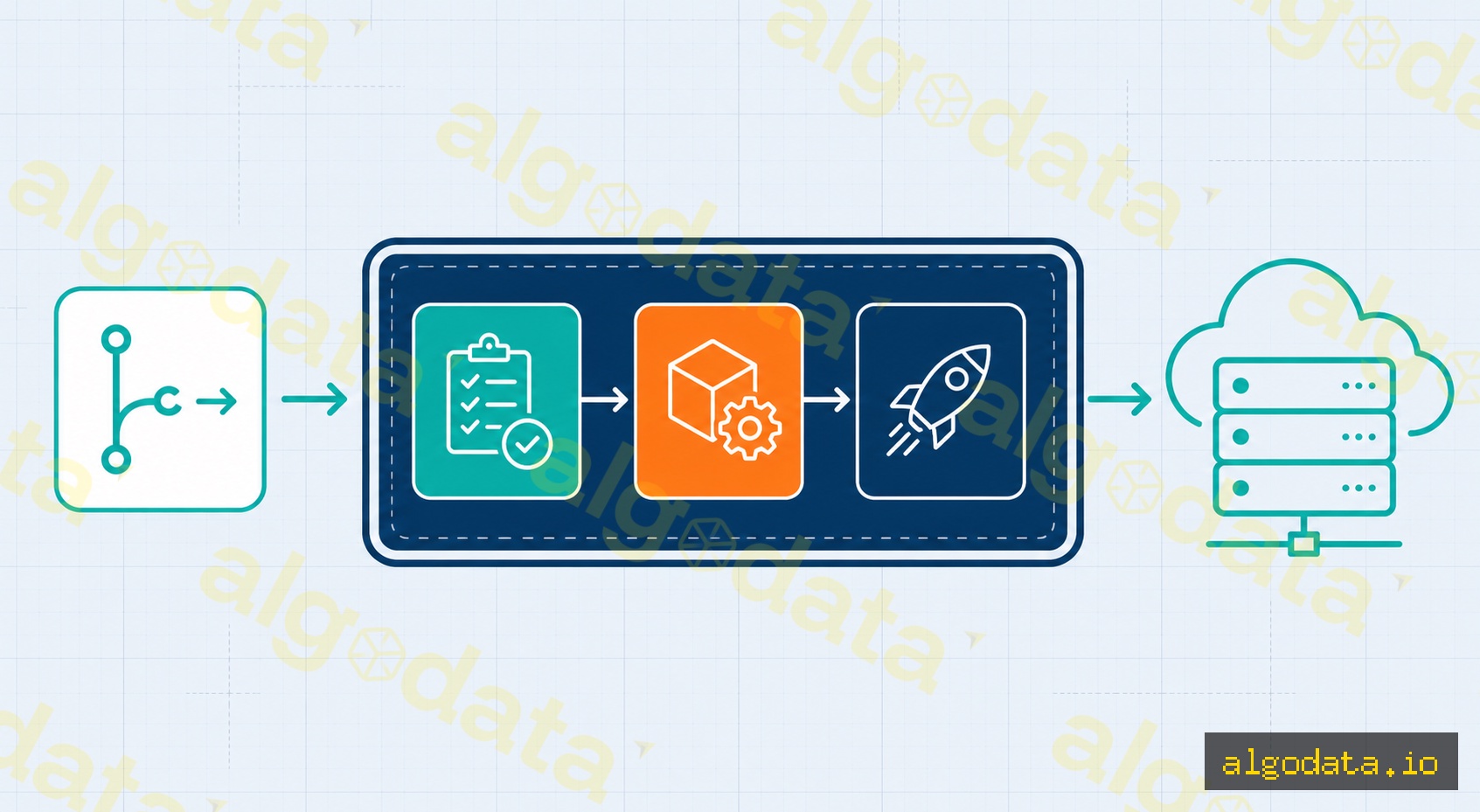
GitLab CI/CD is a Continuous Integration / Continuous Delivery platform embedded natively in GitLab, driven entirely by a .gitlab-ci.yml configuration file placed at the repository root. Every time a developer pushes code or opens a merge request, GitLab reads this file, creates a pipeline composed of sequential stages, and runs one or more jobs in parallel within each stage.

A pipeline follows the pattern: test → build → deploy. If any job fails, the pipeline stops immediately and notifies the developer — the "fail fast" principle ensures errors are caught as early as possible, before broken code reaches production.

The key advantage of GitLab over standalone CI/CD tools like Jenkins is that GitLab bundles a Container Registry, Package Registry, Security Scanning (SAST, DAST), Environments, and Deployment tracking in one platform — dramatically reducing the number of tools your team needs to manage.

What is CI/CD? Overview of Continuous Integration and Delivery

Structure of .gitlab-ci.yml

The entire pipeline is defined in a single YAML file. The following is a real-world example for a Python application deployed to Kubernetes:

YAML
 1stages:
 2  - test
 3  - build
 4  - deploy
 5
 6variables:
 7  DOCKER_IMAGE: $CI_REGISTRY_IMAGE:$CI_COMMIT_SHA
 8
 9# ── Stage 1: Run tests ─────────────────────────────────────────
10test:
11  stage: test
12  image: python:3.11
13  script:
14    - pip install -r requirements.txt
15    - pytest tests/ -v
16  cache:
17    key: ${CI_COMMIT_REF_SLUG}
18    paths:
19      - .cache/pip
20
21# ── Stage 2: Build Docker image and push to GitLab Registry ───
22build:
23  stage: build
24  image: docker:24
25  services:
26    - docker:dind
27  script:
28    - docker login -u $CI_REGISTRY_USER -p $CI_REGISTRY_PASSWORD $CI_REGISTRY
29    - docker build -t $DOCKER_IMAGE .
30    - docker push $DOCKER_IMAGE
31  only:
32    - main
33
34# ── Stage 3: Deploy to Kubernetes (manual gate) ───────────────
35deploy:
36  stage: deploy
37  script:
38    - kubectl set image deployment/myapp app=$DOCKER_IMAGE
39  environment:
40    name: production
41  when: manual
42  only:
43    - main

Key concepts explained:

  • stages — declares the execution order. Jobs in the same stage run in parallel; the next stage only starts when the previous one succeeds.
  • variables — environment variables available across the pipeline. GitLab also provides built-in predefined variables such as $CI_COMMIT_SHA, $CI_REGISTRY_IMAGE, and $CI_COMMIT_REF_SLUG.
  • image — the Docker image used as the job execution environment. Each job can use a different image.
  • services — auxiliary containers running alongside the job (for example: docker:dind enables Docker-in-Docker to build images inside a container).
  • cache — directories persisted between pipeline runs to speed up builds (.cache/pip, node_modules/).
  • artifacts — output files passed to downstream jobs or downloadable after the pipeline finishes.
  • only / rules — conditions controlling when a job runs (only on the main branch, only on tags, etc.).
  • when: manual — the job does not run automatically; someone with permission must click the play button — ideal for production deploy gates.
  • environment — links the job to a named environment in GitLab Environments, enabling deployment history tracking and one-click rollback.

GitLab Runner
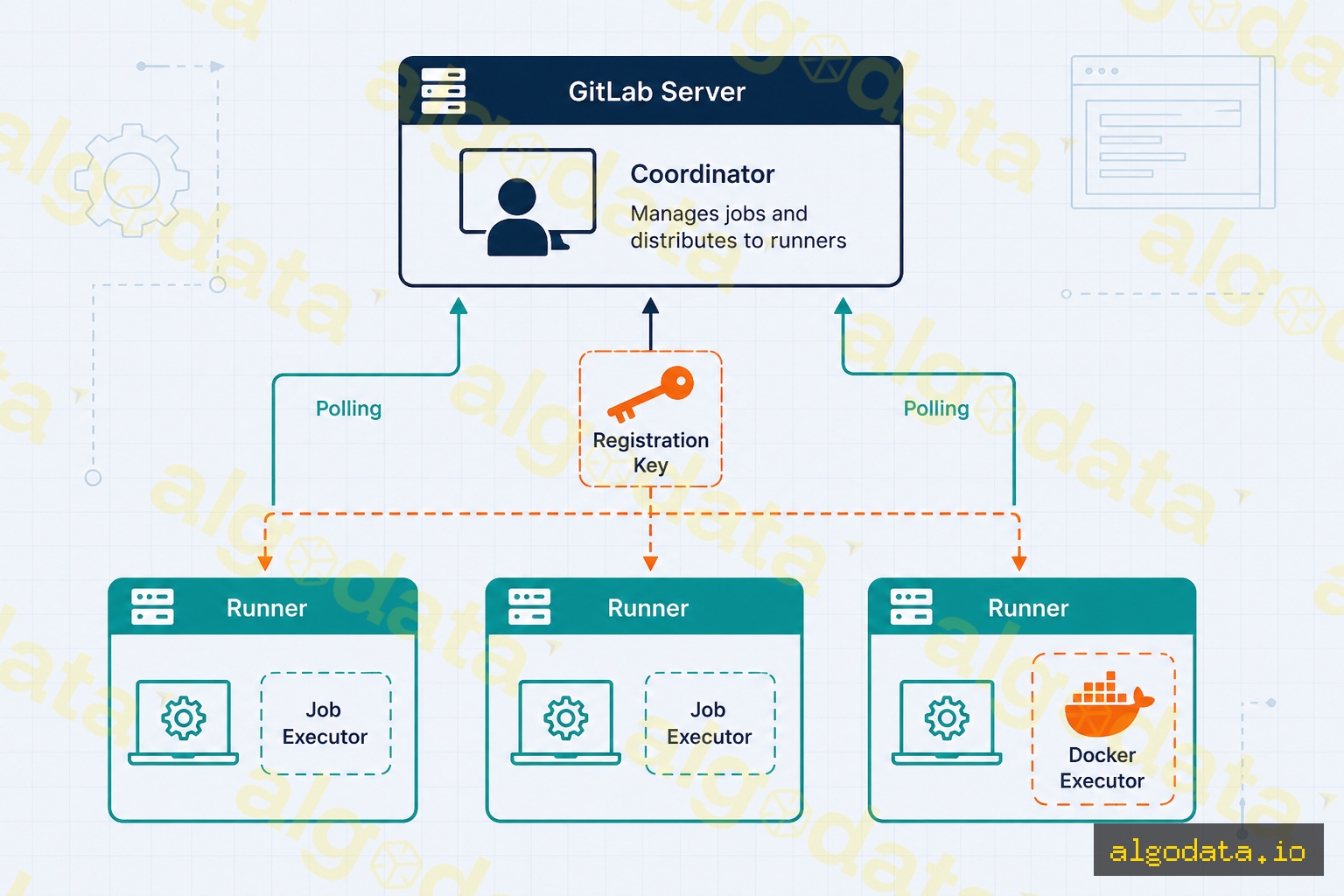
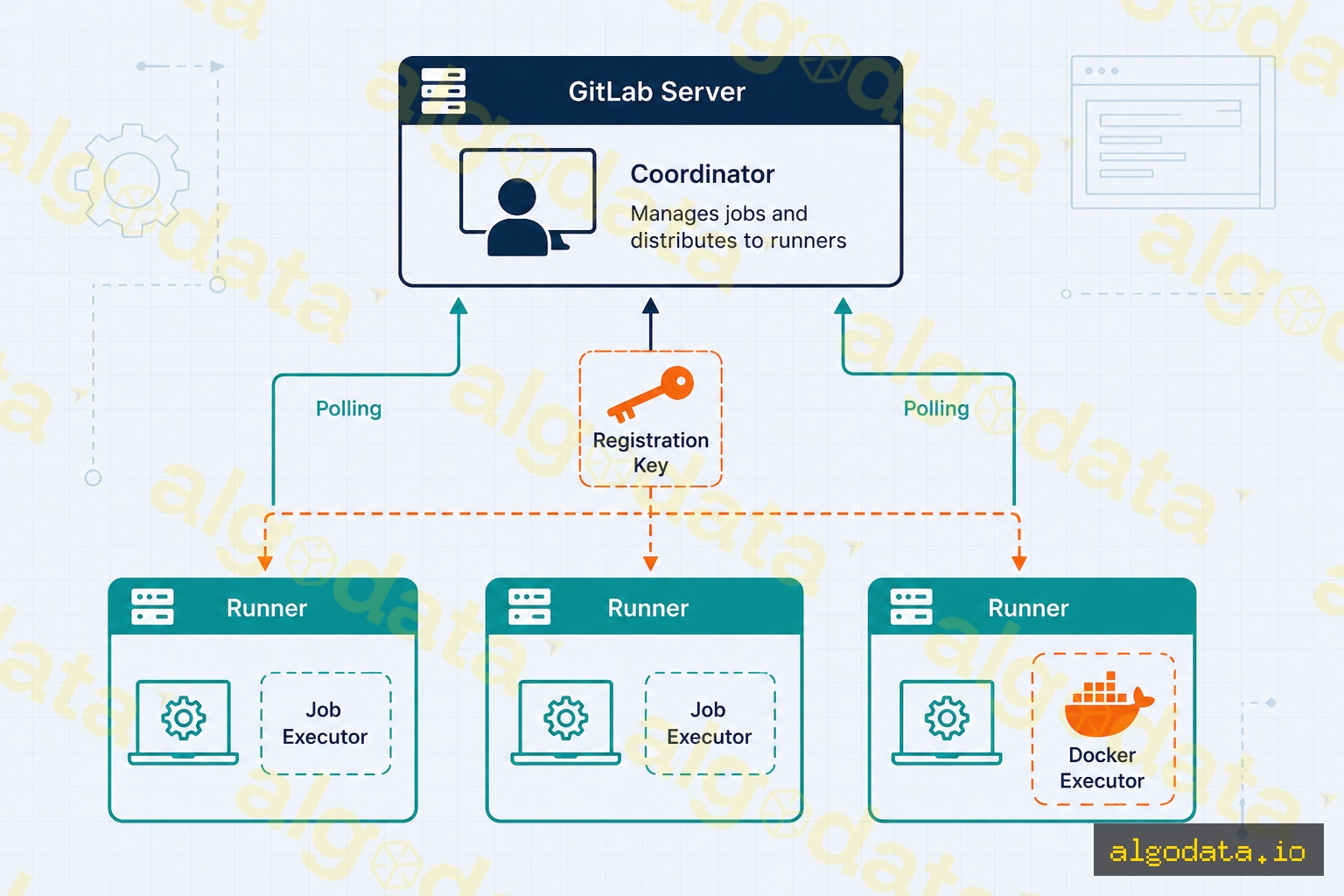
GitLab Runner is a software agent installed on a server (or running inside a container or Kubernetes pod) that accepts jobs from the GitLab server and executes them. The runner continuously polls GitLab, picks up assigned jobs, clones the source code, runs the pipeline scripts inside the configured executor, and sends logs and exit codes back to GitLab.

Shared Runner vs Specific Runner

Shared Runner Specific Runner
Managed by GitLab (or group admin) Your team
Scope All projects in the instance A specific project or group
Resources Shared, may queue under load Dedicated, no queueing
Cost Billed per CI minute Cost of your own server
Best for Small projects, public repos Heavy production workloads

The Docker executor runs each job inside a fresh Docker container, guaranteeing a fully isolated and clean environment for every run. This is the recommended executor for most use cases.

Registering a specific runner with the Docker executor:

Bash
 1# Install GitLab Runner on Ubuntu/Debian
 2curl -L --output /usr/local/bin/gitlab-runner \
 3  "https://gitlab-runner-downloads.s3.amazonaws.com/latest/binaries/gitlab-runner-linux-amd64"
 4chmod +x /usr/local/bin/gitlab-runner
 5
 6# Register the runner (get the token from Settings → CI/CD → Runners)
 7gitlab-runner register \
 8  --url "https://gitlab.com/" \
 9  --registration-token "YOUR_REGISTRATION_TOKEN" \
10  --executor "docker" \
11  --docker-image "alpine:latest" \
12  --description "my-docker-runner" \
13  --tag-list "docker,production"

After registration the runner appears in Settings → CI/CD → Runners and is ready to accept jobs. Use tags to route specific jobs to specific runners — for example, the production deploy job can be restricted to a runner tagged production that lives inside the internal network.

What is Kubernetes? Container Orchestration at Scale

GitLab vs GitHub Actions vs Jenkins

Criterion GitLab CI/CD GitHub Actions Jenkins
Setup complexity Low (built-in) Low (built-in) High (install & configure)
Free self-hosting Yes (GitLab CE) No (GitHub Enterprise) Yes (open-source)
Free cloud tier 400 min/month 2,000 min/month N/A
Built-in Container Registry Yes Yes (GHCR) No
Built-in Security Scanning Yes (SAST/DAST) Partial (CodeQL) Plugin
Config syntax YAML (.gitlab-ci.yml) YAML (.github/workflows/) Groovy (Jenkinsfile)
Marketplace / Plugins GitLab Templates 20,000+ Actions 1,800+ Plugins
Best for Self-host, all-in-one GitHub ecosystem Enterprise on-premise

When to choose GitLab CI/CD:

  • The project needs to self-host the entire stack (code + CI/CD + registry) on-premise.
  • The team requires security scanning, compliance, and audit trails within a single platform.
  • Fintech, banking, or healthcare organizations that must keep 100% of data on internal servers.

When to choose GitHub Actions:

  • The repository is already on GitHub and you want zero-configuration pipelines.
  • Open-source projects that need generous free CI minutes.
  • You need tight integration with the GitHub ecosystem (Dependabot, CodeQL, GitHub Packages).

When to choose Jenkins:

  • Legacy enterprise environments with heavy investment in Jenkins plugins and Groovy pipelines.
  • Scenarios requiring integration with multiple SCM systems (Bitbucket Server, Perforce, SVN).

Best Practices

1. Cache dependencies to speed up builds

YAML
 1# Python — cache pip packages
 2cache:
 3  key: ${CI_COMMIT_REF_SLUG}-pip
 4  paths:
 5    - .cache/pip
 6  policy: pull-push
 7
 8# Node.js — cache node_modules
 9cache:
10  key:
11    files:
12      - package-lock.json
13  paths:
14    - node_modules/

Use policy: pull on jobs that only read the cache (no need to re-upload) to avoid unnecessary uploads at the end of every job.

2. Parallelize with needs: (DAG pipelines)

YAML
 1test-unit:
 2  stage: test
 3  script: pytest tests/unit/
 4
 5test-integration:
 6  stage: test
 7  script: pytest tests/integration/
 8
 9build:
10  stage: build
11  needs: [test-unit]  # Starts as soon as test-unit passes, no need to wait for test-integration
12  script: docker build .

needs: breaks the traditional sequential stage model, allowing the build job to begin immediately after test-unit finishes without waiting for test-integration — significantly reducing total pipeline duration.

3. Protect production environments

In Settings → CI/CD → Environments → production, configure:

  • Required approvals: production deploys require approval from at least one or two designated reviewers.
  • Protected branches: only main or release/* branches can trigger production deployments.
  • Deployment freeze: block deployments during peak traffic hours or major holidays.

4. Enable built-in SAST scanning

YAML
1include:
2  - template: Security/SAST.gitlab-ci.yml
3
4sast:
5  stage: test
6  variables:
7    SAST_EXCLUDED_PATHS: "tests/, docs/"

GitLab SAST automatically selects the appropriate analyzer for the project's language (Bandit for Python, Semgrep for JS/TS, SpotBugs for Java) with no additional configuration required.

5. Manual gate for production deployments

Always combine when: manual with environment: production on deploy jobs. This creates a clear confirmation button in the GitLab UI with a full audit trail recording who triggered the deployment and when.

What is Microservices? Distributed Architecture in Practice

Real-World Use Cases

Startup — fast setup, no dedicated ops team

A startup can use GitLab.com for free (400 minutes/month) with a basic three-stage pipeline: test → build Docker image → deploy to a VPS via SSH. The entire configuration lives in a single .gitlab-ci.yml file — no dedicated DevOps engineer needed from day one. As the team scales, upgrading to a Kubernetes deploy step requires minimal changes to the existing pipeline structure.

Banking and Fintech — self-hosted for compliance

Financial institutions need to keep source code, artifacts, and logs entirely within their own infrastructure. A self-managed GitLab CE instance delivers:

  • No CI minute caps — pipelines run freely on internal servers.
  • Data never leaves the datacenter — source code, Docker images, and pipeline logs stay on internal servers.
  • Complete audit trail — GitLab logs every action: who committed, who approved the merge request, who triggered the deploy, and when.
  • Integrated SAST and Secret Detection — credentials accidentally committed to the repository are flagged immediately within the pipeline.

A typical pipeline for a core banking system: sast → unit-test → integration-test → build-image → push-to-internal-registry → deploy-staging (auto) → deploy-production (manual, requires 2 approvals).

Conclusion: GitLab CI/CD is a compelling choice when you need an all-in-one platform — from source code management to CI/CD, container registry, and security scanning — especially for self-hosted projects with strict data control requirements. Start with a simple .gitlab-ci.yml, then progressively add caching, parallel jobs, and manual gates as your team matures.
Frequently Asked Questions

Frequently Asked QuestionsQ&A
How is GitLab CI/CD different from GitHub Actions?
GitLab CI/CD is built directly into the GitLab platform, configured via a .gitlab-ci.yml file and runnable on GitLab.com (cloud) or a self-managed instance. GitHub Actions is tightly integrated with GitHub and uses a similar YAML syntax but organizes work into workflows and jobs rather than stages and jobs. Key differences: GitLab ships a built-in Container Registry, Package Registry, and security scanning (SAST/DAST) in the same platform; GitHub Actions has a much larger marketplace of reusable actions and more free minutes for public repos. Organizations that must keep data on-premise (fintech, banking) often choose GitLab CE/EE because it is straightforward to self-host.
What is a GitLab Runner?
A GitLab Runner is an agent process installed on a separate server (or running inside a container or Kubernetes pod) that polls GitLab for pending jobs and executes them. The runner picks up a job, clones the source code, runs the script inside the configured executor environment (Shell, Docker, Kubernetes, VirtualBox, etc.), and reports logs and the exit code back to GitLab. GitLab.com provides shared runners free of charge up to a monthly minute limit; you can register a specific runner on your own server for full control over resources with no minute cap.
Where should .gitlab-ci.yml be placed?
The .gitlab-ci.yml file must be placed at the root of the repository, alongside README.md and other configuration files. GitLab automatically detects it on every push or merge request event. You can validate the YAML syntax directly in the browser using the CI Lint tool (Settings → CI/CD → CI Lint) before committing. GitLab also supports splitting the configuration into multiple files using the include: keyword to import templates from other projects or from the built-in GitLab CI/CD template library.
Can pipeline jobs run in parallel?
Yes. GitLab CI/CD supports parallelism in two ways: (1) Jobs within the same stage run in parallel by default whenever enough runners are available. (2) The needs: keyword lets you declare explicit dependencies between jobs — job B can start as soon as job A finishes without waiting for the entire stage to complete. This is called a DAG (Directed Acyclic Graph) pipeline. Additionally, parallel: matrix: allows running the same job with different variable combinations simultaneously, which is ideal for cross-browser or multi-version testing.
Is GitLab CI free to use?
GitLab.com offers a Free tier with 400 CI/CD minutes per month on shared runners. Premium and Ultimate tiers provide more minutes and advanced features (full DAST, SAST, compliance frameworks, etc.). If you self-host GitLab Community Edition (CE) on your own server, there is no minute cap — usage is only limited by your server resources. This is why many organizations choose self-hosted GitLab CE: no license cost and no pipeline minute restrictions.
What is the difference between artifacts and cache in GitLab CI?
Artifacts are output files produced by a job that GitLab stores and passes to downstream jobs or makes available for download after the pipeline completes (for example: compiled binaries, test reports). Cache is a directory saved between pipeline runs (typically node_modules/ or .cache/pip) to speed up builds by skipping repeated dependency downloads. Artifacts are managed by the GitLab server and support expiry policies; cache is stored directly on the runner and can be invalidated at any time, so your pipeline must never depend on the cache being present to run correctly.

GitLab CI/CD là hệ thống tự động hóa pipeline được tích hợp sẵn trong nền tảng GitLab — không cần cài thêm công cụ bên ngoài, chỉ cần một file .gitlab-ci.yml trong repository là toàn bộ quy trình build, test và deploy được kích hoạt tự động mỗi khi có commit mới.

GitLab CI/CD là gì?

GitLab CI/CD là nền tảng Continuous Integration / Continuous Delivery được xây dựng trực tiếp vào GitLab, hoạt động hoàn toàn tự động dựa trên file cấu hình .gitlab-ci.yml đặt tại thư mục gốc của repository. Mỗi khi developer push code hoặc tạo merge request, GitLab tự động đọc file này, tạo ra một pipeline gồm nhiều stage chạy tuần tự, mỗi stage chứa một hoặc nhiều job thực thi song song.

Pipeline là chuỗi bước tự động hóa theo mô hình: test → build → deploy. Nếu bất kỳ job nào thất bại, pipeline dừng ngay và thông báo về developer — nguyên tắc "fail fast" giúp phát hiện lỗi sớm nhất có thể, trước khi code lỗi được đưa lên môi trường production.

Điểm khác biệt lớn của GitLab so với các công cụ CI/CD rời rạc (như Jenkins): GitLab tích hợp sẵn Container Registry, Package Registry, Security Scanning (SAST, DAST), EnvironmentsDeployment tracking trong cùng một nền tảng — giảm đáng kể số lượng công cụ bạn cần quản lý.

CI/CD là gì? Tổng quan về tích hợp và triển khai liên tục

Cấu trúc .gitlab-ci.yml

Toàn bộ pipeline được định nghĩa trong một file YAML duy nhất. Dưới đây là ví dụ thực tế cho ứng dụng Python triển khai lên Kubernetes:

YAML
 1stages:
 2  - test
 3  - build
 4  - deploy
 5
 6variables:
 7  DOCKER_IMAGE: $CI_REGISTRY_IMAGE:$CI_COMMIT_SHA
 8
 9# ── Stage 1: Test ─────────────────────────────────────────────
10test:
11  stage: test
12  image: python:3.11
13  script:
14    - pip install -r requirements.txt
15    - pytest tests/ -v
16  cache:
17    key: ${CI_COMMIT_REF_SLUG}
18    paths:
19      - .cache/pip
20
21# ── Stage 2: Build Docker image và push lên GitLab Registry ───
22build:
23  stage: build
24  image: docker:24
25  services:
26    - docker:dind
27  script:
28    - docker login -u $CI_REGISTRY_USER -p $CI_REGISTRY_PASSWORD $CI_REGISTRY
29    - docker build -t $DOCKER_IMAGE .
30    - docker push $DOCKER_IMAGE
31  only:
32    - main
33
34# ── Stage 3: Deploy lên Kubernetes (manual gate) ──────────────
35deploy:
36  stage: deploy
37  script:
38    - kubectl set image deployment/myapp app=$DOCKER_IMAGE
39  environment:
40    name: production
41  when: manual
42  only:
43    - main

Giải thích các khái niệm chính:

  • stages — khai báo thứ tự các giai đoạn. Job thuộc cùng stage chạy song song; stage sau chỉ bắt đầu khi stage trước hoàn thành thành công.
  • variables — biến môi trường dùng trong toàn pipeline. GitLab cũng cung cấp sẵn các predefined variables như $CI_COMMIT_SHA, $CI_REGISTRY_IMAGE, $CI_COMMIT_REF_SLUG.
  • image — Docker image dùng làm môi trường thực thi job. Mỗi job có thể dùng image khác nhau.
  • services — container phụ trợ chạy cùng job (ví dụ: docker:dind cho phép build Docker image bên trong container).
  • cache — thư mục được lưu lại giữa các lần chạy pipeline để tăng tốc (.cache/pip, node_modules/).
  • artifacts — file output của job được truyền sang job tiếp theo hoặc download sau pipeline.
  • only / rules — điều kiện chạy job (chỉ chạy trên nhánh main, chỉ khi có tag...).
  • when: manual — job không tự động chạy, cần người có quyền bấm nút xác nhận — phù hợp cho bước deploy production.
  • environment — liên kết job với một môi trường trong GitLab Environments, cho phép tracking deployment history và rollback.

GitLab Runner

GitLab Runner là agent phần mềm cài trên máy chủ (hoặc chạy trong container/Kubernetes pod), có nhiệm vụ nhận job từ GitLab server và thực thi chúng. Runner liên tục polling GitLab server, nhận job được assign, tải source code về, thực thi script trong executor đã cấu hình, rồi gửi log và exit code về GitLab.

Shared Runner vs Specific Runner

Shared Runner Specific Runner
Quản lý bởi GitLab (hoặc admin group) Bản thân bạn / team
Phạm vi Mọi project trong instance Project hoặc group cụ thể
Tài nguyên Dùng chung, có thể bị queue Dedicated, không bị queue
Chi phí Tính theo phút CI Chi phí máy chủ tự quản
Phù hợp Project nhỏ, public repo Production workload nặng

Docker Executor — lựa chọn phổ biến nhất

Docker executor chạy mỗi job trong một Docker container mới, đảm bảo môi trường hoàn toàn cô lập và sạch sẽ sau mỗi lần chạy. Đây là executor được khuyến nghị cho hầu hết các trường hợp.

Đăng ký một specific runner với Docker executor:

Bash
 1# Cài GitLab Runner trên Ubuntu/Debian
 2curl -L --output /usr/local/bin/gitlab-runner \
 3  "https://gitlab-runner-downloads.s3.amazonaws.com/latest/binaries/gitlab-runner-linux-amd64"
 4chmod +x /usr/local/bin/gitlab-runner
 5
 6# Đăng ký runner (lấy token trong Settings → CI/CD → Runners)
 7gitlab-runner register \
 8  --url "https://gitlab.com/" \
 9  --registration-token "YOUR_REGISTRATION_TOKEN" \
10  --executor "docker" \
11  --docker-image "alpine:latest" \
12  --description "my-docker-runner" \
13  --tag-list "docker,production"

Sau khi đăng ký, runner xuất hiện trong Settings → CI/CD → Runners của project và sẵn sàng nhận job. Bạn có thể dùng tag để chỉ định job nào chạy trên runner nào — ví dụ job deploy production chỉ chạy trên runner tagged production đặt trong network nội bộ.

Kubernetes là gì? Điều phối container ở quy mô lớn

GitLab vs GitHub Actions vs Jenkins

Tiêu chí GitLab CI/CD GitHub Actions Jenkins
Độ phức tạp cài đặt Thấp (built-in) Thấp (built-in) Cao (cần cài & config)
Self-host miễn phí Có (GitLab CE) Không (GitHub Enterprise) Có (open-source)
Free tier (cloud) 400 phút/tháng 2.000 phút/tháng N/A
Built-in Container Registry Có (GHCR) Không
Built-in Security Scanning Có (SAST/DAST) Partial (CodeQL) Plugin
Cú pháp cấu hình YAML (.gitlab-ci.yml) YAML (.github/workflows/) Groovy (Jenkinsfile)
Marketplace/Plugin GitLab Templates 20.000+ Actions 1.800+ Plugins
Phù hợp nhất Self-host, all-in-one GitHub ecosystem Enterprise on-premise

Khi nào chọn GitLab CI/CD?

  • Dự án cần tự host toàn bộ stack (code + CI/CD + registry) trong môi trường on-premise.
  • Team cần tích hợp security scanning, compliance và audit trail trong cùng nền tảng.
  • Fintech, ngân hàng, healthcare cần kiểm soát dữ liệu 100% trên server nội bộ.

Khi nào chọn GitHub Actions?

  • Repository đang trên GitHub và muốn pipeline zero-config.
  • Open-source project cần nhiều phút CI miễn phí.
  • Cần kết hợp với hệ sinh thái GitHub (Dependabot, CodeQL, GitHub Packages).

Khi nào chọn Jenkins?

  • Legacy enterprise đã đầu tư nhiều vào Jenkins plugin và Groovy pipeline.
  • Cần tích hợp với nhiều SCM khác nhau (Bitbucket Server, Perforce, SVN).

Best Practices

1. Cache dependencies để tăng tốc build

YAML
 1# Python — cache pip packages
 2cache:
 3  key: ${CI_COMMIT_REF_SLUG}-pip
 4  paths:
 5    - .cache/pip
 6  policy: pull-push
 7
 8# Node.js — cache node_modules
 9cache:
10  key:
11    files:
12      - package-lock.json
13  paths:
14    - node_modules/

Dùng policy: pull cho các job chỉ đọc cache (không cần ghi lại) để tránh upload không cần thiết sau mỗi job.

2. Song song hóa với needs: (DAG pipeline)

YAML
 1test-unit:
 2  stage: test
 3  script: pytest tests/unit/
 4
 5test-integration:
 6  stage: test
 7  script: pytest tests/integration/
 8
 9build:
10  stage: build
11  needs: [test-unit]  # Không cần chờ test-integration xong
12  script: docker build .

needs: phá vỡ mô hình stage tuần tự truyền thống, cho phép job build bắt đầu ngay khi test-unit xong mà không cần chờ test-integration — giảm tổng thời gian pipeline đáng kể.

3. Bảo vệ môi trường production

Trong Settings → CI/CD → Environments → production, cấu hình:

  • Required approvals: deploy production cần ít nhất 1-2 người approve.
  • Protected branches: chỉ nhánh main hoặc release/* mới trigger deploy production.
  • Deployment freeze: block deploy trong giờ cao điểm hoặc dịp lễ Tết.

4. SAST scanning tích hợp sẵn

YAML
1include:
2  - template: Security/SAST.gitlab-ci.yml
3
4sast:
5  stage: test
6  variables:
7    SAST_EXCLUDED_PATHS: "tests/, docs/"

GitLab SAST tự động chọn analyzer phù hợp với ngôn ngữ của project (Bandit cho Python, Semgrep cho JS/TS, SpotBugs cho Java...) mà không cần cấu hình thêm.

5. Manual gate cho production deploy

Luôn dùng when: manual cho job deploy production kết hợp với environment: production. Điều này tạo ra một nút bấm xác nhận rõ ràng trong GitLab UI, có audit trail ghi lại ai đã bấm deploy lúc nào.

Microservices là gì? Kiến trúc phân tán và ứng dụng thực tế

Use Cases thực tế

Startup — bắt đầu nhanh, không cần ops team

Startup có thể dùng GitLab.com miễn phí (400 phút/tháng) với pipeline 3 stage cơ bản: test → build Docker → deploy lên VPS bằng SSH. Toàn bộ cấu hình nằm trong một file .gitlab-ci.yml, không cần DevOps chuyên trách từ ngày đầu. Khi scale lên, tự nhiên nâng cấp lên Kubernetes deploy mà không thay đổi cơ bản cấu trúc pipeline.

Ngân hàng & Fintech Việt Nam — self-hosted cho compliance

Các tổ chức tài chính tại Việt Nam (tuân thủ Thông tư 09/2020/TT-NHNN về an toàn thông tin) thường deploy GitLab CE self-managed trên hạ tầng nội bộ:

  • Không giới hạn CI minutes — pipeline chạy thoải mái trên server nội bộ.
  • Dữ liệu không rời khỏi datacenter — source code, artifact và log đều trên server nội bộ.
  • Audit trail đầy đủ — GitLab EE (hoặc CE với plugin) log toàn bộ: ai commit, ai approve MR, ai bấm deploy, lúc nào.
  • Tích hợp SAST/Secret Detection — phát hiện credential bị commit lên repository ngay trong pipeline.

Pipeline điển hình cho core banking system: sast → unit-test → integration-test → build-image → push-to-internal-registry → deploy-staging (auto) → deploy-production (manual, requires 2 approvals).

Kết luận: GitLab CI/CD là lựa chọn mạnh mẽ khi bạn cần một nền tảng all-in-one — từ source code management đến CI/CD, container registry và security scanning — đặc biệt cho dự án self-hosted đòi hỏi kiểm soát dữ liệu nghiêm ngặt. Bắt đầu với một file .gitlab-ci.yml đơn giản, dần bổ sung cache, parallel jobs và manual gates khi team trưởng thành.

Câu hỏi thường gặp

Câu hỏi thường gặpQ&A
GitLab CI/CD khác GitHub Actions thế nào?
GitLab CI/CD là hệ thống tích hợp sẵn trong nền tảng GitLab, cấu hình bằng file .gitlab-ci.yml và có thể chạy trên GitLab.com (cloud) hoặc tự host (self-managed). GitHub Actions tích hợp với GitHub và cú pháp YAML tương tự nhưng dùng khái niệm workflow/job thay vì stages/jobs. Điểm khác biệt lớn: GitLab có built-in Container Registry, package registry và security scanning trong cùng một nền tảng; GitHub Actions có marketplace action phong phú hơn và miễn phí nhiều phút hơn cho public repo. Dự án tự host dữ liệu (fintech, ngân hàng) thường chọn GitLab CE/EE vì dễ triển khai on-premise.
GitLab Runner là gì?
GitLab Runner là tiến trình agent chạy trên máy chủ riêng (hoặc container), lắng nghe lệnh từ GitLab server và thực thi các job trong pipeline. Runner nhận job, tải source code về, chạy script trong môi trường cấu hình sẵn (Shell, Docker, Kubernetes, VirtualBox...) rồi gửi log và kết quả về GitLab. GitLab.com cung cấp shared runner miễn phí với giới hạn phút nhất định; bạn có thể đăng ký specific runner trên máy chủ của mình để có full control về tài nguyên và không bị giới hạn phút.
.gitlab-ci.yml viết ở đâu?
File .gitlab-ci.yml đặt tại thư mục gốc (root) của repository, ngang hàng với README.md và các file cấu hình khác. GitLab tự động phát hiện file này mỗi khi có commit hoặc merge request. Bạn có thể dùng GitLab Web IDE hoặc CI Lint tool (Settings → CI/CD → CI Lint) để validate cú pháp YAML trực tiếp trên giao diện trước khi commit. Ngoài ra, GitLab cho phép chia nhỏ cấu hình bằng keyword include: để import file YAML từ project khác hoặc từ GitLab Templates.
Pipeline có thể chạy song song không?
Có. GitLab CI/CD hỗ trợ song song hóa theo hai cách: (1) Các job trong cùng một stage mặc định chạy song song nếu có đủ runner available. (2) Dùng keyword needs: để khai báo dependency giữa các job — job B có thể bắt đầu ngay khi job A hoàn thành mà không cần chờ toàn bộ stage kết thúc, gọi là DAG (Directed Acyclic Graph) pipeline. Ngoài ra, parallel: matrix: cho phép chạy cùng một job với nhiều biến khác nhau song song, rất hữu ích cho cross-browser testing hoặc multi-version testing.
GitLab CI có miễn phí không?
GitLab.com cung cấp tầng Free với 400 phút CI/CD mỗi tháng trên shared runner. Tầng Premium và Ultimate có nhiều phút hơn và tính năng nâng cao (DAST, SAST full, compliance framework...). Nếu tự host GitLab Community Edition (CE) trên server của bạn, bạn không bị giới hạn phút pipeline — chỉ phụ thuộc vào tài nguyên máy chủ. Đây là lý do nhiều doanh nghiệp Việt Nam chọn self-hosted GitLab CE: không tốn phí license và không bị giới hạn CI minutes.
Artifact và cache trong GitLab CI khác nhau thế nào?
Artifact là file output của một job được GitLab lưu trữ và truyền sang job tiếp theo hoặc cho phép download sau khi pipeline xong (ví dụ: file binary đã build, báo cáo test). Cache là thư mục được lưu lại giữa các lần chạy pipeline (thường là node_modules/ hoặc .cache/pip) để tăng tốc build bằng cách bỏ qua bước download dependency. Artifact được quản lý bởi GitLab server và có expire policy; cache được lưu trực tiếp trên runner và có thể bị xóa bất cứ lúc nào nên code không được phụ thuộc vào cache để chạy đúng.