- 1 What is Ransomware? File Encryption Malware and Prevention
- 2 What Is a WAF? Web Application Firewall Explained
Ransomware is the most dangerous type of malware in today's cybersecurity landscape — it doesn't silently steal data but locks your entire system and demands payment right in front of you. A ransomware attack can cripple a hospital, school, or multinational corporation within minutes.
Need data solutions for your business?
AlgoData has helped businesses with data engineering, analytics & AI since 2019.
What is Ransomware? Definition and Impact
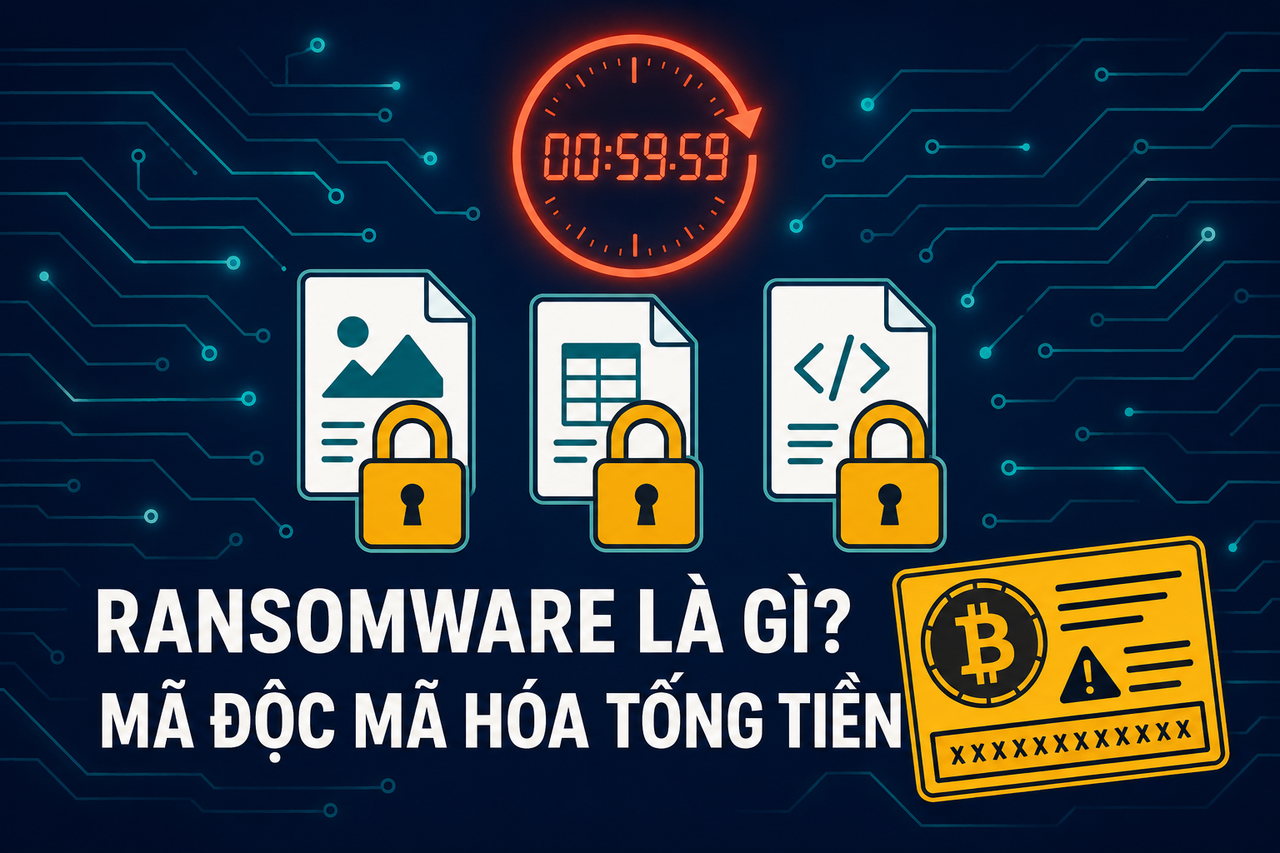
Ransomware is malicious software that encrypts files or an entire system, then displays a message demanding payment — typically in Bitcoin or Monero — in exchange for a decryption key. If not paid within the deadline, data may be permanently deleted or publicly disclosed.
The core difference from ordinary malware: ransomware doesn't operate in the shadows — it directly attacks an organization's ability to operate. Victims know immediately that they've been attacked, and time pressure forces rapid decisions — an intentional psychological tactic.
The global scale of damage is enormous. Cybersecurity Ventures estimates ransomware caused approximately $20 billion USD in damage in 2021, a 57-fold increase from 2015. In 2021, Colonial Pipeline (USA) paid $4.4 million; CNA Financial paid $40 million; a hospital in Germany had to divert emergency patients to other facilities because its systems were completely locked.
History of Ransomware
Ransomware is not a new phenomenon — it has existed for over 35 years and continues to evolve.
AIDS Trojan (1989) was the first documented ransomware. Joseph Popp, a biologist, distributed 20,000 floppy disks at the WHO's AIDS conference. The software hid directories and encrypted file names after 90 system reboots, then demanded $189 be mailed to a P.O. box in Panama. Primitive, but the basic model was established.
CryptoLocker (2013) marked the turning point of the Bitcoin era. Using real RSA-2048 encryption and Bitcoin for anonymous payments, CryptoLocker collected over $27 million before being taken down by the FBI in 2014. It was the first ransomware to prove the model could be highly profitable.
WannaCry (May 2017) was a global shock. Exploiting the EternalBlue vulnerability (MS17-010) — stolen from the NSA — WannaCry spread automatically via SMB without requiring any user interaction. Within 4 days, over 200,000 computers in 150 countries were infected. The UK's NHS had to cancel tens of thousands of appointments; Telefónica, FedEx, and Deutsche Bahn were paralyzed. Estimated damage: $4–8 billion USD.
NotPetya (June 2017) looked like ransomware but was actually a wiper operated by the Russian state. It overwrote the MBR (Master Boot Record), making machines unbootable. There was no real decryption capability. Maersk lost $300 million; Merck lost $870 million. Total damage exceeded $10 billion USD — the largest financial impact of a single cyberattack in history.
LockBit (2019–2024) was the dominant RaaS group of the 2020s. Operating as a professional Ransomware-as-a-Service with an affiliate program, a leak site, and even a bug bounty program for its own malware, LockBit held approximately 25% of the global ransomware market by 2023. The FBI and Europol dismantled LockBit's infrastructure in February 2024, but affiliates continued operating under new names.
Technical Mechanism: AES + RSA Hybrid Encryption
The power of modern ransomware comes from combining two complementary encryption algorithms:
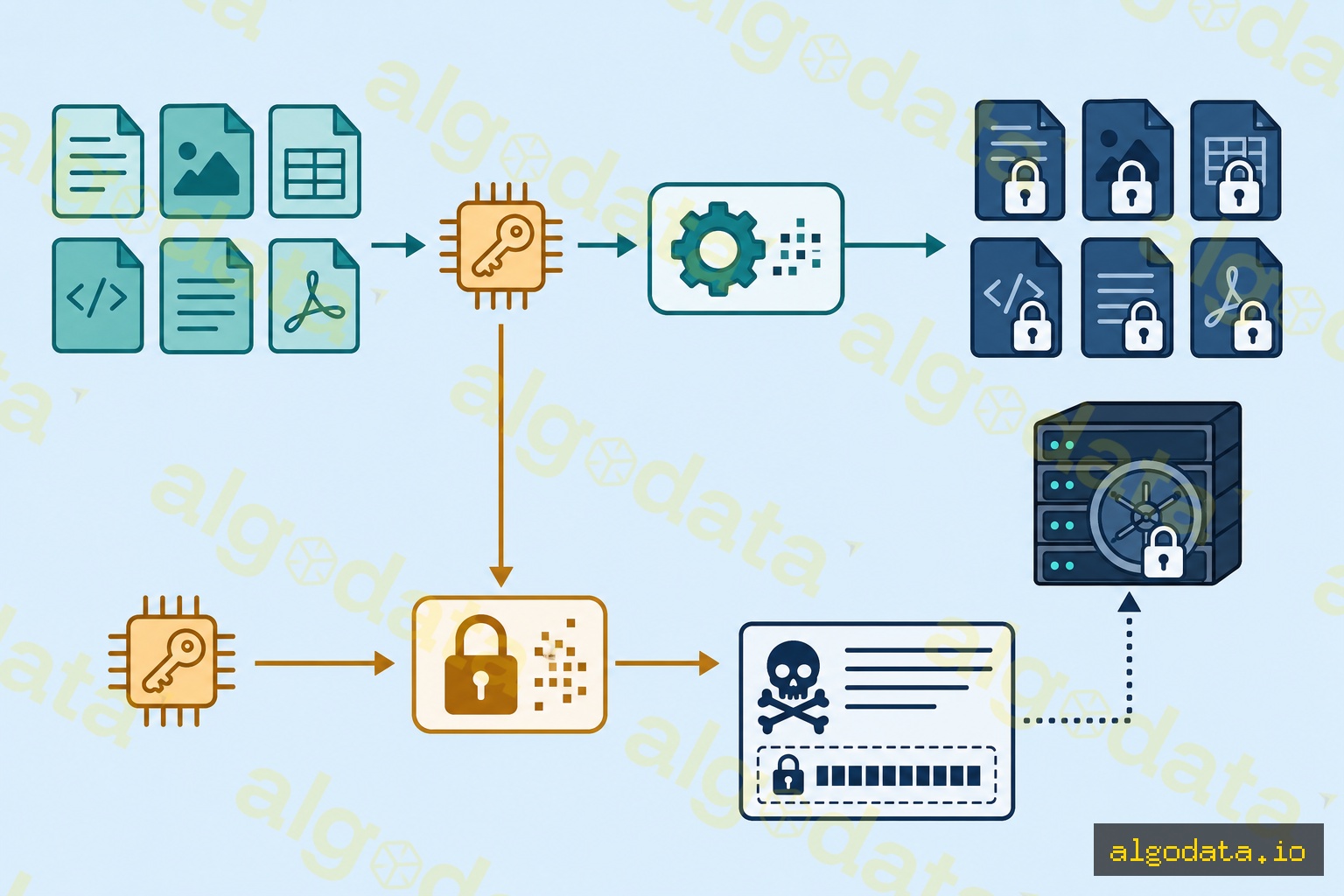
Typical ransomware encryption process:

1. Malware executes on victim's machine
2. Generate a random AES-256 session key
3. Enumerate files (*.doc, *.xlsx, *.jpg, *.db, ...)
4. Encrypt each file using AES-256 (fast, symmetric)
5. Encrypt the AES session key using RSA-2048 public key
   (public key hardcoded in the malware binary)
6. Erase the AES session key from memory
7. Store the RSA-encrypted key in the ransom note file
8. Display ransom note + payment instructions

Decryption is only possible with the RSA private key from the attacker's C2 server.
Why use both? AES-256 encrypts quickly (gigabytes in seconds) but is symmetric — the same key is used for encryption and decryption, making it impossible to hide the key safely. RSA-2048 solves the key distribution problem: the public key (used to encrypt the AES key) can be embedded in the malware without revealing the private key. The private key only exists on the attacker's C2 server.
The result: even with the full malware source code, all the encrypted files, and all the computing power in the world, you still cannot decrypt without the RSA private key. This is why modern ransomware effectively defeats all response measures except clean backups.
Some ransomware adds additional layers: encrypting files in chunks, renaming extensions (.locked, .wncry), and overwriting original files multiple times to prevent forensic recovery.
Infection Vectors
Understanding how ransomware gains entry is the first step toward effective prevention.
Phishing email remains the number one attack vector. Attackers send fake invoices, shipping notifications, or internal documents. Attachments are typically Word/Excel files with malicious macros (prompting users to "Enable Content"), or PDFs with links to a dropper. A single click is enough to start the infection chain.
RDP brute force is the second most common vector. Millions of Windows machines expose port 3389 (Remote Desktop Protocol) to the internet — many with weak or default passwords. Attackers use automated tools to try millions of passwords every day. Once inside, they can deploy ransomware directly with admin privileges.
EternalBlue exploit (MS17-010) is the vulnerability WannaCry exploited. Microsoft patched it in March 2017, but hundreds of thousands of machines were unpatched when WannaCry erupted in May. Today, EternalBlue is still used because many legacy systems remain unpatched.
Supply chain attacks are increasingly common. Kaseya VSA (2021): REvil attacked IT management software Kaseya VSA, affecting 1,500 businesses through Managed Service Providers using Kaseya. SolarWinds (2020, not ransomware but the same vector) demonstrated the extreme danger of supply chain compromises.
Drive-by downloads and malvertising target users through malicious ads on legitimate websites, automatically downloading and running a dropper with no interaction beyond visiting an unpatched browser.
Double Extortion and the RaaS Model
Ransomware has evolved far beyond its simple original model.
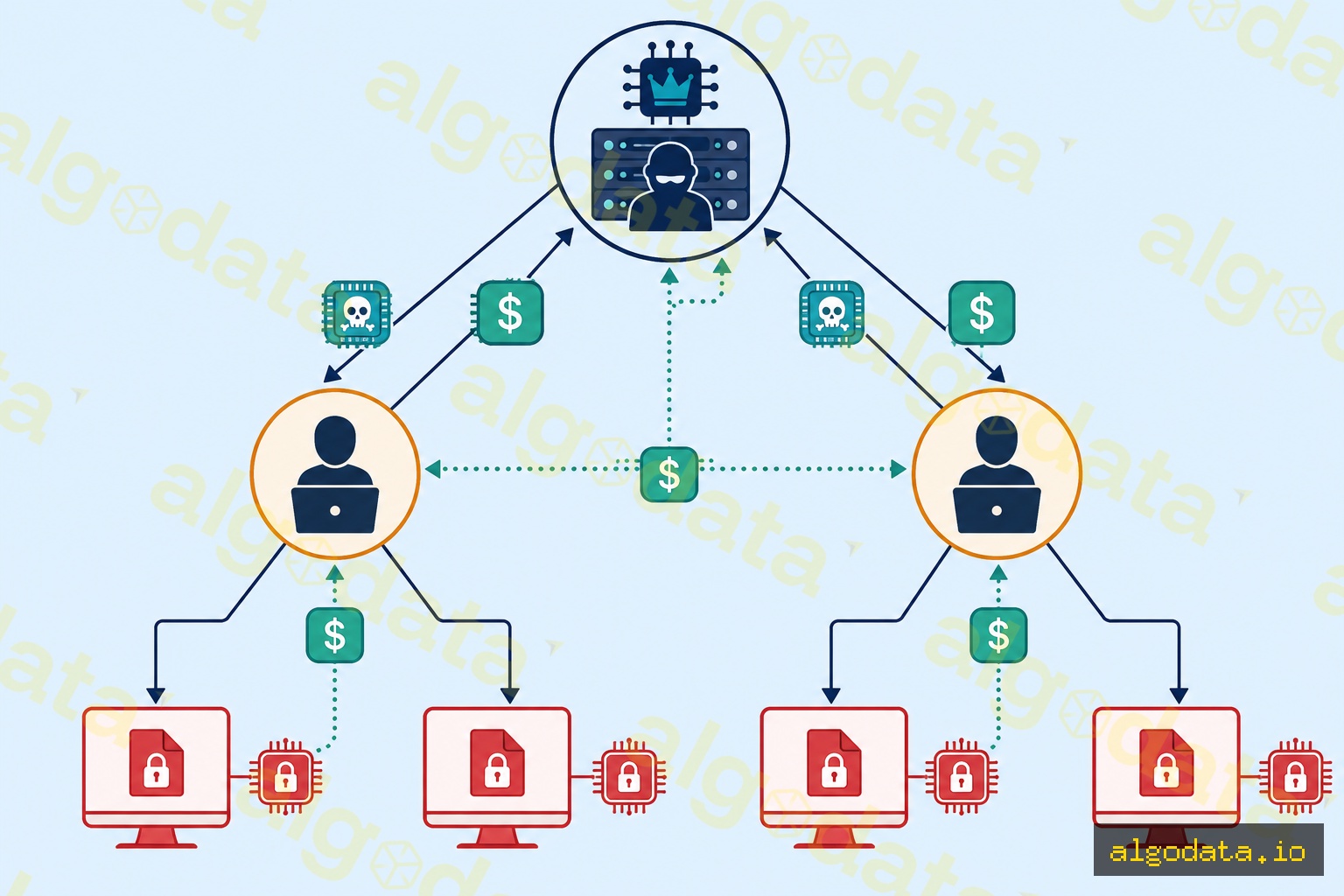
Double extortion emerged in 2019 with Maze ransomware. Rather than only encrypting files, attackers exfiltrate (steal) data first before encrypting it. If a victim refuses to pay, they threaten to publish sensitive data — customer records, trade secrets, personnel data — on dark web leak sites. This creates dual pressure: pay to decrypt AND pay to prevent data disclosure. Some groups even use triple extortion — adding a DDoS attack on the victim's website to increase pressure.
RaaS (Ransomware-as-a-Service) represents the most important business model shift. The operator group (ransomware developers) doesn't directly attack — they build the infrastructure: malware, C2 servers, payment portals, and customer service (helping victims pay). Affiliates (partners) buy or rent the kit, find their own victims, and deploy the attacks. Revenue splits: affiliates keep 70–80%, operators take 20–30%.
This model democratizes ransomware — an attacker doesn't need programming or cryptography skills, only basic intrusion skills and the ability to run tools. LockBit, BlackCat (ALPHV), Conti, and Cl0p all operated under the RaaS model with dozens to hundreds of affiliates.
These groups maintain leak sites on Tor — websites that publish lists of victims who refused to pay, along with sample stolen data as proof. This is an extremely effective public pressure tool.
Ransomware Prevention
No single measure guarantees 100% safety. Ransomware prevention requires a layered strategy (defense in depth).
Ransomware prevention checklist:

Backup:
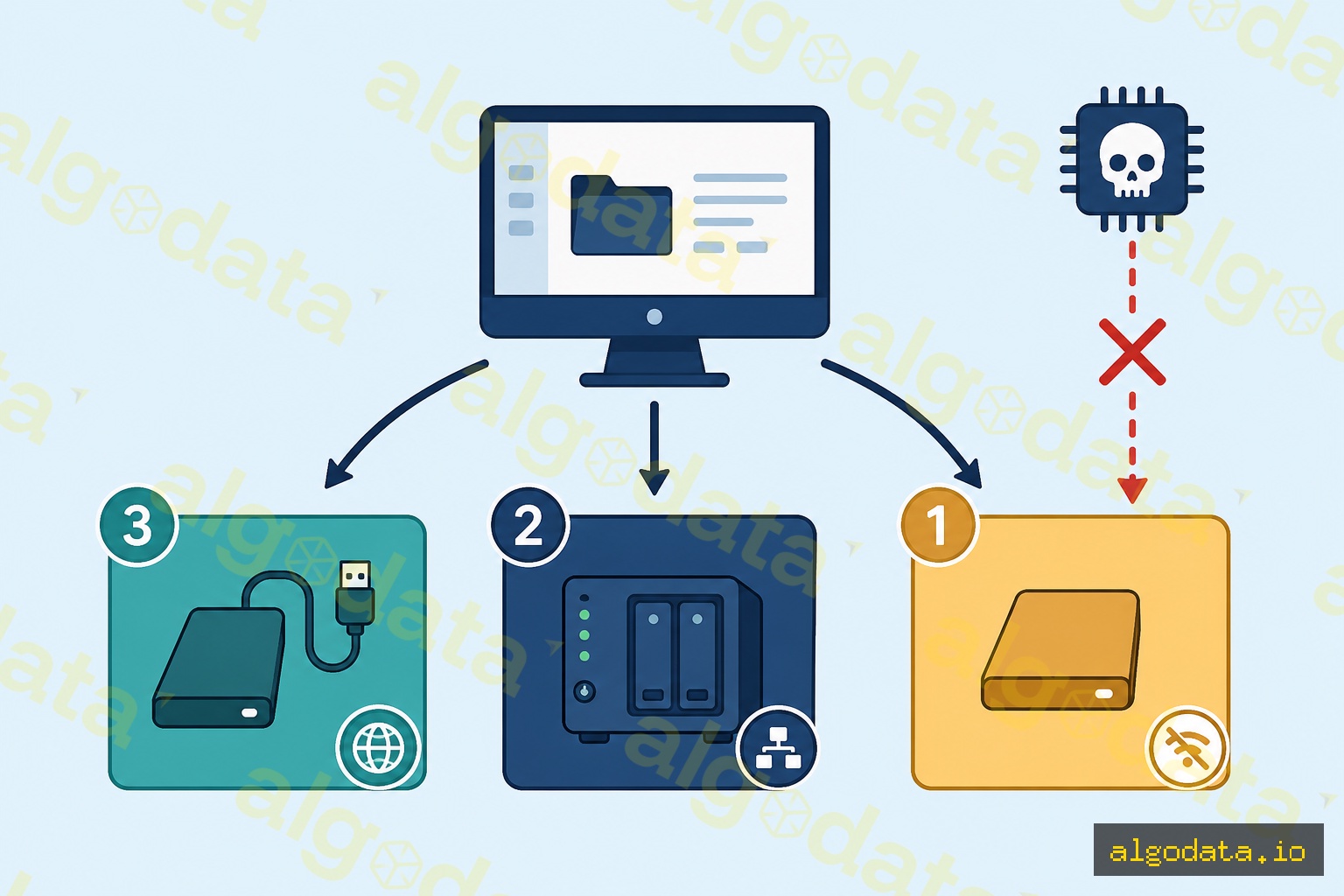
□ 3-2-1 backup: 3 copies, 2 media types, 1 offline/air-gapped copy
□ Test restores monthly — a backup is worthless if it cannot be restored
□ Keep offline backups disconnected from the network at all times

Patch & Hardening:
□ Patch OS and applications within 72 hours of a critical patch release
□ Disable RDP if not needed; use VPN + MFA if RDP is required
□ Disable Office macros for regular users
□ Least privilege — users should not be local admins

Detection & Containment:
□ EDR (Endpoint Detection and Response) — detect abnormal behavior
□ Network segmentation — prevent ransomware from spreading across systems
□ Email gateway to filter malicious attachments

Awareness:
□ Regular phishing recognition training for all staff
□ Quarterly phishing simulation exercises
3-2-1 backup is the most important and often overlooked defense layer. Three elements: keep 3 copies of data, on 2 different media types (e.g., internal hard drive and cloud), with at least 1 copy offline or air-gapped — not connected to the network. Ransomware typically searches for and encrypts online backups; an offline copy cannot be affected. Equally important: test restores regularly. An untested backup is not a real backup.
Fast patching is the best defense against exploits. WannaCry infected 200,000 machines with a vulnerability that had been patched two months earlier. Critical patches must be applied within 72 hours — not "when there's time."
Least privilege prevents ransomware from escalating permissions. If an infected user is not a local admin, ransomware struggles to encrypt system files and spread to other machines via network shares. Most office users don't need admin rights to do their work.
EDR (Endpoint Detection and Response) solutions like CrowdStrike Falcon, Microsoft Defender for Endpoint, or SentinelOne detect abnormal mass-encryption behavior and can kill ransomware processes before they complete.
Network segmentation limits the scope of spread. Ransomware inside one VLAN cannot automatically jump to another VLAN if firewall rules are properly configured.
Responding to an Attack — Incident Response
Being hit by ransomware doesn't have to be a disaster if you respond quickly and correctly.
Priorities in the first hour:
1. Isolate infected machines — cut network (unplug cable / disable WiFi / VLAN isolation)
2. Do NOT fully power off — forensic evidence is still in RAM
3. Snapshot/image the hard drive before doing anything else
4. Determine scope — which machines are affected, what data is encrypted
5. Notify: IT security team, legal, management, cyber insurance

Next steps (hours 2-24):
6. Contact CSIRT / relevant national cybersecurity authority
7. Check nomoreransom.org — some variants have free decryptors
8. Assess backups — is there a clean offline copy?
9. Decision on ransom payment (legal + insurance + FBI guidance)
10. Eradicate → Restore from clean backup → Post-incident review
Immediate isolation is the single most important action. Every second of delay gives ransomware more time to encrypt more files and spread to other machines via network shares. Unplug the network cable, disable WiFi, or move to a quarantine VLAN immediately.
Do not power off is a counterintuitive but critical rule. RAM may contain encryption keys not yet erased, a list of running processes, and network connections — all valuable forensic evidence. Shutting down wipes RAM clean.
nomoreransom.org is a collaborative project between Europol, the FBI, and security companies. They maintain a library of free decryptors for hundreds of ransomware variants whose keys have been recovered from law enforcement operations. Always check here first.
The ransom payment decision is complex. The FBI and CISA advise against paying, but in practice it depends on: is there a backup? How sensitive is the data? Does cyber insurance cover it? Does local law prohibit paying groups under sanctions? Many businesses ultimately pay because they have no backup — and approximately 65% receive a working decryption key (but 35% do not).