VPN是什么?虚拟专用网络与WireGuard、OpenVPN协议
Security

VPN是什么?虚拟专用网络与WireGuard、OpenVPN协议

VPN(虚拟专用网络)在您的设备和VPN服务器之间创建加密隧道,保护流量并隐藏真实IP地址。了解WireGuard和OpenVPN的工作原理,以及何时应使用VPN而不是代理。

系列文章: Bảo mật
  1. 1 什么是恶意软件?分类、特征及预防方法
  2. 2 什么是DDoS?识别迹象、应对方法与有效防御指南
  3. 3 什么是网络钓鱼?识别与防范在线欺诈
  4. 4 什么是DNS Sinkhole?DNS Sinkhole技术的应用与使用方法
  5. 5 什么是OAuth 2.0?授权访问与谷歌登录原理
  6. 6 什么是木马病毒?关于Trojan恶意软件的基本知识
  7. 7 Zero Trust 是什么?'永不信任,始终验证'安全模型
  8. 8 VPN是什么?虚拟专用网络与WireGuard、OpenVPN协议
  9. 9 MFA 是什么?多因素认证与 2FA 对比详解
  10. 10 什么是防火墙?在网络安全中的角色和功能
  11. 11 什么是SQL注入?数据库攻击与防护
  12. 12 什么是XSS?跨站脚本攻击与防护
✦ 快速摘要
VPN(虚拟专用网络)在您的设备和VPN服务器之间创建加密隧道,保护流量并隐藏真实IP地址。了解WireGuard和OpenVPN的工作原理,以及何时应使用VPN而不是代理。
这篇文章怎么样?

VPN(虚拟专用网络)是一种重要的网络安全技术,帮助远程员工访问公司资源、保护公共WiFi上的连接、以及连接各分支机构。本文将解释VPN的工作原理、对比WireGuard与OpenVPN,并提供实用的配置指南。

VPN是什么?

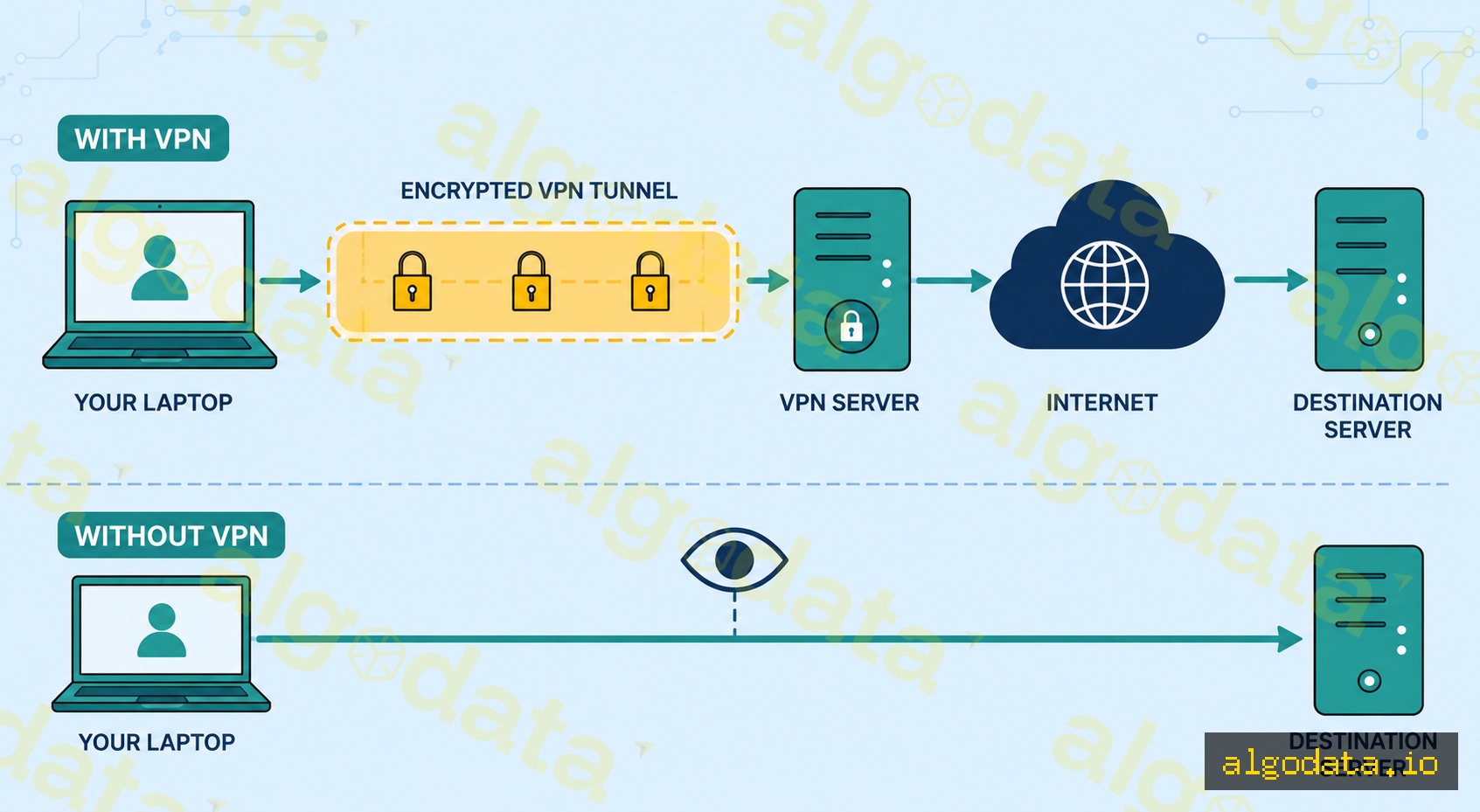
VPN(虚拟专用网络)在您的设备和VPN服务器之间创建一条加密隧道。您的所有流量不再直接发送到互联网,而是经过加密后只在VPN服务器端解密,有效隐藏您的真实IP地址。

工作原理:

  1. 设备与VPN服务器建立加密连接
  2. 所有流量在隧道内被封装并加密
  3. VPN服务器解密流量并将请求转发到真实目标
  4. 响应通过同一条隧道返回
  5. 目标网站只能看到VPN服务器的IP地址

为什么需要VPN?

  • 远程办公:远程员工需要访问内部资源(文件服务器、数据库、内部工具)
  • 公共WiFi:咖啡厅、机场——未加密的WiFi容易被窃听
  • 隐私保护:向网站和ISP隐藏真实IP地址
  • 站点互联:连接各分支机构与数据中心

VPN协议

WireGuard(推荐)

最现代化的协议,从底层为性能和安全而设计:

  • 约4,000行代码(易于审计,攻击面小)
  • 使用UDP——比TCP更快,可靠性略低但对VPN来说完全够用
  • Linux内核5.6版本(2020年)起直接集成
  • 顶尖密码学:Curve25519、ChaCha20、Poly1305
  • 切换网络时(漫游)重连极快

OpenVPN

历史最悠久、最成熟的VPN协议:

  • 约100,000行代码——更复杂,功能更丰富
  • 同时支持TCP和UDP
  • 可在443端口运行(与HTTPS相同),用于绕过严格防火墙
  • 几乎所有平台都受支持
  • 在企业环境中广泛应用

IPsec/IKEv2

  • 行业标准,原生集成于iOS/Android/Windows
  • IKEv2特别适合移动设备:切换网络时(WiFi ↔ 4G)重连速度快
  • 常见于企业VPN方案(Cisco AnyConnect、Juniper)

L2TP/PPTP(已过时)

  • PPTP:切勿使用——自1999年起已被破解,不安全
  • L2TP/IPsec:仍可使用,但WireGuard要好得多

WireGuard实际配置

在Ubuntu上安装WireGuard:

Bash
1# 安装
2apt update && apt install wireguard
3
4# 生成密钥对(服务端)
5wg genkey | tee /etc/wireguard/server_private.key | wg pubkey > /etc/wireguard/server_public.key
6
7# 生成密钥对(客户端)
8wg genkey | tee client_private.key | wg pubkey > client_public.key

服务端配置 — /etc/wireguard/wg0.conf

ini
 1[Interface]
 2Address = 10.0.0.1/24
 3PrivateKey = <server-private-key>
 4ListenPort = 51820
 5
 6# 启用NAT,让客户端可以访问互联网
 7PostUp = iptables -A FORWARD -i wg0 -j ACCEPT; iptables -t nat -A POSTROUTING -o eth0 -j MASQUERADE
 8PostDown = iptables -D FORWARD -i wg0 -j ACCEPT; iptables -t nat -D POSTROUTING -o eth0 -j MASQUERADE
 9
10[Peer]
11# 客户端1
12PublicKey = <client-public-key>
13AllowedIPs = 10.0.0.2/32

客户端配置:

ini
 1[Interface]
 2Address = 10.0.0.2/24
 3PrivateKey = <client-private-key>
 4DNS = 1.1.1.1
 5
 6[Peer]
 7PublicKey = <server-public-key>
 8Endpoint = 203.0.113.1:51820
 9AllowedIPs = 0.0.0.0/0        # 将所有流量路由通过VPN
10PersistentKeepalive = 25       # 通过NAT保持连接活跃

启动WireGuard:

Bash
 1# 启动WireGuard接口
 2wg-quick up wg0
 3
 4# 查看状态
 5wg show
 6
 7# 设置开机自启
 8systemctl enable wg-quick@wg0
 9
10# 查看流量统计
11wg show wg0 transfer

验证隧道是否正常工作:

Bash
1# 检查公网IP——应显示VPN服务器的IP
2curl ifconfig.me
3
4# 确认WireGuard接口已启动
5ip addr show wg0
6
7# 通过隧道测试DNS解析
8nslookup google.com 1.1.1.1

站点到站点VPN vs 远程访问VPN

站点到站点VPN — 连接两个固定网络:

  • 无需在每台员工电脑上安装VPN客户端
  • 两个办公室的路由器/防火墙之间建立隧道
  • 办公室A的员工可以访问办公室B的资源,如同在同一网络中

远程访问VPN — 员工从任何地方连接:

  • 每位员工安装VPN客户端(WireGuard、OpenVPN、Cisco AnyConnect等)
  • 连接到公司的VPN网关
  • 连接成功后可访问所有内部资源

如何选择?

  • 固定办公室 ↔ 数据中心:站点到站点VPN
  • 居家办公、远程团队:远程访问VPN
  • 两者结合:大型企业中的常见方案

常见使用场景:

  • 使用云基础设施的初创公司 + 远程团队:在小型VPS上部署WireGuard远程访问VPN
  • 多办公室公司:在分支路由器之间使用IPsec站点到站点VPN
  • 有合规要求的企业:使用基于证书认证的Cisco AnyConnect

VPN与代理的对比

比较项目 VPN 代理
加密 始终加密 视类型而定(HTTP代理 = 不加密)
覆盖范围 整个操作系统 单个应用程序
DNS 通过VPN(防止泄漏) 由应用决定
速度 略慢 更快
配置方式 操作系统级别 逐应用配置
使用场景 远程办公、完整隐私保护 网页开发、绕过限制、调试

什么时候选择VPN:

  • 需要加密设备上的所有流量
  • 远程员工需要访问公司内部资源
  • 需要连接两个办公室或网络
  • 在不受信任的网络上保护隐私不被ISP窥探

什么时候代理就够了:

  • 只需要路由单个应用的流量
  • 在浏览器中进行网络抓取或测试地理限制内容
  • 使用开发代理(如Charles Proxy)检查HTTP流量

Proxy是什么?正向代理、反向代理与SOCKS5详解

Subnet和CIDR是什么?IP网络分段详解

零信任是什么?"永不信任,始终验证"安全架构

常见问题Q&A
VPN简单来说是什么?
VPN(虚拟专用网络)在您的设备与VPN服务器之间创建一条加密隧道。您的所有流量都通过这条隧道传输,隐藏真实IP地址并加密数据。目标网站和服务器只能看到VPN服务器的IP地址,而无法看到您的真实IP。
WireGuard与OpenVPN有什么区别?
WireGuard只有约4,000行代码,使用UDP协议,从Linux内核5.6版本起直接集成进内核。速度极快,易于审计,配置简单。OpenVPN历史更悠久(2001年),约有100,000行代码,支持更多选项(TCP/UDP,可在443端口运行以绕过防火墙),但更复杂、速度更慢。对于新部署项目,WireGuard是默认推荐选择。
VPN能完全隐藏身份吗?
不能完全隐藏。VPN服务提供商仍然可以看到您的全部流量——请选择可信赖的服务商。此外还需注意:(1) DNS泄漏——如果DNS查询没有经过VPN,ISP仍然能看到您访问的内容;(2) WebRTC泄漏——即使使用VPN,浏览器也可能通过WebRTC暴露真实IP;(3) 设备指纹——网站可以通过浏览器指纹识别您,不需要IP地址。建议使用终止开关(kill switch)和DNS-over-VPN来降低风险。
什么是分离隧道(Split Tunneling)?
分离隧道是一种只将部分流量路由通过VPN,其余流量直接连接互联网的功能。例如:访问公司内部服务器的流量通过VPN(以访问内部资源),而Netflix/YouTube直接走互联网(避免VPN开销)。大多数企业级VPN客户端都支持分离隧道功能。
站点到站点VPN与远程访问VPN有什么区别?
站点到站点VPN连接两个固定网络——例如两个办公室:两个局域网连接后就像同一个网络,无需在每台员工电脑上单独配置。远程访问VPN允许每位员工从任何地方远程连接到公司网络——需要在个人设备上安装VPN客户端。
VPN会降低网速吗?
会,因为需要对每个数据包进行加密/解密并通过中间服务器路由。实际基准测试中,WireGuard比OpenVPN快约40%。速度还取决于VPN服务器的距离(本地服务器比远程服务器快)、服务商的带宽以及服务器当前负载。在正常条件下使用附近的服务器,速度差异通常不超过20%。

VPN (Virtual Private Network) is a critical network security technology that enables remote workers to access company resources, protects connections on public WiFi, and links branch offices together. This article explains how VPN works under the hood, compares WireGuard with OpenVPN, and provides a practical WireGuard configuration guide.

What is a VPN?

A VPN (Virtual Private Network) creates an encrypted tunnel between your device and a VPN server. Instead of your traffic traveling directly to the internet and exposing your real IP address, all data is encrypted and only decrypted at the VPN server end.

How it works:

  1. Your device establishes an encrypted connection to the VPN server
  2. All traffic is encapsulated and encrypted inside the tunnel
  3. The VPN server decrypts the traffic and forwards the request to the real destination
  4. The response travels back through the same tunnel
  5. The destination website sees only the VPN server's IP address

Why do you need a VPN?

  • Remote work: Employees working remotely need access to internal resources (file servers, databases, internal tools)
  • Public WiFi: Coffee shops, airports — unencrypted WiFi is easy to eavesdrop on
  • Privacy: Hide your real IP from websites and your ISP
  • Site-to-site: Connect branch offices to each other or to a data center

VPN Protocols

The most modern protocol, designed from the ground up for performance and security:

  • ~4,000 lines of code (easy to audit, small attack surface)
  • Uses UDP — faster than TCP, slightly less reliable but fine for VPN usage
  • Integrated into the Linux kernel since version 5.6 (2020)
  • State-of-the-art cryptography: Curve25519, ChaCha20, Poly1305
  • Extremely fast reconnect when switching networks (roaming)

OpenVPN

The oldest and most mature VPN protocol:

  • ~100,000 lines of code — more complex, more feature-rich
  • Supports both TCP and UDP
  • Can run on port 443 (same as HTTPS) to bypass strict firewalls
  • Supported on virtually all platforms
  • Widely used in enterprise environments

IPsec/IKEv2

  • Industry standard, built into iOS/Android/Windows natively
  • IKEv2 is especially suited for mobile: fast reconnect when switching networks (WiFi to 4G)
  • Common in corporate VPN solutions (Cisco AnyConnect, Juniper)

L2TP/PPTP (Legacy)

  • PPTP: Do not use — broken since 1999, not secure
  • L2TP/IPsec: Still functional but WireGuard is significantly better

Practical WireGuard Configuration

Installing WireGuard on Ubuntu:

Bash
1# Install WireGuard
2apt update && apt install wireguard
3
4# Generate key pair (server)
5wg genkey | tee /etc/wireguard/server_private.key | wg pubkey > /etc/wireguard/server_public.key
6
7# Generate key pair (client)
8wg genkey | tee client_private.key | wg pubkey > client_public.key

Server config — /etc/wireguard/wg0.conf:

ini
 1[Interface]
 2Address = 10.0.0.1/24
 3PrivateKey = <server-private-key>
 4ListenPort = 51820
 5
 6# Enable NAT so clients have internet access
 7PostUp = iptables -A FORWARD -i wg0 -j ACCEPT; iptables -t nat -A POSTROUTING -o eth0 -j MASQUERADE
 8PostDown = iptables -D FORWARD -i wg0 -j ACCEPT; iptables -t nat -D POSTROUTING -o eth0 -j MASQUERADE
 9
10[Peer]
11# Client 1
12PublicKey = <client-public-key>
13AllowedIPs = 10.0.0.2/32

Client config:

ini
 1[Interface]
 2Address = 10.0.0.2/24
 3PrivateKey = <client-private-key>
 4DNS = 1.1.1.1
 5
 6[Peer]
 7PublicKey = <server-public-key>
 8Endpoint = 203.0.113.1:51820
 9AllowedIPs = 0.0.0.0/0        # Route all traffic through VPN
10PersistentKeepalive = 25       # Keep connection alive through NAT

Starting WireGuard:

Bash
 1# Bring up the WireGuard interface
 2wg-quick up wg0
 3
 4# Check status
 5wg show
 6
 7# Enable auto-start on boot
 8systemctl enable wg-quick@wg0
 9
10# View traffic statistics
11wg show wg0 transfer

Verifying the tunnel is active:

Bash
1# Check your public IP — should show VPN server IP
2curl ifconfig.me
3
4# Confirm the WireGuard interface is up
5ip addr show wg0
6
7# Test DNS resolution through the tunnel
8nslookup google.com 1.1.1.1

Site-to-Site vs Remote Access VPN

Site-to-site VPN — connects two fixed networks:

  • No VPN client needed on individual employee machines
  • The routers/firewalls at both offices establish the tunnel between them
  • Employees at office A can access resources at office B as if they were on the same network

Remote access VPN — employees connect from anywhere:

  • Each employee installs a VPN client (WireGuard, OpenVPN, Cisco AnyConnect, etc.)
  • Connects to the company's VPN gateway
  • Once connected, can access all internal resources

Which type should you choose?

  • Fixed office ↔ data center: Site-to-site
  • Work from home, remote teams: Remote access
  • A combination of both: common in large enterprises

Common use cases:

  • Startup with cloud infra + WFH team: WireGuard remote access VPN on a small VPS
  • Multi-office company: IPsec site-to-site between branch routers
  • Enterprise with compliance requirements: Cisco AnyConnect with certificate-based auth

VPN vs Proxy

Criteria VPN Proxy
Encryption Always Depends (HTTP proxy = none)
Scope Entire OS Single application
DNS Through VPN (leak protection) App decides
Speed Slightly slower Faster
Setup OS-level Per-app config
Use case Remote work, full privacy Web dev, bypass, debugging

When to use a VPN:

  • You need to encrypt all traffic from your device
  • Remote employees need access to internal company resources
  • Connecting two offices or networks together
  • Privacy from your ISP on untrusted networks

When a proxy is enough:

  • You only need to route a single application's traffic
  • Web scraping or testing geo-restricted content in a browser
  • Development proxy (like Charles Proxy) to inspect HTTP traffic

What is a Proxy? Forward, Reverse and SOCKS5 Proxies Explained

What is Subnet & CIDR? IP Network Segmentation Explained

What is Zero Trust? The 'Never Trust, Always Verify' Security Architecture

Frequently Asked QuestionsQ&A
What is a VPN in simple terms?
A VPN (Virtual Private Network) creates an encrypted tunnel between your device and a VPN server. All your traffic passes through this tunnel, hiding your real IP address and encrypting your data. Websites and destination servers only see the VPN server's IP address, not your real one.
How does WireGuard differ from OpenVPN?
WireGuard has only ~4,000 lines of code, uses UDP, and has been integrated directly into the Linux kernel since version 5.6. It is extremely fast, easy to audit, and simple to configure. OpenVPN has a longer history (2001), ~100,000 lines of code, supports more options (TCP/UDP, port 443 to bypass firewalls), but is more complex and slower. WireGuard is the default choice for new deployments.
Does a VPN completely hide your identity?
Not completely. Your VPN provider can still see all your traffic — choose a reputable provider. Additionally: (1) DNS leaks — if DNS queries do not go through the VPN, your ISP can still see what you access; (2) WebRTC leaks — browsers may expose your real IP via WebRTC even when using a VPN; (3) Device fingerprinting — websites can identify you through browser fingerprints without needing your IP. Use a kill switch and DNS-over-VPN to reduce risk.
What is split tunneling?
Split tunneling is a feature that routes only a portion of traffic through the VPN while the rest goes directly to the internet. For example: traffic to internal company servers goes through the VPN (to access internal resources), while Netflix/YouTube goes directly to the internet (to avoid VPN overhead). Most enterprise VPN clients support split tunneling.
How does site-to-site VPN differ from remote access VPN?
Site-to-site VPN connects two fixed networks together — for example, an office in one city connected to another office: both LANs connect as if they were a single network, without needing configuration on each employee's machine. Remote access VPN allows individual employees to connect remotely to the company network from anywhere — a VPN client is required on each personal device.
Does a VPN slow down internet speed?
Yes, because every packet must be encrypted/decrypted and routed through an intermediate server. In practice, WireGuard is about 40% faster than OpenVPN in real-world benchmarks. Speed also depends on the distance to the VPN server (a nearby server is faster than one in another country), the provider's bandwidth, and the current server load. Under normal conditions with a nearby server, the difference is usually less than 20%.