Subnet和CIDR是什么?IP网络分段与现代路由
DevOps

Subnet和CIDR是什么?IP网络分段与现代路由

Subnet和CIDR是现代网络架构的基础。本文解释子网掩码、/24表示法、主机数量计算,以及AWS VPC和Kubernetes如何使用CIDR进行网络分段。

系列文章: DevOps
  1. 1 API网关是什么?微服务的统一入口点
  2. 2 NAT是什么?计算机网络中的网络地址转换详解
  3. 3 GitLab CI/CD是什么?自动化构建、测试与部署流水线
  4. 4 Apache Kafka是什么?分布式事件流处理平台详解
  5. 5 Serverless是什么?FaaS、冷启动与何时选择无服务器架构
  6. 6 Subnet和CIDR是什么?IP网络分段与现代路由
  7. 7 什么是Kubernetes?当今最流行的容器编排平台
  8. 8 Proxy是什么?正向代理、反向代理与SOCKS5详解
  9. 9 什么是Nginx?集Web服务器、反向代理与负载均衡于一体
✦ 快速摘要
Subnet和CIDR是现代网络架构的基础。本文解释子网掩码、/24表示法、主机数量计算,以及AWS VPC和Kubernetes如何使用CIDR进行网络分段。
这篇文章怎么样?

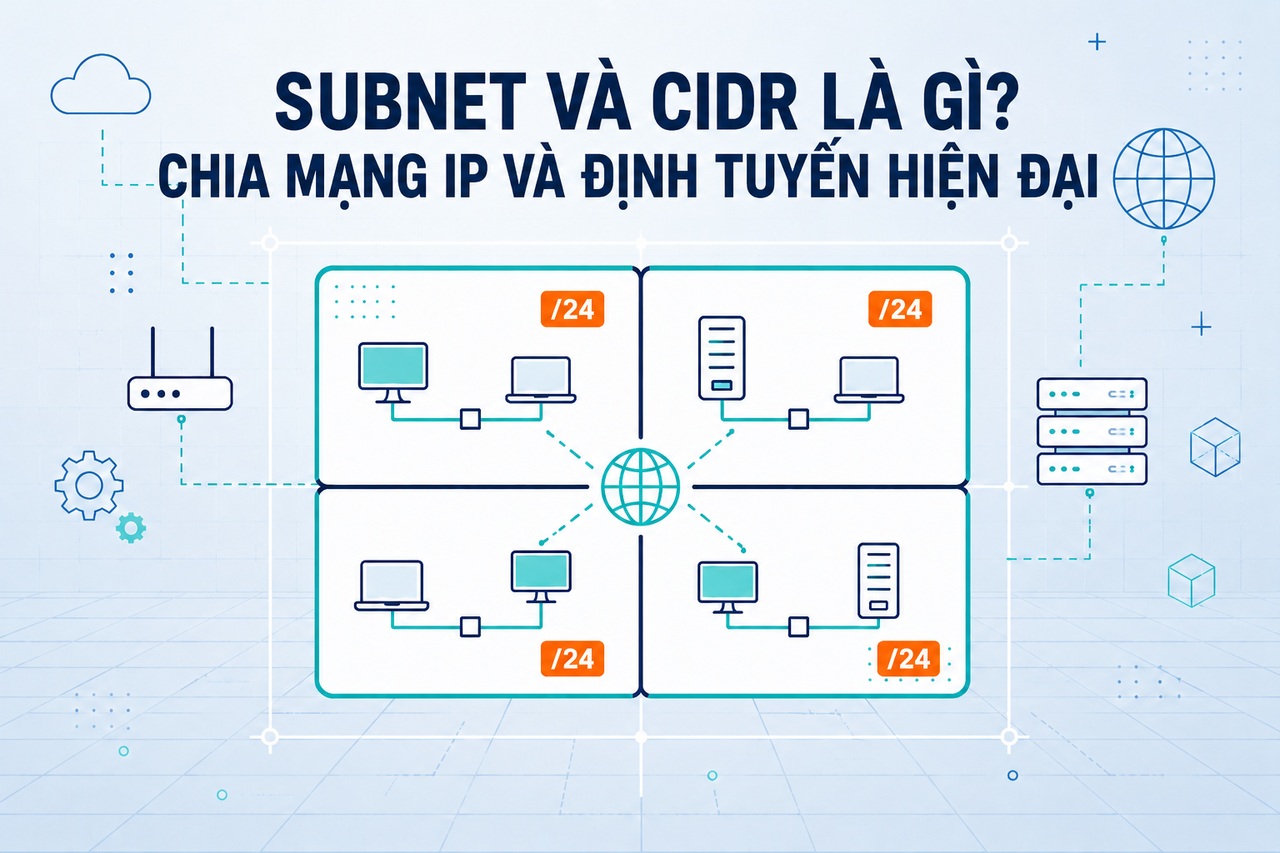
子网(Subnet)和CIDR是每位基础设施工程师或DevOps从业者都必须掌握的两个基础概念——从设计AWS VPC、配置Kubernetes,到简单地理解为什么办公室网络使用192.168.1.x。本文从基础到实践全面讲解这两个概念。

IP地址:基本结构

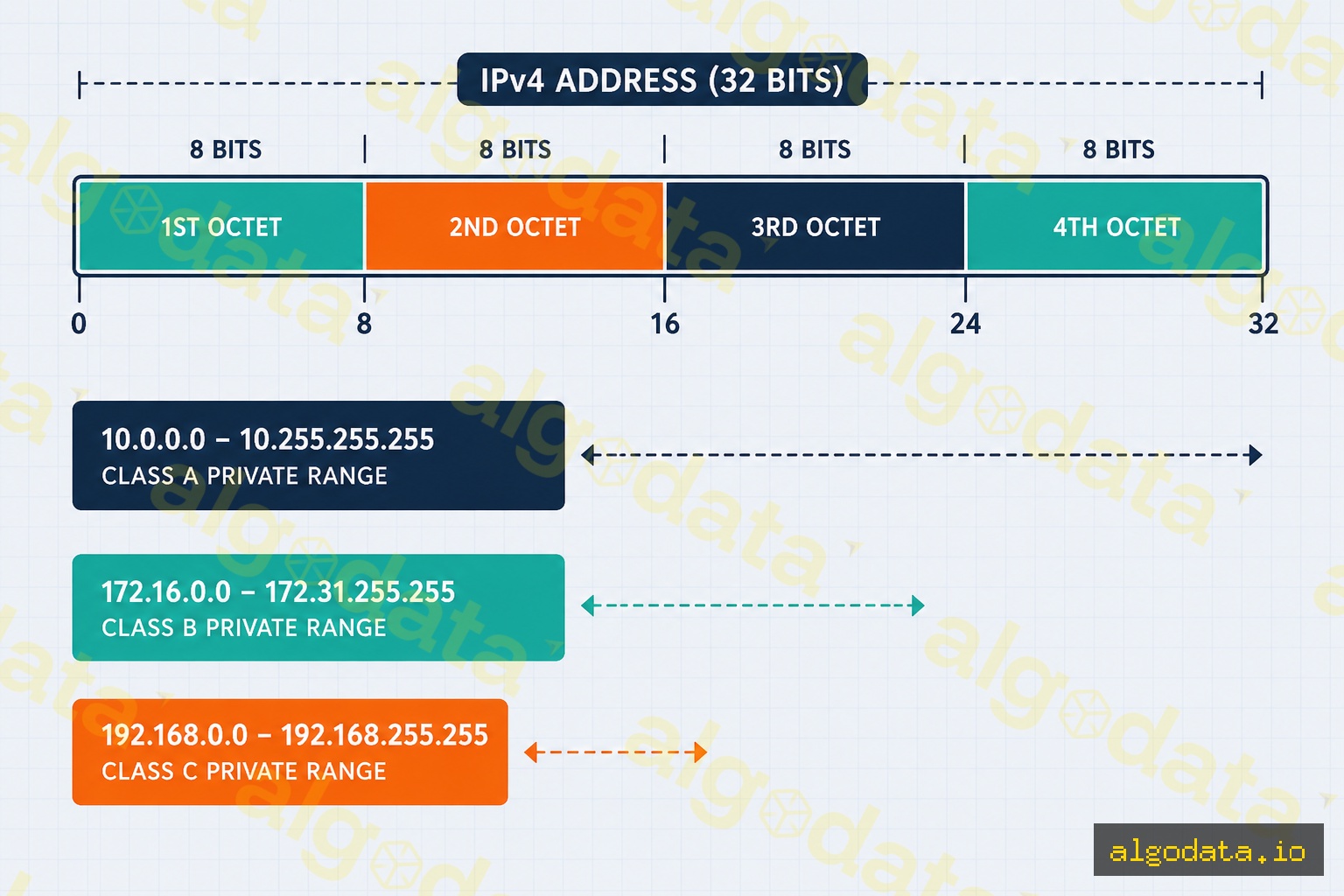
IPv4地址是一个32位的数字,通常以四个用点分隔的八位组形式书写。例如:192.168.1.100 = 11000000.10101000.00000001.01100100(二进制)。

每个IP地址分为两部分:

  • 网络部分(Network part):标识网络(类似电话的区号)
  • 主机部分(Host part):标识该网络中的设备(类似用户号码)

私有IP地址范围(保留用于内部网络,不能直接在互联网上路由):

范围 CIDR 地址数量 常见用途
10.0.0.0 – 10.255.255.255 10.0.0.0/8 约1670万 大型企业网络、云VPC
172.16.0.0 – 172.31.255.255 172.16.0.0/12 约100万 Docker桥接网络
192.168.0.0 – 192.168.255.255 192.168.0.0/16 约65K 家用路由器、小型办公网络

什么是子网(Subnet)?

**子网(subnetwork)**是将一个大型IP网络划分为多个较小子网络的过程。每个子网包含:

  • 网络地址(Network address):子网的第一个地址(不分配给主机)
  • 主机地址(Host addresses):可以分配给设备的地址
  • 广播地址(Broadcast address):最后一个地址(不分配给主机)

为什么需要子网?

  • 安全性:分隔不同区域(DMZ、内部网络、数据库)
  • 性能:减少广播域,减少不必要的流量
  • 管理:更容易按子网监控和过滤流量

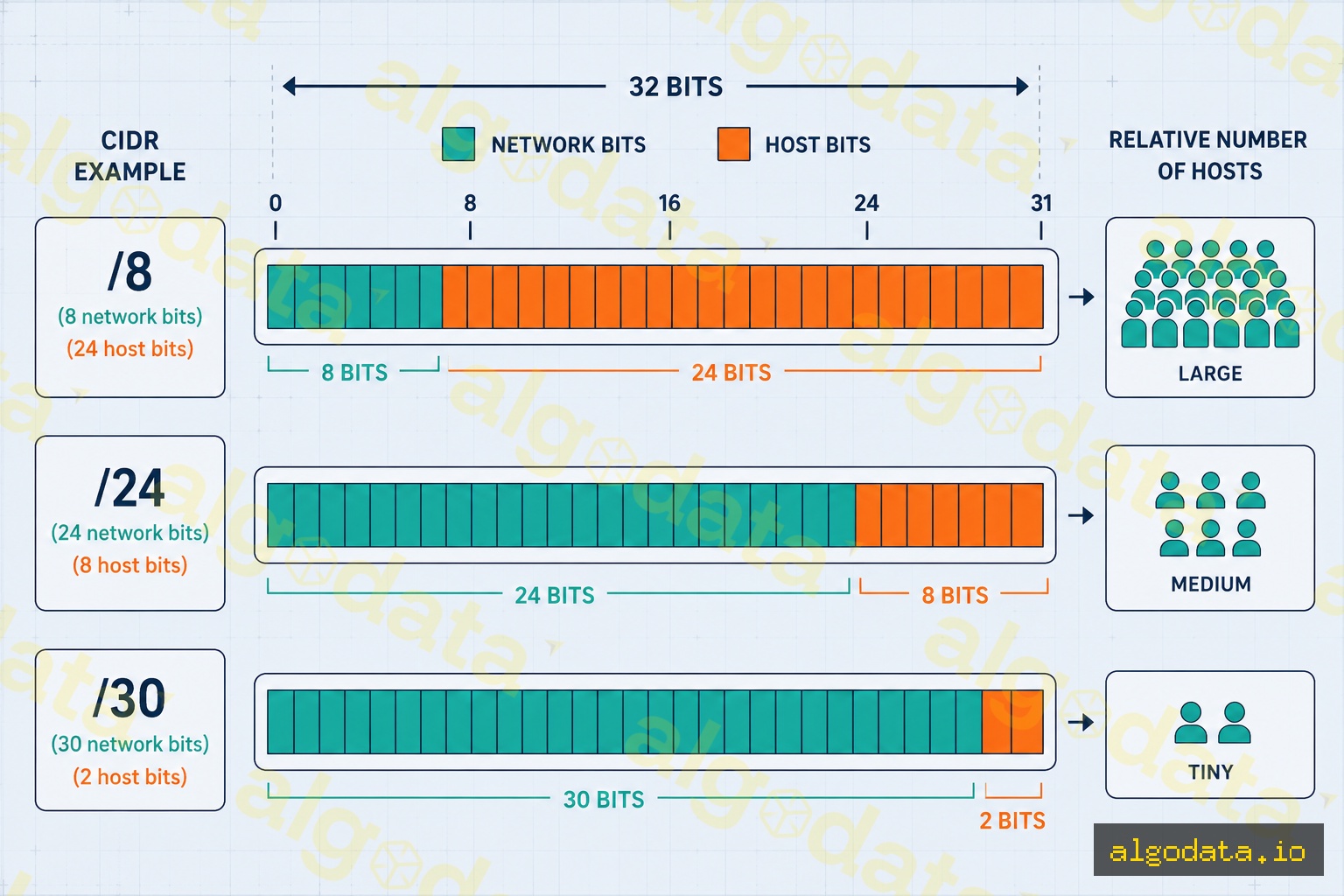
子网掩码指示有多少位属于网络部分。例如 255.255.255.0

  • 255 = 11111111(8个1位 = 8个网络位)
  • 前三个八位组均为255 → 24个网络位
  • 最后一个八位组为0 → 8个主机位

CIDR表示法:/前缀

CIDR(无类别域间路由)通过在斜杠后使用前缀长度(网络位数)来替代旧式的A/B/C类系统。

常用CIDR参考表:

CIDR 子网掩码 总地址数 可用主机数 适用场景
/8 255.0.0.0 16,777,216 16,777,214 超大型网络
/16 255.255.0.0 65,536 65,534 VPC、园区网络
/24 255.255.255.0 256 254 最常见的子网大小
/28 255.255.255.240 16 14 小型子网
/30 255.255.255.252 4 2 点对点链路
/32 255.255.255.255 1 1 主机路由

公式:可用主机数 = 2^(32 - 前缀长度) - 2

子网计算实践

示例1:192.168.1.0/24

网络地址:  192.168.1.0
子网掩码:  255.255.255.0
第一个主机:192.168.1.1
最后一个主机:192.168.1.254
广播地址:  192.168.1.255
主机数量:  254

示例2:10.0.0.0/28(DMZ小型子网)

网络地址:  10.0.0.0
子网掩码:  255.255.255.240
第一个主机:10.0.0.1
最后一个主机:10.0.0.14
广播地址:  10.0.0.15
主机数量:  14

工具:ipcalc

Bash
 1# 安装ipcalc
 2apt-get install ipcalc  # Ubuntu/Debian
 3brew install ipcalc      # macOS
 4
 5# 计算子网详情
 6ipcalc 192.168.1.0/24
 7# 输出:
 8# Address:   192.168.1.0          11000000.10101000.00000001. 00000000
 9# Netmask:   255.255.255.0 = 24   11111111.11111111.11111111. 00000000
10# Network:   192.168.1.0/24       11000000.10101000.00000001. 00000000
11# HostMin:   192.168.1.1          11000000.10101000.00000001. 00000001
12# HostMax:   192.168.1.254        11000000.10101000.00000001. 11111110
13# Broadcast: 192.168.1.255        11000000.10101000.00000001. 11111111
14# Hosts/Net: 254                   Class C, Private Internet
15
16# 查看所有网络接口的IP地址
17ip addr show
18# 或查看特定接口
19ip addr show eth0
20
21# 查看路由表
22ip route show

AWS VPC与子网设计
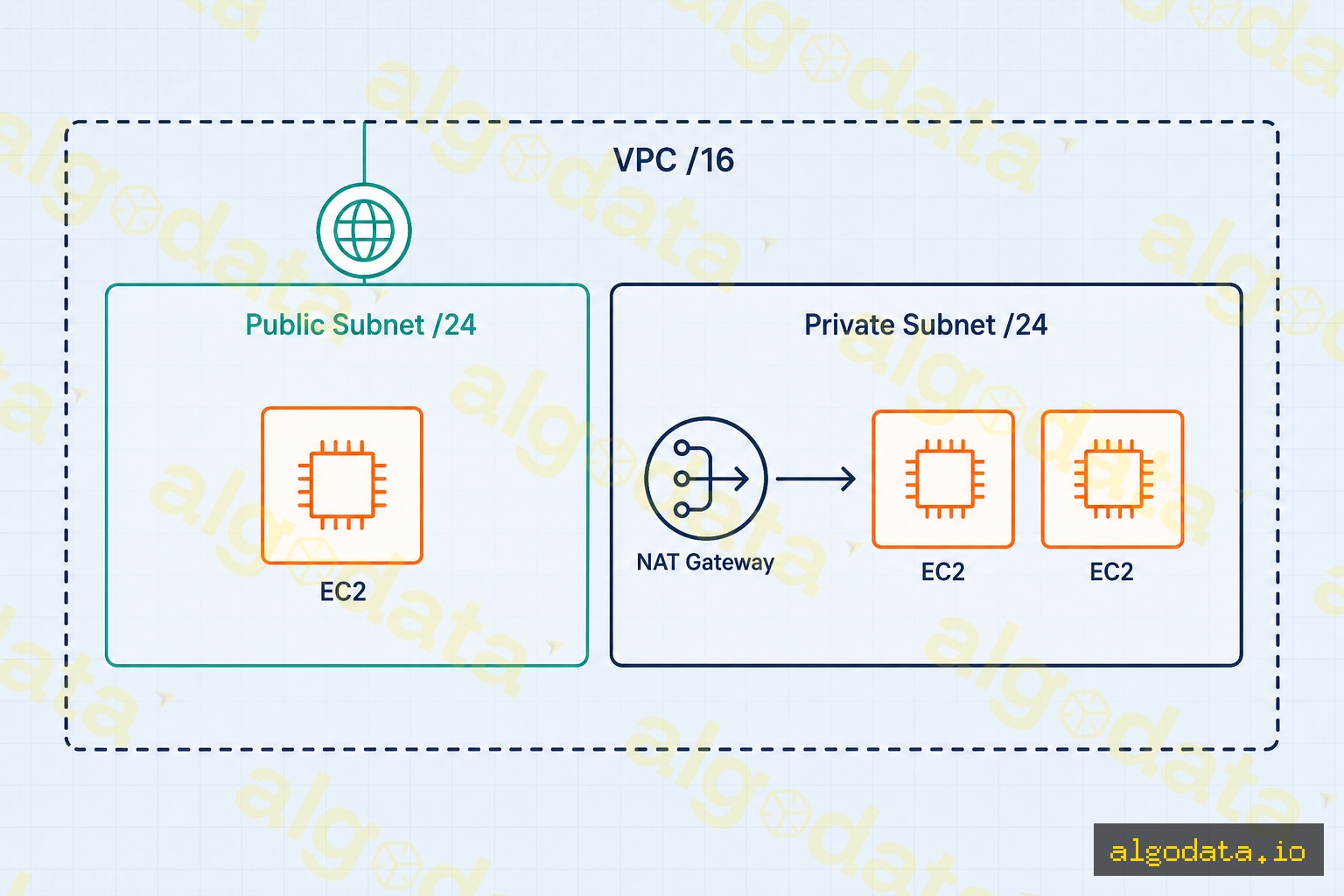
AWS VPC(Virtual Private Cloud)使用CIDR对云网络进行分段。标准架构如下:

VPC: 10.0.0.0/16(65,536个地址)
├── 公共子网(可用区-a):  10.0.1.0/24   (254台主机)
├── 公共子网(可用区-b):  10.0.2.0/24   (254台主机)
├── 私有子网(可用区-a):  10.0.10.0/24  (254台主机)
├── 私有子网(可用区-b):  10.0.20.0/24  (254台主机)
└── 数据库子网(可用区-a):10.0.100.0/24 (254台主机)

AWS在每个子网中保留5个地址:

  • .0 — 网络地址
  • .1 — AWS VPC路由器
  • .2 — AWS DNS服务器
  • .3 — 未来预留
  • .255 — 广播地址(AWS不支持)

→ AWS中的/24子网实际上只有 251个可用地址(256 - 5)

Terraform示例:

hcl
 1resource "aws_vpc" "main" {
 2  cidr_block = "10.0.0.0/16"
 3}
 4
 5resource "aws_subnet" "public_a" {
 6  vpc_id            = aws_vpc.main.id
 7  cidr_block        = "10.0.1.0/24"
 8  availability_zone = "ap-southeast-1a"
 9}
10
11resource "aws_subnet" "private_a" {
12  vpc_id            = aws_vpc.main.id
13  cidr_block        = "10.0.10.0/24"
14  availability_zone = "ap-southeast-1a"
15}

Kubernetes Pod CIDR

Kubernetes为其Pod网络使用专用CIDR范围,与节点IP地址完全分离:

Bash
1# 查看集群的Pod CIDR
2kubectl get nodes -o wide
3# INTERNAL-IP列显示节点IP;POD-CIDR列显示每个节点的Pod CIDR
4
5# 在kubeadm配置中检查Pod CIDR
6kubectl get configmap kubeadm-config -n kube-system -o yaml | grep podSubnet
7
8# 查看所有命名空间中的Pod IP
9kubectl get pods -A -o wide

默认CNI插件及其CIDR:

  • Flannel10.244.0.0/16 — 每个节点获得一个/24(每个节点最多256个Pod)
  • Calico192.168.0.0/16 — 灵活,支持BGP路由
  • Cilium10.0.0.0/8 — 使用eBPF,块大小灵活

VLSM:可变长子网掩码

VLSM允许在同一网络中使用不同大小的子网:

父网络:10.0.0.0/8

胡志明市办公室(500名员工):10.1.0.0/23  → 510台主机
河内办公室(200名员工):    10.2.0.0/24  → 254台主机
岘港办公室(50名员工):     10.3.0.0/26  → 62台主机
路由器间WAN链路:            10.4.0.0/30  → 2台主机
环回接口:                   10.5.0.1/32  → 1台主机

不使用VLSM:每个子网都必须足够大以容纳最大的办公室——在只需要少量设备的网段上浪费了数百个IP地址。

NAT是什么?网络地址转换详解

VPN是什么?虚拟专用网络详解

Kubernetes是什么?容器编排详解

常见问题Q&A
CIDR /24 是什么意思?
CIDR /24 表示IP地址的前24位是网络前缀(network prefix),后8位用于标识主机。使用/24时,共有2^8 = 256个地址,减去1个网络地址和1个广播地址,还剩254个可分配给主机的地址。例如:192.168.1.0/24 可以使用 192.168.1.1 到 192.168.1.254。
子网掩码255.255.255.0和/24是一样的吗?
是的,它们是同一个概念的两种表示方式。255.255.255.0用点分十进制表示:255 = 11111111(8个1位),前三个八位组均为255 → 24个1位 → /24。CIDR(无类别域间路由)是更简洁、更灵活的表示方法,因为它可以表示任意前缀长度,不受传统A/B/C类限制。
广播地址是什么?
广播地址是每个子网末尾的特殊地址,用于向该子网内的所有主机发送数据包。路由器和交换机不会将广播转发到子网之外。在192.168.1.0/24中:广播地址 = 192.168.1.255。在10.0.0.0/28中:广播地址 = 10.0.0.15。这就是为什么每个子网有2个地址(网络地址+广播地址)不能分配给主机。
为什么AWS VPC通常对VPC使用/16,对子网使用/24?
/16提供65,536个地址——足以容纳大型组织的整个云基础设施,并保留扩展空间。/24每个子网提供251个可用地址(AWS保留5个地址)——足以承载一个工作负载层(Web层、应用层、数据库层)。如果整个VPC只使用/24,一旦有多个子网就会立刻耗尽地址空间。
Kubernetes的Pod CIDR是什么?
Pod CIDR是分配给Kubernetes集群中Pod的专用IP地址范围,与节点IP完全分离。每个节点从较大的Pod CIDR中获得一个较小的/24块。例如:Flannel使用10.244.0.0/16(最多支持256个节点,每个节点一个/24),Calico默认使用192.168.0.0/16。CNI插件(Flannel、Calico、Cilium)负责管理这些分配。
VLSM是什么?什么时候使用?
VLSM(可变长子网掩码)是一种在同一网络中使用不同长度子网掩码的技术——而不是要求所有子网大小相同。例如:大型办公室使用/22(1022台主机),小型部门使用/26(62台主机),路由器之间的点对点链路使用/30(2台主机)。VLSM可以节省IP地址空间,并准确反映每个网络段的实际需求。
Subnets and CIDR are two foundational concepts that every infrastructure engineer or DevOps practitioner must understand — from designing AWS VPCs and configuring Kubernetes, to simply understanding why your office network uses 192.168.1.x. This article explains everything from the basics to real-world practice.

IP Addresses: Basic Structure

An IPv4 address is a 32-bit number, typically written as four octets separated by dots. For example: 192.168.1.100 = 11000000.10101000.00000001.01100100 in binary.

Every IP address is divided into two parts:

  • Network part: Identifies the network (like an area code in a phone number)
  • Host part: Identifies the device within that network (like the subscriber number)

Private IP address ranges (reserved for internal networks, not directly routable on the internet):

Range CIDR Address Count Common Use
10.0.0.0 – 10.255.255.255 10.0.0.0/8 ~16.7 million Large enterprise networks, cloud VPCs
172.16.0.0 – 172.31.255.255 172.16.0.0/12 ~1 million Docker bridge networks
192.168.0.0 – 192.168.255.255 192.168.0.0/16 ~65K Home routers, small office networks

What is a Subnet?

A subnet (subnetwork) is the practice of dividing a large IP network into smaller sub-networks. Each subnet has:

  • Network address: The first address of the subnet (cannot be assigned to a host)
  • Host addresses: Addresses that can be assigned to devices
  • Broadcast address: The last address (cannot be assigned to a host)

Why do we need subnets?

  • Security: Separate different zones (DMZ, internal, database)
  • Performance: Reduce broadcast domains, reduce unnecessary traffic
  • Management: Easier to monitor and filter traffic by subnet

A subnet mask indicates how many bits belong to the network portion. For example, 255.255.255.0:

  • 255 = 11111111 (8 bits of 1 = 8 network bits)
  • All three leading octets are 255 → 24 network bits
  • The last octet is 0 → 8 host bits

CIDR Notation: /prefix

CIDR (Classless Inter-Domain Routing) replaces the old classful A/B/C system by using a prefix length (number of network bits) after a forward slash.

Common CIDR reference table:

CIDR Subnet Mask Total Addresses Usable Hosts Used For
/8 255.0.0.0 16,777,216 16,777,214 Very large networks
/16 255.255.0.0 65,536 65,534 VPCs, campus networks
/24 255.255.255.0 256 254 Most common subnet size
/28 255.255.255.240 16 14 Small subnets
/30 255.255.255.252 4 2 Point-to-point links
/32 255.255.255.255 1 1 Host routes

Formula: Usable hosts = 2^(32 - prefix) - 2

Subnet Calculation in Practice

Example 1: 192.168.1.0/24

Network:    192.168.1.0
Subnet mask: 255.255.255.0
First host: 192.168.1.1
Last host:  192.168.1.254
Broadcast:  192.168.1.255
Hosts:      254

Example 2: 10.0.0.0/28 (small subnet for DMZ)

Network:    10.0.0.0
Subnet mask: 255.255.255.240
First host: 10.0.0.1
Last host:  10.0.0.14
Broadcast:  10.0.0.15
Hosts:      14

Tool: ipcalc

Bash
 1# Install ipcalc
 2apt-get install ipcalc  # Ubuntu/Debian
 3brew install ipcalc      # macOS
 4
 5# Calculate subnet details
 6ipcalc 192.168.1.0/24
 7# Output:
 8# Address:   192.168.1.0          11000000.10101000.00000001. 00000000
 9# Netmask:   255.255.255.0 = 24   11111111.11111111.11111111. 00000000
10# Network:   192.168.1.0/24       11000000.10101000.00000001. 00000000
11# HostMin:   192.168.1.1          11000000.10101000.00000001. 00000001
12# HostMax:   192.168.1.254        11000000.10101000.00000001. 11111110
13# Broadcast: 192.168.1.255        11000000.10101000.00000001. 11111111
14# Hosts/Net: 254                   Class C, Private Internet
15
16# View IP addresses of all interfaces
17ip addr show
18# or for a specific interface
19ip addr show eth0
20
21# Check the routing table
22ip route show

AWS VPC and Subnet Design

AWS VPC (Virtual Private Cloud) uses CIDR to segment cloud networks. A standard architecture looks like this:

VPC: 10.0.0.0/16 (65,536 addresses)
├── Public Subnet (AZ-a):   10.0.1.0/24   (254 hosts)
├── Public Subnet (AZ-b):   10.0.2.0/24   (254 hosts)
├── Private Subnet (AZ-a):  10.0.10.0/24  (254 hosts)
├── Private Subnet (AZ-b):  10.0.20.0/24  (254 hosts)
└── Database Subnet (AZ-a): 10.0.100.0/24 (254 hosts)

AWS reserves 5 addresses in every subnet:

  • .0 — Network address
  • .1 — AWS VPC router
  • .2 — AWS DNS server
  • .3 — Reserved for future use
  • .255 — Broadcast (not supported by AWS)

→ A /24 subnet in AWS actually gives you only 251 usable addresses (256 - 5)

Terraform example:

hcl
 1resource "aws_vpc" "main" {
 2  cidr_block = "10.0.0.0/16"
 3}
 4
 5resource "aws_subnet" "public_a" {
 6  vpc_id            = aws_vpc.main.id
 7  cidr_block        = "10.0.1.0/24"
 8  availability_zone = "ap-southeast-1a"
 9}
10
11resource "aws_subnet" "private_a" {
12  vpc_id            = aws_vpc.main.id
13  cidr_block        = "10.0.10.0/24"
14  availability_zone = "ap-southeast-1a"
15}

Kubernetes Pod CIDR

Kubernetes uses a dedicated CIDR range for its pod network, completely separate from node IP addresses:

Bash
1# View pod CIDR for the cluster
2kubectl get nodes -o wide
3# INTERNAL-IP column shows node IPs; POD-CIDR column shows each node's pod CIDR
4
5# Check pod CIDR in kubeadm config
6kubectl get configmap kubeadm-config -n kube-system -o yaml | grep podSubnet
7
8# View pod IPs across all namespaces
9kubectl get pods -A -o wide

Default CNI plugins and their CIDRs:

  • Flannel: 10.244.0.0/16 — each node receives a /24 (up to 256 pods per node)
  • Calico: 192.168.0.0/16 — flexible, supports BGP routing
  • Cilium: 10.0.0.0/8 — uses eBPF, flexible block size

VLSM: Variable Length Subnet Masking

VLSM allows you to use subnets of different sizes within the same network:

Parent network: 10.0.0.0/8

HCM Office (500 employees): 10.1.0.0/23  → 510 hosts
HN Office  (200 employees): 10.2.0.0/24  → 254 hosts
DN Office  (50 employees):  10.3.0.0/26  → 62 hosts
Router-to-Router WAN link:  10.4.0.0/30  → 2 hosts
Loopback interface:          10.5.0.1/32  → 1 host

Without VLSM, every subnet would need to be large enough for the biggest office — wasting hundreds of IP addresses on segments that only need a handful.

What is NAT? Network Address Translation Explained

What is VPN? Virtual Private Network Explained

What is Kubernetes? Container Orchestration Explained

Frequently Asked QuestionsQ&A
What does CIDR /24 mean?
CIDR /24 means the first 24 bits of the IP address are the network prefix, and the remaining 8 bits identify the host. With /24, you have 2^8 = 256 total addresses. Subtract 1 for the network address and 1 for the broadcast address, leaving 254 usable host addresses. For example: 192.168.1.0/24 can use 192.168.1.1 through 192.168.1.254.
Are subnet mask 255.255.255.0 and /24 the same thing?
Yes, they are two representations of the same concept. 255.255.255.0 written in dotted-decimal: 255 = 11111111 (8 bits of 1), three octets of 255 = 24 bits of 1 → /24. CIDR (Classless Inter-Domain Routing) is a more concise and flexible notation because it can represent any prefix length without being restricted to classful A/B/C boundaries.
What is a broadcast address?
The broadcast address is a special address at the end of each subnet, used to send a packet to ALL hosts within that subnet. Routers and switches do not forward broadcasts outside the subnet. In 192.168.1.0/24: broadcast = 192.168.1.255. In 10.0.0.0/28: broadcast = 10.0.0.15. This is why each subnet loses 2 addresses (network + broadcast) that cannot be assigned to hosts.
Why does AWS VPC typically use /16 for the VPC and /24 for subnets?
/16 provides 65,536 addresses — enough space for an entire large organization's cloud infrastructure with room to grow. /24 provides 251 usable addresses per subnet (AWS reserves 5 addresses) — sufficient for one workload tier (web tier, app tier, database tier). Using /24 for the entire VPC would exhaust address space as soon as you have multiple subnets.
What is a Kubernetes pod CIDR?
Pod CIDR is a dedicated IP range allocated to pods inside a Kubernetes cluster, completely separate from node IPs. Each node is assigned a smaller /24 block from the larger pod CIDR. For example: Flannel uses 10.244.0.0/16 (supports up to 256 nodes each with a /24), Calico uses 192.168.0.0/16 by default. The CNI plugin (Flannel, Calico, Cilium) manages this allocation.
What is VLSM and when should you use it?
VLSM (Variable Length Subnet Masking) is a technique that uses subnet masks of different lengths within the same network — instead of requiring all subnets to be the same size. For example: a large office uses /22 (1022 hosts), a small department uses /26 (62 hosts), a point-to-point router link uses /30 (2 hosts). VLSM saves IP address space and accurately reflects the actual needs of each network segment.