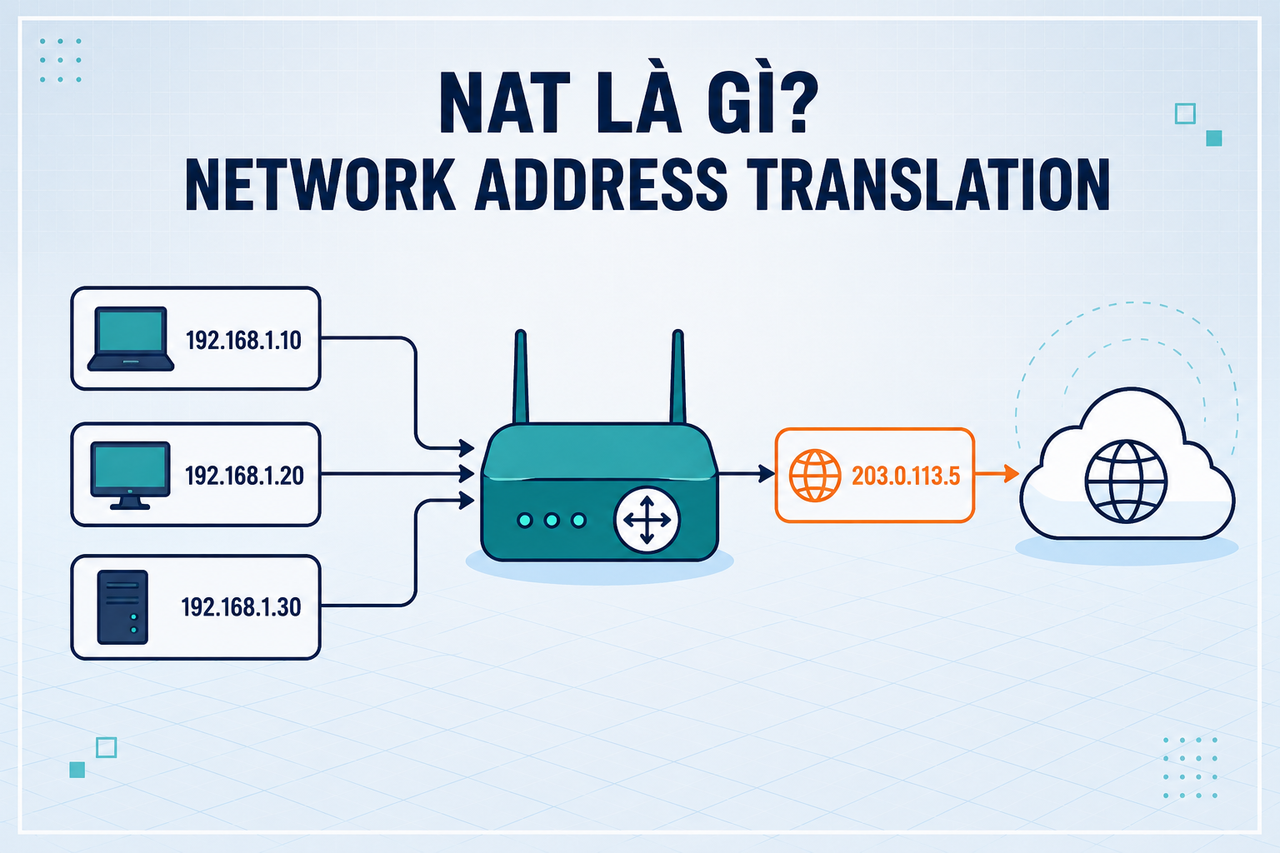
NAT (Network Address Translation) is the networking technique that lets millions of home and office devices share a single public IP address — the practical solution to IPv4 address exhaustion. This article explains what NAT is, how PAT works step by step, and how NAT operates in home routers, cloud VPCs, and Docker.
2019Trusted since
B2BData solutions
Data·AIExpertise
Need data solutions for your business?
AlgoData has helped businesses with data engineering, analytics & AI since 2019.
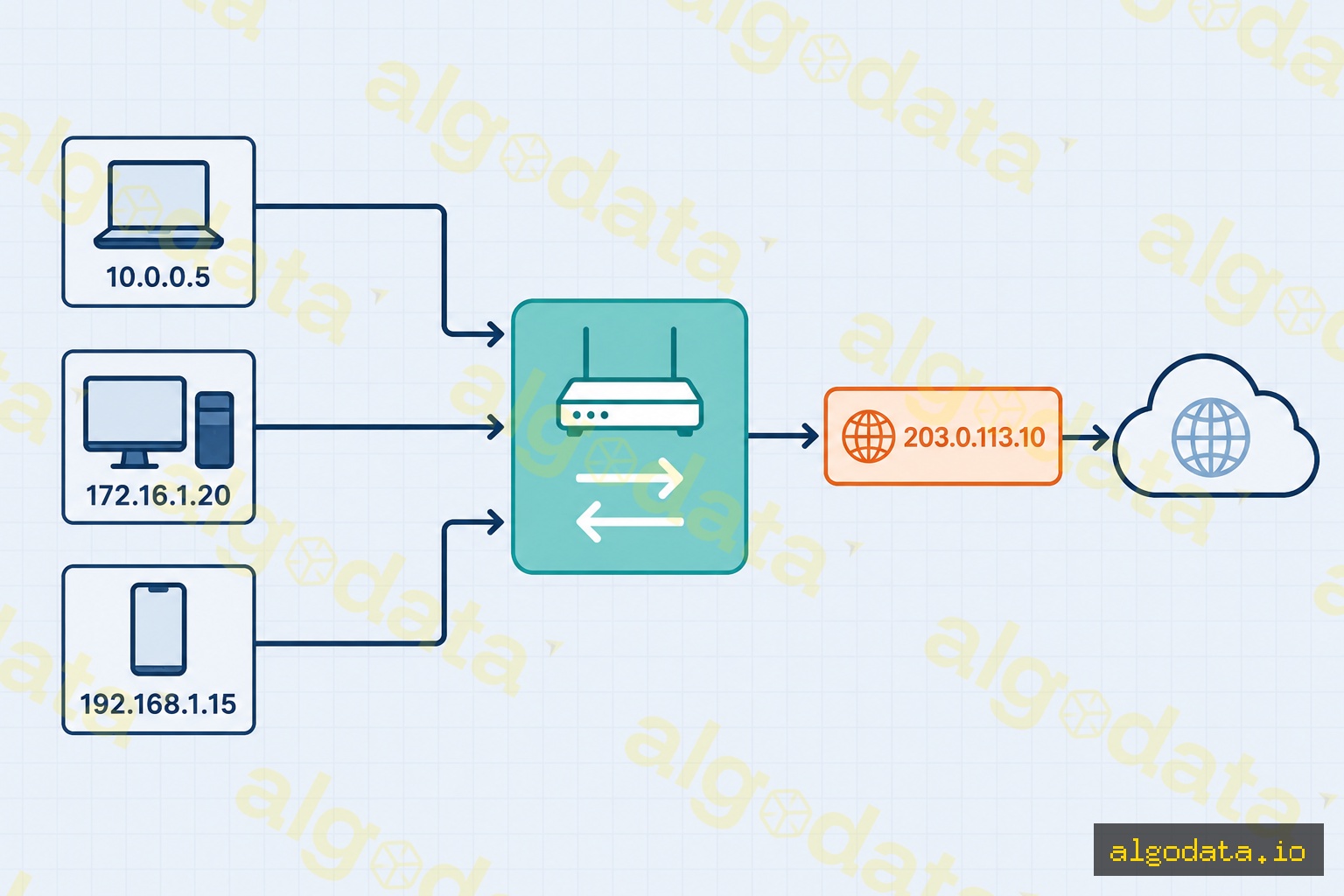
NAT (Network Address Translation) is the process by which a router or firewall modifies IP addresses in packet headers as those packets pass through the device. The original goal: allow multiple devices on a private network to share a single public IP address when communicating with the internet.
In 1996, IANA predicted IPv4 would run out — and they were right (it happened in 2011). NAT became the "life raft" that extended IPv4's lifespan by 15+ years by separating the private address space from the public internet.
Private IP ranges (not routable on the public internet):
10.0.0.0/8 — Class A, up to 16 million internal addresses
172.16.0.0/12 — Class B, commonly used in mid-size enterprises
192.168.0.0/16 — Class C, ubiquitous in home networks (65,536 addresses)
Devices on a local network can use any address in these ranges without registering with IANA, because they never appear directly on the public internet — NAT handles the translation at the boundary.
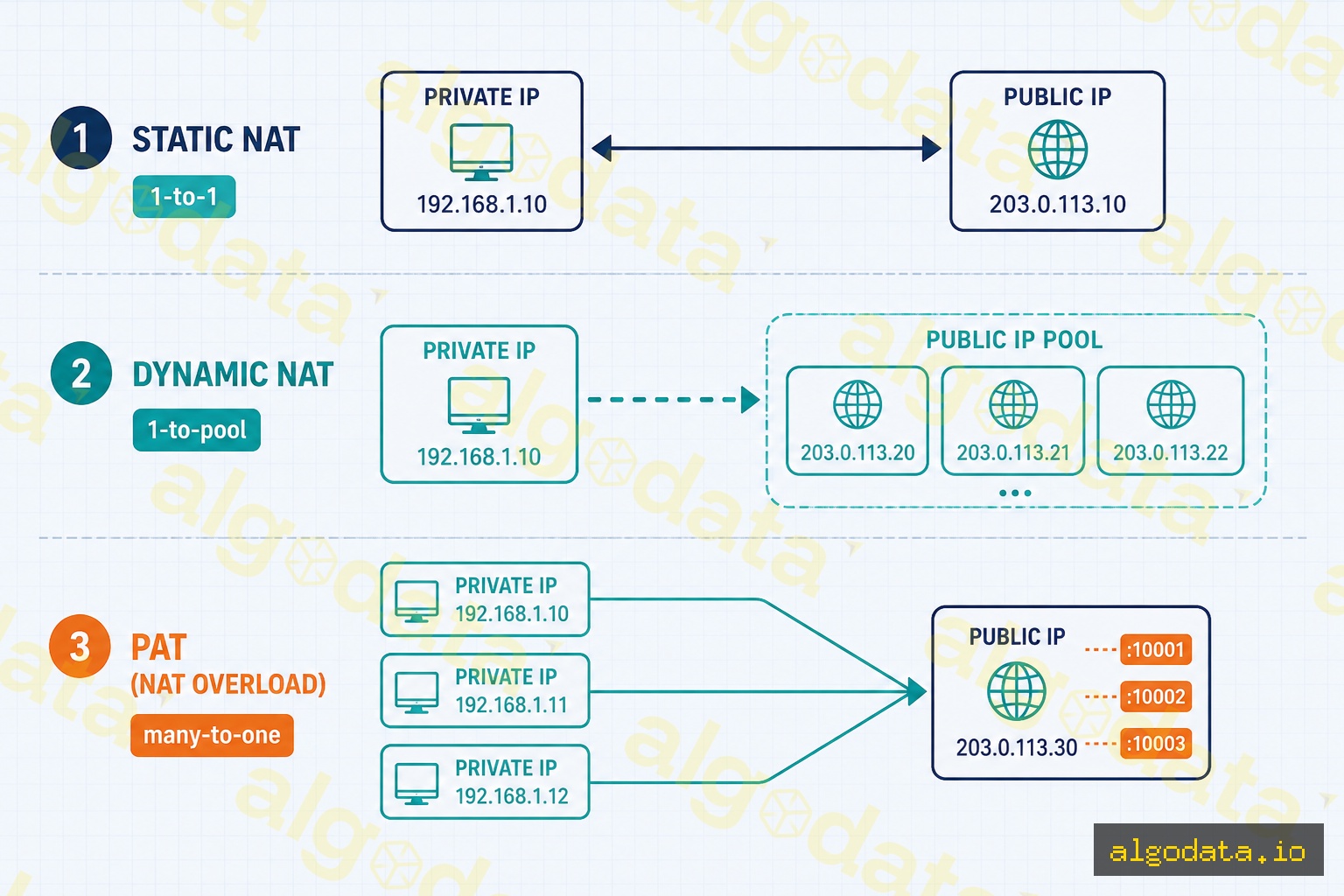
3 Types of NAT
Static NAT
A 1-to-1 fixed mapping: one private IP always corresponds to one fixed public IP. Ideal for web servers and mail servers that need a stable, reachable address so external clients can initiate connections.
The router maintains a pool of public IPs and temporarily assigns one to a device when it needs internet access. When the device disconnects, the IP returns to the pool. Less common today because it still requires multiple public IPs — you don't get the many-to-one efficiency of PAT.
PAT — Port Address Translation (NAT Masquerade)
This is the most common type — many private IPs share a single public IP, distinguished by port number. Also called "IP Masquerading" on Linux or "NAT Overload" on Cisco IOS.
Virtually every home router and most enterprise routers use PAT. A router with a single public IP can simultaneously serve dozens of devices by multiplexing connections across different source port numbers. TCP/UDP ports range from 0–65535, giving the router tens of thousands of slots per public IP.
How PAT Works: Step-by-Step
When a computer at 192.168.1.10 sends a DNS query to 8.8.8.8:53:
Original packet leaves device: src=192.168.1.10:52341, dst=8.8.8.8:53
Router records in NAT table: 192.168.1.10:52341 ↔ 203.0.113.1:40001
DNS response arrives at router: dst=203.0.113.1:40001
Router looks up NAT table → forwards to 192.168.1.10:52341
The NAT table is stateful — the router tracks every active connection. When a connection ends or times out (typically 30 seconds for UDP, 120 seconds for TCP established), the entry is removed and the port slot becomes available again.
Multiple devices can use the same source port internally (e.g., both 192.168.1.10:52341 and 192.168.1.20:52341) — the router gives each a different external port (40001 and 40002) and maps them separately. This is the core insight of PAT: external port number becomes the unique session identifier.
NAT on Linux with iptables
Linux can act as a full NAT router using iptables. This configuration is common for home labs, cloud gateway instances, or self-hosted VPN exit nodes:
Bash
1# Enable IP forwarding (allow Linux to forward packets between interfaces) 2echo1 > /proc/sys/net/ipv4/ip_forward
3 4# Persist across reboots via sysctl 5echo"net.ipv4.ip_forward = 1" >> /etc/sysctl.conf
6sysctl -p
7 8# NAT Masquerade: all traffic from the internal network exits via eth0 9iptables -t nat -A POSTROUTING -o eth0 -j MASQUERADE
1011# Port forwarding (DNAT): route external port 8080 to internal 192.168.1.10:8012iptables -t nat -A PREROUTING -i eth0 -p tcp --dport 8080\
13 -j DNAT --to-destination 192.168.1.10:80
14iptables -A FORWARD -p tcp -d 192.168.1.10 --dport 80 -j ACCEPT
1516# Persist rules across reboots17iptables-save > /etc/iptables/rules.v4
To inspect the current NAT state:
Bash
1# View the connection tracking table (all active NAT mappings) 2conntrack -L
3# or read directly from the kernel 4cat /proc/net/nf_conntrack
5 6# View all iptables NAT rules 7iptables -t nat -L -n -v
8 9# Count active NAT entries10conntrack -L | wc -l
The conntrack command shows every active session being tracked, including protocol, state, timeouts, and the original/reply address tuples. This is the live NAT table you can inspect on a running Linux router.
NAT in Docker
Docker automatically creates NAT rules when launching containers in a bridge network:
Bash
1# Inspect Docker's default bridge network 2docker network inspect bridge
3 4# View iptables NAT rules created by Docker 5sudo iptables -t nat -L DOCKER -n -v
6 7# Port mapping (-p 8080:80) creates a DNAT rule automatically 8docker run -p 8080:80 nginx
9# Equivalent to:10# iptables -t nat -A DOCKER -p tcp --dport 8080 -j DNAT --to 172.17.0.2:80
Containers in the bridge network receive IPs from the 172.17.0.0/16 range by default. When a container sends traffic outbound, the Docker host performs MASQUERADE — replacing the container's IP with the host's IP. Inbound traffic to published ports is DNAT-ed directly to the container's private IP and port.
You can inspect what Docker has created:
Bash
1# See all NAT rules in the POSTROUTING chain (including Docker MASQUERADE)2sudo iptables -t nat -L POSTROUTING -n -v
34# See active connections through Docker NAT5sudo conntrack -L | grep 172.17
Custom Docker networks (created with docker network create) also use NAT by default, but with different subnets (e.g., 172.18.0.0/16, 172.19.0.0/16). This allows containers on different networks to be isolated while still sharing the host's public IP for outbound traffic.
NAT in Cloud (AWS VPC)
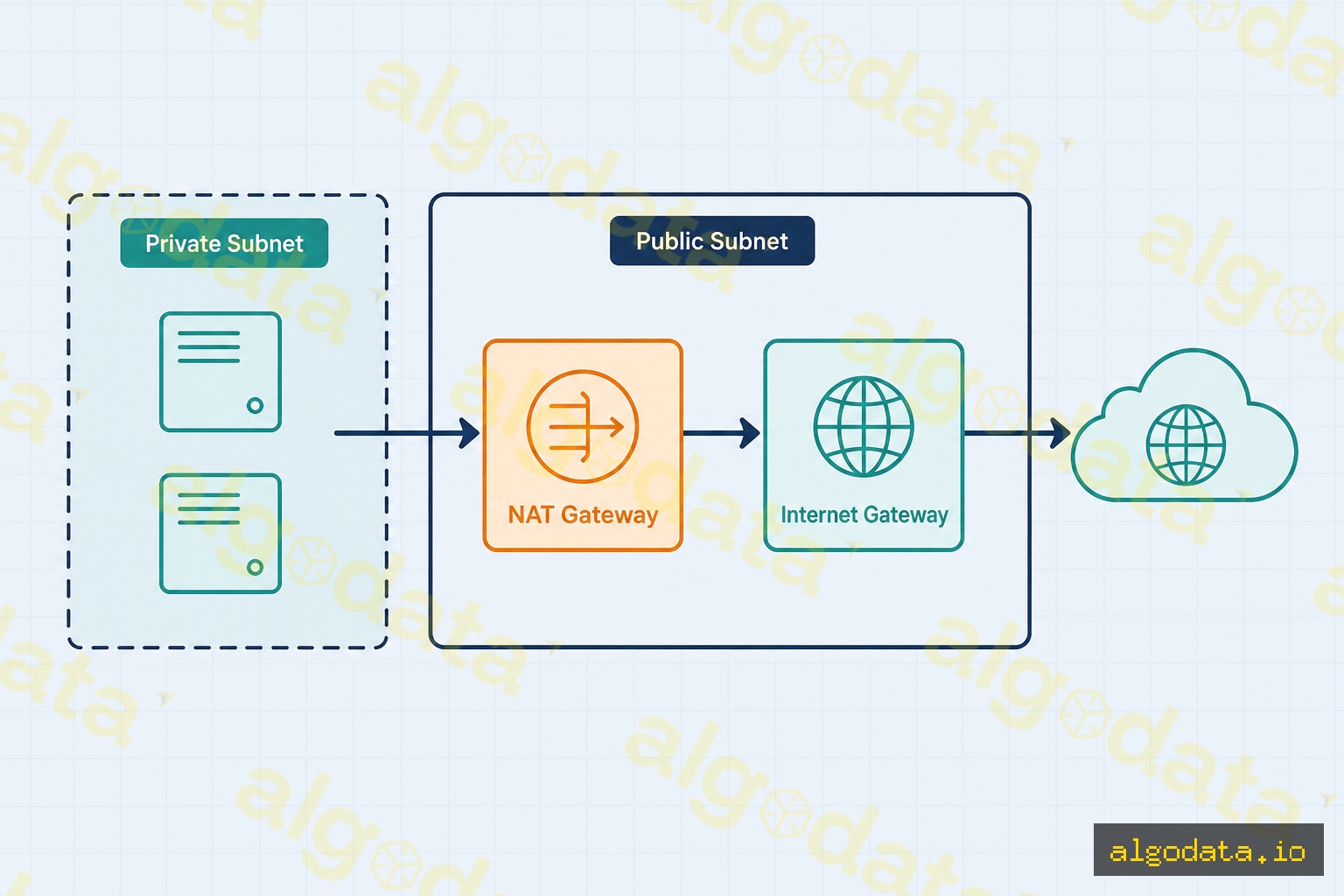
AWS VPC uses a NAT Gateway to give private subnet resources internet access without exposing them with public IPs:
Traffic flow:
Private subnet EC2 → NAT Gateway (in public subnet) → Internet Gateway → Internet
AWS NAT Gateway characteristics:
Has an Elastic IP (static public IP) — useful for IP whitelisting with third-party services
Fully managed — AWS scales it automatically, no administration required
Billed per hour ($0.045/hour) plus data processed ($0.045/GB)
Zone-specific — deploy one NAT Gateway per Availability Zone for high availability
Other cloud providers have equivalent services: Google Cloud NAT, Azure NAT Gateway, and DigitalOcean NAT Gateway all function on the same principles — managed NAT for private resources that need outbound internet access without inbound exposure.
The NAT Traversal Problem
NAT blocks inbound connections — an external host cannot initiate a connection to a device behind NAT because it has no way to reach the private IP. This creates real-world challenges:
VoIP & video calls: WebRTC needs direct P2P connections for low-latency audio/video. Solution: STUN (discovers public IP/port), TURN (relays traffic when P2P fails), and ICE (framework that tries all candidate paths in priority order)
P2P gaming: Game consoles behind NAT need "hole punching" — both endpoints simultaneously send packets to each other to open NAT table entries before the other's packet arrives
Self-hosted servers: Require port forwarding in the router config, or a VPN reverse tunnel (Cloudflare Tunnel, ngrok, Tailscale funnel) that bypasses NAT entirely
Symmetric NAT: The strictest NAT type — allocates a different external port for each destination, making STUN-based P2P unreliable. WebRTC falls back to TURN relay, which increases latency and server costs
NAT type classification (from most permissive to most restrictive):
Full Cone NAT — any external host can reach the internal client after a mapping is established
Restricted Cone NAT — only hosts the client has contacted can send inbound packets
Port Restricted Cone NAT — only the exact IP:port the client contacted can reply
Symmetric NAT — different external port per destination; STUN alone is insufficient
NAT64: Bridging IPv4 and IPv6
As the internet transitions to IPv6, NAT64 allows IPv6-only clients to reach IPv4-only servers:
IPv6 client → NAT64 gateway → IPv4 server
The NAT64 gateway translates IPv6 packets into IPv4 and vice versa at the boundary
Combined with DNS64, which synthesizes IPv6 addresses for IPv4-only domain names, so clients never need to know about the underlying IPv4 infrastructure
NAT64 is increasingly deployed by mobile carriers and enterprise networks that have moved to IPv6-only internally but still need to reach legacy IPv4 services. Apple requires that iOS apps work in NAT64 environments, which is why app developers must test IPv6 compatibility.
NAT (Network Address Translation) is a technique that allows a router to convert the private IP addresses of devices on a local network into a single public IP address when communicating with the internet. This is why billions of devices can connect to the internet even though IPv4 only has ~4.3 billion addresses.
QHow is PAT different from Static NAT?
Static NAT creates a fixed one-to-one mapping: one private IP always maps to one public IP — typically used for servers that need inbound access from the internet. PAT (Port Address Translation), also called NAT Masquerade, maps many private IPs to ONE public IP by distinguishing connections via port numbers — this is the most common NAT type used in home and enterprise routers.
QDoes NAT affect network performance?
Yes, but usually negligibly with modern hardware. The router must maintain a NAT translation table and look up each packet. The real challenges with NAT are: (1) NAT traversal complexity for P2P/VoIP/gaming that requires inbound connections; (2) Full Cone NAT vs Symmetric NAT behavior impacts WebRTC; (3) NAT tables have limits on the number of simultaneous connections.
QHow does Docker use NAT?
Docker bridge networks use NAT (iptables MASQUERADE) by default so containers can access the internet. Containers receive private IPs in the 172.17.0.0/16 range. When a container sends packets outbound, the Docker daemon uses iptables MASQUERADE to replace the container's source IP with the Docker host's IP. Port mapping (-p 8080:80) creates a DNAT rule that forwards traffic to the container.
QDoes IPv6 still need NAT?
In theory, no — IPv6 has 340 undecillion addresses, enough for every atom on Earth. However, NAT66 (NAT for IPv6) still exists in some enterprise deployments for security reasons (hiding internal network topology) or when an ISP only allocates a small IPv6 prefix. The trend is toward end-to-end IPv6 without NAT.
QWhat is NAT traversal?
NAT traversal is a set of techniques that allow two devices behind NAT to connect directly — because NAT blocks inbound connections by default. Common techniques include: STUN (discovering public IP/port), TURN (relay server when direct connection fails), and ICE (a framework combining STUN+TURN used in WebRTC). VoIP, WebRTC, and peer-to-peer games all rely on NAT traversal.