CDN (Content Delivery Network) is a distributed network that speeds up websites by storing copies of content at servers closest to users. This article explains in detail what a CDN is, how it works, its benefits, popular providers, and how to implement CDN for your website.
What is a CDN?
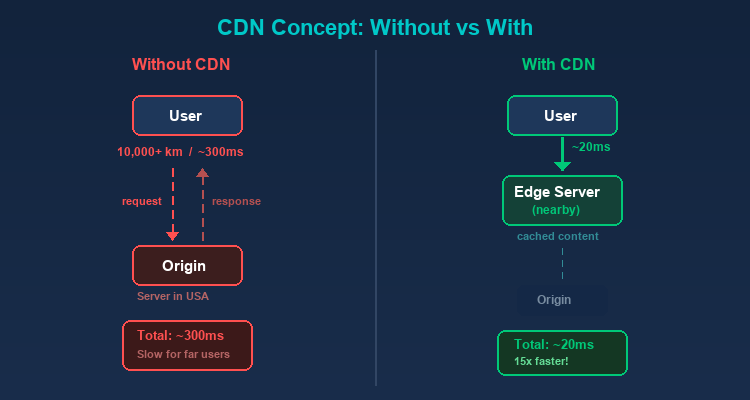
CDN (Content Delivery Network) is a system of distributed servers located across different geographic regions worldwide, designed to deliver web content to users as quickly as possible. Instead of every request going to the origin server, a CDN stores copies of content (cache) at Points of Presence (PoPs) closest to the user.
A Visual Example
Suppose your origin server is located in the United States. When a user in Vietnam visits your website:
Without CDN: The request must travel from Vietnam to the US, fetch the data, and return — a distance of tens of thousands of kilometers, with response times of 200-500ms.
With CDN: The request only needs to reach the nearest PoP in Singapore or Hong Kong — reducing response time to 20-50ms.
2019Trusted since
B2BData solutions
Data·AIExpertise
Need data solutions for your business?
AlgoData has helped businesses with data engineering, analytics & AI since 2019.
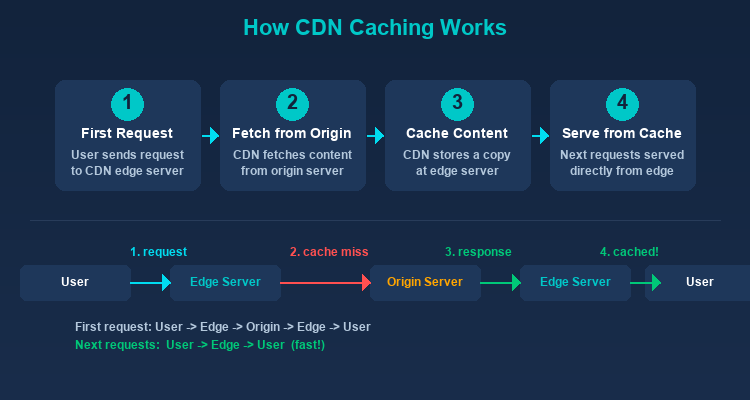
When the first request for content arrives, the CDN fetches it from the origin server, stores a copy at the nearest edge server, and delivers it to the user. Subsequent requests for the same content are served directly from the edge server without going back to the origin.
DNS Routing
When a user visits a website using a CDN, the DNS system resolves the domain name to the nearest edge server instead of the origin server. This process is completely transparent — users don't notice any difference.
Anycast Network
Many CDNs use Anycast technology, allowing multiple servers to share the same IP address. Requests are automatically routed to the nearest server based on network location.
Cache Invalidation
When content on the origin server changes, the CDN needs to update its cache. Common methods include:
TTL (Time to Live): Each piece of content has a defined lifespan; once expired, it's automatically re-fetched from the origin.
Purge: Manually clearing cache when immediate updates are needed.
Stale-while-revalidate: Serving old content to users while silently updating from the origin.
Types of Content CDN Delivers
Static Content
This is the primary strength of CDNs:
Images: JPEG, PNG, WebP, SVG
CSS and JavaScript: Stylesheet and script files
Video and Audio: Streaming media
Fonts: Web fonts (WOFF2, TTF)
Documents: PDFs, downloadable files
Dynamic Content
Modern CDNs also optimize dynamic content through:
Edge Computing: Processing logic at edge servers near users.
Dynamic Site Acceleration (DSA): Optimizing the path between edge and origin for non-cacheable content.
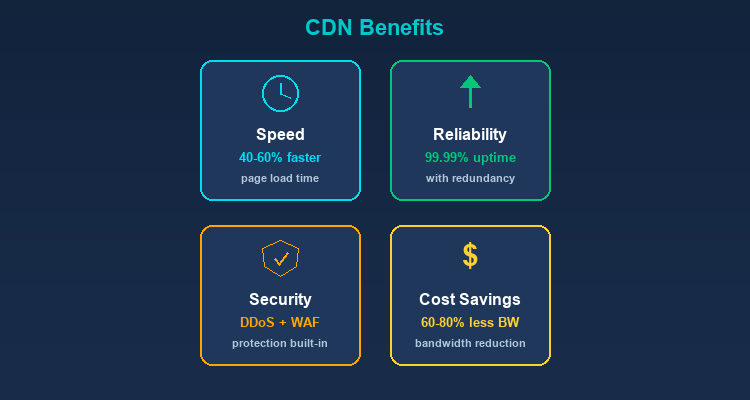
The most obvious benefit. By serving content from the nearest server, CDNs dramatically reduce page load times. Website speed directly impacts:
User Experience: 53% of mobile users leave a page that takes longer than 3 seconds to load.
SEO: Google uses page speed (Core Web Vitals) as a ranking factor.
Conversion Rate: Each additional second of load time can reduce conversion rates by 7%.
Speed directly impacts revenue
For an e-commerce website generating $50,000/day, each additional second of load time can equate to $3,500 in lost revenue. CDN isn't an expense — it's an investment with measurable ROI.
Reduced Load on Origin Server
CDNs serve the majority of requests, allowing the origin server to focus on dynamic content and API calls. This:
Reduces bandwidth and server costs.
Increases the capacity to serve concurrent users.
Allows the origin server to use lower-spec hardware.
High Availability
CDNs with multiple PoPs create redundancy:
If one edge server fails, traffic is automatically redirected to another.
The website remains operational even if the origin server is temporarily down.
Better handling of traffic spikes.
Security
CDNs provide numerous security features:
DDoS Protection: Distributing attack traffic across multiple global servers, absorbing and filtering malicious traffic before it reaches the origin.
Ideal for websites that need frequent content updates.
Google Cloud CDN
Integrated with Google Cloud Platform.
Leverages Google's global network.
Best for businesses using GCP.
CDN and Proxy — The Connection
CDN and Proxy share many similarities — both act as intermediaries between client and server:
CDN as a Reverse Proxy
Essentially, a CDN is a globally distributed form of reverse proxy. Edge servers receive requests from clients, process them (cache or forward), and return responses — exactly how a reverse proxy works.
Proxy in CDN Testing
When testing CDNs, proxies help you simulate requests from different geographic locations. TMProxy with IPs from 200+ countries allows you to verify whether your CDN is correctly distributing content to each region.
Combining CDN and Proxy for Web Scraping
Many websites using CDNs have strong anti-bot mechanisms. Residential proxies from TMProxy help bypass these protection layers effectively thanks to real ISP IPs.
How to Implement CDN for Your Website
Choose a CDN Provider
Consider these factors:
Number and location of PoPs.
Cost (by bandwidth or requests).
Included security features.
Technical support.
Configure DNS
Change DNS records to point your domain to the CDN instead of directly to the origin server. This typically involves changing the CNAME record or using the CDN's nameservers.
Configure Caching Rules
Set up appropriate caching rules:
Static assets: long cache duration (1 year for versioned files).
HTML: short cache or no cache.
API responses: typically no cache or very short cache.
Test and Optimize
Use tools like GTmetrix and PageSpeed Insights to measure performance.
Check cache hit ratio — aim for above 90%.
Cache hit ratio below 80% — review your configuration
Low cache hit ratio is usually caused by: TTLs that are too short, too many query string variations, or improperly cached static assets. Use Cache-Control: public, max-age=31536000, immutable for versioned files (like style.abc123.css).
Monitor origin offload — the percentage of traffic handled by the CDN.
CDN Provider Comparison
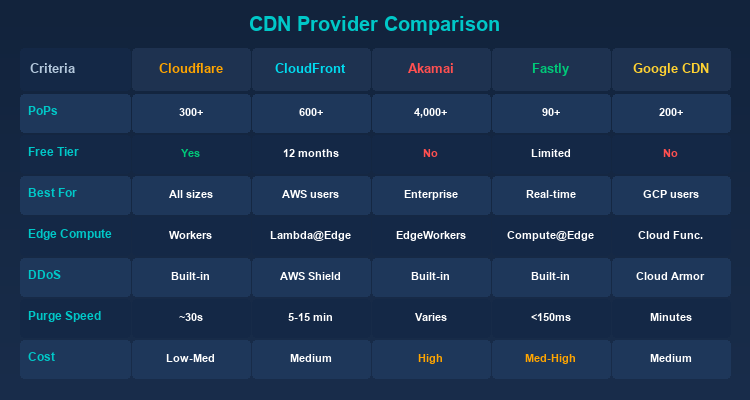
Here's a detailed comparison table of popular CDN providers to help you make an informed choice:
Criteria
Cloudflare
CloudFront
Akamai
Fastly
Google CDN
PoP Count
300+
600+
4,000+
90+
200+
Free Tier
Yes (generous)
Yes (12 months)
No
Yes (limited)
No
Edge Computing
Workers
Lambda@Edge
EdgeWorkers
Compute@Edge
Cloud Functions
DDoS Protection
Built-in
AWS Shield
Built-in
Built-in
Cloud Armor
Purge Speed
~30s
5-15 min
Plan-dependent
<150ms
Several min
Best For
All sizes
AWS users
Enterprise
Real-time content
GCP users
Cost
Low - Medium
Medium
High
Medium - High
Medium
Selection Guide:
Personal website/startup: Cloudflare (the free tier is already very powerful).
While CDNs offer many benefits, not every website needs one:
Locally-Focused Website
If your website only serves users in a single city or small region (e.g., a local restaurant, neighborhood shop), and the server is located near your users, a CDN won't create a significant speed difference.
Internal Applications (Intranet)
Internal applications accessed only within a company's LAN don't need a CDN. Data already travels through a high-speed internal network; adding a CDN only introduces unnecessary complexity.
Development and Staging Environments
Dev/staging servers don't need CDN since only a few developers access them. CDN caching can actually make debugging harder as you might see cached versions of content instead of the latest updates.
Low-Traffic Websites
Websites with under a few hundred visits per day may not see significant benefits from a CDN. A well-configured single server can handle this traffic without any issues.
Fully Dynamic Content
If 100% of your website content is dynamic (no static files, every request returns different data), a traditional CDN will be less effective since there's nothing to cache. However, modern CDNs with Dynamic Site Acceleration can still optimize the delivery path.
CDN Performance Benchmarks
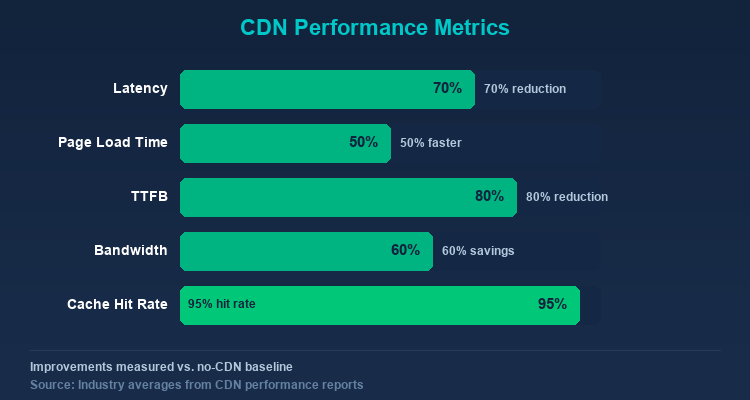
Here are average performance metrics when using a CDN, based on data from multiple industry studies and reports:
Metric
Without CDN
With CDN
Improvement
Average Latency
100-300ms
20-80ms
50-70% reduction
Page Load Time
3-8 seconds
1-3 seconds
40-60% reduction
Time to First Byte (TTFB)
200-800ms
20-80ms
75-90% reduction
Origin Server Bandwidth
100%
20-40%
60-80% reduction
Cache Hit Ratio
N/A
90-98%
—
CDN Performance Test
Tested on 2026-02-15Cloudflare Free
Test results on a WordPress website with 50+ posts, standard theme, hosted in US (DigitalOcean):
Metric
Before CDN
After CDN (Cloudflare)
Improvement
TTFB (from Vietnam)
450ms
35ms
-92%
Page Load
4.2s
1.8s
-57%
Cache Hit Ratio
N/A
94%
—
Bandwidth Saved
0%
72%
—
Cloudflare Free reduced TTFB from Vietnam by over 90% thanks to the Singapore PoP. Cache hit ratio reached 94% after 24 hours of operation.
CDN Best Practices for Maximum Performance
To get the most out of your CDN implementation, follow these optimization tips:
Optimize cache TTLs: Set long TTLs (1 year) for versioned static assets (e.g., style.abc123.css) and shorter TTLs for HTML pages. Use cache-busting techniques like file hash in filenames instead of short TTLs.
Enable image optimization: Most CDNs offer automatic image compression, format conversion (WebP/AVIF), and responsive resizing. This alone can reduce page weight by 40-60%.
Use HTTP/2 or HTTP/3: Modern CDNs support HTTP/2 multiplexing and HTTP/3 (QUIC), which significantly improve performance for pages with many assets by eliminating head-of-line blocking.
Implement preconnect and prefetch: Use <link rel="preconnect"> for your CDN domain and <link rel="prefetch"> for critical resources to reduce perceived load times.
Monitor cache hit ratios: Regularly check your CDN analytics dashboard. A cache hit ratio below 85% indicates potential misconfiguration in caching rules that should be investigated and corrected.
Conclusion:CDN is an essential component for any website that wants to ensure speed, security, and scalability. With the growth of edge computing, CDNs are no longer just about caching content — they've become platforms for running application logic closest to users.
A CDN (Content Delivery Network) is a system of distributed servers across the globe that stores copies of web content at points closest to users. When a request comes in, the CDN serves it from the nearest edge server instead of the origin server, reducing response time to 20-50ms.
QDo small websites need a CDN?
Not always. If your website only serves local users, has low traffic (a few hundred visits/day), or is an internal application, a CDN won't make a big difference. However, with Cloudflare's free tier available, most websites should use a CDN.
QWhich free CDN is the best?
Cloudflare is the most popular free CDN with a generous free tier that includes 300+ global PoPs, DDoS protection, WAF, and integrated SSL. It's suitable for personal websites and startups.
QDoes CDN help improve SEO?
Yes. Google uses Core Web Vitals (page speed) as a ranking factor. CDN reduces page load time by 40-60%, improves TTFB, and increases availability — all of which positively impact search rankings.
QWhat is the difference between CDN and web hosting?
Web hosting stores your website's original content on a single server (origin). A CDN is a supplementary distribution network that stores copies of static content on multiple servers worldwide. CDN doesn't replace hosting — it complements it to speed up and protect your website.