
Nginx là gì? Web server, reverse proxy và load balancer trong một
DevOps

Nginx là gì? Web server, reverse proxy và load balancer trong một

Nginx là gì? Web server hiệu năng cao kiêm reverse proxy và load balancer, phục vụ hàng triệu request/giây. Tìm hiểu cấu hình, use case thực tế và so sánh với Apache.

Trong series: DevOps
  1. 1 API Gateway là gì? Cổng vào thống nhất cho Microservices
  2. 2 NAT là gì? Network Address Translation trong mạng máy tính
  3. 3 GitLab CI/CD là gì? Pipeline tự động hóa build, test và deploy
  4. 4 Kafka là gì? Nền tảng Event Streaming phân tán cho hệ thống lớn
  5. 5 Serverless là gì? FaaS, Cold Start và khi nào nên dùng Serverless
  6. 6 Subnet và CIDR là gì? Chia mạng IP và định tuyến hiện đại
  7. 7 Kubernetes là gì? Nền tảng điều phối container phổ biến nhất hiện nay
  8. 8 Proxy là gì? Forward Proxy, Reverse Proxy và SOCKS5
  9. 9 Nginx là gì? Web server, reverse proxy và load balancer trong một
✦ Tóm tắt nhanh
Nginx là gì? Web server hiệu năng cao kiêm reverse proxy và load balancer, phục vụ hàng triệu request/giây. Tìm hiểu cấu hình, use case thực tế và so sánh với Apache.
Bài này thế nào?

Nginx (đọc là "engine-x") ra đời năm 2004, ban đầu để giải quyết bài toán C10K — phục vụ 10.000 kết nối đồng thời mà Apache thời đó chưa làm tốt. Ngày nay Nginx là web server phổ biến nhất thế giới, chạy trên hơn 34% số website toàn cầu và là lựa chọn mặc định cho hầu hết pipeline DevOps hiện đại.

Nginx là gì?

Nginx là phần mềm mã nguồn mở đa năng, hoạt động đồng thời như: web server phục vụ file tĩnh, reverse proxy (proxy ngược) chuyển tiếp request đến backend, và load balancer phân phối tải giữa nhiều server. Kiến trúc event-driven bất đồng bộ cho phép một worker process xử lý hàng nghìn kết nối cùng lúc mà không tạo thêm thread hay process mới — khác hẳn mô hình thread-per-request của Apache.

Hình dung Nginx như tổng đài lễ tân thông minh của một tòa nhà văn phòng: khách đến (HTTP request) luôn gặp lễ tân trước, lễ tân lập tức phục vụ yêu cầu đơn giản như phát tài liệu sẵn có (file tĩnh), còn yêu cầu phức tạp hơn thì chuyển đến đúng phòng ban (backend service) mà không để khách tự mò lên tầng.

Ba vai trò cốt lõi của Nginx

Web server — phục vụ nội dung tĩnh tốc độ cao

Nginx phục vụ HTML, CSS, JavaScript, ảnh và video trực tiếp từ disk với độ trễ cực thấp. Vì không cần spawn process hay thread mới cho mỗi file, Nginx xử lý hàng triệu request/giây ngay cả trên phần cứng trung bình. Đây là lý do các CDN và hosting tĩnh (Netlify, Vercel tự xây) thường dùng Nginx ở tầng edge.

Reverse proxy — lớp trung gian bảo vệ backend

Khi đặt Nginx trước một ứng dụng backend (Node.js, Python/Gunicorn, Go, PHP-FPM), Nginx đóng vai reverse proxy: nhận toàn bộ request từ internet, kết thúc TLS (SSL termination), tùy chọn cache response, nén gzip, rồi chuyển tiếp qua proxy_pass đến backend chạy ở localhost. Backend hoàn toàn bị che khuất khỏi internet trực tiếp.

Load balancer — phân phối tải giữa nhiều instance

Khi hệ thống có nhiều instance backend (scale-out), Nginx upstream block đóng vai load balancer Layer 7, phân phối request theo các thuật toán round-robin, least_conn hoặc ip_hash. Đây là nền tảng để triển khai kiến trúc microservices với zero downtime deployment.

So sánh Nginx, Apache và IIS

So sánh Nginx vs Apache vs IIS
Tested on 2026-06-12 Nginx 1.26 / Apache 2.4 / IIS 10
| Tiêu chí | Nginx | Apache | IIS | |---|---|---|---| | Kiến trúc | Event-driven (async) | Process/thread-per-request | Thread pool (Windows) | | Hiệu năng tải cao | Rất cao | Trung bình | Cao (Windows) | | Cấu hình | nginx.conf đơn giản | httpd.conf + .htaccess | GUI + XML | | Module động | Không (biên dịch tĩnh) | Có (.so loadable) | Có (IIS modules) | | SSL termination | Tốt | Tốt | Tốt | | Hỗ trợ nền tảng | Linux/macOS/Windows | Đa nền tảng | Windows only | | Giá | Miễn phí (NGINX Plus: trả phí) | Miễn phí | Kèm Windows Server | | Phù hợp nhất | Reverse proxy, static, K8s Ingress | PHP legacy, .htaccess linh hoạt | Stack Microsoft (.NET, [IIS](/iis/)) |
Khi nào chọn Apache thay Nginx?

Nếu ứng dụng dựa nhiều vào file .htaccess per-directory (shared hosting, WordPress plugin tự ghi rewrite rules), Apache linh hoạt hơn vì đọc .htaccess mỗi request. Nginx không hỗ trợ .htaccess — toàn bộ cấu hình phải nằm trong file nginx.conf trung tâm.

Cấu hình Nginx cơ bản
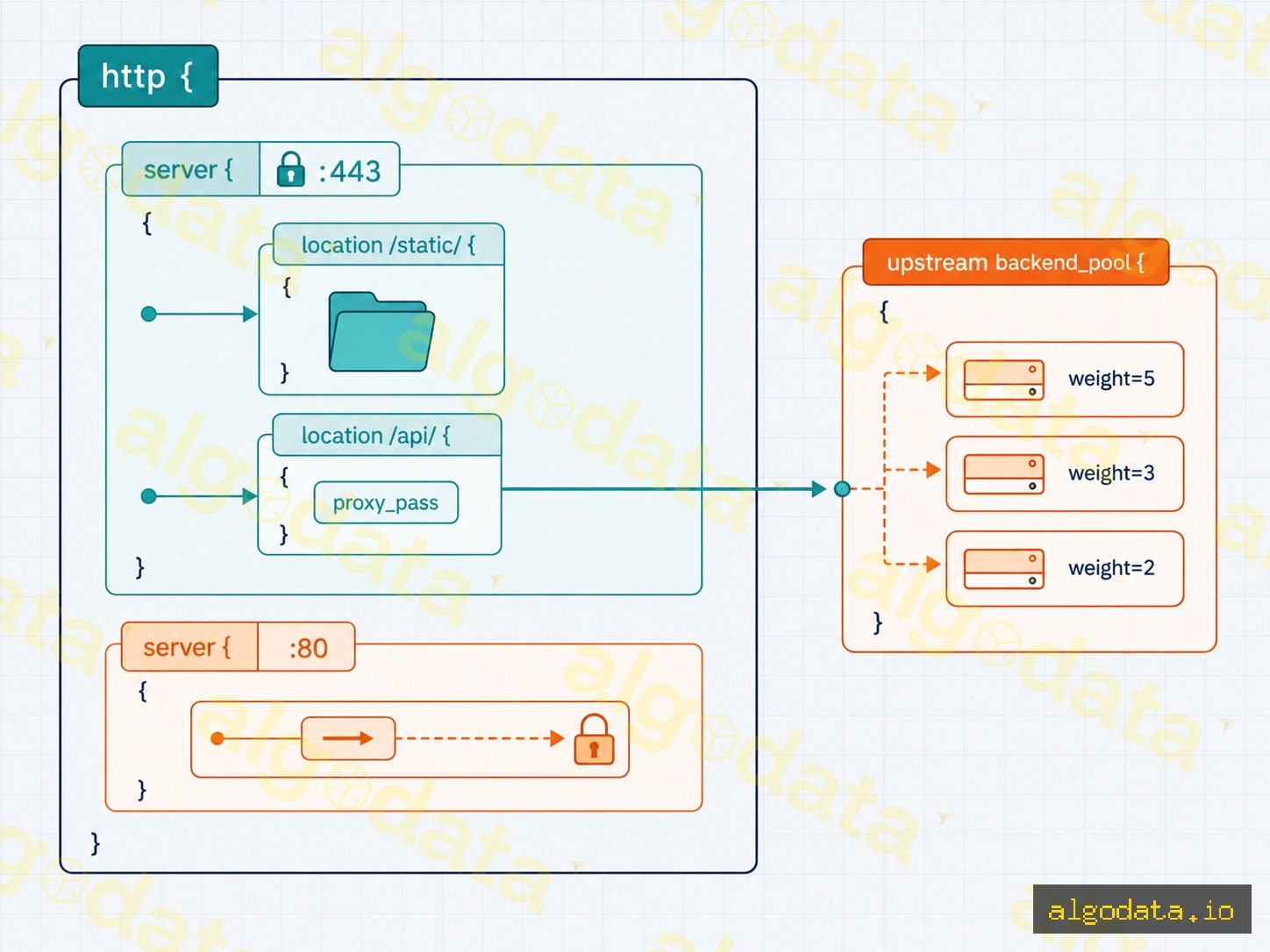
Dưới đây là file nginx.conf hoàn chỉnh bao gồm server block phục vụ file tĩnh, reverse proxy đến backend, và upstream load balancing.

nginx
 1# /etc/nginx/nginx.conf
 2worker_processes auto;          # tự chọn số worker = số CPU core
 3events {
 4    worker_connections 1024;    # kết nối tối đa mỗi worker
 5}
 6
 7http {
 8    # --- Upstream: pool backend cho load balancing ---
 9    upstream app_backend {
10        least_conn;             # thuật toán: ưu tiên server ít kết nối nhất
11        server 10.0.0.10:8080 weight=3;
12        server 10.0.0.11:8080 weight=2;
13        server 10.0.0.12:8080 weight=1 max_fails=3 fail_timeout=30s;
14    }
15
16    # --- Server block: HTTPS + reverse proxy ---
17    server {
18        listen 443 ssl http2;
19        server_name example.com www.example.com;
20
21        ssl_certificate     /etc/letsencrypt/live/example.com/fullchain.pem;
22        ssl_certificate_key /etc/letsencrypt/live/example.com/privkey.pem;
23        ssl_protocols       TLSv1.2 TLSv1.3;
24        ssl_ciphers         HIGH:!aNULL:!MD5;
25
26        # Phục vụ file tĩnh trực tiếp (ảnh, CSS, JS)
27        location /static/ {
28            root /var/www/myapp;
29            expires 30d;
30            add_header Cache-Control "public, immutable";
31        }
32
33        # Proxy mọi request khác đến backend pool
34        location / {
35            proxy_pass         http://app_backend;
36            proxy_set_header   Host              $host;
37            proxy_set_header   X-Real-IP         $remote_addr;
38            proxy_set_header   X-Forwarded-For   $proxy_add_x_forwarded_for;
39            proxy_set_header   X-Forwarded-Proto $scheme;
40            proxy_connect_timeout 5s;
41            proxy_read_timeout    60s;
42        }
43    }
44
45    # --- Redirect HTTP → HTTPS ---
46    server {
47        listen 80;
48        server_name example.com www.example.com;
49        return 301 https://$host$request_uri;
50    }
51}

Giải thích các directive quan trọng

  • worker_processes auto — Nginx tự phát hiện số CPU core và spawn đúng số worker, tối đa hóa throughput.
  • upstream — định nghĩa pool backend; directive least_conn chọn server ít kết nối nhất thay vì round-robin mặc định.
  • proxy_set_header X-Real-IP — chuyển IP thực của client đến backend, nếu không backend chỉ thấy IP của Nginx.
  • expires 30d — bật HTTP caching cho file tĩnh, giảm tải đáng kể cho server.

Use case thực tế

Phục vụ website tĩnh / JAMstack

Nginx phục vụ toàn bộ thư mục build của Next.js, Hugo hay bất kỳ static site generator nào chỉ với vài dòng location block. Tốc độ phục vụ file tĩnh của Nginx gần đạt giới hạn tốc độ đĩa/network — không framework nào ở tầng ứng dụng cạnh tranh được.

Reverse proxy cho ứng dụng backend

Đây là use case phổ biến nhất: Nginx lắng nghe port 80/443 công khai, ứng dụng backend chạy trên localhost:3000 hoặc localhost:8080 không cần expose ra ngoài. Nginx xử lý TLS, gzip, slow client connection — backend chỉ cần lo business logic.

SSL termination

Thay vì cài TLS riêng trên từng backend service, tập trung toàn bộ certificate management tại Nginx. Backend giao tiếp với Nginx qua HTTP nội bộ (plain text trong LAN riêng) — đơn giản hóa configuration và renewal certificate với Certbot.

Rate limiting — chống lạm dụng API

nginx
 1http {
 2    limit_req_zone $binary_remote_addr zone=api_limit:10m rate=10r/s;
 3
 4    server {
 5        location /api/ {
 6            limit_req zone=api_limit burst=20 nodelay;
 7            proxy_pass http://app_backend;
 8        }
 9    }
10}

Directive limit_req_zone tạo vùng nhớ chia sẻ theo IP, giới hạn 10 request/giây với burst tối đa 20. Request vượt ngưỡng nhận HTTP 429 ngay tại Nginx, không tiêu tốn tài nguyên backend.

Nginx làm Ingress Controller trong Kubernetes
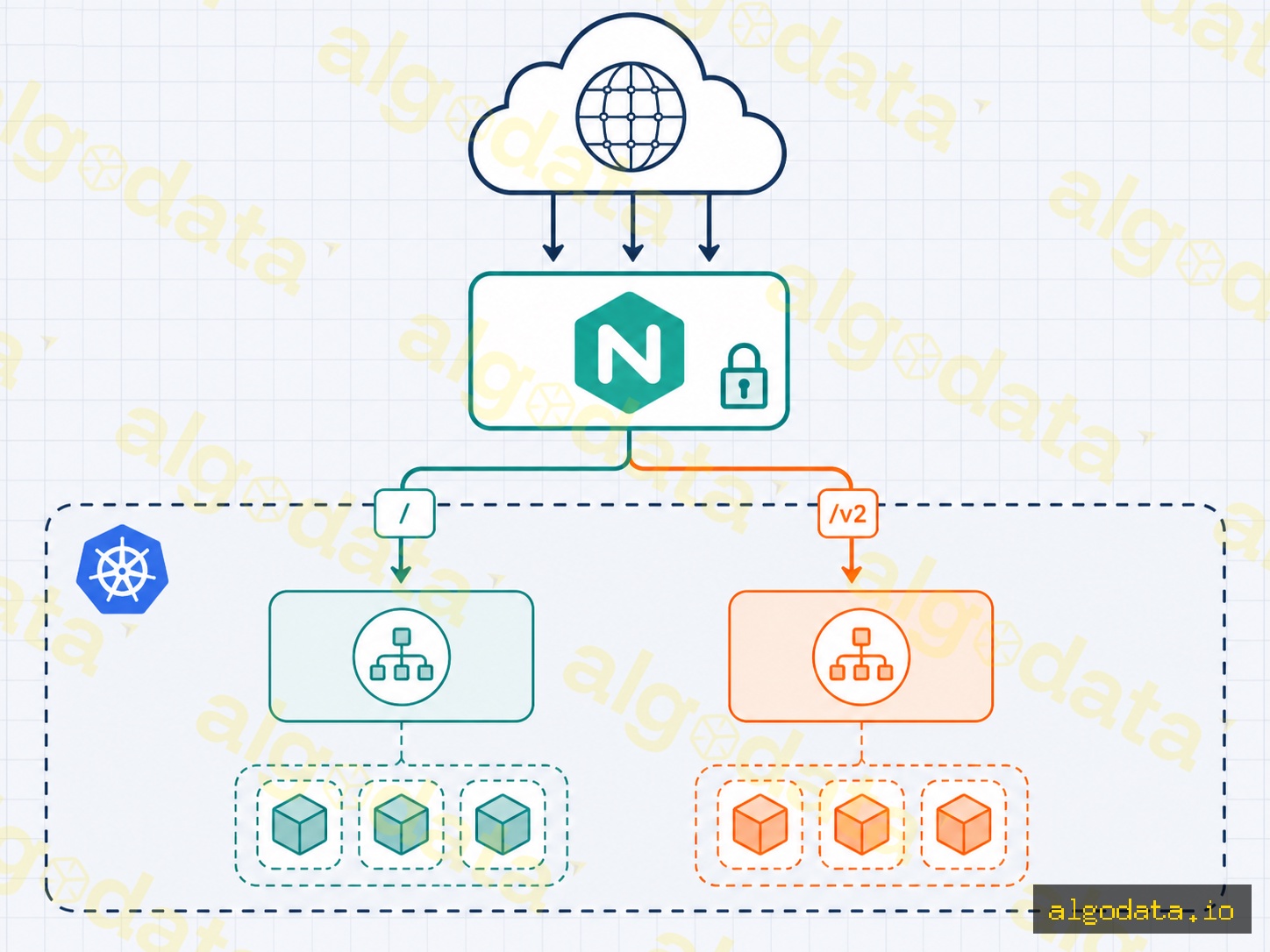
Trong cụm Kubernetes, Nginx Ingress Controller là cách phổ biến nhất để expose service HTTP/HTTPS ra ngoài cluster. Một Ingress resource dạng YAML ánh xạ domain và path đến Service nội bộ:

YAML
 1apiVersion: networking.k8s.io/v1
 2kind: Ingress
 3metadata:
 4  name: myapp-ingress
 5  annotations:
 6    nginx.ingress.kubernetes.io/rewrite-target: /
 7    nginx.ingress.kubernetes.io/limit-rps: "100"
 8spec:
 9  ingressClassName: nginx
10  tls:
11    - hosts:
12        - api.example.com
13      secretName: tls-secret
14  rules:
15    - host: api.example.com
16      http:
17        paths:
18          - path: /v1
19            pathType: Prefix
20            backend:
21              service:
22                name: api-v1-svc
23                port:
24                  number: 80
25          - path: /v2
26            pathType: Prefix
27            backend:
28              service:
29                name: api-v2-svc
30                port:
31                  number: 80

API Gateway là gì? Cổng vào kiến trúc microservices

Nginx Ingress Controller đọc Ingress resource và tự động reload cấu hình nginx.conf bên trong mà không cần restart pod. Đây là cách các hệ thống microservices deploy rolling update: shift traffic dần từ /v1 sang /v2 chỉ bằng cách chỉnh path rule.

Kiểm tra cấu hình trước khi reload

Luôn chạy nginx -t trước khi nginx -s reload. Lệnh này kiểm tra syntax toàn bộ nginx.conf và các file include, trả về lỗi cụ thể nếu có. Reload với config lỗi sẽ bị từ chối tự động — Nginx không bao giờ áp dụng config sai và gây downtime.

Tối ưu hiệu năng Nginx

Ngoài cấu hình cơ bản, một số directive thường bị bỏ qua nhưng có tác động lớn đến throughput:

nginx
1http {
2    sendfile        on;       # dùng syscall sendfile() — zero-copy từ disk đến socket
3    tcp_nopush      on;       # gom nhiều TCP segment lại trước khi gửi
4    tcp_nodelay     on;       # tắt Nagle algorithm cho keep-alive
5    keepalive_timeout 65;     # giữ kết nối TCP 65 giây (giảm TLS handshake lặp)
6    gzip            on;
7    gzip_types      text/plain text/css application/json application/javascript;
8    gzip_min_length 1000;     # không nén file < 1KB (overhead > lợi ích)
9}

sendfile on là tối ưu quan trọng nhất khi phục vụ file tĩnh lớn — kernel chuyển dữ liệu trực tiếp từ page cache ra socket mà không copy qua user space.

Kết luận: Nginx không chỉ là web server — đây là lớp điều phối traffic toàn diện cho kiến trúc hiện đại. Dù bạn đang serve SPA tĩnh, proxy cho backend Node.js, cân bằng tải microservices, hay cần Ingress Controller cho Kubernetes, Nginx cung cấp giải pháp nhất quán, hiệu năng cao và cấu hình minh bạch trong một single binary.
Nguồn tham khảo

Câu hỏi thường gặp

Câu hỏi thường gặpQ&A
Nginx khác Apache ở điểm gì quan trọng nhất?
Apache xử lý mỗi request bằng một thread/process riêng (prefork/worker MPM), nên tiêu tốn RAM khi có nhiều kết nối đồng thời. Nginx dùng kiến trúc event-driven bất đồng bộ — một worker process có thể xử lý hàng nghìn kết nối cùng lúc với bộ nhớ rất thấp. Với traffic cao và nhiều kết nối idle (keep-alive), Nginx chiếm ưu thế rõ rệt về hiệu năng.
Reverse proxy là gì và tại sao nên dùng Nginx làm reverse proxy?
Reverse proxy (proxy ngược) là server trung gian đứng trước các server nội bộ, nhận request từ client rồi chuyển tiếp đến backend phù hợp. Nginx làm reverse proxy để che giấu địa chỉ backend, tập trung SSL termination, bật caching và gzip, đồng thời bảo vệ ứng dụng khỏi tấn công trực tiếp.
Nginx cân bằng tải như thế nào?
Nginx hỗ trợ nhiều thuật toán cân bằng tải qua directive upstream: round-robin (mặc định), least_conn (ít kết nối nhất), ip_hash (cùng IP đến cùng server) và random. Mỗi server trong upstream block có thể gán weight và max_fails để kiểm soát tỷ lệ phân phối và loại server lỗi khỏi pool tự động.
Nginx có thay thế được application server không?
Không nên. Nginx không thể chạy code Python, PHP, Node.js trực tiếp. Vai trò đúng của Nginx là nhận request từ internet, phục vụ file tĩnh ngay lập tức, rồi proxy_pass phần còn lại đến Gunicorn, PHP-FPM, Node.js process hay bất kỳ app server nào đang lắng nghe. Sự kết hợp này tối ưu cả hiệu năng lẫn bảo mật.
Cấu hình SSL/TLS trên Nginx như thế nào?
Trong server block lắng nghe port 443, thêm ssl_certificate trỏ đến file .pem và ssl_certificate_key trỏ đến private key. Bật TLS 1.2/1.3 qua ssl_protocols, chọn cipher suite mạnh qua ssl_ciphers. Dùng listen 80 kết hợp return 301 để tự động redirect HTTP sang HTTPS. Với Let's Encrypt, công cụ Certbot tự động ghi các directive này.

Nginx (pronounced "engine-x") was created in 2004, originally to solve the C10K problem — serving 10,000 concurrent connections that Apache struggled with at the time. Today Nginx is the world's most popular web server, running on more than 34% of all websites globally and serving as the default choice for most modern DevOps pipelines.

What is Nginx?

Nginx is a versatile open-source software platform that functions simultaneously as: a web server for serving static files, a reverse proxy that forwards requests to backends, and a load balancer that distributes traffic across multiple servers. Its asynchronous, event-driven architecture allows a single worker process to handle thousands of connections at once without spawning new threads or processes — fundamentally different from Apache's thread-per-request model.

Think of Nginx as the intelligent front-desk receptionist of an office building: every visitor (HTTP request) always meets the receptionist first. The receptionist immediately handles simple requests like handing out available documents (static files), while more complex requests are routed to the right department (backend service) without the visitor having to find their own way.

Three core roles of Nginx

Web server — high-speed static content delivery

Nginx serves HTML, CSS, JavaScript, images, and video directly from disk with extremely low latency. Because it never needs to spawn a new process or thread per file, Nginx handles millions of requests per second even on modest hardware. This is why CDNs and static hosting platforms (Netlify, Vercel's own infrastructure) typically run Nginx at the edge layer.

Reverse proxy — a protective layer in front of your backend

When you place Nginx in front of a backend application (Node.js, Python/Gunicorn, Go, PHP-FPM), Nginx acts as a reverse proxy: it receives all requests from the internet, terminates TLS (SSL termination), optionally caches responses and applies gzip compression, then forwards traffic via proxy_pass to the backend running on localhost. The backend is completely shielded from the public internet.

Load balancer — distributing traffic across multiple instances

When your system runs multiple backend instances (scaled out horizontally), the Nginx upstream block acts as a Layer 7 load balancer, distributing requests via round-robin, least_conn, or ip_hash algorithms. This is the foundation for deploying microservices architectures with zero-downtime deployments.

Comparing Nginx, Apache, and IIS

Nginx vs Apache vs IIS comparison
Tested on 2026-06-12 Nginx 1.26 / Apache 2.4 / IIS 10
| Criterion | Nginx | Apache | IIS | |---|---|---|---| | Architecture | Event-driven (async) | Process/thread-per-request | Thread pool (Windows) | | High-load performance | Very high | Moderate | High (Windows) | | Configuration | Simple nginx.conf | httpd.conf + .htaccess | GUI + XML | | Dynamic modules | No (statically compiled) | Yes (.so loadable) | Yes (IIS modules) | | SSL termination | Excellent | Excellent | Excellent | | Platform support | Linux/macOS/Windows | Cross-platform | Windows only | | Cost | Free (NGINX Plus: paid) | Free | Included with Windows Server | | Best suited for | Reverse proxy, static files, K8s Ingress | PHP legacy, flexible .htaccess | Microsoft stack (.NET, [IIS](/iis-en/)) |
When should you choose Apache over Nginx?

If your application relies heavily on per-directory .htaccess files (shared hosting, WordPress plugins that write their own rewrite rules), Apache is more flexible because it reads .htaccess on every request. Nginx does not support .htaccess — all configuration must live in the central nginx.conf file.

Basic Nginx configuration

Below is a complete nginx.conf that includes a server block for serving static files, a reverse proxy to a backend, and upstream load balancing.

nginx
 1# /etc/nginx/nginx.conf
 2worker_processes auto;          # automatically match the number of CPU cores
 3events {
 4    worker_connections 1024;    # maximum connections per worker
 5}
 6
 7http {
 8    # --- Upstream: backend pool for load balancing ---
 9    upstream app_backend {
10        least_conn;             # algorithm: prefer the server with the fewest connections
11        server 10.0.0.10:8080 weight=3;
12        server 10.0.0.11:8080 weight=2;
13        server 10.0.0.12:8080 weight=1 max_fails=3 fail_timeout=30s;
14    }
15
16    # --- Server block: HTTPS + reverse proxy ---
17    server {
18        listen 443 ssl http2;
19        server_name example.com www.example.com;
20
21        ssl_certificate     /etc/letsencrypt/live/example.com/fullchain.pem;
22        ssl_certificate_key /etc/letsencrypt/live/example.com/privkey.pem;
23        ssl_protocols       TLSv1.2 TLSv1.3;
24        ssl_ciphers         HIGH:!aNULL:!MD5;
25
26        # Serve static files directly (images, CSS, JS)
27        location /static/ {
28            root /var/www/myapp;
29            expires 30d;
30            add_header Cache-Control "public, immutable";
31        }
32
33        # Proxy all other requests to the backend pool
34        location / {
35            proxy_pass         http://app_backend;
36            proxy_set_header   Host              $host;
37            proxy_set_header   X-Real-IP         $remote_addr;
38            proxy_set_header   X-Forwarded-For   $proxy_add_x_forwarded_for;
39            proxy_set_header   X-Forwarded-Proto $scheme;
40            proxy_connect_timeout 5s;
41            proxy_read_timeout    60s;
42        }
43    }
44
45    # --- Redirect HTTP → HTTPS ---
46    server {
47        listen 80;
48        server_name example.com www.example.com;
49        return 301 https://$host$request_uri;
50    }
51}

Key directive explanations

  • worker_processes auto — Nginx auto-detects the number of CPU cores and spawns the exact right number of workers, maximizing throughput.
  • upstream — defines the backend pool; the least_conn directive selects the server with the fewest active connections instead of default round-robin.
  • proxy_set_header X-Real-IP — passes the client's real IP address to the backend; without this, the backend only sees Nginx's IP.
  • expires 30d — enables HTTP caching for static files, significantly reducing server load.

Real-world use cases

Serving static websites / JAMstack

Nginx serves the entire build output of Next.js, Hugo, or any static site generator with just a few location blocks. Nginx's static file serving speed approaches the theoretical limit of disk and network I/O — no application-layer framework can compete.

Reverse proxy for backend applications

This is the most common use case: Nginx listens on the public ports 80/443, while the backend application runs on localhost:3000 or localhost:8080 without any public exposure. Nginx handles TLS, gzip compression, and slow client connections — the backend only needs to focus on business logic.

SSL termination

Rather than installing TLS separately on each backend service, you centralize all certificate management at Nginx. The backend communicates with Nginx over plain HTTP within a private LAN — simplifying configuration and certificate renewal with Certbot.

Rate limiting — protecting your API from abuse

nginx
 1http {
 2    limit_req_zone $binary_remote_addr zone=api_limit:10m rate=10r/s;
 3
 4    server {
 5        location /api/ {
 6            limit_req zone=api_limit burst=20 nodelay;
 7            proxy_pass http://app_backend;
 8        }
 9    }
10}

The limit_req_zone directive creates a shared memory zone keyed by IP, limiting clients to 10 requests per second with a maximum burst of 20. Requests that exceed the threshold receive an HTTP 429 response directly from Nginx, consuming no backend resources.

Nginx as an Ingress Controller in Kubernetes

Inside a Kubernetes cluster, the Nginx Ingress Controller is the most popular way to expose HTTP/HTTPS services outside the cluster. An Ingress resource defined in YAML maps domains and paths to internal Services:

YAML
 1apiVersion: networking.k8s.io/v1
 2kind: Ingress
 3metadata:
 4  name: myapp-ingress
 5  annotations:
 6    nginx.ingress.kubernetes.io/rewrite-target: /
 7    nginx.ingress.kubernetes.io/limit-rps: "100"
 8spec:
 9  ingressClassName: nginx
10  tls:
11    - hosts:
12        - api.example.com
13      secretName: tls-secret
14  rules:
15    - host: api.example.com
16      http:
17        paths:
18          - path: /v1
19            pathType: Prefix
20            backend:
21              service:
22                name: api-v1-svc
23                port:
24                  number: 80
25          - path: /v2
26            pathType: Prefix
27            backend:
28              service:
29                name: api-v2-svc
30                port:
31                  number: 80

The Nginx Ingress Controller reads the Ingress resource and automatically reloads the internal nginx.conf without restarting the pod. This is how microservices systems perform rolling updates: gradually shift traffic from /v1 to /v2 simply by adjusting path rules.

Always test your configuration before reloading

Always run nginx -t before nginx -s reload. This command checks the syntax of the entire nginx.conf and all included files, returning specific errors if any are found. A reload with an invalid config is rejected automatically — Nginx will never apply a broken configuration and cause downtime.

Nginx performance tuning

Beyond the basic configuration, a few directives are often overlooked but have a significant impact on throughput:

nginx
1http {
2    sendfile        on;       # use the sendfile() syscall — zero-copy from disk to socket
3    tcp_nopush      on;       # batch multiple TCP segments before sending
4    tcp_nodelay     on;       # disable Nagle algorithm for keep-alive connections
5    keepalive_timeout 65;     # keep TCP connections open for 65 seconds (reduces repeated TLS handshakes)
6    gzip            on;
7    gzip_types      text/plain text/css application/json application/javascript;
8    gzip_min_length 1000;     # skip compression for files < 1KB (overhead outweighs benefit)
9}

sendfile on is the single most important optimization when serving large static files — the kernel transfers data directly from the page cache to the socket without copying through user space.

Conclusion: Nginx is far more than a web server — it is a comprehensive traffic orchestration layer for modern architectures. Whether you are serving a static SPA, proxying a Node.js backend, load-balancing microservices, or need an Ingress Controller for Kubernetes, Nginx delivers a consistent, high-performance, and transparently configurable solution in a single binary.

Sources

What is API Gateway? The entry point for microservices

Frequently Asked Questions

Frequently Asked QuestionsQ&A
What is the most important difference between Nginx and Apache?
Apache handles each request with its own thread or process (prefork/worker MPM), which consumes significant RAM under many concurrent connections. Nginx uses an asynchronous, event-driven architecture — a single worker process can handle thousands of connections simultaneously with very low memory usage. For high-traffic workloads with many idle (keep-alive) connections, Nginx holds a clear performance advantage.
What is a reverse proxy, and why use Nginx as one?
A reverse proxy is an intermediary server that sits in front of your internal servers, receiving requests from clients and forwarding them to the appropriate backend. Using Nginx as a reverse proxy lets you hide backend addresses, centralize SSL termination, enable caching and gzip compression, and protect your application from direct attacks.
How does Nginx perform load balancing?
Nginx supports multiple load-balancing algorithms via the upstream directive: round-robin (default), least_conn (fewest active connections), ip_hash (same IP always reaches the same server), and random. Each server in an upstream block can be assigned a weight and max_fails value to control traffic distribution and automatically remove unhealthy servers from the pool.
Can Nginx replace an application server?
It should not. Nginx cannot run Python, PHP, or Node.js code directly. The correct role for Nginx is to receive requests from the internet, serve static files immediately, and proxy_pass everything else to Gunicorn, PHP-FPM, a Node.js process, or any other application server that is listening. This combination optimizes both performance and security.
How do you configure SSL/TLS on Nginx?
In the server block listening on port 443, add ssl_certificate pointing to your .pem file and ssl_certificate_key pointing to your private key. Enable TLS 1.2/1.3 via ssl_protocols and select strong cipher suites via ssl_ciphers. Use a listen 80 block combined with return 301 to automatically redirect HTTP to HTTPS. With Let's Encrypt, the Certbot tool writes these directives automatically.