Nginx (pronounced "engine-x") was created in 2004, originally to solve the C10K problem — serving 10,000 concurrent connections that Apache struggled with at the time. Today Nginx is the world's most popular web server, running on more than 34% of all websites globally and serving as the default choice for most modern DevOps pipelines.
What is Nginx?
Nginx is a versatile open-source software platform that functions simultaneously as: a web server for serving static files, a reverse proxy that forwards requests to backends, and a load balancer that distributes traffic across multiple servers. Its asynchronous, event-driven architecture allows a single worker process to handle thousands of connections at once without spawning new threads or processes — fundamentally different from Apache's thread-per-request model.
Think of Nginx as the intelligent front-desk receptionist of an office building: every visitor (HTTP request) always meets the receptionist first. The receptionist immediately handles simple requests like handing out available documents (static files), while more complex requests are routed to the right department (backend service) without the visitor having to find their own way.
2019Trusted since
B2BData solutions
Data·AIExpertise
Need data solutions for your business?
AlgoData has helped businesses with data engineering, analytics & AI since 2019.
Nginx serves HTML, CSS, JavaScript, images, and video directly from disk with extremely low latency. Because it never needs to spawn a new process or thread per file, Nginx handles millions of requests per second even on modest hardware. This is why CDNs and static hosting platforms (Netlify, Vercel's own infrastructure) typically run Nginx at the edge layer.
Reverse proxy — a protective layer in front of your backend
When you place Nginx in front of a backend application (Node.js, Python/Gunicorn, Go, PHP-FPM), Nginx acts as a reverse proxy: it receives all requests from the internet, terminates TLS (SSL termination), optionally caches responses and applies gzip compression, then forwards traffic via proxy_pass to the backend running on localhost. The backend is completely shielded from the public internet.
Load balancer — distributing traffic across multiple instances
When your system runs multiple backend instances (scaled out horizontally), the Nginx upstream block acts as a Layer 7 load balancer, distributing requests via round-robin, least_conn, or ip_hash algorithms. This is the foundation for deploying microservices architectures with zero-downtime deployments.
Comparing Nginx, Apache, and IIS
Nginx vs Apache vs IIS comparison
Tested on 2026-06-12Nginx 1.26 / Apache 2.4 / IIS 10
| Criterion | Nginx | Apache | IIS |
|---|---|---|---|
| Architecture | Event-driven (async) | Process/thread-per-request | Thread pool (Windows) |
| High-load performance | Very high | Moderate | High (Windows) |
| Configuration | Simple nginx.conf | httpd.conf + .htaccess | GUI + XML |
| Dynamic modules | No (statically compiled) | Yes (.so loadable) | Yes (IIS modules) |
| SSL termination | Excellent | Excellent | Excellent |
| Platform support | Linux/macOS/Windows | Cross-platform | Windows only |
| Cost | Free (NGINX Plus: paid) | Free | Included with Windows Server |
| Best suited for | Reverse proxy, static files, K8s Ingress | PHP legacy, flexible .htaccess | Microsoft stack (.NET, [IIS](/iis-en/)) |
When should you choose Apache over Nginx?
If your application relies heavily on per-directory .htaccess files (shared hosting, WordPress plugins that write their own rewrite rules), Apache is more flexible because it reads .htaccess on every request. Nginx does not support .htaccess — all configuration must live in the central nginx.conf file.
Basic Nginx configuration
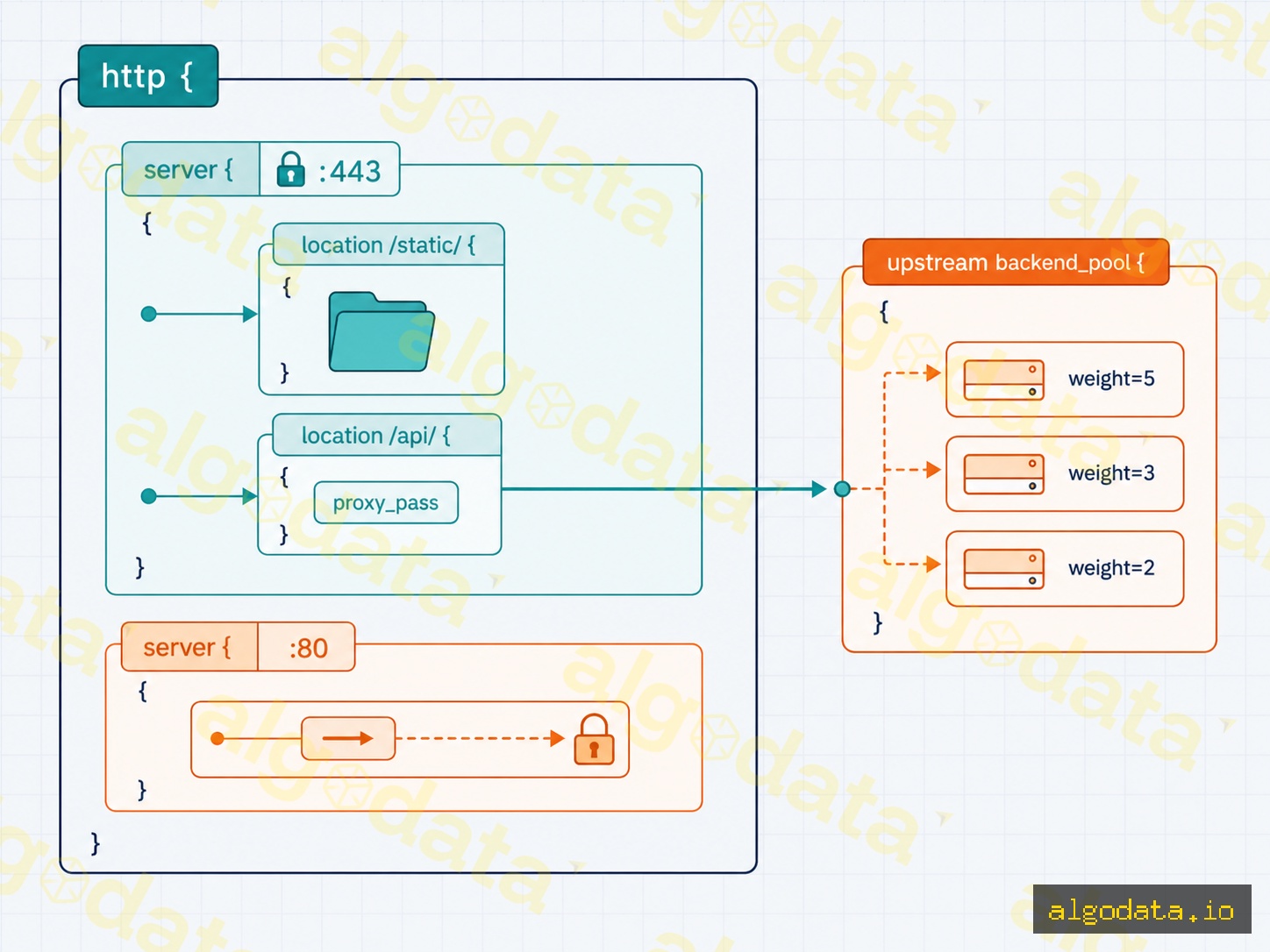
Below is a complete nginx.conf that includes a server block for serving static files, a reverse proxy to a backend, and upstream load balancing.
nginx
1# /etc/nginx/nginx.conf
2worker_processesauto;# automatically match the number of CPU cores
3events{ 4worker_connections1024;# maximum connections per worker
5} 6 7http{ 8# --- Upstream: backend pool for load balancing ---
9upstreamapp_backend{10least_conn;# algorithm: prefer the server with the fewest connections
11server10.0.0.10:8080weight=3;12server10.0.0.11:8080weight=2;13server10.0.0.12:8080weight=1max_fails=3fail_timeout=30s;14}1516# --- Server block: HTTPS + reverse proxy ---
17server{18listen443sslhttp2;19server_nameexample.comwww.example.com;2021ssl_certificate/etc/letsencrypt/live/example.com/fullchain.pem;22ssl_certificate_key/etc/letsencrypt/live/example.com/privkey.pem;23ssl_protocolsTLSv1.2TLSv1.3;24ssl_ciphersHIGH:!aNULL:!MD5;2526# Serve static files directly (images, CSS, JS)
27location/static/{28root/var/www/myapp;29expires30d;30add_headerCache-Control"public,immutable";31}3233# Proxy all other requests to the backend pool
34location/{35proxy_passhttp://app_backend;36proxy_set_headerHost$host;37proxy_set_headerX-Real-IP$remote_addr;38proxy_set_headerX-Forwarded-For$proxy_add_x_forwarded_for;39proxy_set_headerX-Forwarded-Proto$scheme;40proxy_connect_timeout5s;41proxy_read_timeout60s;42}43}4445# --- Redirect HTTP → HTTPS ---
46server{47listen80;48server_nameexample.comwww.example.com;49return301https://$host$request_uri;50}51}
Key directive explanations
worker_processes auto — Nginx auto-detects the number of CPU cores and spawns the exact right number of workers, maximizing throughput.
upstream — defines the backend pool; the least_conn directive selects the server with the fewest active connections instead of default round-robin.
proxy_set_header X-Real-IP — passes the client's real IP address to the backend; without this, the backend only sees Nginx's IP.
expires 30d — enables HTTP caching for static files, significantly reducing server load.
Real-world use cases
Serving static websites / JAMstack
Nginx serves the entire build output of Next.js, Hugo, or any static site generator with just a few location blocks. Nginx's static file serving speed approaches the theoretical limit of disk and network I/O — no application-layer framework can compete.
Reverse proxy for backend applications
This is the most common use case: Nginx listens on the public ports 80/443, while the backend application runs on localhost:3000 or localhost:8080 without any public exposure. Nginx handles TLS, gzip compression, and slow client connections — the backend only needs to focus on business logic.
SSL termination
Rather than installing TLS separately on each backend service, you centralize all certificate management at Nginx. The backend communicates with Nginx over plain HTTP within a private LAN — simplifying configuration and certificate renewal with Certbot.
The limit_req_zone directive creates a shared memory zone keyed by IP, limiting clients to 10 requests per second with a maximum burst of 20. Requests that exceed the threshold receive an HTTP 429 response directly from Nginx, consuming no backend resources.
Nginx as an Ingress Controller in Kubernetes
Inside a Kubernetes cluster, the Nginx Ingress Controller is the most popular way to expose HTTP/HTTPS services outside the cluster. An Ingress resource defined in YAML maps domains and paths to internal Services:
The Nginx Ingress Controller reads the Ingress resource and automatically reloads the internal nginx.conf without restarting the pod. This is how microservices systems perform rolling updates: gradually shift traffic from /v1 to /v2 simply by adjusting path rules.
Always test your configuration before reloading
Always run nginx -t before nginx -s reload. This command checks the syntax of the entire nginx.conf and all included files, returning specific errors if any are found. A reload with an invalid config is rejected automatically — Nginx will never apply a broken configuration and cause downtime.
Nginx performance tuning
Beyond the basic configuration, a few directives are often overlooked but have a significant impact on throughput:
nginx
1http{2sendfileon;# use the sendfile() syscall — zero-copy from disk to socket
3tcp_nopushon;# batch multiple TCP segments before sending
4tcp_nodelayon;# disable Nagle algorithm for keep-alive connections
5keepalive_timeout65;# keep TCP connections open for 65 seconds (reduces repeated TLS handshakes)
6gzipon;7gzip_typestext/plaintext/cssapplication/jsonapplication/javascript;8gzip_min_length1000;# skip compression for files < 1KB (overhead outweighs benefit)
9}
sendfile on is the single most important optimization when serving large static files — the kernel transfers data directly from the page cache to the socket without copying through user space.
Conclusion:Nginx is far more than a web server — it is a comprehensive traffic orchestration layer for modern architectures. Whether you are serving a static SPA, proxying a Node.js backend, load-balancing microservices, or need an Ingress Controller for Kubernetes, Nginx delivers a consistent, high-performance, and transparently configurable solution in a single binary.
QWhat is the most important difference between Nginx and Apache?
Apache handles each request with its own thread or process (prefork/worker MPM), which consumes significant RAM under many concurrent connections. Nginx uses an asynchronous, event-driven architecture — a single worker process can handle thousands of connections simultaneously with very low memory usage. For high-traffic workloads with many idle (keep-alive) connections, Nginx holds a clear performance advantage.
QWhat is a reverse proxy, and why use Nginx as one?
A reverse proxy is an intermediary server that sits in front of your internal servers, receiving requests from clients and forwarding them to the appropriate backend. Using Nginx as a reverse proxy lets you hide backend addresses, centralize SSL termination, enable caching and gzip compression, and protect your application from direct attacks.
QHow does Nginx perform load balancing?
Nginx supports multiple load-balancing algorithms via the upstream directive: round-robin (default), least_conn (fewest active connections), ip_hash (same IP always reaches the same server), and random. Each server in an upstream block can be assigned a weight and max_fails value to control traffic distribution and automatically remove unhealthy servers from the pool.
QCan Nginx replace an application server?
It should not. Nginx cannot run Python, PHP, or Node.js code directly. The correct role for Nginx is to receive requests from the internet, serve static files immediately, and proxy_pass everything else to Gunicorn, PHP-FPM, a Node.js process, or any other application server that is listening. This combination optimizes both performance and security.
QHow do you configure SSL/TLS on Nginx?
In the server block listening on port 443, add ssl_certificate pointing to your .pem file and ssl_certificate_key pointing to your private key. Enable TLS 1.2/1.3 via ssl_protocols and select strong cipher suites via ssl_ciphers. Use a listen 80 block combined with return 301 to automatically redirect HTTP to HTTPS. With Let's Encrypt, the Certbot tool writes these directives automatically.