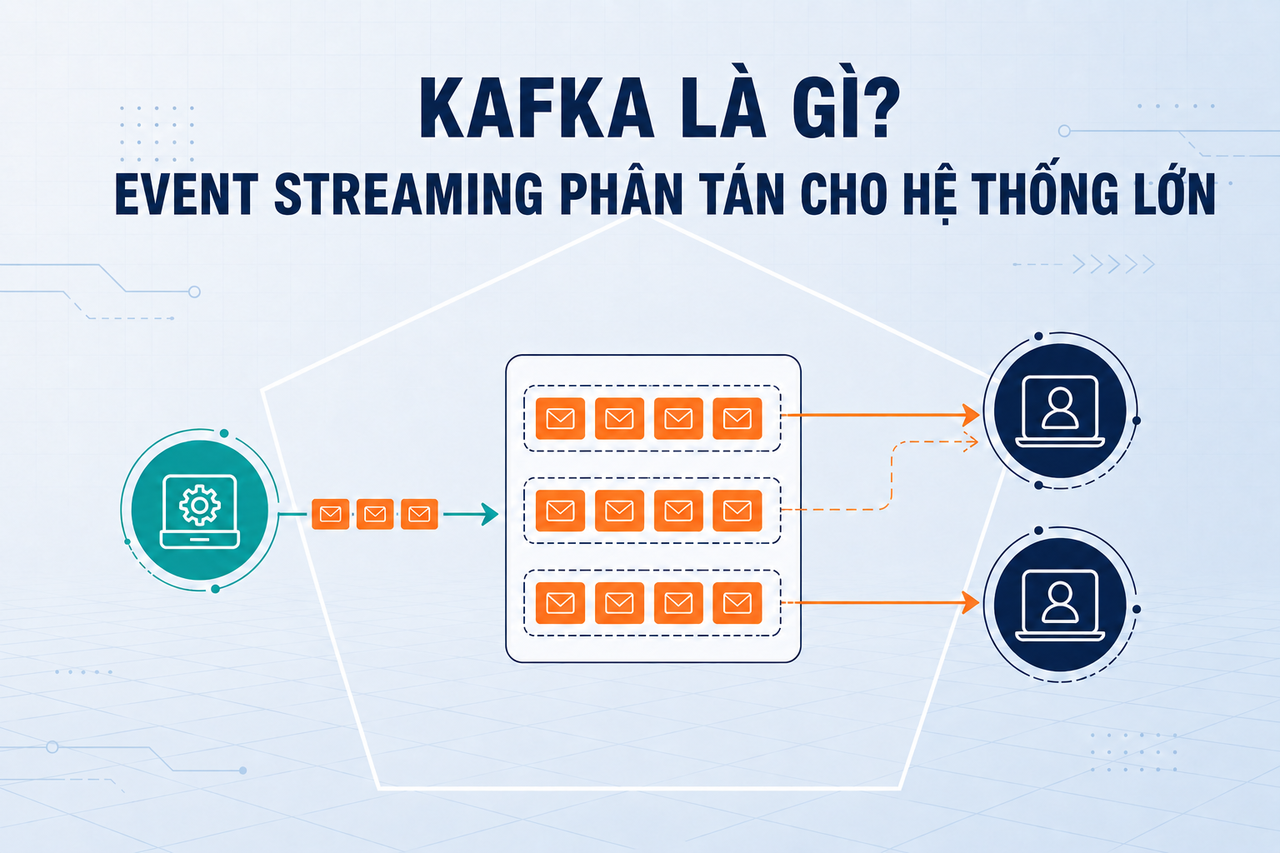
Apache Kafka是什么?分布式事件流处理平台详解
DevOps

Apache Kafka是什么?分布式事件流处理平台详解

Apache Kafka是由LinkedIn发明的开源分布式事件流处理平台,可解耦生产者与消费者,支持事件回放,每秒处理数百万条消息。深入了解Topic、Partition、Broker、Consumer Group架构,以及kafka-python和kafkajs的实际用法。

系列文章: DevOps
  1. 1 API网关是什么?微服务的统一入口点
  2. 2 NAT是什么?计算机网络中的网络地址转换详解
  3. 3 GitLab CI/CD是什么?自动化构建、测试与部署流水线
  4. 4 Apache Kafka是什么?分布式事件流处理平台详解
  5. 5 Serverless是什么?FaaS、冷启动与何时选择无服务器架构
  6. 6 Subnet和CIDR是什么?IP网络分段与现代路由
  7. 7 什么是Kubernetes?当今最流行的容器编排平台
  8. 8 Proxy是什么?正向代理、反向代理与SOCKS5详解
  9. 9 什么是Nginx?集Web服务器、反向代理与负载均衡于一体
✦ 快速摘要
Apache Kafka是由LinkedIn发明的开源分布式事件流处理平台,可解耦生产者与消费者,支持事件回放,每秒处理数百万条消息。深入了解Topic、Partition、Broker、Consumer Group架构,以及kafka-python和kafkajs的实际用法。
这篇文章怎么样?

Apache Kafka是由LinkedIn于2011年发明的分布式事件流处理平台,后捐献给Apache软件基金会。从LinkedIn每天处理数十亿事件的内部工具,Kafka已成为Uber、Airbnb、Netflix等数千家企业实时数据管道的核心基础设施。

Apache Kafka是什么?

Apache Kafka是一个分布式事件流处理系统——一个分布式不可变日志,能够实现:

  • 发布(写入)来自多个Producer的消息
  • 订阅(读取)由多个独立Consumer消费的消息
  • 持久化存储消息,并提供灵活的保留策略
  • 实时处理消息,或回放历史事件

Kafka专为极高吞吐量设计:一个典型的Kafka集群可以每秒处理数百万条消息,端到端延迟低于10毫秒。

核心差异化特性:与传统消息队列(读取后即删除消息)不同,Kafka保留消息一段可配置的时间窗口(例如7天)。消费者可以随时回退并重放完整的历史事件。

Kafka解决的问题

设想一个电商系统:用户下单时,该事件需要被以下服务处理:

  • 库存服务 — 扣减库存
  • 通知服务 — 发送确认邮件
  • 分析服务 — 更新数据看板
  • 风控服务 — 检测异常行为
  • 推荐引擎 — 更新购买历史

如果订单服务通过HTTP直接调用这五个服务:

Order Service → Inventory (HTTP)
             → Notification (HTTP)
             → Analytics (HTTP)
             → Fraud (HTTP)
             → Recommendation (HTTP)

系统变得紧耦合:新增服务必须修改订单服务,一个下游服务变慢会阻塞整个流程,且没有内置的重试机制。

Kafka的解决方案是引入一个中央事件总线

Order Service → [order-placed Topic] → Inventory Service
                                     → Notification Service
                                     → Analytics Service
                                     → Fraud Service
                                     → Recommendation Service

订单服务只需发布一条事件即可。每个下游服务独立订阅并按自身节奏处理,新增服务无需修改订单服务。

Kafka架构
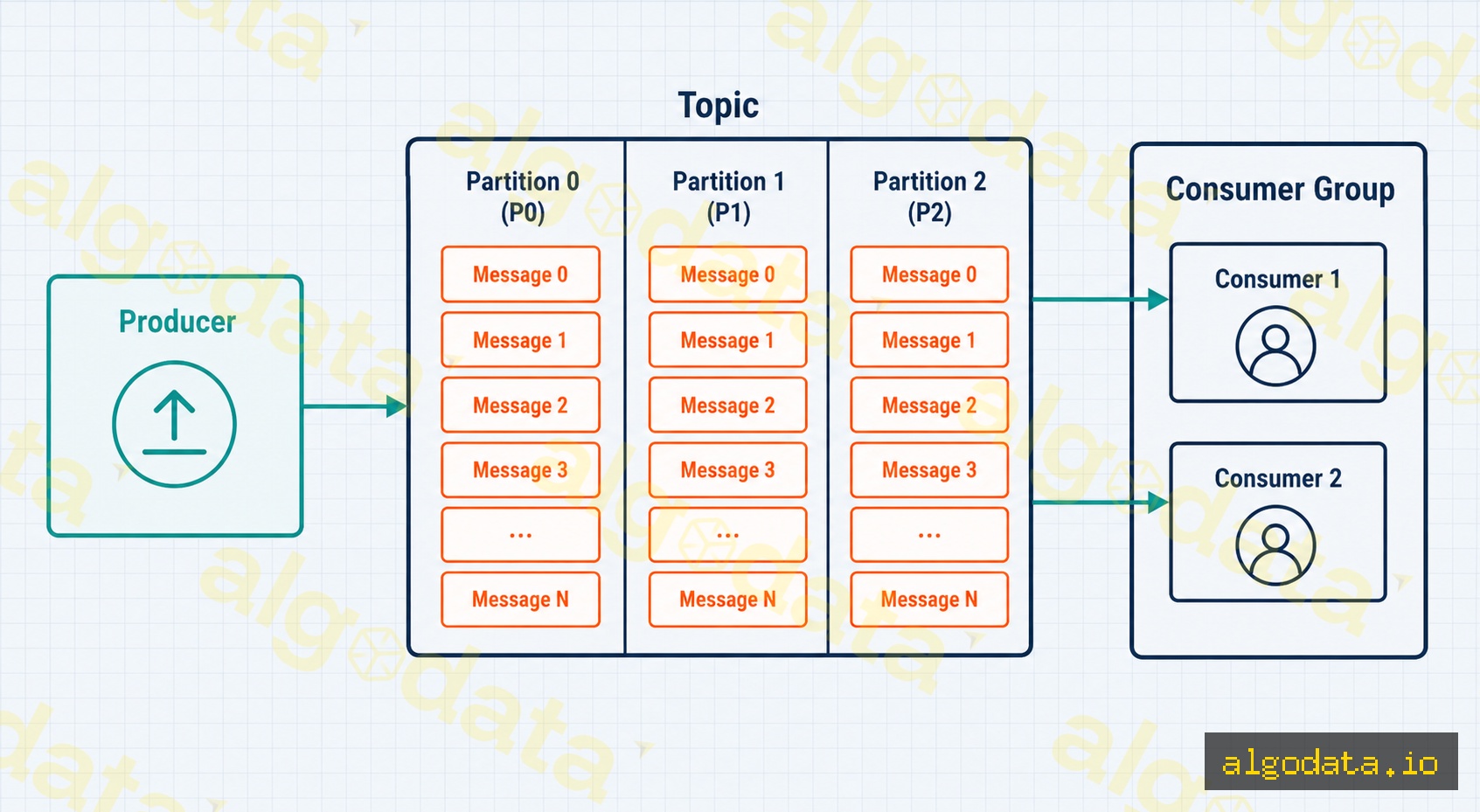
Kafka架构由以下核心组件构成:

Producer(生产者)

Producer是任何向Kafka写入消息的应用程序。Producer选择写入哪个Topic,并可选地指定Partition Key来控制消息路由。

Topic与Partition

Topic是消息的逻辑分类(例如order-placeduser-signuppayment-processed)。

每个Topic被划分为N个Partition——并行化的基本单位:

  • 每个Partition是有序的不可变日志:消息追加到末尾,永不修改。
  • 同一Partition内的消息有严格的顺序保证
  • 相同Partition Key的消息始终进入同一Partition——保证特定实体的顺序(例如,user_id=123的所有事件进入同一Partition)。
  • 更多Partition → 更高并行度 → 更高吞吐量。

Broker(代理节点)

Broker是Kafka服务器——存储和提供Partition的节点。生产环境中,Kafka集群通常有3到5个Broker。每个Partition有一个Leader Broker(处理读写)和多个Follower副本(用于高可用)。

ZooKeeper(或从Kafka 3.3+起的KRaft)管理集群元数据和Leader选举。

Consumer与Consumer Group

Consumer是从Topic读取消息的应用程序。

Consumer Group是协同消费一个Topic的Consumer集合:

  • Kafka将Partition分配给组内的Consumer:每个Partition → 同一时刻只有一个Consumer。
  • 如果组内的Consumer数量多于Partition数量,多余的Consumer将处于空闲状态。
  • 多个Consumer Group完全独立地读取同一Topic——每个Group维护自己的offset。
Topic: order-placed(3个Partition)
│
├─ Consumer Group "inventory-svc"   → Consumer A (P0),Consumer B (P1, P2)
└─ Consumer Group "analytics-svc"  → Consumer X (P0, P1, P2)

保留策略、偏移量与消费者积压
Offset(偏移量)

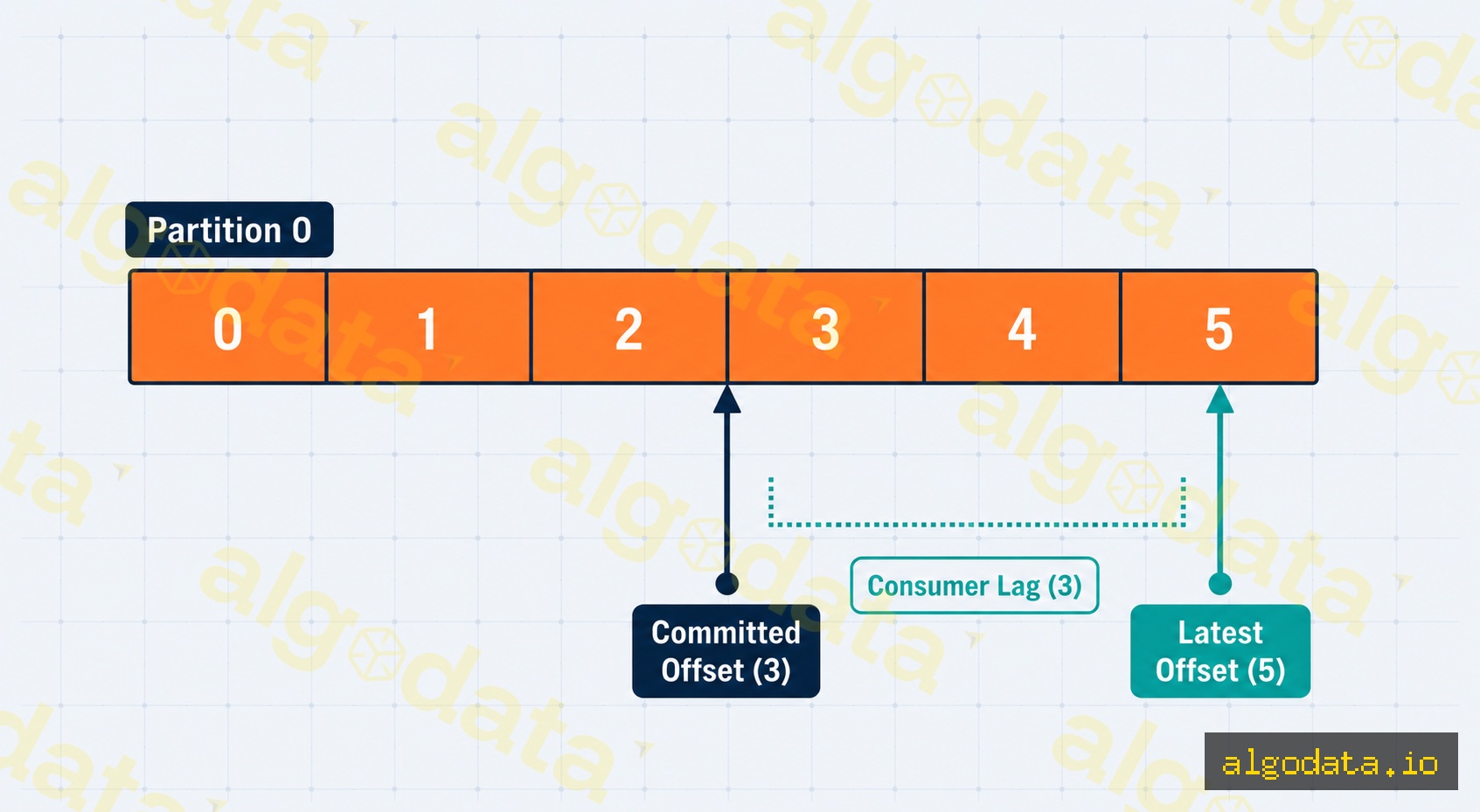
Partition中的每条消息都有一个offset——单调递增的整数(0, 1, 2, …),用于标识消息的位置。Consumer自行管理offset:处理完一条消息后,Consumer提交offset以记录进度。

Offset不是直接存储在Kafka Broker中,而是保存在一个名为**__consumer_offsets**的内部Topic中。

Retention(保留策略)

Kafka按可配置的时间窗口或大小限制保留消息:

properties
# 保留消息7天
log.retention.hours=168

# 或按大小限制
log.retention.bytes=10737418240  # 每个Partition 10 GB

超过保留期后,Kafka删除最旧的消息——无论Consumer是否已读取。这是一个拉取模型:Consumer自行决定读取速度。

Consumer Lag(消费者积压)

Consumer Lag = 最新Offset − 已提交Offset = Consumer尚未处理的消息数量。

积压过高表明Consumer跟不上Producer的发布速度。监控积压是Kafka生产环境中最重要的指标之一。

实际代码示例

Python使用kafka-python

Python
 1from kafka import KafkaProducer, KafkaConsumer
 2import json
 3
 4# Producer:向Topic写入消息
 5producer = KafkaProducer(
 6    bootstrap_servers=['localhost:9092'],
 7    value_serializer=lambda v: json.dumps(v).encode('utf-8'),
 8    # 等待所有同步副本确认,确保不丢消息
 9    acks='all',
10    retries=3
11)
12
13# 发送下单事件
14order_event = {
15    "event": "order_placed",
16    "order_id": "ORD-2026-001",
17    "user_id": 42,
18    "total": 199.00
19}
20
21# Partition Key = user_id,确保同一用户的事件进入同一Partition
22future = producer.send(
23    topic='order-placed',
24    key=str(order_event['user_id']).encode('utf-8'),
25    value=order_event
26)
27record_metadata = future.get(timeout=10)
28print(f"已发送 → partition={record_metadata.partition}, offset={record_metadata.offset}")
29
30producer.flush()
31producer.close()
32
33# Consumer Group:从Topic消费消息
34consumer = KafkaConsumer(
35    'order-placed',
36    bootstrap_servers=['localhost:9092'],
37    group_id='inventory-service',  # Consumer Group ID
38    auto_offset_reset='earliest',  # 没有历史offset时从头开始读取
39    value_deserializer=lambda m: json.loads(m.decode('utf-8')),
40    enable_auto_commit=False  # 关闭自动提交,手动控制offset
41)
42
43print("库存服务正在监听...")
44try:
45    for message in consumer:
46        event = message.value
47        print(f"收到:order_id={event['order_id']}, user={event['user_id']}")
48
49        # 在此处理业务逻辑(扣减库存等)
50        # ...
51
52        # 成功处理后手动提交offset
53        consumer.commit()
54finally:
55    consumer.close()

Node.js使用kafkajs

JavaScript
 1const { Kafka } = require('kafkajs');
 2
 3const kafka = new Kafka({
 4  clientId: 'my-app',
 5  brokers: ['localhost:9092'],
 6});
 7
 8// ── Producer ──────────────────────────────────────────────
 9async function runProducer() {
10  const producer = kafka.producer();
11  await producer.connect();
12
13  // 批量发送消息到Topic
14  await producer.send({
15    topic: 'order-placed',
16    messages: [
17      {
18        key: '42',                               // Partition Key = user_id
19        value: JSON.stringify({
20          event: 'order_placed',
21          orderId: 'ORD-2026-002',
22          userId: 42,
23          total: 299.00,
24        }),
25      },
26      {
27        key: '99',
28        value: JSON.stringify({
29          event: 'order_placed',
30          orderId: 'ORD-2026-003',
31          userId: 99,
32          total: 89.50,
33        }),
34      },
35    ],
36  });
37
38  console.log('已向Kafka发送2条下单事件');
39  await producer.disconnect();
40}
41
42// ── Consumer Group ────────────────────────────────────────
43async function runConsumer() {
44  const consumer = kafka.consumer({ groupId: 'notification-service' });
45  await consumer.connect();
46
47  // 订阅Topic
48  await consumer.subscribe({ topic: 'order-placed', fromBeginning: false });
49
50  await consumer.run({
51    // 每收到一条消息都会调用eachMessage
52    eachMessage: async ({ topic, partition, message }) => {
53      const event = JSON.parse(message.value.toString());
54      console.log(`[P${partition}] orderId=${event.orderId}, userId=${event.userId}`);
55
56      // 发送确认邮件或推送通知
57      // await notificationSvc.send(event);
58    },
59  });
60}
61
62runProducer().catch(console.error);
63runConsumer().catch(console.error);

Kafka vs RabbitMQ vs Redis Pub/Sub
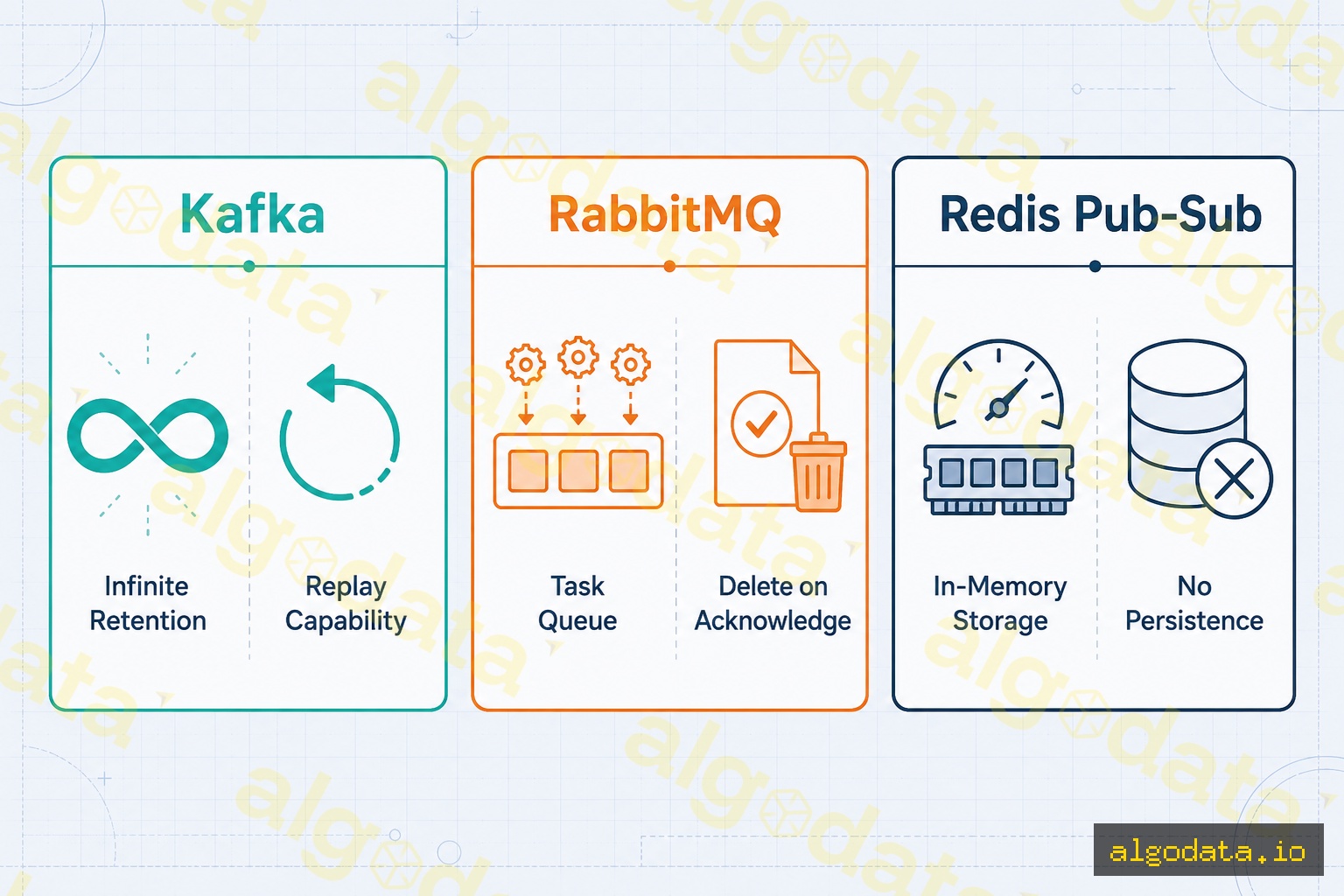
对比维度 Kafka RabbitMQ Redis Pub/Sub
模型 分布式日志 消息代理(AMQP) 内存发布/订阅
消息保留 按时间/大小配置 ACK后删除 不持久化
回放支持 支持(回退offset) 不支持 不支持
吞吐量 极高(百万条/秒) 高(十万条/秒) 非常高但消息即逝
消息顺序 Partition内有序 Queue内有序 不保证
Consumer Group 原生支持,功能强大 竞争消费者模式 所有订阅者均收到
路由能力 简单(基于Key) 复杂(Exchange/Binding) 基于Channel
运维复杂度

何时使用Kafka?

以下场景Kafka是正确选择:

  • 高吞吐量事件流:来自多源的每秒数百万事件
  • 需要回放:审计日志、bug修复后重新处理、数据仓库回填
  • 多个独立Consumer同时消费同一数据流(扇出无事件丢失)
  • 数据管道:数据库CDC(变更数据捕获)、实时ETL
  • 事件溯源:持久化状态变更的完整历史

何时不应使用Kafka?

  • 需要复杂路由(Topic Exchange、Fanout Exchange) → RabbitMQ
  • 简单的即发即忘任务队列 → Redis List / BullMQ
  • 小型团队或系统,缺乏Kafka运维经验 → 不值得引入额外复杂度
  • 需要请求-响应模式(RPC) → RabbitMQ更合适

Kafka Connect与Kafka Streams

Kafka Connect

Kafka Connect是Kafka内置的集成框架,无需编写自定义代码即可与外部系统连接:

  • Source Connector:MySQL Debezium(CDC)、S3、MongoDB → Kafka
  • Sink Connector:Kafka → Elasticsearch、Snowflake、PostgreSQL、S3
JSON
 1// 示例:Debezium MySQL Source Connector配置
 2{
 3  "name": "mysql-orders-connector",
 4  "config": {
 5    "connector.class": "io.debezium.connector.mysql.MySqlConnector",
 6    "database.hostname": "mysql-host",
 7    "database.port": "3306",
 8    "database.user": "debezium",
 9    "database.password": "secret",
10    "database.server.name": "mydb",
11    "table.include.list": "shop.orders"
12  }
13}

Kafka Streams

Kafka Streams是用于直接在Kafka上构建有状态流处理的Java/Scala库:

  • 对Kafka Topic进行过滤、映射、聚合和连接操作
  • KTable — 从流中持续更新的物化视图
  • 窗口聚合 — 在时间窗口内聚合(5分钟、1小时)
  • 无需独立集群(不同于Spark或Flink)——作为库运行在应用程序中

Kafka Streams是轻量级流处理的理想选择;当需要更复杂的大规模有状态计算时,可使用Apache Flink

实际案例:LinkedIn、Uber、Airbnb

LinkedIn——Kafka的诞生地

LinkedIn于2011年创建Kafka,用于处理数亿用户的活动流。在Kafka之前,LinkedIn依赖多个分散的消息队列,造成数十个点对点连接的"数据集成混乱"。Kafka以单一中央神经系统取代了所有这些连接,每天处理超过7万亿条消息

Uber——定价与波峰检测

Uber将Kafka作为实时定价引擎的核心。每次出行、司机位置更新和叫车请求都是事件流。Kafka使Uber能够根据每个地理区域的供需关系实时计算波峰定价,每分钟处理数百万条事件。

Airbnb——数据管道与机器学习特征存储

Airbnb将Kafka用于SmartPricing——房东动态定价推荐系统。每一次用户交互(浏览、搜索、预订)都通过Kafka实时流入数据仓库和机器学习特征存储,使模型无需依赖隔夜批处理即可持续更新特征。
Redis是什么?内存数据库的缓存、发布订阅与队列

Elasticsearch是什么?全文搜索与实时日志分析

API Gateway是什么?架构、功能与部署实践

常见问题Q&A
简单来说,Apache Kafka是什么?
Apache Kafka是一个开源的分布式事件流处理平台。生产者(Producer)将消息写入Topic,消费者(Consumer)按照自己的节奏从Topic中读取消息。Kafka以不可变日志(immutable log)的形式存储消息,并根据配置的保留策略长期保存,支持实时处理和历史事件回放。它最初由LinkedIn构建,如今每天处理数万亿条消息。
Kafka中的Topic和Partition是什么?
Topic是消息的逻辑分类,类似于频道或队列名称。每个Topic被划分为一个或多个Partition,Partition是Kafka的并行化单位。每个Partition是一个有序的、不可变的日志:消息只会追加到末尾,永不修改。同一Partition内的消息严格有序;不同Partition之间不保证顺序。Partition的数量决定了最大并行消费程度。
Kafka中的Consumer Group是什么?
Consumer Group是一组协同消费某个Topic的消费者实例。Kafka将每个Partition分配给组内的一个消费者,实现负载均衡。多个Consumer Group可以完全独立地读取同一个Topic——每个Group维护自己的偏移量(offset)。这种扇出模型(fan-out)允许多个下游服务消费同一事件流而互不干扰。
Kafka与RabbitMQ有什么区别?
Kafka是分布式日志:消息按配置的时间保留,消费者自行管理offset,支持回放。RabbitMQ是传统的消息代理:消费者确认(ACK)后消息即被删除,通过Exchange支持复杂路由。Kafka适合高吞吐量事件流、审计日志和数据管道;RabbitMQ更适合任务队列、RPC模式和复杂路由逻辑。
如果Broker宕机,Kafka会丢失消息吗?
如果配置正确,不会。Kafka使用副本机制:每个Partition有一个Leader和多个Follower副本分布在不同的Broker上。当Leader宕机时,Kafka自动从同步副本(in-sync replicas)中选举新Leader。设置副本因子(replication factor)≥3且生产者acks=all(等待所有同步副本确认),只要宕机的Broker数量少于副本因子,Kafka就能保证不丢消息。
Kafka Connect是什么?
Kafka Connect是Kafka内置的数据集成框架,无需编写自定义代码即可与外部系统对接。Source Connector从数据库、S3、Elasticsearch等系统读取数据并写入Kafka Topic;Sink Connector反向操作,消费Kafka Topic并写入目标系统。Confluent Hub上提供了数百个预构建的连接器,覆盖主流数据库、云存储和搜索引擎。

Apache Kafka is the distributed event streaming platform invented at LinkedIn in 2011 and donated to the Apache Software Foundation. From an internal tool handling billions of events per day at LinkedIn, Kafka has become the backbone of real-time data pipelines at Uber, Airbnb, Netflix, and thousands of companies worldwide.

What is Apache Kafka?

Apache Kafka is a distributed event streaming system — a distributed immutable log that enables:

  • Publishing (writing) messages from many Producers
  • Subscribing (reading) messages by many independent Consumers
  • Storing messages durably with flexible retention policies
  • Processing messages in real time or replaying historical events

Kafka is engineered for extreme throughput: a typical Kafka cluster handles millions of messages per second with end-to-end latency under 10ms.

Core differentiator: Unlike traditional message queues that delete messages after they are read, Kafka retains messages for a configurable window (e.g. 7 days). Consumers can rewind and replay the full history of events at any time.

The Problem Kafka Solves

Imagine an e-commerce system: when a user places an order, that event must be processed by:

  • Inventory service — deduct stock
  • Notification service — send a confirmation email
  • Analytics service — update the dashboard
  • Fraud detection service — check for suspicious activity
  • Recommendation engine — update purchase history

If Order Service calls these five services directly over HTTP:

Order Service → Inventory (HTTP)
             → Notification (HTTP)
             → Analytics (HTTP)
             → Fraud (HTTP)
             → Recommendation (HTTP)

The system becomes tightly coupled: adding a new service requires modifying Order Service, a slow downstream call blocks the entire pipeline, and there is no built-in retry when a downstream service fails.

Kafka solves this by introducing a central event bus:

Order Service → [order-placed Topic] → Inventory Service
                                     → Notification Service
                                     → Analytics Service
                                     → Fraud Service
                                     → Recommendation Service

Order Service publishes one event and is done. Each downstream service subscribes and processes at its own pace, completely independently. Adding a new service requires zero changes to Order Service.

Kafka Architecture

Kafka's architecture is built around several key components:

Producer

A Producer is any application that writes messages to Kafka. The Producer selects which Topic to write to and optionally specifies a Partition key to control message routing.

Topics and Partitions

A Topic is a logical category for grouping related messages (e.g., order-placed, user-signup, payment-processed).

Each Topic is split into N Partitions — the unit of parallelism:

  • Each Partition is an ordered, immutable log: messages are appended to the end and never modified.
  • Messages within the same Partition have a strict ordering guarantee.
  • Messages with the same Partition key always land in the same Partition — guaranteeing ordering for a specific entity (e.g., all events for user_id=123 go to the same Partition).
  • More Partitions → more parallelism → higher throughput.

Brokers

A Broker is a Kafka server — a node that stores and serves Partitions. A production Kafka cluster typically has 3–5 Brokers. Each Partition has one Leader Broker (handles reads and writes) and multiple Follower replicas (for high availability).

ZooKeeper (or KRaft starting from Kafka 3.3+) manages cluster metadata and leader election.

Consumers and Consumer Groups

A Consumer is an application that reads messages from a Topic.

A Consumer Group is a set of Consumers cooperating to consume a Topic:

  • Kafka assigns Partitions to Consumers within the Group: each Partition → exactly one Consumer at a time.
  • If there are more Consumers than Partitions in a Group, the extra Consumers sit idle.
  • Multiple Consumer Groups read the same Topic completely independently — each Group maintains its own offset.
Topic: order-placed (3 Partitions)
│
├─ Consumer Group "inventory-svc"   → Consumer A (P0), Consumer B (P1, P2)
└─ Consumer Group "analytics-svc"  → Consumer X (P0, P1, P2)

Retention, Offsets, and Consumer Lag

Offsets

Every message in a Partition has an offset — a monotonically increasing integer (0, 1, 2, …) that identifies its position. Consumers manage their own offsets: after processing a message, a Consumer commits its offset to signal how far it has progressed.

Offsets are not stored in the Kafka Broker directly but in a special internal topic called __consumer_offsets.

Retention

Kafka retains messages for a configurable time window or size limit:

properties
# Retain messages for 7 days
log.retention.hours=168

# Or cap by size
log.retention.bytes=10737418240  # 10 GB per Partition

After the retention period, Kafka deletes the oldest messages — regardless of whether all Consumers have read them. This is a pull model: Consumers decide how fast to read.

Consumer Lag

Consumer Lag = Latest Offset − Committed Offset = the number of messages the Consumer has not yet processed.

High lag indicates that the Consumer is falling behind the Producer's publish rate. Monitoring lag is one of the most critical metrics in a production Kafka deployment.

Code Examples

Python with kafka-python

Python
 1from kafka import KafkaProducer, KafkaConsumer
 2import json
 3
 4# Producer: write messages to a Topic
 5producer = KafkaProducer(
 6    bootstrap_servers=['localhost:9092'],
 7    value_serializer=lambda v: json.dumps(v).encode('utf-8'),
 8    # Wait for all in-sync replicas to acknowledge — no message loss
 9    acks='all',
10    retries=3
11)
12
13# Send an order-placed event
14order_event = {
15    "event": "order_placed",
16    "order_id": "ORD-2026-001",
17    "user_id": 42,
18    "total": 29.99
19}
20
21# Partition key = user_id ensures all events for a user go to the same Partition
22future = producer.send(
23    topic='order-placed',
24    key=str(order_event['user_id']).encode('utf-8'),
25    value=order_event
26)
27record_metadata = future.get(timeout=10)
28print(f"Sent → partition={record_metadata.partition}, offset={record_metadata.offset}")
29
30producer.flush()
31producer.close()
32
33# Consumer Group: consume messages from the Topic
34consumer = KafkaConsumer(
35    'order-placed',
36    bootstrap_servers=['localhost:9092'],
37    group_id='inventory-service',  # Consumer Group ID
38    auto_offset_reset='earliest',  # Read from the beginning if no prior offset
39    value_deserializer=lambda m: json.loads(m.decode('utf-8')),
40    enable_auto_commit=False  # Manual offset commit for reliability
41)
42
43print("Inventory Service listening...")
44try:
45    for message in consumer:
46        event = message.value
47        print(f"Received: order_id={event['order_id']}, user={event['user_id']}")
48
49        # Handle business logic here (deduct stock, etc.)
50        # ...
51
52        # Commit offset only after successful processing
53        consumer.commit()
54finally:
55    consumer.close()

Node.js with kafkajs

JavaScript
 1const { Kafka } = require('kafkajs');
 2
 3const kafka = new Kafka({
 4  clientId: 'my-app',
 5  brokers: ['localhost:9092'],
 6});
 7
 8// ── Producer ──────────────────────────────────────────────
 9async function runProducer() {
10  const producer = kafka.producer();
11  await producer.connect();
12
13  // Send a batch of messages to the Topic
14  await producer.send({
15    topic: 'order-placed',
16    messages: [
17      {
18        key: '42',                               // Partition key = user_id
19        value: JSON.stringify({
20          event: 'order_placed',
21          orderId: 'ORD-2026-002',
22          userId: 42,
23          total: 49.99,
24        }),
25      },
26      {
27        key: '99',
28        value: JSON.stringify({
29          event: 'order_placed',
30          orderId: 'ORD-2026-003',
31          userId: 99,
32          total: 12.49,
33        }),
34      },
35    ],
36  });
37
38  console.log('Sent 2 order events to Kafka');
39  await producer.disconnect();
40}
41
42// ── Consumer Group ────────────────────────────────────────
43async function runConsumer() {
44  const consumer = kafka.consumer({ groupId: 'notification-service' });
45  await consumer.connect();
46
47  // Subscribe to the Topic
48  await consumer.subscribe({ topic: 'order-placed', fromBeginning: false });
49
50  await consumer.run({
51    // eachMessage is called for every message received
52    eachMessage: async ({ topic, partition, message }) => {
53      const event = JSON.parse(message.value.toString());
54      console.log(`[P${partition}] orderId=${event.orderId}, userId=${event.userId}`);
55
56      // Send confirmation email / push notification
57      // await notificationSvc.send(event);
58    },
59  });
60}
61
62runProducer().catch(console.error);
63runConsumer().catch(console.error);

Kafka vs RabbitMQ vs Redis Pub/Sub

Criterion Kafka RabbitMQ Redis Pub/Sub
Model Distributed log Message broker (AMQP) In-memory pub/sub
Retention Configurable (time/size) Deleted after ACK No persistence
Replay Yes (rewind offset) No No
Throughput Extremely high (millions/s) High (hundreds of thousands/s) Very high but ephemeral
Ordering Within a Partition Within a Queue Not guaranteed
Consumer Groups First-class feature Competing consumers All subscribers receive
Routing Simple (key-based) Complex (Exchange/Binding) Channel-based
Operational Complexity High Medium Low

When to Use Kafka

Kafka is the right choice when:

  • High-throughput event streaming: millions of events per second from many sources
  • Replay required: audit logs, reprocessing after a bug fix, backfilling a data warehouse
  • Multiple independent Consumers need the same stream (fan-out without event loss)
  • Data pipelines: CDC (Change Data Capture) from databases, real-time ETL
  • Event sourcing: persisting the full history of state changes

When NOT to Use Kafka

  • Need complex routing (topic exchange, fanout exchange) → RabbitMQ
  • Simple fire-and-forget task queue → Redis List / BullMQ
  • Small team or system without Kafka operational experience → overhead not justified
  • Request-reply (RPC pattern) required → RabbitMQ is a better fit

Kafka Connect and Kafka Streams

Kafka Connect

Kafka Connect is a framework bundled with Kafka for integrating external systems without writing custom code:

  • Source Connectors: MySQL Debezium (CDC), S3, MongoDB → Kafka
  • Sink Connectors: Kafka → Elasticsearch, Snowflake, PostgreSQL, S3
JSON
 1// Example: Debezium MySQL Source Connector configuration
 2{
 3  "name": "mysql-orders-connector",
 4  "config": {
 5    "connector.class": "io.debezium.connector.mysql.MySqlConnector",
 6    "database.hostname": "mysql-host",
 7    "database.port": "3306",
 8    "database.user": "debezium",
 9    "database.password": "secret",
10    "database.server.name": "mydb",
11    "table.include.list": "shop.orders"
12  }
13}

Kafka Streams

Kafka Streams is a Java/Scala library for building stateful stream processing directly on top of Kafka:

  • Filter, map, aggregate, and join Kafka Topics
  • KTable — a materialized view continuously updated from a stream
  • Windowed aggregation — aggregate over time windows (5 minutes, 1 hour)
  • No separate cluster required (unlike Spark or Flink) — runs as a library inside your application

Kafka Streams is a lightweight choice for stream processing; use Apache Flink when you need more complex stateful computation at very large scale.

Real-World Use Cases: LinkedIn, Uber, Airbnb

LinkedIn — Where Kafka Was Born

LinkedIn created Kafka in 2011 to handle the activity stream of hundreds of millions of users. Before Kafka, LinkedIn relied on a patchwork of message queues resulting in a "data integration mess" of dozens of point-to-point connections. Kafka replaced them all with a single central nervous system, processing more than 7 trillion messages per day.

Uber — Pricing and Surge Detection

Uber uses Kafka as the backbone of its real-time pricing engine. Every trip, driver location update, and ride request is an event stream. Kafka enables Uber to compute surge pricing in real time based on supply and demand in each geographic area, processing millions of events per minute.

Airbnb — Data Pipelines and ML Feature Store

Airbnb uses Kafka for SmartPricing — its dynamic pricing recommendation system for hosts. Every user interaction (view, search, booking) is streamed through Kafka into the data warehouse and ML feature store in real time, allowing models to refresh features continuously without relying on overnight batch jobs.

What is Redis? Caching, Pub/Sub, and Queues with an In-Memory Database

What is Elasticsearch? Full-Text Search and Real-Time Log Analytics

What is an API Gateway? Architecture, Features, and Deployment

Frequently Asked QuestionsQ&A
What is Apache Kafka in simple terms?
Apache Kafka is an open-source distributed event streaming platform. Producers write messages to named Topics; Consumers read from those Topics at their own pace. Kafka stores messages as an immutable, ordered log for a configurable retention period, enabling both real-time processing and historical replay. It was originally built by LinkedIn and handles trillions of events per day at scale.
What are Topics and Partitions in Kafka?
A Topic is a logical category for messages — similar to a channel or queue name. Each Topic is split into one or more Partitions, which are the unit of parallelism. A Partition is an ordered, immutable log: messages are appended and never modified. Messages within one Partition are strictly ordered; messages across Partitions are not. The number of Partitions determines the maximum degree of parallel consumption.
What is a Consumer Group in Kafka?
A Consumer Group is a set of Consumer instances that cooperate to consume a Topic. Kafka assigns each Partition to exactly one Consumer within the group at a time, distributing the workload automatically. Multiple Consumer Groups can read the same Topic fully independently — each group has its own committed offset. This fan-out model allows many downstream services to consume the same event stream without interfering with each other.
How is Kafka different from RabbitMQ?
Kafka is a distributed log: messages are retained for a configurable time period and Consumers manage their own offsets, supporting replay. RabbitMQ is a traditional message broker: messages are deleted after Consumer acknowledgment and it supports complex routing via Exchanges. Kafka excels at high-throughput event streaming, audit logs, and data pipelines; RabbitMQ is better for task queues, RPC patterns, and complex routing logic.
Will Kafka lose messages if a Broker crashes?
No, if configured correctly. Kafka uses replication: each Partition has one Leader and multiple Follower replicas on different Brokers. When the Leader crashes, Kafka automatically elects a new Leader from the in-sync replicas. With replication factor ≥ 3 and producer acks=all (the producer waits for all in-sync replicas to confirm), Kafka guarantees no message loss as long as fewer Brokers fail than the replication factor.
What is Kafka Connect?
Kafka Connect is a framework built into Kafka for integrating external systems without writing custom code. Source Connectors ingest data from databases, S3, Elasticsearch, and more into Kafka Topics. Sink Connectors consume Kafka Topics and write to external destinations. Hundreds of pre-built connectors are available on Confluent Hub, covering common databases, cloud storage services, and search engines.