What is GitHub? A Comprehensive A-Z Guide to Getting Started
Development

What is GitHub? A Comprehensive A-Z Guide to Getting Started

Learn what GitHub is, how to create an account, create a repository, clone, commit, push and pull request. A comprehensive A-Z guide to using GitHub for beginners.

✦ Quick summary
Learn what GitHub is, how to create an account, create a repository, clone, commit, push and pull request. A comprehensive A-Z guide to using GitHub for beginners.
How was this post?

GitHub is the world's most popular source code hosting and version control platform, owned by Microsoft. This article provides a detailed guide on how to create an account, repository, clone, commit, push, pull request, and the standout features of GitHub.

What is GitHub?

What is GitHub? GitHub is a unique social network for developers, serving as both a project management system and a source code repository. GitHub allows you to track, collaborate on, and manage software projects efficiently. It is the most popular Git-based source code hosting service, where developers can clone code from repositories and create their own repositories.

In addition to the core features of Git, GitHub adds social interaction elements such as feeds, followers, and network graphs, making it easy for developers to connect and learn from each other through commit histories.

GitHub offers two versions: free and paid. The paid version is typically designed for businesses with permission management and security features, supporting efficient team management. Meanwhile, the free version is a popular choice for individuals to store source code and participate in the open source community.

A distinctive feature of GitHub is the commit message — a description of the action performed on the source code — which helps the team understand changes in the project. The open source community has grown significantly thanks to GitHub, and for many developers, GitHub is considered a "second resume." Employers often review GitHub profiles to assess candidates' coding skills.

Today, mastering Git and understanding what GitHub is has become not just an advantage but an essential requirement for those seeking opportunities in the programming field.
History and Development of GitHub

GitHub is a testament to the remarkable growth of the open source community, contributing to the transformation of how people work and collaborate in the tech industry. Below are the key milestones in GitHub's development journey.

  • 2008: GitHub was founded by Tom Preston-Werner, Chris Wanstrath, and PJ Hyett with the idea of creating a powerful and user-friendly source code management platform. The product officially launched at TechCrunch Disrupt and quickly attracted the community's attention.
  • 2009: GitHub began attracting open source developers. Major projects like Ruby on Rails, jQuery, and Node.js chose GitHub as their source code management platform.
  • 2010: GitHub successfully raised its first round of funding, receiving a $7.5 million investment from Sequoia Capital, helping the platform grow rapidly and expand.
  • 2011: The number of repositories on GitHub surpassed the 1 million mark, making it the central hub for open source projects.
  • 2012: GitHub launched GitHub Enterprise — a service designed specifically for businesses, allowing organizations to set up their own servers for source code management.
  • 2018: Microsoft acquired GitHub for $7.5 billion, driving further growth and integrating GitHub into the Microsoft ecosystem.
  • 2019: GitHub surpassed 40 million users, becoming an indispensable part of the open source community and the tech industry.
  • 2020: GitHub introduced GitHub Codespaces, allowing developers to write code directly from a browser without needing to set up a development environment on their personal computers.

Through these stages of development, GitHub has demonstrated its influence in supporting and connecting the global developer community.

Key Features of GitHub

What are the standout features of GitHub? GitHub is a leading platform for project management and open source version control, with many notable features that strongly support software development and project management.

  • Version Control System (VCS): GitHub uses Git for version control, enabling you to track changes and manage different versions of a project.
  • Repository: GitHub provides repositories to store source code. Each project can have its own repository, and users can fork it to contribute to the project.
  • Pull Requests: This feature allows contributors to propose changes to the original repository, creating a space for discussion and code review before merging into the main repository.
  • Branching: Supports creating separate branches to develop multiple features simultaneously without affecting each other.
  • Commit History: Stores the commit history with detailed information about who made the change, when, and what was changed.
  • Issues: A tool for tracking tasks, bugs, assignments, and improvements. Issues can be assigned to team members and tracked for progress.
  • Projects: A task management feature that helps track progress and organize work flexibly.
  • Wiki and Pages: Allows creating Wiki pages for sharing information and documentation, and GitHub Pages for building static websites from a repository.
  • Collaboration: Supports discussion, commenting, and permission features, helping project members coordinate effectively.
  • Integrations: Integrates with many tools such as CI/CD, linters, and automated testing services.
  • Security Features: Provides code scanning tools, vulnerability detection, and monitoring of dependencies that may be at risk.
  • Community: GitHub is a hub for a large community with millions of developers worldwide, creating opportunities for learning, sharing, and contributing.

How to Set Up a Proxy for WiFi on Android Super Fast

With these features, GitHub has become the ideal platform for the open source development community and large-scale software projects.
Types of GitHub Accounts

What are the types of accounts on GitHub? GitHub offers multiple account types to meet the diverse needs of individuals and organizations. Below are some common account types:

  • Individual Account: A free account for individuals, allowing the creation of public repositories and participation in open source projects. This is a popular choice in the developer community.
  • Organization Account: Designed for organizations, businesses, or large projects, allowing project and member management within a shared organizational space. Available in both free and paid plans with advanced features.
  • Developer Account: A paid version of the individual account, offering additional features such as integration with external development tools and priority support.
  • Team Account: A paid plan for organizations, allowing the creation of multiple working groups and group-based project management.
  • Enterprise Account: Designed for large organizations, providing advanced features such as enhanced security and integration with enterprise services. This plan is priced based on the number of users.
  • GitHub Free and GitHub Pro: These are two options for individual accounts, where GitHub Free is the free version and GitHub Pro is the paid version with advanced features such as development tool integration and priority support.
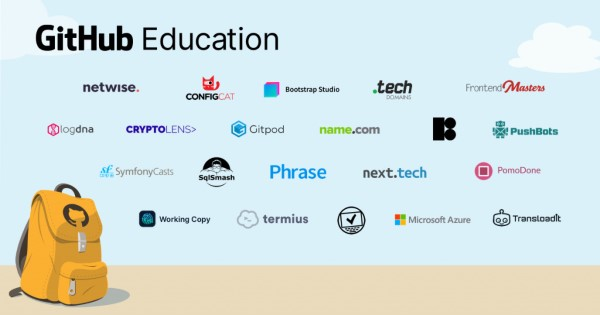
  • GitHub Education: A free support program for students and educators, providing powerful features for teaching and learning.

With its diverse range of account types, GitHub has made it accessible for many types of users, from individuals to large enterprises.
Essential Git Concepts You Need to Know

When using Git, understanding the following basic concepts will help you make the most of Git's features:

  • Repository (Repo): A directory or storage space that contains source code and the complete change history of a project.
  • Commit: A "snapshot" that records the state of the source code at a specific point in time. Each commit has a unique hash code.
  • Branch: A branch is a parallel version of a project, allowing independent development of features without affecting each other.
  • Merge: The process of combining changes from one branch into another.
  • Pull Request (PR): A request to merge changes from one branch into another. PRs are commonly used in projects with multiple contributors.
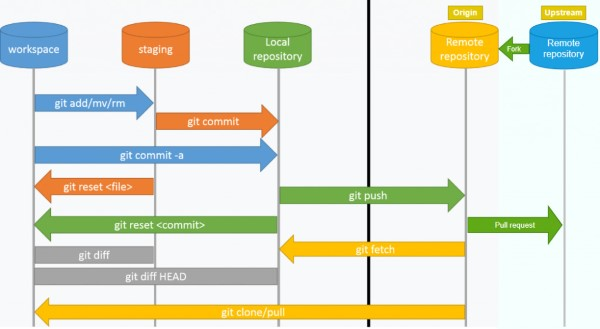
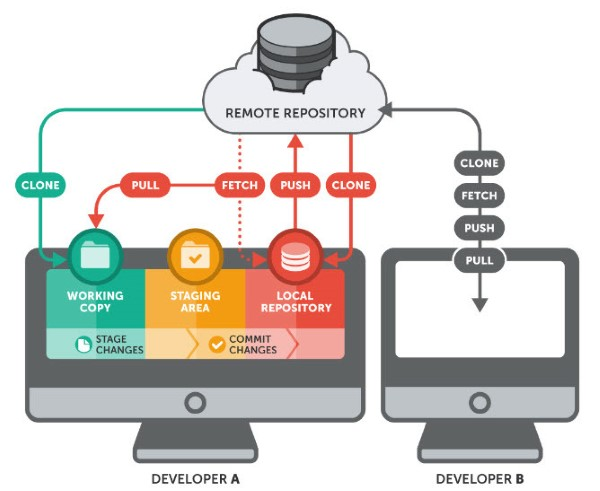
  • Clone: Copying a remote repository to your local computer for local work.
  • Fetch: Downloading remote changes without merging them into the current branch.
  • Pull: Similar to fetch, but automatically merges the remote changes into the current branch.
  • Push: Uploading local commits to the remote repository.
  • Conflict: A conflict occurs when two branches or multiple people modify the same part of the source code.
  • Staging Area/Index: A temporary storage area for changes before committing.
  • Working Directory: The directory on your local machine where you perform work and edit source code.
  • HEAD: A pointer that points to the last commit in the current branch.
  • Tag: A marker on a specific commit for easy searching and referencing.
  • Remote: A repository located at a remote location, usually on the network.

Understanding these GitHub-related concepts will help you work more effectively with Git.
Benefits of Using GitHub

What are the benefits of using GitHub? Using GitHub offers many advantages for developers, from efficient source code management to improving programming skills. Below are some notable benefits:

Efficient Source Code Management

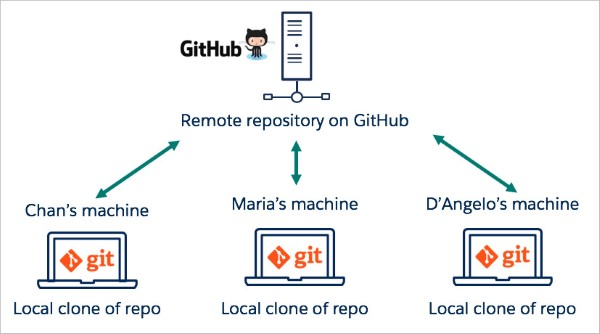
When you create a repository (repo), the entire project's source code is stored on GitHub. Here, you can track the work process through comments after each commit, and notably, multiple people can work on the same repo simultaneously.

GitHub offers many benefits, starting with the ability to see who committed and what the commit contained. Additionally, you can develop the project across multiple branches. The principle of working with branches is as follows: you can create multiple branches to develop new features, but ultimately, all branches need to be merged back into the MASTER branch to create the complete version of the project.
Tracking Changes Through Version Control

When many team members participate in a project, tracking edits — who changed what, when, and where those files are stored — can become complex. Don't worry, GitHub has solved this for you by recording every change you push to the repository. Similar to Microsoft Word or Google Drive, GitHub provides version history, making it easy to restore previous versions in case of issues or when the current version doesn't meet expectations.

What is Taobao Proxy

Using Markdown to Create Documentation

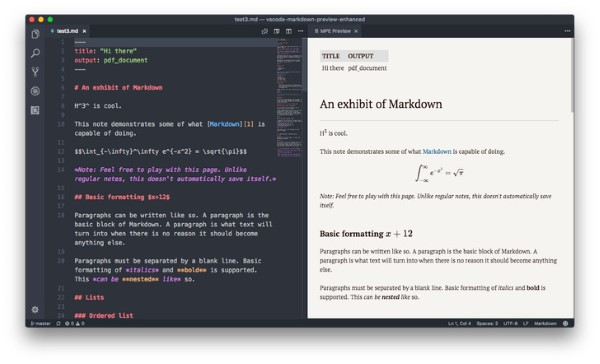
Markdown is a method of formatting text on the web that allows you to adjust how documents display, such as bold, italic formatting, adding images, and creating lists. For the most part, Markdown is just plain text with some special characters inserted, such as # or *. On GitHub, you can use Markdown in many places, including in Git, comments in Issues and Pull Requests, as well as files with .md or .markdown extensions.
Showcasing Personal Value Through GitHub Projects

It's undeniable that what you write in your CV is important. However, source code is always the best evidence to prove you're a genuine developer. A small portion of GitHub on your CV can help you stand out from other candidates. For employers, GitHub is like a fraud detector — helping distinguish real developers from imposters.

Invest in an impressive GitHub account and add the link to your CV; no employer would overlook you.

Many large companies worldwide consider having a GitHub account a requirement in the recruitment process. If you have many contributions to the community or own several products on GitHub, that will be a significant advantage over other candidates. By publishing your projects here, you've built yourself a credible personal portfolio.

Employers will quickly recognize your strengths and programming abilities when looking at your GitHub profile.

Improving Programming Skills and Bug Tracking

There are thousands of ways to learn, and learning on GitHub is an excellent choice in today's era. With millions of open source projects, hundreds of thousands of contributors, and billions of daily commits, observing, comparing, and learning from these changes will provide you with valuable knowledge to improve your programming skills.

The "bug tracking" feature is integrated into GitHub to simplify the process of finding and fixing bugs. To understand this process, you simply need to open each project's dashboard and filter information according to your needs. The system will sort questions by popularity, update time, and related information. The software interface is also very smooth, which is why it's always highly regarded in the IT developer community.

Exploring Rich Resources on GitHub

With the Explore feature, you can easily follow and search for open source projects based on your favorite technologies. GitHub supports code searching not only for individual projects but also for websites. Additionally, the platform has strong search engine optimization (SEO), allowing users to search for any publicly shared code string.

Automating Workflows with GitHub Actions

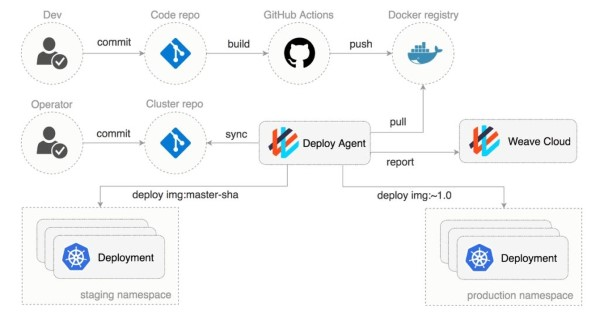
On GitHub's servers, there are workflow scripts that run automatically. Developers (devs) can use them to respond to events on repositories or perform specific actions. For example, I wrote a small utility called Autotagger — GitHub Marketplace, which automatically creates git tags when the version number in the package.json file changes. Although this is just a small action, it can make a big impact when you need to trace source code back to a previous release version, reducing some of the "headaches" for project maintainers.
Managing and Distributing Software Packages via GitHub Package Registry

GitHub Package Registry allows developers to maintain their distribution registries, including npm, Docker, Maven, NuGet, and Ruby gems.

Don't hesitate to create a GitHub account right away. Start your own projects and share them with the community, or feel free to fork an open source project. If you find a bug or need help, create a pull request or issue to report it.

Building and Expanding Relationships in the Developer Community

Meet new developers: Thousands of developers worldwide are joining GitHub's vast network to share experiences and creative ideas.

Share personal experiences: Git allows users to share source code, text snippets, or any information with other developers. You can use it to exchange information, or use Gists as Git repositories, from which you can fork and update different versions.

What is GitHub Used For?

GitHub is an extremely versatile tool that supports many activities in the programming and software development field. Below are some typical use cases of GitHub.

Drag, Drop, and Store Source Code

GitHub allows you to drag and drop source code files directly into a repository, making uploading quick and easy. You can store all project source code here, from small files to large libraries.

Creating and Managing Folders Through the Web Interface

GitHub's web interface makes it easy to create and manage folders within a repository. This means you can organize your source code scientifically and easily find the documents you need.

Shortening URLs with Git URL Shortener

Using GitHub to shorten URLs
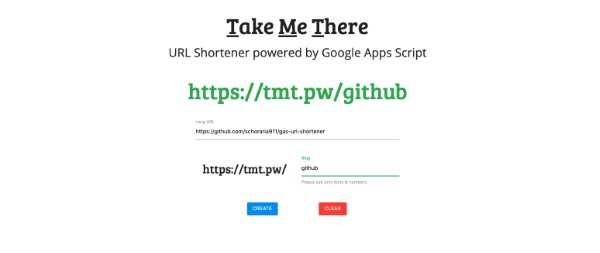
GitHub also provides a URL shortening tool, making it easier to share links to repositories and files. This is extremely useful when you want to send a link to colleagues or friends.

Where to Buy Cheap and Reliable IPv4 Proxy in Vietnam?

Searching for Files and Documents

GitHub provides powerful search capabilities, allowing you to search for files and documents within your repository or across the entire platform. You can easily search for files by name, type, or content.

Using GitHub Emoji in Projects
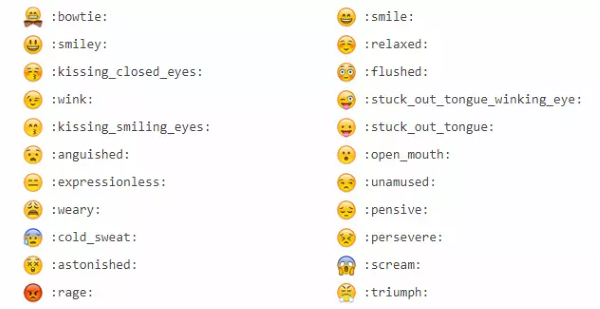
An interesting feature on GitHub is the integration of emoji in comments, commits, and Pull Requests. This not only makes communication more lively but also helps express emotions in technical discussions.

Managing Projects via GitHub CLI

GitHub CLI allows you to manage your projects directly from the terminal. You can perform operations such as creating issues, pull requests, or managing branches without opening a browser, saving time and increasing productivity.

GitHub allows you to create links between different lines of code in a repository. This helps users easily track changes and relationships between code segments, thereby improving understanding of the source code structure.

Using Task Checklists

Task checklists are a useful tool to help you manage and track work progress in a project. You can create checklists for each task, ensuring all work is completed on time.

Formatting Data with Maps, CSV, and 3D Rendering

GitHub supports data formatting as maps, CSV, and 3D rendering, allowing you to easily share and present project data in a visual and easy-to-understand way.

Exploring GitHub's Octodex

Octodex is a collection of cute GitHub avatar images that help users feel more comfortable when joining the community. This creates a fun and friendly atmosphere for users, while also encouraging more active participation.

A Comprehensive A-Z Guide to Using GitHub

To use GitHub effectively, you need to master the basic steps in the workflow. Below is a detailed A-Z guide to get you started.

Step 1: Create a GitHub Account
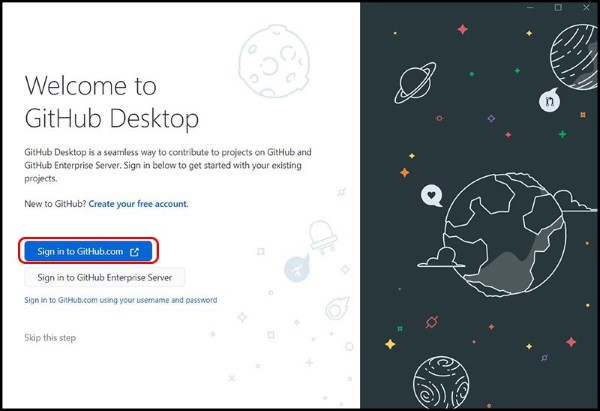
Visit github.com and create an account using email, a Google account, or Facebook. After successful registration, you'll receive a confirmation email. Click the link in the email to activate your account.

Step 2: Create a Repository
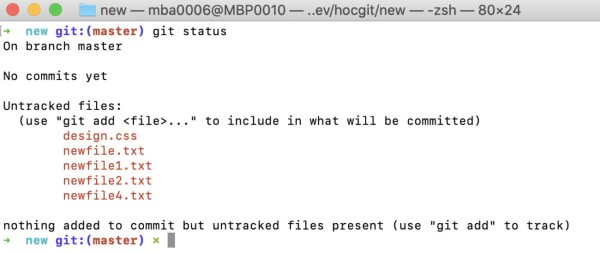
After logging in, click the "New" button in the upper right corner of the screen. Enter the repository name, description, and choose the repository type (Public or Private). Finally, click the "Create repository" button.

Step 3: Connect GitHub to Your Computer

GitHub uses Git for version control. You need to install Git on your computer before you can connect to the repository. Download and install Git from the official website: git-scm.com.

Open a terminal or command prompt and run the following commands to configure Git:

git config --global user.name "Your Name"

git config --global user.email "Your Email"

Step 4: Clone the Repository to Your Computer
Copy the URL of the repository from the GitHub website. Open a terminal and navigate to the directory where you want to store the repository. Run the following command to clone the repository to your computer:

git clone

Step 5: Add Source Code Files and Commit
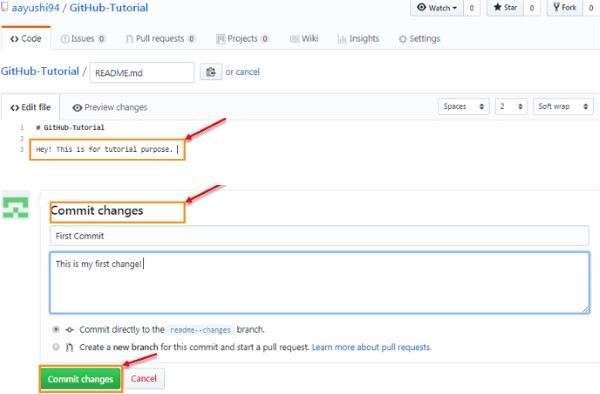
Add source code files to the repository directory. Use the following command to add files to Git's tracking area:

git add .

Use the following command to commit the changes:

git commit -m "Description of the changes"

Step 6: Push Changes to GitHub

Use the following command to push changes to the repository on GitHub:

git push origin main

Step 7: Create a Pull Request
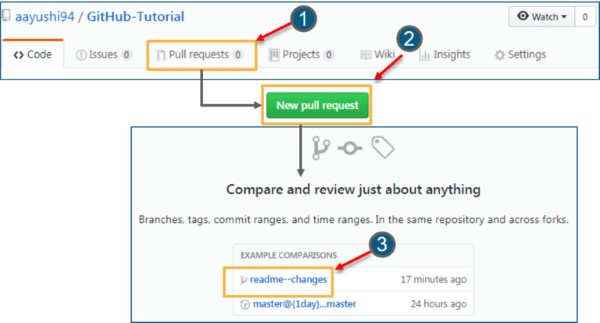
If you want to submit code for others to review and merge, you can create a Pull Request. Create a new branch for the feature or bug fix you want to implement. Commit the changes and push to the new branch.

Visit the GitHub repository page and click the "New pull request" button. Select the branch you want to merge and write a brief description of the changes. Click the "Create pull request" button.

GitHub's Competitors

Of course, GitHub is not the only platform providing source code sharing services among developers. Today, many other companies also offer similar services, including:

  • Bitbucket
  • Google Cloud Source Repositories
  • Phabricator
  • GitLab
  • Gogs
  • Gitea
  • SourceForge
  • Apache Allura
  • Launchpad
  • AWS CodeCommit

We hope that through this article, you now have a better understanding of GitHub, its features, and pricing. If you have any questions, feel free to leave a comment below!

GitLab is known for its powerful integrated CI/CD capabilities and self-hosting ability. It provides comprehensive project management tools and supports effective teamwork.
{{< test-result title="Source Code Hosting Platform Comparison" headers="Criteria|GitHub|GitLab|Bitbucket|SourceForge" row1="Ownership|Microsoft|GitLab Inc.|Atlassian|Slashdot Media" row2="Integrated CI/CD|GitHub Actions|GitLab CI/CD|Bitbucket Pipelines|No" row3="Self-hosted|Enterprise|Community Edition|Data Center|No" row4="Free Repos|Unlimited|Unlimited|5 members|Unlimited" row5="Wiki and Pages|Yes|Yes|Yes|Yes" row6="Community|Largest|Large|Medium|Medium" />}}

Tip

GitHub is the best choice for open source projects thanks to its largest community. GitLab is ideal when you need powerful CI/CD and free self-hosting. Bitbucket integrates well with Jira if you're using the Atlassian ecosystem.

Conclusion: GitHub is the world's most popular source code management and software collaboration platform, with over 100 million users. From repository hosting, Pull Requests, GitHub Actions to GitHub Pages, this platform provides comprehensive tools for both individual developers and enterprises.

Sources
Frequently Asked QuestionsQ&A

GitHub là nền tảng lưu trữ mã nguồn và quản lý phiên bản phổ biến nhất thế giới, thuộc sở hữu Microsoft. Bài viết hướng dẫn chi tiết cách tạo tài khoản, repository, clone, commit, push, pull request và các tính năng nổi bật của GitHub.

GitHub là gì?

GitHub là gì? GitHub là một mạng xã hội độc đáo cho lập trình viên, nơi vừa là hệ thống quản lý dự án, vừa là kho lưu trữ mã nguồn. GitHub cho phép theo dõi, cộng tác và quản lý các dự án phần mềm một cách hiệu quả. Đây là dịch vụ lưu trữ mã nguồn Git phổ biến nhất, nơi các lập trình viên có thể clone lại mã từ các repository và tạo kho chứa riêng của mình.

Ngoài các tính năng cơ bản của Git, GitHub bổ sung những yếu tố tương tác xã hội như feed, follower, và network graph, giúp các developer dễ dàng kết nối và học hỏi lẫn nhau qua lịch sử commit.

GitHub cung cấp hai phiên bản: miễn phí và trả phí. Phiên bản trả phí thường dành cho các doanh nghiệp với các tính năng phân quyền và bảo mật, hỗ trợ quản lý nhóm hiệu quả. Trong khi đó, phiên bản miễn phí là lựa chọn phổ biến cho cá nhân để lưu trữ mã nguồn và tham gia vào cộng đồng mã nguồn mở.

Một điểm đặc biệt của GitHub là commit message – mô tả hành động thực hiện trên mã nguồn – giúp nhóm hiểu rõ các thay đổi trong dự án. Cộng đồng mã nguồn mở ngày càng phát triển nhờ GitHub, và với nhiều lập trình viên, GitHub còn được xem như "CV thứ hai." Các nhà tuyển dụng thường tham khảo profile GitHub để đánh giá kỹ năng coding của ứng viên.

Hiện nay, việc nắm vững Git và GitHub là gì không chỉ là lợi thế mà còn là yêu cầu quan trọng với những người tìm kiếm cơ hội trong ngành lập trình.

Lịch sử phát triển và hình thành của GitHub

GitHub là minh chứng cho sự phát triển vượt bậc trong cộng đồng mã nguồn mở, góp phần thay đổi cách làm việc và hợp tác trong ngành công nghệ. Dưới đây là những dấu mốc quan trọng trong hành trình phát triển của GitHub.

  • Năm 2008: GitHub được thành lập bởi Tom Preston-Werner, Chris Wanstrath, và PJ Hyett với ý tưởng tạo ra một nền tảng quản lý mã nguồn mạnh mẽ và dễ sử dụng. Sản phẩm này chính thức ra mắt tại sự kiện TechCrunch Disrupt và nhanh chóng thu hút sự chú ý của cộng đồng.

  • Năm 2009: GitHub bắt đầu thu hút các nhà phát triển mã nguồn mở. Những dự án lớn như Ruby on Rails, jQuery và Node.js cũng chọn GitHub làm nền tảng quản lý mã nguồn của mình.

  • Năm 2010: GitHub gọi vốn thành công vòng đầu tiên, nhận được khoản đầu tư 7,5 triệu đô la từ Sequoia Capital, giúp nền tảng phát triển mạnh mẽ và mở rộng nhanh chóng.

  • Năm 2011: Số lượng kho lưu trữ trên GitHub vượt mốc 1 triệu, biến nền tảng này thành trung tâm chính cho các dự án mã nguồn mở.

  • Năm 2012: GitHub ra mắt GitHub Enterprise – một dịch vụ dành riêng cho doanh nghiệp, cho phép các tổ chức tạo máy chủ riêng để quản lý mã nguồn.

  • Năm 2018: Microsoft mua lại GitHub với giá 7,5 tỷ đô la, tạo đà cho sự phát triển lớn hơn và tích hợp GitHub vào hệ sinh thái Microsoft.

  • Năm 2019: GitHub vượt mốc 40 triệu người dùng, trở thành một phần không thể thiếu trong cộng đồng mã nguồn mở và ngành công nghệ.

  • Năm 2020: GitHub giới thiệu GitHub Codespaces, cho phép các lập trình viên viết mã trực tiếp từ trình duyệt mà không cần cài đặt môi trường phát triển trên máy tính cá nhân.

Qua các giai đoạn phát triển, GitHub đã chứng minh tầm ảnh hưởng của mình trong việc hỗ trợ và kết nối cộng đồng lập trình viên trên toàn thế giới.

Các tính năng nổi bật của GitHub

Tính năng nổi bật của GitHub là gì? GitHub là một nền tảng hàng đầu cho quản lý dự án và phiên bản mã nguồn mở, với nhiều tính năng nổi bật hỗ trợ mạnh mẽ cho phát triển phần mềm và quản lý dự án.

  • Hệ thống quản lý phiên bản (VCS): GitHub sử dụng Git để quản lý phiên bản, giúp theo dõi các thay đổi và quản lý các phiên bản khác nhau của dự án.

  • Repository: GitHub cung cấp các kho lưu trữ (repository) để lưu mã nguồn. Mỗi dự án có thể có một kho riêng, và người dùng có thể sao chép (fork) để đóng góp vào dự án.

  • Pull Requests: Tính năng này cho phép đóng góp ý kiến và đề xuất thay đổi vào kho gốc, tạo không gian cho thảo luận và đánh giá mã trước khi hợp nhất (merge) vào repository chính.

  • Branching: Hỗ trợ tạo các nhánh riêng biệt để phát triển nhiều tính năng đồng thời mà không ảnh hưởng đến nhau.

  • Commit History: Lưu lại lịch sử commit, với thông tin chi tiết về người thực hiện, thời gian, và nội dung thay đổi.

  • Issues: Công cụ theo dõi công việc, lỗi, nhiệm vụ và cải tiến. Các issue có thể được gán cho thành viên và theo dõi tiến độ.

  • Projects: Tính năng quản lý công việc giúp theo dõi tiến độ và tổ chức công việc một cách linh hoạt.

  • Wiki và Pages: Cho phép tạo trang Wiki để chia sẻ thông tin, tài liệu, và GitHub Pages để tạo website tĩnh từ repository.

  • Collaboration: Hỗ trợ các tính năng thảo luận, nhận xét và cấp quyền, giúp các thành viên trong dự án phối hợp hiệu quả.

  • Integrations: Tích hợp với nhiều công cụ như CI/CD, linter, và các dịch vụ kiểm thử tự động.

  • Security Features: Cung cấp công cụ quét mã, phát hiện lỗ hổng bảo mật, và theo dõi các phần mềm phụ thuộc có nguy cơ bị ảnh hưởng.

  • Community: GitHub là nơi kết nối cộng đồng lớn với hàng triệu lập trình viên trên toàn thế giới, tạo điều kiện học hỏi, chia sẻ và đóng góp.

GitHub với những tính năng này đã trở thành nền tảng lý tưởng cho cộng đồng phát triển mã nguồn mở và các dự án phần mềm quy mô lớn.

Các loại tài khoản trên GitHub

Các loại tài khoản trên GitHub là gì? GitHub cung cấp nhiều loại tài khoản nhằm đáp ứng nhu cầu đa dạng của cá nhân và tổ chức. Dưới đây là một số loại tài khoản phổ biến:

  • Tài khoản cá nhân (Individual Account): Tài khoản miễn phí dành cho cá nhân, cho phép tạo kho lưu trữ công khai và tham gia các dự án mã nguồn mở. Đây là lựa chọn phổ biến trong cộng đồng nhà phát triển.

  • Tài khoản tổ chức (Organization Account): Dành cho các tổ chức, doanh nghiệp hoặc dự án lớn, cho phép quản lý dự án và thành viên trong không gian tổ chức chung. Có cả phiên bản miễn phí và các gói trả phí với nhiều tính năng nâng cao.

  • Tài khoản Developer: Là phiên bản trả phí của tài khoản cá nhân, cung cấp các tính năng bổ sung như tích hợp công cụ phát triển bên ngoài và hỗ trợ ưu tiên.

  • Tài khoản Team: Phiên bản trả phí dành cho tổ chức, cho phép tạo nhiều nhóm làm việc và quản lý dự án theo nhóm.

  • Tài khoản Enterprise: Dành cho các tổ chức lớn, cung cấp các tính năng cao cấp như bảo mật nâng cao và tích hợp với dịch vụ doanh nghiệp. Gói này có phí tùy theo số lượng người dùng.

  • GitHub Free và GitHub Pro: Đây là hai lựa chọn cho tài khoản cá nhân, trong đó GitHub Free là phiên bản miễn phí và GitHub Pro là phiên bản trả phí với các tính năng nâng cao như tích hợp công cụ phát triển và hỗ trợ ưu tiên.

  • GitHub Education: Chương trình hỗ trợ miễn phí cho học sinh, sinh viên và giáo viên, cung cấp các tính năng mạnh mẽ phục vụ cho giảng dạy và học tập.

GitHub với đa dạng các loại tài khoản đã tạo điều kiện cho nhiều đối tượng sử dụng, từ cá nhân đến các doanh nghiệp lớn.

Những khái niệm cơ bản về Git mà bạn cần biết

Khi sử dụng Git, hiểu rõ một số khái niệm cơ bản sau sẽ giúp bạn tận dụng hiệu quả các tính năng của Git:

  • Repository (Repo): Thư mục hoặc không gian lưu trữ chứa mã nguồn và toàn bộ lịch sử thay đổi của dự án.

  • Commit: Một "snapshot" ghi lại trạng thái của mã nguồn tại một thời điểm cụ thể. Mỗi commit có mã hash duy nhất.

  • Branch: Nhánh là một phiên bản song song của dự án, cho phép phát triển độc lập các tính năng mà không ảnh hưởng lẫn nhau.

  • Merge: Quá trình hợp nhất các thay đổi từ một nhánh vào nhánh khác.

  • Pull Request (PR): Yêu cầu hợp nhất thay đổi từ một nhánh vào nhánh khác. PR thường được sử dụng trong các dự án có nhiều người đóng góp.

  • Clone: Sao chép một repository từ xa về máy tính cá nhân để làm việc cục bộ.

  • Fetch: Tải về các thay đổi từ xa mà không hợp nhất vào nhánh hiện tại.

  • Pull: Tương tự fetch, nhưng sẽ tự động hợp nhất các thay đổi từ xa vào nhánh hiện tại.

  • Push: Đẩy các commit từ cục bộ lên repository từ xa.

  • Conflict: Xung đột xảy ra khi hai nhánh hoặc nhiều người sửa đổi cùng một phần mã nguồn.

  • Staging Area/Index: Nơi lưu trữ tạm thời các thay đổi trước khi commit.

  • Working Directory: Thư mục trên máy cá nhân nơi bạn thực hiện công việc và chỉnh sửa mã nguồn.

  • HEAD: Con trỏ trỏ đến commit cuối cùng trong nhánh hiện tại.

  • Tag: Đánh dấu một commit cụ thể để dễ tìm kiếm và tham chiếu.

  • Remote: Repository nằm ở vị trí xa, thường là trên mạng.

Hiểu rõ các khái niệm liên quan GitHub là gì sẽ giúp bạn làm việc hiệu quả hơn với Git.

Lợi ích khi sử dụng GitHub

Lợi ích khi sử dụng GitHub là gì? Sử dụng GitHub mang lại nhiều lợi ích cho lập trình viên, từ việc quản lý mã nguồn hiệu quả đến cải thiện kỹ năng lập trình. Dưới đây là một số lợi ích nổi bật:

Quản lý mã nguồn hiệu quả

Khi bạn tạo một repository (repo), toàn bộ mã nguồn của dự án được lưu trữ trên GitHub. Tại đây, bạn có thể theo dõi quá trình làm việc qua các bình luận sau mỗi lần commit, và đặc biệt, nhiều người có thể cùng làm việc trên một repo.

GitHub mang lại nhiều lợi ích, trong đó đầu tiên là khả năng biết được ai đã commit và nội dung của commit đó. Ngoài ra, bạn có thể phát triển dự án theo nhiều nhánh khác nhau. Nguyên tắc làm việc với các nhánh là như sau: bạn có thể tạo nhiều nhánh để phát triển các tính năng mới, nhưng cuối cùng, các nhánh cần được merge lại vào nhánh MASTER để tạo ra phiên bản hoàn chỉnh của dự án.

Theo dõi các thay đổi thông qua Version Control

Khi có nhiều thành viên cùng tham gia một dự án, việc theo dõi các chỉnh sửa — ai thay đổi gì, lúc nào và các tệp đó được lưu trữ ở đâu — có thể trở nên phức tạp. Đừng lo, GitHub đã giải quyết vấn đề này giúp bạn bằng cách lưu lại mọi thay đổi mà bạn đã đẩy (push) lên repository. Tương tự như Microsoft Word hay Google Drive, GitHub cung cấp lịch sử phiên bản, giúp bạn dễ dàng khôi phục lại các phiên bản trước trong trường hợp có sự cố hoặc phiên bản hiện tại không được như mong muốn.

Sử dụng Markdown để tạo tài liệu

Markdown là một phương pháp định dạng văn bản trên web, cho phép bạn chỉnh sửa cách hiển thị của tài liệu, như định dạng in đậm, in nghiêng, thêm hình ảnh và tạo danh sách. Hầu hết, Markdown chỉ là văn bản thuần túy với một số ký tự đặc biệt được chèn vào, chẳng hạn như # hoặc *. Trên GitHub, bạn có thể sử dụng Markdown ở nhiều nơi, bao gồm trong Git, các bình luận trong Issues và Pull Requests, cũng như các tệp có đuôi .md hoặc .markdown.

Khẳng định giá trị cá nhân qua các dự án trên GitHub

Không thể phủ nhận rằng những điều tốt đẹp bạn viết trong CV là cần thiết. Tuy nhiên, mã nguồn luôn là bằng chứng tốt nhất để chứng minh bạn là một developer thực thụ. Một phần nhỏ của GitHub trong CV có thể giúp bạn nổi bật hơn so với các ứng viên khác. Đối với nhà tuyển dụng, GitHub giống như một chiếc máy phát hiện giả mạo – giúp phân biệt giữa các developer thực sự và những người "giả mạo".

Hãy đầu tư cho một tài khoản GitHub ấn tượng và thêm liên kết vào CV của bạn; không nhà tuyển dụng nào lại bỏ qua bạn đâu.

Nhiều công ty lớn trên thế giới xem việc có một tài khoản GitHub là một yêu cầu trong quy trình tuyển dụng. Nếu bạn có nhiều đóng góp cho cộng đồng hoặc sở hữu nhiều sản phẩm trên GitHub, điều đó sẽ là một lợi thế lớn so với các ứng viên khác. Bằng cách công bố các dự án của mình trên đây, bạn đã tạo dựng cho mình một hồ sơ cá nhân đáng tin cậy.

Nhà tuyển dụng sẽ nhanh chóng nhận ra thế mạnh và khả năng lập trình của bạn khi nhìn vào hồ sơ GitHub của bạn.

Cải thiện kỹ năng lập trình và theo dõi lỗi

Có hàng ngàn cách để học, và học trên GitHub là một lựa chọn tuyệt vời trong thời đại hiện nay. Với hàng triệu dự án mã nguồn mở, hàng trăm ngàn người đóng góp và hàng tỉ lần commit mỗi ngày, việc quan sát, so sánh và học hỏi từ những thay đổi này sẽ mang lại cho bạn nhiều kiến thức quý giá để cải thiện kỹ năng lập trình của mình.

Chức năng "bug tracking" được GitHub tích hợp nhằm đơn giản hóa quy trình tìm và sửa lỗi. Để hiểu rõ quy trình này, bạn chỉ cần mở dashboard của từng dự án và lọc thông tin theo nhu cầu. Hệ thống sẽ sắp xếp các câu hỏi theo mức độ phổ biến, thời gian cập nhật và các thông tin liên quan. Giao diện phần mềm cũng rất mượt mà, vì vậy nó luôn được đánh giá cao trong cộng đồng lập trình viên IT.

Khám phá kho tài nguyên phong phú trên GitHub

Với tính năng Explore, bạn có thể dễ dàng theo dõi và tìm kiếm các dự án mã nguồn mở theo các công nghệ mà bạn yêu thích. GitHub hỗ trợ tìm kiếm mã nguồn không chỉ cho các dự án riêng biệt mà còn cho cả các trang web. Bên cạnh đó, nền tảng này cũng có khả năng tối ưu hóa công cụ tìm kiếm (SEO) tốt, cho phép người dùng tìm kiếm bất kỳ chuỗi mã nào được chia sẻ công khai.

Tự động hóa quy trình với GitHub Actions

Trên máy chủ của GitHub, có những workflow scripts chạy tự động. Các lập trình viên (dev) có thể sử dụng chúng để phản hồi các sự kiện trên các kho lưu trữ (repositories) hoặc thực hiện một số hành động cụ thể. Ví dụ, tôi đã viết một tiện ích nhỏ gọi là Autotagger – GitHub Marketplace, sẽ tự động tạo git tags khi số phiên bản trong file package.json thay đổi. Mặc dù đây chỉ là một hành động nhỏ, nhưng nó có thể tạo ra tác động lớn khi cần truy tìm mã nguồn về phiên bản phát hành trước đó, giúp giảm bớt một phần "nhức đầu" cho các người duy trì dự án.

Quản lý và phân phối gói phần mềm qua GitHub Package Registry

GitHub Package Registry cho phép lập trình viên duy trì các registry phân phối của họ, bao gồm npm, Docker, Maven, NuGet và Ruby gems.

Đừng ngần ngại tạo ngay cho mình một tài khoản GitHub. Hãy khởi tạo những dự án riêng và chia sẻ với cộng đồng, hoặc bạn có thể thoải mái fork một dự án open source nào đó. Nếu tìm thấy lỗi hoặc cần hỗ trợ, hãy tạo pull request hoặc issue để báo cáo.

Xây dựng và mở rộng mối quan hệ trong cộng đồng lập trình

Gặp gỡ những lập trình viên mới: Hàng nghìn lập trình viên trên toàn cầu đang tham gia vào mạng lưới rộng lớn của GitHub để chia sẻ kinh nghiệm và những ý tưởng sáng tạo.

Chia sẻ kinh nghiệm cá nhân: Git cho phép người dùng chia sẻ mã nguồn, đoạn văn bản hoặc bất kỳ thông tin nào với các lập trình viên khác. Bạn có thể sử dụng nó để trao đổi thông tin, hoặc sử dụng Gists như các kho lưu trữ Git, từ đó tách ra và cập nhật các phiên bản khác nhau.

GitHub được sử dụng để làm gì?

GitHub là một công cụ vô cùng đa năng, hỗ trợ rất nhiều hoạt động trong lĩnh vực lập trình và phát triển phần mềm. Dưới đây là một số ứng dụng tiêu biểu của GitHub.

Kéo, thả và lưu trữ mã nguồn

GitHub cho phép bạn kéo và thả file mã nguồn trực tiếp vào repository, giúp việc tải lên trở nên nhanh chóng và dễ dàng. Bạn có thể lưu trữ tất cả mã nguồn của dự án tại đây, từ các file nhỏ đến các thư viện lớn.

Tạo và quản lý thư mục qua giao diện web

Giao diện web của GitHub giúp bạn dễ dàng tạo và quản lý các thư mục trong repository. Điều này có nghĩa là bạn có thể tổ chức mã nguồn của mình một cách khoa học và dễ dàng tìm kiếm tài liệu cần thiết.

Rút gọn URL với Git URL Shortener

GitHub được sử dụng rút gọn URL

GitHub cũng cung cấp một công cụ rút gọn URL, giúp bạn chia sẻ đường dẫn tới các repository và file dễ dàng hơn. Điều này cực kỳ hữu ích khi bạn muốn gửi link cho đồng nghiệp hoặc bạn bè.

Tìm kiếm tập tin và tài liệu

GitHub cung cấp khả năng tìm kiếm mạnh mẽ, cho phép bạn tìm kiếm các tập tin và tài liệu trong repository của mình hoặc trên toàn bộ nền tảng. Bạn có thể dễ dàng tìm kiếm các file theo tên, loại hoặc nội dung bên trong.

Sử dụng GitHub Emoji trong dự án

Một điểm thú vị trên GitHub là việc tích hợp emoji trong các comment, commit và Pull Request. Điều này không chỉ làm cho giao tiếp trở nên sinh động hơn mà còn giúp diễn đạt cảm xúc trong các thảo luận kỹ thuật.

Quản lý dự án qua GitHub CLI

GitHub CLI cho phép bạn quản lý dự án của mình trực tiếp từ terminal. Bạn có thể thực hiện các thao tác như tạo issue, pull request hay quản lý branch mà không cần phải mở trình duyệt, tiết kiệm thời gian và tăng hiệu suất công việc.

Tạo liên kết giữa các dòng mã

GitHub cho phép bạn tạo liên kết giữa các dòng mã khác nhau trong repository. Điều này giúp người dùng dễ dàng theo dõi các thay đổi và mối liên hệ giữa các đoạn mã, từ đó cải thiện khả năng hiểu biết về cấu trúc mã nguồn.

Sử dụng danh sách kiểm tra (Task Checklist)

Danh sách kiểm tra là một công cụ hữu ích giúp bạn quản lý và theo dõi tiến độ công việc trong dự án. Bạn có thể tạo ra các checklist cho từng nhiệm vụ, đảm bảo rằng tất cả các công việc được thực hiện đúng hạn.

Định dạng dữ liệu với Maps, CSV và 3D Rendering

GitHub hỗ trợ định dạng dữ liệu dưới dạng maps, CSV và 3D rendering, cho phép bạn dễ dàng chia sẻ và trình bày dữ liệu của dự án một cách trực quan và dễ hiểu.

Khám phá Octodex của GitHub

Octodex là một bộ sưu tập các hình ảnh đại diện dễ thương của GitHub, giúp người dùng cảm thấy thoải mái hơn khi tham gia vào cộng đồng. Điều này tạo ra một không khí vui vẻ và thân thiện cho người dùng, đồng thời khuyến khích họ tham gia tích cực hơn

Hướng dẫn chi tiết cách sử dụng GitHub từ A-Z

Để sử dụng GitHub một cách hiệu quả, bạn cần nắm vững các bước cơ bản trong quy trình làm việc. Dưới đây là hướng dẫn chi tiết từ A-Z để bạn có thể bắt đầu.

Bước 1: Tạo tài khoản GitHub

Truy cập trang web github.com và tạo một tài khoản bằng email, tài khoản Google hoặc Facebook. Sau khi đăng ký thành công, bạn sẽ nhận được một email xác nhận. Nhấp vào liên kết trong email để kích hoạt tài khoản của bạn.

Bước 2: Tạo kho lưu trữ (repository)

Sau khi đăng nhập, nhấn vào nút "New" ở góc trên bên phải màn hình. Điền tên cho kho lưu trữ (Repository name), mô tả (Description) và chọn loại kho lưu trữ (Public hoặc Private). Cuối cùng, nhấn nút "Create repository".

Bước 3: Kết nối GitHub với máy tính của bạn

GitHub sử dụng Git để quản lý phiên bản. Bạn cần cài đặt Git trên máy tính của mình trước khi có thể kết nối với repository. Tải xuống và cài đặt Git từ trang web chính thức: git-scm.com.

Mở terminal hoặc command prompt và chạy các lệnh sau để cấu hình Git:

git config –global user.name "Tên của bạn"

git config –global user.email "Email của bạn"

Bước 4: Clone repository về máy tính

Sao chép địa chỉ URL của repository từ trang web GitHub. Mở terminal và chuyển đến thư mục nơi bạn muốn lưu trữ repository. Chạy lệnh sau để clone repository về máy tính:

git clone

Bước 5: Thêm file mã nguồn và commit

Thêm các file mã nguồn vào thư mục repository. Sử dụng lệnh sau để thêm các file vào vùng theo dõi của Git:

git add .

Sử dụng lệnh sau để commit các thay đổi:

git commit -m "Thông điệp mô tả thay đổi"

Bước 6: Push các thay đổi lên GitHub

Sử dụng lệnh sau để push các thay đổi lên repository trên GitHub:

git push origin main

Bước 7: Tạo Pull Request

Nếu bạn muốn gửi code để người khác review và hợp nhất, bạn có thể tạo một Pull Request. Tạo một branch mới cho tính năng hoặc sửa lỗi mà bạn muốn thực hiện. Commit các thay đổi và push lên branch mới.

Truy cập trang web GitHub của repository và nhấn vào nút "New pull request". Chọn branch mà bạn muốn hợp nhất và viết một mô tả ngắn gọn về các thay đổi. Nhấn nút "Create pull request".

Các đối thủ cạnh tranh của GitHub

Tất nhiên, GitHub không phải là nền tảng duy nhất cung cấp dịch vụ chia sẻ mã nguồn giữa các lập trình viên. Hiện nay, có nhiều đơn vị khác cũng cung cấp các dịch vụ tương tự, bao gồm:

  • Bitbucket
  • Google Cloud Source Repositories
  • Phabricator
  • GitLab
  • Gogs
  • Gitea
  • SourceForge
  • Apache Allura
  • Launchpad
  • AWS CodeCommit

Hy vọng qua bài viết này, bạn đã hiểu rõ hơn về GitHub, các tính năng cũng như mức phí sử dụng nền tảng này. Nếu bạn có bất kỳ câu hỏi nào, hãy để lại bình luận bên dưới nhé!

GitLab được biết đến với tính năng tích hợp CI/CD mạnh mẽ và khả năng tự host. Nó cung cấp các công cụ quản lý dự án toàn diện và hỗ trợ làm việc nhóm hiệu quả.

{{< test-result title="So sánh các nền tảng lưu trữ mã nguồn" headers="Tiêu chí|GitHub|GitLab|Bitbucket|SourceForge" row1="Sở hữu|Microsoft|GitLab Inc.|Atlassian|Slashdot Media" row2="CI/CD tích hợp|GitHub Actions|GitLab CI/CD|Bitbucket Pipelines|Không" row3="Self-hosted|Enterprise|Community Edition|Data Center|Không" row4="Repo miễn phí|Không giới hạn|Không giới hạn|5 thành viên|Không giới hạn" row5="Wiki và Pages|Có|Có|Có|Có" row6="Cộng đồng|Lớn nhất|Lớn|Trung bình|Trung bình" />}}

Mẹo hay

GitHub là lựa chọn tốt nhất cho dự án mã nguồn mở nhờ cộng đồng lớn nhất. GitLab phù hợp khi cần CI/CD mạnh và self-hosted miễn phí. Bitbucket tích hợp tốt với Jira nếu bạn đang dùng hệ sinh thái Atlassian.

Kết luận: GitHub là nền tảng quản lý mã nguồn và cộng tác phần mềm phổ biến nhất thế giới, với hơn 100 triệu người dùng. Từ lưu trữ repository, Pull Request, GitHub Actions đến GitHub Pages, nền tảng này cung cấp đầy đủ công cụ cho lập trình viên cá nhân lẫn doanh nghiệp.

Nguồn tham khảo
Câu hỏi thường gặpQ&A
GitHub là gì?
GitHub là nền tảng lưu trữ mã nguồn và quản lý phiên bản sử dụng Git, thuộc sở hữu của Microsoft. GitHub cho phép lập trình viên lưu trữ, chia sẻ mã nguồn, cộng tác trong dự án và đóng góp vào mã nguồn mở.
GitHub có miễn phí không?
Có, GitHub Free cho phép tạo repository công khai và riêng tư không giới hạn, hỗ trợ GitHub Actions 2.000 phút/tháng. Các gói Pro, Team và Enterprise có thêm tính năng nâng cao với phí hàng tháng.
GitHub khác Git như thế nào?
Git là hệ thống quản lý phiên bản phân tán chạy trên máy cục bộ. GitHub là nền tảng web lưu trữ repository Git trên cloud, bổ sung tính năng cộng tác như Pull Request, Issues, Actions và Pages.
Pull Request trên GitHub là gì?
Pull Request (PR) là yêu cầu hợp nhất thay đổi từ một branch vào branch khác. PR cho phép thành viên review code, thảo luận và đề xuất chỉnh sửa trước khi merge vào nhánh chính.
GitHub Actions dùng để làm gì?
GitHub Actions là công cụ CI/CD tích hợp sẵn, cho phép tự động hóa quy trình build, test và deploy trực tiếp từ repository. Actions chạy trên máy chủ GitHub và được kích hoạt bởi các sự kiện như push, PR.