Zero Trust 是什么?'永不信任,始终验证'安全模型
Security

Zero Trust 是什么?'永不信任,始终验证'安全模型

Zero Trust 是基于'永不信任,始终验证'原则的现代安全模型。了解核心原则、架构、Google BeyondCorp、Cloudflare Access 及逐步采用方法。

系列文章: Bảo mật
  1. 1 什么是恶意软件?分类、特征及预防方法
  2. 2 什么是DDoS?识别迹象、应对方法与有效防御指南
  3. 3 什么是网络钓鱼?识别与防范在线欺诈
  4. 4 什么是DNS Sinkhole?DNS Sinkhole技术的应用与使用方法
  5. 5 什么是OAuth 2.0?授权访问与谷歌登录原理
  6. 6 什么是木马病毒?关于Trojan恶意软件的基本知识
  7. 7 Zero Trust 是什么?'永不信任,始终验证'安全模型
  8. 8 VPN是什么?虚拟专用网络与WireGuard、OpenVPN协议
  9. 9 MFA 是什么?多因素认证与 2FA 对比详解
  10. 10 什么是防火墙?在网络安全中的角色和功能
  11. 11 什么是SQL注入?数据库攻击与防护
  12. 12 什么是XSS?跨站脚本攻击与防护
✦ 快速摘要
Zero Trust 是基于'永不信任,始终验证'原则的现代安全模型。了解核心原则、架构、Google BeyondCorp、Cloudflare Access 及逐步采用方法。
这篇文章怎么样?

Zero Trust 是什么?旧边界模型为何失败?

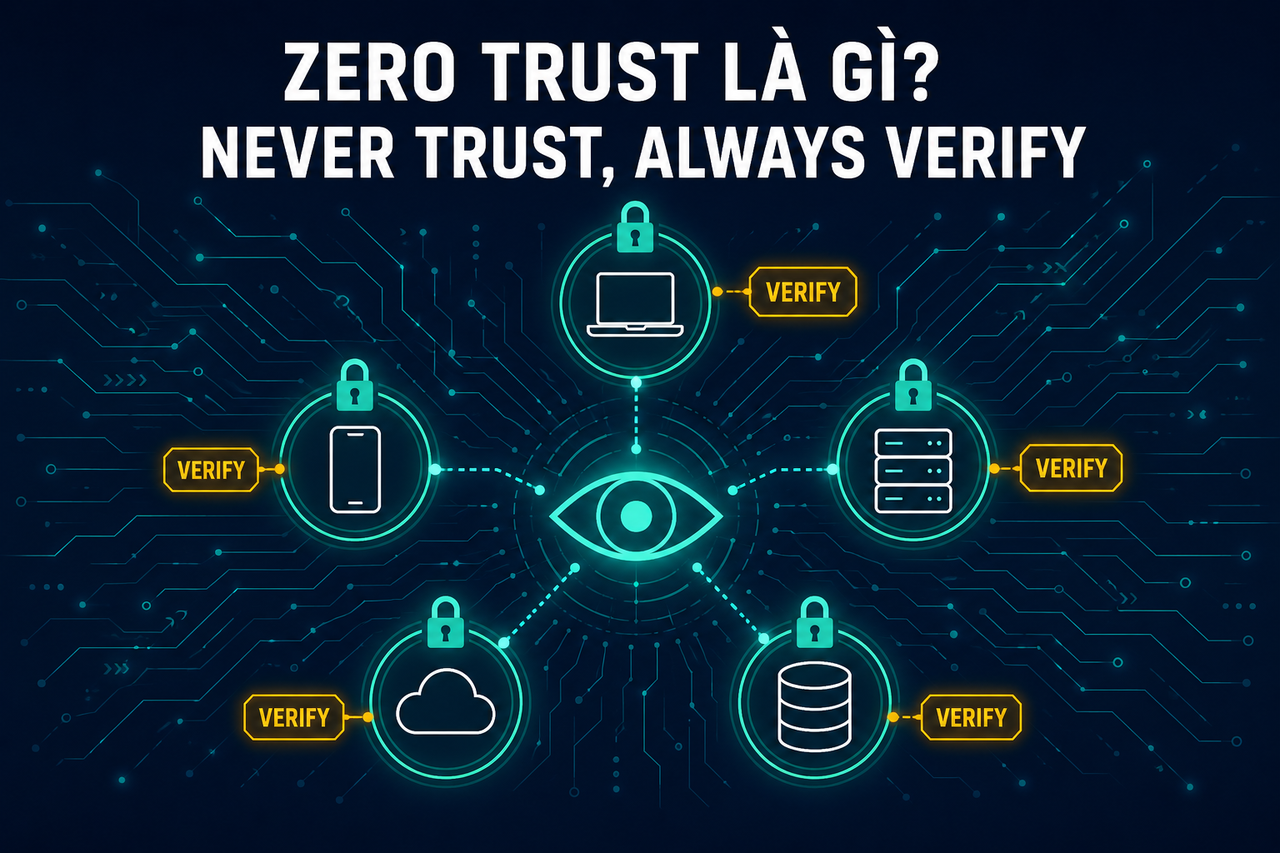
Zero Trust 是 Forrester Research 的 John Kindervag 于 2010 年提出的安全模型,其核心原则为:

"永不信任,始终验证——永远不要默认信任任何事物,始终进行显式认证和授权。"

旧边界模型为何失败?

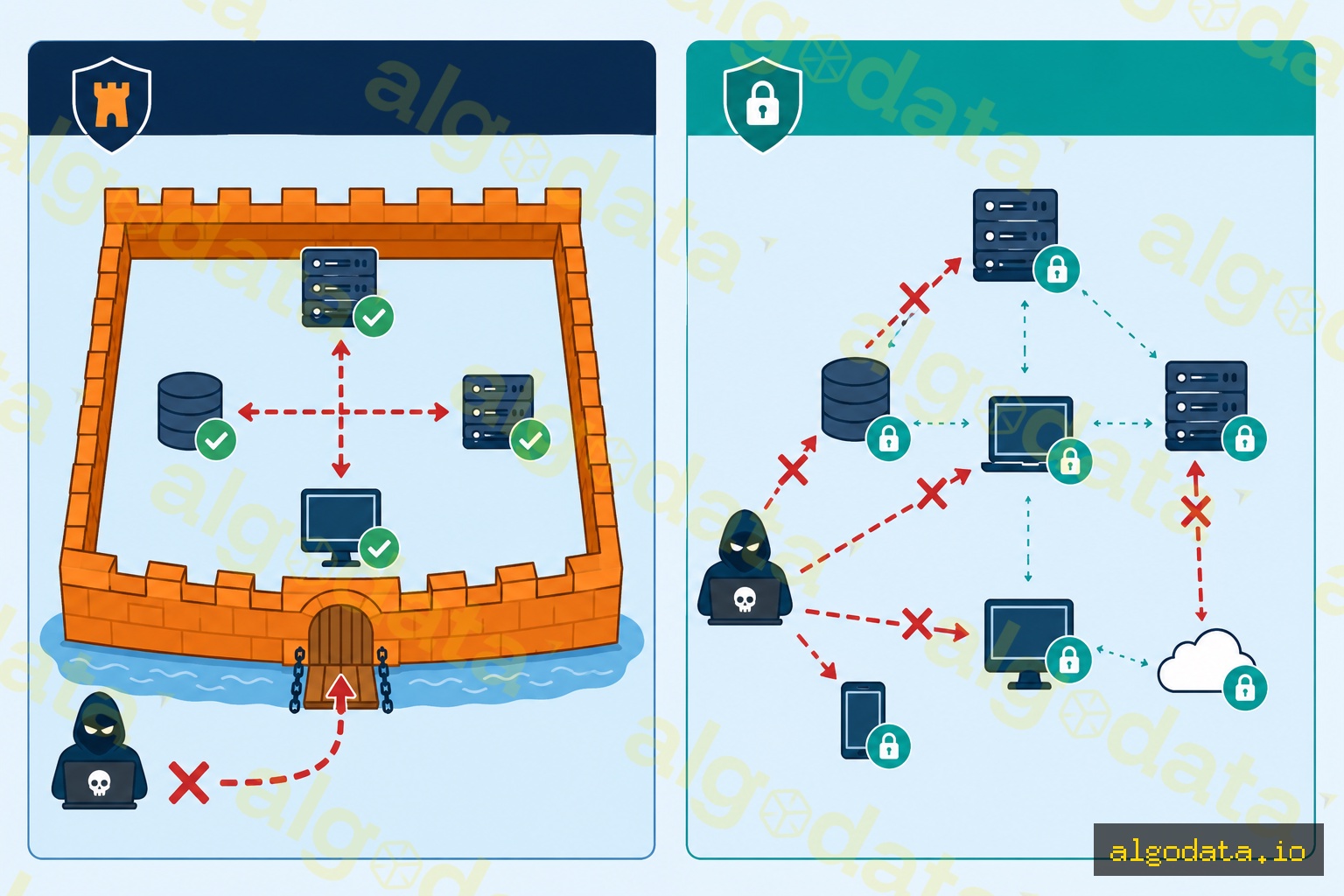
传统的城堡护城河式安全模型假设:企业内部网络(VPN、内网)中的一切都是安全的。攻击者只需突破外围防线一次,之后便可在整个网络中自由横向移动。

现代现实打破了这一假设:

  • 远程办公:员工从多个地点、多种设备工作
  • 云优先:资源部署在 AWS/GCP/Azure 上,不再"位于"企业网络内部
  • 供应链攻击:攻击者通过供应商或合作伙伴渗透,无需直接穿越防火墙
  • 内部威胁:位于网络内部的受感染设备同样危险

数据参考:80% 的数据泄露涉及被盗凭证(Verizon DBIR 2024)。"一次登录即永久信任"的模式是致命弱点。

Zero Trust 的三大核心原则

1. 显式验证(Verify Explicitly)

基于所有可用数据点对每个请求进行身份验证和授权:

  • 身份(谁在发起请求?)
  • 设备健康状态(设备是否受管理、补丁是否完整?)
  • 位置(来自哪里?公司办公室还是咖啡馆 Wi-Fi?)
  • 服务/工作负载(请求访问哪个资源?)
  • 数据分类(是否涉及敏感数据?)

2. 最小权限访问(Use Least Privilege Access)

在正确的时间、以正确的时长授予所需的最小权限:

  • 即时访问(JIT):针对特定任务的临时权限
  • 恰好足够的访问(JEA):不授予永久管理员权限
  • 特权身份管理(PIM):在需要时进行临时权限提升

3. 假设已被入侵(Assume Breach)

在系统设计时假设攻击者已在内部:

  • 加密所有内容,包括内部流量(mTLS)
  • 对网络进行分段以限制爆炸半径
  • 监控并记录所有活动
  • 在发生泄露时将影响最小化

Zero Trust 与 VPN 对比——为何 VPN 不够用?
传统 VPN:

  • 一次身份验证后授予完整内部网络访问权限
  • 不区分受管和非受管设备
  • 不持续验证设备状态
  • 如果凭证被盗,攻击者将获得完整的网络访问权限

零信任网络访问(ZTNA):

  • 仅按应用程序授予访问权限
  • 验证设备状态(操作系统补丁级别、防病毒、磁盘加密)
  • 持续认证——按会话和行为重新验证
  • 最小权限:开发人员只能访问开发服务器,而非生产数据库

对比:

评判维度 VPN ZTNA
认证后的访问范围 整个网络 特定应用
设备信任检查 有(持续进行)
横向移动 容易 被微分段阻止
可见性 高(每个请求均记录)
远程办公体验 慢、有延迟 更快(直连云端)

Zero Trust 架构:4 个核心组件

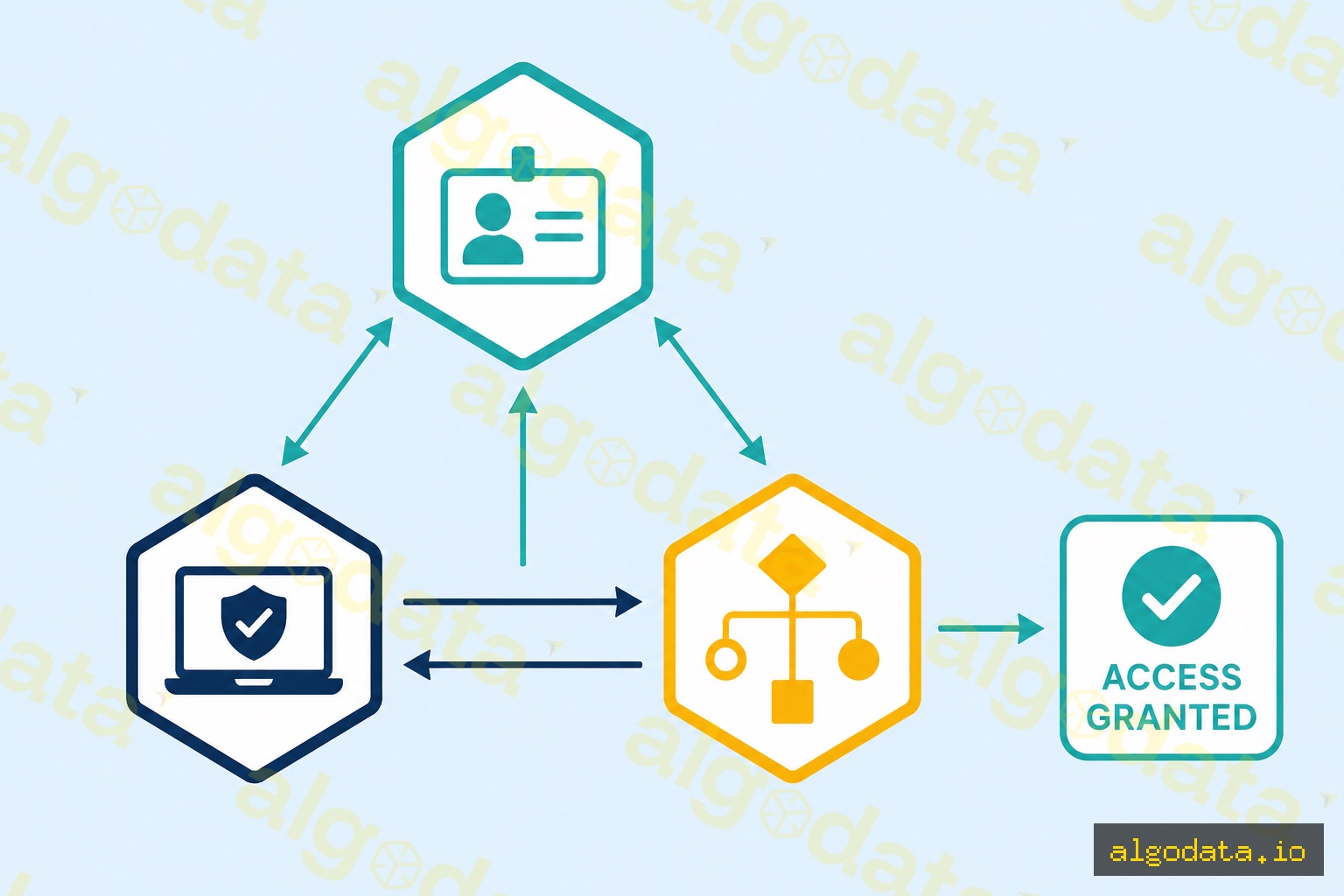
1. 身份提供商(IdP)

Zero Trust 的核心。管理用户身份,强制执行 MFA 和 SSO。

  • 示例:Okta、Azure Active Directory、Google Workspace、Ping Identity

2. 设备信任(Device Trust)

在授予访问权限之前检查设备状态:

  • 设备是否受管理(已加入 MDM)?
  • 操作系统是否已安装最新补丁?
  • 磁盘加密是否已启用?
  • 防病毒软件是否正在运行?
  • 是否存在恶意软件指标?

3. 策略引擎(Policy Engine)

决策核心:根据策略决定允许/拒绝/升级认证。

Policy: 
  IF user.role == "engineer" 
  AND device.managed == true
  AND device.os_patch_age <= 30 days
  AND request.resource == "prod-db"
  AND request.location NOT IN ["high-risk-countries"]
  THEN allow WITH session_logging
  ELSE deny OR require step-up MFA

4. 微分段(Microsegmentation)

将网络划分为带有独立策略的微分段,阻止横向移动。

实际部署:BeyondCorp 与 Cloudflare Access
Google BeyondCorp:

Google 从 2011 年 Operation Aurora(APT 攻击)后开始构建 BeyondCorp。替代 VPN 的方案包括:

  1. 设备清单数据库——跟踪所有公司设备
  2. 身份感知代理——所有请求都必须经过代理,验证身份和设备
  3. 上下文感知访问——策略基于用户角色、设备状态和位置
  4. 没有"受信任"网络——在咖啡馆 Wi-Fi 工作的工程师与在办公室的安全态势相同

Cloudflare Access:

YAML
 1# Cloudflare Access policy (terraform)
 2resource "cloudflare_access_policy" "engineering_only" {
 3  application_id = cloudflare_access_application.internal_app.id
 4  zone_id        = var.zone_id
 5  name           = "Engineering Team Only"
 6  precedence     = 1
 7  decision       = "allow"
 8
 9  include {
10    email_domain = ["company.com"]
11    group        = [cloudflare_access_group.engineers.id]
12  }
13
14  require {
15    device_posture = [cloudflare_device_posture_rule.managed_device.id]
16  }
17}

Azure AD 条件访问:

JSON
 1{
 2  "displayName": "Require MFA for all users",
 3  "state": "enabled",
 4  "conditions": {
 5    "users": { "includeUsers": ["All"] },
 6    "applications": { "includeApplications": ["All"] }
 7  },
 8  "grantControls": {
 9    "operator": "OR",
10    "builtInControls": ["mfa"]
11  }
12}

微分段——阻止横向移动

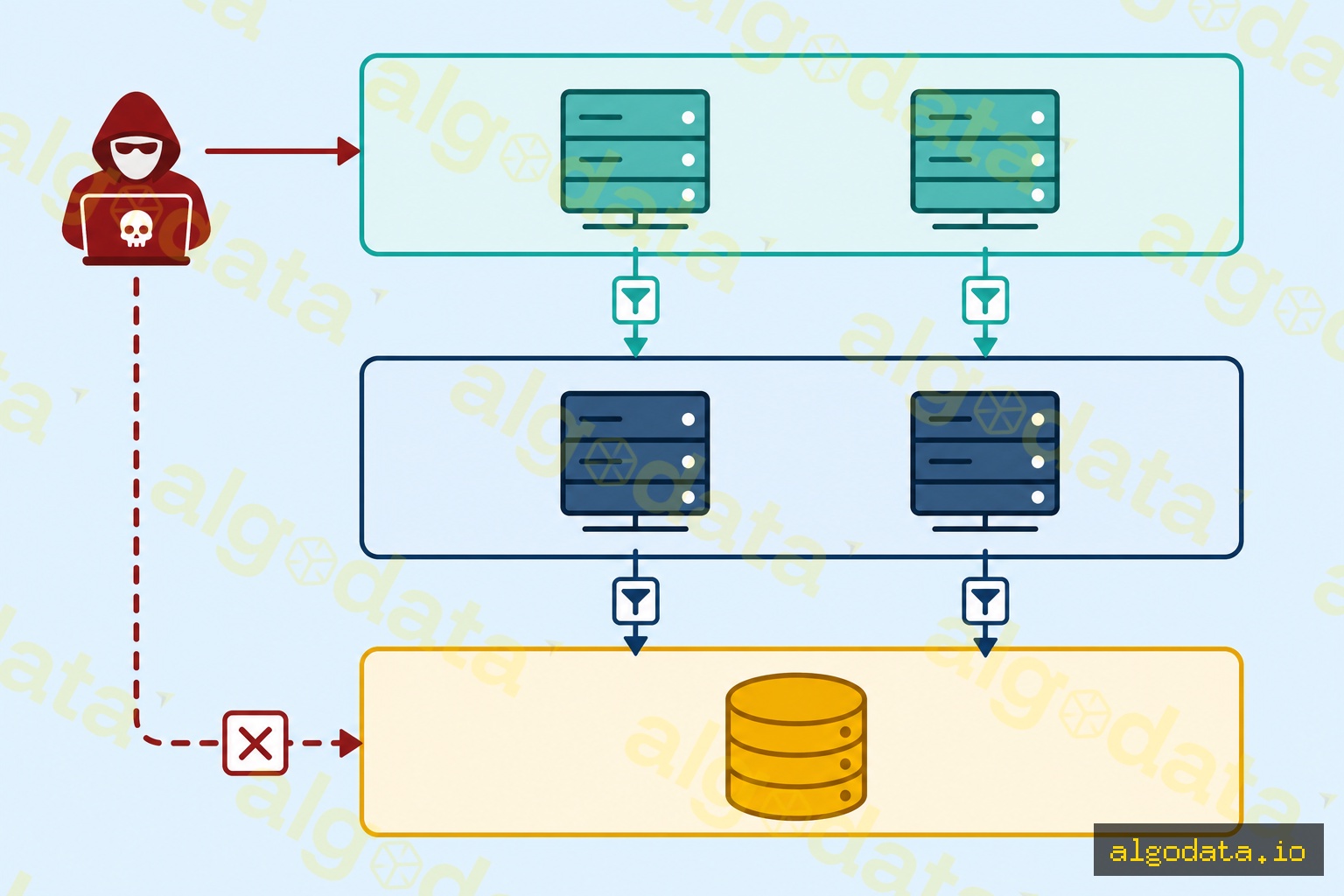
微分段将平坦网络(所有服务器可以互相通信)划分为具有独立策略的小区域:

Zone: Web Tier
  - 仅接受来自负载均衡器的流量(端口 443)
  - 只能连接到 App Tier(端口 8080)
  - 不能直接连接到 Database Tier

Zone: App Tier
  - 仅接受来自 Web Tier 的流量(端口 8080)
  - 只能连接到 DB Tier(端口 5432)
  - 无互联网访问

Zone: DB Tier
  - 仅接受来自 App Tier 的流量(端口 5432)
  - 无出站互联网
  - 静态和传输加密(mTLS)

如果攻击者入侵了 Web Tier,他们无法直接跳转到数据库。必须穿越每个区域,每一步都受到控制和记录。

Zero Trust 成熟度模型——3 个阶段

阶段 1:传统阶段(起点)

  • 使用 VPN 进行远程访问
  • 很少或没有 MFA
  • 平坦网络,所有服务器在同一子网内
  • 行动:为所有账户启用 MFA,部署 SSO

阶段 2:进阶阶段

  • 强制使用 SSO + MFA
  • 基本条件访问策略
  • 设备管理(MDM)
  • 行动:开始微分段,为关键应用实施 ZTNA

阶段 3:最优阶段

  • 对每个请求进行持续验证
  • 自动化设备合规性执行
  • 具有实时策略的完整微分段
  • 行为分析和异常检测
  • 行动:完全消除 VPN,所有服务之间使用 mTLS

实际应用场景

远程办公安全:远程员工通过设备状态和身份进行认证,无需使用缓慢的 VPN。Cloudflare Access 或 Zscaler Private Access 取代 VPN。

泄露后恢复:发生泄露后,Zero Trust 有助于控制损害——攻击者无法随意横向移动。

以 SaaS 为主的组织:当大多数应用是 SaaS(Slack、Salesforce、GitHub)时,身份感知代理与条件访问单独保护每个应用程序。
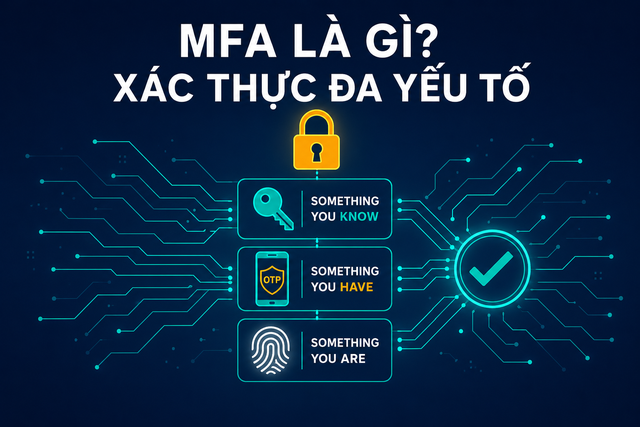
VPN 是什么?Zero Trust 为何正在取代 VPN

MFA 是什么?Zero Trust 中的多因素认证

API 网关是什么?Zero Trust 架构中的控制点

常见问题Q&A

What Is Zero Trust? Why the Old Perimeter Model Failed

Zero Trust is a security model coined by John Kindervag of Forrester Research in 2010, built on one core principle:

"Never trust, always verify — never assume anything is safe by default; always authenticate and authorize explicitly."

Why did the perimeter model fail?

The traditional castle-and-moat security model assumed that everything inside the corporate network (behind the VPN or firewall) was safe. An attacker only needed to breach the perimeter once — after that, they could move freely throughout the network (lateral movement).

Modern realities shatter this assumption:

  • Remote work: employees work from many locations on many different devices
  • Cloud-first: resources live on AWS/GCP/Azure, no longer "inside" the corporate network
  • Supply chain attacks: attackers enter through vendors or partners without ever touching the firewall directly
  • Insider threats: a compromised device inside the network is just as dangerous as an outside attacker

By the numbers: 80% of data breaches involve stolen credentials (Verizon DBIR 2024). Trusting anyone who logged in once is a critical vulnerability.

The Three Core Principles of Zero Trust

1. Verify Explicitly

Authenticate and authorize every request using all available data points:

  • Identity (who is making the request?)
  • Device health (is the device managed and fully patched?)
  • Location (from where? the office, or a coffee shop Wi-Fi?)
  • Service/workload (which resource is being accessed?)
  • Data classification (is this sensitive data?)

2. Use Least Privilege Access

Grant the minimum permissions needed, at the right time, for the right duration:

  • Just-in-Time (JIT) access: temporary rights for a specific task
  • Just-Enough-Access (JEA): no permanent admin privileges
  • Privileged Identity Management (PIM): temporary escalation when genuinely needed

3. Assume Breach

Design systems assuming an attacker is already inside:

  • Encrypt everything, including internal traffic (mTLS)
  • Segment the network to limit blast radius
  • Monitor and log all activity
  • Minimize impact when a breach occurs

Zero Trust vs VPN — Why VPN Isn't Enough

Traditional VPN:

  • Grants full internal network access after a single authentication
  • Does not distinguish between managed and unmanaged devices
  • Does not continuously verify device state
  • If credentials are stolen, the attacker has full network access

Zero Trust Network Access (ZTNA):

  • Grants access per-application only
  • Verifies device posture (OS patch level, antivirus, disk encryption)
  • Continuous authentication — re-verified per session and behavior
  • Least privilege: a developer can only reach the dev server, not the production database

Comparison:

Criterion VPN ZTNA
Scope after authentication Entire network Per application
Device trust check No Yes (continuous)
Lateral movement Easy Blocked by microsegmentation
Visibility Low High (every request logged)
Remote work UX Slow, laggy Faster (direct to cloud)

Zero Trust Architecture: 4 Core Components

1. Identity Provider (IdP)

The center of Zero Trust. Manages user identity, enforces MFA and SSO.

  • Examples: Okta, Azure Active Directory, Google Workspace, Ping Identity

2. Device Trust

Checks device state before granting access:

  • Is the device managed (MDM enrolled)?
  • Is the OS on the latest patch?
  • Is disk encryption enabled?
  • Is antivirus running?
  • Are there any malware indicators?

3. Policy Engine

The decision brain: allow/deny/step-up-auth based on defined policies.

Policy: 
  IF user.role == "engineer" 
  AND device.managed == true
  AND device.os_patch_age <= 30 days
  AND request.resource == "prod-db"
  AND request.location NOT IN ["high-risk-countries"]
  THEN allow WITH session_logging
  ELSE deny OR require step-up MFA

4. Microsegmentation

Divides the network into micro-segments with individual policies to block lateral movement.

Real-World Deployment: BeyondCorp and Cloudflare Access

Google BeyondCorp:

Google built BeyondCorp starting in 2011 after Operation Aurora (an APT attack). Instead of VPN:

  1. Device inventory database — tracks every corporate device
  2. Identity-aware proxy — every request goes through a proxy that verifies identity and device
  3. Context-aware access — policy driven by user role, device state, and location
  4. No "trusted" network — an engineer on coffee shop Wi-Fi has the same security posture as one in the office

Cloudflare Access:

YAML
 1# Cloudflare Access policy (terraform)
 2resource "cloudflare_access_policy" "engineering_only" {
 3  application_id = cloudflare_access_application.internal_app.id
 4  zone_id        = var.zone_id
 5  name           = "Engineering Team Only"
 6  precedence     = 1
 7  decision       = "allow"
 8
 9  include {
10    email_domain = ["company.com"]
11    group        = [cloudflare_access_group.engineers.id]
12  }
13
14  require {
15    device_posture = [cloudflare_device_posture_rule.managed_device.id]
16  }
17}

Azure AD Conditional Access:

JSON
 1{
 2  "displayName": "Require MFA for all users",
 3  "state": "enabled",
 4  "conditions": {
 5    "users": { "includeUsers": ["All"] },
 6    "applications": { "includeApplications": ["All"] }
 7  },
 8  "grantControls": {
 9    "operator": "OR",
10    "builtInControls": ["mfa"]
11  }
12}

Microsegmentation — Blocking Lateral Movement

Microsegmentation breaks up a flat network (where every server can talk to every other server) into small zones with individual policies:

Zone: Web Tier
  - Accepts traffic only from Load Balancer (port 443)
  - May only connect to App Tier (port 8080)
  - CANNOT connect directly to Database Tier

Zone: App Tier
  - Accepts traffic only from Web Tier (port 8080)
  - May only connect to DB Tier (port 5432)
  - NO internet access

Zone: DB Tier
  - Accepts traffic only from App Tier (port 5432)
  - NO outbound internet
  - Encrypted at rest + in transit (mTLS)

If an attacker compromises the Web Tier, they CANNOT jump directly to the database. They must traverse each zone, and every step is controlled and logged.

Zero Trust Maturity Model — 3 Stages

Stage 1: Traditional (Starting Point)

  • VPN used for remote access
  • Little or no MFA
  • Flat network with all servers in a single subnet
  • Action: Enable MFA for all accounts, deploy SSO

Stage 2: Advanced

  • SSO + MFA mandatory
  • Basic conditional access policies
  • Device management (MDM)
  • Action: Begin microsegmentation, implement ZTNA for critical apps

Stage 3: Optimal

  • Continuous verification for every request
  • Automated device compliance enforcement
  • Full microsegmentation with real-time policy
  • Behavioral analytics and anomaly detection
  • Action: Eliminate VPN entirely, mTLS between all services

Practical Applications

Remote work security: Remote employees are authenticated by device state and identity — no slow VPN required. Cloudflare Access or Zscaler Private Access replaces the VPN.

Post-breach recovery: After a breach, Zero Trust helps contain damage — attackers cannot move laterally at will.

SaaS-heavy organizations: When most apps are SaaS (Slack, Salesforce, GitHub), an identity-aware proxy with Conditional Access protects each application individually.

What is VPN? Why Zero Trust is replacing it

What is MFA? Multi-factor auth in Zero Trust

What is an API Gateway? Control point in Zero Trust architecture

Frequently Asked QuestionsQ&A