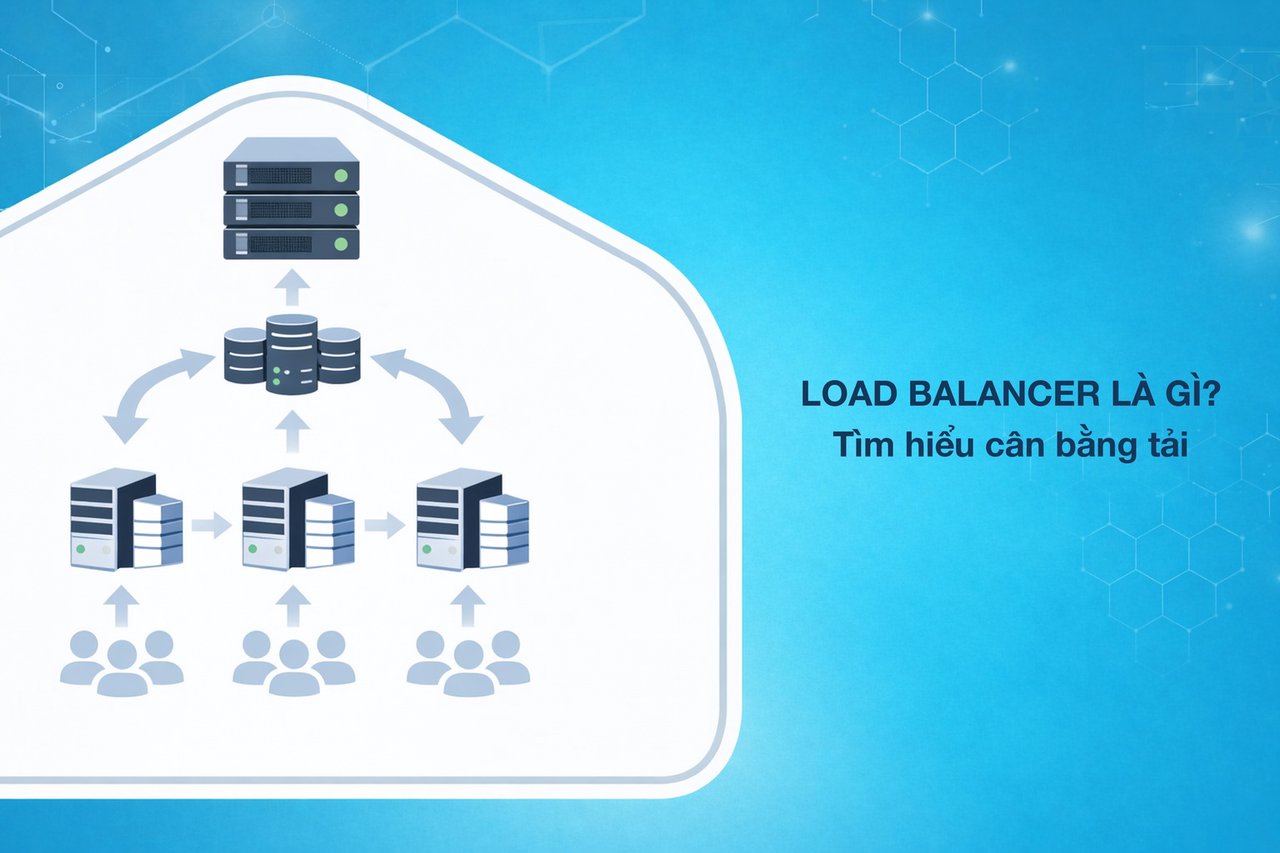
What is a Load Balancer? Understanding Load Balancing and How It Works
Networking

What is a Load Balancer? Understanding Load Balancing and How It Works

A Load Balancer distributes traffic across multiple servers to improve performance, stability, and scalability. Learn how load balancers work, popular algorithms, and implementation strategies.

✦ Quick summary
A Load Balancer distributes traffic across multiple servers to improve performance, stability, and scalability. Learn how load balancers work, popular algorithms, and implementation strategies.
How was this post?

Load Balancers are critical components of modern system architecture, intelligently distributing traffic across multiple servers. This article explains in detail what a load balancer is, popular load balancing algorithms, health checks, session persistence, and real-world deployment architectures.

What is a Load Balancer?

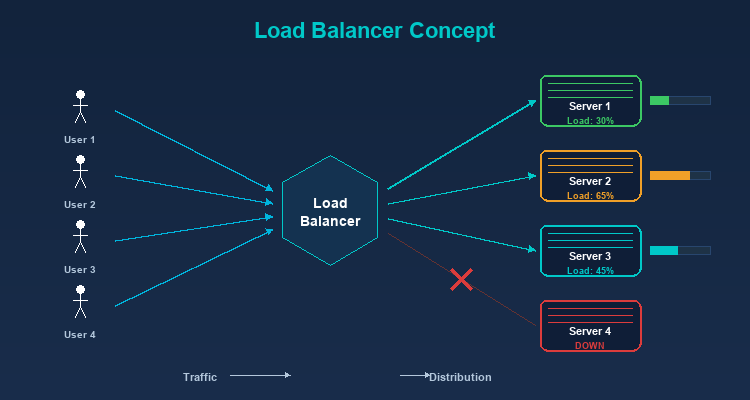
A Load Balancer is a device or software that sits between clients and a group of servers (server pool/server farm), responsible for distributing incoming user requests to backend servers so that the load is evenly spread — preventing any single server from being overwhelmed while others sit idle.

As your website or application grows and user traffic increases, a single server can no longer handle all requests. This is where a Load Balancer comes into play — intelligently distributing traffic across multiple servers to ensure your system remains stable and responsive.

A Real-World Analogy

Imagine a restaurant with 5 checkout counters. If all customers line up at just one counter, wait times would be extremely long despite 4 other counters being free. A load balancer is like the host directing customers to the least busy counter, ensuring all counters are utilized and customers wait as little as possible.
Why Do You Need a Load Balancer?

High Availability

If you have only one server and it fails, your entire service goes down. With a load balancer:

  • Traffic is automatically redirected to remaining healthy servers.
  • The system can tolerate the failure of one or more servers without affecting users.
  • Achieving 99.99% uptime or higher becomes possible.

Scalability

Load balancers enable horizontal scaling — adding new servers to the pool when traffic increases, instead of upgrading existing hardware (vertical scaling). Horizontal scaling is far more flexible and cost-effective.

Optimal Performance

Even load distribution across servers ensures:

  • No server becomes overloaded.
  • Consistent response times for all users.
  • Maximum utilization of hardware resources.

Zero-Downtime Maintenance

You can remove individual servers from the pool for maintenance or updates without affecting the service. The load balancer automatically distributes traffic to the remaining servers.

Types of Load Balancers
Layer 4 Load Balancer (Transport Layer)

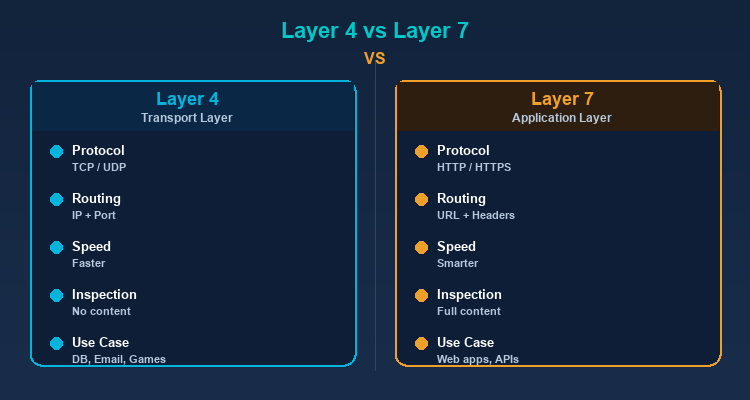
Operates at the Transport layer (TCP/UDP) of the OSI model. Makes routing decisions based on network information like source/destination IP and port number, without inspecting request content.

Characteristics:

  • Faster because it doesn't analyze content.
  • Suitable for non-HTTP services (databases, email, game servers).
  • Cannot route based on URL path or HTTP headers.

Layer 7 Load Balancer (Application Layer)

Operates at the Application layer, capable of reading and analyzing HTTP request content. Makes routing decisions based on URL, headers, cookies, and request body.

Characteristics:

  • More flexible — can route /api to API servers and /images to image servers.
  • Supports SSL termination, compression, and caching.
  • Slightly slower than Layer 4 due to content inspection.
  • Most popular for web applications.

Global Server Load Balancing (GSLB)

Distributes traffic at a global level, routing users to the nearest datacenter. Typically uses DNS-based routing combined with health checks.

Round Robin

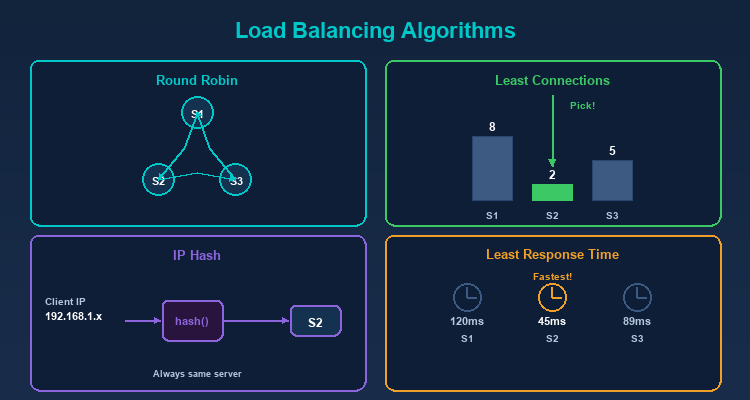
Distributes requests sequentially in a circular pattern: Server 1 → Server 2 → Server 3 → Server 1 → ...

Pros: Simple, easy to implement. Cons: Doesn't account for actual server capacity. If servers have different specs, weaker servers will be overloaded.

Weighted Round Robin

Similar to Round Robin but assigns weights to each server. Stronger servers get higher weights and receive more requests.

Example: Server A (weight 5), Server B (weight 3), Server C (weight 2) → For every 10 requests, A receives 5, B receives 3, C receives 2.

Least Connections

Sends requests to the server with the fewest active connections. Ideal when request processing times vary — servers that finish earlier receive new requests sooner.

Weighted Least Connections

Combines Least Connections with weights. Considers both current connection count and server capacity.

IP Hash

Uses a hash of the client IP to determine the server. The same IP is always directed to the same server — ensuring session persistence without complex sticky session mechanisms.

Least Response Time

Sends requests to the server with the fastest response time and fewest connections. The smartest algorithm, ensuring users are always served by the fastest server.

Random

Selects a server randomly. Simple and surprisingly effective when server count is large and traffic is high (by the law of large numbers).

Algorithm Comparison Table

Algorithm Complexity Best Use Case Session-Aware Capacity-Aware
Round Robin O(1) Identical servers, short requests No No
Weighted Round Robin O(1) Mixed server specs No Yes (static)
Least Connections O(n) Varying request durations No Yes (dynamic)
Weighted Least Conn. O(n) Mixed servers, diverse requests No Yes (both)
IP Hash O(1) Session persistence needed Yes No
Least Response Time O(n) Maximum performance required No Yes (dynamic)

Health Checks — Server Health Monitoring

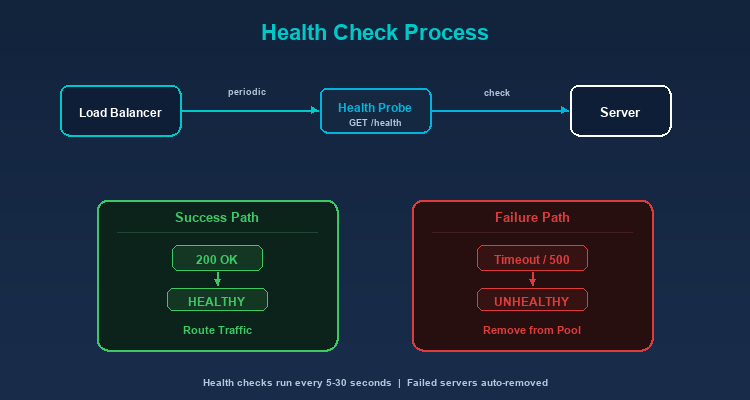
Load balancers continuously monitor the status of backend servers to ensure traffic is only sent to healthy servers.
Active Health Check

The load balancer proactively sends check requests (health check probes) to each server periodically:

  • HTTP Health Check: Sends a GET request to a specific endpoint (usually /health), checking for status code 200.
  • TCP Health Check: Verifies if a TCP connection succeeds.
  • Custom Check: Tests more complex conditions (database connection, disk space, memory usage).

Passive Health Check

Monitors responses from servers during actual request processing. If a server returns too many errors (5xx) or timeouts, the load balancer marks it as unhealthy.

Failure Handling

When a server is marked unhealthy:

  1. The load balancer stops sending new requests to that server.
  2. Current requests may be retried on another server.
  3. Health checks continue — when the server recovers, the load balancer automatically adds it back to the pool.

Session Persistence (Sticky Sessions)

Some applications require all requests from the same user to go to the same server (e.g., shopping cart, login session). Several approaches handle this:

The load balancer adds a cookie to the response containing information about the serving server. Subsequent requests carrying this cookie are sent to the same server.

Source IP Affinity

Uses the client IP to bind to a specific server (similar to IP Hash).

Application-Level Solution

The best approach is designing stateless applications — storing session data in shared storage (Redis, database) instead of on the server. This way, any server can handle any request.

Software Load Balancers

  • Nginx: Serves as a web server, reverse proxy, and load balancer. High performance, flexible configuration, free. The most popular choice today.

  • HAProxy: A dedicated load balancer with extremely high performance. Used by major companies like GitHub and Stack Overflow.

  • Traefik: Designed for container environments (Docker, Kubernetes). Automatically discovers and configures services.

  • Envoy: A modern proxy for microservices architecture, developed by Lyft. Commonly used as a sidecar proxy in service meshes.

Cloud Load Balancers

  • AWS Elastic Load Balancing (ELB): Application Load Balancer (ALB) for Layer 7, Network Load Balancer (NLB) for Layer 4.

  • Google Cloud Load Balancing: Supports global load balancing with automatic scaling.

  • Azure Load Balancer: Integrated with the Azure ecosystem.

Hardware Load Balancers

  • F5 BIG-IP: An enterprise solution with premium performance and security features.
  • Citrix ADC: Application Delivery Controller for large enterprises.

Load Balancer and Proxy

Load balancers have a close relationship with proxies:

Reverse Proxy as Load Balancer

Nginx and HAProxy function as both reverse proxies and load balancers. They receive requests from clients, determine the appropriate backend server, and forward requests — this is the function of a reverse proxy combined with a load balancing algorithm.

Proxy Load Balancing

In systems using proxies (web scraping, ad verification), load balancers distribute requests across different proxies to optimize performance and avoid overloading a single proxy. TMProxy integrates internal load balancing to automatically distribute requests across a pool of over 10 million IPs.

Real-World Deployment Architecture
Single Load Balancer

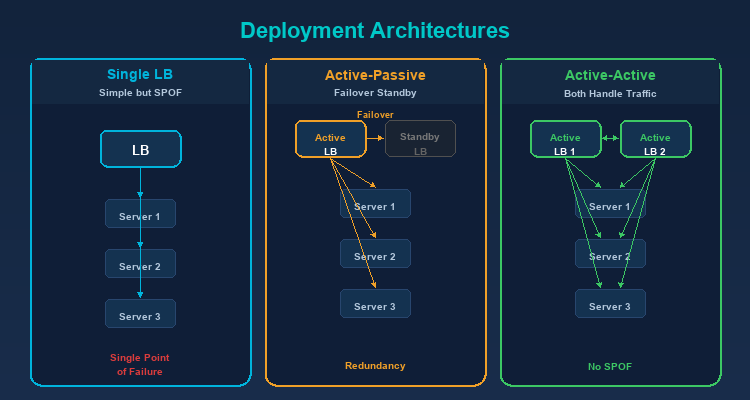
The simplest architecture — one load balancer in front of multiple servers. Drawback: the load balancer is a single point of failure.

Active-Passive (Failover)

Two load balancers — one active handling traffic, one passive on standby. When the active fails, the passive automatically takes over (failover).

Active-Active

Both load balancers are active, sharing traffic. Better resource utilization than Active-Passive and eliminates single point of failure.

Monitoring and Key Metrics

Operating a load balancer effectively requires comprehensive monitoring. Here are the most critical metrics to track:

Requests Per Second (RPS)

The number of requests the load balancer processes per second. This metric indicates the current system load and helps predict when you need to scale. Track RPS over time to identify traffic patterns and plan capacity accordingly.

Active Connections

The number of concurrent active connections per backend server. If one server has unusually high active connections compared to others, the balancing algorithm may need adjustment, or that server may be experiencing slow request processing.

Error Rate

The percentage of failed requests (HTTP 4xx and 5xx). A sudden spike in error rate can indicate: backend server failures, deployment issues, or system overload. Set alerts when error rate exceeds normal thresholds (typically 1-5%).

Response Time (p50, p95, p99)

Response time percentiles are more important than averages. p50 shows the experience of most users, p95 reveals the experience of the slowest 5% of users, and p99 catches severe outliers. If p99 is many times higher than p50, the system has a tail latency problem.

Backend Health Status

The health check status of each backend server: healthy, unhealthy, or draining. Tracking health status history helps detect "flapping" servers (constantly switching between healthy and unhealthy) — a sign of hardware or configuration issues.

Bandwidth (Throughput)

The amount of data (bytes) passing through the load balancer per second. Monitoring bandwidth ensures you don't exceed network interface limits and helps plan upgrades when needed. Unusual bandwidth patterns may indicate DDoS attacks or data leaks.

Popular Monitoring Tools: Prometheus + Grafana is the most widely used combination for load balancer monitoring. Datadog, New Relic, and AWS CloudWatch are also popular choices for cloud environments.

Don't ignore p99 latency

Average values can hide serious problems. If p99 is 10x higher than p50, 1% of your users are having a terrible experience — enough to impact conversion rate and brand image. Always alert on p95/p99, not averages.

Real-World Case Studies

Netflix — Global-Scale Load Balancing

Netflix serves over 200 million users worldwide using a multi-layered load balancing architecture. At the global tier, Netflix uses DNS-based load balancing to route users to the nearest AWS region. At the regional tier, Zuul (their custom API gateway) acts as a Layer 7 load balancer, distributing requests to thousands of microservice instances. Netflix also developed Eureka for service discovery and Ribbon for client-side load balancing, enabling each service to load-balance its own calls to other services.

GitHub — HAProxy for Millions of Developers

GitHub uses HAProxy as its primary load balancer, handling millions of git operations and web requests daily. HAProxy was chosen for its extremely high performance and ability to handle hundreds of thousands of concurrent connections. GitHub deploys an Active-Active architecture with multiple HAProxy instances, combined with custom health checks to ensure traffic only routes to properly functioning servers. During maintenance, individual servers are gracefully drained of traffic through the load balancer.

E-Commerce Flash Sales — Handling Traffic Spikes

During flash sale events (Singles' Day, Black Friday), traffic can surge 10-50x above normal levels within seconds. E-commerce platforms use multi-tier load balancing strategies: Global load balancers distribute across datacenters, Application load balancers distribute across server groups (product catalog, cart, payment), and each group auto-scales based on load balancer metrics. Queue systems (Redis, RabbitMQ) sit behind the load balancer to throttle traffic to sensitive services like payment processing.

Conclusion: Load Balancers are essential components of modern system architecture, ensuring applications remain available, fast, and scalable. Whether you're running a small website or a complex microservices system, understanding load balancing will help you design robust infrastructure ready to handle any level of traffic.

Sources

Frequently Asked Questions

Frequently Asked QuestionsQ&A
What is a Load Balancer and how does it work?
A Load Balancer is a device or software that sits between clients and a group of servers, distributing incoming requests across backend servers to spread the load evenly. It continuously checks server health and only sends traffic to servers that are functioning properly.
What is the difference between Layer 4 and Layer 7 Load Balancers?
Layer 4 operates at the Transport layer, routing based on IP and port — fast but inflexible. Layer 7 operates at the Application layer, reading HTTP requests — more flexible, capable of routing by URL path, headers, and cookies.
Which load balancing algorithm is most popular?
Round Robin is the simplest and most popular for identical servers. Least Connections works well with varying request durations. Weighted Round Robin suits mixed server specs. Least Response Time is the smartest but more complex.
Do small websites need a Load Balancer?
Small websites with a single server may not need one initially. However, when traffic grows or high uptime (99.99%) is required, a load balancer becomes essential to eliminate single points of failure and enable horizontal scaling.
What is a sticky session and when should I use it?
A sticky session (session persistence) ensures requests from the same user always go to the same server. It's needed when applications store session data on the server (shopping cart, login). A better approach is designing stateless apps with shared storage like Redis.

Load Balancer là thành phần quan trọng trong kiến trúc hệ thống hiện đại, giúp phân phối traffic thông minh đến nhiều server. Bài viết giải thích chi tiết load balancer là gì, các thuật toán cân bằng tải phổ biến, health check, session persistence và kiến trúc triển khai thực tế.

Load Balancer là gì?

Load Balancer (cân bằng tải) là một thiết bị hoặc phần mềm đứng giữa client và nhóm server (server pool/server farm), có nhiệm vụ phân phối các request đến từ người dùng đến các server backend sao cho tải được chia đều, không server nào bị quá tải trong khi server khác lại nhàn rỗi.

Khi website hoặc ứng dụng của bạn phát triển và lượng người dùng tăng lên, một server đơn lẻ sẽ không thể đáp ứng hết tất cả request. Đây là lúc Load Balancer phát huy vai trò — phân phối traffic thông minh đến nhiều server, đảm bảo hệ thống luôn ổn định và phản hồi nhanh.

Ví dụ thực tế

Hãy tưởng tượng một nhà hàng có 5 quầy thu ngân. Nếu tất cả khách hàng xếp hàng ở cùng một quầy, thời gian chờ sẽ rất lâu dù 4 quầy còn lại trống. Load Balancer giống như người hướng dẫn khách — phân phối khách hàng đến các quầy đang rảnh nhất, đảm bảo tất cả quầy đều phục vụ và khách hàng chờ ít nhất.

Tại sao cần Load Balancer?

Đảm bảo High Availability (Khả dụng cao)

Nếu chỉ có một server và server đó gặp sự cố, toàn bộ dịch vụ sẽ ngừng hoạt động. Với load balancer:

  • Traffic tự động được chuyển đến các server còn hoạt động.
  • Hệ thống có thể chịu được sự cố của một hoặc nhiều server mà không ảnh hưởng người dùng.
  • Đạt được uptime 99.99% hoặc cao hơn.

Khả năng mở rộng (Scalability)

Load balancer cho phép bạn scale horizontally — thêm server mới vào pool khi traffic tăng, thay vì phải nâng cấp phần cứng của server hiện có (scale vertically). Horizontal scaling linh hoạt và hiệu quả chi phí hơn nhiều.

Hiệu năng tối ưu

Phân phối tải đều giữa các server đảm bảo:

  • Không server nào bị quá tải.
  • Thời gian phản hồi ổn định cho mọi người dùng.
  • Tận dụng tối đa tài nguyên phần cứng.

Bảo trì không gián đoạn

Bạn có thể gỡ từng server khỏi pool để bảo trì hoặc cập nhật mà không ảnh hưởng dịch vụ. Load balancer sẽ tự động phân phối traffic đến các server còn lại.

Các loại Load Balancer

Layer 4 Load Balancer (Transport Layer)

Hoạt động ở tầng Transport (TCP/UDP) của mô hình OSI. Quyết định routing dựa trên thông tin mạng như IP nguồn/đích và port number, không kiểm tra nội dung request.

Đặc điểm:

  • Tốc độ nhanh hơn vì không cần phân tích nội dung.
  • Phù hợp cho các dịch vụ không phải HTTP (database, email, game server).
  • Không thể routing dựa trên URL path hoặc HTTP headers.

Layer 7 Load Balancer (Application Layer)

Hoạt động ở tầng Application, có khả năng đọc và phân tích nội dung HTTP request. Quyết định routing dựa trên URL, headers, cookies, request body.

Đặc điểm:

  • Linh hoạt hơn — có thể routing /api đến API servers và /images đến image servers.
  • Hỗ trợ SSL termination, compression, caching.
  • Chậm hơn Layer 4 một chút do phải phân tích nội dung.
  • Phổ biến nhất cho web applications.

Global Server Load Balancing (GSLB)

Phân phối traffic ở cấp độ toàn cầu, routing người dùng đến datacenter gần nhất. Thường sử dụng DNS-based routing kết hợp với health checks.

Các thuật toán cân bằng tải phổ biến

Round Robin

Phân phối request lần lượt theo vòng tròn: Server 1 → Server 2 → Server 3 → Server 1 → ...

Ưu điểm: Đơn giản, dễ triển khai. Nhược điểm: Không xét đến năng lực thực tế của từng server. Nếu các server có cấu hình khác nhau, server yếu sẽ bị quá tải.

Weighted Round Robin

Tương tự Round Robin nhưng gán trọng số cho mỗi server. Server mạnh hơn được gán trọng số cao hơn, nhận nhiều request hơn.

Ví dụ: Server A (weight 5), Server B (weight 3), Server C (weight 2) → Cứ 10 request thì A nhận 5, B nhận 3, C nhận 2.

Least Connections

Gửi request đến server có ít kết nối đang hoạt động nhất. Phù hợp khi thời gian xử lý request không đồng đều — server xử lý xong sớm hơn sẽ nhận request mới sớm hơn.

Weighted Least Connections

Kết hợp Least Connections với trọng số. Xét cả số kết nối hiện tại và năng lực server.

IP Hash

Sử dụng hash của IP client để quyết định server. Cùng một IP luôn được gửi đến cùng một server — đảm bảo session persistence mà không cần cơ chế sticky session phức tạp.

Least Response Time

Gửi request đến server có thời gian phản hồi nhanh nhất và ít kết nối nhất. Đây là thuật toán thông minh nhất, đảm bảo người dùng luôn được phục vụ bởi server nhanh nhất.

Random

Chọn server ngẫu nhiên. Đơn giản và hiệu quả đáng ngạc nhiên khi số lượng server lớn và traffic cao (theo law of large numbers).

Bảng so sánh thuật toán

Thuật toán Độ phức tạp Use Case phù hợp Nhận biết Session Nhận biết Capacity
Round Robin O(1) Server đồng nhất, request ngắn Không Không
Weighted Round Robin O(1) Server khác cấu hình Không Có (tĩnh)
Least Connections O(n) Request thời gian xử lý khác nhau Không Có (động)
Weighted Least Conn. O(n) Server khác nhau, request đa dạng Không Có (cả hai)
IP Hash O(1) Cần session persistence Không
Least Response Time O(n) Yêu cầu hiệu năng cao nhất Không Có (động)

Kiểm tra sức khỏe server (Health Checks)

Load balancer liên tục kiểm tra tình trạng của các server backend để đảm bảo chỉ gửi traffic đến server đang hoạt động bình thường.

Active Health Check

Load balancer chủ động gửi request kiểm tra (health check probe) đến mỗi server theo chu kỳ:

  • HTTP Health Check: Gửi GET request đến endpoint cụ thể (thường là /health), kiểm tra status code 200.
  • TCP Health Check: Kiểm tra kết nối TCP có thành công không.
  • Custom Check: Kiểm tra điều kiện phức tạp hơn (database connection, disk space, memory usage).

Passive Health Check

Theo dõi response từ server khi xử lý request thực tế. Nếu server trả về quá nhiều error (5xx) hoặc timeout, load balancer đánh dấu server đó là unhealthy.

Failure Handling

Khi một server bị đánh dấu unhealthy:

  1. Load balancer ngừng gửi request mới đến server đó.
  2. Request hiện tại có thể được retry trên server khác.
  3. Health check tiếp tục chạy — khi server phục hồi, load balancer tự động đưa server trở lại pool.

Duy trì phiên làm việc (Session Persistence)

Một số ứng dụng yêu cầu tất cả request từ cùng một người dùng phải đến cùng một server (ví dụ: giỏ hàng, phiên đăng nhập). Có nhiều cách xử lý:

Load balancer thêm cookie vào response, chứa thông tin server đã phục vụ. Request tiếp theo mang theo cookie này sẽ được gửi đến cùng server.

Source IP Affinity

Dùng IP client để gắn kết với một server cụ thể (tương tự IP Hash).

Application-Level Solution

Giải pháp tốt nhất là thiết kế ứng dụng stateless — lưu session data vào shared storage (Redis, database) thay vì trên server. Khi đó, bất kỳ server nào cũng có thể phục vụ bất kỳ request nào.

Các giải pháp Load Balancer phổ biến

Software Load Balancer

  • Nginx: Vừa là web server vừa là reverse proxy/load balancer. Hiệu năng cao, cấu hình linh hoạt, miễn phí. Phổ biến nhất hiện nay.

  • HAProxy: Load balancer chuyên dụng, hiệu năng cực cao. Được sử dụng bởi nhiều công ty lớn như GitHub, Stack Overflow.

  • Traefik: Thiết kế cho môi trường container (Docker, Kubernetes). Tự động phát hiện và cấu hình services.

  • Envoy: Proxy hiện đại cho kiến trúc microservices, được phát triển bởi Lyft. Thường dùng làm sidecar proxy trong service mesh.

Cloud Load Balancer

  • AWS Elastic Load Balancing (ELB): Application Load Balancer (ALB) cho Layer 7, Network Load Balancer (NLB) cho Layer 4.

  • Google Cloud Load Balancing: Hỗ trợ global load balancing, tự động scale.

  • Azure Load Balancer: Tích hợp với hệ sinh thái Azure.

Hardware Load Balancer

  • F5 BIG-IP: Giải pháp enterprise với hiệu năng và tính năng bảo mật cao cấp.
  • Citrix ADC: Application Delivery Controller cho doanh nghiệp lớn.

Load Balancer và Proxy

Load balancer có mối liên hệ chặt chẽ với proxy:

Reverse Proxy as Load Balancer

Nginx và HAProxy vừa là reverse proxy vừa là load balancer. Chúng nhận request từ client, quyết định server backend phù hợp và chuyển tiếp request — đây chính là chức năng của reverse proxy kết hợp với thuật toán cân bằng tải.

Proxy Load Balancing

Trong các hệ thống sử dụng proxy (web scraping, ad verification), load balancer phân phối request qua các proxy khác nhau để tối ưu hiệu năng và tránh overload một proxy đơn lẻ. TMProxy tích hợp cơ chế cân bằng tải nội bộ để tự động phân phối request qua pool hơn 10 triệu IP.

Kiến trúc triển khai thực tế

Single Load Balancer

Kiến trúc đơn giản nhất — một load balancer phía trước nhiều server. Nhược điểm: load balancer là single point of failure.

Active-Passive (Failover)

Hai load balancer — một active xử lý traffic, một passive ở chế độ standby. Khi active gặp sự cố, passive tự động tiếp quản (failover).

Active-Active

Cả hai load balancer đều active, chia sẻ traffic. Tận dụng tốt tài nguyên hơn Active-Passive và loại bỏ single point of failure.

Giám sát và các chỉ số quan trọng

Vận hành load balancer hiệu quả đòi hỏi hệ thống giám sát toàn diện. Dưới đây là các metrics quan trọng nhất cần theo dõi:

Requests Per Second (RPS)

Số lượng request mà load balancer xử lý mỗi giây. Metric này cho biết tải hiện tại của hệ thống và giúp dự đoán khi nào cần scale thêm server. Theo dõi RPS theo thời gian để nhận biết pattern traffic và lên kế hoạch capacity.

Active Connections

Số kết nối đang hoạt động đồng thời trên mỗi backend server. Nếu một server có active connections cao bất thường so với các server khác, có thể thuật toán cân bằng tải cần điều chỉnh hoặc server đó đang gặp vấn đề xử lý request chậm.

Error Rate

Tỷ lệ request lỗi (HTTP 4xx và 5xx). Error rate tăng đột ngột có thể chỉ ra: server backend gặp sự cố, deployment lỗi, hoặc hệ thống đang bị quá tải. Đặt alert khi error rate vượt quá ngưỡng bình thường (thường là 1-5%).

Response Time (p50, p95, p99)

Thời gian phản hồi ở các phân vị khác nhau quan trọng hơn giá trị trung bình. p50 cho biết trải nghiệm của đa số người dùng, p95 cho biết trải nghiệm của 5% người dùng chậm nhất, và p99 phát hiện các outlier nghiêm trọng. Nếu p99 cao hơn p50 nhiều lần, hệ thống có vấn đề về tail latency.

Backend Health Status

Trạng thái health check của từng backend server: healthy, unhealthy, hoặc draining. Theo dõi lịch sử health status giúp phát hiện server "flapping" (liên tục chuyển giữa healthy và unhealthy) — dấu hiệu của vấn đề phần cứng hoặc cấu hình.

Bandwidth (Throughput)

Lượng dữ liệu (bytes) đi qua load balancer mỗi giây. Giám sát bandwidth giúp đảm bảo không vượt quá giới hạn network interface và lên kế hoạch nâng cấp khi cần. Bandwidth bất thường có thể chỉ ra DDoS attack hoặc data leak.

Công cụ giám sát phổ biến: Prometheus + Grafana là combo được sử dụng rộng rãi nhất cho monitoring load balancer. Datadog, New Relic và AWS CloudWatch cũng là các lựa chọn phổ biến cho môi trường cloud.

Đừng bỏ qua p99 latency

Giá trị trung bình (average) có thể che giấu vấn đề nghiêm trọng. Nếu p99 cao hơn p50 gấp 10 lần, 1% người dùng đang trải nghiệm tệ hại — đủ để ảnh hưởng đến conversion rate và brand image. Luôn alert dựa trên p95/p99, không phải average.

Nghiên cứu điển hình thực tế

Netflix — Cân bằng tải quy mô toàn cầu

Netflix phục vụ hơn 200 triệu người dùng trên toàn thế giới, sử dụng kiến trúc multi-layered load balancing. Ở tầng global, Netflix dùng DNS-based load balancing để routing người dùng đến AWS region gần nhất. Ở tầng region, Zuul (API gateway tự phát triển) hoạt động như Layer 7 load balancer, phân phối request đến hàng nghìn microservice instances. Netflix cũng phát triển Eureka cho service discovery và Ribbon cho client-side load balancing, giúp mỗi service tự cân bằng tải khi gọi service khác.

GitHub — HAProxy cho hàng triệu developer

GitHub sử dụng HAProxy làm load balancer chính, xử lý hàng triệu git operations và web requests mỗi ngày. HAProxy được chọn vì hiệu năng cực cao và khả năng xử lý hàng trăm nghìn concurrent connections. GitHub triển khai kiến trúc Active-Active với nhiều HAProxy instances, kết hợp health checks tùy chỉnh để đảm bảo chỉ routing traffic đến server hoạt động bình thường. Khi cần maintenance, từng server được drain traffic một cách graceful thông qua load balancer.

Flash Sale thương mại điện tử — Xử lý traffic spike

Trong các sự kiện flash sale (Shopee 11.11, Black Friday), traffic có thể tăng 10-50 lần so với bình thường chỉ trong vài giây. Các platform e-commerce sử dụng chiến lược multi-tier load balancing: Global load balancer phân phối đến các datacenter, Application load balancer phân phối đến các server group (product catalog, cart, payment), mỗi group auto-scale dựa trên metrics từ load balancer. Queue systems (Redis, RabbitMQ) được đặt sau load balancer để throttle traffic vào các service nhạy cảm như payment processing.

Kết luận: Load Balancer là thành phần thiết yếu trong kiến trúc hệ thống hiện đại, đảm bảo ứng dụng luôn sẵn sàng, nhanh chóng và có khả năng mở rộng. Dù bạn đang vận hành một website nhỏ hay một hệ thống microservices phức tạp, hiểu về cân bằng tải sẽ giúp bạn thiết kế hạ tầng vững chắc và sẵn sàng đối phó với mọi mức tải.

Nguồn tham khảo

Câu hỏi thường gặp

Câu hỏi thường gặpQ&A
Load Balancer là gì và hoạt động như thế nào?
Load Balancer (cân bằng tải) là thiết bị hoặc phần mềm đứng giữa client và nhóm server, phân phối request đến các server backend sao cho tải được chia đều. Nó liên tục kiểm tra sức khỏe server và chỉ gửi traffic đến server đang hoạt động bình thường.
Layer 4 và Layer 7 Load Balancer khác nhau thế nào?
Layer 4 hoạt động ở tầng Transport, routing dựa trên IP và port — nhanh nhưng không linh hoạt. Layer 7 hoạt động ở tầng Application, đọc được HTTP request — linh hoạt hơn, có thể routing theo URL path, headers, cookies.
Thuật toán cân bằng tải nào phổ biến nhất?
Round Robin là đơn giản và phổ biến nhất cho server đồng nhất. Least Connections phù hợp khi thời gian xử lý khác nhau. Weighted Round Robin dùng khi server có cấu hình khác nhau. Least Response Time thông minh nhất nhưng phức tạp hơn.
Load Balancer có cần thiết cho website nhỏ không?
Website nhỏ với 1 server có thể chưa cần load balancer. Tuy nhiên, khi traffic tăng hoặc cần đảm bảo uptime cao (99.99%), load balancer trở nên cần thiết để tránh single point of failure và cho phép scale horizontally.
Sticky session là gì và khi nào cần dùng?
Sticky session (session persistence) đảm bảo request từ cùng user luôn đến cùng server. Cần dùng khi ứng dụng lưu session data trên server (giỏ hàng, đăng nhập). Giải pháp tốt hơn là thiết kế stateless app với shared storage như Redis.