Trackback is an automatic notification technology between websites, helping create connections and increase interaction in the blogging community. This article explains its uses, pros and cons, comparison with Pingback and how to use Trackback in WordPress.
2019Trusted since
B2BData solutions
Data·AIExpertise
Need data solutions for your business?
AlgoData has helped businesses with data engineering, analytics & AI since 2019.
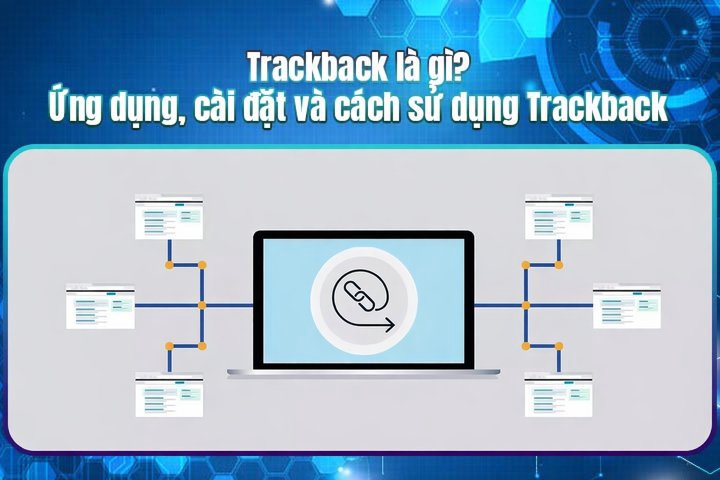
Trackback is an automatic notification method between websites. When you write a new post and link to a post on another website, Trackback automatically sends a notification to that website. This notification includes your website name, post title and the URL of the linked post.
Trackback's mechanism allows webmasters to track which websites have cited or linked to their content. This helps them understand their post's reach and creates opportunities for interaction between websites.
How it works: When a post is published containing a link to another website's post, the Trackback system sends an HTTP request to the Trackback URL of the linked post. This is similar to sending a notification, alerting the website owner that they've been mentioned in another post.
Role in the blog community: Trackback isn't just a notification tool — it plays an important role in building the blog/website community. Through Trackback, bloggers can easily share opinions, discuss and connect with each other.
Uses of Trackback
Trackback has many useful applications for creating connections between websites:
Enhancing website interaction: When a blog links to a post on another site, Trackback automatically notifies the site owner. This helps bloggers recognize each other and encourages commenting and sharing.
Creating automatic backlinks: Trackback automatically creates backlinks, beneficial for SEO as Google and search engines value quality links from multiple sources.
Tracking linked posts: Trackback lets website owners track who has cited or linked to their content, helping build better community relationships.
Building a blog community: Thanks to Trackback features, bloggers can easily create a diverse and rich community, increasing the credibility of each post.
Pros and Cons of Trackback
Pros
Easy to use and set up: On most current website platforms, setting up Trackback is simple with minimal technical knowledge needed.
Enhanced website interaction: Trackback facilitates sharing and commenting, increasing interaction among community members.
Automatic backlink creation: Trackback creates automatic backlinks that can improve website rankings in search results.
Tracking and managing linked posts: Trackback helps websites easily track and manage posts linked to their pages.
Cons
Spam risk: Trackback can be exploited by spammers to send junk links, annoying users.
Not an effective SEO tool: Trackback supports SEO but isn't a decisive factor in search engine rankings.
Limited compatibility: Not all websites support Trackback technology.
Trackback Spam Warning
Trackback has no built-in moderation mechanism, making it easily exploitable by spammers. Always use anti-spam plugins (Akismet, Antispam Bee) and manually moderate Trackbacks to your website.
Detailed Comparison: Trackback vs Pingback
Trackback and Pingback are both technologies used to notify other websites that a post has linked to them. However, there are important differences between them.
How they work:
Trackback: Sends post information via a specific URL.
Pingback: Sends information through post headers and content, checking whether the linked post exists before sending notification.
Features:
Trackback: Only sends basic post information, doesn't display content excerpts.
Pingback: Can extract and display excerpts from the linked post.
Step 1: Enable Trackback feature. Go to Settings > Discussion and check "Allow pingbacks and trackbacks from other websites."
Step 2: Find the Trackback URL. Each post has its own Trackback URL, usually at the bottom of the content. Copy this URL to use.
Step 3: Save the post. WordPress will automatically send a trackback to the linked website if it supports the feature.
Disabling Trackback in WordPress
Go to Settings > Discussion, uncheck "Allow pingbacks and trackbacks from other websites," then click Save Changes.
Trackback Tips
If your website doesn't need Trackback, turn it off to minimize spam and server load. Instead, focus on building quality backlinks through valuable content.
Conclusion:Trackback is a useful technology for connecting websites and creating automatic backlinks, but requires strict management to avoid spam and misuse.
Trackback is an automatic notification method between websites. When you link to a post on another website, Trackback sends a notification with your site name, post title and URL.
QHow is Trackback different from Pingback?
Trackback sends notifications via a specific URL with no moderation and low security. Pingback sends via post header and content with moderation and higher security.
QDoes Trackback help SEO?
Trackback creates automatic backlinks that can support SEO, but it's not a decisive ranking factor. Google evaluates many other more important factors.
QHow to prevent Trackback spam?
You can disable Trackback, use anti-spam plugins (Akismet, Antispam Bee), manually moderate, and set up whitelists/blacklists for allowed websites.
QDoes WordPress support Trackback?
Yes, WordPress supports Trackback by default. You can enable/disable it in Settings > Discussion > Allow pingbacks and trackbacks from other websites.