SSL là gì? Vai trò và cách nhận chứng chỉ bảo mật SSL free
Networking

SSL là gì? Vai trò và cách nhận chứng chỉ bảo mật SSL free

SSL (Secure Sockets Layer) là giao thức mã hóa thông tin giữa trình duyệt và máy chủ web. Tìm hiểu các loại chứng chỉ SSL, cách cài đặt và nhận SSL miễn phí.

✦ Tóm tắt nhanh
SSL (Secure Sockets Layer) là giao thức mã hóa thông tin giữa trình duyệt và máy chủ web. Tìm hiểu các loại chứng chỉ SSL, cách cài đặt và nhận SSL miễn phí.
Bài này thế nào?

SSL (Secure Sockets Layer) là giao thức bảo mật mã hóa thông tin giữa trình duyệt và máy chủ web. Bài viết giải thích SSL là gì, cách hoạt động, các loại chứng chỉ, hướng dẫn cài đặt và cách nhận SSL miễn phí.

SSL là gì?

SSL (Secure Sockets Layer) là một giao thức bảo mật nhằm mã hóa thông tin giữa trình duyệt của người dùng và máy chủ web. Khi một kết nối SSL được thiết lập, tất cả dữ liệu truyền giữa hai bên sẽ được mã hóa, giúp ngăn chặn các hacker và kẻ xấu truy cập vào thông tin nhạy cảm.

Chứng chỉ SSL thường được cấp bởi các cơ quan chứng thực (CA – Certificate Authority). Chứng chỉ này xác nhận danh tính của website và đảm bảo rằng thông tin được truyền đi là an toàn và không bị can thiệp.

Tóm lại, ssl là gì có thể hiểu là công nghệ và tiêu chuẩn bảo mật cho phép dữ liệu được truyền tải một cách an toàn qua Internet, bảo vệ thông tin của người dùng khỏi các mối đe dọa từ bên ngoài.

Tại sao website cần sử dụng chứng chỉ SSL?
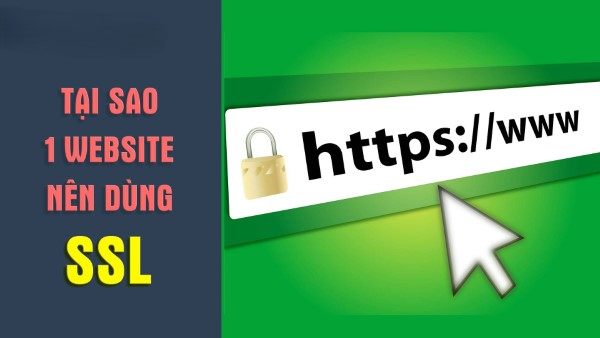
Việc sử dụng chứng chỉ SSL không còn là một lựa chọn mà đã trở thành yêu cầu thiết yếu đối với mọi website, đặc biệt là những trang web liên quan đến giao dịch tài chính hoặc lưu trữ thông tin nhạy cảm. Một số lý do chính khiến website cần phải sử dụng chứng chỉ SSL bao gồm:

  • Bảo vệ thông tin người dùng: Khi người dùng nhập dữ liệu trên website, chẳng hạn như thông tin thẻ tín dụng hay mật khẩu, SSL sẽ mã hóa những dữ liệu này, ngăn chặn việc rò rỉ thông tin.
  • Xây dựng niềm tin: Website có chứng chỉ SSL sẽ tạo được sự tin tưởng từ phía người dùng, giúp họ yên tâm hơn khi thực hiện giao dịch hoặc cung cấp thông tin.

Nguy cơ khi không sử dụng SSL

Nếu website không sử dụng SSL, thông tin truyền tải giữa người dùng và máy chủ sẽ không được bảo vệ. Điều này đồng nghĩa với việc bất kỳ ai cũng có khả năng nghe lén và đánh cắp thông tin nhạy cảm. Kết quả là, không chỉ người dùng mà cả doanh nghiệp cũng có thể gặp nguy hiểm nghiêm trọng về mặt tài chính và pháp lý.

Xu hướng thị trường

Ngoài ra, ngày càng nhiều trình duyệt như Google Chrome và Firefox đã bắt đầu cảnh báo người dùng khi truy cập vào các trang web không sử dụng SSL. Đây là một đòn bẩy mạnh mẽ khuyến khích các nhà phát triển và quản trị viên website nâng cấp bảo mật cho trang web của mình.

Tầm quan trọng của chứng chỉ SSL
Chứng chỉ SSL không chỉ đơn thuần là một công cụ bảo mật mà còn là yếu tố then chốt giúp tăng cường uy tín và thương hiệu của một website. Hãy cùng khám phá những lợi ích quan trọng mà chứng chỉ SSL mang lại cho website:

Chứng chỉ SSL giúp mã hóa dữ liệu nhạy cảm

Một trong những chức năng chính của SSL là mã hóa dữ liệu. Mọi thông tin nhạy cảm như mật khẩu, thông tin ngân hàng, hoặc dữ liệu cá nhân sẽ được mã hóa trong quá trình truyền tải. Điều này có nghĩa là ngay cả khi kẻ xấu cố gắng đánh cắp dữ liệu, họ cũng sẽ không thể đọc được nội dung vì đã bị mã hóa.

RTP là gì? Tìm hiểu chi tiết về giao thức RTP

Mã hóa dữ liệu không chỉ bảo vệ thông tin cá nhân mà còn bảo vệ cả doanh nghiệp khỏi các nguy cơ pháp lý liên quan đến việc rò rỉ dữ liệu cá nhân. Việc chứng minh rằng đã thực hiện các biện pháp bảo mật thích hợp có thể giúp doanh nghiệp tránh được những khoản tiền phạt nặng nề.

Chứng chỉ SSL cung cấp tính xác thực cho website

Chứng chỉ SSL cũng xác nhận danh tính của website. Khi người dùng truy cập vào một trang web có SSL, họ có thể yên tâm rằng họ đang tương tác với đúng tổ chức mà họ muốn. Điều này rất quan trọng trong môi trường trực tuyến, nơi mà sự giả mạo và lừa đảo diễn ra khá phổ biến.

Một website được xác thực bằng SSL sẽ hiển thị rõ ràng tên doanh nghiệp và các thông tin liên quan, giúp người dùng tự tin hơn khi tham gia vào các giao dịch trực tuyến.

Chứng chỉ SSL mang lại sự tin cậy cho người truy cập

Sự hiện diện của chứng chỉ SSL trên một trang web không chỉ đơn thuần là một biện pháp bảo mật, mà còn gửi đi một thông điệp mạnh mẽ tới người dùng rằng website đó coi trọng sự an toàn của họ. Các nghiên cứu cho thấy rằng người tiêu dùng có nhiều khả năng hoàn thành giao dịch trên một trang web có SSL so với trang web không có.

Người dùng có thể dễ dàng nhận biết tình trạng bảo mật của trang web thông qua biểu tượng ổ khóa trong thanh địa chỉ. Điều này tạo ra một cảm giác an toàn và thúc đẩy sự tương tác tích cực hơn với website.

Chứng chỉ SSL giúp website tuân thủ các tiêu chuẩn bảo mật PCI

Đối với các doanh nghiệp xử lý thẻ tín dụng, việc tuân thủ các tiêu chuẩn bảo mật PCI DSS (Payment Card Industry Data Security Standard) là rất quan trọng. Chứng chỉ SSL là một phần không thể thiếu trong việc đáp ứng các yêu cầu này. Bằng cách mã hóa thông tin thẻ tín dụng và thông tin nhạy cảm khác, SSL hỗ trợ các doanh nghiệp giảm thiểu rủi ro lừa đảo và vi phạm dữ liệu.

Cách hoạt động của chứng chỉ SSL
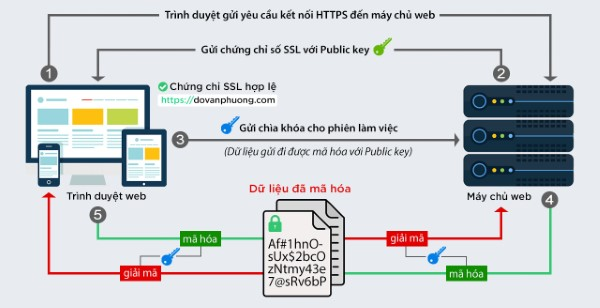
Để hiểu rõ hơn về ssl là gì, chúng ta cần nắm vững cách mà chứng chỉ SSL hoạt động. Quá trình thiết lập một kết nối an toàn giữa trình duyệt và máy chủ diễn ra qua nhiều bước.

Bước 1: Thực hiện Handshake

Bước đầu tiên của quá trình này gọi là "handshake". Khi người dùng truy cập vào một trang web có SSL, trình duyệt của họ sẽ gửi một yêu cầu đến máy chủ web. Máy chủ sẽ trả về chứng chỉ SSL và thông tin cần thiết để tiến hành mã hóa.

Bước 2: Xác thực chứng chỉ

Trình duyệt sau đó sẽ kiểm tra tính hợp lệ của chứng chỉ SSL. Nếu chứng chỉ được xác thực bởi một cơ quan chứng thực đáng tin cậy và chưa hết hạn, trình duyệt sẽ tiếp tục thiết lập kết nối bảo mật.

Bước 3: Thiết lập khóa phiên

Sau khi xác thực, trình duyệt và máy chủ sẽ trao đổi thông tin để tạo ra một khóa phiên. Khóa này sẽ được sử dụng để mã hóa tất cả dữ liệu trong suốt phiên làm việc, đảm bảo rằng không bên thứ ba nào có thể can thiệp vào thông tin.

Bước 4: Truyền dữ liệu an toàn

Cuối cùng, khi kết nối đã được thiết lập thành công, dữ liệu sẽ được mã hóa và truyền tải qua lại giữa trình duyệt và máy chủ. Giai đoạn này diễn ra một cách nhanh chóng và không gây trở ngại cho trải nghiệm của người dùng.

Phân loại các loại chứng chỉ SSL phổ biến

Chứng chỉ SSL không chỉ có một loại mà còn có nhiều dạng khác nhau, mỗi loại đều phục vụ cho các mục đích khác nhau của người dùng và doanh nghiệp. Dưới đây là những loại chứng chỉ SSL phổ biến nhất:

Chứng chỉ SSL xác thực tên miền (DV SSL)
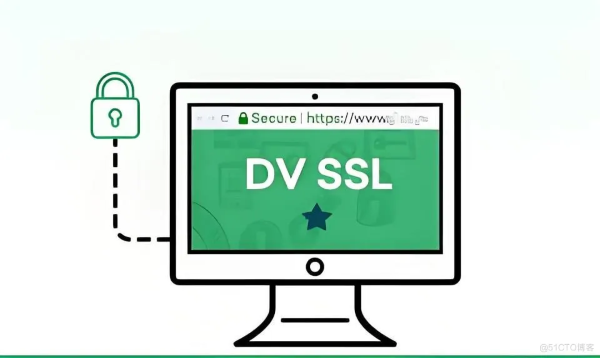
Chứng chỉ DV (Domain Validation) là loại chứng chỉ đơn giản nhất và nhanh chóng nhất để nhận được. Nó chỉ yêu cầu người sở hữu chứng chỉ chứng minh quyền sở hữu domain thông qua một email hoặc một phương thức xác thực đơn giản khác. DV SSL thường được các trang web cá nhân hoặc những trang không yêu cầu mức độ bảo mật cao sử dụng.

Chứng chỉ SSL xác thực tổ chức (OV SSL)

Chứng chỉ OV (Organization Validation) yêu cầu tổ chức phải trải qua một quy trình xác thực nghiêm ngặt hơn. Không chỉ xác thực quyền sở hữu tên miền, các tổ chức cũng cần cung cấp thông tin chi tiết về doanh nghiệp của mình. Chính vì vậy, OV SSL thường được các doanh nghiệp vừa và nhỏ hay các tổ chức phi lợi nhuận ưa chuộng.

Chứng chỉ SSL xác thực mở rộng (EV SSL)

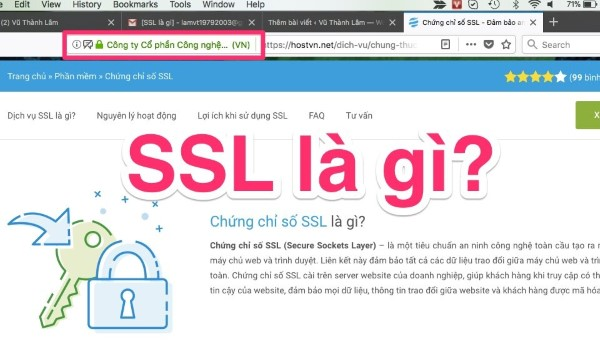
Chứng chỉ EV (Extended Validation) là loại chứng chỉ có độ bảo mật cao nhất. Quy trình xác thực của EV SSL rất nghiêm ngặt và yêu cầu phải kiểm tra kỹ lưỡng thông tin doanh nghiệp. Khi sử dụng chứng chỉ EV, tên tổ chức sẽ hiển thị rõ ràng trên thanh địa chỉ của trình duyệt, tạo sự tin tưởng tối đa cho khách hàng. Loại chứng chỉ này thường được các ngân hàng và các tổ chức tài chính lớn sử dụng.

Chứng chỉ SSL cho nhiều tên miền (SANs SSL)

Chứng chỉ SANs (Subject Alternative Names) cho phép bạn bảo mật nhiều tên miền khác nhau dưới một chứng chỉ duy nhất. Điều này rất hữu ích cho các doanh nghiệp có nhiều website hoặc các trang con khác nhau, giúp tiết kiệm chi phí và quản lý dễ dàng hơn.

Chứng chỉ SSL dạng Wildcard
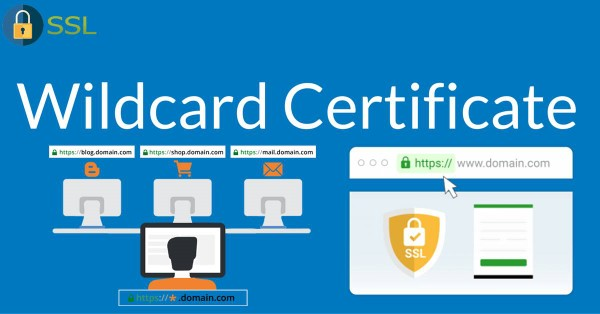
Chứng chỉ Wildcard cho phép bạn bảo mật tất cả các subdomain của một tên miền. Ví dụ, nếu bạn có chứng chỉ Wildcard cho "example.com", bạn có thể bảo mật "www.example.com", "shop.example.com", "blog.example.com" mà không cần mua thêm chứng chỉ cho từng subdomain riêng biệt.

Các thành phần của chứng chỉ SSL
Một chứng chỉ SSL thường bao gồm các thành phần chính sau đây:

Thông tin về tổ chức

Thông tin này bao gồm tên, địa chỉ và thông tin liên lạc của tổ chức hoặc cá nhân sở hữu chứng chỉ. Đối với chứng chỉ OV và EV, thông tin này cần phải chính xác và được kiểm chứng.

Khóa công khai

Khóa công khai là một phần quan trọng trong việc mã hóa dữ liệu. Nó sẽ được sử dụng để mã hóa dữ liệu trước khi gửi đến máy chủ. Ngược lại, máy chủ sẽ sử dụng khóa riêng để giải mã dữ liệu này.

Thời gian hết hạn

Mỗi chứng chỉ SSL đều có thời gian hiệu lực nhất định. Thời gian này thường dao động từ một năm đến ba năm. Sau khi hết hạn, chứng chỉ cần được gia hạn để tiếp tục duy trì bảo mật cho website.

Chữ ký của cơ quan chứng thực

Chứng chỉ SSL được cấp bởi một cơ quan chứng thực đáng tin cậy, và chữ ký của họ chứng minh rằng chứng chỉ là hợp lệ và đã được kiểm tra.

Ưu nhược điểm của chứng chỉ SSL
Như bất kỳ công nghệ nào khác, chứng chỉ SSL cũng có những ưu nhược điểm riêng. Hãy cùng phân tích chi tiết hơn về vấn đề này.

Lợi ích của việc sử dụng SSL

  • Bảo mật thông tin: Chứng chỉ SSL giúp mã hóa dữ liệu nhạy cảm, ngăn chặn các cuộc tấn công từ bên ngoài.
  • Xây dựng lòng tin: Sự hiện diện của SSL trên website tạo ra sự tin tưởng từ phía người tiêu dùng, đặc biệt trong các giao dịch tài chính.
  • Cải thiện SEO: Google đã công bố rằng họ ưu tiên các website sử dụng HTTPS trong các kết quả tìm kiếm. Do đó, việc có chứng chỉ SSL có thể cải thiện khả năng hiển thị của website trên các công cụ tìm kiếm.
  • Tuân thủ các tiêu chuẩn bảo mật: Nhiều ngành nghề yêu cầu các doanh nghiệp tuân thủ các tiêu chuẩn bảo mật nhất định, và việc sử dụng SSL là một phần quan trọng trong quy trình này.

Hạn chế của chứng chỉ SSL

  • Chi phí: Mặc dù có nhiều dịch vụ cung cấp chứng chỉ SSL miễn phí, nhưng vẫn có những lựa chọn mất phí với mức giá khá cao cho các chứng chỉ quốc tế và chất lượng tốt hơn.
  • Quy trình cài đặt phức tạp: Đối với những người không có kinh nghiệm về công nghệ, việc cài đặt chứng chỉ SSL có thể khá phức tạp và gây khó khăn trong quá trình sử dụng.
  • Cần gia hạn định kỳ: Chứng chỉ SSL thường có thời gian hiệu lực nhất định, và cần phải gia hạn để duy trì tính bảo mật của website. Điều này đôi khi có thể gây khó khăn cho người quản lý.

Hướng dẫn chi tiết cách cài đặt chứng chỉ SSL cho website
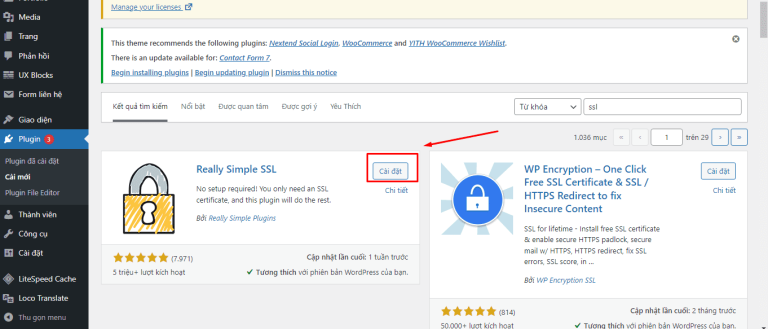
Việc cài đặt chứng chỉ SSL có vẻ phức tạp, nhưng nếu bạn làm theo các bước sau đây, quá trình này sẽ trở nên dễ dàng hơn rất nhiều.

Bước 1: Mua hoặc nhận chứng chỉ SSL

Trước hết, bạn cần có chứng chỉ SSL. Bạn có thể chọn mua từ một nhà cung cấp đáng tin cậy hoặc sử dụng dịch vụ cung cấp SSL miễn phí như Let's Encrypt.

Bước 2: Cài đặt chứng chỉ trên máy chủ

Sau khi có chứng chỉ, bạn cần cài đặt nó trên máy chủ web của mình. Quy trình cài đặt có thể khác nhau tùy thuộc vào nền tảng máy chủ mà bạn đang sử dụng (như Apache, Nginx hay IIS). Hầu hết các nhà cung cấp dịch vụ hosting đều cung cấp hướng dẫn cài đặt chi tiết.

Bước 3: Cấu hình chuyển đổi từ HTTP sang HTTPS

Sau khi cài đặt thành công chứng chỉ SSL, bạn cần cấu hình để chuyển đổi tất cả lưu lượng từ HTTP sang HTTPS. Điều này có thể thực hiện thông qua việc chỉnh sửa tập tin .htaccess nếu bạn sử dụng Apache, hoặc thông qua cài đặt trên bảng điều khiển hosting.

Alias là gì? Hướng dẫn sử dụng Alias Domain hiệu quả

Bước 4: Kiểm tra kết nối

Cuối cùng, bạn cần kiểm tra kết nối SSL để đảm bảo rằng mọi thứ hoạt động bình thường. Bạn có thể sử dụng các công cụ kiểm tra SSL trực tuyến để xác minh rằng chứng chỉ đã được cài đặt đúng cách và không có lỗi xảy ra.

Cách kiểm tra tính xác thực của SSL trên trình duyệt
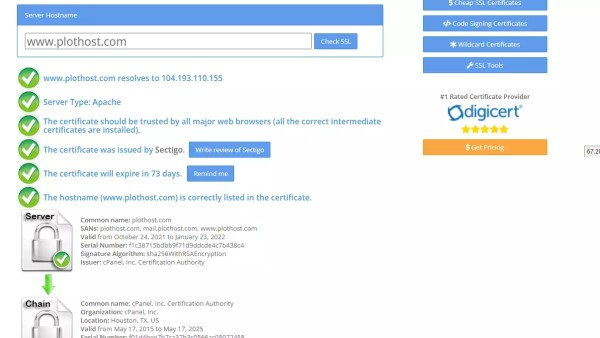
Kiểm tra tính xác thực của chứng chỉ SSL rất quan trọng để đảm bảo rằng thông tin của bạn được bảo vệ. Dưới đây là cách kiểm tra chứng chỉ SSL trên các trình duyệt phổ biến:

Google Chrome

Trên Chrome, bạn chỉ cần nhấp vào biểu tượng ổ khóa nằm bên trái thanh địa chỉ. Một menu sẽ xuất hiện, hiển thị thông tin về chứng chỉ SSL, bao gồm tên tổ chức, thời gian hết hạn và cơ quan chứng thực. Nếu có vấn đề gì, Chrome sẽ cảnh báo người dùng.

Firefox

Trên Firefox, bạn cũng nhấp vào biểu tượng ổ khóa trong thanh địa chỉ. Tương tự như Chrome, bạn sẽ thấy thông tin về chứng chỉ SSL và nếu có bất kỳ vấn đề nào, Firefox sẽ có thông báo rõ ràng.

Safari

Đối với Safari, bạn cũng có thể nhấp vào biểu tượng ổ khóa để xem thông tin chi tiết về chứng chỉ SSL. Ngoài ra, Safari cũng sẽ cảnh báo người dùng nếu trang web không an toàn.

Các công cụ kiểm tra chứng chỉ SSL đã được cài đặt đúng cách
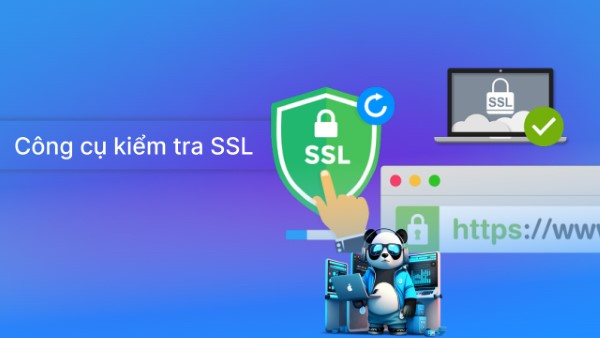
Có nhiều công cụ trực tuyến để giúp bạn kiểm tra xem chứng chỉ SSL đã được cài đặt đúng cách hay chưa. Dưới đây là một số công cụ phổ biến mà bạn có thể sử dụng:

SSL Labs

SSL Labs là một trong những công cụ kiểm tra SSL đáng tin cậy nhất hiện nay. Nó sẽ cung cấp cho bạn một báo cáo chi tiết về chứng chỉ SSL của bạn, bao gồm các vấn đề bảo mật, cây chứng chỉ và độ an toàn của cấu hình SSL.

Why No Padlock?

Công cụ này giúp kiểm tra lý do tại sao một trang web không hiển thị biểu tượng ổ khóa. Nó sẽ chỉ ra các yếu tố gây ra vấn đề và đưa ra giải pháp để khắc phục.

SSL Checker

SSL Checker là một công cụ đơn giản nhưng hiệu quả giúp bạn xác minh tính hợp lệ của chứng chỉ SSL, thời gian hết hạn, và các thông tin quan trọng khác.

Những lưu ý quan trọng khi cài đặt chứng chỉ SSL
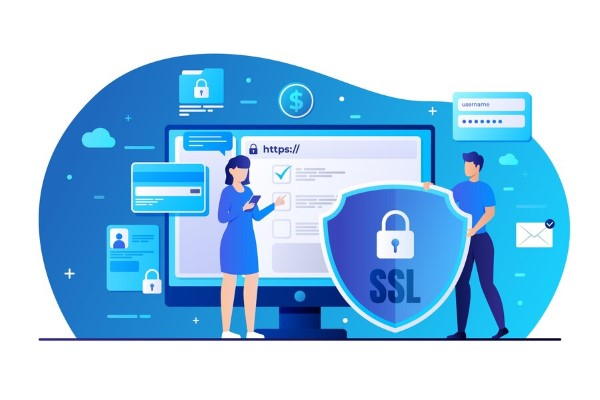
Việc cài đặt chứng chỉ SSL không chỉ đơn giản là một quy trình kỹ thuật mà còn yêu cầu bạn lưu ý đến nhiều yếu tố khác nhau. Dưới đây là một số lưu ý quan trọng:

Các bước thiết lập kết nối mã hóa SSL

Hãy chắc chắn rằng bạn đã thực hiện đầy đủ các bước cần thiết để thiết lập kết nối mã hóa. Điều này không chỉ bao gồm việc cài đặt chứng chỉ mà còn cấu hình máy chủ để xử lý các kết nối SSL.

Khi nào website cần áp dụng chứng chỉ SSL?

Website cần áp dụng chứng chỉ SSL khi có những yếu tố nhạy cảm như thông tin thanh toán, đăng nhập tài khoản, hoặc khi bạn muốn xây dựng lòng tin từ phía người tiêu dùng. Nếu bạn chỉ sở hữu một trang blog cá nhân mà không yêu cầu bảo mật cao thì có thể không cần thiết.

Cách kích hoạt SSL cho website

Các nền tảng hosting khác nhau có thể có các bước kích hoạt SSL khác nhau. Hãy kiểm tra tài liệu hướng dẫn của nhà cung cấp dịch vụ hosting để tìm hiểu cách kích hoạt SSL cho website của bạn.

Các thông tin cần thiết để đăng ký và sử dụng SSL

Khi đăng ký chứng chỉ SSL, bạn sẽ cần cung cấp thông tin chi tiết về tổ chức của bạn, quyền sở hữu tên miền, và các thông tin liên quan khác. Đảm bảo rằng thông tin bạn cung cấp là chính xác để hạn chế các vấn đề xác thực sau này.

{{< test-result title="So sanh cac loai chung chi SSL" headers="Tieu chi|DV SSL|OV SSL|EV SSL|Wildcard SSL|SANs SSL" row1="Xac thuc|Ten mien|To chuc|Mo rong|Ten mien|Nhieu ten mien" row2="Thoi gian cap|Vai phut|1-3 ngay|3-7 ngay|Vai phut - 3 ngay|Tuy loai" row3="Thanh dia chi|Khoa xam|Khoa xam|Thanh xanh|Khoa xam|Khoa xam" row4="Phu hop|Blog ca nhan|Doanh nghiep|Tai chinh, TMDT|Nhieu subdomain|Nhieu domain" row5="Chi phi|Mien phi - thap|Trung binh|Cao|Trung binh|Trung binh - cao" />}}

Ghi chú

Chung chi SSL la thanh phan bat buoc de bao mat website hien dai. Voi cac giai phap mien phi nhu Let's Encrypt, moi website deu co the trien khai HTTPS de bao ve du lieu nguoi dung va cai thien thu hang SEO.

Ket luan: Chung chi SSL dong vai tro thiet yeu trong viec ma hoa du lieu giua trinh duyet va may chu, bao ve thong tin nhay cam cua nguoi dung. Tuy theo quy mo va nhu cau, ban co the chon DV SSL mien phi cho blog ca nhan, OV SSL cho doanh nghiep, hoac EV SSL cho cac trang thuong mai dien tu va tai chinh. Viec cai dat SSL khong chi tang bao mat ma con cai thien thu hang tren Google va xay dung long tin voi khach hang.
Nguồn tham khảo
Câu hỏi thường gặpQ&A

SSL (Secure Sockets Layer) is a security protocol that encrypts information between the browser and the web server. This article explains what SSL is, how it works, the types of certificates, installation guides, and how to get a free SSL certificate.

What is SSL?

SSL (Secure Sockets Layer) is a security protocol designed to encrypt information between the user's browser and the web server. When an SSL connection is established, all data transmitted between the two parties is encrypted, helping prevent hackers and malicious actors from accessing sensitive information.

SSL certificates are typically issued by Certificate Authorities (CAs). These certificates verify the identity of a website and ensure that transmitted information is secure and has not been tampered with.

In summary, SSL can be understood as a security technology and standard that enables data to be transmitted safely over the Internet, protecting user information from external threats.

Why Does a Website Need an SSL Certificate?

Using an SSL certificate is no longer optional — it has become an essential requirement for every website, especially those involving financial transactions or storing sensitive information. Here are the main reasons why a website needs an SSL certificate:

  • Protecting user information: When users enter data on a website, such as credit card information or passwords, SSL encrypts this data, preventing information leaks.
  • Building trust: A website with an SSL certificate earns trust from users, making them more confident when conducting transactions or providing information.

Risks of Not Using SSL

If a website does not use SSL, information transmitted between users and the server is unprotected. This means that anyone could potentially eavesdrop and steal sensitive information. As a result, not only users but also businesses may face serious financial and legal risks.

Additionally, more and more browsers such as Google Chrome and Firefox have begun warning users when they visit websites that do not use SSL. This is a powerful incentive for developers and website administrators to upgrade the security of their websites.

The Importance of SSL Certificates

SSL certificates are not just a security tool — they are also a key factor in enhancing the credibility and brand of a website. Let's explore the important benefits that SSL certificates bring to a website:

SSL Certificates Encrypt Sensitive Data

One of the primary functions of SSL is data encryption. All sensitive information such as passwords, banking information, or personal data is encrypted during transmission. This means that even if malicious actors attempt to steal data, they cannot read its contents because it has been encrypted.

What is RTP? A Detailed Guide to the RTP Protocol

Data encryption not only protects personal information but also shields businesses from legal risks related to personal data breaches. Demonstrating that appropriate security measures have been implemented can help businesses avoid hefty fines.

SSL Certificates Provide Authentication for Websites

SSL certificates also verify the identity of a website. When users visit a website with SSL, they can be assured that they are interacting with the correct organization. This is very important in the online environment, where impersonation and fraud are quite common.

A website authenticated by SSL will clearly display the business name and related information, giving users more confidence when engaging in online transactions.

SSL Certificates Build Trust for Visitors

The presence of an SSL certificate on a website is not merely a security measure — it also sends a strong message to users that the website values their safety. Studies show that consumers are more likely to complete transactions on a website with SSL compared to one without.

Users can easily identify the security status of a website through the padlock icon in the address bar. This creates a sense of security and encourages more positive interaction with the website.

SSL Certificates Help Websites Comply with PCI Security Standards

For businesses that process credit cards, compliance with PCI DSS (Payment Card Industry Data Security Standard) is very important. SSL certificates are an indispensable part of meeting these requirements. By encrypting credit card information and other sensitive data, SSL helps businesses reduce the risk of fraud and data breaches.

How SSL Certificates Work

To better understand what SSL is, we need to understand how SSL certificates work. The process of establishing a secure connection between the browser and the server occurs through several steps.

Step 1: Performing the Handshake

The first step in this process is called the "handshake." When a user visits a website with SSL, their browser sends a request to the web server. The server responds with the SSL certificate and the necessary information to proceed with encryption.

Step 2: Certificate Verification

The browser then checks the validity of the SSL certificate. If the certificate has been authenticated by a trusted Certificate Authority and has not expired, the browser continues to establish a secure connection.

Step 3: Establishing the Session Key

After verification, the browser and server exchange information to create a session key. This key is used to encrypt all data throughout the session, ensuring that no third party can interfere with the information.

Step 4: Secure Data Transmission

Finally, once the connection has been successfully established, data is encrypted and transmitted back and forth between the browser and the server. This phase occurs quickly and does not hinder the user experience.

Types of Common SSL Certificates

SSL certificates come in various types, each serving different purposes for users and businesses. Here are the most common types of SSL certificates:

Domain Validation SSL Certificate (DV SSL)

DV (Domain Validation) certificates are the simplest and quickest type to obtain. They only require the certificate owner to prove domain ownership through an email or another simple verification method. DV SSL is typically used by personal websites or sites that do not require a high level of security.

Organization Validation SSL Certificate (OV SSL)

OV (Organization Validation) certificates require the organization to undergo a more rigorous verification process. In addition to verifying domain ownership, organizations also need to provide detailed information about their business. Therefore, OV SSL is often preferred by small and medium businesses or non-profit organizations.

What is SMTP? How SMTP Servers Work in Networking

Extended Validation SSL Certificate (EV SSL)

EV (Extended Validation) certificates provide the highest level of security. The EV SSL verification process is very strict and requires thorough examination of business information. When using an EV certificate, the organization's name is clearly displayed in the browser's address bar, creating maximum trust for customers. This type of certificate is typically used by banks and large financial institutions.

Multi-Domain SSL Certificate (SANs SSL)

SANs (Subject Alternative Names) certificates allow you to secure multiple different domains under a single certificate. This is very useful for businesses with multiple websites or different subpages, helping to save costs and simplify management.

Wildcard SSL Certificate

Wildcard certificates allow you to secure all subdomains of a domain. For example, if you have a Wildcard certificate for "example.com," you can secure "www.example.com," "shop.example.com," and "blog.example.com" without needing to purchase a separate certificate for each subdomain.

Components of an SSL Certificate

An SSL certificate typically includes the following main components:

Organization Information

This includes the name, address, and contact information of the organization or individual that owns the certificate. For OV and EV certificates, this information must be accurate and verified.

Public Key

The public key is a crucial part of data encryption. It is used to encrypt data before sending it to the server. Conversely, the server uses the private key to decrypt this data.

Expiration Date

Every SSL certificate has a specific validity period. This period typically ranges from one year to three years. After expiration, the certificate needs to be renewed to continue maintaining website security.

Certificate Authority Signature

SSL certificates are issued by trusted Certificate Authorities, and their signature proves that the certificate is valid and has been verified.

Advantages and Disadvantages of SSL Certificates

Like any other technology, SSL certificates have their own advantages and disadvantages. Let's analyze this in more detail.

Benefits of Using SSL

  • Information security: SSL certificates encrypt sensitive data, preventing attacks from external sources.
  • Building trust: The presence of SSL on a website creates trust among consumers, especially in financial transactions.
  • Improved SEO: Google has announced that they prioritize websites using HTTPS in search results. Therefore, having an SSL certificate can improve a website's visibility on search engines.
  • Compliance with security standards: Many industries require businesses to comply with certain security standards, and using SSL is an important part of this process.

Limitations of SSL Certificates

  • Cost: Although many services offer free SSL certificates, there are paid options with relatively high prices for international and higher-quality certificates.
  • Complex installation process: For those without technical experience, installing an SSL certificate can be quite complex and cause difficulties during the process.
  • Periodic renewal required: SSL certificates typically have a specific validity period and need to be renewed to maintain website security. This can sometimes be challenging for administrators.

Detailed Guide to Installing an SSL Certificate for Your Website

Installing an SSL certificate may seem complex, but if you follow the steps below, the process will become much easier.

Step 1: Purchase or Obtain an SSL Certificate

First, you need an SSL certificate. You can choose to purchase one from a trusted provider or use a free SSL service like Let's Encrypt.

Step 2: Install the Certificate on the Server

After obtaining the certificate, you need to install it on your web server. The installation process may vary depending on the server platform you are using (such as Apache, Nginx, or IIS). Most hosting providers offer detailed installation guides.

Step 3: Configure the Redirect from HTTP to HTTPS

After successfully installing the SSL certificate, you need to configure all traffic to redirect from HTTP to HTTPS. This can be done by editing the .htaccess file if you use Apache, or through settings in the hosting control panel.

What is an Alias? A Guide to Using Domain Aliases Effectively

Step 4: Test the Connection

Finally, you need to test the SSL connection to ensure everything is working properly. You can use online SSL testing tools to verify that the certificate has been installed correctly and that no errors have occurred.

How to Verify SSL Authenticity on Browsers

Verifying the authenticity of an SSL certificate is very important to ensure that your information is protected. Here is how to check SSL certificates on popular browsers:

Google Chrome

On Chrome, simply click the padlock icon to the left of the address bar. A menu will appear displaying information about the SSL certificate, including the organization name, expiration date, and Certificate Authority. If there are any issues, Chrome will warn the user.

Firefox

On Firefox, also click the padlock icon in the address bar. Similar to Chrome, you will see information about the SSL certificate, and if there are any issues, Firefox will display a clear notification.

Safari

For Safari, you can also click the padlock icon to view detailed information about the SSL certificate. Additionally, Safari will warn users if the website is not secure.

Tools to Check if an SSL Certificate Has Been Installed Correctly

There are many online tools to help you check whether an SSL certificate has been installed correctly. Here are some popular tools you can use:

SSL Labs

SSL Labs is one of the most reliable SSL testing tools available today. It provides a detailed report about your SSL certificate, including security issues, the certificate chain, and the safety of your SSL configuration.

Why No Padlock?

This tool helps identify why a website does not display the padlock icon. It points out the factors causing the issue and provides solutions to fix them.

SSL Checker

SSL Checker is a simple but effective tool that helps you verify the validity of an SSL certificate, its expiration date, and other important information.

Important Notes When Installing SSL Certificates

Installing an SSL certificate is not just a technical process — it also requires you to consider many different factors. Here are some important notes:

Steps to Set Up an Encrypted SSL Connection

Make sure you have completed all the necessary steps to establish an encrypted connection. This includes not only installing the certificate but also configuring the server to handle SSL connections.

When Does a Website Need an SSL Certificate?

A website needs an SSL certificate when it involves sensitive elements such as payment information, account login, or when you want to build consumer trust. If you only own a personal blog that does not require high security, it may not be necessary.

How to Activate SSL for Your Website

Different hosting platforms may have different steps to activate SSL. Check the documentation from your hosting provider to learn how to activate SSL for your website.

Information Required to Register and Use SSL

When registering for an SSL certificate, you will need to provide detailed information about your organization, domain ownership, and other related information. Ensure that the information you provide is accurate to avoid verification issues later on.

{{< test-result title="Comparison of SSL Certificate Types" headers="Criteria|DV SSL|OV SSL|EV SSL|Wildcard SSL|SANs SSL" row1="Validation|Domain|Organization|Extended|Domain|Multiple domains" row2="Issuance time|Minutes|1-3 days|3-7 days|Minutes - 3 days|Varies" row3="Address bar|Gray padlock|Gray padlock|Green bar|Gray padlock|Gray padlock" row4="Suitable for|Personal blogs|Businesses|Finance, e-commerce|Multiple subdomains|Multiple domains" row5="Cost|Free - low|Medium|High|Medium|Medium - high" />}}

Note

SSL certificates are an essential component for securing modern websites. With free solutions like Let's Encrypt, every website can implement HTTPS to protect user data and improve SEO rankings.

Conclusion: SSL certificates play a vital role in encrypting data between the browser and server, protecting sensitive user information. Depending on the scale and needs, you can choose free DV SSL for personal blogs, OV SSL for businesses, or EV SSL for e-commerce and financial websites. Installing SSL not only enhances security but also improves Google rankings and builds customer trust.

Sources
Frequently Asked QuestionsQ&A