SMTP (Simple Mail Transfer Protocol) là giao thức tiêu chuẩn gửi email qua Internet. Tìm hiểu cách hoạt động, vai trò và hướng dẫn cấu hình SMTP.
Bài này thế nào?
SMTP (Simple Mail Transfer Protocol) là giao thức tiêu chuẩn cho phép gửi email qua Internet, đóng vai trò quan trọng trong truyền tải thư điện tử. Bài viết giúp bạn hiểu rõ cách hoạt động, vai trò của máy chủ SMTP và hướng dẫn cấu hình chi tiết.
2019Đồng hành từ
B2BGiải pháp dữ liệu
Data·AIChuyên môn
Cần giải pháp dữ liệu cho doanh nghiệp?
AlgoData đồng hành cùng doanh nghiệp về data engineering, phân tích & AI từ 2019.
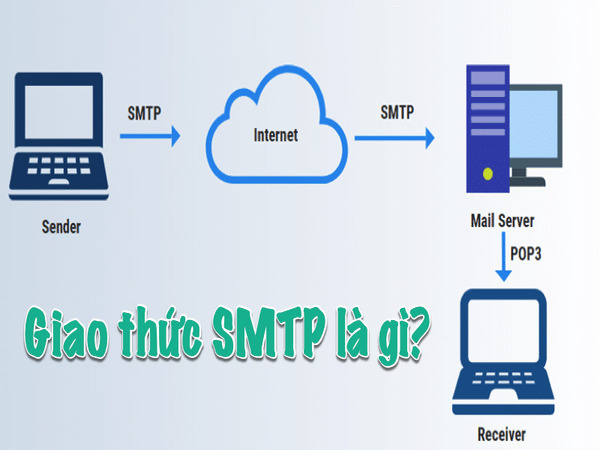
SMTP (Simple Mail Transfer Protocol) là giao thức truyền tải thư điện tử qua mạng Internet. SMTP chịu trách nhiệm gửi email từ máy khách (client) tới máy chủ (server) và giữa các máy chủ với nhau. Đây là giao thức thuộc tầng ứng dụng trong mô hình OSI, giúp đảm bảo các email được gửi đi đúng cách và tới đúng địa chỉ.
Trong quá trình này, SMTP sử dụng mô hình client-server, nơi máy khách khởi tạo kết nối và yêu cầu gửi email, trong khi máy chủ chịu trách nhiệm xử lý và phân phối thư đến đích.
Máy chủ SMTP là gì?
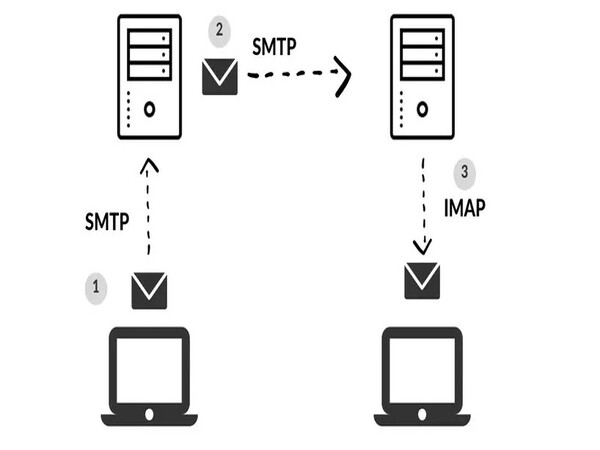
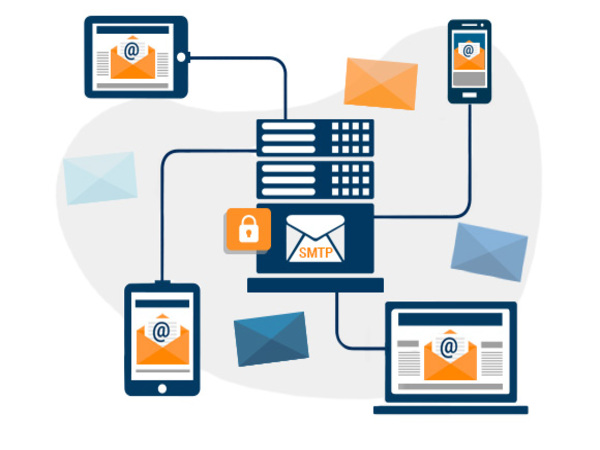
Máy chủ SMTP (SMTP server) là một máy chủ đảm nhiệm vai trò gửi và nhận email qua giao thức SMTP. Máy chủ này đóng vai trò trung gian, giúp chuyển tiếp email từ máy gửi đến máy nhận thông qua Internet.
Khi người dùng gửi email, máy chủ SMTP sẽ kiểm tra tính hợp lệ của địa chỉ email nhận, xác thực người gửi, sau đó gửi email tới máy chủ đích hoặc máy chủ trung gian khác. Máy chủ SMTP cũng chịu trách nhiệm gửi báo cáo lỗi nếu quá trình gửi thư gặp sự cố.
Nguyên lý hoạt động của giao thức SMTP
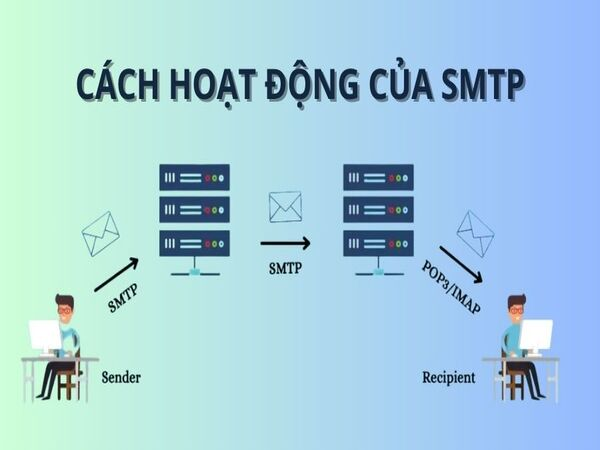
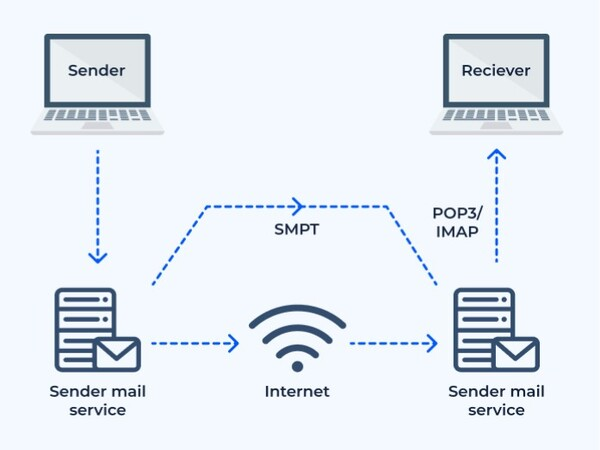
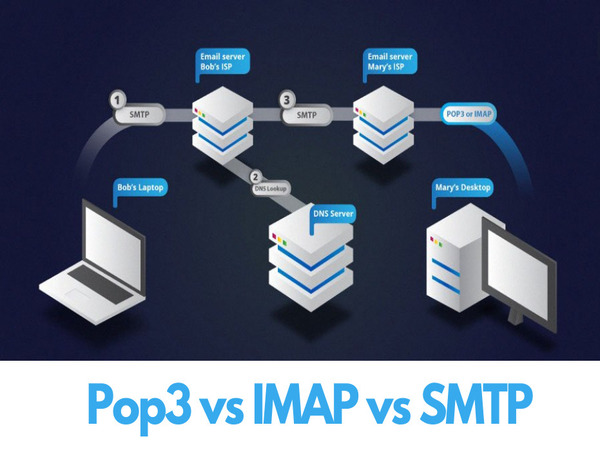
Nguyên lý hoạt động của SMTP dựa trên cơ chế yêu cầu và phản hồi giữa máy gửi và máy chủ:
Khởi tạo kết nối: Phần mềm email (Outlook, Gmail) kết nối với máy chủ SMTP để bắt đầu gửi email.
Xác thực người gửi: Máy chủ SMTP yêu cầu xác thực qua username và password.
Xác định địa chỉ người nhận: Máy chủ nhận thông tin về người nhận bao gồm địa chỉ email và tên miền.
Kiểm tra tên miền: SMTP sử dụng DNS để tra cứu tên miền người nhận và tìm máy chủ nhận email.
Chuyển email qua mạng: Email được gửi qua Internet đến máy chủ email của người nhận.
Gửi thông tin email: SMTP gửi thông điệp email cùng dữ liệu đính kèm, sử dụng cổng 25 hoặc 587.
Xác nhận gửi thành công: Máy chủ SMTP gửi tín hiệu xác nhận hoặc thông báo lỗi.
Lưu trữ tại máy chủ người nhận: Email được lưu trữ và chờ người nhận truy cập.
Bật xác minh hai bước (2-step verification) nếu chưa bật.
Chọn Mật khẩu ứng dụng, chọn ứng dụng "Thư" và thiết bị "Máy tính".
Lưu mật khẩu ứng dụng được tạo để sử dụng trong cấu hình SMTP.
Bước 3: Cài đặt plugin WP Mail SMTP
Đăng nhập WordPress, vào Plugin > Thêm mới, tìm WP Mail SMTP và cài đặt.
Truy cập Cài đặt > WP Mail SMTP, chọn Other SMTP.
Điền thông tin: smtp.gmail.com, cổng 465/587, bật xác thực.
Nhập địa chỉ Gmail và mật khẩu ứng dụng, lưu cài đặt và gửi email kiểm tra.
So sánh POP3, IMAP và SMTP
Tiêu chí
POP3
IMAP
SMTP
Chức năng chính
Tải email về máy khách
Đồng bộ email giữa máy chủ và máy khách
Gửi email
Lưu trữ email
Email thường bị xóa khỏi máy chủ
Email lưu trên máy chủ và đồng bộ
Không lưu trữ
Ngoại tuyến
Có, email đã tải về
Hạn chế
Không hỗ trợ
Đa thiết bị
Hạn chế
Hỗ trợ đầy đủ
Không áp dụng
Bảo mật
Hỗ trợ SSL/TLS
Hỗ trợ SSL/TLS
Hỗ trợ SSL/TLS
Ứng dụng chính
Tải email về một thiết bị
Truy cập email từ nhiều thiết bị
Gửi email từ máy khách đến máy chủ
Lưu ý bảo mật SMTP
Không bao giờ sử dụng cổng 25 không mã hóa để gửi email qua Internet. Luôn bật SSL/TLS và sử dụng mật khẩu ứng dụng thay vì mật khẩu chính của tài khoản email.
Kết luận:SMTP là giao thức cốt lõi cho hệ thống email, đảm bảo thư điện tử được gửi đi nhanh chóng và an toàn. Hiểu rõ cách cấu hình SMTP giúp tối ưu hóa khả năng gửi email cho cá nhân và doanh nghiệp.
SMTP (Simple Mail Transfer Protocol) là giao thức tiêu chuẩn để gửi email qua Internet, chịu trách nhiệm truyền tải thư từ máy khách đến máy chủ và giữa các máy chủ với nhau.
QSMTP sử dụng cổng nào?
SMTP sử dụng cổng 25 (mặc định), cổng 465 (SSL) hoặc cổng 587 (TLS). Cổng 587 được khuyến nghị cho việc gửi email từ ứng dụng vì hỗ trợ mã hóa TLS.
QSMTP khác POP3 và IMAP thế nào?
SMTP chỉ dùng để gửi email. POP3 tải email về máy khách và thường xóa bản sao trên máy chủ. IMAP đồng bộ email giữa máy chủ và nhiều thiết bị, hỗ trợ quản lý thư mục.
QMáy chủ SMTP là gì?
Máy chủ SMTP là máy chủ chuyên xử lý việc gửi và nhận email qua giao thức SMTP, đóng vai trò trung gian chuyển tiếp email từ máy gửi đến máy nhận qua Internet.
QLàm sao để cấu hình SMTP cho Gmail?
Sử dụng máy chủ smtp.gmail.com, cổng 465 (SSL) hoặc 587 (TLS), bật xác minh hai bước và tạo mật khẩu ứng dụng để xác thực an toàn.
SMTP (Simple Mail Transfer Protocol) is the standard protocol for sending email over the Internet, playing a critical role in email transmission. This article explains how SMTP works, the role of SMTP servers and provides a detailed configuration guide.
2019Trusted since
B2BData solutions
Data·AIExpertise
Need data solutions for your business?
AlgoData has helped businesses with data engineering, analytics & AI since 2019.
SMTP (Simple Mail Transfer Protocol) is the protocol for transmitting email over the Internet. SMTP is responsible for sending email from the client to the server and between servers. It's an application layer protocol in the OSI model, ensuring emails are sent correctly to the right address.
SMTP uses a client-server model where the client initiates the connection and requests to send email, while the server handles processing and delivering mail to the destination.
What is an SMTP Server?
An SMTP server handles sending and receiving email via the SMTP protocol. It acts as an intermediary, relaying email from sender to recipient through the Internet.
When a user sends email, the SMTP server checks the recipient address validity, authenticates the sender, then sends the email to the destination server or another relay server. The SMTP server also sends error reports if the sending process encounters issues.
How SMTP Works
SMTP operates on a request-response mechanism between sender and server:
Connection initiation: Email software (Outlook, Gmail) connects to the SMTP server to begin sending.
Sender authentication: The SMTP server requires authentication via username and password.
Recipient identification: The server receives recipient information including email address and domain.
Domain lookup: SMTP uses DNS to look up the recipient domain and find the receiving mail server.
Email transmission: The email is sent over the Internet to the recipient's mail server.
Message delivery: SMTP sends the email message with attachments using port 25 or 587.
Send confirmation: The SMTP server sends a confirmation signal or error notification.
Storage at recipient server: The email is stored waiting for the recipient to access it.
Multiple tasks: storage, data processing, applications
Protocol
SMTP protocol
Multiple: HTTP, FTP, SQL
Scope
Email sending only
Various purposes
Optimization
Optimized for fast email delivery
Optimized per specific task
Roles and Importance of SMTP Servers
Email processing: SMTP servers ensure email is sent from client to destination quickly and accurately.
Email relay between servers: SMTP servers act as intermediaries, relaying email across networks and organizations.
Security and authentication: Integrated security mechanisms prevent spam and protect against phishing attacks.
Error management and reporting: Reports reasons when email fails to send (invalid address, unresponsive server).
Improving Email Deliverability
Use SPF, DKIM and DMARC to authenticate outgoing email, reducing the risk of being marked as spam. Always use port 587 with TLS instead of unencrypted port 25.
Benefits of Using SMTP Servers
Speed and efficiency: Email is sent quickly and securely, optimizing the transmission process.
Better security: Supports SSL/TLS for data encryption, preventing man-in-the-middle attacks.
Reduced spam risk: Automatic spam checking and filtering mechanisms.
Error management and reporting: Provides detailed information about error causes and fixes.
High customizability: Businesses can customize configurations to suit specific needs.
Practical Applications of SMTP
Sending and receiving email: SMTP is the primary protocol used by Gmail, Outlook, Yahoo Mail.
Email marketing: Helps send bulk marketing emails to the inbox instead of spam folder.
Automated notification systems: CRM, e-commerce apps and project management systems use SMTP for automated notifications.
Enterprise systems: Handles internal communications, important notifications and daily reports.
Gmail SMTP Configuration Guide
Step 1: Gather Configuration Information
Information needed to configure SMTP for Gmail:
SMTP Server: smtp.gmail.com
Port: 465 (SSL) or 587 (TLS)
Security method: SSL or TLS
Username: Your Gmail email address
Password: App password (created in step 2)
Step 2: Create an App Password
Sign in to your Google account, go to Security page.
Enable 2-step verification if not already enabled.
Select App passwords, choose "Mail" application and "Computer" device.
Save the generated app password for use in SMTP configuration.
Step 3: Install WP Mail SMTP Plugin
Log in to WordPress, go to Plugins > Add New, search for WP Mail SMTP and install.
Go to Settings > WP Mail SMTP, select Other SMTP.
Enter information: smtp.gmail.com, port 465/587, enable authentication.
Enter Gmail address and app password, save settings and send a test email.
Never use unencrypted port 25 to send email over the Internet. Always enable SSL/TLS and use app passwords instead of your main email account password.
Conclusion:SMTP is the core protocol for email systems, ensuring email is sent quickly and securely. Understanding how to configure SMTP helps optimize email delivery for both individuals and businesses.
SMTP (Simple Mail Transfer Protocol) is the standard protocol for sending email over the Internet, responsible for transmitting mail from clients to servers and between servers.
QWhat ports does SMTP use?
SMTP uses port 25 (default), port 465 (SSL) or port 587 (TLS). Port 587 is recommended for sending email from applications as it supports TLS encryption.
QHow is SMTP different from POP3 and IMAP?
SMTP is only for sending email. POP3 downloads email to the client and usually deletes server copies. IMAP syncs email between server and multiple devices with folder management.
QWhat is an SMTP server?
An SMTP server handles sending and receiving email via the SMTP protocol, acting as an intermediary that relays email from sender to recipient across the Internet.
QHow to configure SMTP for Gmail?
Use server smtp.gmail.com, port 465 (SSL) or 587 (TLS), enable 2-step verification and create an app password for secure authentication.