
What is RTP? A Detailed Guide to the Real-time Transport Protocol
Networking

What is RTP? A Detailed Guide to the Real-time Transport Protocol

Learn what RTP (Real-time Transport Protocol) is, its header structure, how it works with RTCP. Advantages, disadvantages, and applications in VoIP, video streaming, and video conferencing.

In this series: Giao thức mạng
  1. 1 What is SMTP? How SMTP Servers Work in Email Systems
  2. 2 What is TCP/IP? Functions and How TCP/IP Works
  3. 3 What is Telnet? A Complete Overview of Telnet and Its Applications
  4. 4 What is SSH? Functions and How the SSH Protocol Works
  5. 5 What is FTP? A Basic Guide to File Transfer Protocol
  6. 6 What is RTP? A Detailed Guide to the Real-time Transport Protocol
  7. 7 What is UDP? Features and Applications of the UDP Protocol
✦ Quick summary
Learn what RTP (Real-time Transport Protocol) is, its header structure, how it works with RTCP. Advantages, disadvantages, and applications in VoIP, video streaming, and video conferencing.
How was this post?

RTP (Real-time Transport Protocol) is a protocol for delivering multimedia data in real time over IP networks. This article explains the header structure, how it works with RTCP, its advantages and disadvantages, and its applications in VoIP, streaming, and video conferencing.

Overview of the RTP Protocol

When we talk about RTP, it is important to understand that it is not just a simple protocol but an entire complex system that helps transport multimedia data smoothly and reliably. To get a comprehensive view of this protocol, we need to explore its various aspects including structure, functionality, and development history.

What is the RTP Protocol?

RTP (Real-time Transport Protocol) is a real-time transport protocol designed to deliver multimedia data in real time via unicast or multicast services. This protocol ensures that data is distributed uniformly. RTP was first defined in IETF's RFC 1889 in 1996 and was later updated in 2003 by RFC 3550.

The IETF developed RTP to support features such as live video streaming over the Internet. In RTP, data is sent in individual packets. However, due to the distributed nature of the Internet, these packets may arrive at different times, out of order, or may be lost entirely.

To address these issues, RTP provides rapid packet delivery capabilities, helping maintain the stability of the video stream and ensuring continuous playback without the need for buffering or other supporting operations.

For example, when a video playback request is made on the Internet, the streaming service uses RTP to send video data to the user's computer. If some data packets are lost, RTP quickly recovers, though the video may experience a brief interruption of a few seconds of audio.

Additionally, users can use the HTTP protocol to download a backup copy of the video. This protocol allows re-requesting lost packets, which slows down the download process but ensures higher accuracy.

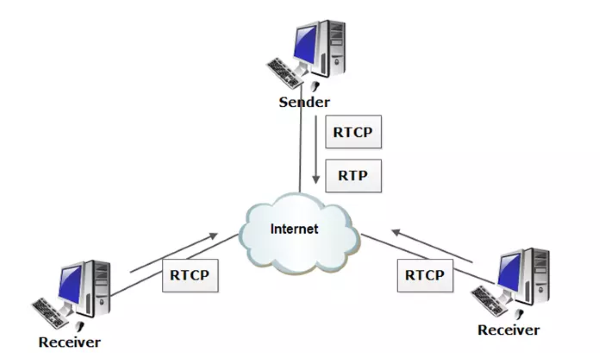
RTCP (RTP Control Protocol) works alongside RTP to provide feedback to users about the quality of the media stream. RTCP is a protocol commonly used on client devices to report on service quality metrics such as latency, packet loss, or round-trip time (RTT). Based on this feedback, the server can adjust the codec or stream quality. If RTP cannot identify the codec or handle the data stream, it can use protocols such as SIP, H.323, or XMPP.
What is the RTCP Protocol?

Real-time Transport Control Protocol (RTCP) is a protocol that operates alongside RTP to monitor data delivery over large multicast networks. RTCP provides Quality of Service (QoS) information about the data stream, including packet loss rate, latency, and jitter.

The information collected by RTCP can be used to adjust data stream parameters, such as bitrate or codec format. This protocol is widely used in many multimedia fields, including:

  • Voice over IP (VoIP)
  • Internet Protocol Television (IPTV)
  • Media streaming
  • Video conferencing

In summary, although RTCP does not directly transmit multimedia data, it plays a crucial role in ensuring that data is transmitted reliably and efficiently.

History of the RTP Protocol

The RTP (Real-time Transport Protocol) was developed by the Audio Video Transport Working Group and was first published in 1996.

In the early 1990s, video conferencing emerged as a new application that required multimedia data to be transmitted reliably and efficiently. However, existing data transmission protocols such as TCP and UDP could not meet these requirements.

TCP is a connection-oriented protocol that guarantees all sent data packets are received, but this can cause high latency, making it unsuitable for video conferencing applications. Conversely, UDP is a connectionless protocol that does not guarantee delivery of all data packets, leading to the risk of data loss, which is also unsuitable for applications requiring high reliability.

What is FTP? A Basic Guide to File Transfer Protocol

To overcome these problems, the Audio Video Transport Working Group developed the RTP protocol. RTP provides the necessary features for reliable and efficient real-time multimedia data transmission, including:

  • Packet sequence numbering: RTP packets are sequentially numbered to help applications detect lost or out-of-order packets.
  • Timestamps: Each RTP packet contains a timestamp that helps applications synchronize multimedia data.
  • Quality of Service (QoS) reporting: RTP can collect information about the quality of service of the data stream, allowing adjustment of parameters such as bitrate or codec format.

The RTP protocol has been improved and developed over many years to meet the growing demands of multimedia applications. Key improvements include:

  • Support for new multimedia data formats such as H.264 and MPEG-4.
  • Ability to operate on large multicast networks.
  • Optimization for low-latency applications such as online gaming.

In summary, RTP is an important protocol in the field of multimedia communications, providing essential features to ensure reliable and efficient real-time multimedia data transmission.

Advantages and Disadvantages of the RTP Protocol

Like any other technology, the RTP protocol has its own advantages and disadvantages. Understanding these factors will help users make informed decisions when choosing this protocol for their applications.

Advantages of RTP

Some notable advantages of the RTP protocol include:

  • Optimized design for real-time transmission: RTP was developed to transmit multimedia data with low latency, improving user experience in applications such as video conferencing and streaming.
  • Versatile transmission capabilities: In addition to video and audio, RTP can also be used to transmit other types of data such as display status updates, telemetry data, and control information.
  • Ensuring transmission accuracy: RTP employs multiple techniques to ensure transmission accuracy, such as calculating packet loss rates to detect lost packets. The protocol also uses packet sequence numbering and jitter compensation mechanisms to properly deliver out-of-order packets. These techniques ensure that multimedia data reaches its destination accurately, even when issues occur during transmission.

Disadvantages of RTP

RTP is an important protocol in multimedia communications, but it also has some limitations, including:

  • No Quality of Service (QoS) guarantee: RTP does not provide functions to guarantee quality of service metrics such as latency, reliability, and bandwidth.
  • No resource management: The RTP protocol does not reserve network resources or handle lost or out-of-order data packets.
  • Primarily operates over UDP: RTP is mainly implemented over UDP, which limits the protocol's compatibility with other systems.

Technical Details of the RTP Protocol

Typically, RTP uses UDP packets, which makes data transmission faster and simpler, although it does not guarantee delivery efficiency. Therefore, RTP is often considered for use with TCP; however, issues arise because RTP's time-sensitive nature is incompatible with TCP's reliability and overhead.

All ports can be used for RTP, within the high port range from 1024 to 65535. RTP uses an even-numbered port, while RTCP uses the next odd-numbered port. For example, the Internet Assigned Numbers Authority has registered port 5004 for RTP and port 5005 for RTCP. Many other applications also use these ports as a standard.

RTP packets contain information such as packet sequence numbering, payload type specification, internal synchronization, and timestamps to identify latency issues within a single stream and find ways to resolve them.

Security vulnerabilities in RTP servers can arise from improper implementation, as they cannot encrypt or authenticate data. If left unaddressed, these vulnerabilities can lead to third-party intrusion, spoofing, or attacks on media streams. Therefore, VoIP systems using RTP need to be properly configured and secured to ensure the safety of media streams.

Additionally, RTP can be subject to DDoS attacks through distribution, corrupting a media stream or the clients connected to it. Furthermore, some services using RTP have had software vulnerabilities that made them susceptible to attacks.

What is a Rotating Proxy? Benefits of Using Rotating Proxies

RTP Protocol Header Formats

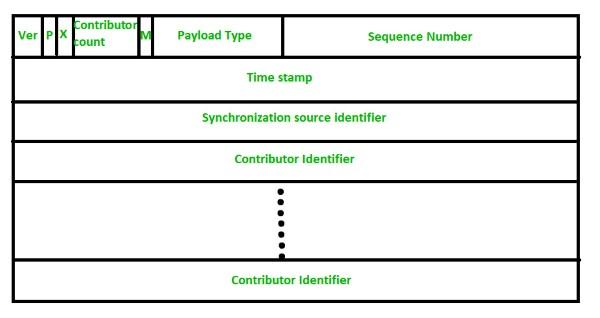
The RTP header format is simple and encompasses all real-time applications. Below is an explanation of each field in the header format:

  • Version: This field is 2 bits long and identifies the version of RTP. The current version is 2.
  • P (1 bit): If the value is 1, it indicates padding at the end of the data packet. If the value is 0, there is no padding.
  • X (1 bit): If the value is 1, there is an additional extension header between the basic header and the data. If the value is 0, there is no extension header.
  • Contributor Count (4 bits): Indicates the number of contributors, with a maximum of 15, since this field can only contain numbers from 0 to 15.
  • M (1 bit): Used as an end marker, indicating that the data has ended.
  • Payload Types (7 bits): Indicates the type of payload. Some common payload types include:
    • The payload type is represented by a unique number, encoded in 7 bits in the RTP header format. Each payload type corresponds to a specific audio or video encoding method. An RTP source is only allowed to send one payload type at a time. This field primarily identifies the type of codec used in the media stream.
For example, if '1' is used to indicate the payload type with encoding name 1016, it will use the FS-1016 voice encoding type for media streams. If the payload type is '31' with encoding name H.261, it will use the ITU-T video compression standard. Each payload type number indicates a specific encoding type for audio or video streams.

  • Sequence Number: This 16-bit field provides serial numbers for RTP packets, helping to determine ordering. The first packet's sequence number is randomly assigned, and subsequent packets increment by 1. This field is primarily used to check for packet loss or out-of-order delivery.
  • Timestamp: The 32-bit Timestamp field is used to find the timing relationship between different RTP packets. The timestamp for the first packet is randomly chosen, and subsequent packets are calculated as the sum of the previous timestamp and the time required to generate the first byte of the current packet. The value of each timestamp increment may differ depending on the application.
  • Synchronization Source Identifier: This 32-bit field is used to identify and define the RTP source. The value is a random number chosen by the source, helping to resolve conflicts that may occur when two sources have the same sequence number.
  • Contributor Identifier: Finally, this 32-bit field is used to identify sources when there are more than one source in a session. The mixer source uses one Synchronization Source Identifier, and the remaining sources (up to 15) use Contributor Identifiers for differentiation.

Current Applications of the RTP Protocol

The RTP protocol is used to transmit real-time media streams, including audio and video. Some common use cases for RTP include:

  • VoIP: RTP is used to transmit audio in VoIP calls.
  • Video conferencing: Used to transmit audio and video in video conference meetings.
  • Live broadcasting: Supports live video broadcasting, such as sporting events or news.
  • Video-on-demand streaming: Previously, RTP was used for video-on-demand streaming, but nowadays, these services typically use DASH instead.

Code Examples Using the RTP Protocol

Consider a simple customer service phone system where a customer service agent needs a short time to look up information to answer a customer's question.

However, we cannot let the customer feel that the agent has paused the conversation. Therefore, a hold feature needs to be designed. This feature allows the agent to mute the audio from the customer's side and play music for them, enabling the agent to focus while the customer still feels the conversation is continuing.

In this example, we will use JavaScript combined with asynchronous functions and local peer for implementation.

Enabling Hold Mode

To enable hold mode, you can use the following code:

async function enableHold(audioStream) {

    try {

    await audioTransceiver.sender.replaceTrack(audioStream.getAudioTracks()[0]);

    audioTransceiver.receiver.track.enabled = false;

    audioTransceiver.direction = "sendonly";

    } catch(err) {

    /* handle the error */

    }

}

In the try block, we perform three steps:

  1. Replace the outgoing audio with a MediaStreamTrack containing music.
  2. Disable the incoming audio from the customer.
  3. Switch the audio transceiver to send-only mode. With these steps, the audio from the customer will be muted and music will be played for them to hear.

Disabling Hold Mode

To restore normal functionality, we add a disableHold() function as follows:

async function disableHold(micStream) {

    await audioTransceiver.sender.replaceTrack(micStream.getAudioTracks()[0]);

    audioTransceiver.receiver.track.enabled = true;

    audioTransceiver.direction = "sendrecv";

}

To restore the customer's audio and resume streaming, we perform the following steps:

Replace the currently playing music track with the original audio stream. Re-enable the audio from the customer's side. Switch the transceiver back to send-and-receive mode.

What is OpenShift? A Comprehensive Guide to OpenShift

These steps reverse the enableHold() process that we performed earlier.
The example above simulates an application sending RTP packets. This code uses a socket library to establish a connection and send RTP packets with headers generated from basic information such as sequence numbers and timestamps. This is just a simple example, but it demonstrates how easy it is to start working with the RTP protocol.

Frequently Asked Questions About the RTP Protocol
Where Can I Learn About RFC 1889 and RFC 3550?

You can learn about RFC 1889 and RFC 3550 from the following sources:

  • IETF Website: The IETF (Internet Engineering Task Force) is the organization that develops Internet protocols, including RTP and RTCP. The IETF website provides RFC documents, including RFC 1889 and RFC 3550.
  • IANA Website: IANA (Internet Assigned Numbers Authority) manages Internet parameters, including the RTP packet format. The IANA website contains detailed information about the RTP packet format and related RFCs.
  • Standards Organization Websites: Standards organizations such as ISO (International Organization for Standardization) and IEC (International Electrotechnical Commission) also provide information about the RTP and RTCP protocols.
  • Service Provider Websites: Services such as Skype and Zoom often share information about how they implement RTP and RTCP in their products.

Additionally, you can learn about RTP and RTCP through technical documentation, specialized books, and research papers.

What is QoS?

QoS (Quality of Service) is an important concept in computer networking, especially in multimedia data transmission. QoS refers to the ability to adjust and manage bandwidth to ensure that real-time applications such as video conferencing or video streaming always operate smoothly and with high quality.

How is QoS Latency Measured?

QoS (Quality of Service) is a complex concept that encompasses many different factors. To accurately evaluate QoS, these factors need to be measured.

  • Packet Loss: This is the number of data packets that are not successfully transmitted over the network. Packet loss can lead to interruptions or errors in applications requiring real-time data, such as video conferencing and online gaming.
  • Latency: Latency is the time required for a data packet to travel from point A to point B on the network. High latency can cause disruptions in data transmission.
  • Jitter: This is the unexpected variation in latency or bandwidth. This factor can cause disruptions or errors in data transmission.
  • Bandwidth: Bandwidth is the maximum data transfer rate on the network. Low bandwidth can lead to congestion and affect service quality.
  • Error Rate: The error rate measures the number of data packets that are corrupted during network transmission. A high error rate can cause disruptions or errors in data transmission.

Where Can I Learn More About QoS?

There are many online resources and books about QoS and methods for measuring it. Online courses from learning platforms such as Coursera and Udemy also provide useful knowledge about QoS and its applications in computer networking.

  • Technical Reference Materials: There are many technical documents about QoS, including books, articles, and specialized publications such as "Quality of Service: Theory and Practice" by J. Kurose and K. Ross, and "The Art of Network Engineering" by D. E. Comer.
  • Standards Organization Websites: Standards organizations such as ISO and IEC provide detailed information about QoS.
  • Service Provider Websites: Companies such as Cisco and Juniper Networks also have extensive information related to QoS.
  • Online Courses: There are many online courses about QoS, both free and paid. Some notable courses include "QoS on Juniper Networks" provided by Juniper Networks and "QoS for the Enterprise" by Pluralsight.

{{< test-result title="Comparison of Media Transport Protocols" headers="Criteria|RTP|RTSP|HLS|DASH" row1="Type|Transport protocol|Control protocol|Streaming protocol|Streaming protocol" row2="Transport over|UDP|TCP|HTTP|HTTP" row3="Latency|Very low|Low|High (10-30s)|High (10-30s)" row4="Interactivity|Yes (bidirectional)|Yes (play/pause)|No|No" row5="Applications|VoIP, Video call|IP camera, IPTV|Live/VOD streaming|Live/VOD streaming" row6="Security|SRTP|RTSPS|HTTPS|HTTPS" />}}

Tip

RTP is suitable for bidirectional real-time applications such as VoIP and video calls. For large-scale unidirectional streaming, HLS or DASH over HTTP is better due to CDN and firewall compatibility.

Conclusion: RTP is an indispensable protocol for real-time multimedia data transmission. Combined with RTCP for quality monitoring, RTP ensures synchronization and low latency for VoIP, video conferencing, and live streaming. Understanding RTP's header structure and operating mechanisms helps optimize communication applications.

Sources
Frequently Asked QuestionsQ&A

RTP (Real-time Transport Protocol) là giao thức truyền tải dữ liệu đa phương tiện theo thời gian thực qua mạng IP. Bài viết giải thích cấu trúc header, cách hoạt động với RTCP, ưu nhược điểm và ứng dụng trong VoIP, streaming, hội nghị truyền hình.

Tổng quan về giao thức RTP

Khi chúng ta nói đến RTP, cần phải hiểu rõ rằng đây không chỉ là một giao thức đơn thuần mà là toàn bộ hệ thống phức tạp giúp vận chuyển dữ liệu đa phương tiện một cách mượt mà và đáng tin cậy. Để có cái nhìn tổng quát hơn về giao thức này, chúng ta cần tìm hiểu về các khía cạnh khác nhau của nó như cấu trúc, chức năng và lịch sử phát triển.

Giao thức RTP là gì?

RTP (Real-time Transport Protocol) là một giao thức truyền tải thời gian thực được thiết kế để truyền tải dữ liệu đa phương tiện theo thời gian thực qua các dịch vụ unicast hoặc multicast. Giao thức này đảm bảo rằng dữ liệu được phân phối một cách đồng nhất. RTP được quy định lần đầu trong RFC 1889 của IETF vào năm 1996 và sau đó đã được cập nhật vào năm 2003 bởi RFC 3550.

IETF phát triển RTP để hỗ trợ các tính năng như truyền video trực tiếp qua Internet. Trong RTP, dữ liệu được gửi trong các gói riêng lẻ. Tuy nhiên, do tính chất phân tán của Internet, các gói này có thể đến với thời gian khác nhau, không theo thứ tự, hoặc có thể bị mất.

Để khắc phục những vấn đề này, RTP cung cấp khả năng phân phối nhanh các gói tin, giúp duy trì sự ổn định của luồng video và đảm bảo quá trình phát diễn ra liên tục mà không cần phải lưu trữ hay thực hiện các thao tác hỗ trợ khác.

Chẳng hạn, khi có một yêu cầu phát video trên Internet, dịch vụ phát trực tuyến sẽ sử dụng RTP để gửi dữ liệu video tới máy tính của người dùng. Nếu có một số gói dữ liệu bị mất, RTP sẽ nhanh chóng khôi phục lại, mặc dù video có thể bị ngắt trong vài giây âm thanh.

Ngoài ra, người dùng cũng có thể sử dụng giao thức HTTP để tải xuống một bản sao lưu của video. Giao thức này cho phép yêu cầu lại các gói bị mất, mặc dù điều này làm chậm quá trình tải xuống nhưng đảm bảo độ chính xác cao hơn.

RTCP (RTP Control Protocol) kết hợp với RTP để cung cấp thông tin phản hồi cho người dùng về chất lượng luồng phương tiện. RTCP là giao thức được sử dụng phổ biến trên máy khách để phản hồi về chất lượng dịch vụ như độ trễ, mất gói, hoặc thời gian tròn RTT. Dựa trên các phản hồi này, máy chủ có thể điều chỉnh codec hoặc chất lượng luồng. Nếu RTP không xác định được codec hoặc không xử lý được luồng dữ liệu, nó có thể sử dụng các giao thức như SIP, H.323 hoặc XMPP.

Giao thức RTCP là gì?

Real-time Transport Control Protocol (RTCP) là một giao thức hoạt động song song với RTP để giám sát việc phân phối dữ liệu trên các mạng đa hướng lớn. RTCP cung cấp thông tin về chất lượng dịch vụ (QoS) của luồng dữ liệu, bao gồm tỷ lệ mất gói, độ trễ và độ lệch.

Thông tin mà RTCP thu thập có thể được sử dụng để điều chỉnh các tham số của luồng dữ liệu, chẳng hạn như tốc độ bit hoặc định dạng codec. Giao thức này được ứng dụng rộng rãi trong nhiều lĩnh vực đa phương tiện, bao gồm:

  • Thoại qua IP (VoIP)
  • Truyền hình qua Internet (IPTV)
  • Phát trực tuyến media
  • Video hội nghị

Tóm lại, mặc dù RTCP không trực tiếp truyền tải dữ liệu đa phương tiện, nhưng nó đóng vai trò quan trọng trong việc đảm bảo rằng dữ liệu được truyền tải một cách đáng tin cậy và hiệu quả.

Lịch sử phát triển của giao thức RTP

Giao thức RTP (Real-time Transport Protocol) được phát triển bởi nhóm Audio Video Transport Working và lần đầu tiên được ban hành vào năm 1996.

Vào đầu những năm 1990, hội nghị truyền hình đã nổi lên như một ứng dụng mới, yêu cầu dữ liệu đa phương tiện phải được truyền tải một cách đáng tin cậy và hiệu quả. Tuy nhiên, các giao thức truyền dữ liệu hiện có như TCP và UDP không đáp ứng được yêu cầu này.

TCP là một giao thức kết nối, đảm bảo rằng tất cả các gói dữ liệu được gửi đi đều được nhận, nhưng điều này có thể gây ra độ trễ cao, không phù hợp với các ứng dụng hội nghị truyền hình. Ngược lại, UDP là một giao thức không kết nối, không đảm bảo việc nhận toàn bộ các gói dữ liệu, dẫn đến nguy cơ mất dữ liệu, điều này cũng không phù hợp cho các ứng dụng yêu cầu độ tin cậy cao.

FTP là gì? Hướng dẫn cơ bản về giao thức truyền tệp tin

Để khắc phục những vấn đề này, nhóm Audio Video Transport Working đã phát triển giao thức RTP. RTP cung cấp các tính năng cần thiết để truyền tải dữ liệu đa phương tiện theo thời gian thực một cách đáng tin cậy và hiệu quả, bao gồm:

  • Đánh số thứ tự các gói: Các gói RTP được đánh số thứ tự để giúp ứng dụng phát hiện các gói bị mất hoặc sai thứ tự.
  • Dấu thời gian: Mỗi gói RTP chứa một dấu thời gian giúp các ứng dụng đồng bộ hóa dữ liệu đa phương tiện.
  • Báo cáo chất lượng dịch vụ (QoS): RTP có khả năng thu thập thông tin về chất lượng dịch vụ của luồng dữ liệu, cho phép điều chỉnh các tham số như tốc độ bit hoặc định dạng codec.

Giao thức RTP đã được cải tiến và phát triển qua nhiều năm để đáp ứng nhu cầu ngày càng cao của các ứng dụng đa phương tiện. Một số cải tiến chính bao gồm:

  • Hỗ trợ cho các định dạng dữ liệu đa phương tiện mới như H.264 và MPEG-4.
  • Khả năng hoạt động trên các mạng đa hướng lớn.
  • Tối ưu hóa cho các ứng dụng yêu cầu độ trễ thấp như trò chơi trực tuyến.

Tóm lại, RTP là một giao thức quan trọng trong lĩnh vực truyền thông đa phương tiện, cung cấp các tính năng thiết yếu để đảm bảo việc truyền tải dữ liệu đa phương tiện theo thời gian thực một cách đáng tin cậy và hiệu quả.

Ưu điểm và nhược điểm của giao thức RTP

Như bất kỳ công nghệ nào khác, giao thức RTP cũng có những ưu điểm và nhược điểm riêng. Việc hiểu rõ những yếu tố này sẽ giúp người sử dụng có quyết định đúng đắn khi lựa chọn giao thức này cho các ứng dụng của mình.

Ưu điểm của RTP

Một số ưu điểm nổi bật của giao thức RTP bao gồm:

  • Thiết kế tối ưu cho truyền tải thời gian thực: RTP được phát triển để truyền tải dữ liệu đa phương tiện với độ trễ thấp, giúp cải thiện trải nghiệm người dùng trong các ứng dụng như video hội nghị và phát trực tuyến.
  • Khả năng truyền đa dạng: Ngoài việc truyền video và âm thanh, RTP còn có thể được sử dụng để truyền tải các loại dữ liệu khác như cập nhật trạng thái hiển thị, dữ liệu đo lường, và thông tin điều khiển.
  • Đảm bảo tính chính xác trong truyền tải: RTP áp dụng nhiều kỹ thuật để đảm bảo độ chính xác của việc truyền tin, chẳng hạn như tính toán tỷ lệ mất gói để phát hiện gói bị mất. Giao thức này cũng sử dụng phương pháp đánh số thứ tự các gói và cơ chế bù jitter để phân phối các gói không theo thứ tự một cách hợp lý. Những kỹ thuật này giúp đảm bảo rằng dữ liệu đa phương tiện được truyền đến đích một cách chính xác, ngay cả khi có sự cố xảy ra trong quá trình truyền.

Nhược điểm của RTP

RTP là một giao thức quan trọng trong lĩnh vực truyền thông đa phương tiện, nhưng cũng tồn tại một số hạn chế, bao gồm:

  • Không đảm bảo chất lượng dịch vụ (QoS): RTP không cung cấp các chức năng để đảm bảo chất lượng dịch vụ như độ trễ, độ tin cậy và băng thông.
  • Không quản lý tài nguyên: Giao thức RTP không thực hiện việc đặt trước tài nguyên mạng hoặc xử lý các gói dữ liệu bị mất hoặc sai thứ tự.
  • Chỉ hoạt động trên UDP: RTP chủ yếu được triển khai trên UDP, điều này giới hạn tính tương thích của giao thức với các hệ thống khác.

Chi tiết kỹ thuật của giao thức RTP

Thông thường, RTP sử dụng gói UDP, giúp quá trình truyền dữ liệu diễn ra nhanh chóng và đơn giản hơn, mặc dù không đảm bảo hiệu quả phân phối. Do đó, RTP thường được định hướng sử dụng TCP, tuy nhiên, vấn đề phát sinh do bản chất nhạy cảm về thời gian của RTP không tương thích với độ tin cậy và chi phí của TCP.

Tất cả các cổng đều có thể sử dụng RTP, nằm trong dải cổng cao từ 1024 đến 65535. Trong đó, RTP sẽ sử dụng một cổng chẵn, trong khi RTCP sẽ sử dụng cổng lẻ ngay sau đó. Ví dụ, Internet Assigned Numbers Authority đã đăng ký cổng 5004 cho RTP và cổng 5005 cho RTCP. Nhiều ứng dụng khác cũng sử dụng các cổng này như một tiêu chuẩn.

Các gói RTP bao gồm thông tin như đánh số thứ tự các gói, chỉ định loại tải trọng, đồng bộ hóa nội bộ và dấu thời gian để xác định các vấn đề về độ trễ trong một luồng đơn và tìm cách khắc phục chúng.

Các lỗ hổng bảo mật trong máy chủ RTP có thể phát sinh do việc triển khai không đúng cách, vì chúng không thể mã hóa hay xác thực. Nếu không được xử lý, các lỗ hổng này có thể dẫn đến việc bên thứ ba xâm nhập, giả mạo hoặc tấn công các luồng phương tiện. Vì vậy, các hệ thống VoIP sử dụng RTP cần được cấu hình và bảo mật đúng cách để đảm bảo an toàn cho các luồng phương tiện.

Ngoài ra, RTP cũng có thể bị tấn công DDoS bằng cách phân tán, làm hỏng một luồng phương tiện hoặc các máy khách kết nối với luồng đó. Hơn nữa, một số dịch vụ sử dụng RTP đã từng tồn tại các lỗ hổng trong phần mềm, khiến cho chúng dễ bị tấn công.

Các định dạng Header của giao thức RTP

Định dạng Header của RTP rất đơn giản và bao gồm tất cả các ứng dụng thời gian thực. Dưới đây là giải thích về từng trường trong định dạng Header:

  • Version: Trường này dài 2 bit, xác định phiên bản của RTP. Phiên bản hiện tại là 2.
  • P (1 bit): Nếu giá trị là 1, điều này cho biết có phần đệm ở cuối gói dữ liệu. Nếu giá trị là 0, không có phần đệm.
  • X (1 bit): Nếu giá trị là 1, có một header mở rộng bổ sung giữa dữ liệu và header cơ bản. Ngược lại, nếu giá trị là 0, không có header mở rộng.
  • Contributor Count (4 bit): Cho biết số lượng người đóng góp, tối đa là 15, vì trường này chỉ có thể chứa các số từ 0 đến 15.
  • M (1 bit): Dùng để đánh dấu kết thúc, biểu thị rằng dữ liệu đã kết thúc.
  • Payload Types (7 bit): Chỉ ra kiểu của payload. Một số kiểu payload phổ biến bao gồm:
    • Kiểu payload được biểu thị bằng một số duy nhất, mã hóa bằng 7 bit trong định dạng header RTP. Mỗi kiểu payload tương ứng với một cách mã hóa âm thanh hoặc hình ảnh cụ thể. Nguồn RTP chỉ được phép gửi một kiểu payload duy nhất tại một thời điểm. Trường này chủ yếu xác định loại codec được sử dụng trong media stream.

Ví dụ, nếu dùng '1' để chỉ kiểu payload với tên mã hóa là 1016, thì nó sẽ sử dụng kiểu mã hóa giọng nói FS-1016 cho các luồng media. Nếu kiểu payload là '31' với tên mã hóa H.261, nó sẽ sử dụng tiêu chuẩn nén video ITU-T. Mỗi số của các kiểu payload đều chỉ ra một loại mã hóa nhất định cho các luồng âm thanh hoặc video.

  • Sequence Number: Trường này dài 16 bit, cung cấp số serial cho các gói RTP, giúp xác định thứ tự. Số thứ tự của gói đầu tiên được cấp ngẫu nhiên, và các gói tiếp theo tăng dần lên 1 đơn vị. Trường này chủ yếu dùng để kiểm tra xem có bị mất gói hoặc sai thứ tự hay không.
  • Time Stamp: Trường Time Stamp dài 32 bit, được sử dụng để tìm mối quan hệ giữa thời gian của các gói RTP khác nhau. Timestamp cho gói đầu tiên được chọn ngẫu nhiên, và các gói tiếp theo được tính bằng tổng của timestamp trước đó và thời gian cần thiết để tạo ra byte đầu tiên của gói hiện tại. Giá trị của mỗi lần đánh dấu có thể khác nhau tùy theo ứng dụng.
  • Synchronization Source Identifier: Có độ dài 32 bit, được dùng để xác định và định nghĩa nguồn RTP. Giá trị là một số ngẫu nhiên được chọn bởi nguồn, giúp giải quyết các xung đột có thể xảy ra khi hai nguồn có cùng một số thứ tự.
  • Contributor Identifier: Cuối cùng, trường 32 bit này dùng để nhận dạng nguồn khi có nhiều hơn một nguồn trong phiên. Mixer source sử dụng một bộ Synchronization Source Identifier và các nguồn còn lại (tối đa 15) sẽ dùng Contributor Identifier để phân biệt.

Các ứng dụng hiện tại của giao thức RTP

Giao thức RTP được sử dụng để truyền tải luồng phương tiện theo thời gian thực, bao gồm âm thanh và video. Một số trường hợp sử dụng phổ biến của RTP như sau:

  • VoIP: RTP được áp dụng để truyền âm thanh trong các cuộc gọi VoIP.
  • Hội nghị truyền hình: Được sử dụng để truyền âm thanh và video trong các cuộc họp hội nghị truyền hình.
  • Truyền hình trực tiếp: Hỗ trợ việc phát video trực tiếp, chẳng hạn như các sự kiện thể thao hoặc tin tức.
  • Phát trực tuyến video theo yêu cầu: Trước đây, RTP được sử dụng để phát trực tuyến video theo yêu cầu, nhưng hiện nay, các dịch vụ này thường chuyển sang sử dụng DASH.

Ví dụ mã nguồn khi sử dụng giao thức RTP

Giả sử trong một hệ thống điện thoại chăm sóc khách hàng đơn giản, chuyên viên chăm sóc khách hàng (CSKH) cần một khoảng thời gian ngắn để tìm kiếm thông tin trả lời cho khách hàng.

Tuy nhiên, chúng ta không thể để khách hàng cảm thấy rằng CSKH đã tạm dừng cuộc trò chuyện. Do đó, cần thiết kế tính năng giữ (hold). Tính năng này cho phép CSKH tắt âm thanh từ phía khách hàng và phát nhạc cho họ, giúp CSKH có thể tập trung mà khách hàng vẫn cảm thấy được tiếp tục cuộc trò chuyện.

Trong ví dụ này, chúng ta sẽ sử dụng JavaScript kết hợp với các hàm không đồng bộ và local peer để triển khai.

Bật chế độ giữ

Để bật chế độ giữ, bạn có thể sử dụng đoạn mã sau:

async function enableHold(audioStream) {

    try {

    await audioTransceiver.sender.replaceTrack(audioStream.getAudioTracks()[0]);

    audioTransceiver.receiver.track.enabled = false;

    audioTransceiver.direction = "sendonly";

    } catch(err) {

    /* handle the error */

    }

}

Trong khối try, chúng ta thực hiện ba bước sau:

  1. Thay đổi âm thanh gửi đi bằng một MediaStreamTrack chứa nhạc.
  2. Tắt âm thanh nhận từ khách hàng.
  3. Chuyển bộ thu phát âm thanh sang chế độ chỉ gửi. Với các bước này, âm thanh từ khách hàng sẽ bị tắt và nhạc sẽ được phát cho họ nghe.

Tắt chế độ giữ

Để khôi phục lại chức năng bình thường, chúng ta sẽ thêm một hàm disableHold() như sau:

async function disableHold(micStream) {

    await audioTransceiver.sender.replaceTrack(micStream.getAudioTracks()[0]);

    audioTransceiver.receiver.track.enabled = true;

    audioTransceiver.direction = "sendrecv";

}

Để khôi phục âm thanh từ khách hàng và tiếp tục phát trực tuyến, chúng ta thực hiện các bước sau:

Thay thế bản nhạc đang phát bằng luồng âm thanh ban đầu. Bật lại âm thanh từ phía khách hàng. Chuyển bộ thu phát về chế độ gửi và nhận. Các bước này thực hiện ngược lại với quá trình enableHold() mà chúng ta đã thực hiện trước đó.

Ví dụ trên mô phỏng một ứng dụng gửi gói RTP. Mã này sử dụng thư viện socket để thiết lập kết nối và gửi gói RTP với tiêu đề được tạo ra từ các thông tin cơ bản như số thứ tự và dấu thời gian. Đây chỉ là một ví dụ đơn giản, nhưng nó cho thấy cách thức dễ dàng để bắt đầu làm việc với giao thức RTP.

Các câu hỏi thường gặp về giao thức RTP

Tìm hiểu về RFC 1889 và RFC 3550 ở đâu?

Bạn có thể tìm hiểu về RFC 1889 và RFC 3550 qua các nguồn sau:

  • Trang web của IETF: IETF (Internet Engineering Task Force) là tổ chức phát triển các giao thức Internet, bao gồm RTP và RTCP. Trang web của IETF cung cấp các tài liệu RFC, trong đó có RFC 1889 và RFC 3550.
  • Trang web của IANA: IANA (Internet Assigned Numbers Authority) quản lý các thông số Internet, bao gồm định dạng gói RTP. Trang web của IANA chứa thông tin chi tiết về định dạng gói RTP và các RFC liên quan.
  • Trang web của các tổ chức tiêu chuẩn: Các tổ chức tiêu chuẩn như ISO (International Organization for Standardization) và IEC (International Electrotechnical Commission) cũng cung cấp thông tin về giao thức RTP và RTCP.
  • Trang web của các nhà cung cấp dịch vụ: Các dịch vụ như Skype và Zoom thường chia sẻ thông tin về cách họ triển khai RTP và RTCP trong các sản phẩm của mình.

Ngoài ra, bạn cũng có thể tìm hiểu về RTP và RTCP qua các tài liệu kỹ thuật, sách chuyên khảo và bài viết nghiên cứu.

QoS là gì?

QoS (Quality of Service) là một khái niệm quan trọng trong lĩnh vực mạng máy tính, đặc biệt là trong việc truyền tải dữ liệu đa phương tiện. QoS đề cập đến khả năng điều chỉnh và quản lý băng thông để đảm bảo rằng các ứng dụng thời gian thực như hội nghị truyền hình hoặc phát trực tuyến video luôn hoạt động mượt mà và chất lượng cao.

Đo lường độ trễ QoS như thế nào?

QoS (Chất lượng Dịch vụ) là một khái niệm phức tạp, bao gồm nhiều yếu tố khác nhau. Để đánh giá QoS một cách chính xác, cần phải đo lường các yếu tố này.

  • Gói bị mất: Đây là số lượng gói dữ liệu không được truyền thành công trên mạng. Việc mất gói có thể dẫn đến gián đoạn hoặc lỗi trong các ứng dụng yêu cầu dữ liệu thời gian thực, chẳng hạn như hội nghị truyền hình và trò chơi trực tuyến.
  • Độ trễ: Độ trễ là khoảng thời gian cần thiết để một gói dữ liệu di chuyển từ điểm A đến điểm B trên mạng. Độ trễ cao có thể gây ra sự gián đoạn trong quá trình truyền tải dữ liệu.
  • Jitter: Đây là sự biến động bất ngờ trong độ trễ hoặc băng thông. Yếu tố này có thể gây ra sự gián đoạn hoặc lỗi trong việc truyền tải.
  • Băng thông: Băng thông là tốc độ truyền dữ liệu tối đa trên mạng. Băng thông thấp có thể dẫn đến tình trạng tắc nghẽn và ảnh hưởng đến chất lượng dịch vụ.
  • Tỷ lệ lỗi: Tỷ lệ lỗi đo lường số lượng gói dữ liệu bị lỗi trong quá trình truyền tải trên mạng. Tỷ lệ lỗi cao có thể gây ra sự gián đoạn hoặc lỗi trong quá trình truyền tải dữ liệu.

Nơi tìm hiểu thêm về QoS?

Có nhiều tài nguyên trực tuyến và sách vở nói về QoS và các phương pháp đo lường nó. Các khóa học trực tuyến từ các nền tảng học tập như Coursera hay Udemy cũng cung cấp những kiến thức hữu ích về QoS và ứng dụng trong mạng máy tính.

  • Tài liệu tham khảo kỹ thuật: Có nhiều tài liệu kỹ thuật về QoS, bao gồm sách, bài báo và tài liệu chuyên ngành như "Quality of Service: Theory and Practice" của J. Kurose và K. Ross, cùng với "The Art of Network Engineering" của D. E. Comer.
  • Trang web của các tổ chức tiêu chuẩn: Các tổ chức tiêu chuẩn như ISO và IEC cung cấp thông tin chi tiết về QoS.
  • Trang web của các nhà cung cấp dịch vụ: Các công ty như Cisco và Juniper Networks cũng có nhiều thông tin liên quan đến QoS.
  • Khóa học trực tuyến: Có nhiều khóa học trực tuyến về QoS, cả miễn phí và trả phí. Một số khóa học nổi bật bao gồm "QoS on Juniper Networks" do Juniper Networks cung cấp và "QoS for the Enterprise" của Pluralsight.

{{< test-result title="So sanh cac giao thuc truyen tai media" headers="Tieu chi|RTP|RTSP|HLS|DASH" row1="Loai|Transport protocol|Control protocol|Streaming protocol|Streaming protocol" row2="Truyen tai qua|UDP|TCP|HTTP|HTTP" row3="Do tre|Rat thap|Thap|Cao (10-30s)|Cao (10-30s)" row4="Tuong tac|Co (2 chieu)|Co (play/pause)|Khong|Khong" row5="Ung dung|VoIP, Video call|IP camera, IPTV|Live/VOD streaming|Live/VOD streaming" row6="Bao mat|SRTP|RTSPS|HTTPS|HTTPS" />}}

Mẹo hay

RTP phu hop cho ung dung thoi gian thuc 2 chieu nhu VoIP va video call. Cho streaming 1 chieu quy mo lon, HLS hoac DASH qua HTTP tot hon vi tuong thich CDN va firewall.

Ket luan: RTP la giao thuc khong the thieu cho truyen tai du lieu da phuong tien theo thoi gian thuc. Ket hop voi RTCP de giam sat chat luong, RTP dam bao dong bo hoa va do tre thap cho VoIP, video conferencing va live streaming. Hieu ro cau truc header va co che hoat dong cua RTP giup toi uu hoa ung dung truyen thong.

Nguồn tham khảo
Câu hỏi thường gặpQ&A
RTP là gì?
RTP (Real-time Transport Protocol) là giao thức truyền tải dữ liệu đa phương tiện theo thời gian thực, được định nghĩa trong RFC 3550. RTP truyền audio/video qua UDP với đánh số thứ tự gói, timestamp và payload type.
RTP khác RTCP như thế nào?
RTP truyền tải dữ liệu media thực tế (audio/video). RTCP (RTP Control Protocol) hoạt động song song để giám sát chất lượng dịch vụ (QoS) — báo cáo tỷ lệ mất gói, độ trễ, jitter. RTP dùng port chẵn, RTCP dùng port lẻ kế tiếp.
RTP sử dụng TCP hay UDP?
RTP chủ yếu sử dụng UDP vì yêu cầu độ trễ thấp cho dữ liệu thời gian thực. TCP đảm bảo giao nhận nhưng gây trễ do cơ chế retransmission, không phù hợp cho streaming. RTP tự xử lý thứ tự gói và đồng bộ.
RTP được dùng trong ứng dụng nào?
RTP được dùng trong VoIP (gọi điện qua Internet), video conferencing (Zoom, Teams), IPTV, live streaming, game online và các ứng dụng yêu cầu truyền audio/video theo thời gian thực.
Header RTP gồm những trường nào?
Header RTP gồm: Version (2 bit), Padding, Extension, CSRC Count, Marker, Payload Type (7 bit - loại codec), Sequence Number (16 bit), Timestamp (32 bit), SSRC (32 bit - định danh nguồn) và CSRC list.