What is PHP-FPM? Features and How It Works
Development

What is PHP-FPM? Features and How It Works

PHP-FPM (FastCGI Process Manager) is a high-performance PHP process manager. Learn how it works, pros, cons, and configuration with Nginx.

✦ Quick summary
PHP-FPM (FastCGI Process Manager) is a high-performance PHP process manager. Learn how it works, pros, cons, and configuration with Nginx.
How was this post?

PHP-FPM (FastCGI Process Manager) is a high-performance PHP process manager widely used in modern web servers. This article explains what PHP-FPM is, how it works, its pros and cons, and how to configure it with Nginx.

What is PHP-FPM?

PHP-FPM (FastCGI Process Manager) is a process manager specifically designed for PHP, acting as an intermediary between the web server and PHP scripts. Instead of creating a new PHP process for each request (like traditional CGI), PHP-FPM maintains a pool of worker processes ready to handle requests.

PHP-FPM was officially integrated into PHP from version 5.3.3 (2010) and has become the default choice for most modern web servers, especially when combined with Nginx.

How PHP-FPM Works
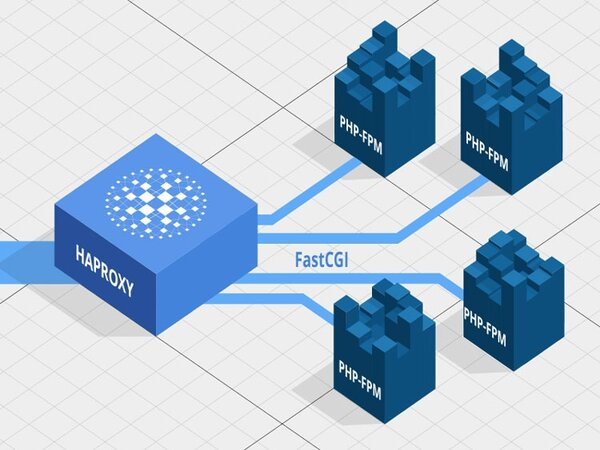
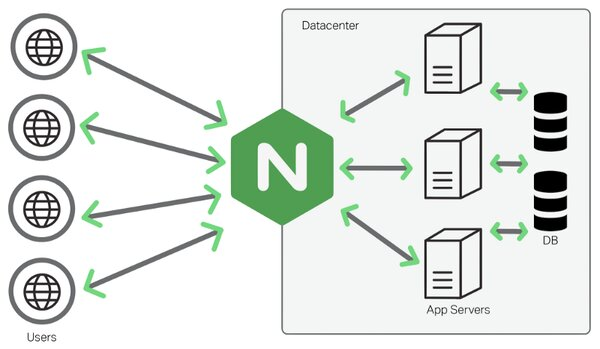
Request processing flow through PHP-FPM:

  1. User sends an HTTP request to the web server (Nginx/Apache).
  2. Web server receives the request; if it's a PHP file, forwards it to PHP-FPM via Unix socket or TCP.
  3. PHP-FPM master process receives the request and distributes it to a worker process in the pool.
  4. Worker process executes the PHP code, queries the database if needed.
  5. HTML result is returned to the web server → user's browser.

PHP-FPM supports 3 process management modes:

Mode Description Best For
static Fixed number of workers Dedicated servers, stable traffic
dynamic Workers scale up/down based on demand Most cases (default)
ondemand Workers created only when requested Small VPS, low traffic

PHP Handler Comparison

Criteria PHP-CGI PHP-FPM DSO (mod_php)
Process Management New per request Reusable worker pool Embedded in Apache
Performance Low High Medium
Concurrency Poor Good Medium
Resources Wasteful Optimized Medium
Web Server Any server Nginx, Apache, LiteSpeed Apache only
Configuration Simple Medium Simple
Security Basic Good (per-user pools) Low (shared user)

PHP-CGI: Creates a new process per request → slow, resource-heavy. Only suitable for simple environments.

DSO (mod_php): Embeds PHP directly into Apache, easy to install but all scripts run as Apache user → security risk on shared hosting.

PHP-FPM: Maintains worker pool, reuses processes, supports per-user pools → balances performance and security.

What is Laravel? The Most Popular PHP Framework

Pros and Cons of PHP-FPM

Pros:

  • High Performance: Reusable worker pool reduces process initialization overhead.
  • Good Concurrency: Handles thousands of concurrent requests with proper pool configuration.
  • Flexible Management: 3 process modes (static/dynamic/ondemand), slow-log, status page.
  • Security: Separate pools per user/website, per-pool resource limits.
  • Wide Compatibility: Nginx, Apache, LiteSpeed, Caddy, and all FastCGI-capable servers.
  • Graceful Restart: Configuration reload without service interruption.

Cons:

  • More Complex Configuration: Requires understanding of pools, workers, sockets for optimization.
  • RAM Usage: Each worker uses 20-50MB RAM; careful calculation needed for small VPS.
  • Not Embedded in Apache: Requires separate proxy configuration (mod_proxy_fcgi).
Calculating Optimal Worker Count

Formula: max_children = (Available RAM) / (RAM per worker). Example: 2GB VPS, each worker ~40MB → max_children = 1500MB / 40MB ≈ 35-40 workers. Use pm.status_path to monitor active workers.

Configuring PHP-FPM with cPanel

cPanel integrates PHP-FPM through EasyApache for easy configuration:

  1. Log into WHM → EasyApache 4 → Customize.
  2. In the PHP Extensions tab, select the PHP version to use.
  3. Go to MultiPHP Manager → select PHP-FPM as PHP Handler.
  4. Configure per-domain pools in MultiPHP INI Editor.

cPanel automatically creates separate pools for each cPanel user, ensuring resource isolation and security between websites on shared hosting.

Configuring PHP-FPM with Nginx
Install PHP-FPM:

Bash
1# Ubuntu/Debian
2sudo apt update
3sudo apt install php8.2-fpm
4
5# CentOS/RHEL
6sudo dnf install php-fpm

Nginx Configuration:

nginx
 1server {
 2    listen 80;
 3    server_name example.com;
 4    root /var/www/html;
 5    index index.php index.html;
 6
 7    location / {
 8        try_files $uri $uri/ =404;
 9    }
10
11    location ~ \.php$ {
12        include snippets/fastcgi-php.conf;
13        fastcgi_pass unix:/var/run/php/php8.2-fpm.sock;
14        fastcgi_param SCRIPT_FILENAME $document_root$fastcgi_script_name;
15        include fastcgi_params;
16    }
17}

Test and Restart:

Bash
1# Test Nginx configuration
2sudo nginx -t
3
4# Restart services
5sudo systemctl restart nginx
6sudo systemctl restart php8.2-fpm
7
8# Check status
9sudo systemctl status php8.2-fpm
PHP-FPM Security Best Practices

Always use Unix sockets instead of TCP ports to connect Nginx with PHP-FPM (more secure and faster). Configure open_basedir to limit PHP access to website directories only. Enable HTTPS with SSL/TLS to encrypt data in transit.

What is IIS? Understanding Microsoft's Web Server

Conclusion: PHP-FPM is a high-performance PHP process manager that outperforms PHP-CGI and mod_php. With flexible worker pool management, PHP-FPM is the top choice for modern PHP web applications, especially when paired with Nginx.

Sources

Frequently Asked Questions

Frequently Asked QuestionsQ&A
What is PHP-FPM?
PHP-FPM (FastCGI Process Manager) is a PHP process manager that maintains a pool of ready worker processes instead of creating a new process for each request, significantly improving performance.
How is PHP-FPM different from PHP-CGI?
PHP-CGI creates a new process for each request and destroys it afterward. PHP-FPM maintains a pool of ready processes and reuses them, reducing initialization overhead and increasing concurrent handling.
Does WordPress need PHP-FPM?
WordPress works without PHP-FPM, but PHP-FPM noticeably improves performance and page load speed, especially for sites with many plugins or high traffic.
Which web servers work with PHP-FPM?
PHP-FPM works best with Nginx (via FastCGI), but is also compatible with Apache (via mod_proxy_fcgi), LiteSpeed, Caddy, and most web servers supporting FastCGI.
How do I start PHP-FPM?
On Ubuntu/Debian: sudo systemctl start php8.2-fpm. On CentOS/RHEL: sudo systemctl start php-fpm. Replace the PHP version accordingly.

PHP-FPM (FastCGI Process Manager) là trình quản lý tiến trình PHP hiệu suất cao, được sử dụng rộng rãi trong các web server hiện đại. Bài viết giúp bạn hiểu rõ PHP-FPM là gì, cách hoạt động, ưu nhược điểm và hướng dẫn cấu hình với Nginx.

PHP FPM là gì?

PHP-FPM (FastCGI Process Manager) là trình quản lý tiến trình dành riêng cho PHP, đóng vai trò trung gian giữa web server và các script PHP. Thay vì khởi tạo tiến trình PHP mới cho mỗi request (như CGI truyền thống), PHP-FPM duy trì một pool các worker process sẵn sàng xử lý yêu cầu.

PHP-FPM được tích hợp chính thức vào PHP từ phiên bản 5.3.3 (2010) và trở thành lựa chọn mặc định cho hầu hết web server hiện đại, đặc biệt khi kết hợp với Nginx.

Cách hoạt động của PHP FPM

Quy trình xử lý request qua PHP-FPM:

  1. Người dùng gửi request HTTP đến web server (Nginx/Apache).
  2. Web server nhận request, nếu là file PHP thì chuyển đến PHP-FPM qua Unix socket hoặc TCP.
  3. PHP-FPM master process nhận request và phân phối đến worker process trong pool.
  4. Worker process thực thi mã PHP, truy vấn database nếu cần.
  5. Kết quả HTML được trả ngược về web server → trình duyệt người dùng.

PHP-FPM hỗ trợ 3 chế độ quản lý process:

Chế độ Mô tả Phù hợp
static Số worker cố định Server chuyên dụng, traffic ổn định
dynamic Worker tăng/giảm theo nhu cầu Đa số trường hợp (mặc định)
ondemand Worker chỉ tạo khi có request VPS nhỏ, ít traffic

So sánh PHP Handler

Tiêu chí PHP-CGI PHP-FPM DSO (mod_php)
Quản lý tiến trình Tạo mới mỗi request Pool worker tái sử dụng Nhúng vào Apache
Hiệu suất Thấp Cao Trung bình
Xử lý đồng thời Kém Tốt Trung bình
Tài nguyên Lãng phí Tối ưu Trung bình
Web server Mọi server Nginx, Apache, LiteSpeed Chỉ Apache
Cấu hình Đơn giản Trung bình Đơn giản
Bảo mật Cơ bản Tốt (pool riêng/user) Thấp (chung user)

PHP-CGI: Tạo tiến trình mới cho mỗi request → chậm, tốn tài nguyên. Chỉ phù hợp cho môi trường đơn giản.

DSO (mod_php): Nhúng PHP trực tiếp vào Apache, dễ cài đặt nhưng tất cả script chạy cùng user Apache → rủi ro bảo mật trên shared hosting.

PHP-FPM: Duy trì pool worker, tái sử dụng tiến trình, hỗ trợ pool riêng theo user → cân bằng giữa hiệu suất và bảo mật.

Ưu nhược điểm PHP-FPM

Ưu điểm:

  • Hiệu suất cao: Pool worker tái sử dụng, giảm overhead khởi tạo tiến trình.
  • Xử lý đồng thời tốt: Hàng nghìn request đồng thời với cấu hình pool phù hợp.
  • Quản lý linh hoạt: 3 chế độ process (static/dynamic/ondemand), slow-log, status page.
  • Bảo mật: Pool riêng cho từng user/website, giới hạn tài nguyên per-pool.
  • Tương thích rộng: Nginx, Apache, LiteSpeed, Caddy và mọi server hỗ trợ FastCGI.
  • Graceful restart: Reload cấu hình không gián đoạn service.

Nhược điểm:

  • Cấu hình phức tạp hơn: Cần hiểu pool, worker, socket để tối ưu.
  • Tốn RAM: Mỗi worker chiếm 20-50MB RAM, cần tính toán kỹ cho VPS nhỏ.
  • Không nhúng vào Apache: Cần cấu hình proxy riêng (mod_proxy_fcgi).
Tính toán số worker phù hợp

Công thức: max_children = (RAM khả dụng) / (RAM mỗi worker). Ví dụ: VPS 2GB RAM, mỗi worker ~40MB → max_children = 1500MB / 40MB ≈ 35-40 worker. Dùng pm.status_path để theo dõi số worker active.

Cấu hình PHP-FPM với cPanel

cPanel tích hợp sẵn PHP-FPM qua EasyApache, giúp cấu hình dễ dàng:

  1. Đăng nhập WHM → EasyApache 4 → Customize.
  2. Trong tab PHP Extensions, chọn phiên bản PHP cần dùng.
  3. Vào MultiPHP Manager → chọn PHP-FPM làm PHP Handler.
  4. Cấu hình pool riêng cho từng domain tại MultiPHP INI Editor.

cPanel tự động tạo pool riêng cho mỗi cPanel user, đảm bảo cách ly tài nguyên và bảo mật giữa các website trên shared hosting.

Cấu hình PHP-FPM với Nginx

Cài đặt PHP-FPM:

Bash
1# Ubuntu/Debian
2sudo apt update
3sudo apt install php8.2-fpm
4
5# CentOS/RHEL
6sudo dnf install php-fpm

Cấu hình Nginx:

nginx
 1server {
 2    listen 80;
 3    server_name example.com;
 4    root /var/www/html;
 5    index index.php index.html;
 6
 7    location / {
 8        try_files $uri $uri/ =404;
 9    }
10
11    location ~ \.php$ {
12        include snippets/fastcgi-php.conf;
13        fastcgi_pass unix:/var/run/php/php8.2-fpm.sock;
14        fastcgi_param SCRIPT_FILENAME $document_root$fastcgi_script_name;
15        include fastcgi_params;
16    }
17}

Kiểm tra và khởi động:

Bash
1# Kiểm tra cấu hình Nginx
2sudo nginx -t
3
4# Khởi động lại
5sudo systemctl restart nginx
6sudo systemctl restart php8.2-fpm
7
8# Kiểm tra trạng thái
9sudo systemctl status php8.2-fpm
Bảo mật PHP-FPM

Luôn sử dụng Unix socket thay vì TCP port để kết nối Nginx với PHP-FPM (bảo mật và nhanh hơn). Cấu hình open_basedir để giới hạn PHP chỉ truy cập thư mục website. Bật HTTPS với SSL/TLS để mã hóa dữ liệu truyền tải.

Kết luận: PHP-FPM là trình quản lý tiến trình PHP hiệu suất cao, vượt trội so với PHP-CGI và mod_php. Với khả năng quản lý pool worker linh hoạt, PHP-FPM là lựa chọn hàng đầu cho các ứng dụng web PHP hiện đại, đặc biệt khi kết hợp với Nginx.

Nguồn tham khảo

Laravel là gì? Framework PHP phổ biến nhất

Nginx là gì? Tìm hiểu web server phổ biến nhất thế giới

Câu hỏi thường gặp

Câu hỏi thường gặpQ&A
PHP FPM là gì?
PHP-FPM (FastCGI Process Manager) là trình quản lý tiến trình PHP, duy trì pool worker sẵn sàng xử lý request thay vì khởi tạo tiến trình mới cho mỗi yêu cầu, giúp tăng hiệu suất đáng kể.
PHP FPM khác PHP-CGI như thế nào?
PHP-CGI tạo tiến trình mới cho mỗi request rồi hủy sau khi xong. PHP-FPM duy trì pool tiến trình sẵn sàng và tái sử dụng, giảm overhead khởi tạo và tăng khả năng xử lý đồng thời.
WordPress có cần PHP FPM không?
WordPress hoạt động được mà không cần PHP-FPM, nhưng PHP-FPM giúp cải thiện rõ rệt hiệu suất và tốc độ tải trang, đặc biệt với site có nhiều plugin hoặc lưu lượng cao.
PHP FPM dùng với web server nào?
PHP-FPM hoạt động tốt nhất với Nginx (qua FastCGI), nhưng cũng tương thích Apache (qua mod_proxy_fcgi), LiteSpeed, Caddy và hầu hết web server hỗ trợ FastCGI.
Làm cách nào khởi động PHP FPM?
Trên Ubuntu/Debian: sudo systemctl start php8.2-fpm. Trên CentOS/RHEL: sudo systemctl start php-fpm. Thay đổi phiên bản PHP tương ứng.