OpenStack là gì? Lợi ích, ứng dụng và cách hoạt động
Cloud and Server

OpenStack là gì? Lợi ích, ứng dụng và cách hoạt động

OpenStack là nền tảng mã nguồn mở giúp xây dựng và quản lý hạ tầng đám mây. Tìm hiểu các thành phần, ưu nhược điểm và cách triển khai OpenStack.

✦ Tóm tắt nhanh
OpenStack là nền tảng mã nguồn mở giúp xây dựng và quản lý hạ tầng đám mây. Tìm hiểu các thành phần, ưu nhược điểm và cách triển khai OpenStack.
Bài này thế nào?

OpenStack là nền tảng mã nguồn mở mạnh mẽ giúp các tổ chức xây dựng và quản lý hạ tầng đám mây riêng hoặc đám mây lai. Bài viết giúp bạn hiểu rõ khái niệm, thành phần, ưu nhược điểm và cách triển khai OpenStack.

OpenStack là gì?

OpenStack là một bộ phần mềm mã nguồn mở, bao gồm nhiều thành phần khác nhau cho phép các tổ chức xây dựng và quản lý môi trường đám mây. Với OpenStack, các công ty có thể tự tạo ra hạ tầng đám mây của riêng mình, từ đó tăng cường khả năng kiểm soát và bảo mật dữ liệu.

Điều đặc biệt của OpenStack là nó hỗ trợ cả đám mây riêng (private cloud) và đám mây lai (hybrid cloud), giúp tổ chức có thể linh hoạt tích hợp giữa các tài nguyên đám mây công cộng và riêng tư. Nhờ vào kiến trúc mở, người dùng có thể tùy biến, tích hợp các tính năng và dịch vụ theo nhu cầu riêng của từng tổ chức.

OpenStack dùng để làm gì?
OpenStack là một nền tảng mã nguồn mở được sử dụng để xây dựng và quản lý hạ tầng điện toán đám mây. Dưới đây là những ứng dụng chính:

  • Quản lý tài nguyên máy chủ: Quản lý máy chủ vật lý và máy ảo, đảm bảo phân bổ tài nguyên hợp lý.
  • Xây dựng hạ tầng đám mây: Tạo ra môi trường private cloud, public cloud hoặc hybrid cloud.
  • Tự động hóa triển khai dịch vụ: Tự động hóa việc triển khai và mở rộng các ứng dụng nhanh chóng.
  • Quản lý lưu trữ dữ liệu: Hỗ trợ Object Storage, Block Storage và File Storage.
  • Quản lý mạng: Cấu hình mạng ảo, cân bằng tải và quản lý tường lửa.
  • Tích hợp AI và Big Data: Triển khai các giải pháp phân tích dữ liệu lớn và ứng dụng trí tuệ nhân tạo.

OpenStack hoạt động như thế nào?
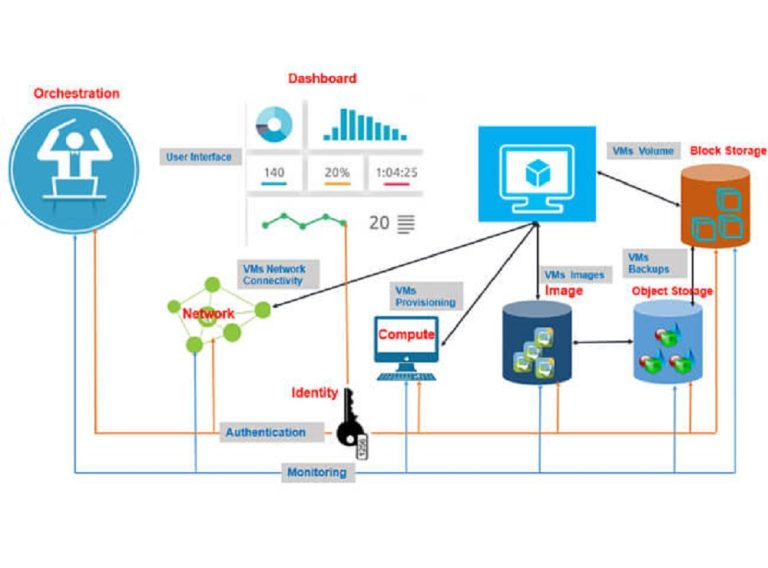
OpenStack hoạt động dựa trên kiến trúc microservices — nhiều dịch vụ nhỏ, độc lập, giao tiếp với nhau thông qua API. Các dịch vụ này làm việc cùng nhau để cung cấp nền tảng đám mây đầy đủ tính năng.

Khi người dùng yêu cầu tài nguyên (ví dụ: máy ảo), quy trình xử lý như sau:

  1. Xác thực (Keystone): Kiểm tra quyền truy cập của người dùng.
  2. Phân bổ tài nguyên (Nova): Cấp phát CPU, RAM cho máy ảo.
  3. Kết nối mạng (Neutron): Đảm bảo kết nối mạng cho máy ảo.
  4. Cấp phát lưu trữ (Cinder/Swift): Cung cấp dung lượng lưu trữ cần thiết.

Các thành phần bên trong OpenStack
OpenStack bao gồm nhiều thành phần, mỗi thành phần đóng vai trò quan trọng trong việc cung cấp các dịch vụ đám mây.

Nova — Compute Service

Nova là dịch vụ chính cho việc quản lý các máy ảo. Nó chịu trách nhiệm khởi tạo, khởi động, dừng và xóa các máy ảo. Nova cũng hỗ trợ quản lý tài nguyên tính toán và chuyển đổi trực tiếp giữa các máy ảo.

Swift — Object Storage

Swift là dịch vụ lưu trữ đối tượng phân tán, được thiết kế để lưu trữ lượng lớn dữ liệu không cấu trúc như hình ảnh và video. Swift có tính năng sao lưu và khôi phục dữ liệu, đảm bảo tính khả dụng cao.

Glance — Image Service

Glance là dịch vụ quản lý hình ảnh hệ điều hành và ứng dụng, cho phép Nova sử dụng các image này để khởi tạo máy ảo. Glance hỗ trợ nhiều định dạng image khác nhau.

Neutron — Networking Service

Neutron là bộ điều khiển mạng, đảm bảo các máy ảo có thể kết nối và giao tiếp với nhau. Nó quản lý mạng ảo, cấp phát địa chỉ IP và định tuyến lưu lượng.

Network là gì? Các loại network phổ biến nhất hiện nay

Cinder — Block Storage

Cinder là dịch vụ quản lý lưu trữ khối, cho phép người dùng tạo, gán và quản lý các volume lưu trữ cho máy ảo.

Keystone — Identity Service

Keystone là dịch vụ quản lý danh tính và kiểm soát truy cập, xác thực người dùng và cấp quyền truy cập vào các tài nguyên.

Mẹo triển khai OpenStack

Sử dụng các công cụ tự động hóa như Ansible, Puppet hoặc Chef để đơn giản hóa quá trình triển khai OpenStack. Điều này giảm lỗi thủ công và tiết kiệm thời gian đáng kể.

Ưu và nhược điểm của OpenStack
Ưu điểm

  • Mã nguồn mở: Truy cập và sửa đổi mã nguồn miễn phí, tùy biến cao.
  • Khả năng mở rộng linh hoạt: Dễ dàng thêm hoặc bớt thành phần theo nhu cầu.
  • Tích hợp công nghệ: Tương thích với Kubernetes, Docker và các nền tảng đám mây khác.
  • Cộng đồng hỗ trợ mạnh mẽ: Tài liệu phong phú và cộng đồng người dùng lớn.

Nhược điểm

  • Độ phức tạp cao: Thiết lập và triển khai đòi hỏi kiến thức chuyên sâu.
  • Yêu cầu kỹ thuật: Cần đội ngũ kỹ thuật có chuyên môn để vận hành và bảo trì.
  • Thời gian học tập: Người mới cần thời gian đáng kể để làm quen với nền tảng.

OpenStack so với các nền tảng đám mây khác
VMware vCloud

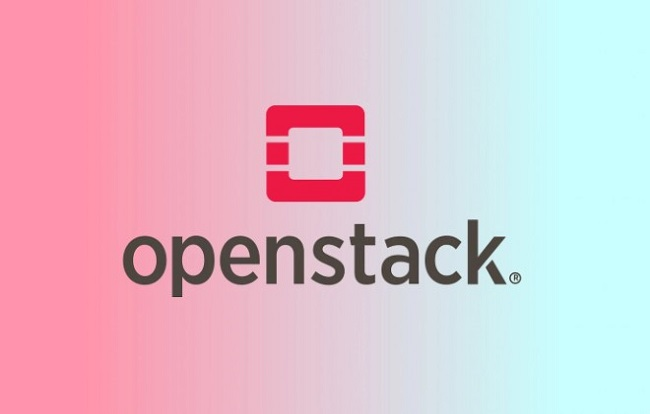
VMware vCloud thường dễ sử dụng hơn, tuy nhiên kém linh hoạt và có chi phí cao hơn OpenStack. OpenStack là lựa chọn hấp dẫn cho tổ chức muốn tiết kiệm chi phí mà vẫn giữ tính linh hoạt cao.

Public Clouds (AWS, Azure, Google Cloud)

Các nền tảng public cloud dễ sử dụng và triển khai hơn. Tuy nhiên, OpenStack mang lại sự kiểm soát và linh hoạt cao hơn, đồng thời giảm chi phí lâu dài nhờ tự quản lý hạ tầng.

Lưu ý trước khi chọn OpenStack

OpenStack phù hợp với tổ chức có đội ngũ kỹ thuật mạnh. Nếu doanh nghiệp nhỏ, thiếu nhân sự IT chuyên trách, nên cân nhắc sử dụng dịch vụ cloud công cộng (AWS, Azure) thay vì tự triển khai OpenStack.

Cách triển khai OpenStack
  • Triển khai thủ công: Yêu cầu kiến thức chuyên sâu, cho phép tùy chỉnh tối đa nhưng tốn thời gian.
  • Giải pháp triển khai có sẵn: Các nhà cung cấp như Red Hat, Canonical, SUSE cung cấp giải pháp đơn giản hóa quy trình cài đặt.
  • Công cụ tự động hóa: Ansible, Puppet, Chef giúp tự động hóa triển khai, giảm lỗi và tiết kiệm thời gian.

UDP là gì? Tính năng và ứng dụng của giao thức UDP Kết luận: OpenStack là nền tảng đám mây mã nguồn mở mạnh mẽ, phù hợp cho tổ chức cần kiểm soát hoàn toàn hạ tầng IT. Dù đòi hỏi chuyên môn kỹ thuật cao, OpenStack mang lại sự linh hoạt và tiết kiệm chi phí dài hạn.

Nguồn tham khảo

Câu hỏi thường gặp

Câu hỏi thường gặpQ&A
OpenStack là gì?
OpenStack là bộ phần mềm mã nguồn mở cho phép các tổ chức xây dựng và quản lý hạ tầng đám mây riêng (private cloud) hoặc đám mây lai (hybrid cloud) với khả năng tùy biến cao.
OpenStack có miễn phí không?
OpenStack là mã nguồn mở và miễn phí sử dụng. Tuy nhiên, chi phí phát sinh từ phần cứng, nhân sự vận hành và hỗ trợ thương mại nếu cần.
OpenStack gồm những thành phần nào?
Các thành phần chính gồm: Nova (tính toán), Swift (lưu trữ đối tượng), Cinder (lưu trữ khối), Neutron (mạng), Keystone (xác thực) và Glance (quản lý image).
OpenStack khác gì so với AWS hay Azure?
OpenStack là mã nguồn mở, cho phép tự quản lý hạ tầng với chi phí thấp hơn lâu dài. AWS và Azure là dịch vụ đám mây công cộng, dễ sử dụng hơn nhưng phụ thuộc vào nhà cung cấp.
Ai nên sử dụng OpenStack?
OpenStack phù hợp với doanh nghiệp cần kiểm soát hoàn toàn hạ tầng đám mây, có đội ngũ kỹ thuật chuyên môn và muốn tiết kiệm chi phí dài hạn so với cloud công cộng.

OpenStack is a powerful open-source platform that helps organizations build and manage their own private cloud or hybrid cloud infrastructure. This article helps you understand the concept, components, advantages, disadvantages, and how to deploy OpenStack.

What is OpenStack?

OpenStack is an open-source software suite consisting of multiple components that allow organizations to build and manage cloud environments. With OpenStack, companies can create their own cloud infrastructure, thereby enhancing control and data security.

What makes OpenStack special is that it supports both private cloud and hybrid cloud, enabling organizations to flexibly integrate public and private cloud resources. Thanks to its open architecture, users can customize and integrate features and services according to each organization's specific needs.

What is OpenStack Used For?

OpenStack is an open-source platform used to build and manage cloud computing infrastructure. Here are the main applications:

  • Server resource management: Manage physical and virtual servers, ensuring optimal resource allocation.
  • Building cloud infrastructure: Create private cloud, public cloud, or hybrid cloud environments.
  • Automating service deployment: Automate the deployment and scaling of applications quickly.
  • Data storage management: Support Object Storage, Block Storage, and File Storage.
  • Network management: Configure virtual networks, load balancing, and firewall management.
  • AI and Big Data integration: Deploy big data analytics solutions and artificial intelligence applications.

How Does OpenStack Work?

OpenStack operates on a microservices architecture — multiple small, independent services that communicate with each other through APIs. These services work together to provide a fully-featured cloud platform.

What is GitHub Proxy?

When a user requests resources (for example, a virtual machine), the process works as follows:

  1. Authentication (Keystone): Verifies the user's access rights.
  2. Resource allocation (Nova): Allocates CPU and RAM for the virtual machine.
  3. Network connection (Neutron): Ensures network connectivity for the virtual machine.
  4. Storage provisioning (Cinder/Swift): Provides the necessary storage capacity.

Core Components of OpenStack

OpenStack consists of multiple components, each playing a critical role in delivering cloud services.

Nova — Compute Service

Nova is the primary service for managing virtual machines. It is responsible for creating, starting, stopping, and deleting virtual machines. Nova also supports compute resource management and live migration between virtual machines.

Swift — Object Storage

Swift is a distributed object storage service designed to store large volumes of unstructured data such as images and videos. Swift features data backup and recovery capabilities, ensuring high availability.

Glance — Image Service

Glance is the service for managing operating system and application images, allowing Nova to use these images to create virtual machines. Glance supports multiple image formats.

Neutron — Networking Service

Neutron is the network controller, ensuring virtual machines can connect and communicate with each other. It manages virtual networks, IP address allocation, and traffic routing.

Cinder — Block Storage

Cinder is the block storage management service that allows users to create, attach, and manage storage volumes for virtual machines.

Keystone — Identity Service

Keystone is the identity management and access control service that authenticates users and grants access to resources.

What is a Network? The Most Common Types of Networks Today

OpenStack Deployment Tip

Use automation tools like Ansible, Puppet, or Chef to simplify the OpenStack deployment process. This reduces manual errors and saves significant time.

Advantages and Disadvantages of OpenStack

Advantages

  • Open source: Free access to and modification of source code, highly customizable.
  • Flexible scalability: Easily add or remove components as needed.
  • Technology integration: Compatible with Kubernetes, Docker, and other cloud platforms.
  • Strong community support: Rich documentation and a large user community.

Disadvantages

  • High complexity: Setup and deployment require in-depth knowledge.
  • Technical requirements: Requires a skilled technical team for operation and maintenance.
  • Learning curve: Newcomers need considerable time to become familiar with the platform.

OpenStack Compared to Other Cloud Platforms

VMware vCloud

VMware vCloud is generally easier to use, but less flexible and more expensive than OpenStack. OpenStack is an attractive choice for organizations wanting to save costs while maintaining high flexibility.

Public Clouds (AWS, Azure, Google Cloud)

Public cloud platforms are easier to use and deploy. However, OpenStack offers greater control and flexibility while reducing long-term costs through self-managed infrastructure.

Important Considerations Before Choosing OpenStack

OpenStack is suitable for organizations with strong technical teams. If your business is small and lacks dedicated IT personnel, consider using public cloud services (AWS, Azure) instead of deploying OpenStack on your own.

How to Deploy OpenStack

  • Manual deployment: Requires in-depth knowledge, allows maximum customization but is time-consuming.
  • Pre-built deployment solutions: Providers like Red Hat, Canonical, and SUSE offer solutions that simplify the installation process.
  • Automation tools: Ansible, Puppet, and Chef help automate deployment, reducing errors and saving time.

What is UDP? Features and Applications of the UDP Protocol

Conclusion: OpenStack is a powerful open-source cloud platform, ideal for organizations that need full control over their IT infrastructure. Although it requires advanced technical expertise, OpenStack delivers flexibility and long-term cost savings.

Sources

Frequently Asked Questions

Frequently Asked QuestionsQ&A
What is OpenStack?
OpenStack is an open-source software suite that allows organizations to build and manage their own private cloud or hybrid cloud infrastructure with high customizability.
Is OpenStack free?
OpenStack is open-source and free to use. However, costs arise from hardware, operational staff, and commercial support if needed.
What components does OpenStack include?
The main components include: Nova (compute), Swift (object storage), Cinder (block storage), Neutron (networking), Keystone (identity), and Glance (image management).
How is OpenStack different from AWS or Azure?
OpenStack is open-source, allowing self-managed infrastructure with lower long-term costs. AWS and Azure are public cloud services that are easier to use but create vendor dependency.
Who should use OpenStack?
OpenStack is suitable for enterprises that need full control over their cloud infrastructure, have a skilled technical team, and want to save long-term costs compared to public cloud services.