MFA 是什么?多因素认证与 2FA 对比详解
Security

MFA 是什么?多因素认证与 2FA 对比详解

MFA(多因素认证)使用多种验证因素保护账户。了解三种因素类别、TOTP、FIDO2/WebAuthn、防钓鱼 MFA 及如何防御 MFA 疲劳攻击。

系列文章: Bảo mật
  1. 1 什么是恶意软件?分类、特征及预防方法
  2. 2 什么是DDoS?识别迹象、应对方法与有效防御指南
  3. 3 什么是网络钓鱼?识别与防范在线欺诈
  4. 4 什么是DNS Sinkhole?DNS Sinkhole技术的应用与使用方法
  5. 5 什么是OAuth 2.0?授权访问与谷歌登录原理
  6. 6 什么是木马病毒?关于Trojan恶意软件的基本知识
  7. 7 Zero Trust 是什么?'永不信任,始终验证'安全模型
  8. 8 VPN是什么?虚拟专用网络与WireGuard、OpenVPN协议
  9. 9 MFA 是什么?多因素认证与 2FA 对比详解
  10. 10 什么是防火墙?在网络安全中的角色和功能
  11. 11 什么是SQL注入?数据库攻击与防护
  12. 12 什么是XSS?跨站脚本攻击与防护
✦ 快速摘要
MFA(多因素认证)使用多种验证因素保护账户。了解三种因素类别、TOTP、FIDO2/WebAuthn、防钓鱼 MFA 及如何防御 MFA 疲劳攻击。
这篇文章怎么样?

MFA 是什么?三种认证因素

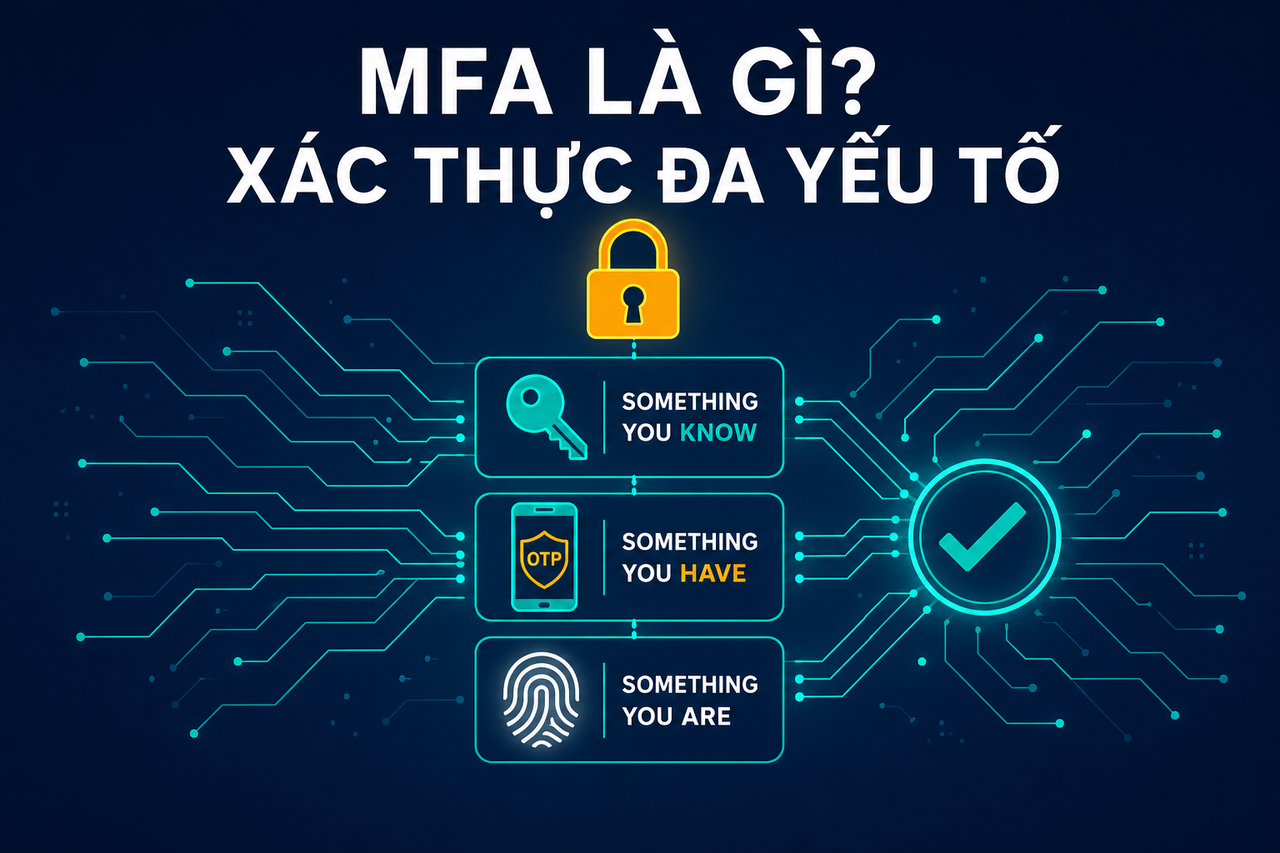
MFA(多因素认证)是一种身份验证方式,要求用户在获得访问权限之前,从不同类别中提供两个或两个以上的身份证明。

三种认证因素类别:

1. 你知道的(Something You Know)

  • 密码、PIN 码、安全问题
  • 最弱的类别:可能被猜测、钓鱼或通过凭证填充攻击获取

2. 你拥有的(Something You Have)

  • OTP 令牌(Google Authenticator、Authy)
  • 硬件密钥(YubiKey、Google Titan)
  • 手机(短信验证码、推送通知)
  • 智能卡

3. 你本身的(Something You Are)

  • 指纹
  • 人脸识别(Face ID)
  • 视网膜扫描
  • 声纹识别

MFA 与 2FA 的区别:

2FA 是 MFA 的子集,恰好使用 2 个因素。MFA 可以使用 3 个或更多因素(例如密码 + OTP + 指纹)。在实际使用中,"2FA"和"MFA"两个术语可以互换使用。

为什么单靠密码不够?

根据 HaveIBeenPwned 的数据:超过 120 亿个凭证对已遭泄露。凭证填充攻击——利用已泄露的账号密码组合自动登录——之所以能够成功,是因为用户重复使用密码。即使密码被盗,MFA 也能阻止攻击者。

常见的 MFA 方式

TOTP(基于时间的一次性密码):

  • 应用:Google Authenticator、Authy、Microsoft Authenticator
  • 生成 6 位数字验证码,每 30 秒更新一次
  • 离线可用,无需联网
  • 需要时间同步

短信验证码(SMS OTP):

  • 通过短信发送验证码
  • 最易上手
  • 易受 SIM 卡劫持和 SS7 攻击
  • 敏感账户应避免使用

硬件安全密钥(FIDO2/U2F):

  • YubiKey、Google Titan Key
  • 通过 USB 或 NFC 连接的物理设备
  • 绝对防钓鱼
  • 由于密钥绑定到源 URL,无法被钓鱼攻击利用

推送通知:

  • 向移动应用发送推送(Duo、Okta Verify)
  • 使用便捷,但易受 MFA 疲劳攻击
  • 建议启用数字匹配

Passkey(FIDO2/WebAuthn):

  • 完全取代密码和 MFA
  • 使用设备生物特征(Face ID、Touch ID)
  • 防钓鱼,无共享密钥

TOTP 的工作原理

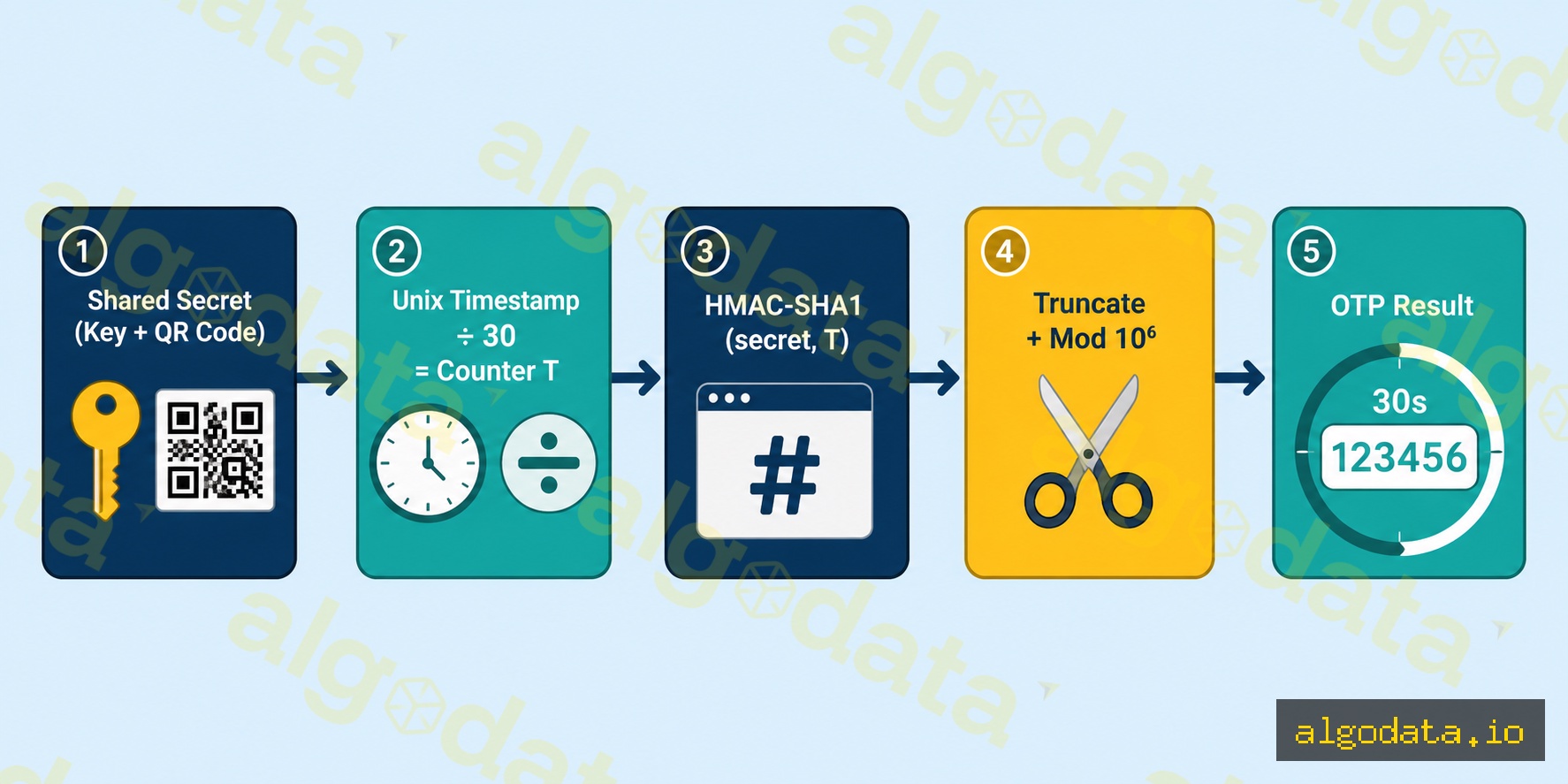
TOTP(RFC 6238)是一种基于以下要素生成一次性密码的算法:

  1. 共享密钥(种子密钥,Base32 编码——设置时扫描二维码获取)
  2. 当前时间(Unix 时间戳 / 30 = 时间计数器 T)
  3. HMAC-SHA1(密钥, T) → 截断 → 6 位数字
T = floor(current_unix_time / 30)  # time step
HMAC = HMAC-SHA1(secret, T)
offset = HMAC[19] & 0xf
code = (HMAC[offset:offset+4] & 0x7fffffff) % 10^6

Python pyotp 实战示例:

Python
 1import pyotp
 2import time
 3
 4# 生成新密钥(存入数据库,向用户展示二维码)
 5secret = pyotp.random_base32()
 6print(f"Secret: {secret}")  # 例如:JBSWY3DPEHPK3PXP
 7
 8# 创建 TOTP 对象
 9totp = pyotp.TOTP(secret)
10
11# 获取当前验证码
12current_code = totp.now()
13print(f"Current OTP: {current_code}")  # 例如:123456
14
15# 验证用户输入的验证码(接受 ±1 个窗口 = 90 秒)
16user_input = "123456"
17is_valid = totp.verify(user_input, valid_window=1)
18print(f"Valid: {is_valid}")
19
20# 生成二维码的 URI
21uri = totp.provisioning_uri(
22    name="user@example.com",
23    issuer_name="MyApp"
24)
25print(f"QR URI: {uri}")
26# otpauth://totp/MyApp:user@example.com?secret=JBSWY3DPEHPK3PXP&issuer=MyApp

在 Django REST Framework 中实现 MFA:

Python
 1# views.py
 2from rest_framework.views import APIView
 3from rest_framework.response import Response
 4import pyotp
 5
 6class MFAVerifyView(APIView):
 7    def post(self, request):
 8        user = request.user
 9        otp_code = request.data.get('otp_code')
10        
11        # 从用户配置中获取密钥
12        totp = pyotp.TOTP(user.mfa_secret)
13        
14        if totp.verify(otp_code, valid_window=1):
15            # MFA 验证通过后颁发短期令牌
16            session_token = generate_session_token(user)
17            return Response({'token': session_token})
18        
19        return Response({'error': 'Invalid OTP'}, status=401)

防钓鱼 MFA:FIDO2 vs TOTP vs SMS
并非所有 MFA 方式都同等安全。 攻击者越来越能够钓鱼获取 MFA 验证码。

钓鱼攻击如何绕过 MFA:

  1. 攻击者创建一个假登录页面(例如:g00gle.com)
  2. 受害者输入用户名/密码 → 攻击者将其转发至真实的 google.com
  3. Google 发出 MFA 挑战 → 攻击者将挑战转发回给受害者
  4. 受害者输入 TOTP 验证码 → 攻击者立即截获并使用(30 秒窗口内)
  5. 攻击者成功登录真实账户

FIDO2/WebAuthn 如何防御钓鱼:

密钥绑定到源 URL。签署挑战时:

signed_data = sign(private_key, challenge + origin + rpId)

rpId = google.com。如果受害者在 g00gle.com 上,rpId 不匹配 → 浏览器拒绝签名 → 钓鱼攻击失败。

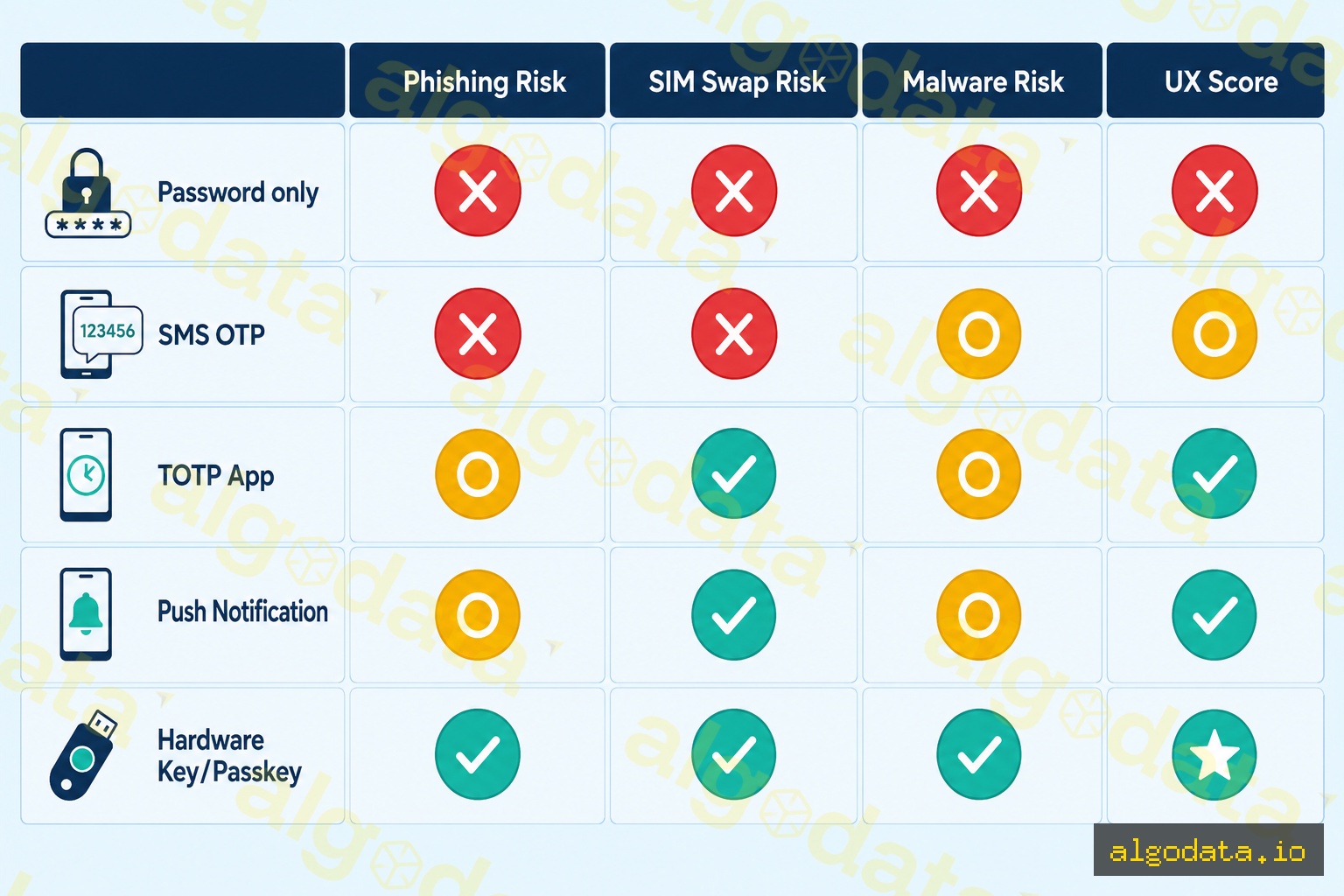
抗攻击能力对比表:

方式 钓鱼攻击 SIM 劫持 恶意软件 用户体验
仅密码 易受攻击 不适用 易受攻击 简单
短信验证码 易受攻击 易受攻击 中等 简单
TOTP 应用 易受攻击 中等 良好
推送通知 易受攻击 中等 良好
硬件密钥(U2F) 不可能 良好
Passkey(FIDO2) 不可能 最佳

MFA 疲劳攻击——及防御方法

MFA 疲劳攻击(又称 MFA 轰炸或推送垃圾攻击)是一种社会工程学技术:

  1. 攻击者已掌握用户名和密码(来自数据泄露或钓鱼)
  2. 持续触发 MFA 推送通知——有时一晚上发送 50-100 次
  3. 受害者筋疲力尽、失去警惕,误操作点击批准
  4. 攻击者成功获取访问权限

真实案例:2022 年 Uber 数据泄露事件——攻击者通过 WhatsApp 冒充 IT 支持人员,结合 MFA 轰炸获得批准。

防御措施:

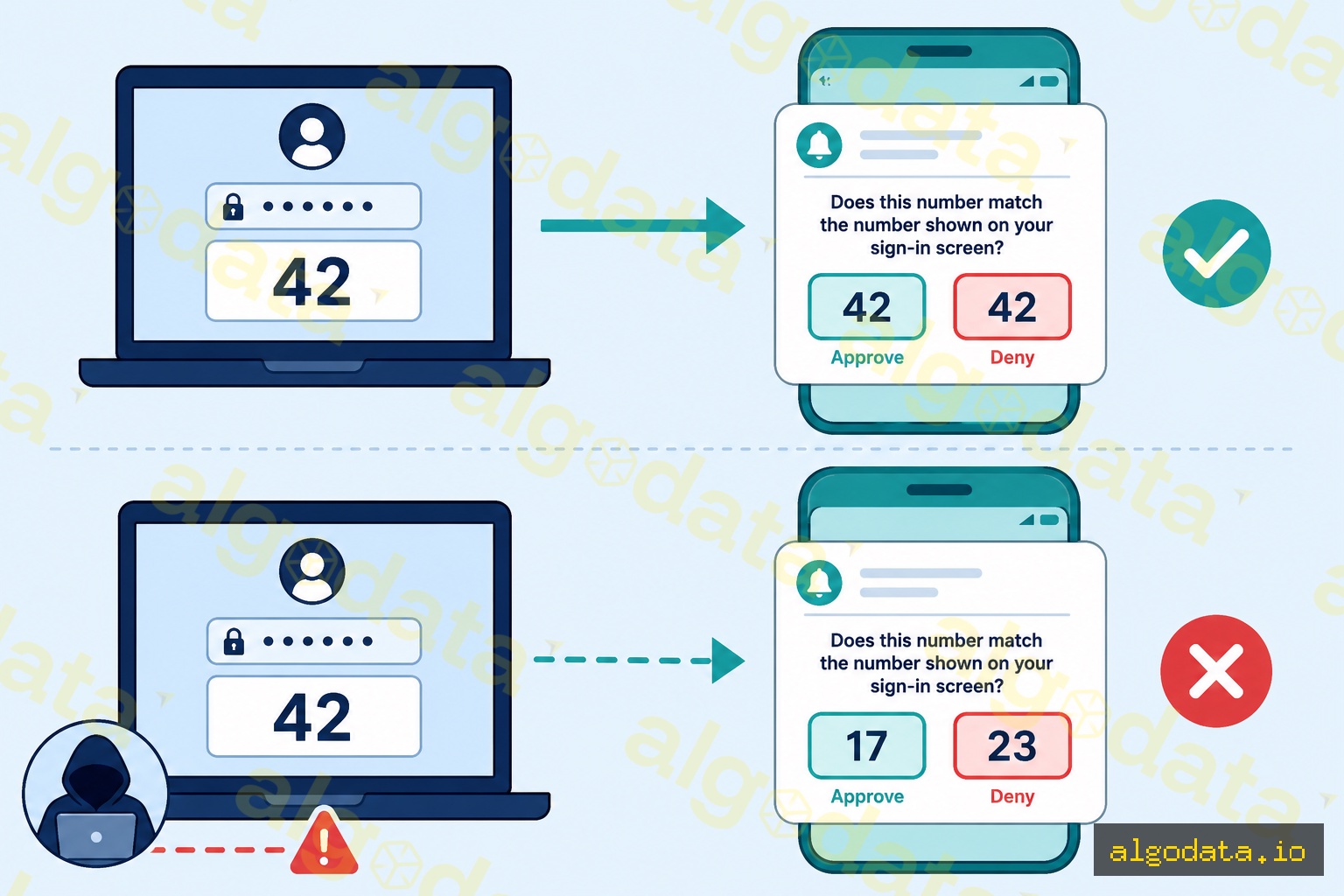
1. 数字匹配 — 要求用户将登录界面显示的数字输入到应用中:

登录界面:"请输入验证码:42"
应用推送:"如验证码匹配请点击:[42] [批准] [拒绝]"

如果受害者看不到这个数字,批准就意味着出了问题——他们会意识到异常。

2. 附加上下文 — 在推送通知中显示更多信息:IP 地址、位置、浏览器。如果用户在河内但登录来自俄罗斯 → 可疑。

3. 频率限制 — 限制每次会话的推送通知次数(最多 3 次),之后锁定账户。

4. 迁移至 FIDO2 — 无推送通知,无疲劳攻击。改用硬件密钥或 Passkey。

为团队和组织部署 MFA

第一步:通过身份提供商(IdP)强制执行 MFA

  • Google Workspace:管理员 → 安全 → 两步验证 → 强制执行
  • Okta:安全 → 认证器 → 注册策略 → 必需
  • Azure AD:安全 → MFA → 每用户设置或条件访问策略

第二步:根据风险级别选择合适的方式

  • 高风险(管理员、财务、高管):硬件密钥(YubiKey)+ Passkey
  • 普通用户:认证器应用(TOTP)——不允许使用短信
  • 不支持 MFA 的遗留系统:短信验证码(配合频率限制)

第三步:安全处理账户恢复

  • 将备用恢复码存储在安全保险库中
  • 管理员协助恢复并进行身份核验
  • 如果主要方式为硬件密钥,不允许通过短信进行恢复

2FA 是什么?两因素认证基础

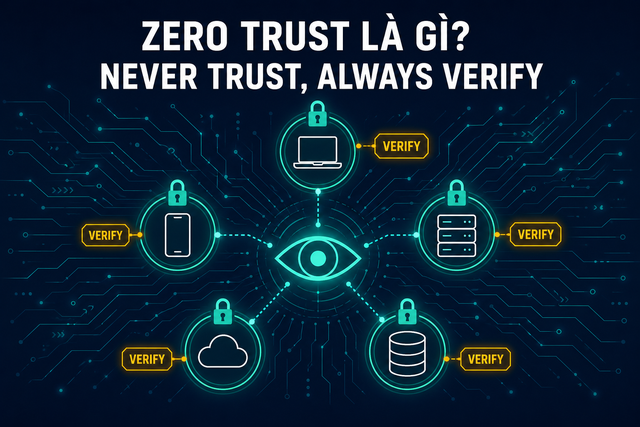
Zero Trust 是什么?MFA 是零信任的基础

OAuth 2.0 是什么?集成 MFA 的授权框架

常见问题Q&A

What Is MFA? The Three Authentication Factors

MFA (Multi-Factor Authentication) is an authentication method that requires users to provide two or more identity proofs from different categories before being granted access.

The three authentication factor categories:

1. Something You Know

  • Password, PIN, security questions
  • Weakest category: can be guessed, phished, or obtained via credential stuffing

2. Something You Have

  • OTP token (Google Authenticator, Authy)
  • Hardware key (YubiKey, Google Titan)
  • Phone (SMS OTP, push notification)
  • Smart card

3. Something You Are

  • Fingerprint
  • Face recognition (Face ID)
  • Retina scan
  • Voice recognition

MFA vs 2FA:

2FA is a subset of MFA that uses exactly 2 factors. MFA can use 3+ factors (for example, password + OTP + fingerprint). In practice, the terms "2FA" and "MFA" are used interchangeably.

Why isn't a password alone sufficient?

According to HaveIBeenPwned: over 12 billion credential pairs have been exposed. Credential stuffing — using leaked combos to automatically log in — succeeds because users reuse passwords. MFA blocks attackers even when a password is compromised.

Common MFA Methods

TOTP (Time-based One-Time Password):

  • Apps: Google Authenticator, Authy, Microsoft Authenticator
  • Generates a 6-digit code that refreshes every 30 seconds
  • Works offline, no internet required
  • Requires time synchronization

SMS OTP:

  • Code sent via text message
  • Easiest to use
  • Vulnerable to SIM swap and SS7 attacks
  • Avoid for sensitive accounts

Hardware Security Key (FIDO2/U2F):

  • YubiKey, Google Titan Key
  • Physical device via USB or NFC
  • Absolutely phishing-resistant
  • Cannot be phished because the key is bound to the origin URL

Push Notification:

  • Push sent to a mobile app (Duo, Okta Verify)
  • Convenient but vulnerable to MFA fatigue attacks
  • Should enable number matching

Passkey (FIDO2/WebAuthn):

  • Fully replaces both password and MFA
  • Uses device biometrics (Face ID, Touch ID)
  • Phishing-resistant, no shared secret

How Does TOTP Work?

TOTP (RFC 6238) is an OTP generation algorithm based on:

  1. Shared secret (seed key, base32 encoded — scanned via QR code during setup)
  2. Current time (unix timestamp / 30 = time counter T)
  3. HMAC-SHA1(secret, T) → truncate → 6 digits
T = floor(current_unix_time / 30)  # time step
HMAC = HMAC-SHA1(secret, T)
offset = HMAC[19] & 0xf
code = (HMAC[offset:offset+4] & 0x7fffffff) % 10^6

Practical Python pyotp example:

Python
 1import pyotp
 2import time
 3
 4# Generate a new secret (store in DB, show QR to user)
 5secret = pyotp.random_base32()
 6print(f"Secret: {secret}")  # e.g. JBSWY3DPEHPK3PXP
 7
 8# Create TOTP object
 9totp = pyotp.TOTP(secret)
10
11# Get the current code
12current_code = totp.now()
13print(f"Current OTP: {current_code}")  # e.g. 123456
14
15# Verify code from user (accept ±1 window = 90 seconds)
16user_input = "123456"
17is_valid = totp.verify(user_input, valid_window=1)
18print(f"Valid: {is_valid}")
19
20# Generate provisioning URI for QR code
21uri = totp.provisioning_uri(
22    name="user@example.com",
23    issuer_name="MyApp"
24)
25print(f"QR URI: {uri}")
26# otpauth://totp/MyApp:user@example.com?secret=JBSWY3DPEHPK3PXP&issuer=MyApp

Implementing MFA in Django REST Framework:

Python
 1# views.py
 2from rest_framework.views import APIView
 3from rest_framework.response import Response
 4import pyotp
 5
 6class MFAVerifyView(APIView):
 7    def post(self, request):
 8        user = request.user
 9        otp_code = request.data.get('otp_code')
10        
11        # Retrieve secret from user profile
12        totp = pyotp.TOTP(user.mfa_secret)
13        
14        if totp.verify(otp_code, valid_window=1):
15            # Issue short-lived token after MFA verification
16            session_token = generate_session_token(user)
17            return Response({'token': session_token})
18        
19        return Response({'error': 'Invalid OTP'}, status=401)

Phishing-Resistant MFA: FIDO2 vs TOTP vs SMS

Not all MFA methods are equal. Attackers are increasingly able to phish even MFA codes.

How phishing attacks bypass MFA:

  1. Attacker creates a fake login page (e.g., g00gle.com)
  2. Victim enters username/password → attacker relays them to the real google.com
  3. Google sends an MFA challenge → attacker relays the challenge back to the victim
  4. Victim enters the TOTP code → attacker captures and uses it immediately (30-second window)
  5. Attacker successfully logs into the real account

How FIDO2/WebAuthn prevents phishing:

The key is bound to the origin URL. When signing a challenge:

signed_data = sign(private_key, challenge + origin + rpId)

rpId = google.com. If the victim is on g00gle.com, the rpId does not match → the browser refuses to sign → phishing fails.

Resistance comparison table:

Method Phishing SIM Swap Malware UX
Password only Vulnerable N/A Vulnerable Easy
SMS OTP Vulnerable Vulnerable Medium Easy
TOTP App Vulnerable No Medium Good
Push Notification Vulnerable No Medium Good
Hardware Key (U2F) Impossible No No Good
Passkey (FIDO2) Impossible No No Best

MFA Fatigue Attacks — And How to Defend Against Them

MFA Fatigue (also called MFA bombing or push spam) is a social engineering technique:

  1. Attacker already has the username + password (from a breach or phishing)
  2. Continuously triggers MFA push notifications — sometimes 50–100 times overnight
  3. The victim, exhausted and off-guard, accidentally approves one
  4. Attacker gains access

Real-world example: The 2022 Uber breach — the attacker WhatsApp-messaged the victim posing as IT support, combined with MFA bombing to get approval.

Defenses:

1. Number Matching — Require the user to enter the number displayed on the login screen into the app:

Login screen: "Enter code: 42"
App push: "Tap if code matches: [42] [Approve] [Deny]"

If the victim cannot see this number, approving means something is wrong — they will notice.

2. Additional Context — Show extra information in the push: IP address, location, browser. If the user is in Hanoi but the login comes from Russia → suspicious.

3. Rate Limiting — Limit push notifications per session (max 3 attempts), then lock the account.

4. Migrate to FIDO2 — No push notifications, no fatigue. Use a hardware key or passkey instead.

Deploying MFA for Teams and Organizations

Step 1: Enforce MFA via an Identity Provider (IdP)

  • Google Workspace: Admin → Security → 2-Step Verification → Enforcement
  • Okta: Security → Authenticators → Enrollment Policy → Required
  • Azure AD: Security → MFA → Per-user or Conditional Access Policy

Step 2: Choose the right method based on risk level

  • High-risk (admins, finance, executives): Hardware key (YubiKey) + Passkey
  • Standard users: Authenticator app (TOTP) — do not allow SMS
  • Legacy systems without MFA support: SMS OTP (with rate limiting)

Step 3: Handle account recovery securely

  • Store backup codes in a secure vault
  • Admin-assisted recovery with identity verification
  • Do not allow recovery via SMS if the primary method is a hardware key

What is 2FA? Two-factor authentication basics

What is Zero Trust? MFA is the foundation

What is OAuth 2.0? Authorization framework with MFA

Frequently Asked QuestionsQ&A