Malware is malicious software designed to infiltrate, damage, or steal data from computer systems. This article provides a detailed analysis of 12 common types of malware, their harmful effects, and effective prevention solutions.
2019Trusted since
B2BData solutions
Data·AIExpertise
Need data solutions for your business?
AlgoData has helped businesses with data engineering, analytics & AI since 2019.
Understanding malware, grasping the characteristics of each type, and knowing how to prevent them is extremely important for protecting our data and systems. This article will provide you with a comprehensive view of what malware is, its classification, harmful effects, and effective prevention solutions.
What is Malware?
Malware, also known as malicious software, is a general term for computer programs written with the purpose of infiltrating, damaging, or stealing data from computers without the owner's consent. Malware is designed to spread and operate silently, aiming to evade both users and security systems.
Malware can infiltrate computers through many different pathways. The most common method is infection through email or malicious websites. Hackers often disguise malware as attachments, links, or attractive software to trick users into downloading and installing them. Malware can also spread through portable storage devices like USB drives, through local networks, or by exploiting unpatched security vulnerabilities in systems.
The main objective of malware is to profit by stealing sensitive information, destroying systems, extorting money, or turning computers into tools for carrying out other illegal activities. Depending on the type of malware, their methods of operation and harmful effects can differ. However, they all share the common trait of causing serious consequences for users and organizations if not detected and dealt with promptly.
Why is Malware Dangerous?
Malware is considered one of the top threats to information security because of the negative impacts it causes. Here are some typical harmful effects of malware:
Impact on Computer Performance
When malware infiltrates a system, it often consumes hardware resources such as RAM and CPU to carry out background activities. This makes your computer sluggish, frozen, or frequently experiencing errors. These negative impacts on performance reduce work productivity, cause frustration, and waste users' time.
Computer Freezing
Some types of malware can cause a complete system freeze. When this happens, you are forced to restart the computer, leading to loss of unsaved data and work interruption. Frequent freezing can be a sign of malware presence on the system.
Data Damage
Malware can directly damage data by deleting, modifying, or encrypting it without user permission. This leads to loss of important information, seriously affecting individuals and causing significant damage to businesses. Malware can also infect files and turn them into sources of infection for other computers and networks.
Malware can target applications and programs installed on your computer. They attack critical system processes and services, causing applications to malfunction or fail to start. This not only affects your ability to work but can also lead to complete loss of data stored in the application.
Opening Backdoors
Many types of malware are designed to create "backdoors," allowing hackers to access and control your computer remotely and illegally. Once in, hackers can perform any action such as stealing information, monitoring activities, modifying system configurations, or installing additional malware. Intrusion through backdoors is very difficult to detect and causes unpredictable consequences.
Beyond these, malware can also turn your computer into a tool for sending spam, launching DDoS attacks, and spreading malware to other computers on the network. Malware operates silently — users cannot detect it, but the consequences are extremely serious. These threats are precisely why we need to be vigilant and take appropriate protective measures against malware risks.
Classification and Characteristics of Each Type of Malware
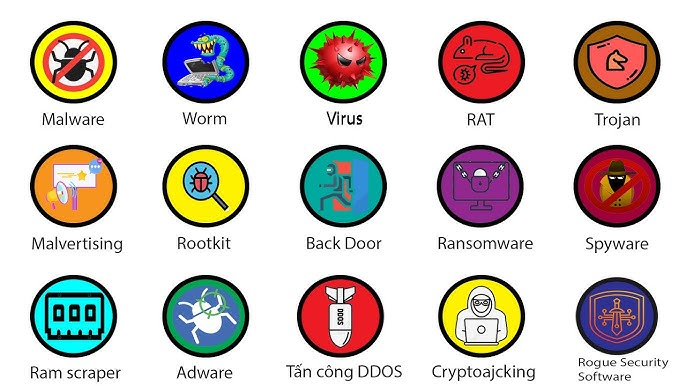
Malware is highly diverse in both form and method of operation. Based on how they infiltrate, spread, and impact systems, we can classify malware into several main groups:
Virus: This is the most common and oldest type of malware. Viruses infect executable files (.exe, .com) or documents (Word, Excel) and replicate their malicious code when an infected file is opened. Viruses require user interaction to activate and cause damage. However, they can spread very quickly through sharing of infected files.
Worm: Unlike viruses, worms can spread across networks on their own without user intervention. They exploit security vulnerabilities or use deception techniques to infiltrate and replicate at breakneck speed, overloading systems. Worms can also spread via email by automatically sending copies attached to messages to addresses in the victim's contact list.
Trojan: Named after the ancient Greek stratagem of the Trojan Horse, Trojans disguise themselves as useful software to trick users into installing them. Once inside, Trojans open backdoors for attackers to access and control the victim's computer remotely to steal data, monitor activity, or install additional malicious software.
Spyware: As their name suggests, spyware operates silently to monitor, record personal information and user habits without consent. Spyware steals sensitive data such as financial information, passwords, browsing history, and sends it to hackers. They also facilitate the installation of other types of malware.
Adware: Adware often comes bundled with free software downloads. It displays unwanted advertisements and malicious links in the form of pop-ups and banners on browsers to trick users into clicking. If you accidentally access these, malware will infect your computer.
Ransomware: This is the most sophisticated and dangerous type of malware today. Ransomware encrypts all data on a computer or network and demands victims pay a ransom for decryption. This prevents you from accessing your data, disrupts operations, and can even bankrupt businesses.
[What is a firewall? Its role and functions in network security]
Beyond these main groups, malware can also manifest in many other forms. However, regardless of the type, they all share the common purpose of damaging systems, stealing confidential information, and seeking illicit profit.
12 Most Common Types of Malware Today
For a more detailed look at the world of malware, here is a list of the 12 types of malware that are most prevalent and cause the most damage today:
Boot Virus
Boot viruses can infiltrate the boot sector of a hard drive (MBR) or the boot sector of storage devices. They activate before the operating system, making remediation extremely complex and time-consuming.
Macro Virus
This type of virus is written using the macro language of Microsoft Office applications. They spread by inserting malicious macros into Word and Excel documents. When a user inadvertently opens the file, the macro activates and carries out its destructive purpose.
Scripting Virus
Script viruses use programming languages like JS and VBS to execute malicious code. They are common on web browsers and cause unpredictable consequences, from data theft to crashing websites.
File Virus
This type of virus attaches its malicious code to executable files (.exe, .com), script files (.bat), and infects the system each time an infected file is opened. They can delete, modify, or encrypt files, disrupting the functionality of the system and applications.
Trojan Horse
Trojans disguise themselves as attractive software and files to trick users into installing them. Trojans do not self-replicate but open backdoors for attackers to access and control computers remotely.
Backdoor
Backdoors allow unauthorized access to a system. They are planted by hackers to maintain control even after security vulnerabilities have been patched. Backdoors often accompany other types of malware such as Trojans or worms.
Adware and Spyware
Adware attacks users by displaying excessive advertisements. It not only causes annoyance but also collects personal data to sell to third parties for targeted advertising. Spyware operates covertly to spy on users, recording their information and browsing behavior without permission.
Worm — Computer Worm
Worms self-replicate and spread at breakneck speed without requiring user action. They exploit system vulnerabilities, overload networks, and affect infrastructure performance. Worms can also carry other malware payloads, launch DDoS attacks, and destroy data.
Rootkit
Rootkits are designed to conceal the presence of malware on a system by burrowing deep into the operating system kernel. Detecting and removing rootkits is a challenge that requires specialized knowledge and dedicated tools. Hackers use rootkits to maintain secret access to systems.
Botnet
A botnet consists of thousands of infected computers (zombies), networked and controlled by hackers through a C&C server. They can be mobilized to send spam, distribute malware, or launch DDoS attacks. Botnets are a powerful tool for cybercriminals in dangerous campaigns.
Variants
One of the major challenges in cybersecurity is the constant evolution of malware. When a type of malware is detected and countermeasures are deployed, hackers create new variants with changes in source code and behavior to evade antivirus software. This puts significant pressure on security researchers and demands continuous updates from users.
Finally, virus hoaxes are rumors that warn about a new super virus with extremely serious destructive capabilities. Their purpose is to create public panic about cybersecurity. Although not real malware, spreading virus hoaxes wastes users' time and causes unnecessary network overload.
Malware Prevention Solutions
As malware becomes increasingly sophisticated and causes more damage, implementing preventive measures is absolutely essential. Here are some guidelines to help you protect your computer and data from attack threats:
Install Antivirus Software
Choosing and installing reliable, regularly updated antivirus software is the first line of defense against malware. Enable email and download file scanning to limit infection risks from these sources. Run full system scans periodically, at least once a month, to detect and remove threats.
Update Operating System and Software
Hackers often exploit security vulnerabilities in operating systems and software to distribute malware. Therefore, always install the latest security patches for Windows, macOS, browsers, and other important applications. Additionally, disable the autorun feature on portable devices to prevent malware attacks.
Avoid Visiting Suspicious Websites
Be cautious of unfamiliar links, shady websites, and emails from unknown sources. They may contain dangerous malware. Only visit websites with HTTPS protocol to ensure safety. Do not download cracked software, keygens, or suspicious attachments, as these are common methods for malware to infiltrate computers.
Use Strong Passwords
Hackers constantly try to steal user accounts to gain control of devices. One effective way to prevent this is to use passwords that are long enough (at least 8 characters), combining uppercase and lowercase letters, numbers, and special characters. Set unique passwords for each important account and change them regularly.
Back Up Important Data Regularly
Regularly backing up important data is an essential measure to prevent loss due to malware impact. You should back up on a regular schedule, ideally weekly, and store copies in safe locations such as external hard drives or cloud services. When incidents occur, you can quickly recover to minimize disruption and damage.
{{< test-result
title="Comparison of common malware types"
headers="Type|Spread method|Requires user?|Danger level|Examples"
row1="Virus|Attaches to files|Yes|Medium|File virus, Macro virus"
row2="Worm|Automatic via network|No|High|WannaCry, Conficker"
row3="Trojan|Disguised software|Yes|High|Emotet, Zeus"
row4="Ransomware|Email, exploit|Varies|Very high|CryptoLocker, LockBit"
row5="Rootkit|Exploit, Trojan|No|Very high|Necurs, TDSS"
/>}}
Note
Malware is a constant threat in the digital world. Combining antivirus software, operating system updates, safe browsing habits, and regular data backups is the most effective way to protect your system.
Conclusion: Malware is malicious software that is diverse in form and method of operation, from viruses, worms, and trojans to ransomware and rootkits. They spread through email, malicious websites, USB devices, and security vulnerabilities, causing serious damage to data and finances. For prevention, combine installing reputable antivirus software, regularly updating systems, using strong passwords, and backing up data periodically.