What is an LDAP Server? Concepts and Basic Applications
Networking

What is an LDAP Server? Concepts and Basic Applications

An LDAP Server is a system that implements the Lightweight Directory Access Protocol, used to store, organize, and manage user information in enterprise networks.

✦ Quick summary
An LDAP Server is a system that implements the Lightweight Directory Access Protocol, used to store, organize, and manage user information in enterprise networks.
How was this post?

LDAP Server is a system that implements the Lightweight Directory Access Protocol, used to store and manage user information in enterprise networks. This article explains what LDAP is, how it works, deployment models, authentication processes, and common applications.

What is an LDAP Server?

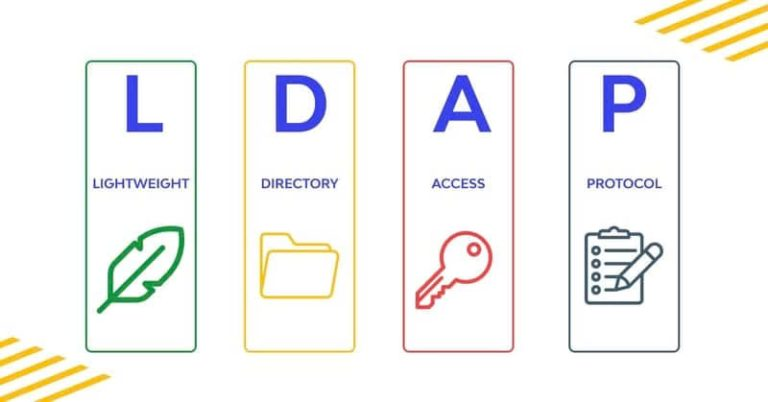
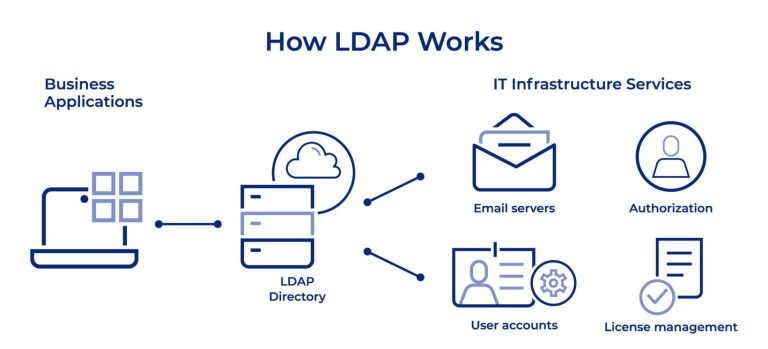
LDAP (Lightweight Directory Access Protocol) Server is a server system that implements the LDAP protocol, used to store, organize, and manage information within a computer network. An LDAP Server functions as a hierarchical database, enabling fast and efficient access to information about users, groups, and other resources on the network.

LDAP Server is designed to handle fast and efficient read queries, making it an ideal choice for storing directory information such as user directories, organizational structures, and system configuration settings. It provides a standardized interface for different applications to access and manage this information.

Key characteristics of an LDAP Server include:

  • Hierarchical structure: Data is organized in a tree structure, making it easy to manage and search for information.
  • Scalability: LDAP Server can handle large volumes of data and concurrent queries.
  • High performance: Optimized for read operations, enabling rapid information retrieval.
  • Flexibility: The schema can be customized to meet the specific needs of an organization.
  • Security support: Provides authentication and encryption mechanisms to protect sensitive information.
How an LDAP Server Works

LDAP Server operates on a client-server model, where the LDAP server stores and manages data, while client applications send requests to access or modify information. The basic operating mechanism of an LDAP Server includes the following steps:

  • Connection: The client establishes a connection with the LDAP Server via the TCP/IP protocol, typically using port 389 for non-secure connections or port 636 for SSL/TLS connections.
  • Authentication: The client authenticates with the server by providing login credentials (such as username and password) or digital certificates.
  • Performing operations: After successful authentication, the client can perform operations such as searching, adding, modifying, or deleting information in the LDAP database.
  • Processing requests: The LDAP Server processes requests from the client, performs necessary operations on the database, and returns results.
  • Returning results: The server sends the operation results back to the client.
  • Closing the connection: After completing the necessary operations, the client closes the connection with the server.

LDAP Server uses several important concepts in its operating mechanism:

  • Entry: The basic unit of information in LDAP, equivalent to a record in a relational database.
  • Attributes: Properties that contain information about an entry.
  • Distinguished Name (DN): A unique identifier for each entry in the LDAP tree.
  • Schema: Defines the structure and rules for data stored in LDAP.

What is DNS Sinkhole? Applications and How to Use DNS Sinkhole Techniques

LDAP Classification Models

LDAP can be deployed according to various models, depending on the needs and scale of the organization. Below are some common LDAP classification models:

  • Single Server Model:
    • Uses only a single LDAP server.
    • Suitable for small organizations or testing environments.
    • Advantages: Simple, easy to manage.
    • Disadvantages: Lacks high availability and scalability.
  • Master-Slave Model:
    • Uses one primary server (Master) and one or more secondary servers (Slave).
    • The Master handles all write operations; Slaves only read and replicate data from the Master.
    • Advantages: Improves read performance and availability.
    • Disadvantages: Data replication latency may occur.
  • Multi-Master Model:
    • Multiple LDAP servers operate as Masters, capable of handling both read and write operations.
    • Data is synchronized across servers.
    • Advantages: High availability, good load balancing.
    • Disadvantages: Complex management and conflict resolution.
  • Distributed Model:
    • Data is divided and stored across multiple different LDAP servers.
    • Each server is responsible for a portion of the information tree.
    • Advantages: Good scalability, suitable for large organizations.
    • Disadvantages: Requires complex configuration and management.
  • Federated Model:
    • Combines multiple independent LDAP Servers into a unified system.
    • Allows information sharing between different organizations.
    • Advantages: Flexible, supports collaboration between organizations.
    • Disadvantages: Can be complex in managing access rights and security.

Choosing the appropriate model depends on many factors such as organizational scale, performance requirements, availability, and scalability needs. Organizations can start with a simple model and evolve over time to meet growing demands.
Benefits of Using LDAP

Implementing an LDAP Server in an enterprise environment brings significant benefits:

  • Centralized management:
    • LDAP enables centralized management of user, group, and resource information.
    • Minimizes data fragmentation and increases consistency across the organization.
  • Improved performance:
    • Optimized for fast read operations, enabling efficient information retrieval.
    • Reduces the load on other systems by providing a centralized data source.
  • Enhanced security:
    • Provides a centralized access control point.
    • Supports strong authentication and encryption mechanisms.
  • Scalability:
    • Can handle large volumes of data and concurrent queries.
    • Easily scalable to meet the growing needs of the organization.
  • Flexibility:
    • Schema can be customized to meet the specific needs of the organization.
    • Supports various types of data and applications.
  • Standardization:
    • LDAP is a standard protocol, supported by many applications and platforms.
    • Increases compatibility and integration between systems.
  • Cost reduction:
    • Reduces management costs by centralizing account and access management.
    • Many open-source LDAP solutions are available, saving licensing costs.
  • Improved user experience:
    • Supports Single Sign-On (SSO), allowing users to access multiple applications with a single set of credentials.
    • Provides quick access to directory information and resources.
  • Compliance support:
    • Helps organizations easily track and manage access rights, supporting compliance with security and privacy regulations.
  • Easy integration:
    • Many enterprise applications support LDAP integration, simplifying system deployment and management.

What is VNPT Proxy?

With these benefits, LDAP Server has become an essential tool for managing information and authenticating users in modern enterprise environments.

LDAP Server Backend Database Systems

The backend database system plays a crucial role in storing and managing data for the LDAP Server. There are various types of backends, each with its own advantages and disadvantages. Below are some common backend types:

  • BDB (Berkeley DB):
    • A high-performance key-value database system.
    • Advantages: Good performance, transaction support.
    • Disadvantages: May encounter issues with large datasets.
  • HDB (Hierarchical Database):
    • An improved version of BDB, optimized for LDAP's hierarchical structure.
    • Advantages: Better performance than BDB for subtree operations.
    • Disadvantages: Still has some limitations when handling very large datasets.
  • MDB (Memory-Mapped Database):
    • Uses memory-mapping techniques to increase performance.
    • Advantages: Very high performance, suitable for large datasets.
    • Disadvantages: Requires significant RAM.
  • LMDB (Lightning Memory-Mapped Database):
    • An improved version of MDB, optimized for LDAP.
    • Advantages: Extremely high performance, stable, supports ACID transactions.
    • Disadvantages: May require significant disk space.
  • SQL Backend:
    • Uses SQL databases such as MySQL or PostgreSQL.
    • Advantages: Flexible, easy to integrate with existing systems.
    • Disadvantages: Performance may be lower compared to dedicated backends.
  • LDIF Backend:
    • Stores data in LDIF text file format.
    • Advantages: Simple, easy to back up and restore.
    • Disadvantages: Low performance, not suitable for large datasets or frequent updates.

Choosing the appropriate backend depends on many factors such as data scale, performance requirements, system resources, and the specific needs of the organization.
User Authentication Process in LDAP

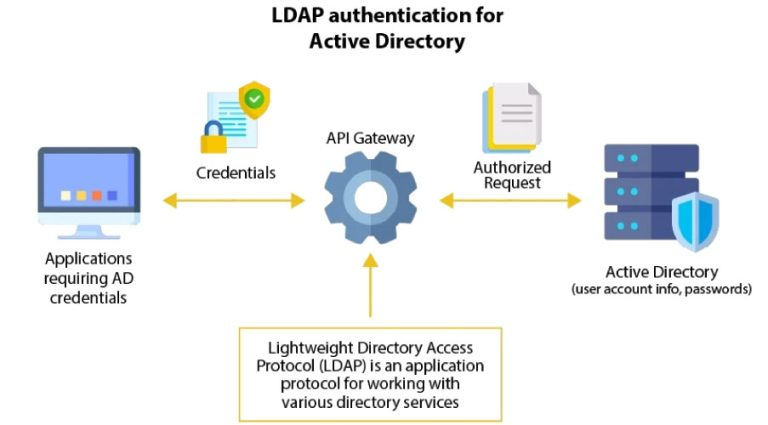
User authentication is one of the most important functions of an LDAP Server. The authentication process can be performed in various ways, depending on the security requirements and system configuration. Below are three common authentication methods in LDAP:

Anonymous Authentication

  • Characteristics:
    • Allows access to public information without providing login credentials.
    • Commonly used for public directory applications.
  • Process:
    • The client connects to the LDAP Server without providing authentication credentials.
    • The server allows access to information configured for anonymous access.
  • Advantages:
    • Simple, easy to deploy.
    • Suitable for non-sensitive information.
  • Disadvantages:
    • Not secure for sensitive data.
    • Difficult to control and monitor user activity.

Simple Authentication

  • Characteristics:
    • Uses a username (DN) and password for authentication.
    • The most common authentication method in LDAP.
  • Process:
    • The client sends the user's DN and password to the LDAP Server.
    • The server verifies the authentication credentials against stored data.
    • If they match, the server grants access with corresponding permissions.
  • Advantages:
    • Easy to deploy and use.
    • Widely supported by LDAP applications and libraries.
  • Disadvantages:
    • The password is sent in plain text and can be intercepted if SSL/TLS is not used.

SSL/TLS Authentication

  • Characteristics:
    • Uses the SSL/TLS protocol to encrypt the connection between client and server.
    • Provides an additional security layer for the authentication process.
  • Process:
    • The client establishes an SSL/TLS connection with the LDAP Server.
    • After the secure connection is established, the client sends authentication credentials.
    • The server authenticates the user and grants corresponding access permissions.
  • Advantages:
    • High security, protects authentication credentials during transmission.
    • Can be combined with client certificate authentication for enhanced security.
  • Disadvantages:
    • Requires SSL/TLS certificate configuration and management.
    • May slightly affect performance due to encryption overhead.
What is Airbnb Proxy?

Common Applications of LDAP Server

LDAP Server is widely used across many fields and applications. Below are some common applications:

  • Enterprise directory management:
    • Stores and manages contact information for employees, customers, and partners.
    • Provides quick access to directory information for applications such as email and internal communications.
  • Centralized authentication and authorization:
    • Provides a single authentication source for multiple applications and services within the organization.
    • Supports Single Sign-On (SSO) deployment, allowing users to access multiple applications with a single set of credentials.
  • User account management:
    • Centralizes the creation, modification, and deletion of user accounts.
    • Manages user access rights and roles across the organization.
  • System configuration management:
    • Stores and manages configuration information for computers and network devices.
    • Enables centralized and consistent configuration deployment across the network.
  • Cloud service integration:
    • Synchronizes user information between on-premise systems and cloud services.
    • Supports seamless authentication for hybrid cloud applications.
  • Digital certificate management:
    • Stores and manages digital certificates and public keys.
    • Supports Public Key Infrastructure (PKI) deployment within the organization.
  • Network resource management:
    • Stores information about network resources such as servers, printers, and network devices.
    • Supports efficient resource management and allocation.
  • Email system integration:
    • Provides directory information and authentication for email systems.
    • Supports email address auto-complete and directory search features.
  • Security policy management:
    • Stores and deploys centralized security policies.
    • Supports consistent policy enforcement across the organization.
  • Mobile application support:
    • Provides authentication and information access for enterprise mobile applications.
    • Supports security policy deployment for mobile devices.
{{< test-result title="Comparison of LDAP Deployment Models" headers="Model|Read Performance|Write Performance|Availability|Complexity" rows="Single Server|Medium|Medium|Low|Simple;Master-Slave|High|Medium|Medium|Medium;Multi-Master|High|High|High|Complex;Distributed|Very High|High|High|Very Complex;Federated|High|Medium|High|Complex" />}}

Note

LDAP Server is an effective centralized information management solution for enterprises. With its hierarchical structure, high read performance, and SSO support, LDAP simplifies user authentication and network resource management.

Conclusion: LDAP Server is an indispensable tool for information management and user authentication in enterprises. From simple models to Multi-Master, LDAP provides high flexibility, strong security, and good scalability. Choosing the appropriate backend and deployment model will help optimize performance and ensure system availability.

Sources
  • https://ldap.com/
  • https://www.openldap.org/doc/admin26/
  • https://learn.microsoft.com/en-us/windows-server/identity/ad-ds/get-started/virtual-dc/active-directory-domain-services-overview
Frequently Asked QuestionsQ&A

LDAP Server là hệ thống triển khai giao thức Lightweight Directory Access Protocol, dùng để lưu trữ và quản lý thông tin người dùng trong mạng doanh nghiệp. Bài viết giải thích LDAP là gì, cơ chế hoạt động, mô hình triển khai, quy trình xác thực và các ứng dụng phổ biến.

LDAP Server là gì?

LDAP (Lightweight Directory Access Protocol) Server là một hệ thống máy chủ triển khai giao thức LDAP, được sử dụng để lưu trữ, tổ chức và quản lý thông tin trong một mạng máy tính. LDAP Server hoạt động như một cơ sở dữ liệu phân cấp, cho phép truy cập nhanh chóng và hiệu quả vào thông tin về người dùng, nhóm, và các tài nguyên khác trong mạng.

LDAP Server được thiết kế để xử lý các truy vấn đọc nhanh và hiệu quả, làm cho nó trở thành lựa chọn lý tưởng cho việc lưu trữ thông tin danh mục như danh bạ người dùng, cấu trúc tổ chức, và các thiết lập cấu hình hệ thống. Nó cung cấp một giao diện chuẩn hóa cho các ứng dụng khác nhau để truy cập và quản lý thông tin này.

Một số đặc điểm chính của LDAP Server bao gồm:

  • Cấu trúc phân cấp: Dữ liệu được tổ chức theo cấu trúc cây, giúp dễ dàng quản lý và tìm kiếm thông tin.
  • Khả năng mở rộng: LDAP Server có thể xử lý lượng lớn dữ liệu và số lượng truy vấn đồng thời.
  • Hiệu suất cao: Được tối ưu hóa cho các hoạt động đọc, cho phép truy xuất thông tin nhanh chóng.
  • Tính linh hoạt: Có thể tùy chỉnh schema để phù hợp với nhu cầu cụ thể của tổ chức.
  • Hỗ trợ bảo mật: Cung cấp các cơ chế xác thực và mã hóa để bảo vệ thông tin nhạy cảm.

Cơ chế hoạt động của LDAP Server

LDAP Server hoạt động dựa trên mô hình client-server, trong đó máy chủ LDAP lưu trữ và quản lý dữ liệu, còn các ứng dụng client gửi yêu cầu để truy cập hoặc sửa đổi thông tin. Cơ chế hoạt động cơ bản của LDAP Server bao gồm các bước sau:

  • Kết nối: Client thiết lập kết nối với LDAP Server thông qua giao thức TCP/IP, thường sử dụng cổng 389 cho kết nối không bảo mật hoặc cổng 636 cho kết nối SSL/TLS.
  • Xác thực: Client xác thực với server bằng cách cung cấp thông tin đăng nhập (như tên người dùng và mật khẩu) hoặc chứng chỉ số.
  • Thực hiện hoạt động: Sau khi xác thực thành công, client có thể thực hiện các hoạt động như tìm kiếm, thêm, sửa đổi hoặc xóa thông tin trong cơ sở dữ liệu LDAP.
  • Xử lý yêu cầu: LDAP Server xử lý yêu cầu từ client, thực hiện các hoạt động cần thiết trên cơ sở dữ liệu và trả về kết quả.
  • Trả về kết quả: Server gửi kết quả của hoạt động về cho client.
  • Đóng kết nối: Sau khi hoàn thành các hoạt động cần thiết, client đóng kết nối với server.

LDAP Server sử dụng một số khái niệm quan trọng trong cơ chế hoạt động của nó:

  • Entry: Đơn vị cơ bản của thông tin trong LDAP, tương đương với một bản ghi trong cơ sở dữ liệu quan hệ.
  • Attributes: Các thuộc tính chứa thông tin về một entry.
  • Distinguished Name (DN): Định danh duy nhất cho mỗi entry trong cây LDAP.
  • Schema: Định nghĩa cấu trúc và quy tắc cho dữ liệu được lưu trữ trong LDAP.

DNS Sinkhole là gì? Ứng dụng và cách dùng kỹ thuật DNS Sinkhole

Các mô hình phân loại của LDAP

LDAP có thể được triển khai theo nhiều mô hình khác nhau, tùy thuộc vào nhu cầu và quy mô của tổ chức. Dưới đây là một số mô hình phân loại phổ biến của LDAP:

  • Mô hình đơn lẻ (Single Server):
    • Chỉ sử dụng một máy chủ LDAP duy nhất.
    • Phù hợp cho các tổ chức nhỏ hoặc môi trường thử nghiệm.
    • Ưu điểm: Đơn giản, dễ quản lý.
    • Nhược điểm: Thiếu tính sẵn sàng cao và khả năng mở rộng.
  • Mô hình Master-Slave:
    • Sử dụng một máy chủ chính (Master) và một hoặc nhiều máy chủ phụ (Slave).
    • Master xử lý tất cả các hoạt động ghi, Slave chỉ đọc và sao chép dữ liệu từ Master.
    • Ưu điểm: Cải thiện hiệu suất đọc và tính sẵn sàng.
    • Nhược điểm: Có thể xảy ra độ trễ trong sao chép dữ liệu.
  • Mô hình Multi-Master:
    • Nhiều máy chủ LDAP hoạt động như Master, có thể xử lý cả đọc và ghi.
    • Dữ liệu được đồng bộ hóa giữa các máy chủ.
    • Ưu điểm: Tính sẵn sàng cao, cân bằng tải tốt.
    • Nhược điểm: Phức tạp trong quản lý và giải quyết xung đột.
  • Mô hình phân tán (Distributed):
    • Dữ liệu được phân chia và lưu trữ trên nhiều máy chủ LDAP khác nhau.
    • Mỗi máy chủ chịu trách nhiệm cho một phần của cây thông tin.
    • Ưu điểm: Khả năng mở rộng tốt, phù hợp cho tổ chức lớn.
    • Nhược điểm: Yêu cầu cấu hình và quản lý phức tạp.
  • Mô hình liên kết (Federated):
    • Kết hợp nhiều LDAP Server độc lập thành một hệ thống thống nhất.
    • Cho phép chia sẻ thông tin giữa các tổ chức khác nhau.
    • Ưu điểm: Linh hoạt, hỗ trợ hợp tác giữa các tổ chức.
    • Nhược điểm: Có thể phức tạp trong việc quản lý quyền truy cập và bảo mật.

Việc lựa chọn mô hình phù hợp phụ thuộc vào nhiều yếu tố như quy mô tổ chức, yêu cầu về hiệu suất, tính sẵn sàng và khả năng mở rộng. Các tổ chức có thể bắt đầu với mô hình đơn giản và phát triển theo thời gian để đáp ứng nhu cầu ngày càng tăng.

Lợi ích của việc sử dụng LDAP

Việc triển khai LDAP Server trong môi trường doanh nghiệp mang lại nhiều lợi ích đáng kể:

  • Quản lý tập trung:
    • LDAP cho phép quản lý tập trung thông tin người dùng, nhóm và tài nguyên.
    • Giảm thiểu sự phân mảnh dữ liệu và tăng tính nhất quán trong toàn tổ chức.
  • Cải thiện hiệu suất:
    • Được tối ưu hóa cho các hoạt động đọc nhanh, giúp truy xuất thông tin hiệu quả.
    • Giảm tải cho các hệ thống khác bằng cách cung cấp một nguồn dữ liệu tập trung.
  • Tăng cường bảo mật:
    • Cung cấp một điểm kiểm soát truy cập tập trung.
    • Hỗ trợ các cơ chế xác thực và mã hóa mạnh mẽ.
  • Khả năng mở rộng:
    • Có thể xử lý lượng lớn dữ liệu và số lượng truy vấn đồng thời.
    • Dễ dàng mở rộng để đáp ứng nhu cầu ngày càng tăng của tổ chức.
  • Tính linh hoạt:
    • Schema có thể tùy chỉnh để phù hợp với nhu cầu cụ thể của tổ chức.
    • Hỗ trợ nhiều loại dữ liệu và ứng dụng khác nhau.
  • Tiêu chuẩn hóa:
    • LDAP là một giao thức chuẩn, được hỗ trợ bởi nhiều ứng dụng và nền tảng.
    • Giúp tăng khả năng tương thích và tích hợp giữa các hệ thống.
  • Giảm chi phí:
    • Giảm chi phí quản lý bằng cách tập trung hóa việc quản lý tài khoản và quyền truy cập.
    • Nhiều giải pháp LDAP mã nguồn mở có sẵn, giúp tiết kiệm chi phí bản quyền.
  • Cải thiện trải nghiệm người dùng:
    • Hỗ trợ đăng nhập một lần (Single Sign-On), giúp người dùng truy cập nhiều ứng dụng với một bộ thông tin đăng nhập.
    • Cung cấp truy cập nhanh chóng đến thông tin danh bạ và tài nguyên.
  • Hỗ trợ tuân thủ:
    • Giúp tổ chức dễ dàng theo dõi và quản lý quyền truy cập, hỗ trợ việc tuân thủ các quy định về bảo mật và quyền riêng tư.
  • Tích hợp dễ dàng:
    • Nhiều ứng dụng doanh nghiệp hỗ trợ tích hợp với LDAP, giúp đơn giản hóa quá trình triển khai và quản lý hệ thống. Với những lợi ích này, LDAP Server đã trở thành một công cụ quan trọng trong việc quản lý thông tin và xác thực người dùng trong môi trường doanh nghiệp hiện đại.

Hệ thống cơ sở dữ liệu backend của LDAP Server

Hệ thống cơ sở dữ liệu backend đóng vai trò quan trọng trong việc lưu trữ và quản lý dữ liệu của LDAP Server. Có nhiều loại backend khác nhau được sử dụng, mỗi loại có ưu điểm và nhược điểm riêng. Dưới đây là một số loại backend phổ biến:

  • BDB (Berkeley DB):
    • Là một hệ thống cơ sở dữ liệu key-value hiệu suất cao.
    • Ưu điểm: Hiệu suất tốt, hỗ trợ giao dịch.
    • Nhược điểm: Có thể gặp vấn đề với dữ liệu lớn.
  • HDB (Hierarchical Database):
    • Phiên bản cải tiến của BDB, được tối ưu hóa cho cấu trúc phân cấp của LDAP.
    • Ưu điểm: Hiệu suất tốt hơn BDB cho các hoạt động subtree.
    • Nhược điểm: Vẫn có một số hạn chế khi xử lý dữ liệu rất lớn.
  • MDB (Memory-Mapped Database):
    • Sử dụng kỹ thuật ánh xạ bộ nhớ để tăng hiệu suất.
    • Ưu điểm: Hiệu suất rất cao, phù hợp cho dữ liệu lớn.
    • Nhược điểm: Yêu cầu nhiều RAM.
  • LMDB (Lightning Memory-Mapped Database):
    • Phiên bản cải tiến của MDB, được tối ưu hóa cho LDAP.
    • Ưu điểm: Hiệu suất cực cao, ổn định, hỗ trợ giao dịch ACID.
    • Nhược điểm: Có thể yêu cầu nhiều dung lượng ổ đĩa.
  • SQL Backend:
    • Sử dụng cơ sở dữ liệu SQL như MySQL hoặc PostgreSQL.
    • Ưu điểm: Linh hoạt, dễ tích hợp với hệ thống hiện có.
    • Nhược điểm: Hiệu suất có thể thấp hơn so với các backend chuyên dụng.
  • LDIF Backend:
    • Lưu trữ dữ liệu dưới dạng file văn bản LDIF.
    • Ưu điểm: Đơn giản, dễ sao lưu và khôi phục.
    • Nhược điểm: Hiệu suất thấp, không phù hợp cho dữ liệu lớn hoặc cập nhật thường xuyên.

Việc lựa chọn backend phù hợp phụ thuộc vào nhiều yếu tố như quy mô dữ liệu, yêu cầu hiệu suất, tài nguyên hệ thống và nhu cầu cụ thể của tổ chức.

Quy trình xác thực người dùng trong LDAP

Xác thực người dùng là một trong những chức năng quan trọng nhất của LDAP Server. Quy trình xác thực có thể được thực hiện theo nhiều cách khác nhau, tùy thuộc vào yêu cầu bảo mật và cấu hình của hệ thống. Dưới đây là ba phương pháp xác thực phổ biến trong LDAP:

Xác thực người dùng không định danh (Anonymous Authentication)

  • Đặc điểm:
    • Cho phép truy cập vào thông tin công khai mà không cần cung cấp thông tin đăng nhập.
    • Thường được sử dụng cho các ứng dụng danh bạ công cộng.
  • Quy trình:
    • Client kết nối đến LDAP Server mà không cung cấp thông tin xác thực.
    • Server cho phép truy cập vào các thông tin được cấu hình cho truy cập ẩn danh.
  • Ưu điểm:
    • Đơn giản, dễ triển khai.
    • Phù hợp cho thông tin không nhạy cảm.
  • Nhược điểm:
    • Không an toàn cho dữ liệu nhạy cảm.
    • Khó kiểm soát và theo dõi hoạt động của người dùng.

Xác thực người dùng cơ bản (Simple Authentication)

  • Đặc điểm:
    • Sử dụng tên người dùng (DN) và mật khẩu để xác thực.
    • Phương pháp xác thực phổ biến nhất trong LDAP.
  • Quy trình:
    • Client gửi DN và mật khẩu của người dùng đến LDAP Server.
    • Server kiểm tra thông tin xác thực với dữ liệu lưu trữ.
    • Nếu khớp, server cho phép truy cập với quyền tương ứng.
  • Ưu điểm:
    • Dễ triển khai và sử dụng.
    • Hỗ trợ rộng rãi bởi các ứng dụng và thư viện LDAP.
  • Nhược điểm:
    • Mật khẩu được gửi dưới dạng văn bản thuần túy, có thể bị chặn nếu không sử dụng SSL/TLS.

Xác thực qua SSL/TLS

  • Đặc điểm:
    • Sử dụng giao thức SSL/TLS để mã hóa kết nối giữa client và server.
    • Cung cấp lớp bảo mật bổ sung cho quá trình xác thực.
  • Quy trình:
    • Client thiết lập kết nối SSL/TLS với LDAP Server.
    • Sau khi kết nối an toàn được thiết lập, client gửi thông tin xác thực.
    • Server xác thực người dùng và cấp quyền truy cập tương ứng.
  • Ưu điểm:
    • Bảo mật cao, bảo vệ thông tin xác thực trong quá trình truyền.
    • Có thể kết hợp với xác thực chứng chỉ client để tăng cường bảo mật.
  • Nhược điểm:
    • Yêu cầu cấu hình và quản lý chứng chỉ SSL/TLS.
    • Có thể ảnh hưởng nhẹ đến hiệu suất do overhead của mã hóa.

Các ứng dụng phổ biến của LDAP Server

LDAP Server được sử dụng rộng rãi trong nhiều lĩnh vực và ứng dụng khác nhau. Dưới đây là một số ứng dụng phổ biến:

  • Quản lý danh bạ doanh nghiệp:
    • Lưu trữ và quản lý thông tin liên hệ của nhân viên, khách hàng, đối tác.
    • Cung cấp truy cập nhanh chóng đến thông tin danh bạ cho các ứng dụng như email và truyền thông nội bộ.
  • Xác thực và ủy quyền tập trung:
    • Cung cấp một nguồn xác thực duy nhất cho nhiều ứng dụng và dịch vụ trong tổ chức.
    • Hỗ trợ triển khai Single Sign-On (SSO), giúp người dùng truy cập nhiều ứng dụng với một bộ thông tin đăng nhập.
  • Quản lý tài khoản người dùng:
    • Tập trung hóa việc tạo, sửa đổi và xóa tài khoản người dùng.
    • Quản lý quyền truy cập và vai trò của người dùng trong toàn tổ chức.
  • Quản lý cấu hình hệ thống:
    • Lưu trữ và quản lý thông tin cấu hình cho các máy tính và thiết bị mạng.
    • Cho phép triển khai cấu hình tập trung và nhất quán trong toàn mạng.
  • Tích hợp với các dịch vụ cloud:
    • Đồng bộ hóa thông tin người dùng giữa hệ thống on-premise và các dịch vụ cloud.
    • Hỗ trợ xác thực liền mạch cho các ứng dụng hybrid cloud.
  • Quản lý chứng chỉ số:
    • Lưu trữ và quản lý chứng chỉ số và khóa công khai.
    • Hỗ trợ triển khai hạ tầng khóa công khai (PKI) trong tổ chức.
  • Quản lý tài nguyên mạng:
    • Lưu trữ thông tin về các tài nguyên mạng như máy chủ, máy in, và thiết bị mạng.
    • Hỗ trợ quản lý và phân bổ tài nguyên hiệu quả.
  • Tích hợp với hệ thống email:
    • Cung cấp thông tin danh bạ và xác thực cho các hệ thống email.
    • Hỗ trợ tính năng auto-complete địa chỉ email và tìm kiếm danh bạ.
  • Quản lý chính sách bảo mật:
    • Lưu trữ và triển khai các chính sách bảo mật tập trung.
    • Hỗ trợ việc thực thi chính sách nhất quán trên toàn tổ chức.
  • Hỗ trợ ứng dụng di động:
    • Cung cấp xác thực và truy cập thông tin cho các ứng dụng di động doanh nghiệp.
    • Hỗ trợ triển khai chính sách bảo mật cho thiết bị di động.

{{< test-result title="So sanh cac mo hinh trien khai LDAP" headers="Mo hinh|Hieu suat doc|Hieu suat ghi|Tinh san sang|Do phuc tap" rows="Single Server|Trung binh|Trung binh|Thap|Don gian;Master-Slave|Cao|Trung binh|Trung binh|Trung binh;Multi-Master|Cao|Cao|Cao|Phuc tap;Distributed|Rat cao|Cao|Cao|Rat phuc tap;Federated|Cao|Trung binh|Cao|Phuc tap" />}}

Ghi chú

LDAP Server la giai phap quan ly thong tin tap trung hieu qua cho doanh nghiep. Voi cau truc phan cap, hieu suat doc cao va ho tro SSO, LDAP giup don gian hoa viec xac thuc nguoi dung va quan ly tai nguyen mang.

Ket luan: LDAP Server la cong cu khong the thieu trong quan ly thong tin va xac thuc nguoi dung tai doanh nghiep. Tu mo hinh don gian den Multi-Master, LDAP cung cap tinh linh hoat cao, bao mat manh va kha nang mo rong tot. Viec lua chon backend va mo hinh trien khai phu hop se giup toi uu hieu suat va dam bao tinh san sang cua he thong.

Nguồn tham khảo
  • https://ldap.com/
  • https://www.openldap.org/doc/admin26/
  • https://learn.microsoft.com/en-us/windows-server/identity/ad-ds/get-started/virtual-dc/active-directory-domain-services-overview
Câu hỏi thường gặpQ&A