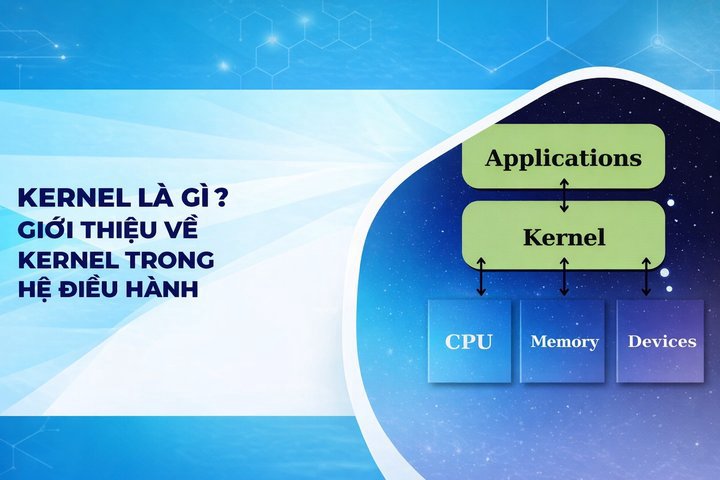
What is a Kernel? Introduction to Kernels in Operating Systems
Networking

What is a Kernel? Introduction to Kernels in Operating Systems

Learn what a Kernel is, its role in operating systems, popular kernel types (Monolithic, Micro, Hybrid), and a comparison of Kernel Mode vs User Mode.

✦ Quick summary
Learn what a Kernel is, its role in operating systems, popular kernel types (Monolithic, Micro, Hybrid), and a comparison of Kernel Mode vs User Mode.
How was this post?

The Kernel (operating system core) is the central component that manages hardware resources and provides an interface for software. This article explains the types of kernels, their role in operating systems, and compares Kernel Mode vs User Mode.

What is a Kernel?
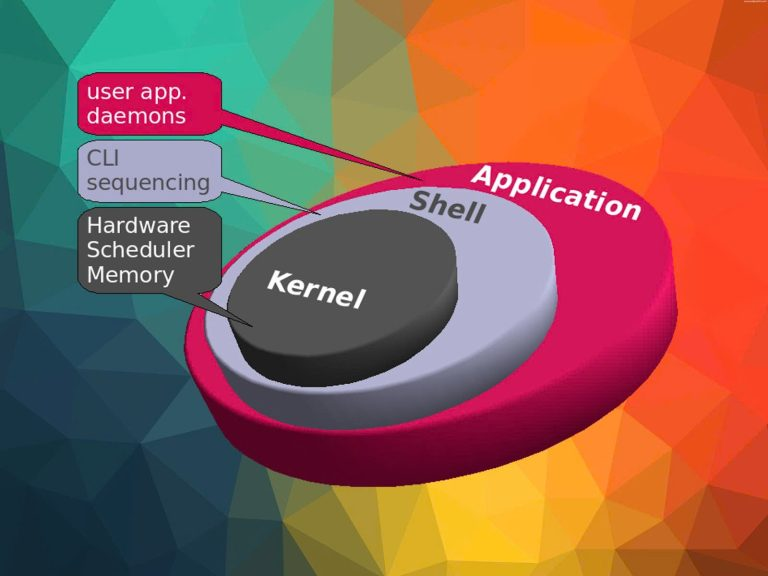
A Kernel, also known as the operating system core, is the most central and important component of an operating system. It acts as a bridge between computer hardware and software applications running on the system. The Kernel is designed to manage and coordinate all computer activities, from allocating system resources to handling requests from application software.

The Kernel is loaded into memory when the system boots and remains active until the computer is shut down. It is the first layer of software loaded after the firmware and bootloader, and it controls everything in the system. The Kernel has full access to all of the computer's hardware resources, including the CPU, memory, storage devices, and other peripheral devices.

Simply put, you can think of the Kernel as the "brain" of the operating system, controlling and managing every activity that takes place on your computer.

Position of the Kernel in the Operating System

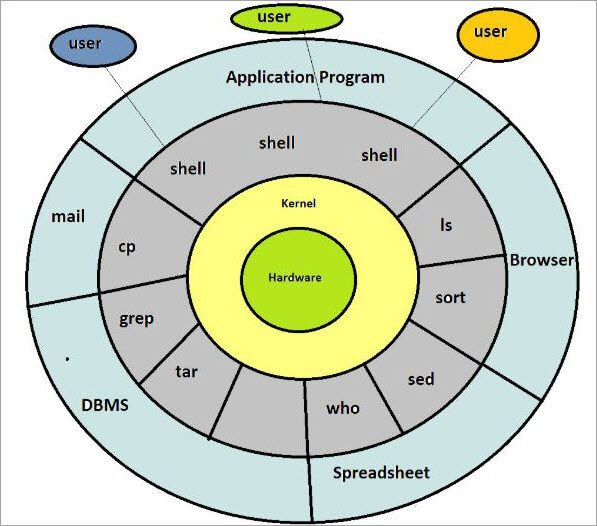
To better understand the position of the Kernel within the operating system, we can imagine the operating system as a multi-layered cake:

  • Bottom layer: Computer hardware (CPU, RAM, hard drive, network card, etc.)
  • Second layer: Kernel
  • Third layer: System services and libraries
  • Top layer: User applications

The Kernel sits at the center, between the hardware and application software. It acts as an abstraction layer, hiding the complexity of the hardware and providing a simple interface for software applications to interact with the hardware.

This special position allows the Kernel to:

  • Directly control hardware
  • Manage system resources
  • Provide basic services to applications
  • Ensure system safety and security

Thanks to this position, the Kernel can perform critical functions that no other component in the operating system is capable of.

What is a Samba Server? Installation and usage guide for Samba Server
Role of the Kernel in the Operating System

The Kernel plays a crucial role in ensuring the operating system runs smoothly and efficiently. Below are the main roles of the Kernel:

Managing Computer Resources

One of the most important tasks of the Kernel is managing computer resources. This includes:

  • CPU Management: The Kernel decides which application runs, when, and for how long. It uses complex scheduling algorithms to ensure each application receives sufficient CPU time to operate efficiently.
  • Memory Management: The Kernel controls the allocation and deallocation of RAM. It ensures each application has enough memory to function without affecting other applications. The Kernel also manages virtual memory, allowing the system to use more memory than the physical RAM capacity.
  • Storage Management: The Kernel controls reading and writing data on storage devices such as hard drives and SSDs. It manages the file system, ensuring data is stored and retrieved efficiently and securely.

Resource Distribution and Sharing

The Kernel not only manages but also distributes and shares resources fairly and efficiently:

  • Multitasking: The Kernel allows multiple applications to run simultaneously by rapidly switching between tasks, creating the illusion that all are running at the same time.
  • Resource Sharing: The Kernel ensures that each application receives the necessary resources without affecting the performance of other applications.
  • Synchronization: The Kernel manages concurrent access to shared resources, preventing conflicts and ensuring data consistency.

Managing Peripheral Devices

The Kernel also plays an important role in managing peripheral devices:

  • Hardware Communication: The Kernel contains device drivers that allow the operating system to communicate with peripheral devices such as monitors, keyboards, mice, printers, and USB devices.
  • Interrupt Handling: The Kernel processes interrupts from hardware, ensuring that requests from peripheral devices are handled promptly.
  • Hardware Abstraction: The Kernel provides a unified interface for applications to interact with hardware, hiding the complexity and differences between device types.

Ensuring Security and Hardware Protection

Finally, the Kernel plays a critical role in ensuring security and protecting the system:

  • Access Control: The Kernel enforces security policies, controlling application access to system resources and data.
  • Application Isolation: The Kernel ensures that applications cannot interfere with each other's operations or gain unauthorized access to each other's memory.
  • Hardware Protection: The Kernel prevents applications from directly accessing hardware, protecting the system from potentially harmful activities.
  • Error Handling: The Kernel has the ability to detect and handle system errors, preventing issues from spreading and protecting system integrity.

What is OpenShift? A comprehensive guide to OpenShift

Types of Kernels

In the field of operating systems, there are several types of kernels, each with its own design and characteristics. Below are some of the most common kernel types:

Monolithic Kernel

Monolithic Kernel is the most traditional and widely used type of kernel. In this architecture, the entire operating system runs in kernel space with full access to hardware.

Characteristics:

  • All system services run in kernel mode
  • High performance due to direct access to hardware resources
  • Large and complex in size
  • Difficult to maintain and extend
  • Examples: Linux, traditional Unix

Advantages:

  • High performance
  • Direct interaction between components

Disadvantages:

  • Difficult to maintain and debug
  • A bug in any part can crash the entire system

Microkernel

Microkernel is a minimalist kernel design that includes only the most basic functions. Other system services run as user-space processes.

Characteristics:

  • Compact kernel containing only essential functions
  • Most system services run in user mode
  • Communication between components via message passing
  • Examples: MINIX, QNX

Advantages:

  • Easy to maintain and extend
  • Enhanced reliability and security

Disadvantages:

  • Lower performance due to message passing overhead
  • More complex design

Hybrid Kernel

Hybrid Kernel is a combination of Monolithic Kernel and Microkernel, aiming to leverage the advantages of both types.

Characteristics:

  • Some services run in kernel mode, others in user mode
  • Balances performance and modularity
  • Examples: Windows NT, macOS (XNU kernel)

Advantages:

  • Flexible design
  • Balances performance and maintainability

Disadvantages: Can be complex in deciding what should run in kernel space

Nanokernel

Nanokernel is an extremely minimalist version of a microkernel, providing only the most basic functions.

Characteristics:

  • Very small in size
  • Provides only the most basic mechanisms such as scheduling and IPC
  • Most functions are implemented in user space
  • Example: KeyKOS

Advantages:

  • Extremely safe and reliable
  • Easy to verify correctness

Disadvantages:

  • Performance can be significantly affected
  • Difficult to develop complex applications

What is OpenStack? Benefits, applications, and how it works

Exokernel

Exokernel is an extremely minimalist kernel design focused on providing hardware resource control to applications.

Characteristics:

  • The kernel only ensures resource protection and sharing
  • Applications have direct control over hardware resources
  • Operating system libraries (libOS) provide high-level abstractions
  • Example: MIT Exokernel

Advantages:

  • Extremely high performance for optimized applications
  • Maximum flexibility for application developers

Disadvantages:

  • Difficult to develop applications due to lack of abstraction
  • Can cause security issues if not managed carefully

Comparison of Kernel Mode and User Mode

To better understand how the Kernel operates, we need to distinguish between Kernel Mode and User Mode. These are the two main operating modes in modern operating systems.

Criteria Kernel Mode User Mode
Definition Highest privilege, full hardware access Limited privileges, runs user applications
Access Rights Direct access to memory and hardware Indirect via OS API
Memory Space Entire memory space Only allocated portion
Instruction Execution All CPU instructions Only non-privileged instructions
Error Handling Can crash the entire system Only affects the running application
Security Kernel protects itself Protected by the kernel
Examples Memory management, CPU scheduling, interrupt handling Running applications, data processing
Kernel Type Comparison
Tested on 2026-01-05 Comprehensive Benchmark
Comparison of characteristics across 5 common kernel types:
Kernel Type Performance Security Maintainability Examples
Monolithic Very High Medium Difficult Linux, Unix
Microkernel Medium High Easy MINIX, QNX
Hybrid High High Medium Windows NT, macOS
Nanokernel Low Very High Easy KeyKOS
Exokernel Extremely High Low Very Difficult MIT Exokernel

Monolithic Kernel (Linux) remains the most popular thanks to its high performance. Hybrid Kernel is chosen by Windows and macOS to balance performance and security.

This separation enhances system security and stability by preventing user applications from directly interfering with hardware or system memory.

Which kernel type should you choose for your project?

Monolithic (Linux): ideal for servers and embedded systems requiring maximum performance. Hybrid (Windows/macOS): balances performance and security for desktops/workstations. Microkernel (QNX): real-time systems requiring high reliability such as automotive and medical devices.

Conclusion: The Kernel is the core component of every operating system, managing hardware resources and providing an interface for software. Understanding the different kernel types and how they work helps you make the right decisions when choosing an operating system and designing systems.

Sources

Frequently Asked Questions

Frequently Asked QuestionsQ&A

Kernel (nhân hệ điều hành) là thành phần trung tâm quản lý tài nguyên phần cứng và cung cấp giao diện cho phần mềm. Bài viết giải thích các loại kernel, vai trò trong hệ điều hành và so sánh Kernel Mode vs User Mode.

Kernel là gì?

Kernel, hay còn được gọi là nhân hệ điều hành, là thành phần trung tâm và quan trọng nhất của một hệ điều hành. Nó đóng vai trò như một cầu nối giữa phần cứng máy tính và các ứng dụng phần mềm chạy trên hệ thống. Kernel được thiết kế để quản lý và điều phối tất cả các hoạt động của máy tính, từ việc phân bổ tài nguyên hệ thống cho đến việc xử lý các yêu cầu từ phần mềm ứng dụng.

Kernel được tải vào bộ nhớ khi hệ thống khởi động và nó luôn hoạt động cho đến khi máy tính tắt. Nó là lớp phần mềm đầu tiên được tải sau firmware và bootloader, và nó kiểm soát mọi thứ trong hệ thống. Kernel có quyền truy cập đầy đủ vào tất cả tài nguyên phần cứng của máy tính, bao gồm CPU, bộ nhớ, thiết bị lưu trữ và các thiết bị ngoại vi khác.

Một cách đơn giản, có thể hình dung kernel như "bộ não" của hệ điều hành, điều khiển và quản lý mọi hoạt động diễn ra trong máy tính của bạn.

Vị trí của kernel trong hệ điều hành

Để hiểu rõ hơn về vị trí của kernel là gì trong hệ điều hành, chúng ta có thể tưởng tượng hệ điều hành như một chiếc bánh nhiều lớp:

  • Lớp dưới cùng: Phần cứng máy tính (CPU, RAM, ổ cứng, card mạng, v.v.)
  • Lớp thứ hai: Kernel
  • Lớp thứ ba: Các dịch vụ hệ thống và thư viện
  • Lớp trên cùng: Các ứng dụng người dùng

Kernel nằm ở vị trí trung tâm, giữa phần cứng và phần mềm ứng dụng. Nó hoạt động như một lớp trừu tượng, che giấu sự phức tạp của phần cứng và cung cấp một giao diện đơn giản cho các ứng dụng phần mềm tương tác với phần cứng.

Vị trí đặc biệt này cho phép kernel:

  • Kiểm soát trực tiếp phần cứng
  • Quản lý tài nguyên hệ thống
  • Cung cấp các dịch vụ cơ bản cho các ứng dụng
  • Đảm bảo an toàn và bảo mật cho hệ thống

Nhờ vào vị trí này, kernel có thể thực hiện các chức năng quan trọng mà không có thành phần nào khác trong hệ điều hành có thể làm được.

Samba Server là gì? Cài đặt và cách dùng Samba Server

Vai trò của kernel trong hệ điều hành

Kernel đóng vai trò then chốt trong việc đảm bảo hệ điều hành hoạt động một cách mượt mà và hiệu quả. Dưới đây là các vai trò chính của kernel:

Quản lý tài nguyên máy tính

Một trong những nhiệm vụ quan trọng nhất của kernel là quản lý tài nguyên máy tính. Điều này bao gồm:

  • Quản lý CPU: Kernel quyết định ứng dụng nào được chạy, khi nào và trong bao lâu. Nó sử dụng các thuật toán lập lịch phức tạp để đảm bảo mỗi ứng dụng được cấp phát đủ thời gian CPU để hoạt động hiệu quả.
  • Quản lý bộ nhớ: Kernel kiểm soát việc phân bổ và giải phóng bộ nhớ RAM. Nó đảm bảo mỗi ứng dụng có đủ bộ nhớ để hoạt động mà không ảnh hưởng đến các ứng dụng khác. Kernel cũng quản lý bộ nhớ ảo, cho phép hệ thống sử dụng nhiều bộ nhớ hơn dung lượng RAM vật lý.
  • Quản lý không gian lưu trữ: Kernel điều khiển việc đọc và ghi dữ liệu trên các thiết bị lưu trữ như ổ cứng, SSD. Nó quản lý hệ thống tệp tin, đảm bảo dữ liệu được lưu trữ và truy xuất một cách hiệu quả và an toàn.

Phân phối và chia sẻ tài nguyên

Kernel không chỉ quản lý mà còn phải phân phối và chia sẻ tài nguyên một cách công bằng và hiệu quả:

  • Đa nhiệm: Kernel cho phép nhiều ứng dụng chạy đồng thời bằng cách nhanh chóng chuyển đổi giữa các tác vụ, tạo ảo giác rằng tất cả đang chạy cùng một lúc.
  • Chia sẻ tài nguyên: Kernel đảm bảo rằng mỗi ứng dụng nhận được phần tài nguyên cần thiết mà không ảnh hưởng đến hiệu suất của các ứng dụng khác.
  • Đồng bộ hóa: Kernel quản lý việc truy cập đồng thời vào tài nguyên được chia sẻ, ngăn chặn xung đột và đảm bảo tính nhất quán của dữ liệu.

Quản lý các thiết bị ngoại vi

Kernel cũng đóng vai trò quan trọng trong việc quản lý các thiết bị ngoại vi:

  • Giao tiếp với phần cứng: Kernel chứa các trình điều khiển thiết bị (device drivers) cho phép hệ điều hành giao tiếp với các thiết bị ngoại vi như màn hình, bàn phím, chuột, máy in, và các thiết bị USB.
  • Quản lý ngắt: Kernel xử lý các ngắt từ phần cứng, đảm bảo rằng các yêu cầu từ thiết bị ngoại vi được xử lý kịp thời.
  • Trừu tượng hóa phần cứng: Kernel cung cấp một giao diện thống nhất cho các ứng dụng tương tác với phần cứng, che giấu sự phức tạp và khác biệt giữa các loại thiết bị.

Đảm bảo bảo mật và bảo vệ phần cứng

Cuối cùng, kernel đóng vai trò quan trọng trong việc đảm bảo an ninh và bảo vệ hệ thống:

  • Kiểm soát truy cập: Kernel thực thi các chính sách bảo mật, kiểm soát quyền truy cập của ứng dụng vào tài nguyên hệ thống và dữ liệu.
  • Cô lập ứng dụng: Kernel đảm bảo rằng các ứng dụng không thể can thiệp vào hoạt động của nhau hoặc truy cập trái phép vào bộ nhớ của nhau.
  • Bảo vệ phần cứng: Kernel ngăn chặn các ứng dụng truy cập trực tiếp vào phần cứng, giúp bảo vệ hệ thống khỏi các hoạt động có thể gây hại.
  • Xử lý lỗi: Kernel có khả năng phát hiện và xử lý các lỗi hệ thống, ngăn chặn sự cố lan rộng và bảo vệ tính toàn vẹn của hệ thống.

Các loại Kernel

Trong lĩnh vực hệ điều hành, có nhiều loại kernel khác nhau, mỗi loại có thiết kế và đặc điểm riêng. Dưới đây là một số loại kernel phổ biến:

Monolithic Kernel

Monolithic Kernel là loại kernel truyền thống và phổ biến nhất. Trong kiến trúc này, toàn bộ hệ điều hành chạy trong không gian kernel với quyền truy cập đầy đủ vào phần cứng.

Đặc điểm:

  • Tất cả các dịch vụ hệ thống chạy trong chế độ kernel
  • Hiệu suất cao do truy cập trực tiếp vào tài nguyên phần cứng
  • Kích thước lớn và phức tạp
  • Khó bảo trì và mở rộng
  • Ví dụ: Linux, Unix truyền thống

Ưu điểm:

  • Hiệu suất cao
  • Tương tác trực tiếp giữa các thành phần

Nhược điểm:

  • Khó bảo trì và debug
  • Một lỗi trong bất kỳ phần nào cũng có thể gây sập toàn bộ hệ thống

Microkernel

Microkernel là một thiết kế kernel tối giản, chỉ bao gồm các chức năng cơ bản nhất. Các dịch vụ hệ thống khác chạy như các tiến trình người dùng.

Đặc điểm:

  • Kernel nhỏ gọn, chỉ chứa các chức năng thiết yếu
  • Hầu hết các dịch vụ hệ thống chạy trong chế độ người dùng
  • Giao tiếp giữa các thành phần thông qua truyền thông điệp
  • Ví dụ: MINIX, QNX

Ưu điểm:

  • Dễ bảo trì và mở rộng
  • Tăng cường độ tin cậy và bảo mật

Nhược điểm:

  • Hiệu suất thấp hơn do overhead của truyền thông điệp
  • Thiết kế phức tạp hơn

Hybrid Kernel

Hybrid Kernel là sự kết hợp giữa Monolithic Kernel và Microkernel, nhằm tận dụng ưu điểm của cả hai loại.

Đặc điểm:

  • Một số dịch vụ chạy trong chế độ kernel, một số khác trong chế độ người dùng
  • Cân bằng giữa hiệu suất và tính mô-đun
  • Ví dụ: Windows NT, macOS (XNU kernel)

Ưu điểm:

  • Linh hoạt trong thiết kế
  • Cân bằng giữa hiệu suất và tính bảo trì

Nhược điểm: Có thể phức tạp trong việc quyết định những gì nên chạy trong kernel space

Nanokernel

Nanokernel là một phiên bản cực kỳ tối giản của microkernel, chỉ cung cấp các chức năng cơ bản nhất.

Đặc điểm:

  • Kích thước rất nhỏ
  • Chỉ cung cấp các cơ chế cơ bản nhất như scheduling và IPC
  • Hầu hết chức năng được thực hiện ở user space
  • Ví dụ: KeyKOS

Ưu điểm:

  • Cực kỳ an toàn và đáng tin cậy
  • Dễ dàng kiểm chứng tính đúng đắn

Nhược điểm:

  • Hiệu suất có thể bị ảnh hưởng đáng kể
  • Khó khăn trong việc phát triển các ứng dụng phức tạp

Openstack là gì? Lợi ích, ứng dụng và cách hoạt động

Exokernel

Exokernel là một thiết kế kernel cực kỳ tối giản, tập trung vào việc cung cấp quyền kiểm soát tài nguyên phần cứng cho các ứng dụng.

Đặc điểm:

  • Kernel chỉ đảm bảo bảo vệ và chia sẻ tài nguyên
  • Ứng dụng có quyền kiểm soát trực tiếp đối với tài nguyên phần cứng
  • Các thư viện hệ điều hành (libOS) cung cấp trừu tượng hóa cao cấp
  • Ví dụ: MIT Exokernel

Ưu điểm:

  • Hiệu suất cực cao cho các ứng dụng được tối ưu hóa
  • Linh hoạt tối đa cho các nhà phát triển ứng dụng

Nhược điểm:

  • Khó phát triển ứng dụng do thiếu trừu tượng hóa
  • Có thể gây ra vấn đề bảo mật nếu không được quản lý cẩn thận

So sánh Kernel Mode và User Mode

Để hiểu rõ hơn về cách kernel hoạt động, chúng ta cần phân biệt giữa Kernel Mode và User Mode. Đây là hai chế độ hoạt động chính trong hệ điều hành hiện đại.

Tiêu chí Kernel Mode User Mode
Định nghĩa Đặc quyền cao nhất, truy cập đầy đủ phần cứng Quyền hạn chế, chạy ứng dụng người dùng
Quyền truy cập Trực tiếp vào bộ nhớ và phần cứng Gián tiếp qua API hệ điều hành
Không gian bộ nhớ Toàn bộ không gian bộ nhớ Chỉ phần được phân bổ
Thực thi lệnh Mọi lệnh CPU Chỉ lệnh không đặc quyền
Xử lý lỗi Có thể gây sập toàn bộ hệ thống Chỉ ảnh hưởng ứng dụng đang chạy
Bảo mật Kernel tự bảo vệ mình Được kernel bảo vệ
Ví dụ Quản lý bộ nhớ, lập lịch CPU, xử lý ngắt Chạy ứng dụng, xử lý dữ liệu
So sánh các loại Kernel
Tested on 2026-01-05 Benchmark tổng hợp
So sánh đặc điểm 5 loại kernel phổ biến:
Loại Kernel Hiệu suất Bảo mật Dễ bảo trì Ví dụ
Monolithic Rất cao Trung bình Khó Linux, Unix
Microkernel Trung bình Cao Dễ MINIX, QNX
Hybrid Cao Cao Trung bình Windows NT, macOS
Nanokernel Thấp Rất cao Dễ KeyKOS
Exokernel Cực cao Thấp Rất khó MIT Exokernel

Monolithic Kernel (Linux) vẫn phổ biến nhất nhờ hiệu suất cao. Hybrid Kernel được Windows và macOS lựa chọn để cân bằng hiệu suất và bảo mật.

Sự phân chia này giúp tăng cường bảo mật và ổn định của hệ thống bằng cách ngăn chặn các ứng dụng người dùng can thiệp trực tiếp vào phần cứng hoặc bộ nhớ hệ thống.

Chọn loại kernel nào cho dự án của bạn?

Monolithic (Linux): phù hợp server, embedded systems cần hiệu suất tối đa. Hybrid (Windows/macOS): cân bằng giữa hiệu suất và bảo mật cho desktop/workstation. Microkernel (QNX): hệ thống real-time yêu cầu độ tin cậy cao như automotive, y tế.

Kết luận: Kernel là thành phần cốt lõi của mọi hệ điều hành, quản lý tài nguyên phần cứng và cung cấp giao diện cho phần mềm. Hiểu về các loại kernel và cách chúng hoạt động giúp đưa ra quyết định đúng khi chọn hệ điều hành và thiết kế hệ thống.

Nguồn tham khảo

Câu hỏi thường gặp

Câu hỏi thường gặpQ&A
Kernel là gì?
Kernel (nhân hệ điều hành) là thành phần trung tâm của hệ điều hành, đóng vai trò cầu nối giữa phần cứng và phần mềm, quản lý CPU, RAM, thiết bị lưu trữ và các thiết bị ngoại vi.
Có bao nhiêu loại Kernel?
Có 5 loại chính: Monolithic Kernel (Linux, Unix), Microkernel (MINIX, QNX), Hybrid Kernel (Windows NT, macOS), Nanokernel (KeyKOS), và Exokernel (MIT Exokernel).
Kernel Mode và User Mode khác nhau như thế nào?
Kernel Mode có quyền truy cập đầy đủ vào phần cứng, lỗi có thể gây sập hệ thống. User Mode chạy với quyền hạn chế, lỗi chỉ ảnh hưởng đến ứng dụng đang chạy.
Monolithic Kernel và Microkernel khác nhau như thế nào?
Monolithic chạy toàn bộ dịch vụ trong kernel space, hiệu suất cao nhưng khó bảo trì. Microkernel chỉ giữ chức năng tối thiểu, an toàn hơn nhưng hiệu suất thấp hơn do overhead truyền thông điệp.
Linux dùng loại Kernel nào?
Linux sử dụng Monolithic Kernel với hỗ trợ loadable kernel modules. Thiết kế này kết hợp hiệu suất cao của monolithic với khả năng mở rộng linh hoạt qua modules.