GitHub is the world's most popular source code hosting and version control platform, owned by Microsoft. This article provides a detailed guide on how to create an account, repository, clone, commit, push, pull request, and the standout features of GitHub.
2019Trusted since
B2BData solutions
Data·AIExpertise
Need data solutions for your business?
AlgoData has helped businesses with data engineering, analytics & AI since 2019.
What is GitHub? GitHub is a unique social network for developers, serving as both a project management system and a source code repository. GitHub allows you to track, collaborate on, and manage software projects efficiently. It is the most popular Git-based source code hosting service, where developers can clone code from repositories and create their own repositories.
In addition to the core features of Git, GitHub adds social interaction elements such as feeds, followers, and network graphs, making it easy for developers to connect and learn from each other through commit histories.
GitHub offers two versions: free and paid. The paid version is typically designed for businesses with permission management and security features, supporting efficient team management. Meanwhile, the free version is a popular choice for individuals to store source code and participate in the open source community.
A distinctive feature of GitHub is the commit message — a description of the action performed on the source code — which helps the team understand changes in the project. The open source community has grown significantly thanks to GitHub, and for many developers, GitHub is considered a "second resume." Employers often review GitHub profiles to assess candidates' coding skills.
Today, mastering Git and understanding what GitHub is has become not just an advantage but an essential requirement for those seeking opportunities in the programming field.
History and Development of GitHub
GitHub is a testament to the remarkable growth of the open source community, contributing to the transformation of how people work and collaborate in the tech industry. Below are the key milestones in GitHub's development journey.
2008: GitHub was founded by Tom Preston-Werner, Chris Wanstrath, and PJ Hyett with the idea of creating a powerful and user-friendly source code management platform. The product officially launched at TechCrunch Disrupt and quickly attracted the community's attention.
2009: GitHub began attracting open source developers. Major projects like Ruby on Rails, jQuery, and Node.js chose GitHub as their source code management platform.
2010: GitHub successfully raised its first round of funding, receiving a $7.5 million investment from Sequoia Capital, helping the platform grow rapidly and expand.
2011: The number of repositories on GitHub surpassed the 1 million mark, making it the central hub for open source projects.
2012: GitHub launched GitHub Enterprise — a service designed specifically for businesses, allowing organizations to set up their own servers for source code management.
2018: Microsoft acquired GitHub for $7.5 billion, driving further growth and integrating GitHub into the Microsoft ecosystem.
2019: GitHub surpassed 40 million users, becoming an indispensable part of the open source community and the tech industry.
2020: GitHub introduced GitHub Codespaces, allowing developers to write code directly from a browser without needing to set up a development environment on their personal computers.
Through these stages of development, GitHub has demonstrated its influence in supporting and connecting the global developer community.
Key Features of GitHub
What are the standout features of GitHub? GitHub is a leading platform for project management and open source version control, with many notable features that strongly support software development and project management.
Version Control System (VCS): GitHub uses Git for version control, enabling you to track changes and manage different versions of a project.
Repository: GitHub provides repositories to store source code. Each project can have its own repository, and users can fork it to contribute to the project.
Pull Requests: This feature allows contributors to propose changes to the original repository, creating a space for discussion and code review before merging into the main repository.
Branching: Supports creating separate branches to develop multiple features simultaneously without affecting each other.
Commit History: Stores the commit history with detailed information about who made the change, when, and what was changed.
Issues: A tool for tracking tasks, bugs, assignments, and improvements. Issues can be assigned to team members and tracked for progress.
Projects: A task management feature that helps track progress and organize work flexibly.
Wiki and Pages: Allows creating Wiki pages for sharing information and documentation, and GitHub Pages for building static websites from a repository.
Collaboration: Supports discussion, commenting, and permission features, helping project members coordinate effectively.
Integrations: Integrates with many tools such as CI/CD, linters, and automated testing services.
Security Features: Provides code scanning tools, vulnerability detection, and monitoring of dependencies that may be at risk.
Community: GitHub is a hub for a large community with millions of developers worldwide, creating opportunities for learning, sharing, and contributing.
With these features, GitHub has become the ideal platform for the open source development community and large-scale software projects.
Types of GitHub Accounts
What are the types of accounts on GitHub? GitHub offers multiple account types to meet the diverse needs of individuals and organizations. Below are some common account types:
Individual Account: A free account for individuals, allowing the creation of public repositories and participation in open source projects. This is a popular choice in the developer community.
Organization Account: Designed for organizations, businesses, or large projects, allowing project and member management within a shared organizational space. Available in both free and paid plans with advanced features.
Developer Account: A paid version of the individual account, offering additional features such as integration with external development tools and priority support.
Team Account: A paid plan for organizations, allowing the creation of multiple working groups and group-based project management.
Enterprise Account: Designed for large organizations, providing advanced features such as enhanced security and integration with enterprise services. This plan is priced based on the number of users.
GitHub Free and GitHub Pro: These are two options for individual accounts, where GitHub Free is the free version and GitHub Pro is the paid version with advanced features such as development tool integration and priority support.
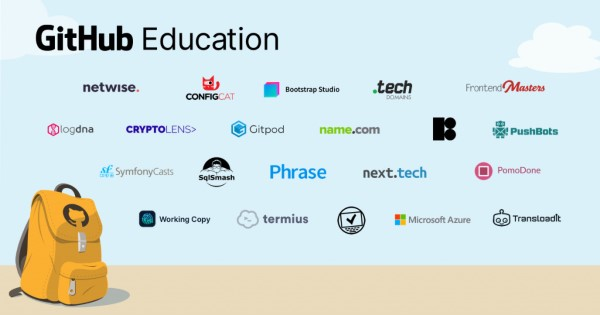
GitHub Education: A free support program for students and educators, providing powerful features for teaching and learning.
With its diverse range of account types, GitHub has made it accessible for many types of users, from individuals to large enterprises.
Essential Git Concepts You Need to Know
When using Git, understanding the following basic concepts will help you make the most of Git's features:
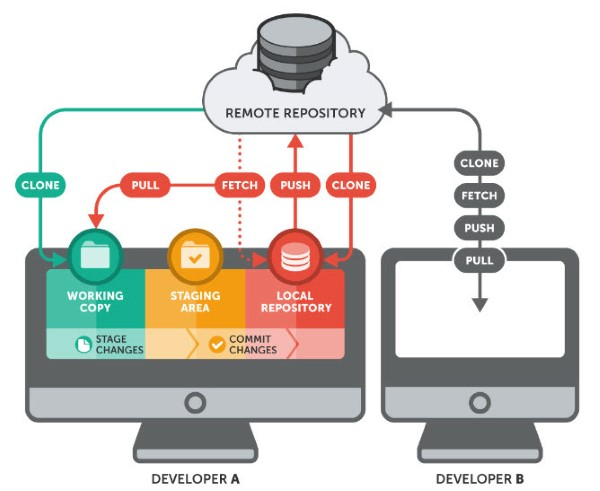
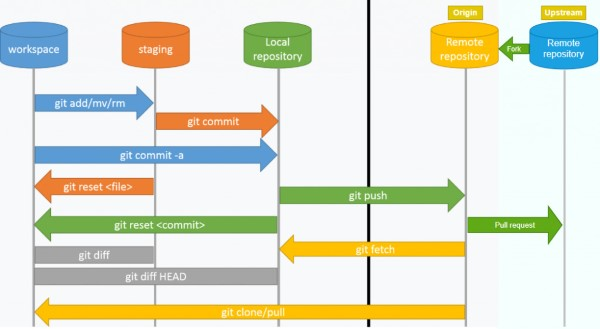
Repository (Repo): A directory or storage space that contains source code and the complete change history of a project.
Commit: A "snapshot" that records the state of the source code at a specific point in time. Each commit has a unique hash code.
Branch: A branch is a parallel version of a project, allowing independent development of features without affecting each other.
Merge: The process of combining changes from one branch into another.
Pull Request (PR): A request to merge changes from one branch into another. PRs are commonly used in projects with multiple contributors.
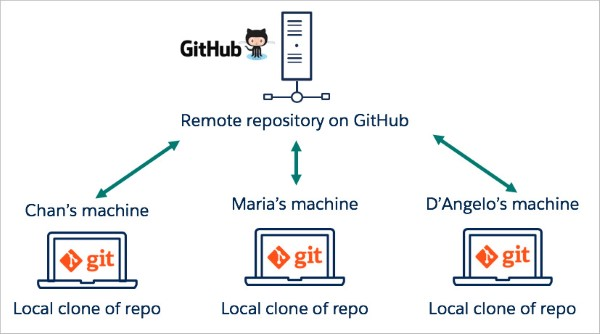
Clone: Copying a remote repository to your local computer for local work.
Fetch: Downloading remote changes without merging them into the current branch.
Pull: Similar to fetch, but automatically merges the remote changes into the current branch.
Push: Uploading local commits to the remote repository.
Conflict: A conflict occurs when two branches or multiple people modify the same part of the source code.
Staging Area/Index: A temporary storage area for changes before committing.
Working Directory: The directory on your local machine where you perform work and edit source code.
HEAD: A pointer that points to the last commit in the current branch.
Tag: A marker on a specific commit for easy searching and referencing.
Remote: A repository located at a remote location, usually on the network.
Understanding these GitHub-related concepts will help you work more effectively with Git.
Benefits of Using GitHub
What are the benefits of using GitHub? Using GitHub offers many advantages for developers, from efficient source code management to improving programming skills. Below are some notable benefits:
Efficient Source Code Management
When you create a repository (repo), the entire project's source code is stored on GitHub. Here, you can track the work process through comments after each commit, and notably, multiple people can work on the same repo simultaneously.
GitHub offers many benefits, starting with the ability to see who committed and what the commit contained. Additionally, you can develop the project across multiple branches. The principle of working with branches is as follows: you can create multiple branches to develop new features, but ultimately, all branches need to be merged back into the MASTER branch to create the complete version of the project.
Tracking Changes Through Version Control
When many team members participate in a project, tracking edits — who changed what, when, and where those files are stored — can become complex. Don't worry, GitHub has solved this for you by recording every change you push to the repository. Similar to Microsoft Word or Google Drive, GitHub provides version history, making it easy to restore previous versions in case of issues or when the current version doesn't meet expectations.
Markdown is a method of formatting text on the web that allows you to adjust how documents display, such as bold, italic formatting, adding images, and creating lists. For the most part, Markdown is just plain text with some special characters inserted, such as # or *. On GitHub, you can use Markdown in many places, including in Git, comments in Issues and Pull Requests, as well as files with .md or .markdown extensions.
Showcasing Personal Value Through GitHub Projects
It's undeniable that what you write in your CV is important. However, source code is always the best evidence to prove you're a genuine developer. A small portion of GitHub on your CV can help you stand out from other candidates. For employers, GitHub is like a fraud detector — helping distinguish real developers from imposters.
Invest in an impressive GitHub account and add the link to your CV; no employer would overlook you.
Many large companies worldwide consider having a GitHub account a requirement in the recruitment process. If you have many contributions to the community or own several products on GitHub, that will be a significant advantage over other candidates. By publishing your projects here, you've built yourself a credible personal portfolio.
Employers will quickly recognize your strengths and programming abilities when looking at your GitHub profile.
Improving Programming Skills and Bug Tracking
There are thousands of ways to learn, and learning on GitHub is an excellent choice in today's era. With millions of open source projects, hundreds of thousands of contributors, and billions of daily commits, observing, comparing, and learning from these changes will provide you with valuable knowledge to improve your programming skills.
The "bug tracking" feature is integrated into GitHub to simplify the process of finding and fixing bugs. To understand this process, you simply need to open each project's dashboard and filter information according to your needs. The system will sort questions by popularity, update time, and related information. The software interface is also very smooth, which is why it's always highly regarded in the IT developer community.
Exploring Rich Resources on GitHub
With the Explore feature, you can easily follow and search for open source projects based on your favorite technologies. GitHub supports code searching not only for individual projects but also for websites. Additionally, the platform has strong search engine optimization (SEO), allowing users to search for any publicly shared code string.
Automating Workflows with GitHub Actions
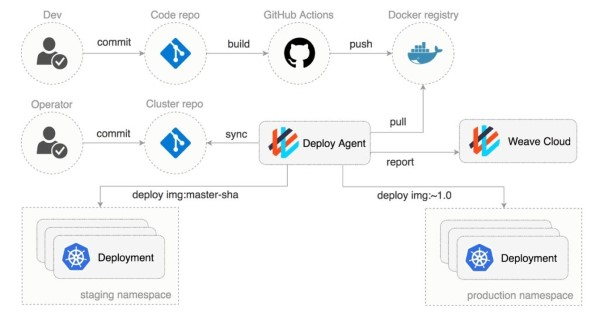
On GitHub's servers, there are workflow scripts that run automatically. Developers (devs) can use them to respond to events on repositories or perform specific actions. For example, I wrote a small utility called Autotagger — GitHub Marketplace, which automatically creates git tags when the version number in the package.json file changes. Although this is just a small action, it can make a big impact when you need to trace source code back to a previous release version, reducing some of the "headaches" for project maintainers.
Managing and Distributing Software Packages via GitHub Package Registry
GitHub Package Registry allows developers to maintain their distribution registries, including npm, Docker, Maven, NuGet, and Ruby gems.
Don't hesitate to create a GitHub account right away. Start your own projects and share them with the community, or feel free to fork an open source project. If you find a bug or need help, create a pull request or issue to report it.
Building and Expanding Relationships in the Developer Community
Meet new developers: Thousands of developers worldwide are joining GitHub's vast network to share experiences and creative ideas.
Share personal experiences: Git allows users to share source code, text snippets, or any information with other developers. You can use it to exchange information, or use Gists as Git repositories, from which you can fork and update different versions.
What is GitHub Used For?
GitHub is an extremely versatile tool that supports many activities in the programming and software development field. Below are some typical use cases of GitHub.
Drag, Drop, and Store Source Code
GitHub allows you to drag and drop source code files directly into a repository, making uploading quick and easy. You can store all project source code here, from small files to large libraries.
Creating and Managing Folders Through the Web Interface
GitHub's web interface makes it easy to create and manage folders within a repository. This means you can organize your source code scientifically and easily find the documents you need.
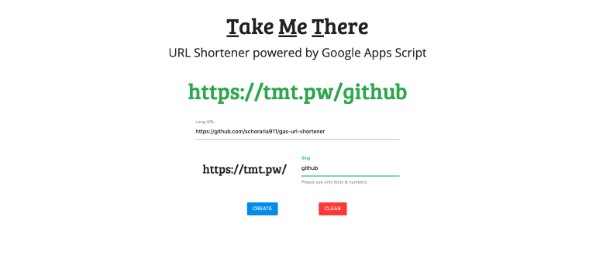
Shortening URLs with Git URL Shortener
Using GitHub to shorten URLs
GitHub also provides a URL shortening tool, making it easier to share links to repositories and files. This is extremely useful when you want to send a link to colleagues or friends.
GitHub provides powerful search capabilities, allowing you to search for files and documents within your repository or across the entire platform. You can easily search for files by name, type, or content.
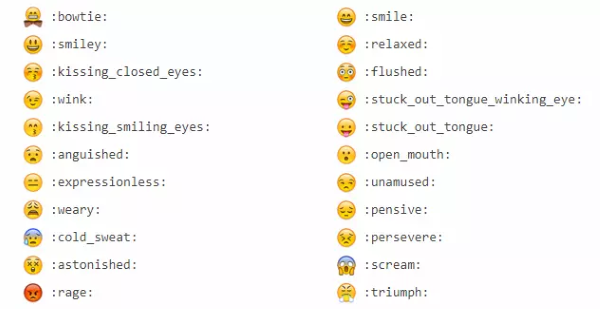
Using GitHub Emoji in Projects
An interesting feature on GitHub is the integration of emoji in comments, commits, and Pull Requests. This not only makes communication more lively but also helps express emotions in technical discussions.
Managing Projects via GitHub CLI
GitHub CLI allows you to manage your projects directly from the terminal. You can perform operations such as creating issues, pull requests, or managing branches without opening a browser, saving time and increasing productivity.
Creating Links Between Lines of Code
GitHub allows you to create links between different lines of code in a repository. This helps users easily track changes and relationships between code segments, thereby improving understanding of the source code structure.
Using Task Checklists
Task checklists are a useful tool to help you manage and track work progress in a project. You can create checklists for each task, ensuring all work is completed on time.
Formatting Data with Maps, CSV, and 3D Rendering
GitHub supports data formatting as maps, CSV, and 3D rendering, allowing you to easily share and present project data in a visual and easy-to-understand way.
Exploring GitHub's Octodex
Octodex is a collection of cute GitHub avatar images that help users feel more comfortable when joining the community. This creates a fun and friendly atmosphere for users, while also encouraging more active participation.
A Comprehensive A-Z Guide to Using GitHub
To use GitHub effectively, you need to master the basic steps in the workflow. Below is a detailed A-Z guide to get you started.
Step 1: Create a GitHub Account
Visit github.com and create an account using email, a Google account, or Facebook. After successful registration, you'll receive a confirmation email. Click the link in the email to activate your account.
Step 2: Create a Repository
After logging in, click the "New" button in the upper right corner of the screen. Enter the repository name, description, and choose the repository type (Public or Private). Finally, click the "Create repository" button.
Step 3: Connect GitHub to Your Computer
GitHub uses Git for version control. You need to install Git on your computer before you can connect to the repository. Download and install Git from the official website: git-scm.com.
Open a terminal or command prompt and run the following commands to configure Git:
git config --global user.name "Your Name"
git config --global user.email "Your Email"
Step 4: Clone the Repository to Your Computer
Copy the URL of the repository from the GitHub website. Open a terminal and navigate to the directory where you want to store the repository. Run the following command to clone the repository to your computer:
git clone
Step 5: Add Source Code Files and Commit
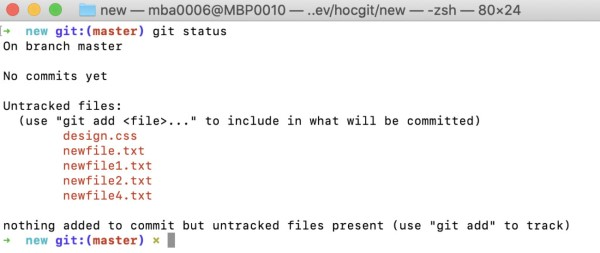
Add source code files to the repository directory. Use the following command to add files to Git's tracking area:
git add .
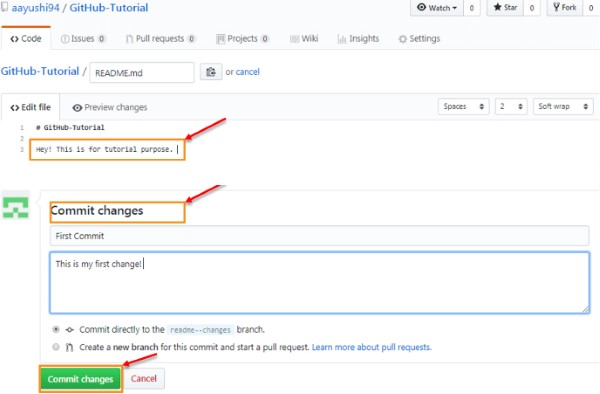
Use the following command to commit the changes:
git commit -m "Description of the changes"
Step 6: Push Changes to GitHub
Use the following command to push changes to the repository on GitHub:
git push origin main
Step 7: Create a Pull Request
If you want to submit code for others to review and merge, you can create a Pull Request. Create a new branch for the feature or bug fix you want to implement. Commit the changes and push to the new branch.
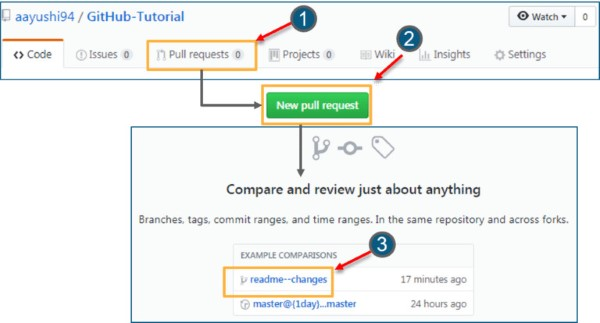
Visit the GitHub repository page and click the "New pull request" button. Select the branch you want to merge and write a brief description of the changes. Click the "Create pull request" button.
GitHub's Competitors
Of course, GitHub is not the only platform providing source code sharing services among developers. Today, many other companies also offer similar services, including:
Bitbucket
Google Cloud Source Repositories
Phabricator
GitLab
Gogs
Gitea
SourceForge
Apache Allura
Launchpad
AWS CodeCommit
We hope that through this article, you now have a better understanding of GitHub, its features, and pricing. If you have any questions, feel free to leave a comment below!
GitLab is known for its powerful integrated CI/CD capabilities and self-hosting ability. It provides comprehensive project management tools and supports effective teamwork.
GitHub is the best choice for open source projects thanks to its largest community. GitLab is ideal when you need powerful CI/CD and free self-hosting. Bitbucket integrates well with Jira if you're using the Atlassian ecosystem.
Conclusion: GitHub is the world's most popular source code management and software collaboration platform, with over 100 million users. From repository hosting, Pull Requests, GitHub Actions to GitHub Pages, this platform provides comprehensive tools for both individual developers and enterprises.