
CNAME là gì? Tìm hiểu về bản ghi CNAME và vai trò của nó
Networking

CNAME là gì? Tìm hiểu về bản ghi CNAME và vai trò của nó

CNAME (Canonical Name Record) là bản ghi DNS tạo bí danh cho tên miền. Tìm hiểu vai trò, cách cấu hình, ưu nhược điểm và ứng dụng của bản ghi CNAME.

✦ Tóm tắt nhanh
CNAME (Canonical Name Record) là bản ghi DNS tạo bí danh cho tên miền. Tìm hiểu vai trò, cách cấu hình, ưu nhược điểm và ứng dụng của bản ghi CNAME.
Bài này thế nào?

CNAME (Canonical Name Record) là bản ghi DNS tạo bí danh cho tên miền, cho phép trỏ subdomain về tên miền chính. Bài viết phân tích vai trò, định dạng, cách cấu hình, ưu nhược điểm và ứng dụng thực tế của bản ghi CNAME.

CNAME là gì?

CNAME là gì? CNAME (Canonical Name Record) là một loại bản ghi tên trong Hệ thống tên miền (DNS), còn được gọi là bản ghi bí danh, dùng để chỉ định một tên miền là bí danh của một tên miền chính khác.

Mỗi hệ thống lưu trữ website cần có một địa chỉ IP để kết nối với Internet. Một máy tính có thể sở hữu vô số bí danh CNAME, nhưng mỗi bí danh này phải có một bản ghi CNAME riêng biệt trong cơ sở dữ liệu. Điều này cho phép nhiều máy chủ, như máy chủ FTP và máy chủ web, có thể hoạt động trên các cổng khác nhau từ cùng một địa chỉ IP. Mỗi máy chủ sẽ có mục nhập riêng trong DNS, ví dụ như ftp.yourdomain.com.

CNAME cũng cho phép sử dụng nhiều máy chủ HTTP trên cùng một cổng nhưng với các tên khác nhau, tất cả thuộc cùng một máy chủ vật lý.

Lợi ích của việc sử dụng CNAME là khi bạn thay đổi địa chỉ IP của một bản ghi A, tất cả các bản ghi CNAME trỏ đến host đó cũng sẽ tự động được cập nhật theo. Ví dụ, nếu bạn có một website với tên miền bizflycloud.vn, nó sẽ được liên kết với một bản ghi A, bản ghi này sẽ chuyển đổi tên miền thành địa chỉ IP 1.2.3.4. Khi có một số tên miền phụ như www.example.com, ftp.example.com, mail.example.com, bạn có thể sử dụng CNAME để tất cả những tên miền phụ này trỏ về tên miền chính vccloud.com, thay vì phải tạo bản ghi A riêng cho mỗi tên miền phụ và liên kết với địa chỉ IP.
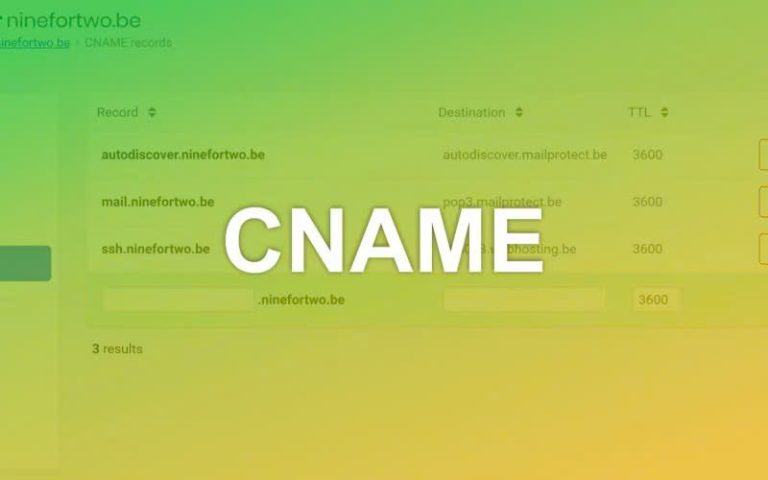
Vai trò của CNAME trong quản lý tên miền

Vai trò của CNAME trong domain là cung cấp một phương pháp để trỏ tên miền này tới một tên miền khác, tạo ra một liên kết giữa chúng mà vẫn giữ nguyên tính chất của tên miền gốc.

Khi một máy chủ nhận được yêu cầu truy cập vào tên miền có bản ghi CNAME, nó sẽ tự động chuyển hướng yêu cầu đó đến tên miền được chỉ định trong bản ghi CNAME.

CNAME rất hữu ích khi bạn muốn ánh xạ một tên miền con hoặc dịch vụ cụ thể tới một tên miền chính. Thay vì phải cập nhật nhiều bản ghi A (địa chỉ IP) mỗi khi thay đổi máy chủ, bạn chỉ cần thay đổi bản ghi CNAME để ánh xạ lại tên miền.

Ví dụ, nếu bạn có tên miền con blog.tmproxy.com và muốn trỏ nó tới tên miền chính tmproxy.com, bạn chỉ cần tạo một bản ghi CNAME, trong đó blog.tmproxy.com trỏ tới tmproxy.com. Khi có yêu cầu truy cập vào blog.tmproxy.com, hệ thống sẽ tự động chuyển hướng tới tmproxy.com.

Định dạng bản ghi CNAME

Định dạng của bản ghi CNAME là:

<Tên miền> IN CNAME <Tên miền thay thế>

Trong đó:

  • <Tên miền>: là tên miền bạn muốn tạo bản ghi CNAME cho nó.
  • IN: là kiểu bản ghi (ở đây là IN cho kiểu Internet).
  • CNAME: là loại bản ghi.
  • <Tên miền thay thế>: là tên miền chính (canonical) mà bạn muốn liên kết với tên miền được chỉ định.

Ví dụ, để tạo một bản ghi CNAME liên kết tên miền www với tên miền chính example.com, bạn có thể sử dụng định dạng sau:

www IN CNAME example.com

Lưu ý rằng cú pháp và định dạng của bản ghi CNAME có thể khác nhau tùy theo dịch vụ DNS và phiên bản DNS bạn đang sử dụng.
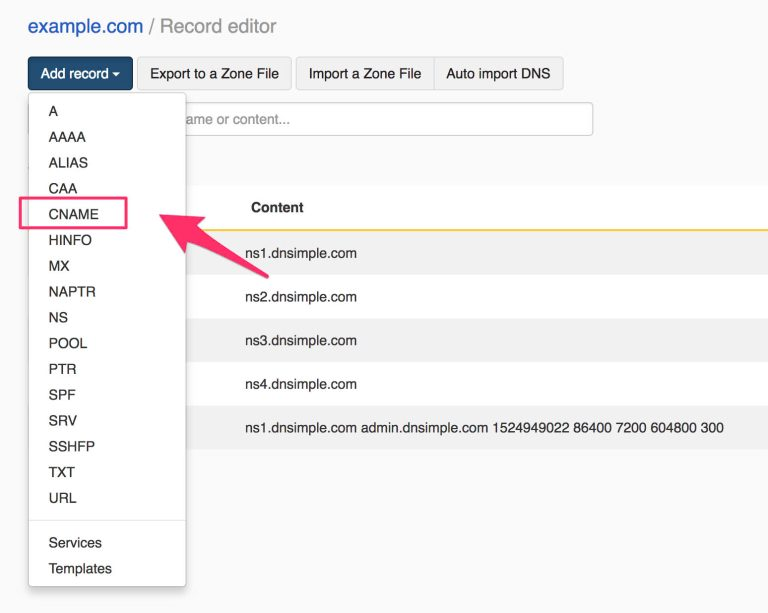
Ưu điểm và nhược điểm của bản ghi CNAME

Như mọi công nghệ khác, CNAME cũng có những ưu điểm và nhược điểm riêng. Việc hiểu rõ những điểm mạnh và điểm yếu này sẽ giúp bạn sử dụng CNAME hiệu quả hơn trong chiến lược quản lý tên miền của mình.

Ưu điểm của bản ghi CNAME

Trước hết, CNAME giúp tạo ra các tên miền thay thế (alias) cho tên miền chính (canonical), từ đó làm việc quản lý tên miền và cấu trúc website trở nên dễ dàng và thuận tiện hơn. Thay vì sử dụng tên miền chính, bạn có thể tạo các tên miền thay thế dễ nhớ và linh hoạt hơn.

Thứ hai, bản ghi CNAME cho phép thay đổi địa chỉ IP của tên miền chỉ với một lần chỉnh sửa bản ghi liên kết đến nó. Điều này giúp tiết kiệm thời gian và công sức so với việc phải sửa đổi nhiều bản ghi A hoặc AAAA. Thay vì cập nhật nhiều bản ghi, bạn chỉ cần chỉnh sửa một bản ghi duy nhất để thay đổi địa chỉ IP.

Cuối cùng, việc sử dụng bản ghi CNAME giúp chuyển hướng truy cập từ một tên miền sang tên miền khác một cách đơn giản. Điều này giảm thiểu các bước phức tạp khi chuyển đổi tên miền. Thay vì điều chỉnh nhiều cài đặt và cập nhật nhiều bản ghi, bạn chỉ cần tạo một bản ghi duy nhất để chuyển hướng truy cập từ một tên miền sang tên miền khác.

Nhược điểm của bản ghi CNAME

Mặc dù bản ghi CNAME mang lại nhiều lợi ích trong việc quản lý tên miền, nhưng cũng có một số nhược điểm cần lưu ý:

  • Mỗi khi có yêu cầu đến bản ghi CNAME, quá trình phân giải DNS sẽ phải chuyển hướng từ tên miền alias đến tên miền mục tiêu. Điều này có thể làm tăng thời gian phản hồi do phải thực hiện thêm một bước chuyển tiếp.
  • Khi một bản ghi CNAME được cấu hình cho một tên miền, tên miền đó không thể có các bản ghi DNS khác (như A, MX, TXT). Điều này có thể gây xung đột nếu tên miền cần trỏ tới nhiều dịch vụ khác nhau.
  • Bản ghi CNAME không thể được sử dụng cho tên miền gốc, mà chỉ áp dụng cho các subdomain. Điều này hạn chế tính linh hoạt khi bạn cần sử dụng CNAME cho tên miền chính.
  • Nếu tên miền đích trong bản ghi CNAME gặp sự cố hoặc không hoạt động, tên miền alias sẽ bị ảnh hưởng và không thể truy cập bình thường, gây tăng sự phụ thuộc vào cấu hình của máy chủ đích.
  • Việc sử dụng CNAME không được cấu hình cẩn thận có thể ảnh hưởng đến SEO, vì công cụ tìm kiếm có thể lập chỉ mục cả tên miền alias và tên miền chính, dẫn đến nội dung trùng lặp.

Hướng dẫn cấu hình bản ghi CNAME

Việc cấu hình bản ghi CNAME đúng cách là rất quan trọng để đảm bảo hoạt động hiệu quả của hệ thống DNS. Dưới đây là hướng dẫn chi tiết về cách cấu hình bản ghi CNAME trong các trường hợp phổ biến.

Cấu hình bản ghi CNAME cho tên miền

Thông thường, khi cấu hình CNAME record, bạn sẽ thực hiện như sau:

Ví dụ: với domain pavietnam.vn, bạn có thể cấu hình bản ghi CNAME như sau:

www 360 IN CNAME pavietnam.vn

Cấu hình bản ghi CNAME cho subdomain

Để cấu hình bí danh cho một subdomain, bạn thường sử dụng bản ghi CNAME.

Ví dụ: với subdomain ftp.pavietnam.vn, bạn có thể cấu hình như sau:

ftp IN CNAME www.pavietnam.vn

Cấu hình bản ghi CNAME để xác thực chứng chỉ SSL cho tên miền/subdomain

Cấu hình CNAME xác thực SSL cho domain

Ví dụ: Quý khách sẽ nhận được một bản ghi CNAME để cấu hình trên tên miền nhằm xác thực SSL:

_AF5022C8CD914E2B20A0AD92FE150ACC.toanthanggps.vn Point to C41E05B39DFB2AD4C401F8C35558A62F.1BA50DB0AAA11954414EE0555CFC4B83.M45k5m5f5mg0Ks5kc25z.sectigo.com

Quý khách vui lòng cấu hình CNAME cho tên miền như sau:

Để cấu hình tên miền khi đăng ký tại P.A Việt Nam, Quý khách truy cập vào trang quản lý tên miền tại:

  • https://access.pavietnam.vn/
  • https://access.dotvndns.vn/

Đăng nhập bằng tên miền và mật khẩu (thông tin mật khẩu sẽ được gửi khi tên miền được đăng ký).

Sau khi đăng nhập, Quý khách thêm bản ghi CNAME tại mục cấu hình domain, như hình sau:
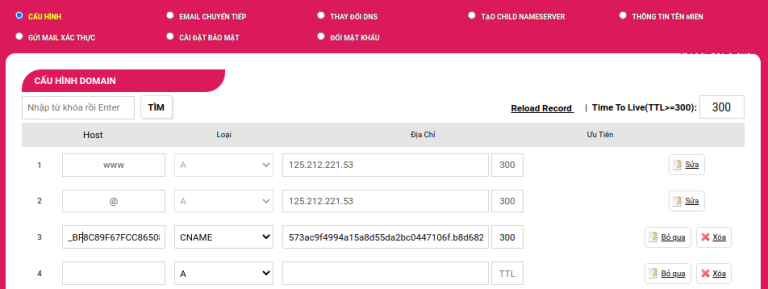
Chèn hình ảnh cấu hình CNAME

Sau đó, lưu lại cài đặt.

Quý khách có thể kiểm tra bản ghi CNAME đã cấu hình bằng cách truy cập vào:

https://mxtoolbox.com/SuperTool.aspx và nhập giá trị CNAME để kiểm tra:
_AF5022C8CD914E2B20A0AD92FE150ACC.toanthanggps.vn
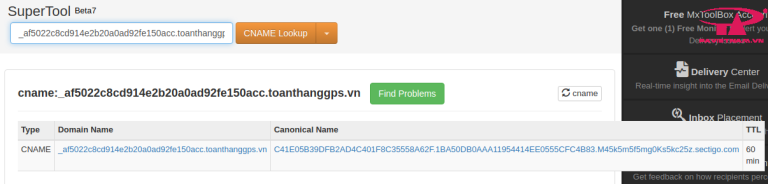
Cấu hình CNAME xác thực SSL cho Subdomain

Cloud là gì? Ý nghĩa, lợi ích và ứng dụng của Cloud Server

Ví dụ: Quý khách sẽ nhận được một bản ghi CNAME để cấu hình lên tên miền cho việc xác thực SSL:

_C539FA59AA8F08F5EB02805BFBD9E44C.tienich.tatthanh.vn CNAME B322AF6FFA0CE4E7099D4F3F539B98AC.F53A4B0BABC1EEA13E0CCF94327D8892.8Qk9Rp6s.comodoca.com
Quý khách vui lòng cấu hình CNAME cho tên miền như sau:

_C539FA59AA8F08F5EB02805BFBD9E44C.tienich 360 IN CNAME b322af6ffa0ce4e7099d4f3f539b98ac.f53a4b0babc1eea13e0ccf94327d8892.8qk9rp6s.comodoca.com
Sau đó, lưu lại cài đặt.

Quý khách có thể kiểm tra bản ghi CNAME bằng cách truy cập vào:

https://mxtoolbox.com/SuperTool.aspx và nhập giá trị CNAME để kiểm tra:

_c539fa59aa8f08f5eb02805bfbd9e44c.tienich.tatthanh.vn
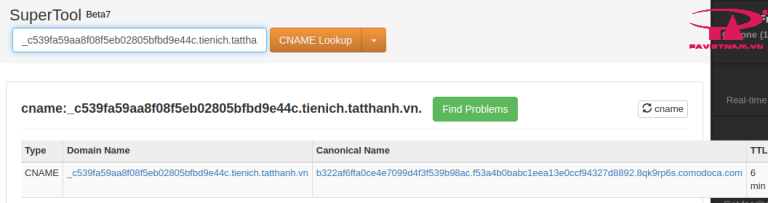
Truy vấn bản ghi CNAME

Quý khách có thể sử dụng lệnh dig trong terminal để xác định bản ghi CNAME liên kết với tên miền. Kết quả sẽ xuất hiện trong phần ANSWER, bao gồm tên miền đầy đủ (FQDN), thời gian sống (TTL), và tên miền.

Ví dụ lệnh dig:

dig www.pavietnam.vn Kết quả có thể sẽ như sau:

yaml

; <<>> DiG 9.16.1-Ubuntu <<>> www.pavietnam.vn ;; global options: +cmd ;; Got answer: ;; ->>HEADER<<- opcode: QUERY, status: NOERROR, id: 188 ;; flags: qr rd ra; QUERY: 1, ANSWER: 1, AUTHORITY: 0, ADDITIONAL: 1 ;; OPT PSEUDOSECTION: ; EDNS: version: 0, flags:; udp: 65494 ;; QUESTION SECTION: ;www.pavietnam.vn. IN A ;; ANSWER SECTION: www.pavietnam.vn. 302 IN A 112.213.82.66 ;; Query time: 3 msec ;; SERVER: 127.0.0.53#53(127.0.0.53) ;; WHEN: T2 Thg 11 14 09:20:32 +07 2022 ;; MSG SIZE rcvd: 61

Ứng dụng của bản ghi CNAME

Bản ghi CNAME (Canonical Name) có nhiều ứng dụng quan trọng trong quản lý tên miền và DNS, bao gồm:

  • Chuyển hướng tên miền: CNAME cho phép bạn chuyển hướng một tên miền alias tới một tên miền khác, giúp đơn giản hóa việc quản lý nhiều tên miền và đảm bảo người dùng luôn truy cập vào một địa chỉ duy nhất.
  • Quản lý các dịch vụ đám mây: Khi sử dụng dịch vụ lưu trữ đám mây hoặc CDN (Content Delivery Network), bản ghi CNAME có thể trỏ tên miền của bạn tới địa chỉ dịch vụ, giúp duy trì sự nhất quán về thương hiệu mà không cần thay đổi địa chỉ IP khi dịch vụ thay đổi.
  • Chỉ định các tên miền phụ: CNAME thường được dùng để trỏ các tên miền phụ tới các dịch vụ khác nhau. Ví dụ, bạn có thể trỏ blog.example.com tới một nền tảng blog như WordPress.com hoặc Medium.
  • Hỗ trợ nhiều môi trường phát triển: Khi phát triển ứng dụng web, bản ghi CNAME có thể trỏ từ một tên miền phụ đến môi trường thử nghiệm hoặc phát triển mà không cần thay đổi cấu hình DNS chính, giúp việc quản lý trở nên dễ dàng hơn.
  • Quản lý dịch vụ email: CNAME cũng có thể được sử dụng để cấu hình các dịch vụ email, như Google Workspace hoặc Microsoft 365. Bản ghi CNAME trỏ tới các máy chủ của dịch vụ email, hỗ trợ xác thực và quản lý tên miền.
  • Tối ưu hóa SEO: Mặc dù cần được cấu hình cẩn thận, CNAME có thể giúp quản lý nội dung hiệu quả và đảm bảo rằng các tên miền alias không làm phân tán lưu lượng truy cập, từ đó cải thiện hiệu suất SEO.
  • Tích hợp với các dịch vụ bên thứ ba: CNAME thường được sử dụng để tích hợp với các dịch vụ bên thứ ba như nền tảng thương mại điện tử (Shopify, BigCommerce) hoặc dịch vụ lưu trữ video (YouTube, Vimeo), giúp duy trì thương hiệu và tối ưu hóa việc sử dụng tên miền.

Sự khác biệt giữa ALIAS và CNAME

Dưới đây là bảng so sánh giữa CNAME Record và Redirect:

Tiêu chí CNAME Record Redirect
Khái niệm Là một bản ghi DNS dùng để trỏ một tên miền alias đến một tên miền khác. Là một phương pháp chuyển hướng yêu cầu từ một URL này sang một URL khác.
Cách thức hoạt động Thực hiện chuyển tiếp tại cấp độ DNS. Thực hiện chuyển tiếp tại cấp độ HTTP.
Thời gian phản hồi Có thể gây độ trễ trong phân giải DNS do cần nhiều bước hơn. Thường nhanh hơn vì chuyển hướng được thực hiện ngay lập tức sau khi truy cập.
Sử dụng cho tên miền gốc Không thể sử dụng cho tên miền gốc (root domain). Có thể sử dụng cho tên miền gốc và tên miền phụ.
Kiểm soát địa chỉ IP Không cung cấp quyền kiểm soát địa chỉ IP, chỉ chuyển tiếp tên miền. Có thể chỉ định địa chỉ IP cụ thể cho trang đích.
SEO Không trực tiếp ảnh hưởng đến SEO, nhưng có thể gây ra nội dung trùng lặp nếu không cẩn thận. Có thể ảnh hưởng đến SEO tùy thuộc vào loại redirect (301, 302, etc.).
Loại chuyển hướng Chỉ hỗ trợ chuyển hướng tên miền. Hỗ trợ nhiều loại chuyển hướng (301, 302, meta refresh, etc.).
Tác động đến bộ nhớ cache CNAME có thể được lưu trong bộ nhớ cache của DNS. Redirect có thể được lưu trong bộ nhớ cache của trình duyệt hoặc proxy.

VPS là gì? Ưu nhược điểm và ứng dụng về Virtual Private Server

Tóm tắt:

CNAME Record thường được sử dụng để liên kết tên miền với tên miền khác và tạo các tên miền thay thế. Redirect được sử dụng để chuyển hướng người dùng từ URL này sang URL khác. Khi nào nên sử dụng CNAME:

Khi muốn tạo các subdomain để trỏ về cùng một IP address. Khi muốn kết nối domain name với các dịch vụ bên ngoài như CDN, email hosting… Khi nào nên sử dụng Redirect:

Khi muốn chuyển hướng người dùng từ URL này đến URL khác. Khi muốn cập nhật cấu trúc URL của trang web hoặc di chuyển trang web sang domain mới. Khi muốn thông báo cho người dùng biết về việc di chuyển tạm thời của website.

Những lưu ý khi sử dụng bản ghi CNAME

Khi cấu hình và sử dụng CNAME Records, có một số điều quan trọng bạn cần lưu ý để đảm bảo hoạt động hiệu quả của DNS:

  • Không sử dụng CNAME cho tên miền gốc (root domain): CNAME không thể được áp dụng cho tên miền gốc, chỉ có thể dùng cho các tên miền con (subdomains). Để liên kết tên miền gốc, bạn nên sử dụng bản ghi ALIAS hoặc A.
  • Kiểm tra tên miền: Trước khi thêm CNAME record, hãy chắc chắn rằng tên miền bạn sử dụng không có các bản ghi DNS khác như A, MX, hoặc NS trỏ đến nó. Nếu có, bạn cần phải xóa hoặc chỉnh sửa các bản ghi đó trước khi thêm CNAME.
  • Đảm bảo tính duy nhất của tên máy chủ: Tên máy chủ trong bản ghi CNAME phải là duy nhất và không được sử dụng cho các bản ghi khác như MX, A, hoặc AAAA. Tuy nhiên, các bản ghi DNSSEC như RRSIG và NSEC có thể ngoại lệ.
  • Ảnh hưởng đến tốc độ phản hồi DNS: Việc sử dụng quá nhiều CNAME records có thể làm tăng thời gian phản hồi DNS. Mỗi CNAME đòi hỏi một truy vấn DNS bổ sung để giải quyết tên máy chủ mới.
  • Quản lý cập nhật: Khi cần thay đổi địa chỉ IP hoặc tên máy chủ đích, bạn chỉ cần chỉnh sửa bản ghi CNAME thay vì phải thay đổi nhiều bản ghi A hoặc AAAA. Tuy nhiên, hãy đảm bảo cập nhật đúng và đồng bộ để tránh gián đoạn dịch vụ.
  • Sử dụng với các dịch vụ bên thứ ba: Kiểm tra xem nhà cung cấp dịch vụ DNS hoặc nhà cung cấp hosting có hỗ trợ bản ghi CNAME hay không. Đảm bảo rằng họ cho phép bạn cấu hình và quản lý bản ghi này trong hệ thống của họ.
  • Cân nhắc về cache DNS: Các truy vấn DNS có thể được lưu trong bộ nhớ cache của máy chủ DNS và thiết bị mạng. Vì vậy, khi thay đổi thông tin DNS, như chuyển đổi Nameserver, có thể mất thời gian để các thay đổi này được cập nhật trên tất cả các máy chủ DNS trên mạng.

{{< test-result title="So sanh CNAME va cac ban ghi DNS khac" headers="Tieu chi|CNAME|A Record|ALIAS|Redirect" row1="Chuc nang|Tro alias den domain|Tro den dia chi IP|Tro root domain den domain|Chuyen huong URL" row2="Root domain|Khong ho tro|Ho tro|Ho tro|Ho tro" row3="Cap do|DNS|DNS|DNS|HTTP" row4="Toc do|Cham hon (them buoc)|Nhanh|Nhanh|Nhanh" row5="SEO|Can than noi dung trung lap|Tot|Tot|Tuy loai 301/302" />}}

Ghi chú

CNAME phu hop de tro subdomain ve domain chinh hoac dich vu ben ngoai. Khong dung CNAME cho root domain - su dung ban ghi A hoac ALIAS thay the.

Ket luan: CNAME la ban ghi DNS quan trong giup tao bi danh cho ten mien, don gian hoa quan ly he thong va ho tro tich hop dich vu ben thu ba. Can cau hinh can than de tranh anh huong toc do DNS va van de SEO noi dung trung lap.

Nguồn tham khảo
Câu hỏi thường gặpQ&A

CNAME (Canonical Name Record) is a DNS record that creates an alias for a domain name, allowing you to point a subdomain to a canonical domain. This article analyzes the role, format, configuration, advantages, disadvantages, and practical applications of CNAME records.

What is CNAME?

What is CNAME? CNAME (Canonical Name Record) is a type of name record in the Domain Name System (DNS), also known as an alias record, used to designate a domain name as an alias of another canonical domain name.

Every website hosting system needs an IP address to connect to the Internet. A computer can have countless CNAME aliases, but each alias must have a separate CNAME record in the database. This allows multiple servers, such as FTP servers and web servers, to operate on different ports from the same IP address. Each server will have its own entry in DNS, for example ftp.yourdomain.com.

CNAME also allows multiple HTTP servers to run on the same port but with different names, all belonging to the same physical server.

The benefit of using CNAME is that when you change the IP address of an A record, all CNAME records pointing to that host will also be automatically updated. For example, if you have a website with the domain bizflycloud.vn, it will be linked to an A record that converts the domain name to IP address 1.2.3.4. When you have several subdomains like www.example.com, ftp.example.com, mail.example.com, you can use CNAME so that all these subdomains point to the main domain vccloud.com, instead of having to create a separate A record for each subdomain and link it to an IP address.

The Role of CNAME in Domain Management

The role of CNAME in domain management is to provide a method for pointing one domain name to another, creating a link between them while maintaining the properties of the original domain.

When a server receives a request to access a domain with a CNAME record, it automatically redirects the request to the domain specified in the CNAME record.

CNAME is very useful when you want to map a subdomain or specific service to a main domain. Instead of updating multiple A records (IP addresses) every time you change servers, you only need to change the CNAME record to remap the domain.

For example, if you have the subdomain blog.tmproxy.com and want to point it to the main domain tmproxy.com, you simply create a CNAME record where blog.tmproxy.com points to tmproxy.com. When there is a request to access blog.tmproxy.com, the system will automatically redirect to tmproxy.com.

CNAME Record Format

The format of a CNAME record is:

IN CNAME

Where:

  • : is the domain name you want to create a CNAME record for.
  • IN: is the record class (here IN stands for Internet).
  • CNAME: is the record type.
  • : is the canonical domain name that you want to link with the specified domain.

For example, to create a CNAME record linking the www domain to the main domain example.com, you can use the following format:

www IN CNAME example.com

Note that the syntax and format of CNAME records may vary depending on the DNS service and DNS version you are using.

How to check proxy and firewall accurately and simply

Advantages and Disadvantages of CNAME Records

Like any other technology, CNAME has its own advantages and disadvantages. Understanding these strengths and weaknesses will help you use CNAME more effectively in your domain management strategy.

Advantages of CNAME Records

First, CNAME helps create alternative domain names (aliases) for the canonical domain, making domain management and website structure easier and more convenient. Instead of using the main domain, you can create alternative domain names that are easier to remember and more flexible.

Second, CNAME records allow you to change the IP address of a domain with just a single edit to the linked record. This saves time and effort compared to modifying multiple A or AAAA records. Instead of updating multiple records, you only need to edit a single record to change the IP address.

Finally, using CNAME records simplifies redirecting access from one domain to another. This minimizes the complex steps involved in domain migration. Instead of adjusting multiple settings and updating multiple records, you only need to create a single record to redirect access from one domain to another.

Disadvantages of CNAME Records

Although CNAME records offer many benefits in domain management, there are some disadvantages to be aware of:

  • Every time there is a request to a CNAME record, the DNS resolution process must redirect from the alias domain to the target domain. This can increase response time due to the additional forwarding step.
  • When a CNAME record is configured for a domain, that domain cannot have other DNS records (such as A, MX, TXT). This can cause conflicts if the domain needs to point to multiple different services.
  • CNAME records cannot be used for the root domain — they only apply to subdomains. This limits flexibility when you need to use CNAME for the main domain.
  • If the target domain in the CNAME record encounters issues or goes down, the alias domain will be affected and cannot be accessed normally, increasing dependency on the target server's configuration.
  • Using CNAME without careful configuration can affect SEO, as search engines may index both the alias domain and the main domain, leading to duplicate content.

Guide to Configuring CNAME Records

Properly configuring CNAME records is crucial to ensuring the effective operation of the DNS system. Below is a detailed guide on how to configure CNAME records in common scenarios.

Configuring CNAME Records for a Domain

Typically, when configuring a CNAME record, you would do the following:

Example: with the domain pavietnam.vn, you can configure the CNAME record as follows:

www 360 IN CNAME pavietnam.vn

Configuring CNAME Records for a Subdomain

To configure an alias for a subdomain, you typically use a CNAME record.

Example: with the subdomain ftp.pavietnam.vn, you can configure as follows:

ftp IN CNAME www.pavietnam.vn

Configuring CNAME Records for SSL Certificate Verification for Domain/Subdomain

Configuring CNAME for SSL verification for a domain

Example: You will receive a CNAME record to configure on the domain for SSL verification:

_AF5022C8CD914E2B20A0AD92FE150ACC.toanthanggps.vn Point to C41E05B39DFB2AD4C401F8C35558A62F.1BA50DB0AAA11954414EE0555CFC4B83.M45k5m5f5mg0Ks5kc25z.sectigo.com

Please configure the CNAME for the domain as follows:

To configure the domain when registered at P.A Vietnam, access the domain management page at:

  • https://access.pavietnam.vn/
  • https://access.dotvndns.vn/

Log in using the domain name and password (password information will be sent when the domain is registered).

After logging in, add the CNAME record in the domain configuration section, as shown below:

Insert CNAME configuration image

Then save the settings.

You can verify the configured CNAME record by visiting:

https://mxtoolbox.com/SuperTool.aspx and entering the CNAME value to check: _AF5022C8CD914E2B20A0AD92FE150ACC.toanthanggps.vn

Configuring CNAME for SSL verification for a Subdomain

What is Cloud? Meaning, benefits, and applications of Cloud Server

Example: You will receive a CNAME record to configure on the domain for SSL verification:

_C539FA59AA8F08F5EB02805BFBD9E44C.tienich.tatthanh.vn CNAME B322AF6FFA0CE4E7099D4F3F539B98AC.F53A4B0BABC1EEA13E0CCF94327D8892.8Qk9Rp6s.comodoca.com Please configure the CNAME for the domain as follows:

_C539FA59AA8F08F5EB02805BFBD9E44C.tienich 360 IN CNAME b322af6ffa0ce4e7099d4f3f539b98ac.f53a4b0babc1eea13e0ccf94327d8892.8qk9rp6s.comodoca.com Then save the settings.

You can verify the CNAME record by visiting:

https://mxtoolbox.com/SuperTool.aspx and entering the CNAME value to check:

_c539fa59aa8f08f5eb02805bfbd9e44c.tienich.tatthanh.vn

Querying CNAME Records

You can use the dig command in the terminal to identify the CNAME record linked to a domain. The result will appear in the ANSWER section, including the fully qualified domain name (FQDN), time to live (TTL), and the domain name.

Example dig command:

dig www.pavietnam.vn The result may look like this:

yaml

; <<>> DiG 9.16.1-Ubuntu <<>> www.pavietnam.vn ;; global options: +cmd ;; Got answer: ;; ->>HEADER<<- opcode: QUERY, status: NOERROR, id: 188 ;; flags: qr rd ra; QUERY: 1, ANSWER: 1, AUTHORITY: 0, ADDITIONAL: 1 ;; OPT PSEUDOSECTION: ; EDNS: version: 0, flags:; udp: 65494 ;; QUESTION SECTION: ;www.pavietnam.vn. IN A ;; ANSWER SECTION: www.pavietnam.vn. 302 IN A 112.213.82.66 ;; Query time: 3 msec ;; SERVER: 127.0.0.53#53(127.0.0.53) ;; WHEN: T2 Thg 11 14 09:20:32 +07 2022 ;; MSG SIZE rcvd: 61

Applications of CNAME Records

CNAME (Canonical Name) records have many important applications in domain management and DNS, including:

  • Domain redirection: CNAME allows you to redirect an alias domain to another domain, simplifying the management of multiple domains and ensuring users always access a single address.
  • Cloud service management: When using cloud hosting or CDN (Content Delivery Network), CNAME records can point your domain to the service address, maintaining brand consistency without needing to change IP addresses when the service changes.
  • Subdomain assignment: CNAME is commonly used to point subdomains to different services. For example, you can point blog.example.com to a blogging platform like WordPress.com or Medium.
  • Supporting multiple development environments: When developing web applications, CNAME records can point from a subdomain to a testing or development environment without changing the main DNS configuration, making management easier.
  • Email service management: CNAME can also be used to configure email services such as Google Workspace or Microsoft 365. CNAME records point to the email service's servers, supporting authentication and domain management.
  • SEO optimization: Although it requires careful configuration, CNAME can help manage content effectively and ensure alias domains do not dilute traffic, thereby improving SEO performance.
  • Third-party service integration: CNAME is commonly used to integrate with third-party services such as e-commerce platforms (Shopify, BigCommerce) or video hosting services (YouTube, Vimeo), helping maintain branding and optimize domain usage.

Differences Between ALIAS and CNAME

Below is a comparison table between CNAME Record and Redirect:

Criteria CNAME Record Redirect
Concept A DNS record used to point an alias domain to another domain. A method of redirecting requests from one URL to another.
How it works Forwards at the DNS level. Forwards at the HTTP level.
Response time May cause latency in DNS resolution due to additional steps. Usually faster because the redirect is executed immediately after access.
Use for root domain Cannot be used for root domains. Can be used for both root domains and subdomains.
IP address control Does not provide IP address control, only forwards domain names. Can specify a specific IP address for the destination page.
SEO Does not directly affect SEO, but may cause duplicate content if not careful. Can affect SEO depending on the redirect type (301, 302, etc.).
Redirect type Only supports domain forwarding. Supports multiple redirect types (301, 302, meta refresh, etc.).
Cache impact CNAME can be stored in DNS cache. Redirect can be stored in browser or proxy cache.

What is VPS? Advantages, disadvantages, and applications of Virtual Private Server

Summary:

CNAME Record is typically used to link domains with other domains and create alias domains. Redirect is used to redirect users from one URL to another. When to use CNAME:

When you want to create subdomains that point to the same IP address. When you want to connect a domain name with external services like CDN, email hosting, etc. When to use Redirect:

When you want to redirect users from one URL to another. When you want to update the URL structure of a website or migrate to a new domain. When you want to notify users about a temporary website migration.

Important Considerations When Using CNAME Records

When configuring and using CNAME Records, there are several important things you need to keep in mind to ensure effective DNS operation:

  • Do not use CNAME for root domains: CNAME cannot be applied to root domains — it can only be used for subdomains. To link a root domain, you should use an ALIAS or A record.
  • Verify the domain: Before adding a CNAME record, make sure the domain you are using does not have other DNS records such as A, MX, or NS pointing to it. If it does, you need to delete or modify those records before adding the CNAME.
  • Ensure hostname uniqueness: The hostname in the CNAME record must be unique and cannot be used for other records like MX, A, or AAAA. However, DNSSEC records like RRSIG and NSEC may be exceptions.
  • Impact on DNS response speed: Using too many CNAME records can increase DNS response time. Each CNAME requires an additional DNS query to resolve the new hostname.
  • Update management: When you need to change the IP address or target hostname, you only need to edit the CNAME record instead of changing multiple A or AAAA records. However, ensure updates are correct and synchronized to avoid service disruption.
  • Use with third-party services: Check whether your DNS service provider or hosting provider supports CNAME records. Make sure they allow you to configure and manage this record in their system.
  • Consider DNS caching: DNS queries can be cached in DNS servers and network devices. Therefore, when changing DNS information, such as switching Nameservers, it may take time for these changes to propagate across all DNS servers on the network.

{{< test-result title="Comparison of CNAME and other DNS records" headers="Criteria|CNAME|A Record|ALIAS|Redirect" row1="Function|Point alias to domain|Point to IP address|Point root domain to domain|URL redirect" row2="Root domain|Not supported|Supported|Supported|Supported" row3="Level|DNS|DNS|DNS|HTTP" row4="Speed|Slower (extra step)|Fast|Fast|Fast" row5="SEO|Careful of duplicate content|Good|Good|Depends on 301/302" />}}

Note

CNAME is suitable for pointing subdomains to the main domain or external services. Do not use CNAME for root domains — use A or ALIAS records instead.

Conclusion: CNAME is an important DNS record that helps create aliases for domain names, simplifies system management, and supports third-party service integration. Careful configuration is needed to avoid DNS speed impacts and duplicate content SEO issues.

Sources

Frequently Asked Questions

Frequently Asked QuestionsQ&A
What is CNAME?
CNAME (Canonical Name Record) is a DNS record used to designate a domain name as an alias for another canonical domain name.
Can CNAME be used for a root domain?
No, CNAME cannot be used for a root domain — it only applies to subdomains. To link a root domain, use an ALIAS or A record instead.
What is the difference between CNAME and Redirect?
CNAME forwards at the DNS level, while Redirect forwards at the HTTP level. CNAME cannot be used for root domains, but Redirect can.
When should you use CNAME?
When you need to create subdomains pointing to the same IP, connect a domain with external services like CDN or email hosting, or manage multiple subdomains.
Does CNAME affect SEO?
If not configured carefully, CNAME can cause duplicate content issues when search engines index both the alias and the canonical domain.