Cloud Hosting là gì? Tổng hợp kiến thức cần biết về Cloud Hosting
Cloud and Server

Cloud Hosting là gì? Tổng hợp kiến thức cần biết về Cloud Hosting

Cloud Hosting là dịch vụ lưu trữ web trên nền tảng điện toán đám mây, phân tán tài nguyên qua nhiều server, mang lại tính linh hoạt và uptime cao.

Trong series: Cloud Computing
  1. 1 Cloud Hosting là gì? Tổng hợp kiến thức cần biết về Cloud Hosting
  2. 2 Cloud Server là gì? Tính năng, lợi ích và ứng dụng Cloud Server
  3. 3 Cloud là gì? Ý nghĩa, lợi ích và ứng dụng của Cloud Server
✦ Tóm tắt nhanh
Cloud Hosting là dịch vụ lưu trữ web trên nền tảng điện toán đám mây, phân tán tài nguyên qua nhiều server, mang lại tính linh hoạt và uptime cao.
Bài này thế nào?

Cloud Hosting là dịch vụ lưu trữ website trên nền tảng điện toán đám mây, phân tán tài nguyên qua nhiều server để đảm bảo uptime cao và khả năng mở rộng linh hoạt. Bài viết cung cấp kiến thức toàn diện về Cloud Hosting, phân loại, ưu nhược điểm và tiêu chí đánh giá quan trọng.

Cloud Hosting là gì?

Cloud Hosting (hosting đám mây) là một dạng dịch vụ lưu trữ website trên nền tảng điện toán đám mây. Thay vì một máy chủ vật lý riêng lẻ như hosting truyền thống, Cloud Hosting ảo hóa và phân tán tài nguyên máy chủ qua nhiều server khác nhau. Khi một server gặp sự cố, các server khác vẫn hoạt động bình thường để đảm bảo website luôn online.

Nhờ sử dụng công nghệ ảo hóa và hệ thống máy chủ phân tán, Cloud Hosting có thể linh hoạt điều chỉnh và cung cấp tài nguyên tùy theo nhu cầu thực tế của website. Điều này giúp tăng cường độ ổn định, khả năng chịu tải và tiết kiệm chi phí so với hosting thông thường.

Cách thức hoạt động của Cloud Hosting

Để hiểu rõ hơn về cách thức hoạt động của Cloud Hosting, bạn có thể hình dung một hệ thống máy chủ ảo hóa phân tán. Nhà cung cấp dịch vụ (provider) sẽ xây dựng cụm server kết hợp phần cứng và phần mềm với nhau. Phần cứng là các máy chủ vật lý (bare metal server) mạnh mẽ. Phần mềm ảo hóa được cài đặt trên những server vật lý này giúp chia nhỏ các tài nguyên như CPU, RAM, ổ cứng… thành nhiều VPS (Virtual Private Server) độc lập.

Khi người dùng thuê Cloud Hosting, hệ thống sẽ tự động cấp cho bạn một VPS với tài nguyên dựa trên gói hosting đã chọn. Tất cả file và database của website sẽ được lưu trữ và xử lý trên VPS này. Điểm khác biệt với VPS hosting thông thường là tài nguyên của Cloud VPS có thể dễ dàng thay đổi, mở rộng linh hoạt mà không gây gián đoạn dịch vụ.

Ngoài ra, nhờ hệ thống ảo hóa Cloud, nếu một máy chủ vật lý gặp sự cố, các VPS trên nó sẽ được nhanh chóng di chuyển sang máy chủ khác (live migration) mà không ảnh hưởng đến hoạt động. Tính năng này giúp Cloud Hosting có thời gian uptime rất cao (lên đến 99,99%) đồng thời hạn chế được rủi ro mất dữ liệu.

Phân loại về Cloud Hosting

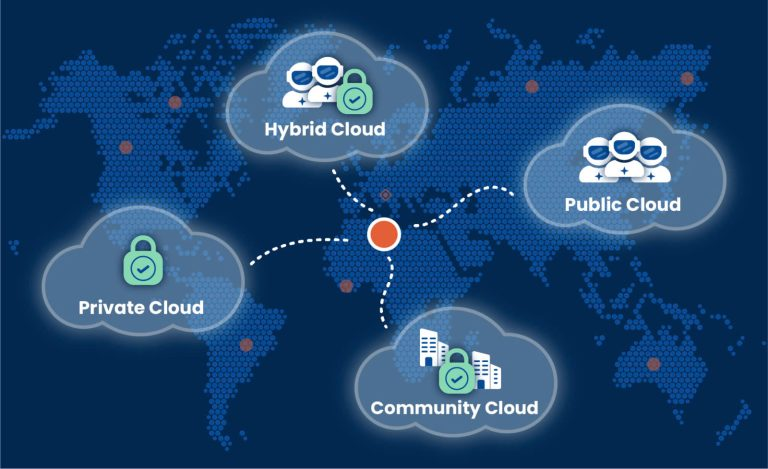
Cloud hosting ứng dụng công nghệ điện toán đám mây, mang đến trải nghiệm vượt trội cho người dùng với khả năng truyền tải và lưu trữ dữ liệu nhanh chóng, hiệu quả. Hiện nay, có 4 mô hình lưu trữ đám mây phổ biến được sử dụng rộng rãi.

Public Cloud

Public Cloud, hay còn gọi là đám mây công cộng, là dịch vụ cloud được cung cấp bởi bên thứ ba, thường là các nhà cung cấp dịch vụ đám mây. Đây là mô hình cloud hosting phổ biến nhất hiện nay.

Public Cloud nổi bật với khả năng mở rộng lớn, đáp ứng hiệu quả các nhu cầu truy cập tăng đột biến. Tuy nhiên, vì các máy chủ thuộc sở hữu của nhà cung cấp, người dùng sẽ phụ thuộc vào họ, do đó cần cân nhắc lựa chọn nhà cung cấp phù hợp.

Private Cloud

Private Cloud là mô hình đám mây được doanh nghiệp tự xây dựng và sử dụng riêng, không chia sẻ với bất kỳ bên thứ ba nào. Điểm mạnh lớn nhất của mô hình này là khả năng kiểm soát toàn diện và mức độ bảo mật cao cho các hoạt động trên nền tảng đám mây nội bộ.

Tuy nhiên, việc triển khai Private Cloud đòi hỏi nguồn ngân sách và nhân lực đáng kể. Doanh nghiệp cần đầu tư vào hệ thống máy chủ mạnh mẽ, đặt tại trung tâm dữ liệu riêng, cùng đội ngũ chuyên trách để vận hành và quản trị hệ thống.

Hybrid Cloud

Hybrid Cloud là sự kết hợp của hai hoặc nhiều loại đám mây (riêng tư, công cộng hoặc cộng đồng), hoạt động như những thực thể riêng lẻ nhưng có thể kết nối và tương tác với nhau, tận dụng lợi thế của từng mô hình triển khai. Hybrid Cloud cho phép khách hàng truy cập các tài nguyên đám mây để định vị, quản lý hoặc sử dụng dịch vụ một cách linh hoạt. Tuy nhiên, các dịch vụ đám mây lai không thể được giới hạn chỉ trong một loại đám mây riêng lẻ (riêng tư, công cộng hoặc cộng đồng).

Việc áp dụng Hybrid Cloud phụ thuộc vào nhiều yếu tố, chẳng hạn như nhu cầu bảo mật dữ liệu, mức độ quản lý cần thiết, và cách doanh nghiệp sử dụng ứng dụng. Một ví dụ điển hình là "Cloud Blasting" – mô hình triển khai trong đó ứng dụng hoạt động trên đám mây riêng hoặc trung tâm dữ liệu nhưng sẽ mở rộng sang đám mây công cộng khi nhu cầu về tài nguyên tính toán tăng đột biến.

Community Cloud

Community Cloud là mô hình hạ tầng được chia sẻ giữa nhiều doanh nghiệp hoặc tổ chức trong cùng một cộng đồng, dựa trên các yếu tố chung như bảo mật, tuân thủ quy định, và quyền riêng tư.

Hình thức này thường phù hợp với các cộng đồng có cùng mục tiêu hoặc yêu cầu đặc thù, chẳng hạn như doanh nghiệp trong cùng ngành, tổ chức phi lợi nhuận, hoặc cơ quan chính phủ. Trên Community Cloud, các thành viên chia sẻ tài nguyên hạ tầng như lưu trữ, mạng và phần cứng, giúp tối ưu hóa chi phí và khai thác hiệu quả các nguồn lực.

Community Cloud thường được quản lý bởi một nhà cung cấp dịch vụ độc lập hoặc một tổ chức bên ngoài. Điều này đảm bảo tính chuyên nghiệp trong vận hành và tuân thủ các tiêu chuẩn bảo mật, quyền riêng tư.

Lưu ý khi sử dụng Community Cloud:

  • Cần đánh giá yếu tố tài chính và khả năng đầu tư.
  • Mô hình này chưa được tối ưu hóa hoàn toàn và chưa phổ biến rộng rãi.

Ưu điểm:

  • Bảo mật cao hơn so với Public Cloud.

  • Chia sẻ chi phí giữa các tổ chức.

  • Tăng cường hợp tác trong cộng đồng. Nhược điểm:

  • Ít linh hoạt hơn Public Cloud.

  • Phức tạp trong việc quản lý nhiều bên tham gia.
Distributed Cloud

Distributed Cloud là mô hình trong đó các dịch vụ và tài nguyên đám mây được phân phối qua nhiều địa điểm địa lý, nhưng vẫn được quản lý tập trung bởi một nhà cung cấp duy nhất. Mô hình này cho phép các dịch vụ được cung cấp gần người dùng hơn, giảm thiểu độ trễ và cải thiện hiệu suất, đặc biệt phù hợp với các tổ chức hoạt động tại nhiều khu vực hoặc quốc gia khác nhau.

Distributed Cloud dựa trên kiến trúc cloud computing sử dụng một tập hợp các máy tính tại các vị trí khác nhau. Mô hình này chia thành hai loại:

  • Public-Resource Computing: Tận dụng các tài nguyên công cộng để tạo thành một môi trường cloud chung.
  • Volunteer Cloud: Người dùng tự nguyện đóng góp tài nguyên máy tính cá nhân để xây dựng mạng lưới cloud.

Ưu điểm:

  • Hiệu suất cao.
  • Giảm độ trễ đáng kể.
  • Thích hợp cho các hệ thống phân tán toàn cầu.

Nhược điểm:

  • Quản lý phức tạp do sự phân tán tài nguyên.
  • Chi phí triển khai và duy trì cao.

Big Data Cloud

Big Data Cloud là mô hình đám mây được thiết kế đặc biệt để xử lý và phân tích khối lượng dữ liệu lớn (Big Data). Với khả năng cung cấp tài nguyên tính toán mạnh mẽ và không gian lưu trữ tối ưu, Big Data Cloud giúp các doanh nghiệp khai thác dữ liệu hiệu quả, hỗ trợ ra quyết định dựa trên dữ liệu.

Mô hình này thường tích hợp với các công cụ xử lý dữ liệu phân tán như Hadoop, Spark, và NoSQL, cho phép xử lý dữ liệu nhanh chóng và hiệu quả trên quy mô lớn.

Ưu điểm:

  • Xử lý và phân tích dữ liệu lớn hiệu quả.
  • Tối ưu hóa hiệu năng tính toán cho các tác vụ phức tạp.

Nhược điểm: Yêu cầu kỹ năng chuyên môn cao để quản lý dữ liệu và sử dụng các công cụ phân tích.

Multi-Cloud

Multi-Cloud là chiến lược triển khai nhiều nhà cung cấp dịch vụ đám mây cùng lúc, nhằm tận dụng ưu thế của từng nền tảng và giảm sự phụ thuộc vào một nhà cung cấp duy nhất.

Bằng cách sử dụng dịch vụ từ các nhà cung cấp hàng đầu như AWS, Azure, hoặc Google Cloud, doanh nghiệp có thể tăng cường sự linh hoạt, tối ưu hóa chi phí và đảm bảo hiệu suất vận hành. Multi-Cloud cũng giảm thiểu rủi ro gián đoạn dịch vụ (downtime) khi một nhà cung cấp gặp sự cố.

Ưu điểm:

  • Tăng tính linh hoạt trong việc lựa chọn dịch vụ.
  • Giảm rủi ro nhờ tránh phụ thuộc vào một nhà cung cấp.
  • Tối ưu hóa hiệu suất và chi phí bằng cách chọn dịch vụ phù hợp nhất.

Nhược điểm:

  • Quản lý phức tạp do phải tích hợp và duy trì nhiều nền tảng.
  • Yêu cầu kỹ năng chuyên môn cao để vận hành hiệu quả.

HPC Cloud

HPC Cloud (High-Performance Computing Cloud) được thiết kế để cung cấp tài nguyên tính toán hiệu suất cao, phục vụ các tác vụ phức tạp như mô phỏng khoa học, mô hình tài chính, hoặc phân tích dữ liệu lớn.

Mô hình này giúp các tổ chức không cần đầu tư vào cơ sở hạ tầng phần cứng đắt tiền, mà vẫn có thể tiếp cận tài nguyên tính toán mạnh mẽ thông qua các nhà cung cấp dịch vụ đám mây.

Ưu điểm:

  • Hiệu suất tính toán cao, phù hợp với các tác vụ chuyên sâu.
  • Giảm chi phí đầu tư vào phần cứng, chỉ trả phí dựa trên nhu cầu sử dụng.

Nhược điểm:

  • Chi phí vận hành có thể cao nếu sử dụng liên tục.
  • Cần kỹ năng kỹ thuật chuyên sâu để khai thác và tối ưu hóa tài nguyên.

Ưu và nhược điểm của Cloud Hosting

Cloud Hosting mang lại nhiều ưu điểm về tính linh hoạt, hiệu suất và tiết kiệm chi phí, tuy nhiên cũng không thiếu thách thức như vấn đề bảo mật, chi phí dài hạn và khả năng quản lý.

Ưu điểm

  • Tính linh hoạt và khả năng mở rộng (Scalability): Cloud Hosting cho phép điều chỉnh tài nguyên như CPU, RAM và dung lượng lưu trữ một cách dễ dàng, tùy theo nhu cầu sử dụng. Điều này rất thích hợp cho các website hoặc ứng dụng có lưu lượng truy cập thay đổi bất thường.
  • Hiệu suất cao (High performance): Cloud Hosting sử dụng mạng lưới các máy chủ phân phối tải công việc đồng đều, giúp giảm thiểu tình trạng quá tải. Hệ thống có khả năng xử lý lượng truy cập lớn mà không làm ảnh hưởng đến tốc độ hay trải nghiệm người dùng.
  • Độ tin cậy và khả năng dự phòng (Reliability & Redundancy): Nếu một máy chủ gặp sự cố, các máy chủ khác trong hệ thống sẽ tự động tiếp quản, đảm bảo dịch vụ không bị gián đoạn và giảm thiểu thời gian chết (downtime).
  • Thanh toán theo mức sử dụng (Pay-as-you-go): Với Cloud Hosting, bạn chỉ phải trả tiền cho tài nguyên thực tế đã sử dụng, giúp tối ưu hóa chi phí, đặc biệt khi không cần tài nguyên cố định liên tục.
  • Tự động cập nhật và bảo trì (Automatic updates and Maintenance): Nhà cung cấp Cloud Hosting sẽ tự động cập nhật phần mềm, bảo mật và bảo trì hệ thống, giúp giảm bớt gánh nặng cho người dùng.
  • Truy cập từ bất kỳ đâu (Global accessibility): Cloud Hosting cho phép người dùng truy cập tài nguyên từ bất kỳ đâu chỉ cần có kết nối Internet, mang lại sự linh hoạt cao cho người quản lý hệ thống.

Nhược điểm

  • Chi phí tăng dần (Rising costs): Mặc dù mô hình thanh toán theo mức sử dụng mang lại sự linh hoạt, nhưng khi nhu cầu tài nguyên tăng cao và kéo dài, chi phí có thể tăng nhanh chóng. Điều này có thể trở nên khó kiểm soát đối với các website hoặc ứng dụng có lượng truy cập lớn.
  • Bảo mật và quyền kiểm soát hạn chế (Security & Control limitations): Với Cloud Hosting, dữ liệu và ứng dụng của bạn được lưu trữ trên các máy chủ của nhà cung cấp dịch vụ, điều này có thể tạo ra lo ngại về bảo mật, đặc biệt là với các dữ liệu nhạy cảm. Hơn nữa, quyền kiểm soát trực tiếp của bạn đối với hệ thống cũng bị giới hạn.
  • Phụ thuộc vào Internet (Internet dependency): Cloud Hosting yêu cầu kết nối Internet để truy cập và quản lý dịch vụ. Nếu mạng gặp sự cố hoặc tốc độ kết nối chậm, hiệu suất và khả năng truy cập của hệ thống sẽ bị ảnh hưởng.
  • Tính phức tạp trong quản lý (Complex management): Đối với những tổ chức có yêu cầu sử dụng dịch vụ phức tạp, việc quản lý Cloud Hosting có thể đòi hỏi kiến thức chuyên môn về kỹ thuật và quản lý tài nguyên, đặc biệt là trong các môi trường Hybrid hoặc Multi-Cloud.
  • Khả năng phụ thuộc vào nhà cung cấp (Vendor Lock-in): Khi sử dụng dịch vụ Cloud Hosting từ một nhà cung cấp cụ thể, việc chuyển sang nhà cung cấp khác có thể gặp khó khăn và chi phí cao do sự phụ thuộc vào hệ thống và công nghệ riêng của nhà cung cấp ban đầu.

CNAME là gì? Tìm hiểu về bản ghi CNAME và vai trò của nó

Khi nào nên sử dụng Cloud Hosting?

Lưu trữ đám mây là một giải pháp linh hoạt và mạnh mẽ, phù hợp cho nhiều loại hình doanh nghiệp, từ các công ty lớn như Netflix cần hiệu suất cao, băng thông lớn và thời gian hoạt động tối đa, đến các công ty khởi nghiệp với nhu cầu mở rộng lưu lượng truy cập và chất lượng dịch vụ.

Với tính linh hoạt của mình, dịch vụ lưu trữ đám mây cung cấp các lựa chọn phù hợp từ các tổ chức doanh nghiệp quy mô lớn đến cá nhân sở hữu các blog có lượng truy cập cao.

Đối với các tổ chức lớn, lưu trữ đám mây là một giải pháp lý tưởng để đảm bảo thời gian hoạt động gần như hoàn hảo và khả năng tìm kiếm các máy chủ phù hợp mà không gặp phải độ trễ. Các nhà cung cấp dịch vụ lưu trữ đám mây chất lượng có thể mang đến cho bạn không chỉ bảo mật mạnh mẽ mà còn hiệu suất trang web cực kỳ nhanh chóng.

Cloud Hosting cũng rất phù hợp cho những chủ sở hữu trang web có lưu lượng truy cập ổn định. Trong trường hợp có sự gia tăng đột ngột về lượng truy cập, dịch vụ này có thể giúp tránh tình trạng trang web bị chậm hoặc offline. Nếu bạn đối mặt với lượng truy cập cao hơn, việc thuê một máy chủ ảo hoặc chuyên dụng là lựa chọn, nhưng nó có thể không cung cấp khả năng mở rộng linh hoạt như dịch vụ đám mây.

Tuy nhiên, tùy thuộc vào nhà cung cấp dịch vụ, bạn có thể cần có các kỹ năng kỹ thuật khác nhau để quản lý hiệu quả các máy chủ đám mây của mình. Một số nhà cung cấp có thể yêu cầu bạn có kiến thức kỹ thuật sâu để tối ưu hóa và duy trì hệ thống.

Các thông số cần biết khi chọn Cloud Hosting

Để chọn được gói Cloud Hosting phù hợp, bạn cần nắm rõ ý nghĩa và vai trò của một số thông số kỹ thuật quan trọng. Sau đây là các thông số cơ bản cần biết:

Disk Space (Dung lượng lưu trữ)

Disk Space chỉ dung lượng của ổ cứng ảo cấp cho VPS Cloud. Dung lượng này quyết định không gian bạn có thể lưu trữ hình ảnh, video, mã nguồn và dữ liệu cho website. Hãy dự trù lượng Disk Space phù hợp với nhu cầu lưu trữ của website.

Bandwith (Băng thông)

Bandwith chỉ lượng dữ liệu tối đa được truyền qua kết nối mạng trong một khoảng thời gian nhất định. Nó thường được tính theo GB/tháng. Băng thông ảnh hưởng đến số lượt truy cập đồng thời của website. Nhu cầu băng thông lớn thường cân nhắc dùng gói hosting không giới hạn băng thông.

Sub Domain

Sub Domain là các domain phụ tạo ra từ domain chính. Ví dụ: blog.domain.com, shop.domain.com là các sub domain của domain.com. Đây là thông số quan trọng với website cần nhiều phân mục riêng biệt.

Addon Domain

Addon Domain là số domain riêng biệt được add thêm vào hosting hiện tại. Các addon domain độc lập hoàn toàn về nội dung và quản lý so với domain chính. Tính năng này phù hợp để triển khai nhiều website trên cùng một hosting.

Parked Domain

Parked Domain là các domain chỉ chuyển hướng (redirect) đến domain chính, mục đích để bảo vệ thương hiệu hoặc tranh thủ traffic từ nhiều domain. Parked domain không có không gian lưu trữ và nội dung riêng biệt.

Tài khoản Email

Đây là số lượng tài khoản email @tên-miền bạn có thể tạo trên hosting. Hầu hết người dùng ít khi dùng email hosting nên lưu ý tiêu chí này. Hosting càng nhiều tài khoản email thường càng đắt hơn.

So sánh giữa Cloud Hosting, web hosting và VPS

Web hosting truyền thống thường lưu trữ toàn bộ dữ liệu và nội dung của website trên một máy chủ duy nhất. Khi người dùng truy cập vào tên miền của website, nội dung sẽ được tải lên trình duyệt từ máy chủ đó.

Web hosting có bốn loại chính, bao gồm shared hosting, dedicated server hosting, managed hosting, và virtual private server (VPS).

Với shared hosting, một máy chủ duy nhất sẽ được chia sẻ cho nhiều website khác nhau. Đây là lựa chọn tiết kiệm nhất vì chi phí máy chủ được chia sẻ giữa các website. Tuy nhiên, hạn chế lớn của shared hosting là khả năng mở rộng bị giới hạn, vì tất cả các website đều phụ thuộc vào tài nguyên của một máy chủ duy nhất.

Nếu bạn muốn tránh vấn đề này, có thể lựa chọn dedicated hosting, cho phép bạn thuê một hoặc nhiều máy chủ riêng biệt để chạy website hoặc ứng dụng của mình mà không phải chia sẻ với bất kỳ website nào khác. Tuy nhiên, nhược điểm của phương án này là bạn phải tự quản lý và chịu trách nhiệm hoàn toàn về các vấn đề liên quan đến máy chủ chuyên dụng.

Dưới đây là bảng so sánh chi tiết các điểm giống và khác nhau giữa Web Hosting, VPS và Cloud Hosting:

Tiêu chí Cloud Hosting Web Hosting VPS (Virtual Private Server)
Định nghĩa Tài nguyên được phân phối qua nhiều máy chủ, cho phép mở rộng linh hoạt. Dịch vụ lưu trữ trang web trên một máy chủ duy nhất. Một máy chủ vật lý được chia thành nhiều máy chủ ảo, cung cấp tài nguyên riêng biệt cho từng VPS.
Tính linh hoạt Rất linh hoạt, dễ dàng mở rộng hoặc thu hẹp tài nguyên. Ít linh hoạt, thường giới hạn về dung lượng và tài nguyên. Có tính linh hoạt hơn Web Hosting nhưng ít hơn Cloud Hosting.
Hiệu suất Hiệu suất cao nhờ phân phối tải trên nhiều máy chủ. Hiệu suất trung bình, có thể giảm khi có lưu lượng truy cập cao. Hiệu suất tốt hơn Web Hosting do tài nguyên riêng biệt.
Độ tin cậy Rất cao, tự động chuyển đổi tài nguyên khi gặp sự cố. Thấp hơn, nếu máy chủ gặp sự cố, toàn bộ dịch vụ có thể bị ảnh hưởng. Cao, nhưng không bằng Cloud Hosting, vì phụ thuộc vào máy chủ vật lý.
Quản lý Cần ít kỹ thuật hơn nhờ vào tự động hóa và quản lý của nhà cung cấp. Dễ quản lý, phù hợp cho người mới bắt đầu. Cần kiến thức kỹ thuật để cấu hình và quản lý.
Chi phí Chi phí có thể tăng dần theo mức sử dụng, thường cao hơn Web Hosting. Chi phí thấp, phù hợp cho các website nhỏ. Chi phí trung bình, tùy thuộc vào cấu hình và tài nguyên.
Bảo mật Bảo mật cao nhờ vào công nghệ phân tán và quản lý chuyên nghiệp. Bảo mật cơ bản, thường kém hơn so với VPS và Cloud Hosting. Bảo mật tốt hơn Web Hosting nhờ vào tài nguyên riêng.
Khả năng sử dụng Phù hợp cho các doanh nghiệp có nhu cầu mở rộng nhanh và không ổn định. Phù hợp cho các website cá nhân hoặc nhỏ. Thích hợp cho các ứng dụng yêu cầu hiệu suất cao và kiểm soát tốt hơn.
Sao lưu và phục hồi Cung cấp tính năng sao lưu và phục hồi tự động. Thường yêu cầu sao lưu thủ công. Có thể cài đặt sao lưu nhưng không tự động.

Khi nào nên chọn loại hosting nào

  • Chọn Cloud Hosting khi: Bạn cần một giải pháp linh hoạt, có thể mở rộng quy mô nhanh chóng, và có yêu cầu cao về hiệu suất và bảo mật.
  • Chọn Web Hosting khi: Bạn có một website nhỏ, ngân sách hạn hẹp và không có yêu cầu cao về hiệu năng.
  • Chọn VPS Hosting khi: Bạn cần một giải pháp có hiệu năng cao hơn Web Hosting, nhưng không cần đến sự linh hoạt của Cloud Hosting.

Dù VPS và cloud hosting có nhiều điểm tương đồng về tính tùy chỉnh và đều do nhà cung cấp chịu trách nhiệm bảo trì, cloud hosting có lợi thế về khả năng mở rộng, tính linh hoạt và độ tin cậy nhờ vào mạng lưới máy chủ rộng lớn. Cloud hosting cũng cung cấp hiệu suất và tốc độ cao hơn so với VPS, đặc biệt nhờ vào các tính năng như mạng phân phối nội dung (CDN).

Một số câu hỏi liên quan đến Cloud Hosting

Ai là đối tượng phù hợp sử dụng Cloud Hosting ?

Cloud Hosting là giải pháp lưu trữ linh hoạt, tin cậy, và dễ dàng mở rộng, phù hợp với nhiều đối tượng khác nhau, từ cá nhân đến các doanh nghiệp lớn. Dưới đây là một số đối tượng cụ thể có thể tận dụng Cloud Hosting:

  • Doanh nghiệp vừa và lớn: Các doanh nghiệp có nhu cầu mở rộng nhanh chóng và linh hoạt sẽ tìm thấy Cloud Hosting là giải pháp lý tưởng. Với khả năng tự động mở rộng tài nguyên theo lưu lượng truy cập, Cloud Hosting giúp duy trì hiệu suất ổn định ngay cả khi lưu lượng truy cập lớn.
  • Website thương mại điện tử: Các trang web bán hàng trực tuyến cần đảm bảo tính sẵn sàng và độ tin cậy cao để phục vụ khách hàng 24/7. Cloud Hosting giúp xử lý nhiều giao dịch đồng thời mà không gặp gián đoạn.
  • Dự án khởi nghiệp: Các dự án mới cần sự linh hoạt và khả năng mở rộng khi phát triển. Cloud Hosting giúp các công ty khởi nghiệp tiết kiệm chi phí ban đầu và dễ dàng nâng cấp khi có nhu cầu tăng trưởng.
  • Các nhà phát triển ứng dụng: Cloud Hosting cung cấp môi trường linh hoạt, giúp các nhà phát triển ứng dụng thử nghiệm và triển khai mà không cần lo lắng về phần cứng, đồng thời dễ dàng tùy chỉnh theo yêu cầu.
  • Ngành giáo dục và đào tạo trực tuyến: Các nền tảng eLearning và giáo dục trực tuyến cần khả năng truy cập toàn cầu và có thể xử lý nhiều người dùng đồng thời. Cloud Hosting đáp ứng tốt các yêu cầu này.
  • Các trang web có lưu lượng truy cập không ổn định: Những website có lượng truy cập biến động lớn, chẳng hạn như blog, sự kiện trực tuyến, hoặc chiến dịch marketing, sẽ được hưởng lợi từ khả năng mở rộng linh hoạt của Cloud Hosting.

Tại sao nên chọn Cloud Hosting?

Cloud Hosting mang lại nhiều lợi ích quan trọng cho cả cá nhân và doanh nghiệp.

Trước tiên, Cloud Hosting cung cấp tính linh hoạt và khả năng mở rộng, cho phép bạn dễ dàng điều chỉnh tài nguyên theo nhu cầu mà không cần đầu tư vào phần cứng mới. Điều này đặc biệt hữu ích cho các doanh nghiệp có lưu lượng truy cập thay đổi thất thường. Hệ thống máy chủ phân tán của Cloud Hosting giúp tăng độ tin cậy và giảm thiểu thời gian gián đoạn (downtime).

Một lợi thế khác của Cloud Hosting là chi phí hiệu quả, vì bạn chỉ phải trả tiền cho tài nguyên thực tế mà mình sử dụng. Hơn nữa, Cloud Hosting giúp cải thiện hiệu suất, tăng tốc độ tải trang, đồng thời cung cấp bảo mật nâng cao nhờ vào các công nghệ bảo vệ dữ liệu tiên tiến từ nhà cung cấp.

Cloud Hosting cũng giúp việc quản lý trở nên dễ dàng hơn với các công cụ thân thiện và khả năng truy cập từ xa, cho phép bạn làm việc linh hoạt từ bất kỳ đâu có kết nối Internet.

IaaS, PaaS và SaaS có liên quan gì đến cloud hosting?

Cloud Hosting là một phần quan trọng trong ba mô hình dịch vụ chính của điện toán đám mây: IaaS (Infrastructure as a Service), PaaS (Platform as a Service), và SaaS (Software as a Service). Mỗi mô hình này đều sử dụng Cloud Hosting để cung cấp hạ tầng và nền tảng cho các dịch vụ của mình:

  • IaaS (Infrastructure as a Service): Đây là mô hình cung cấp hạ tầng máy chủ ảo hóa qua Internet, cho phép người dùng thuê các tài nguyên như máy chủ, lưu trữ và mạng mà không cần quản lý phần cứng vật lý. Cloud Hosting được coi là một dạng của IaaS vì nó cung cấp hạ tầng đám mây để lưu trữ dữ liệu và chạy ứng dụng. Người dùng có thể dễ dàng mở rộng tài nguyên và chỉ trả tiền cho tài nguyên mà mình sử dụng.
  • PaaS (Platform as a Service): PaaS cung cấp môi trường phát triển và triển khai ứng dụng mà không cần người dùng quản lý hạ tầng. Cloud Hosting đóng vai trò là nền tảng cơ sở hạ tầng cho PaaS, cung cấp các công cụ và dịch vụ mà các nhà phát triển cần để xây dựng, thử nghiệm và triển khai ứng dụng.
  • SaaS (Software as a Service): SaaS cung cấp phần mềm qua Internet, giúp người dùng truy cập ứng dụng mà không cần cài đặt trên thiết bị cá nhân. Các ứng dụng SaaS thường được triển khai trên nền tảng Cloud Hosting, cho phép người dùng truy cập từ bất kỳ đâu có kết nối Internet và đảm bảo phần mềm luôn được duy trì và cập nhật.
So sanh cac mo hinh Cloud Hosting
Tested on 2025-08-28 Public Cloud, Private Cloud, Hybrid Cloud
| Tieu chi | Public Cloud | Private Cloud | Hybrid Cloud | |---|---|---|---| | Chi phi | Thap (pay-as-you-go) | Cao (dau tu ha tang) | Trung binh | | Bao mat | Trung binh | Rat cao | Cao | | Kha nang mo rong | Rat linh hoat | Han che | Linh hoat | | Kiem soat | Han che | Toan quyen | Linh hoat | | Phu hop | Startup, SME | Tai chinh, y te, chinh phu | Doanh nghiep lon | | Uptime | 99.9%+ | Phu thuoc ha tang | 99.99%+ |
Meo chon Cloud Hosting

Voi website co luong truy cap bien dong lon, uu tien chon nha cung cap ho tro auto-scaling va thanh toan theo muc su dung (pay-as-you-go). Kiem tra cam ket uptime toi thieu 99.9% va chinh sach sao luu tu dong truoc khi dang ky.

Ket luan: Cloud Hosting la giai phap luu tru web hien dai, phan tan tai nguyen qua nhieu may chu de dam bao uptime cao va kha nang mo rong linh hoat. Viec lua chon mo hinh Cloud phu hop (Public, Private hay Hybrid) phu thuoc vao nhu cau bao mat, ngan sach va kha nang quan ly cua doanh nghiep.

Nguồn tham khảo

Câu hỏi thường gặp

Câu hỏi thường gặpQ&A
Cloud Hosting là gì?
Cloud Hosting là dịch vụ lưu trữ website trên nền tảng điện toán đám mây, phân tán tài nguyên qua nhiều máy chủ thay vì phụ thuộc vào một máy chủ duy nhất, giúp tăng uptime và hiệu suất.
Cloud Hosting khác gì Shared Hosting và VPS?
Shared Hosting chia sẻ một máy chủ cho nhiều website. VPS có tài nguyên riêng trên một máy chủ vật lý. Cloud Hosting phân tán tài nguyên qua nhiều máy chủ, linh hoạt mở rộng và có uptime cao nhất.
Cloud Hosting có đắt không?
Cloud Hosting thường đắt hơn Shared Hosting nhưng rẻ hơn Dedicated Server. Mô hình pay-as-you-go giúp bạn chỉ trả tiền cho tài nguyên thực tế sử dụng, tối ưu chi phí.
Có những loại Cloud Hosting nào?
Có nhiều loại gồm Public Cloud (đám mây công cộng), Private Cloud (đám mây riêng), Hybrid Cloud (kết hợp), Community Cloud (cộng đồng), Multi-Cloud (đa đám mây) và HPC Cloud (tính toán hiệu suất cao).
Khi nào nên chuyển sang Cloud Hosting?
Khi website có lưu lượng truy cập biến động lớn, cần uptime cao (99.99%), yêu cầu mở rộng tài nguyên nhanh chóng, hoặc khi Shared Hosting và VPS không còn đáp ứng được nhu cầu.

Cloud Hosting is a web hosting service built on cloud computing that distributes resources across multiple servers to ensure high uptime and flexible scalability. This article provides comprehensive knowledge about Cloud Hosting, its types, pros and cons, and key evaluation criteria.

What is Cloud Hosting?

Cloud Hosting is a type of web hosting service built on cloud computing. Instead of relying on a single physical server like traditional hosting, Cloud Hosting virtualizes and distributes server resources across multiple servers. When one server encounters an issue, the other servers continue operating normally to ensure your website stays online.

By leveraging virtualization technology and distributed server systems, Cloud Hosting can flexibly adjust and provision resources based on the actual needs of your website. This enhances stability, load-bearing capacity, and saves costs compared to traditional hosting.

How Cloud Hosting Works

To better understand how Cloud Hosting works, think of a distributed virtualized server system. The service provider builds server clusters that combine hardware and software. The hardware consists of powerful bare metal servers. Virtualization software installed on these physical servers divides resources such as CPU, RAM, and storage into multiple independent VPS (Virtual Private Server) instances.

When a user subscribes to Cloud Hosting, the system automatically provisions a VPS with resources based on the selected hosting plan. All files and databases for the website are stored and processed on this VPS. The key difference from standard VPS hosting is that Cloud VPS resources can be easily modified and flexibly scaled without disrupting the service.

Additionally, thanks to Cloud virtualization, if a physical server encounters a problem, the VPS instances on it are quickly migrated to another server (live migration) without affecting operations. This feature gives Cloud Hosting extremely high uptime (up to 99.99%) while minimizing the risk of data loss.

Types of Cloud Hosting

Cloud Hosting applies cloud computing technology, delivering a superior experience for users with fast and efficient data transfer and storage capabilities. Currently, there are four popular cloud storage models widely in use.

Public Cloud

Public Cloud is a cloud service provided by a third party, typically cloud service providers. It is the most popular cloud hosting model today.

Public Cloud stands out for its large scalability, effectively meeting sudden spikes in traffic demand. However, since the servers are owned by the provider, users are dependent on them, so careful selection of a suitable provider is essential.

Private Cloud

Private Cloud is a cloud model built and used exclusively by an enterprise, not shared with any third party. The greatest strength of this model is its comprehensive control and high level of security for operations on the internal cloud platform.

However, deploying Private Cloud requires significant budget and human resources. Enterprises need to invest in powerful server systems, housed in dedicated data centers, along with a specialized team to operate and manage the system.

Hybrid Cloud

Hybrid Cloud is the combination of two or more cloud types (private, public, or community), operating as separate entities but able to connect and interact with each other, leveraging the advantages of each deployment model. Hybrid Cloud allows customers to access cloud resources to locate, manage, or use services flexibly. However, hybrid cloud services cannot be confined to a single cloud type (private, public, or community).

The adoption of Hybrid Cloud depends on various factors, such as data security needs, the level of management required, and how the enterprise uses applications. A typical example is "Cloud Bursting" — a deployment model where an application runs on a private cloud or data center but expands to the public cloud when demand for computing resources spikes.

Community Cloud

Community Cloud is an infrastructure model shared among multiple enterprises or organizations within the same community, based on common factors such as security, regulatory compliance, and privacy.

This model is typically suited for communities with shared goals or specific requirements, such as enterprises in the same industry, non-profit organizations, or government agencies. On a Community Cloud, members share infrastructure resources like storage, networking, and hardware, helping optimize costs and efficiently leverage resources.

Community Cloud is usually managed by an independent service provider or an external organization. This ensures professional operations and compliance with security and privacy standards.

Considerations when using Community Cloud:

  • Financial factors and investment capacity should be assessed.
  • This model is not yet fully optimized and is not yet widely adopted.

Advantages:

  • Higher security than Public Cloud.
  • Cost sharing among organizations.
  • Enhanced collaboration within the community.

Affordable rotating proxy in Vietnam with large capacity and high security

Disadvantages:

  • Less flexible than Public Cloud.
  • Complex management with multiple participating parties.

Distributed Cloud

Distributed Cloud is a model in which cloud services and resources are distributed across multiple geographic locations but are still centrally managed by a single provider. This model allows services to be delivered closer to users, minimizing latency and improving performance, making it especially suitable for organizations operating across multiple regions or countries.

Distributed Cloud is based on a cloud computing architecture that uses a collection of computers at different locations. This model is divided into two types:

  • Public-Resource Computing: Leverages public resources to create a shared cloud environment.
  • Volunteer Cloud: Users voluntarily contribute personal computing resources to build a cloud network.

Advantages:

  • High performance.
  • Significantly reduced latency.
  • Suitable for globally distributed systems.

Disadvantages:

  • Complex management due to resource distribution.
  • High deployment and maintenance costs.

Big Data Cloud

Big Data Cloud is a cloud model specifically designed to process and analyze large volumes of data (Big Data). With the ability to provide powerful computing resources and optimized storage space, Big Data Cloud helps enterprises efficiently leverage data, supporting data-driven decision making.

This model is typically integrated with distributed data processing tools such as Hadoop, Spark, and NoSQL, enabling fast and efficient data processing at scale.

Advantages:

  • Efficient processing and analysis of large data sets.
  • Optimized computing performance for complex tasks.

Disadvantages: Requires highly specialized skills to manage data and use analytical tools.

Multi-Cloud

Multi-Cloud is a strategy of deploying multiple cloud service providers simultaneously to leverage the strengths of each platform and reduce dependency on a single provider.

By using services from leading providers like AWS, Azure, or Google Cloud, enterprises can enhance flexibility, optimize costs, and ensure operational performance. Multi-Cloud also minimizes the risk of service downtime when one provider encounters issues.

Advantages:

  • Increased flexibility in service selection.
  • Reduced risk by avoiding dependency on a single provider.
  • Optimized performance and cost by choosing the most suitable services.

Disadvantages:

  • Complex management due to integrating and maintaining multiple platforms.
  • Requires highly specialized skills for effective operation.

HPC Cloud

HPC Cloud (High-Performance Computing Cloud) is designed to provide high-performance computing resources for complex tasks such as scientific simulations, financial modeling, or big data analysis.

This model allows organizations to access powerful computing resources through cloud service providers without investing in expensive hardware infrastructure.

Advantages:

  • High computing performance, suitable for intensive tasks.
  • Reduced hardware investment costs, paying only based on usage needs.

Disadvantages:

  • Operational costs can be high with continuous use.
  • Requires deep technical skills to leverage and optimize resources.

Pros and Cons of Cloud Hosting

Cloud Hosting offers many advantages in terms of flexibility, performance, and cost savings, but it also comes with challenges such as security concerns, long-term costs, and management complexity.

Advantages

  • Flexibility and Scalability: Cloud Hosting allows easy adjustment of resources such as CPU, RAM, and storage capacity based on usage needs. This is ideal for websites or applications with fluctuating traffic.
  • High Performance: Cloud Hosting uses a network of servers that distribute workloads evenly, minimizing overload situations. The system can handle large traffic volumes without affecting speed or user experience.
  • Reliability and Redundancy: If one server encounters an issue, other servers in the system automatically take over, ensuring uninterrupted service and minimizing downtime.
  • Pay-as-you-go: With Cloud Hosting, you only pay for the resources you actually use, optimizing costs, especially when you don't need constant fixed resources.
  • Automatic Updates and Maintenance: Cloud Hosting providers automatically update software, security patches, and maintain the system, reducing the burden on users.
  • Global Accessibility: Cloud Hosting allows users to access resources from anywhere with an Internet connection, providing high flexibility for system administrators.

Disadvantages

  • Rising Costs: Although the pay-as-you-go model provides flexibility, when resource demand increases and persists, costs can escalate quickly. This can become difficult to manage for websites or applications with high traffic.
  • Security and Control Limitations: With Cloud Hosting, your data and applications are stored on the provider's servers, which can raise security concerns, especially with sensitive data. Additionally, your direct control over the system is limited.
  • Internet Dependency: Cloud Hosting requires an Internet connection to access and manage services. If the network encounters issues or connection speed is slow, system performance and accessibility will be affected.
  • Complex Management: For organizations with complex service requirements, managing Cloud Hosting may require specialized technical and resource management knowledge, especially in Hybrid or Multi-Cloud environments.
  • Vendor Lock-in: When using Cloud Hosting services from a specific provider, switching to another provider can be difficult and costly due to dependency on the original provider's proprietary systems and technology.

What is CNAME? Understanding CNAME records and their role

When Should You Use Cloud Hosting?

Cloud hosting is a flexible and powerful solution, suitable for many types of businesses — from large companies like Netflix that need high performance, large bandwidth, and maximum uptime, to startups with needs for scaling traffic and service quality.

With its flexibility, cloud hosting provides suitable options for organizations ranging from large enterprises to individuals who own high-traffic blogs.

For large organizations, cloud hosting is an ideal solution to ensure near-perfect uptime and the ability to find suitable servers without encountering latency. Quality cloud hosting providers can offer not only robust security but also extremely fast website performance.

Cloud Hosting is also well-suited for website owners with steady traffic. In the event of a sudden traffic spike, the service can help prevent the website from slowing down or going offline. If you face higher traffic volumes, renting a virtual or dedicated server is an option, but it may not provide the flexible scalability that cloud services offer.

However, depending on the service provider, you may need various technical skills to effectively manage your cloud servers. Some providers may require deep technical knowledge to optimize and maintain the system.

Key Specifications to Know When Choosing Cloud Hosting

To choose the right Cloud Hosting plan, you need to understand the meaning and role of several important technical specifications. Here are the basic specs to know:

Disk Space

Disk Space refers to the virtual hard drive capacity allocated to your Cloud VPS. This capacity determines the space you have for storing images, videos, source code, and website data. Plan your Disk Space according to your website's storage needs.

Bandwidth

Bandwidth refers to the maximum amount of data that can be transferred over a network connection in a given period of time. It is usually measured in GB/month. Bandwidth affects the number of concurrent visitors to your website. For high bandwidth needs, consider a hosting plan with unlimited bandwidth.

Sub Domain

Sub Domains are secondary domains created from the main domain. For example: blog.domain.com, shop.domain.com are sub domains of domain.com. This is an important specification for websites that need multiple separate sections.

Addon Domain

Addon Domain is the number of separate domains that can be added to your existing hosting. Addon domains are completely independent in content and management from the main domain. This feature is ideal for running multiple websites on a single hosting account.

Parked Domain

Parked Domain refers to domains that only redirect to the main domain, serving to protect your brand or capture traffic from multiple domains. Parked domains do not have their own storage space or content.

Email Accounts

This is the number of email@your-domain accounts you can create on your hosting. Most users rarely use hosting email, so keep this criterion in mind. Hosting with more email accounts is typically more expensive.

Comparison of Cloud Hosting, Web Hosting, and VPS

Traditional web hosting typically stores all website data and content on a single server. When users access the website's domain, the content is loaded into the browser from that server.

Web hosting has four main types, including shared hosting, dedicated server hosting, managed hosting, and virtual private server (VPS).

With shared hosting, a single server is shared among multiple websites. This is the most cost-effective option because server costs are divided among the websites. However, the major limitation of shared hosting is limited scalability, since all websites depend on the resources of a single server.

If you want to avoid this issue, you can choose dedicated hosting, which allows you to rent one or more dedicated servers to run your website or application without sharing with any other website. However, the downside is that you must manage and take full responsibility for all issues related to the dedicated server.

Below is a detailed comparison table of the similarities and differences between Web Hosting, VPS, and Cloud Hosting:

Criteria Cloud Hosting Web Hosting VPS (Virtual Private Server)
Definition Resources are distributed across multiple servers, allowing flexible scaling. A web hosting service on a single server. A physical server is divided into multiple virtual servers, providing dedicated resources for each VPS.
Flexibility Highly flexible, easy to scale resources up or down. Less flexible, typically limited in capacity and resources. More flexible than Web Hosting but less than Cloud Hosting.
Performance High performance through load distribution across multiple servers. Average performance, may decrease with high traffic. Better performance than Web Hosting due to dedicated resources.
Reliability Very high, automatic resource failover when issues occur. Lower, if the server fails, all services may be affected. High, but not as much as Cloud Hosting, since it depends on a physical server.
Management Requires less technical skill thanks to automation and provider management. Easy to manage, suitable for beginners. Requires technical knowledge for configuration and management.
Cost Costs can increase with usage, typically higher than Web Hosting. Low cost, suitable for small websites. Mid-range cost, depending on configuration and resources.
Security High security through distributed technology and professional management. Basic security, typically lower than VPS and Cloud Hosting. Better security than Web Hosting thanks to dedicated resources.
Use Cases Suitable for businesses with rapid and fluctuating scaling needs. Suitable for personal or small websites. Suitable for applications requiring high performance and better control.
Backup & Recovery Provides automatic backup and recovery features. Usually requires manual backup. Backup can be set up but is not automatic.

When to Choose Each Hosting Type

  • Choose Cloud Hosting when: You need a flexible solution that can scale quickly, with high performance and security requirements.
  • Choose Web Hosting when: You have a small website, a limited budget, and no high performance requirements.
  • Choose VPS Hosting when: You need a solution with higher performance than Web Hosting but don't need the flexibility of Cloud Hosting.

Although VPS and Cloud Hosting share many similarities in customizability and both are maintained by the provider, Cloud Hosting has the advantage of scalability, flexibility, and reliability thanks to its extensive server network. Cloud Hosting also delivers higher performance and speed than VPS, particularly thanks to features like Content Delivery Networks (CDN).

Additional Questions About Cloud Hosting

Who is Cloud Hosting Best Suited For?

Cloud Hosting is a flexible, reliable, and easily scalable hosting solution suitable for a wide range of users, from individuals to large enterprises. Here are some specific audiences that can benefit from Cloud Hosting:

  • Medium and large enterprises: Businesses with rapid and flexible scaling needs will find Cloud Hosting an ideal solution. With the ability to automatically scale resources based on traffic, Cloud Hosting helps maintain stable performance even under heavy traffic loads.
  • E-commerce websites: Online stores need to ensure high availability and reliability to serve customers 24/7. Cloud Hosting handles multiple concurrent transactions without interruption.
  • Startups: New projects need flexibility and scalability as they grow. Cloud Hosting helps startups save on initial costs and easily upgrade when growth demands increase.
  • Application developers: Cloud Hosting provides a flexible environment for developers to test and deploy without worrying about hardware, while easily customizing to their requirements.
  • Education and e-learning platforms: eLearning and online education platforms need global accessibility and the ability to handle many concurrent users. Cloud Hosting effectively meets these requirements.
  • Websites with fluctuating traffic: Websites with highly variable traffic, such as blogs, online events, or marketing campaigns, benefit from Cloud Hosting's flexible scaling capabilities.

Why Choose Cloud Hosting?

Cloud Hosting offers many important benefits for both individuals and businesses.

First, Cloud Hosting provides flexibility and scalability, allowing you to easily adjust resources as needed without investing in new hardware. This is especially useful for businesses with unpredictable traffic patterns. Cloud Hosting's distributed server system increases reliability and minimizes downtime.

Another advantage of Cloud Hosting is cost efficiency, as you only pay for the resources you actually use. Furthermore, Cloud Hosting improves performance, speeds up page loading, and provides enhanced security through advanced data protection technologies from the provider.

Cloud Hosting also makes management easier with user-friendly tools and remote access capabilities, allowing you to work flexibly from anywhere with an Internet connection.

How Do IaaS, PaaS, and SaaS Relate to Cloud Hosting?

Cloud Hosting is a key component of the three main cloud computing service models: IaaS (Infrastructure as a Service), PaaS (Platform as a Service), and SaaS (Software as a Service). Each of these models uses Cloud Hosting to provide infrastructure and platforms for their services:

  • IaaS (Infrastructure as a Service): This model provides virtualized server infrastructure over the Internet, allowing users to rent resources such as servers, storage, and networking without managing physical hardware. Cloud Hosting is considered a form of IaaS because it provides cloud infrastructure for data storage and running applications. Users can easily scale resources and only pay for what they use.
  • PaaS (Platform as a Service): PaaS provides a development and deployment environment for applications without requiring users to manage infrastructure. Cloud Hosting serves as the foundational infrastructure for PaaS, providing the tools and services developers need to build, test, and deploy applications.
  • SaaS (Software as a Service): SaaS delivers software over the Internet, enabling users to access applications without installing them on personal devices. SaaS applications are typically deployed on Cloud Hosting platforms, allowing users to access from anywhere with an Internet connection and ensuring the software is always maintained and updated.
Comparison of Cloud Hosting Models
Tested on 2025-08-28 Public Cloud, Private Cloud, Hybrid Cloud
| Criteria | Public Cloud | Private Cloud | Hybrid Cloud | |---|---|---|---| | Cost | Low (pay-as-you-go) | High (infrastructure investment) | Medium | | Security | Medium | Very high | High | | Scalability | Very flexible | Limited | Flexible | | Control | Limited | Full control | Flexible | | Best for | Startups, SMEs | Finance, healthcare, government | Large enterprises | | Uptime | 99.9%+ | Depends on infrastructure | 99.99%+ |
Tips for Choosing Cloud Hosting

For websites with highly fluctuating traffic, prioritize providers that support auto-scaling and pay-as-you-go billing. Check for a minimum uptime commitment of 99.9% and an automatic backup policy before signing up.

Conclusion: Cloud Hosting is a modern web hosting solution that distributes resources across multiple servers to ensure high uptime and flexible scalability. Choosing the right Cloud model (Public, Private, or Hybrid) depends on your security needs, budget, and management capabilities.

Sources

Frequently Asked Questions

Frequently Asked QuestionsQ&A
What is Cloud Hosting?
Cloud Hosting is a web hosting service built on cloud computing that distributes resources across multiple servers instead of relying on a single server, improving uptime and performance.
How is Cloud Hosting different from Shared Hosting and VPS?
Shared Hosting shares a single server among multiple websites. VPS has dedicated resources on one physical server. Cloud Hosting distributes resources across multiple servers, offering flexible scaling and the highest uptime.
Is Cloud Hosting expensive?
Cloud Hosting is typically more expensive than Shared Hosting but cheaper than a Dedicated Server. The pay-as-you-go model lets you only pay for the resources you actually use, optimizing costs.
What types of Cloud Hosting are there?
There are several types including Public Cloud, Private Cloud, Hybrid Cloud, Community Cloud, Multi-Cloud, and HPC Cloud (High-Performance Computing).
When should I switch to Cloud Hosting?
When your website has highly fluctuating traffic, requires high uptime (99.99%), needs rapid resource scaling, or when Shared Hosting and VPS can no longer meet your demands.