CDN là gì? Tại sao website của bạn cần Content Delivery Network?
Cloud and Server

CDN là gì? Tại sao website của bạn cần Content Delivery Network?

CDN (Content Delivery Network) là mạng phân phối nội dung giúp tăng tốc website bằng cách lưu trữ bản sao nội dung tại các máy chủ phân tán trên toàn cầu. Tìm hiểu CDN hoạt động như thế nào, lợi ích và cách chọn CDN phù hợp.

✦ Tóm tắt nhanh
CDN (Content Delivery Network) là mạng phân phối nội dung giúp tăng tốc website bằng cách lưu trữ bản sao nội dung tại các máy chủ phân tán trên toàn cầu. Tìm hiểu CDN hoạt động như thế nào, lợi ích v...
Bài này thế nào?

CDN (Content Delivery Network) là mạng phân phối nội dung giúp tăng tốc website bằng cách lưu bản sao tại các máy chủ gần người dùng nhất. Bài viết giải thích chi tiết CDN là gì, cách hoạt động, lợi ích, các nhà cung cấp phổ biến và cách triển khai CDN cho website của bạn.

CDN là gì?

CDN (Content Delivery Network — Mạng phân phối nội dung) là một hệ thống gồm nhiều máy chủ phân tán tại các vị trí địa lý khác nhau trên toàn cầu, được thiết kế để phân phối nội dung web đến người dùng một cách nhanh nhất có thể. Thay vì mọi request đều phải đi đến server gốc (origin server), CDN lưu trữ bản sao nội dung (cache) tại các điểm hiện diện (PoP — Point of Presence) gần người dùng nhất.

Ví dụ trực quan

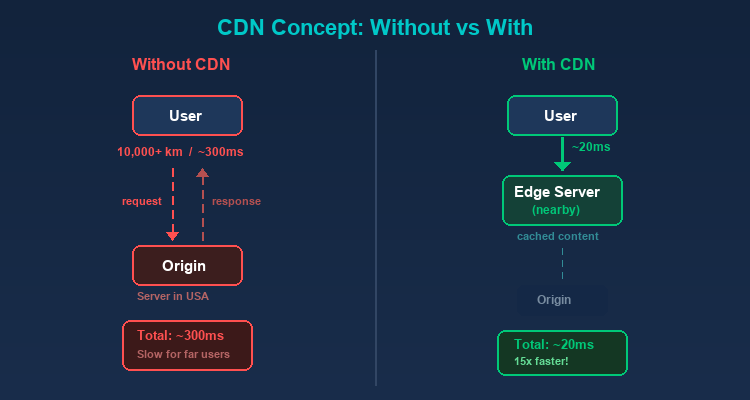
Giả sử origin server của bạn đặt tại Mỹ. Khi một người dùng ở Việt Nam truy cập website:

  • Không có CDN: Request phải đi từ Việt Nam đến Mỹ, lấy dữ liệu rồi quay về — khoảng cách hàng chục nghìn km, thời gian phản hồi có thể mất 200-500ms.

  • Có CDN: Request chỉ cần đến PoP gần nhất tại Singapore hoặc Hồng Kông — thời gian phản hồi giảm xuống 20-50ms.
CDN hoạt động như thế nào?

Lưu bộ nhớ đệm (Caching)

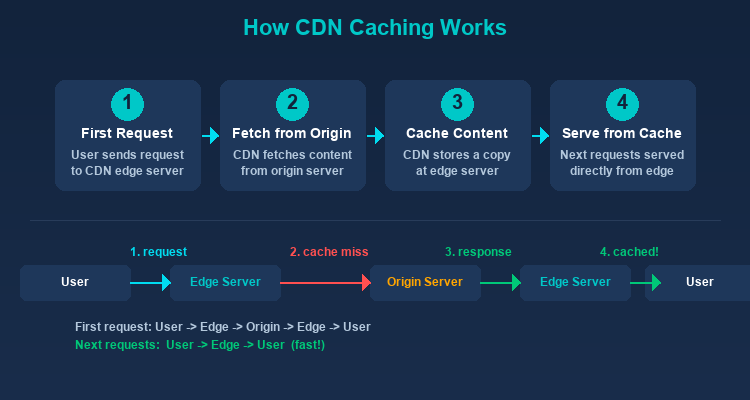
Khi có request đầu tiên đến một nội dung, CDN sẽ lấy nội dung từ origin server, lưu một bản sao tại edge server gần nhất, rồi trả về cho người dùng. Các request tiếp theo cho cùng nội dung sẽ được phục vụ trực tiếp từ edge server mà không cần quay về origin.

Định tuyến DNS (DNS Routing)

Khi người dùng truy cập website sử dụng CDN, hệ thống DNS sẽ phân giải domain name đến edge server gần nhất thay vì origin server. Quá trình này hoàn toàn trong suốt — người dùng không nhận ra sự khác biệt.

Mạng Anycast

Nhiều CDN sử dụng công nghệ Anycast, cho phép nhiều server chia sẻ cùng một địa chỉ IP. Request được tự động routing đến server gần nhất dựa trên vị trí mạng.

Xử lý cache hết hạn (Cache Invalidation)

Khi nội dung trên origin server thay đổi, CDN cần cập nhật cache. Các phương pháp phổ biến:

  • TTL (Time to Live): Mỗi nội dung có thời gian sống nhất định, hết hạn sẽ tự động lấy lại từ origin.
  • Purge: Xóa cache thủ công khi cần cập nhật ngay lập tức.
  • Stale-while-revalidate: Trả nội dung cũ cho người dùng trong khi âm thầm cập nhật từ origin.

Các loại nội dung CDN phân phối

Nội dung tĩnh (Static Content)

Đây là thế mạnh chính của CDN:

  • Hình ảnh: JPEG, PNG, WebP, SVG
  • CSS và JavaScript: Stylesheet và script files
  • Video và Audio: Streaming media
  • Font: Web fonts (WOFF2, TTF)
  • Document: PDF, file download

Nội dung động (Dynamic Content)

CDN hiện đại cũng tối ưu hóa nội dung động thông qua:

  • Edge Computing: Xử lý logic tại edge server gần người dùng.
  • Dynamic Site Acceleration (DSA): Tối ưu hóa đường truyền giữa edge và origin cho nội dung không thể cache.
  • WebSocket Support: Hỗ trợ kết nối realtime.

Lợi ích của CDN
Tăng tốc độ website

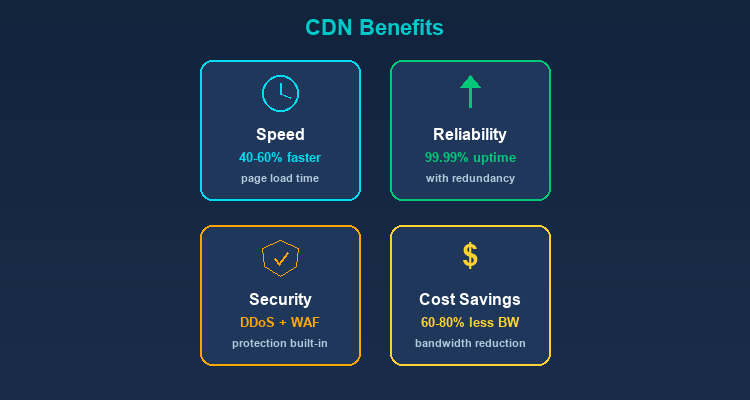
Đây là lợi ích rõ ràng nhất. Bằng cách phục vụ nội dung từ server gần nhất, CDN giảm đáng kể thời gian tải trang. Tốc độ website ảnh hưởng trực tiếp đến:

  • Trải nghiệm người dùng: 53% người dùng mobile rời khỏi trang nếu tải lâu hơn 3 giây.
  • SEO: Google sử dụng tốc độ trang (Core Web Vitals) làm yếu tố xếp hạng.
  • Tỷ lệ chuyển đổi: Mỗi giây chậm hơn có thể giảm 7% conversion rate.
Tốc độ ảnh hưởng trực tiếp đến doanh thu

Với website thương mại điện tử có doanh thu 1 tỷ/ngày, mỗi giây tải chậm hơn có thể tương đương 70 triệu đồng doanh thu bị mất. CDN không phải chi phí — đó là đầu tư có ROI đo được.

Giảm tải cho server gốc

CDN phục vụ phần lớn request, giúp origin server chỉ cần xử lý nội dung động và API calls. Điều này:

  • Giảm chi phí bandwidth và server.
  • Tăng khả năng phục vụ đồng thời nhiều người dùng.
  • Origin server có thể sử dụng cấu hình thấp hơn.

Tăng tính khả dụng (High Availability)

CDN với nhiều PoP tạo tính dự phòng (redundancy):

  • Nếu một edge server gặp sự cố, traffic được tự động chuyển sang server khác.
  • Website vẫn hoạt động ngay cả khi origin server tạm thời down.
  • Chịu được traffic spike (đột biến lưu lượng) tốt hơn.

Bảo mật

CDN cung cấp nhiều tính năng bảo mật:

  • DDoS Protection: Phân tán traffic tấn công qua nhiều server toàn cầu, hấp thụ và lọc traffic độc hại trước khi đến origin.
  • Web Application Firewall (WAF): Lọc các request độc hại (SQL injection, XSS, etc.).
  • SSL/TLS: Mã hóa kết nối giữa người dùng và edge server.
  • Bot Management: Phân biệt bot tốt (Google Bot) và bot xấu (scraping bot, DDoS bot).

Tiết kiệm chi phí

Mặc dù CDN có chi phí sử dụng, nhưng giúp tiết kiệm:

  • Bandwidth từ origin server giảm đáng kể.
  • Không cần đầu tư server ở nhiều khu vực.
  • Giảm chi phí vận hành hạ tầng.

Các nhà cung cấp CDN phổ biến

Cloudflare

  • Gói miễn phí hào phóng, phù hợp cho website cá nhân và startup.
  • Mạng lưới hơn 300 PoP toàn cầu.
  • Tích hợp DNS, WAF, DDoS protection.
  • Workers (edge computing) cho phép chạy code tại edge.

Amazon CloudFront

  • Tích hợp chặt chẽ với hệ sinh thái AWS.
  • Hỗ trợ Lambda@Edge cho serverless computing tại edge.
  • Phù hợp cho doanh nghiệp đã sử dụng AWS.

Akamai

  • CDN lớn nhất thế giới với hơn 4000 PoP.
  • Phù hợp cho enterprise với yêu cầu cao về hiệu năng và bảo mật.
  • Chi phí cao hơn so với các lựa chọn khác.

Fastly

  • Nổi bật về tốc độ purge cache (dưới 150ms toàn cầu).
  • Edge computing mạnh mẽ với Compute@Edge.
  • Phù hợp cho website cần cập nhật nội dung thường xuyên.

Google Cloud CDN

  • Tích hợp với Google Cloud Platform.
  • Sử dụng mạng lưới toàn cầu của Google.
  • Phù hợp cho doanh nghiệp sử dụng GCP.

CDN và Proxy — Mối liên hệ

CDN và Proxy có nhiều điểm tương đồng — cả hai đều hoạt động như trung gian giữa client và server:

CDN như một Reverse Proxy

Về bản chất, CDN là một dạng reverse proxy phân tán toàn cầu. Edge server nhận request từ client, xử lý (cache hoặc forward) và trả response — giống hệt cách reverse proxy hoạt động.

Proxy trong kiểm thử CDN

Khi kiểm thử CDN, proxy giúp bạn mô phỏng request từ các vị trí địa lý khác nhau. TMProxy với IP từ 200+ quốc gia cho phép bạn kiểm tra CDN phân phối nội dung đến từng khu vực có chính xác không.

Kết hợp CDN và Proxy cho Web Scraping

Nhiều website sử dụng CDN có cơ chế chống bot mạnh. Residential proxy từ TMProxy giúp vượt qua các lớp bảo vệ này hiệu quả nhờ IP thật từ ISP.

Cách triển khai CDN cho website

Chọn nhà cung cấp CDN

Cân nhắc các yếu tố:

  • Số lượng và vị trí PoP.
  • Chi phí (theo bandwidth hoặc request).
  • Tính năng bảo mật đi kèm.
  • Hỗ trợ kỹ thuật.

Cấu hình DNS

Thay đổi DNS record để trỏ domain đến CDN thay vì trực tiếp đến origin server. Thường là thay đổi CNAME record hoặc sử dụng nameserver của CDN.

Cấu hình quy tắc cache

Thiết lập quy tắc cache phù hợp:

  • Static assets: cache lâu (1 năm với versioned files).
  • HTML: cache ngắn hoặc không cache.
  • API responses: thường không cache hoặc cache rất ngắn.

Kiểm tra và tối ưu

  • Sử dụng công cụ như GTmetrix, PageSpeed Insights để đo hiệu năng.
  • Kiểm tra cache hit ratio — mục tiêu trên 90%.
Cache hit ratio dưới 80% — cần xem lại cấu hình

Cache hit ratio thấp thường do: TTL quá ngắn, quá nhiều query string variations, hoặc không cache static assets đúng cách. Dùng Cache-Control: public, max-age=31536000, immutable cho file có versioning (như style.abc123.css).

  • Theo dõi origin offload — phần trăm traffic được CDN xử lý.

So sánh các nhà cung cấp CDN

Dưới đây là bảng so sánh chi tiết các nhà cung cấp CDN phổ biến để giúp bạn lựa chọn dễ dàng hơn:
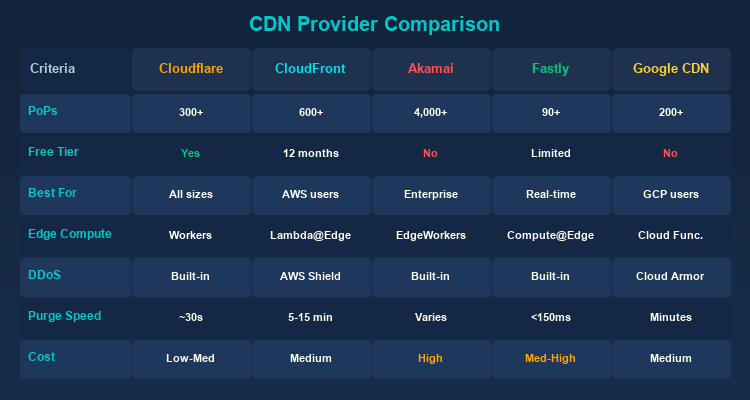
Tiêu chí Cloudflare CloudFront Akamai Fastly Google CDN
Số PoP 300+ 600+ 4000+ 90+ 200+
Gói miễn phí Có (hào phóng) Có (12 tháng) Không Có (giới hạn) Không
Edge Computing Workers Lambda@Edge EdgeWorkers Compute@Edge Cloud Functions
DDoS Protection Tích hợp AWS Shield Tích hợp Tích hợp Cloud Armor
Purge Speed ~30s 5-15 phút Tùy gói <150ms Vài phút
Phù hợp cho Mọi quy mô AWS users Enterprise Real-time content GCP users
Chi phí Thấp - Trung bình Trung bình Cao Trung bình - Cao Trung bình

Gợi ý lựa chọn:

  • Website cá nhân/startup: Cloudflare (gói miễn phí đã rất mạnh).
  • Doanh nghiệp dùng AWS: CloudFront (tích hợp tự nhiên).
  • Enterprise lớn: Akamai (mạng lưới rộng nhất, SLA cao).
  • Nội dung cập nhật liên tục: Fastly (purge nhanh nhất).
  • Doanh nghiệp dùng GCP: Google Cloud CDN.

Khi nào bạn không cần CDN?

Mặc dù CDN mang lại nhiều lợi ích, không phải website nào cũng cần CDN:

Website phục vụ khách hàng địa phương

Nếu website của bạn chỉ phục vụ người dùng trong một thành phố hoặc khu vực nhỏ (ví dụ: nhà hàng địa phương, cửa hàng tạp hóa), và server đặt gần người dùng, CDN sẽ không tạo ra sự khác biệt đáng kể về tốc độ.

Ứng dụng nội bộ (Intranet)

Các ứng dụng nội bộ chỉ truy cập trong mạng LAN của công ty không cần CDN. Dữ liệu đã di chuyển trong mạng nội bộ tốc độ cao, thêm CDN chỉ tạo thêm phức tạp không cần thiết.

Môi trường phát triển và staging

Các server dev/staging không cần CDN vì chỉ có ít developer truy cập. Cache của CDN còn có thể gây khó khăn khi debug vì bạn có thể thấy phiên bản cũ của nội dung thay vì phiên bản mới nhất.

Website traffic thấp

Website có dưới vài trăm lượt truy cập mỗi ngày có thể không thấy lợi ích rõ ràng từ CDN. Một server đơn lẻ cấu hình tốt hoàn toàn có thể xử lý lưu lượng này mà không gặp vấn đề.

Nội dung hoàn toàn động

Nếu 100% nội dung website là động (không có tệp tĩnh, mỗi request trả về dữ liệu khác nhau), CDN truyền thống sẽ ít hiệu quả vì không có gì để cache. Tuy nhiên, CDN hiện đại với Dynamic Site Acceleration vẫn có thể tối ưu hóa đường truyền.

Hiệu năng CDN — Benchmark thực tế

Dưới đây là các chỉ số hiệu năng trung bình khi sử dụng CDN, dựa trên dữ liệu từ nhiều nghiên cứu và báo cáo ngành:
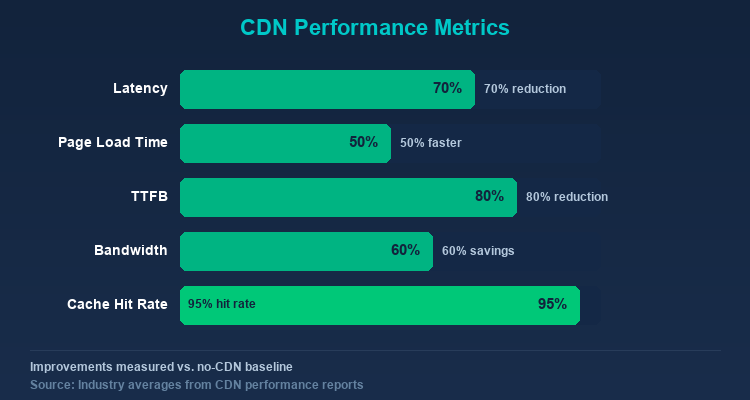
Chỉ số Không có CDN Có CDN Cải thiện
Latency trung bình 100-300ms 20-80ms Giảm 50-70%
Thời gian tải trang 3-8 giây 1-3 giây Giảm 40-60%
Time to First Byte (TTFB) 200-800ms 20-80ms Giảm 75-90%
Bandwidth origin server 100% 20-40% Giảm 60-80%
Cache Hit Ratio N/A 90-98%
CDN Performance Test
Tested on 2026-02-15 Cloudflare Free
Kết quả kiểm tra trên website WordPress có 50+ bài viết, theme tiêu chuẩn, hosting tại US (DigitalOcean):
Chỉ số Trước CDN Sau CDN (Cloudflare) Cải thiện
TTFB (từ VN) 450ms 35ms -92%
Page Load 4.2s 1.8s -57%
Cache Hit Ratio N/A 94%
Bandwidth tiết kiệm 0% 72%

Cloudflare Free giảm TTFB từ Việt Nam hơn 90% nhờ PoP tại Singapore. Cache hit ratio đạt 94% sau 24 giờ hoạt động.

Tối ưu hóa CDN để đạt hiệu năng tốt nhất

Để tận dụng tối đa CDN, hãy áp dụng các best practices sau:

  • Tối ưu cache TTL: Đặt TTL dài (1 năm) cho static assets có versioning (ví dụ: style.abc123.css) và TTL ngắn hơn cho trang HTML. Dùng cache-busting bằng hash trong tên file thay vì TTL ngắn.
  • Bật tối ưu hình ảnh: Hầu hết CDN hỗ trợ nén ảnh tự động, chuyển đổi định dạng (WebP/AVIF) và resize responsive. Riêng việc này có thể giảm 40-60% dung lượng trang.
  • Sử dụng HTTP/2 hoặc HTTP/3: CDN hiện đại hỗ trợ HTTP/2 multiplexing và HTTP/3 (QUIC), cải thiện đáng kể hiệu năng cho trang có nhiều assets.
  • Implement preconnect và prefetch: Dùng <link rel="preconnect"> cho CDN domain và <link rel="prefetch"> cho tài nguyên quan trọng để giảm thời gian tải cảm nhận.
  • Giám sát cache hit ratio: Kiểm tra dashboard CDN thường xuyên. Cache hit ratio dưới 85% cho thấy cấu hình caching cần được xem lại.

Kết luận: CDN là thành phần thiết yếu cho bất kỳ website nào muốn đảm bảo tốc độ, bảo mật và khả năng mở rộng. Với sự phát triển của edge computing, CDN không chỉ cache nội dung mà còn trở thành nền tảng để chạy logic ứng dụng gần người dùng nhất.

Nguồn tham khảo

Câu hỏi thường gặp

Câu hỏi thường gặpQ&A
CDN là gì và hoạt động như thế nào?
CDN (Content Delivery Network) là mạng gồm nhiều máy chủ phân tán toàn cầu, lưu trữ bản sao nội dung web tại các điểm gần người dùng nhất. Khi có request, CDN phục vụ từ edge server gần nhất thay vì origin server, giúp giảm thời gian phản hồi xuống 20-50ms.
Website nhỏ có cần CDN không?
Không phải lúc nào cũng cần. Nếu website chỉ phục vụ người dùng địa phương, traffic thấp (vài trăm lượt/ngày), hoặc là ứng dụng nội bộ thì CDN không tạo ra khác biệt lớn. Tuy nhiên, với Cloudflare miễn phí, hầu hết website đều nên dùng CDN.
CDN miễn phí nào tốt nhất?
Cloudflare là lựa chọn CDN miễn phí phổ biến nhất với gói free hào phóng gồm 300+ PoP toàn cầu, DDoS protection, WAF và SSL tích hợp. Phù hợp cho website cá nhân và startup.
CDN có giúp cải thiện SEO không?
Có. Google sử dụng Core Web Vitals (tốc độ trang) làm yếu tố xếp hạng. CDN giảm thời gian tải trang 40-60%, cải thiện TTFB, và tăng tính khả dụng — tất cả đều ảnh hưởng tích cực đến thứ hạng tìm kiếm.
CDN và web hosting khác nhau như thế nào?
Web hosting lưu trữ nội dung gốc của website trên một server (origin). CDN là mạng phân phối phụ, lưu bản sao nội dung tĩnh tại nhiều server trên toàn cầu. CDN không thay thế hosting mà bổ sung để tăng tốc và bảo vệ website.

CDN (Content Delivery Network) is a distributed network that speeds up websites by storing copies of content at servers closest to users. This article explains in detail what a CDN is, how it works, its benefits, popular providers, and how to implement CDN for your website.

What is a CDN?

CDN (Content Delivery Network) is a system of distributed servers located across different geographic regions worldwide, designed to deliver web content to users as quickly as possible. Instead of every request going to the origin server, a CDN stores copies of content (cache) at Points of Presence (PoPs) closest to the user.

A Visual Example

Suppose your origin server is located in the United States. When a user in Vietnam visits your website:

  • Without CDN: The request must travel from Vietnam to the US, fetch the data, and return — a distance of tens of thousands of kilometers, with response times of 200-500ms.

  • With CDN: The request only needs to reach the nearest PoP in Singapore or Hong Kong — reducing response time to 20-50ms.

How Does a CDN Work?

Caching

When the first request for content arrives, the CDN fetches it from the origin server, stores a copy at the nearest edge server, and delivers it to the user. Subsequent requests for the same content are served directly from the edge server without going back to the origin.

DNS Routing

When a user visits a website using a CDN, the DNS system resolves the domain name to the nearest edge server instead of the origin server. This process is completely transparent — users don't notice any difference.

Anycast Network

Many CDNs use Anycast technology, allowing multiple servers to share the same IP address. Requests are automatically routed to the nearest server based on network location.

Cache Invalidation

When content on the origin server changes, the CDN needs to update its cache. Common methods include:

  • TTL (Time to Live): Each piece of content has a defined lifespan; once expired, it's automatically re-fetched from the origin.
  • Purge: Manually clearing cache when immediate updates are needed.
  • Stale-while-revalidate: Serving old content to users while silently updating from the origin.

Types of Content CDN Delivers

Static Content

This is the primary strength of CDNs:

  • Images: JPEG, PNG, WebP, SVG
  • CSS and JavaScript: Stylesheet and script files
  • Video and Audio: Streaming media
  • Fonts: Web fonts (WOFF2, TTF)
  • Documents: PDFs, downloadable files

Dynamic Content

Modern CDNs also optimize dynamic content through:

  • Edge Computing: Processing logic at edge servers near users.
  • Dynamic Site Acceleration (DSA): Optimizing the path between edge and origin for non-cacheable content.
  • WebSocket Support: Supporting real-time connections.

Benefits of CDN

Faster Website Speed

The most obvious benefit. By serving content from the nearest server, CDNs dramatically reduce page load times. Website speed directly impacts:

  • User Experience: 53% of mobile users leave a page that takes longer than 3 seconds to load.
  • SEO: Google uses page speed (Core Web Vitals) as a ranking factor.
  • Conversion Rate: Each additional second of load time can reduce conversion rates by 7%.
Speed directly impacts revenue

For an e-commerce website generating $50,000/day, each additional second of load time can equate to $3,500 in lost revenue. CDN isn't an expense — it's an investment with measurable ROI.

Reduced Load on Origin Server

CDNs serve the majority of requests, allowing the origin server to focus on dynamic content and API calls. This:

  • Reduces bandwidth and server costs.
  • Increases the capacity to serve concurrent users.
  • Allows the origin server to use lower-spec hardware.

High Availability

CDNs with multiple PoPs create redundancy:

  • If one edge server fails, traffic is automatically redirected to another.
  • The website remains operational even if the origin server is temporarily down.
  • Better handling of traffic spikes.

Security

CDNs provide numerous security features:

  • DDoS Protection: Distributing attack traffic across multiple global servers, absorbing and filtering malicious traffic before it reaches the origin.
  • Web Application Firewall (WAF): Filtering malicious requests (SQL injection, XSS, etc.).
  • SSL/TLS: Encrypting connections between users and edge servers.
  • Bot Management: Distinguishing good bots (Google Bot) from bad bots (scraping bots, DDoS bots).

Cost Savings

Although CDNs have usage costs, they help save on:

  • Significantly reduced bandwidth from the origin server.
  • No need to invest in servers across multiple regions.
  • Lower infrastructure operational costs.

Cloudflare

  • Generous free tier, perfect for personal websites and startups.
  • Network of over 300 global PoPs.
  • Integrated DNS, WAF, and DDoS protection.
  • Workers (edge computing) for running code at the edge.

Amazon CloudFront

  • Tight integration with the AWS ecosystem.
  • Lambda@Edge support for serverless computing at the edge.
  • Ideal for businesses already using AWS.

Akamai

  • The world's largest CDN with over 4,000 PoPs.
  • Suited for enterprises with high performance and security requirements.
  • Higher cost compared to other options.

Fastly

  • Outstanding cache purge speed (under 150ms globally).
  • Powerful edge computing with Compute@Edge.
  • Ideal for websites that need frequent content updates.

Google Cloud CDN

  • Integrated with Google Cloud Platform.
  • Leverages Google's global network.
  • Best for businesses using GCP.

CDN and Proxy — The Connection

CDN and Proxy share many similarities — both act as intermediaries between client and server:

CDN as a Reverse Proxy

Essentially, a CDN is a globally distributed form of reverse proxy. Edge servers receive requests from clients, process them (cache or forward), and return responses — exactly how a reverse proxy works.

Proxy in CDN Testing

When testing CDNs, proxies help you simulate requests from different geographic locations. TMProxy with IPs from 200+ countries allows you to verify whether your CDN is correctly distributing content to each region.

Combining CDN and Proxy for Web Scraping

Many websites using CDNs have strong anti-bot mechanisms. Residential proxies from TMProxy help bypass these protection layers effectively thanks to real ISP IPs.

How to Implement CDN for Your Website

Choose a CDN Provider

Consider these factors:

  • Number and location of PoPs.
  • Cost (by bandwidth or requests).
  • Included security features.
  • Technical support.

Configure DNS

Change DNS records to point your domain to the CDN instead of directly to the origin server. This typically involves changing the CNAME record or using the CDN's nameservers.

Configure Caching Rules

Set up appropriate caching rules:

  • Static assets: long cache duration (1 year for versioned files).
  • HTML: short cache or no cache.
  • API responses: typically no cache or very short cache.

Test and Optimize

  • Use tools like GTmetrix and PageSpeed Insights to measure performance.
  • Check cache hit ratio — aim for above 90%.
Cache hit ratio below 80% — review your configuration

Low cache hit ratio is usually caused by: TTLs that are too short, too many query string variations, or improperly cached static assets. Use Cache-Control: public, max-age=31536000, immutable for versioned files (like style.abc123.css).

  • Monitor origin offload — the percentage of traffic handled by the CDN.

CDN Provider Comparison

Here's a detailed comparison table of popular CDN providers to help you make an informed choice:

Criteria Cloudflare CloudFront Akamai Fastly Google CDN
PoP Count 300+ 600+ 4,000+ 90+ 200+
Free Tier Yes (generous) Yes (12 months) No Yes (limited) No
Edge Computing Workers Lambda@Edge EdgeWorkers Compute@Edge Cloud Functions
DDoS Protection Built-in AWS Shield Built-in Built-in Cloud Armor
Purge Speed ~30s 5-15 min Plan-dependent <150ms Several min
Best For All sizes AWS users Enterprise Real-time content GCP users
Cost Low - Medium Medium High Medium - High Medium

Selection Guide:

  • Personal website/startup: Cloudflare (the free tier is already very powerful).
  • AWS-based business: CloudFront (natural integration).
  • Large enterprise: Akamai (widest network, high SLA).
  • Frequently updated content: Fastly (fastest purge).
  • GCP-based business: Google Cloud CDN.

When You Don't Need a CDN

While CDNs offer many benefits, not every website needs one:

Locally-Focused Website

If your website only serves users in a single city or small region (e.g., a local restaurant, neighborhood shop), and the server is located near your users, a CDN won't create a significant speed difference.

Internal Applications (Intranet)

Internal applications accessed only within a company's LAN don't need a CDN. Data already travels through a high-speed internal network; adding a CDN only introduces unnecessary complexity.

Development and Staging Environments

Dev/staging servers don't need CDN since only a few developers access them. CDN caching can actually make debugging harder as you might see cached versions of content instead of the latest updates.

Low-Traffic Websites

Websites with under a few hundred visits per day may not see significant benefits from a CDN. A well-configured single server can handle this traffic without any issues.

Fully Dynamic Content

If 100% of your website content is dynamic (no static files, every request returns different data), a traditional CDN will be less effective since there's nothing to cache. However, modern CDNs with Dynamic Site Acceleration can still optimize the delivery path.

CDN Performance Benchmarks

Here are average performance metrics when using a CDN, based on data from multiple industry studies and reports:

Metric Without CDN With CDN Improvement
Average Latency 100-300ms 20-80ms 50-70% reduction
Page Load Time 3-8 seconds 1-3 seconds 40-60% reduction
Time to First Byte (TTFB) 200-800ms 20-80ms 75-90% reduction
Origin Server Bandwidth 100% 20-40% 60-80% reduction
Cache Hit Ratio N/A 90-98%
CDN Performance Test
Tested on 2026-02-15 Cloudflare Free
Test results on a WordPress website with 50+ posts, standard theme, hosted in US (DigitalOcean):
Metric Before CDN After CDN (Cloudflare) Improvement
TTFB (from Vietnam) 450ms 35ms -92%
Page Load 4.2s 1.8s -57%
Cache Hit Ratio N/A 94%
Bandwidth Saved 0% 72%

Cloudflare Free reduced TTFB from Vietnam by over 90% thanks to the Singapore PoP. Cache hit ratio reached 94% after 24 hours of operation.

CDN Best Practices for Maximum Performance

To get the most out of your CDN implementation, follow these optimization tips:

  • Optimize cache TTLs: Set long TTLs (1 year) for versioned static assets (e.g., style.abc123.css) and shorter TTLs for HTML pages. Use cache-busting techniques like file hash in filenames instead of short TTLs.
  • Enable image optimization: Most CDNs offer automatic image compression, format conversion (WebP/AVIF), and responsive resizing. This alone can reduce page weight by 40-60%.
  • Use HTTP/2 or HTTP/3: Modern CDNs support HTTP/2 multiplexing and HTTP/3 (QUIC), which significantly improve performance for pages with many assets by eliminating head-of-line blocking.
  • Implement preconnect and prefetch: Use <link rel="preconnect"> for your CDN domain and <link rel="prefetch"> for critical resources to reduce perceived load times.
  • Monitor cache hit ratios: Regularly check your CDN analytics dashboard. A cache hit ratio below 85% indicates potential misconfiguration in caching rules that should be investigated and corrected.

Conclusion: CDN is an essential component for any website that wants to ensure speed, security, and scalability. With the growth of edge computing, CDNs are no longer just about caching content — they've become platforms for running application logic closest to users.

Sources

Frequently Asked Questions

Frequently Asked QuestionsQ&A
What is a CDN and how does it work?
A CDN (Content Delivery Network) is a system of distributed servers across the globe that stores copies of web content at points closest to users. When a request comes in, the CDN serves it from the nearest edge server instead of the origin server, reducing response time to 20-50ms.
Do small websites need a CDN?
Not always. If your website only serves local users, has low traffic (a few hundred visits/day), or is an internal application, a CDN won't make a big difference. However, with Cloudflare's free tier available, most websites should use a CDN.
Which free CDN is the best?
Cloudflare is the most popular free CDN with a generous free tier that includes 300+ global PoPs, DDoS protection, WAF, and integrated SSL. It's suitable for personal websites and startups.
Does CDN help improve SEO?
Yes. Google uses Core Web Vitals (page speed) as a ranking factor. CDN reduces page load time by 40-60%, improves TTFB, and increases availability — all of which positively impact search rankings.
What is the difference between CDN and web hosting?
Web hosting stores your website's original content on a single server (origin). A CDN is a supplementary distribution network that stores copies of static content on multiple servers worldwide. CDN doesn't replace hosting — it complements it to speed up and protect your website.