
What is an Alias? A Guide to Using Alias Domains Effectively
Development

What is an Alias? A Guide to Using Alias Domains Effectively

An alias is an alternative name for an object in IT. Alias Domains let you point multiple domain names to a single website. Learn how to configure them on cPanel, Directadmin, and Plesk.

✦ Quick summary
An alias is an alternative name for an object in IT. Alias Domains let you point multiple domain names to a single website. Learn how to configure them on cPanel, Directadmin, and Plesk.
How was this post?

Alias is an alternative name for an object in information technology, ranging from variables in programming to domain names on the web. This article explains the concept of Alias Domain in detail, how it works, its benefits, and provides configuration guides for cPanel, Directadmin, and Plesk.

Overview of Alias

To get a better overview of aliases, we first need to clearly define what they are and their practical applications.

What is an Alias?

What is an alias? The word "alias" means another name, a nickname, or a pseudonym. In information technology, an alias is commonly used to refer to an alternative name or label for a specific object. For example, in programming, you can create an alias for a variable or function to make the source code shorter and easier to understand. From a networking perspective, an alias can refer to a virtual IP address that allows a device to access multiple services simultaneously.

Using aliases is not just about making work easier — it also provides higher security for users. You can use an alias to keep your real identity hidden on forums or social media platforms. In practice, aliases are becoming a useful tool for optimizing workflows.

What is an Alias Domain? Examples of Alias Domains

An alias domain is a type of domain name that you can use to point to an existing website. This means that when users type the alias domain into their browser, they will be redirected to the original website you have specified. This is an effective method for managing multiple domain names without having to build separate websites.

For example, you might own the primary domain example.com and want to create an additional domain example.net by setting up example.net as an alias domain for example.com. When someone visits example.net, they will automatically be redirected to example.com. This not only strengthens brand recognition but also simplifies management.

How Aliases Work
When an alias domain is configured, it works very similarly to the primary domain but does not require content duplication. This saves both cost and time for website administrators.

In simple terms, when an alias domain is activated, it maps to the IP address of the original domain. This means all user requests are routed to the primary domain's server. As a result, the content is displayed identically for both domains, even though the user entered the alias domain.

What is an IP Address? Advantages, Disadvantages, and How It Works

Additionally, managing alias domains is very straightforward. You can make changes to the primary domain and everything will automatically update for the alias domain without any extra steps. This is why many businesses choose to use alias domains as part of their marketing and branding strategy.

When Should You Use an Alias?

Using an alias domain is not always appropriate; however, there are certain situations where you should consider applying it. Below are some typical scenarios.

Using Multiple Domain Addresses for a Single Website

One of the most common reasons to use an alias domain is to manage multiple domain addresses for the same website. This helps strengthen your online presence and supports advertising campaigns.

For instance, if you own an online store selling health products, you could purchase multiple domains related to your products — such as suckhoe.com, skincare.com, or thucphamchucnang.com — then set them all as aliases for your official web address. This way, you can attract different customer segments without spending too much effort on management.

Using a Single Email Account with Multiple Domain Extensions

One of the major benefits of using alias domains is the ability to use a single email account with multiple domain extensions. This can be very useful in a business environment.

For example, you could use an email account like contact@company.com and then configure aliases for other domains such as info@company.net or support@company.org. When customers send emails to any of these addresses, all messages will be forwarded to the primary email account. This helps you manage all customer contacts more easily.

Creating Multiple Landing Pages for Different Marketing Campaigns

In marketing, creating multiple landing pages for different campaigns is very important. Using alias domains allows you to do this flexibly.

Suppose you are running an advertising campaign for a new product — you could create an alias domain like productlaunch.company.com. This way, you can easily track and analyze the performance of each campaign without having to rebuild the website for every campaign.

Creating Multiple Website Versions for Different Regions

If you run an international business, having multiple website versions for different regions is essential. Alias domains help you accomplish this without difficulty.

You could own a primary domain like yourbusiness.com, then create alias domains such as yourbusiness.fr for France or yourbusiness.de for Germany. Each alias can lead to a language version or content appropriate for the corresponding geographic region. This helps you serve customers better and increase sales opportunities.

Benefits of Domain Aliases

Using alias domains brings many benefits to businesses. Below are some key highlights.

Strengthening Brand Recognition

One of the greatest benefits of using alias domains is the ability to strengthen brand recognition. With multiple domains related to your brand, you can attract more customers and enhance your brand value.

The memorability of web addresses also makes it easier for customers to find and return to you. This is especially important in today's competitive environment, where capturing customer attention is very difficult.

Easier Advertising

Using alias domains makes advertising easier. Instead of running multiple promotional campaigns for each individual web address, you only need to focus on one primary domain and use aliases for specific campaigns.

This not only saves time but also reduces advertising costs. With additional alias domains, you can run A/B tests to see which address delivers the best results without having to create a new website from scratch.

What is GitHub Proxy?

Cost Savings

Using alias domains also helps you save significant costs. Instead of paying for multiple domains and different hosting plans, you only need one primary domain and use aliases for other addresses.

This is very beneficial for small businesses or startups in their early stages when budgets are limited. You can still expand your online presence without worrying too much about costs.

Comparing Domain, SubDomain, Addon Domain, and Alias/Parked Domain

When it comes to domain names, there are many different concepts you need to understand to make the right decisions. Below are some common domain types.

Domain

A domain, or domain name, is the main address that users type into their browser to access a website. It consists of two basic parts: the name and the extension (such as .com, .net, .org). It is the address you register, own, and use to build your brand.

SubDomain

A subdomain is a part of the main domain. It is commonly used to separate different sections of a website. For example, blog.example.com is a subdomain of example.com. Subdomains allow you to organize content more effectively.

Addon Domain

An addon domain is a completely independent domain that is hosted on the same hosting account as the primary domain. This means you can have one or more addon domains without purchasing additional hosting. Addon domains are commonly used for different projects or websites.

Alias/Parked Domain

An alias domain, also known as a parked domain, is a domain name that points to another web address without needing to reinstall content. It acts as a protective layer for the primary domain and can help you control traffic without creating multiple separate websites.

The differences between these domain types are important so you can choose the most suitable solution for your needs.

Guide to Using Alias Domains

Using alias domains is not complicated, but specific steps are needed to ensure proper setup. Below is a step-by-step guide for using alias domains.

How to Configure Alias Domains on cPanel

cPanel is one of the most popular website management tools. Configuring alias domains on cPanel is also very simple and straightforward.
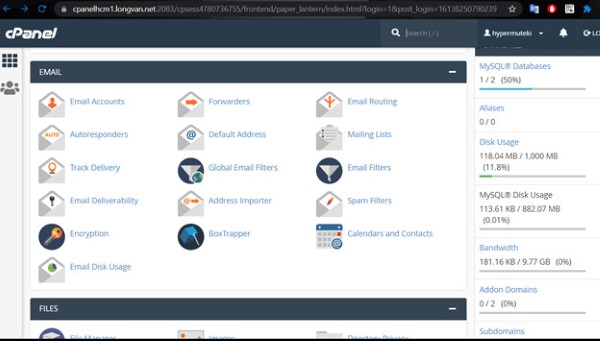
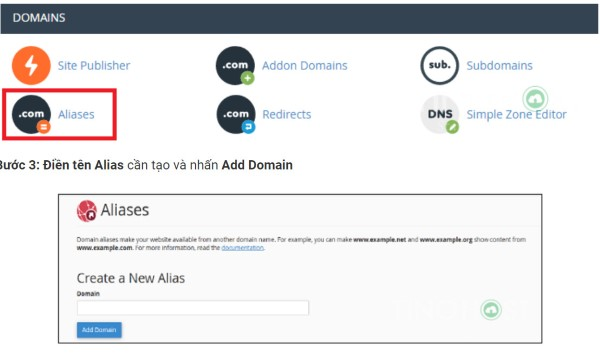
Creating an Alias Domain on cPanel First, log in to your cPanel account. Then, find the "Alias" or "Parked Domains" section. Here, you will see an option to add a new alias domain.

Enter the domain name you want to add in the text field and click the "Add Domain" button. Once the process is complete, your alias domain will be added and will point to the main website.

Editing an Alias Domain on cPanel If you need to edit information related to an alias domain, you can easily do this on cPanel. Simply navigate to the list of aliases you have created, then click the "Edit" option. You can change the domain name or other settings as needed.

Searching for an Alias Domain on cPanel If you have many alias domains and want to find a specific address, you can use the search function on cPanel. Type the domain name you are looking for in the search box and the system will quickly filter the corresponding results.

Deleting an Alias Domain on cPanel To delete an alias domain you no longer use, go to the alias list on cPanel. Find the domain name to delete and click the "Delete" button. Confirm your action and the alias domain will be removed from your account.

How to Configure Alias Domains on Directadmin
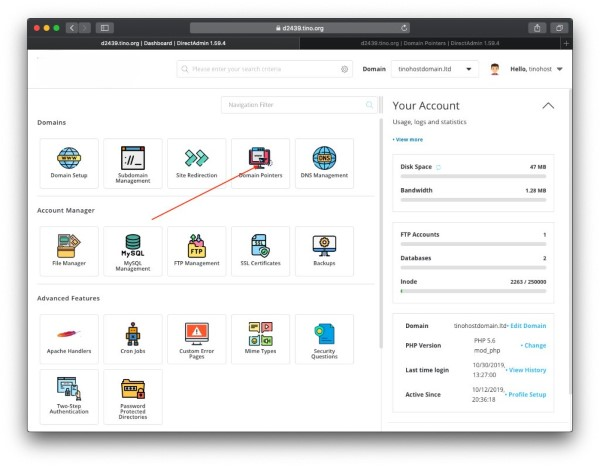
Direct Admin is also a popular hosting management tool used by many people. The process of configuring alias domains on Directadmin is relatively easy.

Creating an Alias Domain on Direct Admin After logging into your Directadmin account, navigate to the "Domain Setup" section. Here, you will see the "Create Alias Domain" option. Enter the domain name you want to add and click "Create".

Editing an Alias Domain on Direct Admin To edit an alias domain, simply go to the "Domain Setup" section, select the alias you want to edit, and click "Edit". Here, you can change the related information.

What is Shopee Proxy? A Guide to Choosing the Right Proxy for Shopee

Deleting an Alias Domain on Direct Admin When you no longer need a particular alias domain, go back to the "Domain Setup" section. Find the alias you want to delete and click "Delete". The system will confirm and remove that alias.

How to Configure Alias Domains on Plesk

Plesk is another highly popular hosting management platform. Configuring alias domains on Plesk is also quite simple and convenient.
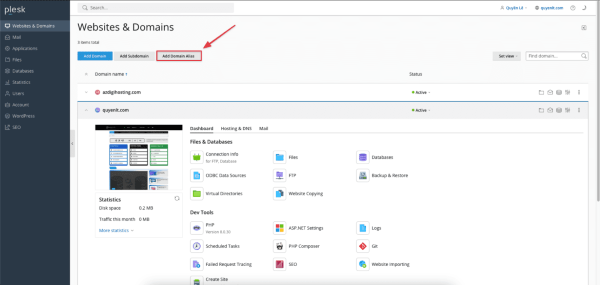
Creating an Alias Domain on Plesk

Log in to Plesk and navigate to the "Websites & Domains" section. Here, you will see the "Add New Alias" option. Enter the domain name you want to add and click the "OK" button.

Editing an Alias Domain on Plesk

To edit alias domain information, simply go back to the "Websites & Domains" section, find the alias you want to modify, and select "Edit". You can easily change the information here.

Deleting an Alias Domain on Plesk

When you want to delete an alias domain on Plesk, search in the alias list, then select the alias to delete and click "Remove". The system will ask you to confirm before performing the deletion.

Important Notes When Using Aliases

Although using alias domains brings many benefits, you should also keep several considerations in mind to optimize usage.

Name aliases carefully and clearly: Alias names should clearly reflect their function or purpose to avoid confusion.

Avoid using too many aliases: Using too many aliases can make code or systems difficult to understand and maintain.

Ensure aliases are not duplicated: Aliases should be named so they do not conflict with other aliases in the same context.

Test aliases thoroughly before use: Before using an alias, you should test it thoroughly to ensure it works as expected.

Use aliases responsibly: Aliases can be used for anonymity or to protect personal information, but they can also be exploited for malicious purposes. Therefore, use aliases responsibly and with caution.

Frequently Asked Questions About Aliases

Below are some frequently asked questions related to alias domains that users commonly have.

Should you use Alias Domains or Parked Domains when you already have subdomains and addon domains?

The answer depends on your specific needs. If you only need a different domain name to point to the same content, an alias domain is the better choice. On the other hand, if you want to manage multiple separate websites, addon domains or subdomains may be more suitable.

Why are there two terms — Parked Domain and Alias Domain — for the same concept?

In practice, these two terms are often used interchangeably, but sometimes Parked Domain refers to reserving a domain without using it, while Alias Domain can include pointing to more specific content. However, both serve the purpose of helping you manage multiple domain names more easily.

Should you use multiple Alias Domains?

Using multiple alias domains can bring many benefits, but you also need to be careful to avoid creating confusion. If your alias domains are all related to a single brand or common theme, then this is perfectly acceptable. Conversely, without a clear plan, it can be confusing for users.

{{< test-result title="So sanh cac loai ten mien" headers="Tieu chi|Domain|SubDomain|Addon Domain|Alias Domain" row1="Noi dung|Doc lap|Phan cua domain chinh|Doc lap|Giong domain chinh" row2="Hosting|Rieng|Chung voi domain chinh|Chung hosting|Chung hosting" row3="Chi phi|Cao|Mien phi|Them phi ten mien|Them phi ten mien" row4="Quan ly|Doc lap|Don gian|Phuc tap hon|Don gian" row5="SEO|Tot nhat|Tot|Doc lap|Khong anh huong" />}}

Note

Alias Domain phu hop khi ban can nhieu ten mien tro ve cung mot website. Ket hop voi SubDomain va Addon Domain de quan ly he thong ten mien hieu qua.

Conclusion: Alias is an alternative name that simplifies management in IT. Alias Domains allow you to point multiple domain names to the same website, strengthen brand recognition, and save costs. Configuration on cPanel, Directadmin, or Plesk is straightforward and quick.

Sources
Frequently Asked QuestionsQ&A

Alias là tên gọi thay thế cho một đối tượng trong công nghệ thông tin, từ biến trong lập trình đến tên miền trên web. Bài viết giải thích chi tiết khái niệm Alias Domain, cách hoạt động, lợi ích và hướng dẫn cấu hình trên cPanel, Directadmin, Plesk.

Tổng quan về Alias

Để có cái nhìn tổng quan hơn về alias, trước tiên chúng ta cần định nghĩa rõ ràng về nó và những ứng dụng của nó trong thực tế.

Alias là gì?

Alias là gì? Alias trong tiếng Anh có nghĩa là tên gọi khác, biệt danh hoặc tên giả. Trong các lĩnh vực công nghệ thông tin, alias thường được sử dụng để chỉ một cái tên hoặc nhãn hiệu thay thế cho một đối tượng cụ thể. Chẳng hạn, trong lập trình, bạn có thể tạo ra một alias cho biến hoặc hàm nhằm làm cho mã nguồn trở nên ngắn gọn và dễ hiểu hơn. Ở góc độ mạng máy tính, alias có thể chỉ một địa chỉ IP ảo giúp thiết bị truy cập vào nhiều dịch vụ cùng lúc.

Việc sử dụng alias không chỉ đơn thuần giúp cho công việc dễ dàng hơn mà còn mang lại sự bảo mật cao hơn cho người dùng. Bạn có thể sử dụng alias để giữ kín danh tính thật của mình trên các diễn đàn hay trang mạng xã hội. Thực tế cho thấy, alias đang trở thành một công cụ hữu ích trong việc tối ưu hóa quy trình làm việc.

Alias domain là gì? Ví dụ về Alias Domain

Alias domain là một loại tên miền mà bạn có thể sử dụng để trỏ đến một website hiện có. Điều này có nghĩa là khi người dùng nhập alias domain vào trình duyệt, họ sẽ được chuyển đến trang web gốc mà bạn đã xác định. Đây là một phương pháp hiệu quả để quản lý nhiều tên miền mà không phải xây dựng nhiều trang web riêng biệt.

Ví dụ, bạn có thể sở hữu tên miền chính là example.com, và bạn muốn tạo thêm một tên miền khácexample.net à bằng cách thiết lập example.net là một alias domain cho example.com. Khi ai đó truy cập vào example.net, họ sẽ tự động được chuyển hướng đến example.com. Việc này không chỉ giúp tăng cường nhận diện thương hiệu mà còn dễ dàng quản lý hơn.

Cách hoạt động của Alias

Khi một alias domain được cấu hình, nó hoạt động rất giống với tên miền chính nhưng không yêu cầu phải sao chép nội dung. Điều này giúp tiết kiệm chi phí và thời gian cho người quản lý website.

Có thể hiểu đơn giản rằng khi một alias domain được kích hoạt, nó sẽ ánh xạ với địa chỉ IP của tên miền gốc. Điều này có nghĩa là mọi yêu cầu từ người dùng đều được chuyển đến server của tên miền chính. Kết quả là, nội dung sẽ hiển thị giống nhau cho cả hai tên miền, mặc dù người dùng đã nhập vào tên miền alias.

Địa chỉ IP là gì? Ưu điểm, nhược điểm và nguyên lý hoạt động

Bên cạnh đó, việc quản lý alias domain cũng rất đơn giản. Bạn có thể thực hiện các thay đổi trên tên miền chính và mọi thứ sẽ tự động cập nhật cho alias domain mà không cần phải thao tác thêm bất kỳ bước nào khác. Chính vì vậy, nhiều doanh nghiệp lựa chọn sử dụng alias domain như một phần trong chiến lược tiếp thị và quảng bá thương hiệu của họ.

Khi nào nên sử dụng Alias?

Sử dụng alias domain không phải lúc nào cũng phù hợp, tuy nhiên có một số trường hợp nhất định mà bạn nên cân nhắc để áp dụng. Dưới đây là một vài tình huống tiêu biểu.

Sử dụng nhiều địa chỉ tên miền cho một website

Một trong những lý do phổ biến để sử dụng alias domain là để quản lý nhiều địa chỉ tên miền cho cùng một website. Điều này giúp tăng cường sự hiện diện trực tuyến và tạo điều kiện thuận lợi cho các chiến dịch quảng cáo.

Chẳng hạn, nếu bạn là chủ một cửa hàng trực tuyến bán sản phẩm sức khỏe, bạn có thể mua nhiều tên miền liên quan đến sản phẩm của mình như suckhoe.com, skincare.com, hay thucphamchucnang.com, sau đó thiết lập tất cả chúng làm alias cho một địa chỉ web chính thức. Như vậy, bạn sẽ có khả năng thu hút được nhiều đối tượng khách hàng khác nhau mà không tốn nhiều công sức quản lý.

Sử dụng một tài khoản email với nhiều đuôi tên miền khác nhau

Một trong những lợi ích lớn của việc sử dụng alias domain là khả năng sử dụng một tài khoản email với nhiều đuôi tên miền khác nhau. Điều này có thể rất hữu ích trong môi trường kinh doanh.

Ví dụ, bạn có thể sử dụng một tài khoản email như contact@company.com và sau đó cấu hình alias cho các tên miền khác như info@company.net hay support@company.org. Khi khách hàng gửi email đến bất kỳ địa chỉ nào trong số này, tất cả sẽ được chuyển đến tài khoản email chính. Điều này giúp bạn quản lý tất cả các liên hệ từ khách hàng một cách dễ dàng hơn.

Tạo nhiều landing page cho các chiến dịch marketing khác nhau

Trong marketing, việc tạo nhiều landing page cho từng chiến dịch khác nhau là rất quan trọng. Sử dụng alias domain cho phép bạn làm điều này một cách linh hoạt.

Giả sử bạn đang chạy một chiến dịch quảng cáo cho một sản phẩm mới, bạn có thể tạo một alias domain như productlaunch.company.com. Bằng cách này, bạn có thể dễ dàng theo dõi và phân tích hiệu suất của từng chiến dịch mà không cần phải xây dựng lại trang web cho mỗi chiến dịch.

Tạo nhiều phiên bản website cho từng khu vực

Nếu bạn điều hành một doanh nghiệp quốc tế, việc có nhiều phiên bản website cho từng khu vực khác nhau là điều cần thiết. Alias domain giúp bạn thực hiện điều này mà không gặp khó khăn.

Bạn có thể sở hữu một tên miền chính như yourbusiness.com, sau đó tạo các alias domain như yourbusiness.fr cho Pháp hay yourbusiness.de cho Đức. Mỗi alias có thể dẫn đến phiên bản ngôn ngữ hoặc nội dung thích hợp với vùng địa lý tương ứng. Điều này sẽ giúp bạn phục vụ khách hàng tốt hơn và gia tăng cơ hội bán hàng.

Lợi ích của Domain Alias

Việc sử dụng alias domain mang lại nhiều lợi ích cho doanh nghiệp, dưới đây là một số điểm nổi bật.

Tăng cường nhận diện thương hiệu

Một trong những lợi ích lớn nhất của việc sử dụng alias domain là khả năng tăng cường nhận diện thương hiệu. Với nhiều tên miền liên quan đến thương hiệu, bạn có thể thu hút nhiều khách hàng hơn và nâng cao giá trị thương hiệu của mình.

Sự dễ nhớ của các địa chỉ web cũng làm cho khách hàng dễ dàng tìm kiếm và quay lại với bạn. Điều này đặc biệt quan trọng trong môi trường cạnh tranh ngày nay, nơi mà sự chú ý của khách hàng rất khó nắm bắt.

Dễ dàng trong việc quảng cáo

Sử dụng alias domain giúp bạn dễ dàng hơn trong việc quảng cáo. Thay vì phải chạy nhiều chiến dịch quảng bá cho từng địa chỉ web riêng lẻ, bạn chỉ cần tập trung vào một tên miền chính và sử dụng alias cho các chiến dịch cụ thể.

Điều này không chỉ tiết kiệm thời gian mà còn giảm thiểu chi phí quảng cáo. Khi bạn có thêm nhiều alias domain, bạn có thể thực hiện các thử nghiệm A/B để xem địa chỉ nào mang lại hiệu quả cao nhất mà không cần phải tạo một trang web mới từ đầu.

Tiết kiệm chi phí

Việc sử dụng alias domain cũng giúp bạn tiết kiệm chi phí đáng kể. Thay vì phải trả tiền cho nhiều tên miền và hosting khác nhau, bạn chỉ cần một tên miền chính và sử dụng alias cho các địa chỉ khác.

Điều này rất có lợi cho các doanh nghiệp nhỏ hoặc các startup đang trong giai đoạn khởi đầu, khi ngân sách còn hạn chế. Bạn vẫn có thể mở rộng sự hiện diện trực tuyến mà không phải lo lắng quá nhiều về chi phí.

So sánh Domain, SubDomain, Addon Domain và Alias/Parked Domain

Khi nói về tên miền, có nhiều khái niệm khác nhau mà bạn cần hiểu rõ để đưa ra quyết định đúng đắn. Dưới đây là một số loại tên miền phổ biến.

Domain

Domain hay tên miền là địa chỉ chính mà người dùng sẽ nhập vào trình duyệt để truy cập vào một website. Nó bao gồm hai phần cơ bản: phần tên và phần mở rộng (như .com, .net, .org). Đó là địa chỉ mà bạn đăng ký và sở hữu, sử dụng để xây dựng thương hiệu của mình.

SubDomain

Subdomain là một phần của tên miền chính. Nó thường được sử dụng để chia tách các phần khác nhau của trang web. Ví dụ, blog.example.com là một subdomain của example.com. Subdomain cho phép bạn tổ chức nội dung một cách hiệu quả hơn.

Addon Domain

Addon domain là một tên miền hoàn toàn độc lập nhưng được lưu trữ trên cùng một tài khoản hosting với tên miền chính. Điều này có nghĩa là bạn có thể có một hoặc nhiều addon domain mà không cần phải mua thêm hosting. Addon domain thường được sử dụng cho các dự án hoặc website khác nhau.

Alias/Parked Domain

Alias domain, hay còn gọi là parked domain, là một tên miền trỏ đến một địa chỉ web khác mà không cần phải cài đặt lại nội dung. Nó hoạt động như một lớp bảo vệ cho tên miền chính và có thể giúp bạn kiểm soát được lưu lượng truy cập mà không cần tạo ra nhiều trang web riêng biệt.

Sự khác biệt giữa các loại tên miền này rất quan trọng để bạn có thể lựa chọn giải pháp phù hợp nhất với nhu cầu của mình.

Hướng dẫn sử dụng Alias Domain

Việc sử dụng alias domain không hề phức tạp, nhưng cần có những bước cụ thể để đảm bảo rằng bạn thiết lập đúng cách. Dưới đây là hướng dẫn từng bước để sử dụng alias domain.

Cách cấu hình Alias Domain trên cPanel

cPanel là một trong những công cụ quản lý website phổ biến nhất. Việc cấu hình alias domain trên cPanel cũng rất đơn giản và dễ dàng.

Tạo Alias Domain trên cPanel Trước tiên, bạn cần đăng nhập vào tài khoản cPanel của mình. Sau đó, tìm mục "Alias" hoặc "Parked Domains". Tại đây, bạn sẽ thấy tùy chọn để thêm một alias domain mới.

Nhập tên miền mà bạn muốn thêm vào ô trống và nhấn nút "Add Domain". Một khi quá trình hoàn tất, alias domain của bạn sẽ được thêm vào và trỏ đến trang web chính.

Chỉnh sửa Alias Domain trên cPanel Nếu bạn cần chỉnh sửa thông tin liên quan đến alias domain, bạn cũng có thể dễ dàng thực hiện điều này trên cPanel. Chỉ cần tìm đến danh sách alias mà bạn đã tạo, sau đó nhấn vào tùy chọn "Edit". Bạn có thể thay đổi tên miền hoặc các thiết lập khác theo nhu cầu.

Tìm kiếm Alias Domain trên cPanel Nếu bạn có nhiều alias domain và muốn tìm một địa chỉ cụ thể, bạn có thể sử dụng chức năng tìm kiếm trên cPanel. Gõ tên miền bạn cần tìm vào ô tìm kiếm và hệ thống sẽ nhanh chóng lọc ra kết quả tương ứng.

Xóa Alias Domain trên cPanel Để xóa một alias domain mà bạn không còn sử dụng nữa, hãy đến danh sách alias trên cPanel. Tìm tên miền cần xóa và nhấn nút "Delete". Xác nhận hành động của bạn và alias domain sẽ bị xóa khỏi tài khoản.

Cách cấu hình Alias Domain trên Directadmin

Direct Admin cũng là một công cụ quản lý hosting phổ biến mà nhiều người sử dụng. Quá trình cấu hình alias domain trên Directadmin tương đối dễ dàng.

Tạo Alias Domain trên Direct Admin Sau khi đăng nhập vào tài khoản Directadmin, tìm đến mục "Domain Setup". Tại đây, bạn có thể thấy tùy chọn "Create Alias Domain". Nhập tên miền bạn muốn thêm và bấm "Create".

Chỉnh sửa Alias Domain trên Direct Admin Để chỉnh sửa một alias domain, bạn chỉ cần tìm đến mục "Domain Setup", chọn alias cần chỉnh sửa và bấm vào "Edit". Tại đây, bạn có thể thay đổi các thông tin liên quan. Xóa Alias Domain trên Direct Admin Khi bạn không còn cần một alias domain nào đó, hãy trở lại mục "Domain Setup". Tìm alias mà bạn muốn xóa và nhấn vào "Delete". Hệ thống sẽ xác nhận và xóa alias đó.

Cách cấu hình Alias Domain trên Plesk

Plesk là một nền tảng quản lý hosting khác rất được ưa chuộng. Việc cấu hình alias domain trên Plesk cũng khá đơn giản và tiện lợi.

Tạo Alias Domain trên Plesk

Bạn đăng nhập vào Plesk và tìm đến mục "Websites & Domains". Tại đây, bạn sẽ thấy tùy chọn "Add New Alias". Nhập tên miền mà bạn muốn thêm và nhấn nút "OK".

Chỉnh sửa Alias Domain trên Plesk

Để chỉnh sửa thông tin của alias domain, bạn chỉ cần quay lại mục "Websites & Domains", tìm alias mà bạn muốn điều chỉnh và chọn "Edit". Bạn có thể thay đổi thông tin dễ dàng ở đây.

Xóa Alias Domain trên Plesk

Khi muốn xóa một alias domain trên Plesk, hãy tìm kiếm trong danh sách alias, sau đó chọn alias cần xóa và nhấn vào "Remove". Hệ thống sẽ yêu cầu bạn xác nhận trước khi thực hiện hành động xóa.

Một số lưu ý khi sử dụng Alias

Mặc dù việc sử dụng alias domain mang lại nhiều lợi ích, bạn cũng cần lưu ý một số vấn đề để tối ưu hóa quy trình sử dụng.

Đặt tên alias một cách cẩn thận và rõ ràng: Tên alias cần phản ánh rõ chức năng hoặc mục đích sử dụng của nó để tránh gây nhầm lẫn.

Tránh sử dụng alias quá nhiều: Sử dụng quá nhiều alias có thể làm cho code hoặc hệ thống trở nên khó hiểu và khó bảo trì.

Đảm bảo alias không bị trùng lặp: Alias cần được đặt tên sao cho không bị trùng lặp với các alias khác trong cùng một ngữ cảnh.

Kiểm tra kỹ alias trước khi sử dụng: Trước khi sử dụng alias, bạn nên kiểm tra kỹ để đảm bảo rằng nó hoạt động đúng như mong đợi.

Sử dụng alias một cách có trách nhiệm: Alias có thể được sử dụng để ẩn danh hoặc bảo vệ thông tin cá nhân, nhưng cũng có thể bị lợi dụng cho các mục đích xấu. Vì vậy, hãy sử dụng alias một cách có trách nhiệm và thận trọng.

Câu hỏi thường gặp về Alias

Dưới đây là một số câu hỏi thường gặp liên quan đến alias domain mà người dùng thường thắc mắc.

Có nên sử dụng Alias domain hay Parked domain khi đã có subdomain, addon domain?

Câu trả lời phụ thuộc vào nhu cầu cụ thể của bạn. Nếu bạn chỉ cần một tên miền khác để trỏ về cùng một nội dung, alias domain là sự lựa chọn tốt hơn. Ngược lại, nếu bạn muốn quản lý nhiều trang web riêng biệt, addon domain hoặc subdomain có thể phù hợp hơn.

Tại sao có hai thuật ngữ Parked Domain và Alias Domain cho cùng một khái niệm?

Thực tế, hai thuật ngữ này thường được sử dụng thay thế cho nhau, nhưng đôi khi Parked Domain chỉ việc lưu giữ tên miền mà không sử dụng, trong khi Alias Domain có thể bao gồm việc trỏ đến một nội dung cụ thể hơn. Tuy nhiên, cả hai đều nhằm mục đích giúp bạn quản lý nhiều tên miền dễ dàng hơn.

Có nên sử dụng nhiều Alias Domain không?

Việc sử dụng nhiều alias domain có thể mang lại nhiều lợi ích, nhưng bạn cũng cần cẩn thận để tránh tạo ra sự nhầm lẫn. Nếu các alias domain của bạn đều có liên quan đến một thương hiệu hoặc chủ đề chung, thì việc này hoàn toàn có thể chấp nhận được. Ngược lại, nếu không có kế hoạch rõ ràng, nó có thể gây rối cho người dùng.

{{< test-result title="So sanh cac loai ten mien" headers="Tieu chi|Domain|SubDomain|Addon Domain|Alias Domain" row1="Noi dung|Doc lap|Phan cua domain chinh|Doc lap|Giong domain chinh" row2="Hosting|Rieng|Chung voi domain chinh|Chung hosting|Chung hosting" row3="Chi phi|Cao|Mien phi|Them phi ten mien|Them phi ten mien" row4="Quan ly|Doc lap|Don gian|Phuc tap hon|Don gian" row5="SEO|Tot nhat|Tot|Doc lap|Khong anh huong" />}}

Ghi chú

Alias Domain phu hop khi ban can nhieu ten mien tro ve cung mot website. Ket hop voi SubDomain va Addon Domain de quan ly he thong ten mien hieu qua.

Ket luan: Alias la ten goi thay the giup don gian hoa viec quan ly trong CNTT. Alias Domain cho phep tro nhieu ten mien ve cung mot website, tang cuong nhan dien thuong hieu va tiet kiem chi phi. Viec cau hinh tren cPanel, Directadmin hay Plesk deu don gian va nhanh chong.

Nguồn tham khảo
Câu hỏi thường gặpQ&A